
鸿蒙 ArkUI 收尾篇:动画体系,animateTo、animation、CustomDialog 三件套让界面「动起来」
鸿蒙 ArkUI 收尾篇:动画体系,animateTo、animation、CustomDialog 三件套让界面「动起来」
写在前面
如果你写 ArkUI 写过交互稍丰富的页面,大概率遇到过这三个场景:
场景一:点「放大」按钮,
@State字段从 1.0 改到 1.5,方块瞬间硬切变大——毫无过渡,用户感觉像被掐了一下。你想加动画,查文档发现animateTo,但不知道咋挂。场景二:你给方块挂了
.scale({ x: this.boxScale }),每次改boxScale都是硬切。你希望「只要这个绑的字段变,就自动跑 300ms 动画」,不想每次套animateTo,文档说有animation隐式动画但没讲清咋用。场景三:你写个「确认操作」弹层,用
if (this.showDialog)硬切显示,出现/消失毫无动画,像突然蹦出来又突然消失。设计说「要像原生弹层那样淡入淡出」,你查到CustomDialog但一脸懵。
这是「状态硬切」和「动画过渡」的分水岭。鸿蒙 ArkUI 给的答案是三件套:animateTo 显式动画、animation 隐式动画、CustomDialog 入场动画——前两个管状态变的过渡,第三个管弹层的原生入场。
本文就用一个真机可跑的 demo,把这三件套从「听名字一脸懵」讲到「下个项目直接抄」。代码托管在 AtomGit,文末有链接,真机实拍截图作证。这是 ArkUI 系列第十篇,凑齐十篇收尾。
适合人群:写过 ArkUI、被「状态硬切毫无动画」折磨过的同学。
不适合人群:还在学@State的同学——出门左转看我的入门篇。
一、先讲清楚:三件套到底是啥
一句话:animateTo 显式包一段状态改带动画,animation 隐式装组件上自动过渡,CustomDialog 自带原生入场。
| 装饰器/类 | 解决什么 | 怎么用 | 何时用 |
|---|---|---|---|
animateTo |
显式包一段状态改 | animateTo({...}, () => { 改状态 }) |
要精确控时长/曲线的显式动画 |
animation |
隐式装组件自动过渡 | .animation({ duration: 300 }) |
状态绑的字段变就自动过渡 |
CustomDialog |
弹层原生入场 | CustomDialogController + @Builder |
自定义弹层带淡入淡出 |
新手最容易混淆的决策:「要精确控这段改带动画」用 animateTo,「要绑字段变自动过渡」用 animation,「要弹层带原生入场」用 CustomDialog。
二、animateTo:显式包一段状态改带动画
最小例子:
Button('放大').onClick(() => {
  // animateTo 闭合一段状态改,这段改带动画过渡(不套 animateTo 就是硬切)
  animateTo({ duration: 400, curve: Curve.EaseInOut }, () => {
    this.boxScale = 1.5
    this.boxColor = '#FF4D4F'
    this.rotation = 15
  })
})
animateTo 两个参数:
AnimateParam:动画参数(duration时长、curve曲线、playMode播放模式、iterations迭代次数)event:闭合回调,里面写要带动画的状态改
回调里改的所有状态字段都会带动画过渡——一次改三个字段(scale/color/rotation),三个一起过渡,不需要各自套 animateTo。
AnimateParam 常用字段
| 字段 | 类型 | 默认 | 作用 |
|---|---|---|---|
duration |
number | 1000 | 动画时长(ms) |
curve |
Curve | Linear |
过渡曲线(EaseInOut/EaseOut/EaseIn/Spring 等) |
playMode |
PlayMode | Normal |
播放模式(Normal/Reverse/Alternate) |
iterations |
number | 1 | 迭代次数(-1 = 无限循环) |
onFinish |
callback | - | 动画完成回调 |
注:鸿蒙 6.1 API 23 里
animateTo已 deprecated(建议改animateTo的 V2 版animateToImmediately或新 API),但 V1 仍可用,本 demo 用 V1 演示。
三、animation:隐式装组件上自动过渡
animateTo 每次改状态都要套一层闭合,繁琐。如果只要某字段变就自动跑动画,用 animation 隐式动画——装在组件上,绑的字段变就自动过渡。
Stack({ alignContent: Alignment.Center }) {
  Text('B').fontSize(36).fontColor('#fff').fontWeight(FontWeight.Bold)
}
.width(80).height(80).backgroundColor('#27AE60').borderRadius(40)
// animation 装在组件上:绑的 boxScale 变就自动跑 300ms 动画
.animation({ duration: 300, curve: Curve.EaseOut })
.scale({ x: this.boxScale, y: this.boxScale })

Button('切换大小').onClick(() => {
  // 改 boxScale 自动触发 animation 装的动画(不用套 animateTo)
  this.boxScale = this.boxScale === 1.0 ? 0.6 : 1.0
})
.animation({...}) 装在组件上,绑定的状态字段变就自动跑动画——不用每次套 animateTo,改字段即可。
animateTo vs animation:啥时候用哪个
| 维度 | animateTo |
animation |
|---|---|---|
| 用法 | 显式闭合一段改 | 隐式装组件上 |
| 触发 | 调 animateTo 那一刻 |
绑字段变自动触发 |
| 控粒度 | 精确控这段改的参数 | 装一次,所有绑字段变都跑 |
| 何时用 | 要精确控某次改的动画 | 要绑字段变自动过渡 |
一句话:要精确控某次改用 animateTo,要绑字段变自动过渡用 animation。
四、CustomDialog:自定义弹层带原生入场
CustomDialog 不是属性,是一套弹层机制——CustomDialogController 控制弹层的 open/close,弹层内容用 @Builder 写,自带原生淡入淡出入场动画。
4.1 @Builder 写弹层内容
@Builder
function confirmDialogContent(controller: CustomDialogController, title: string, msg: string) {
  Column({ space: 14 }) {
    Text(title).fontSize(18).fontWeight(FontWeight.Bold).fontColor('#222')
    Text(msg).fontSize(14).fontColor('#555')
    Row({ space: 12 }) {
      Button('取消').backgroundColor('#eee').fontColor('#333').height(38)
        .onClick(() => { controller.close() })
      Button('确认').backgroundColor('#007DFF').fontColor('#fff').height(38)
        .onClick(() => { controller.close() })
    }
    .width('100%').justifyContent(FlexAlign.End)
  }
  .width('80%').padding(20).backgroundColor('#fff').borderRadius(14)
}
弹层内容就是个 @Builder 函数,第一参数接 CustomDialogController(用于内部 close),后面是自定义参数。
4.2 CustomDialogController 控制入场
private dialogController: CustomDialogController = new CustomDialogController({
  builder: confirmDialogContent.bind(this, this, '确认操作', '这是自定义弹层,带原生入场动画'),
  autoCancel: true,                        // 点遮罩取消
  alignment: DialogAlignment.Center,       // 居中显示
  offset: { dx: 0, dy: -20 },              // 微偏移
  customStyle: false,                      // false = 带原生样式包裹
  maskColor: '#66000000'                   // 遮罩色(半透明黑)
})

// 用的时候:
this.dialogController.open()    // 打开(带淡入)
// ...
this.dialogController.close()   // 关闭(带淡出)
CustomDialogControllerOptions 常用字段:
| 字段 | 作用 |
|---|---|
builder |
弹层内容 builder(用 .bind 挂 this + 参数) |
autoCancel |
点遮罩/按返回是否取消 |
alignment |
弹层位置(Center/Top/Bottom) |
offset |
位置微调 |
customStyle |
false = 带原生样式包裹,true = 裸内容 |
maskColor |
遮罩色 |
注:
builder字段用Function.bind挂this和参数,ArkTS WARN「Function.bind不支持」但仍可运行。生产项目可改用@Builder方法形式避开 WARN。
五、动手:一个 demo 同台演示三件套
5.1 主页面:三件套就位
@Entry
@Component
struct Index {
  @State boxScale: number = 1.0
  @State boxColor: string = '#007DFF'
  @State rotation: number = 0

  private dialogController: CustomDialogController = new CustomDialogController({
    builder: confirmDialogContent.bind(this, this, '确认操作', '这是自定义弹层,带原生入场动画'),
    autoCancel: true,
    alignment: DialogAlignment.Center,
    offset: { dx: 0, dy: -20 },
    customStyle: false,
    maskColor: '#66000000'
  })

  build() {
    Column({ space: 14 }) {
      Text('动画体系 Demo').fontSize(22).fontWeight(FontWeight.Bold).margin({ top: 16 })

      // ① animateTo 显式动画
      Column({ space: 10 }) {
        Stack({ alignContent: Alignment.Center }) {
          Text('A').fontSize(36).fontColor('#fff').fontWeight(FontWeight.Bold)
        }
        .width(80).height(80).backgroundColor(this.boxColor)
        .borderRadius(20 * this.boxScale)
        .rotate({ angle: this.rotation })
        .scale({ x: this.boxScale, y: this.boxScale })

        Row({ space: 12 }) {
          Button('放大').onClick(() => {
            animateTo({ duration: 400, curve: Curve.EaseInOut }, () => {
              this.boxScale = 1.5; this.boxColor = '#FF4D4F'; this.rotation = 15
            })
          })
          Button('还原').onClick(() => {
            animateTo({ duration: 400, curve: Curve.EaseInOut }, () => {
              this.boxScale = 1.0; this.boxColor = '#007DFF'; this.rotation = 0
            })
          })
        }
      }

      // ② animation 隐式动画
      Column({ space: 10 }) {
        Stack({ alignContent: Alignment.Center }) {
          Text('B').fontSize(36).fontColor('#fff').fontWeight(FontWeight.Bold)
        }
        .width(80).height(80).backgroundColor('#27AE60').borderRadius(40)
        .animation({ duration: 300, curve: Curve.EaseOut })
        .scale({ x: this.boxScale, y: this.boxScale })

        Button('切换大小').onClick(() => {
          this.boxScale = this.boxScale === 1.0 ? 0.6 : 1.0
        })
      }

      // ③ CustomDialog 自定义弹层
      Column({ space: 10 }) {
        Button('打开确认弹层')
          .onClick(() => { this.dialogController.open() })
      }
    }
    .padding(16).backgroundColor('#F5F6F8').height('100%').width('100%')
  }
}
六、真机实拍:三件套跑起来长这样
我把这个 demo 装到真机上跑(鸿蒙 6.1.1.125, API 24),下面这张是真机实拍,没有任何 P 图。
整体效果:三区块依次演示「① animateTo 显式动画(蓝色 A 圆角方块 + 放大/还原按钮)」「② animation 隐式动画(绿色 B 圆方块 + 切换大小按钮)」「③ CustomDialog 自定义弹层入场(打开确认弹层按钮)」:
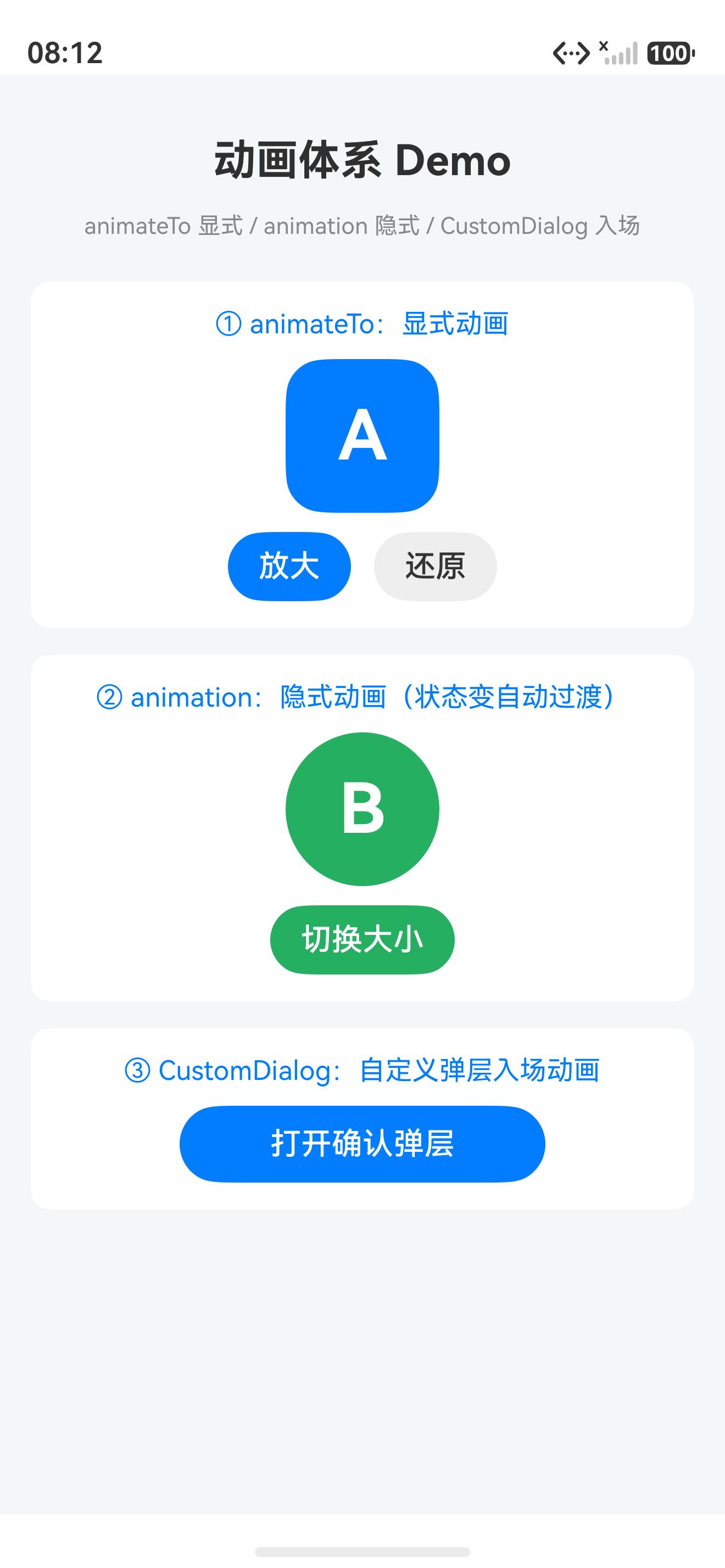
重点看画面:第一区块是蓝色 A 圆角方块(点「放大」会带 400ms 动画变大变红旋转 15°,「还原」带动画回初);第二区块是绿色 B 圆方块(点「切换大小」自动跑 300ms 动画,不用套
animateTo);第三区块是「打开确认弹层」按钮(点开有原生淡入遮罩 + 弹层居中)。三件套各司其职,界面动起来。
七、三件套 vs:啥时候用哪个
| 维度 | animateTo |
animation |
CustomDialog |
|---|---|---|---|
| 管啥 | 显式一段改 | 绑字段变自动 | 弹层入场 |
| 用法 | 闭合回调 | 装组件上 | Controller.open |
| 控粒度 | 精确控这次改 | 装一次绑字段都跑 | 原生入场不可控 |
| 何时用 | 要精确控动画参数 | 要绑字段自动过渡 | 自定义弹层 |
一句话决策:精确控用 animateTo,绑字段自动用 animation,弹层入场用 CustomDialog。
八、常见坑(都是血泪)
| 坑 | 症状 | 解法 |
|---|---|---|
改状态忘套 animateTo |
硬切无动画 | 要动画的改套 animateTo 闭合回调 |
animation 装错位置 |
不触发 | .animation() 装在绑状态的组件上,装父级无效 |
CustomDialogController 用 Function.bind |
WARN 但能跑 | 可改 @Builder 方法形式避开,或忽略 WARN |
animateTo 回调里改非绑字段 |
动画不跑 | 回调里改的必须是组件绑的状态字段 |
animation 期望立即跳 |
仍有 300ms 过渡 | 要立即跳用 animateToImmediately(不带动画) |
CustomDialog 忘 .open() |
弹层不显示 | Controller 只声明不打开,要调 .open() |
九、完整代码仓库
本文所有代码都已托管到 AtomGit,欢迎 clone、提 issue、点 star:
🔗 仓库地址:https://atomgit.com/JaneConan/arkui-animation
仓库包含:
- 完整的「三件套同台演示」demo 工程
Index.ets主页面(animateTo+animation+CustomDialogController)confirmDialogContent@Builder弹层内容- 可直接用 DevEco Studio 打开运行
十、ArkUI 系列十篇脉络(完结)
这是 ArkUI 系列第十篇,凑齐十篇收尾。十篇脉络由浅入深:
| 篇 | 主题 | 深度 |
|---|---|---|
| 1 | 入门:@State/@Link/@Prop + ForEach 列表渲染 |
浅 |
| 2 | 进阶:Tabs 嵌套滚动 | 中 |
| 3 | 进阶:@Builder/@BuilderParam 组件复用 |
中 |
| 4 | 深水区:Navigation 多级路由 | 深 |
| 5 | 进阶:@Extend/@Styles 样式复用 |
中 |
| 6 | 深水区:Stage 模型四级状态 | 深 |
| 7 | 深水区:@Watch/@Observed 深层状态响应 |
深 |
| 8 | 进阶:@Provide/@Consume 跨层传递 |
中 |
| 9 | 深水区:LazyForEach 大列表虚拟滚动 | 深 |
| 10 | 收尾:动画体系 animateTo/animation/CustomDialog | 中 |
十篇读完,你的 ArkUI UI + 状态 + 性能 + 动画就齐了基础覆盖。
写在最后
animateTo/animation/CustomDialog 的关系,本质是**「显式控动画」/「隐式自动过渡」/「原生入场」的分离**——前两个管状态变的过渡策略,第三个管弹层的原生入场。这思想在前端圈叫 transition/animation/dialog modal,在鸿蒙圈叫三件套,名字不同灵魂相通。
一旦你开始用动画思维写交互,你会发现大部分「状态硬切毫无动画」的需求,都是三件套声明的自然结果。代码量少一半,交互顺滑九成,设计逮不住你硬切。
代码已经给你了,仓库链接在上面。现在关掉这篇文章,打开 DevEco Studio,把 demo 跑起来,亲手点「放大」感受下 400ms 动画过渡。
跑通了,回来评论区打个「1」,我看看有多少人真的动手了。🚀
作者:JaneConan
仓库:https://atomgit.com/JaneConan/arkui-animation
协议:Apache-2.0,随便用,别告我

作为“人工智能6S店”的官方数字引擎,为AI开发者与企业提供一个覆盖软硬件全栈、一站式门户。
更多推荐

 1
1 0
0- 0


 已为社区贡献14条内容

所有评论(0)