
鸿蒙Flutter TextStyle样式配置
作者:孟少康(世人万千)
仓库地址:https://gitcode.com/feng8403000/FlutterfromBeginnertoAdvancedForHarmonyOS.git
联系邮箱:372699828@qq.com
概述
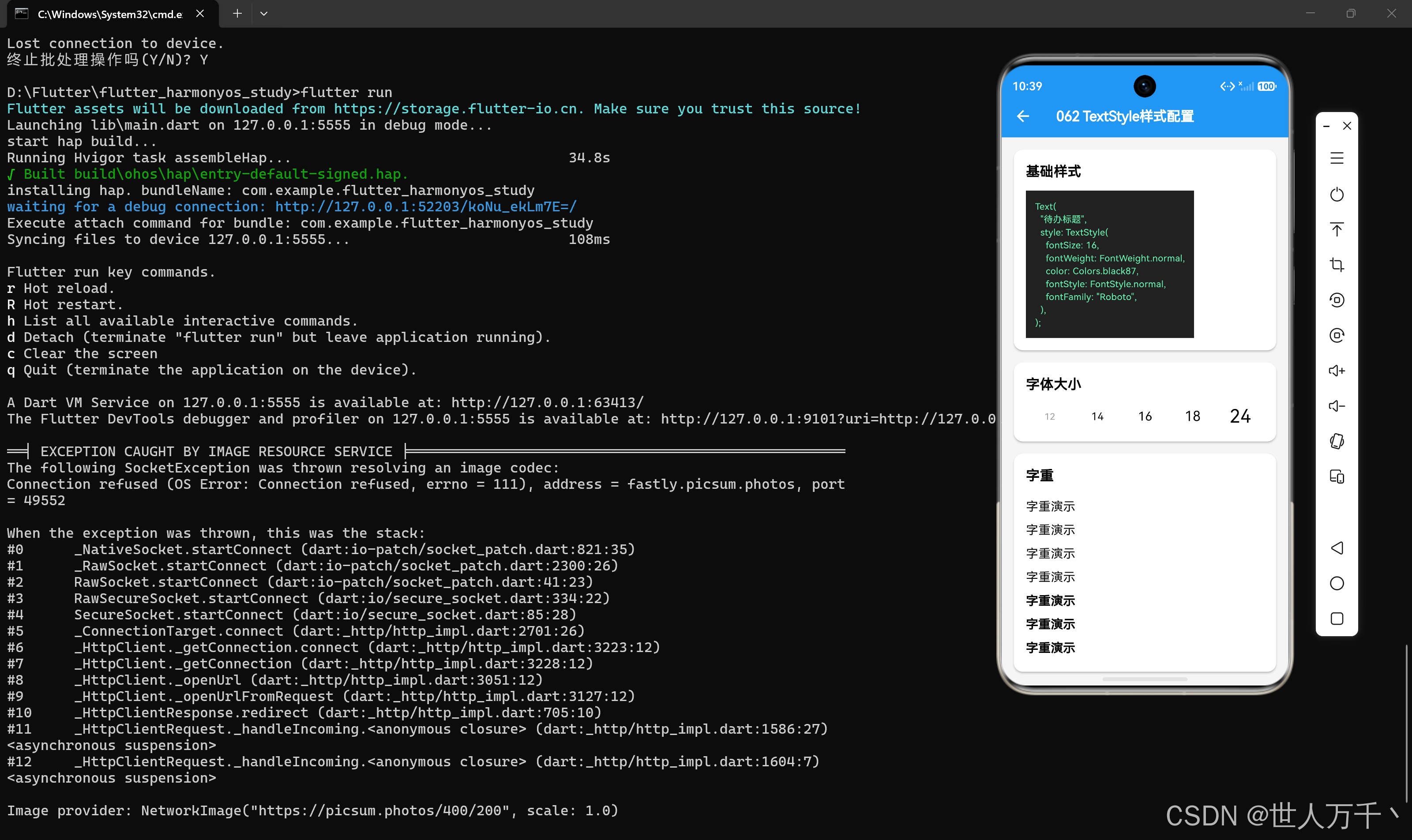
TextStyle是Flutter中用于配置文本样式的核心类,它几乎包含了所有与文本外观相关的属性。掌握TextStyle的各种属性对于创建美观、一致的UI界面至关重要。
基础用法
创建TextStyle
TextStyle(
  fontSize: 16,
  fontWeight: FontWeight.normal,
  color: Colors.black,
);
应用TextStyle到Text组件
Text(
  "带样式的文本",
  style: TextStyle(
    fontSize: 18,
    fontWeight: FontWeight.bold,
    color: Colors.blue,
  ),
);
颜色相关属性
color属性
color属性定义文本的颜色。
TextStyle(
  color: Colors.red,
);

TextStyle(
  color: Colors.blue[500],
);

TextStyle(
  color: const Color(0xFF0000FF),
);

TextStyle(
  color: Color.fromARGB(255, 0, 0, 255),
);
backgroundColor属性
backgroundColor属性为文本添加背景色。
Text(
  "带背景色的文本",
  style: TextStyle(
    backgroundColor: Colors.yellow,
    color: Colors.black,
  ),
);
字体大小相关属性
fontSize属性
fontSize属性定义字体大小,单位为逻辑像素。
TextStyle(
  fontSize: 16, // 默认字体大小
);

TextStyle(
  fontSize: 24, // 较大字体
);

TextStyle(
  fontSize: 12, // 较小字体
);
height属性
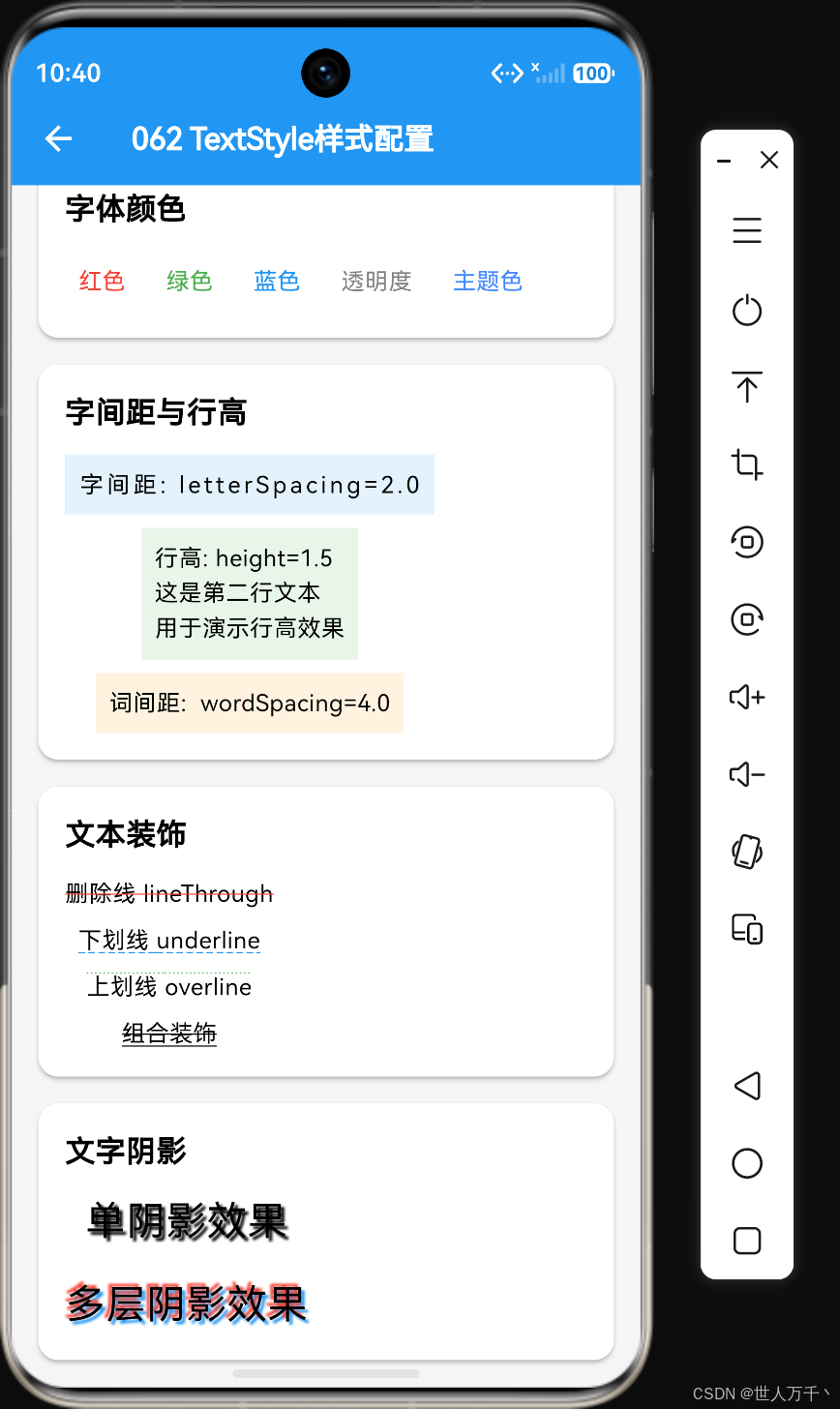
height属性定义行高,它是一个倍数,乘以fontSize得到实际行高。
Text(
  "这是一段多行文本内容,用于演示行高的效果。",
  style: TextStyle(
    fontSize: 16,
    height: 1.5, // 行高 = 16 * 1.5 = 24
  ),
);
字重与字体样式
fontWeight属性
fontWeight属性定义字重,即字体的粗细程度。
TextStyle(
  fontWeight: FontWeight.normal, // 正常字重
);

TextStyle(
  fontWeight: FontWeight.bold, // 粗体
);

TextStyle(
  fontWeight: FontWeight.w300, // 细体
);

TextStyle(
  fontWeight: FontWeight.w500, // 中等粗细
);

TextStyle(
  fontWeight: FontWeight.w700, // 粗体
);

TextStyle(
  fontWeight: FontWeight.w900, // 极粗体
);
FontWeight支持的字重值:
| 字重值 | 数值 | 说明 |
|---|---|---|
| FontWeight.w100 | 100 | Thin |
| FontWeight.w200 | 200 | ExtraLight |
| FontWeight.w300 | 300 | Light |
| FontWeight.w400 | 400 | Normal / Regular |
| FontWeight.w500 | 500 | Medium |
| FontWeight.w600 | 600 | SemiBold |
| FontWeight.w700 | 700 | Bold |
| FontWeight.w800 | 800 | ExtraBold |
| FontWeight.w900 | 900 | Black |
fontStyle属性
fontStyle属性定义字体样式,支持正常和斜体。
TextStyle(
  fontStyle: FontStyle.normal, // 正常样式
);

TextStyle(
  fontStyle: FontStyle.italic, // 斜体
);
字体族配置
fontFamily属性
fontFamily属性用于指定字体族名称。
TextStyle(
  fontFamily: 'Arial',
);

TextStyle(
  fontFamily: 'Roboto',
);

TextStyle(
  fontFamily: 'Noto Sans SC',
);
fontFamilyFallback属性
fontFamilyFallback属性定义字体族回退列表,当主字体不支持某些字符时使用。
TextStyle(
  fontFamily: 'Roboto',
  fontFamilyFallback: ['Noto Sans SC', 'PingFang SC'],
);
装饰线属性
decoration属性
decoration属性用于添加文本装饰线。
TextStyle(
  decoration: TextDecoration.none, // 无装饰线
);

TextStyle(
  decoration: TextDecoration.underline, // 下划线
);

TextStyle(
  decoration: TextDecoration.overline, // 上划线
);

TextStyle(
  decoration: TextDecoration.lineThrough, // 删除线
);

TextStyle(
  decoration: TextDecoration.combine([ // 组合装饰线
    TextDecoration.underline,
    TextDecoration.lineThrough,
  ]),
);
decorationColor属性
decorationColor属性定义装饰线的颜色。
TextStyle(
  decoration: TextDecoration.lineThrough,
  decorationColor: Colors.red,
);
decorationStyle属性
decorationStyle属性定义装饰线的样式。
TextStyle(
  decoration: TextDecoration.underline,
  decorationStyle: TextDecorationStyle.solid, // 实线
);

TextStyle(
  decoration: TextDecoration.underline,
  decorationStyle: TextDecorationStyle.double, // 双实线
);

TextStyle(
  decoration: TextDecoration.underline,
  decorationStyle: TextDecorationStyle.dashed, // 虚线
);

TextStyle(
  decoration: TextDecoration.underline,
  decorationStyle: TextDecorationStyle.dotted, // 点线
);

TextStyle(
  decoration: TextDecoration.underline,
  decorationStyle: TextDecorationStyle.wavy, // 波浪线
);
decorationThickness属性
decorationThickness属性定义装饰线的粗细。
TextStyle(
  decoration: TextDecoration.underline,
  decorationThickness: 2.0,
);
字间距与字母间距
letterSpacing属性
letterSpacing属性定义字母之间的间距。
TextStyle(
  letterSpacing: 0, // 默认值
);

TextStyle(
  letterSpacing: 2, // 增加字母间距
);

TextStyle(
  letterSpacing: -0.5, // 减小字母间距
);
wordSpacing属性
wordSpacing属性定义单词之间的间距。
TextStyle(
  wordSpacing: 0, // 默认值
);

TextStyle(
  wordSpacing: 4, // 增加单词间距
);
文本基线与对齐
textBaseline属性
textBaseline属性定义文本的基线对齐方式。
Row(
  crossAxisAlignment: CrossAxisAlignment.baseline,
  textBaseline: TextBaseline.alphabetic,
  children: [
    Text("Hello", style: TextStyle(fontSize: 24)),
    Text("World", style: TextStyle(fontSize: 16)),
  ],
);
支持的值:
TextBaseline.alphabetic:字母基线TextBaseline.ideographic:表意文字基线
背景与阴影
shadows属性
shadows属性为文本添加阴影效果。
Text(
  "带阴影的文本",
  style: TextStyle(
    fontSize: 24,
    fontWeight: FontWeight.bold,
    shadows: [
      Shadow(
        color: Colors.black.withOpacity(0.5),
        offset: const Offset(2, 2),
        blurRadius: 4,
      ),
    ],
  ),
);
可以添加多个阴影:
Text(
  "多层阴影文本",
  style: TextStyle(
    fontSize: 24,
    shadows: [
      Shadow(
        color: Colors.blue,
        offset: const Offset(-2, -2),
        blurRadius: 4,
      ),
      Shadow(
        color: Colors.red,
        offset: const Offset(2, 2),
        blurRadius: 4,
      ),
    ],
  ),
);
前景与背景绘制
foreground属性
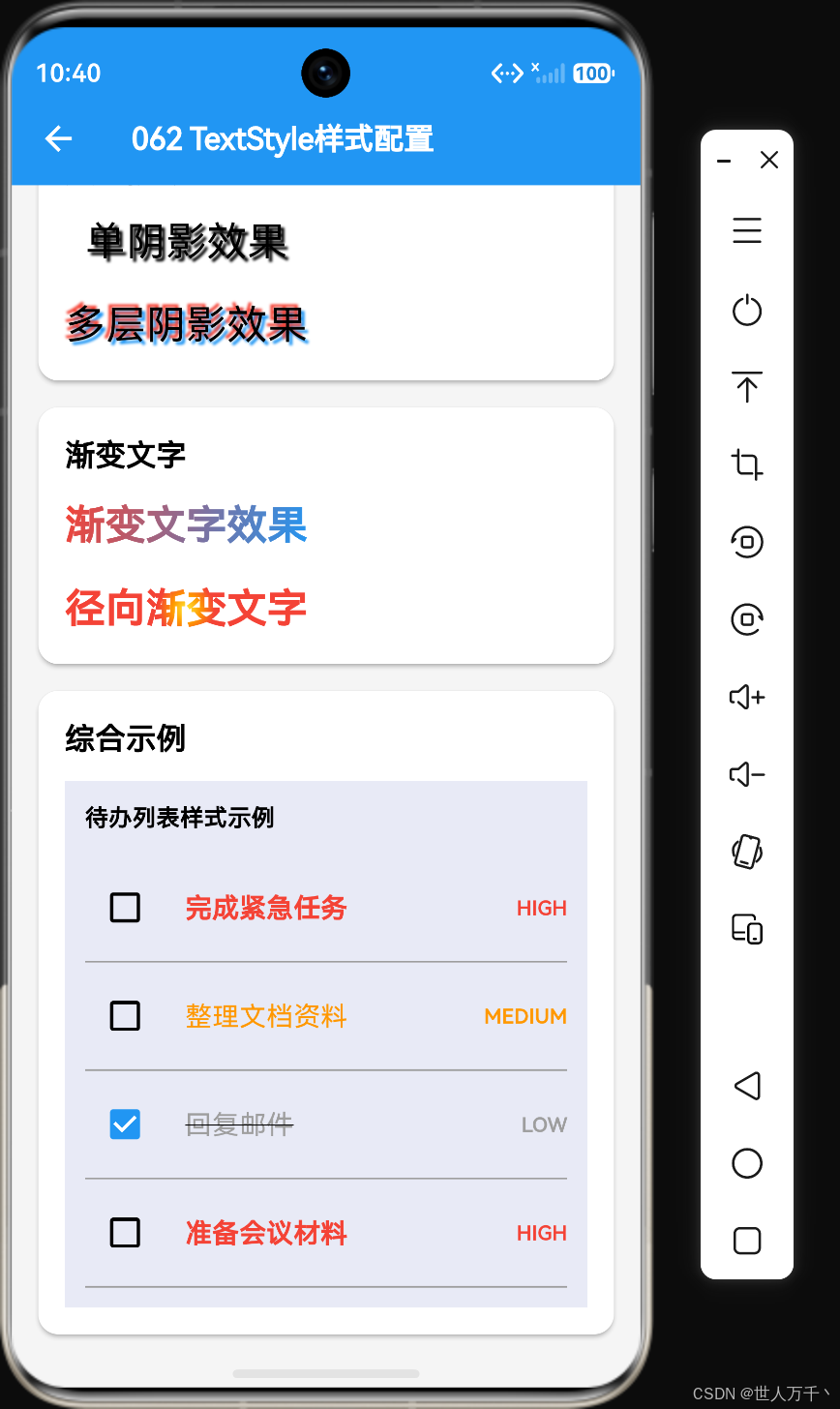
foreground属性定义文本的前景绘制器,可以用于实现渐变文字等效果。
Text(
  "渐变文字",
  style: TextStyle(
    fontSize: 32,
    fontWeight: FontWeight.bold,
    foreground: Paint()
      ..shader = const LinearGradient(
        colors: [Colors.blue, Colors.purple],
      ).createShader(const Rect.fromLTWH(0, 0, 200, 50)),
  ),
);
background属性
background属性定义文本的背景绘制器。
Text(
  "带背景绘制的文本",
  style: TextStyle(
    fontSize: 18,
    background: Paint()..color = Colors.yellow,
  ),
);
文本样式继承
使用ThemeData中的文本样式
Theme(
  data: ThemeData(
    textTheme: const TextTheme(
      headline1: TextStyle(fontSize: 32, fontWeight: FontWeight.bold),
      headline2: TextStyle(fontSize: 28, fontWeight: FontWeight.bold),
      bodyText1: TextStyle(fontSize: 16),
      bodyText2: TextStyle(fontSize: 14),
      caption: TextStyle(fontSize: 12, color: Colors.grey),
    ),
  ),
  child: Text(
    "使用主题样式",
    style: Theme.of(context).textTheme.headline1,
  ),
);
覆盖主题样式
Text(
  "覆盖主题样式",
  style: Theme.of(context).textTheme.bodyText1?.copyWith(
    color: Colors.blue,
    fontWeight: FontWeight.bold,
  ),
);
实际应用示例
标题样式
Text(
  "一级标题",
  style: TextStyle(
    fontSize: 24,
    fontWeight: FontWeight.bold,
    color: Colors.black,
  ),
);

Text(
  "二级标题",
  style: TextStyle(
    fontSize: 20,
    fontWeight: FontWeight.w600,
    color: Colors.black87,
  ),
);

Text(
  "三级标题",
  style: TextStyle(
    fontSize: 18,
    fontWeight: FontWeight.w500,
    color: Colors.black54,
  ),
);
正文样式
Text(
  "正文内容,通常用于展示主要的文本信息。",
  style: TextStyle(
    fontSize: 16,
    color: Colors.black87,
    height: 1.6,
    letterSpacing: 0.5,
  ),
);
提示文本样式
Text(
  "提示信息或次要内容",
  style: TextStyle(
    fontSize: 14,
    color: Colors.grey[600],
  ),
);
错误提示样式
Text(
  "错误提示信息",
  style: TextStyle(
    fontSize: 14,
    color: Colors.red,
    fontStyle: FontStyle.italic,
  ),
);
价格样式
Text(
  "¥99.00",
  style: TextStyle(
    fontSize: 24,
    fontWeight: FontWeight.bold,
    color: Colors.red,
  ),
);

Text(
  "原价 ¥199.00",
  style: TextStyle(
    fontSize: 14,
    color: Colors.grey,
    decoration: TextDecoration.lineThrough,
  ),
);
链接样式
Text(
  "点击查看详情",
  style: TextStyle(
    fontSize: 14,
    color: Colors.blue,
    decoration: TextDecoration.underline,
    decorationStyle: TextDecorationStyle.solid,
  ),
);
性能优化建议
使用静态常量样式
class MyWidget extends StatelessWidget {
static const TextStyle _titleStyle = TextStyle(
fontSize: 20,
fontWeight: FontWeight.bold,
);
static const TextStyle _bodyStyle = TextStyle(
fontSize: 16,
height: 1.5,
);
Widget build(BuildContext context) {
return Column(
children: [
Text("标题", style: _titleStyle),
Text("正文", style: _bodyStyle),
],
);
}
}
使用TextStyle.copyWith方法
const TextStyle _baseStyle = TextStyle(
  fontSize: 16,
  color: Colors.black,
);

// 基于基础样式创建变体
TextStyle _boldStyle = _baseStyle.copyWith(fontWeight: FontWeight.bold);
TextStyle _smallStyle = _baseStyle.copyWith(fontSize: 14);
TextStyle _grayStyle = _baseStyle.copyWith(color: Colors.grey);
避免在build方法中创建样式
// 不好的做法
Widget build(BuildContext context) {
  return Text(
    "文本",
    style: TextStyle(fontSize: 16), // 每次build都会创建新对象
  );
}

// 好的做法
static const TextStyle _style = TextStyle(fontSize: 16);

Widget build(BuildContext context) {
  return Text(
    "文本",
    style: _style,
  );
}
常见问题
如何实现渐变文字?
使用foreground属性配合Shader。
Text(
  "渐变文字效果",
  style: TextStyle(
    fontSize: 32,
    fontWeight: FontWeight.bold,
    foreground: Paint()
      ..shader = const LinearGradient(
        colors: [Colors.red, Colors.orange, Colors.yellow],
        begin: Alignment.topLeft,
        end: Alignment.bottomRight,
      ).createShader(const Rect.fromLTWH(0, 0, 300, 50)),
  ),
);
如何添加文字阴影?
使用shadows属性。
Text(
  "带阴影的文字",
  style: TextStyle(
    fontSize: 24,
    shadows: [
      Shadow(
        color: Colors.black.withOpacity(0.3),
        offset: const Offset(2, 2),
        blurRadius: 4,
      ),
    ],
  ),
);
如何设置行高?
使用height属性,它是一个倍数。
Text(
  "多行文本内容",
  style: TextStyle(
    fontSize: 16,
    height: 1.8, // 行高 = 16 * 1.8 = 28.8
  ),
);
如何实现文字描边?
使用foreground和background配合。
Stack(
  children: [
    Text(
      "描边文字",
      style: TextStyle(
        fontSize: 32,
        fontWeight: FontWeight.bold,
        foreground: Paint()
          ..style = PaintingStyle.stroke
          ..strokeWidth = 2
          ..color = Colors.black,
      ),
    ),
    Text(
      "描边文字",
      style: TextStyle(
        fontSize: 32,
        fontWeight: FontWeight.bold,
        color: Colors.white,
      ),
    ),
  ],
);
总结
TextStyle是Flutter文本样式的核心类,它提供了丰富的属性来控制文本的外观。以下是一些关键点:
- 颜色:
color、backgroundColor - 字体大小:
fontSize、height - 字重与样式:
fontWeight、fontStyle - 字体族:
fontFamily、fontFamilyFallback - 装饰线:
decoration、decorationColor、decorationStyle - 间距:
letterSpacing、wordSpacing - 阴影:
shadows - 绘制器:
foreground、background
通过灵活组合这些属性,可以创建出各种精美的文本效果。同时,注意性能优化,避免在build方法中重复创建样式对象。
参考资料:

作为“人工智能6S店”的官方数字引擎,为AI开发者与企业提供一个覆盖软硬件全栈、一站式门户。
更多推荐

 7
7 0
0- 0


 已为社区贡献10条内容

所有评论(0)