
鸿蒙Flutter Expanded与Flexible:弹性布局技巧
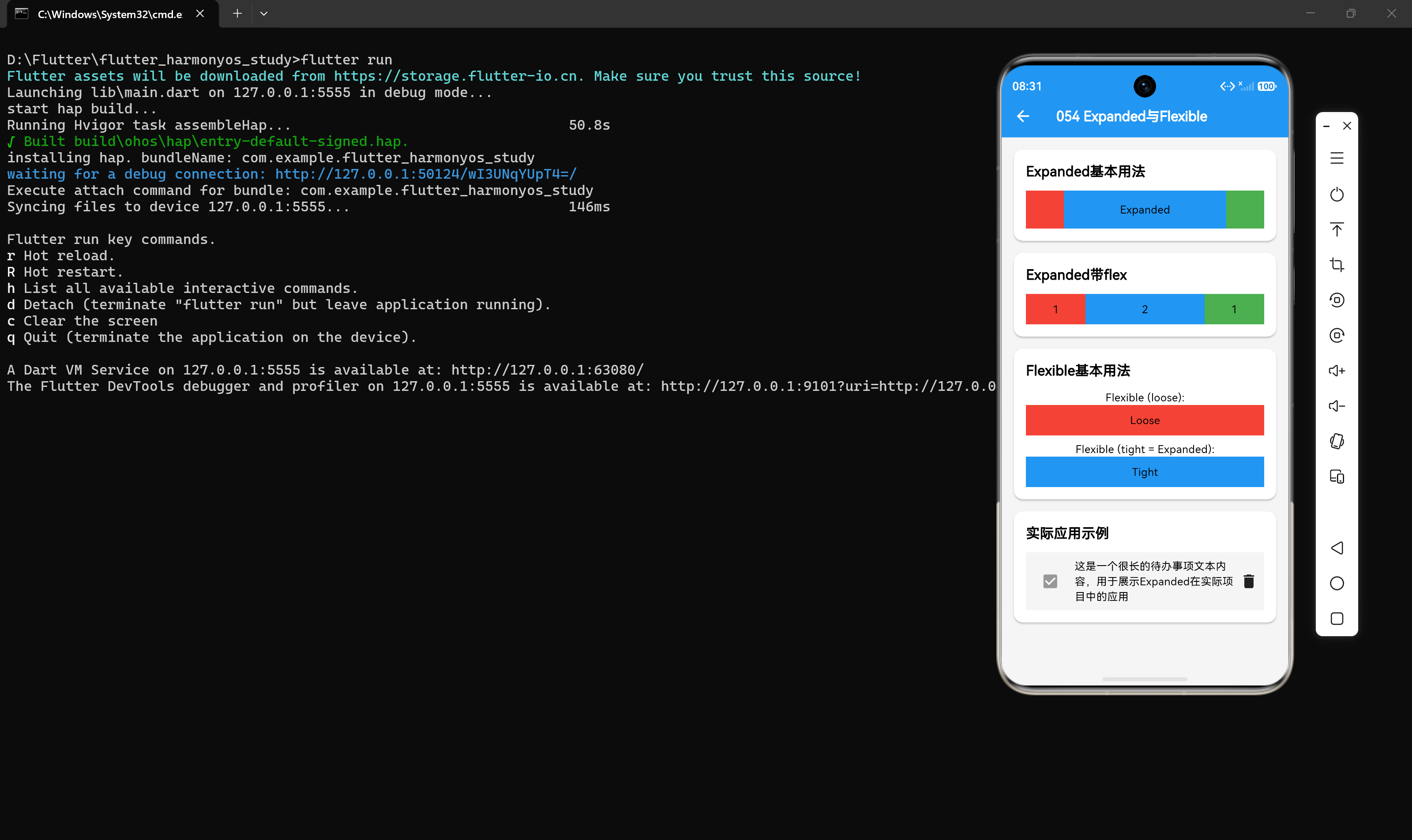
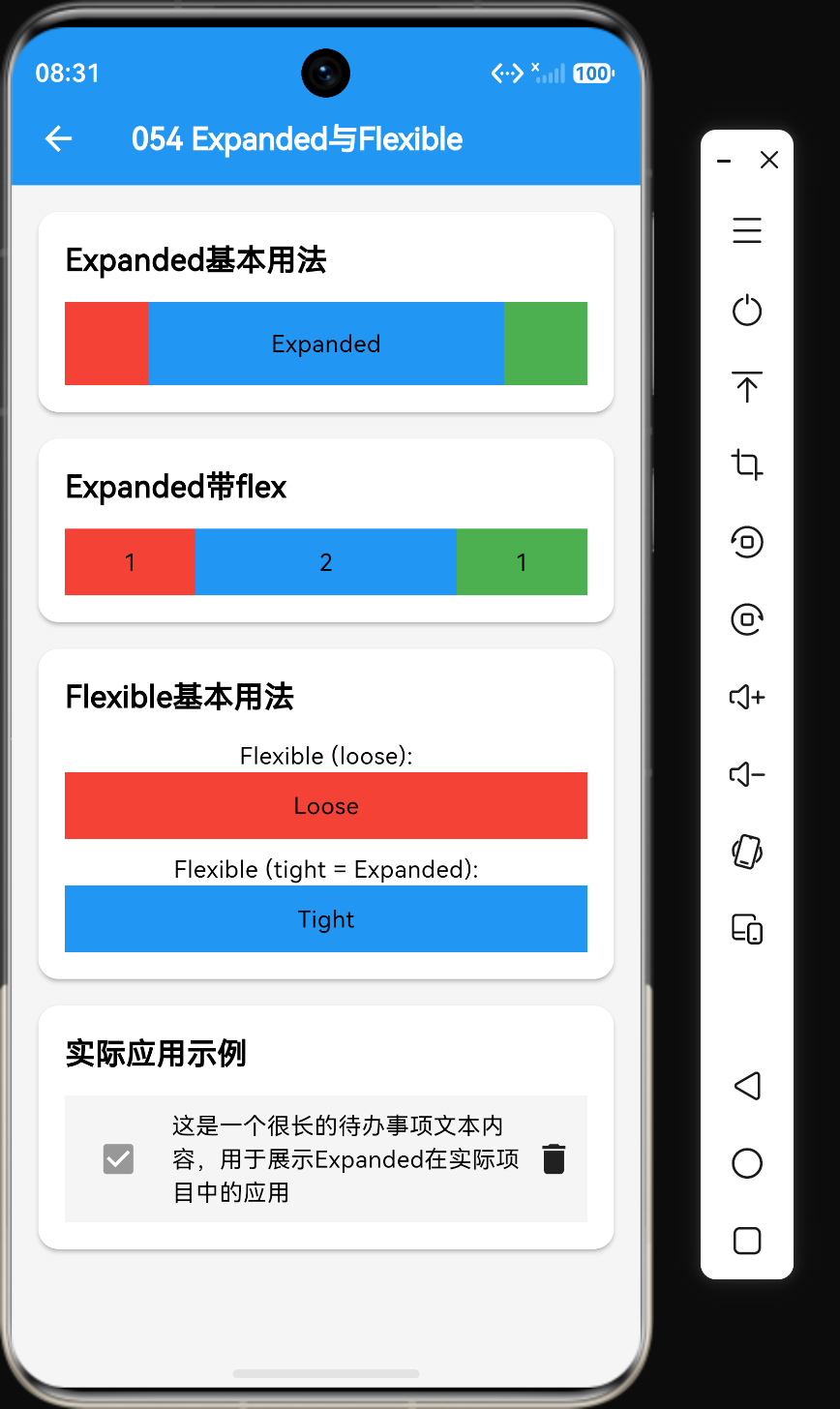
作者:付梓烁(AI_零食)
仓库地址:https://gitcode.com/feng8403000/FlutterfromBeginnertoAdvancedForHarmonyOS.git
联系邮箱:372699828@qq.com
引言
在Flutter开发中,Expanded和Flexible是两个非常重要的布局组件,它们用于在Row和Column中实现弹性布局。弹性布局是现代UI设计的核心,它允许组件根据可用空间自动调整大小,确保界面在不同屏幕尺寸下都能良好显示。
对于待办事项应用来说,弹性布局尤为重要。例如,待办项中的文本可能长短不一,需要根据剩余空间自动调整,同时保持复选框和操作按钮的固定位置。Expanded和Flexible正是实现这种效果的关键组件。
本文将深入探讨Expanded和Flexible的各种用法,包括基本属性、弹性系数、布局行为差异,并结合待办事项应用的实际场景进行讲解。
一、Expanded基本概念
1.1 Expanded的作用
Expanded组件用于在Row或Column中占据剩余空间。它是实现弹性布局的核心组件,能够让子组件根据可用空间自动扩展。
Row(
  children: [
    Container(width: 50, height: 50, color: Colors.red),
    Expanded(
      child: Container(height: 50, color: Colors.blue),
    ),
    Container(width: 50, height: 50, color: Colors.green),
  ],
)
在这个例子中,蓝色容器会占据红色和绿色容器之间的所有剩余空间。
1.2 Expanded的工作原理
Expanded的工作原理基于Flex布局模型:
Expanded必须作为Row或Column的直接子组件Expanded会将子组件的尺寸约束设置为FlexFit.tightExpanded会计算剩余空间,并根据flex系数分配给子组件- 如果多个
Expanded存在,它们会按照flex比例分配剩余空间
二、Expanded核心属性
2.1 flex属性
flex属性用于指定Expanded的弹性系数,决定多个Expanded之间的空间分配比例:
Row(
  children: [
    Expanded(
      flex: 1,
      child: Container(height: 40, color: Colors.red),
    ),
    Expanded(
      flex: 2,
      child: Container(height: 40, color: Colors.blue),
    ),
    Expanded(
      flex: 1,
      child: Container(height: 40, color: Colors.green),
    ),
  ],
)
在这个例子中,三个容器的宽度比例为1:2:1。
2.2 Expanded的注意事项
Expanded只能在Row或Column中使用Expanded不能嵌套使用flex属性必须是正整数(默认值为1)- 多个
Expanded的flex值之和决定空间分配比例
三、Flexible基本概念
3.1 Flexible的作用
Flexible是Expanded的父类,提供了更多的布局灵活性。它允许子组件根据自身需求分配空间,而不是强制占据所有剩余空间。
Row(
  children: [
    Flexible(
      child: Container(height: 40, color: Colors.red),
    ),
    Flexible(
      child: Container(height: 40, color: Colors.blue),
    ),
  ],
)
3.2 Flexible与Expanded的关系
Expanded实际上是Flexible的一个特例,相当于:
Flexible(
  fit: FlexFit.tight,
  child: child,
)
四、Flexible核心属性
4.1 fit属性
fit属性控制Flexible如何占据空间:
// FlexFit.tight(等同于Expanded)
Flexible(
  fit: FlexFit.tight,
  child: Container(color: Colors.red),
)

// FlexFit.loose(只占据子组件需要的空间)
Flexible(
  fit: FlexFit.loose,
  child: Container(color: Colors.blue),
)
4.2 flex属性
与Expanded类似,flex属性用于指定弹性系数:
Flexible(
  flex: 2,
  fit: FlexFit.loose,
  child: Container(color: Colors.red),
)
4.3 FlexFit枚举值说明
| 枚举值 | 说明 |
|---|---|
| tight | 强制占据分配给它的所有空间(等同于Expanded) |
| loose | 只占据子组件需要的空间,不强制扩展 |
五、Expanded与Flexible的区别
5.1 核心差异
| 属性 | Expanded | Flexible |
|---|---|---|
| fit默认值 | FlexFit.tight | FlexFit.loose |
| 空间分配 | 强制占据剩余空间 | 根据子组件需求分配 |
| 子组件溢出 | 会溢出报错 | 会被压缩 |
| 适用场景 | 需要填充剩余空间 | 需要灵活布局 |
5.2 布局行为对比
// Expanded:强制占据所有分配的空间
Row(
  children: [
    Expanded(
      child: Container(width: 100, height: 40, color: Colors.red),
    ),
  ],
)
// 结果:红色容器会扩展到填满整个Row宽度

// Flexible(loose):只占据子组件需要的空间
Row(
  children: [
    Flexible(
      fit: FlexFit.loose,
      child: Container(width: 100, height: 40, color: Colors.blue),
    ),
  ],
)
// 结果:蓝色容器宽度为100,不会扩展
六、实际应用:待办事项列表项
6.1 基本待办项布局
Row(
  children: const [
    Checkbox(value: true, onChanged: null),
    SizedBox(width: 8),
    Expanded(
      child: Text('这是一个很长的待办事项文本内容,用于展示Expanded在实际项目中的应用'),
    ),
    SizedBox(width: 8),
    Icon(Icons.delete),
  ],
)
在这个例子中:
- 复选框和删除图标保持固定大小
- 文本区域使用
Expanded占据剩余空间 - 当文本过长时,会自动换行显示
6.2 带优先级标签的待办项
Row(
  children: [
    Checkbox(value: false, onChanged: null),
    SizedBox(width: 8),
    Container(
      width: 8,
      height: 8,
      decoration: BoxDecoration(
        color: Colors.red,
        borderRadius: BorderRadius.circular(4),
      ),
    ),
    SizedBox(width: 8),
    Expanded(
      flex: 3,
      child: Text('紧急任务:完成项目交付'),
    ),
    SizedBox(width: 8),
    Flexible(
      fit: FlexFit.loose,
      child: Text('今天'),
    ),
    SizedBox(width: 8),
    Icon(Icons.chevron_right),
  ],
)
6.3 多行待办项布局
Container(
  padding: EdgeInsets.all(12),
  child: Row(
    crossAxisAlignment: CrossAxisAlignment.start,
    children: [
      Checkbox(value: true, onChanged: null),
      SizedBox(width: 12),
      Expanded(
        child: Column(
          crossAxisAlignment: CrossAxisAlignment.start,
          children: [
            Text(
              '学习Flutter布局Widget',
              style: TextStyle(fontSize: 16, fontWeight: FontWeight.bold),
            ),
            SizedBox(height: 4),
            Text(
              '掌握Row、Column、Container等布局组件的使用',
              style: TextStyle(color: Colors.grey),
            ),
          ],
        ),
      ),
      SizedBox(width: 12),
      Chip(label: Text('进行中')),
    ],
  ),
)
七、弹性布局进阶技巧
7.1 多个Expanded的比例分配
Row(
  children: [
    Expanded(
      flex: 1,
      child: Container(height: 40, color: Colors.red),
    ),
    Expanded(
      flex: 2,
      child: Container(height: 40, color: Colors.blue),
    ),
    Expanded(
      flex: 1,
      child: Container(height: 40, color: Colors.green),
    ),
  ],
)
在这个例子中,总比例为1+2+1=4,所以:
- 红色容器占据1/4的宽度
- 蓝色容器占据2/4(即1/2)的宽度
- 绿色容器占据1/4的宽度
7.2 Expanded与固定尺寸组合
Row(
  children: [
    Container(width: 80, height: 40, color: Colors.red),
    Expanded(
      child: Container(height: 40, color: Colors.blue),
    ),
    Container(width: 80, height: 40, color: Colors.green),
  ],
)
蓝色容器会占据红色和绿色容器之间的所有剩余空间。
7.3 嵌套弹性布局
Column(
  children: [
    Container(height: 50, color: Colors.red),
    Expanded(
      child: Row(
        children: [
          Container(width: 50, color: Colors.blue),
          Expanded(
            child: Container(color: Colors.green),
          ),
        ],
      ),
    ),
    Container(height: 50, color: Colors.yellow),
  ],
)
在这个例子中:
- 红色和黄色容器固定高度50
- 中间区域(绿色+蓝色)占据剩余高度
- 蓝色容器固定宽度50
- 绿色容器占据蓝色容器右侧的所有剩余宽度
7.4 Flexible的实际应用场景
Row(
  children: [
    Flexible(
      fit: FlexFit.loose,
      child: Container(width: 100, height: 40, color: Colors.red),
    ),
    Flexible(
      fit: FlexFit.loose,
      child: Container(width: 150, height: 40, color: Colors.blue),
    ),
  ],
)
当两个Flexible的子组件总宽度小于可用空间时,它们不会扩展,只会占据自身所需的空间。
八、常见问题与解决方案
8.1 问题1:Expanded导致子组件溢出
问题描述:使用Expanded后,子组件内容溢出。
解决方案:确保子组件能够正确处理超出的内容,例如使用Text的overflow属性:
Expanded(
  child: Text(
    '这是一个很长很长的文本',
    overflow: TextOverflow.ellipsis,
    maxLines: 1,
  ),
)
8.2 问题2:多个Expanded的比例计算错误
问题描述:多个Expanded的空间分配不符合预期。
解决方案:检查flex值的比例关系,确保计算正确:
// flex总和为1+2+3=6
Row(
  children: [
    Expanded(flex: 1, child: Container(color: Colors.red)),
    Expanded(flex: 2, child: Container(color: Colors.blue)),
    Expanded(flex: 3, child: Container(color: Colors.green)),
  ],
)
// 红色:蓝色:绿色 = 1:2:3
8.3 问题3:Flexible没有扩展
问题描述:使用Flexible后,子组件没有扩展。
解决方案:检查fit属性是否设置为FlexFit.tight,或者直接使用Expanded:
// 方案1:设置fit为tight
Flexible(
  fit: FlexFit.tight,
  child: Container(color: Colors.red),
)

// 方案2:直接使用Expanded
Expanded(
  child: Container(color: Colors.red),
)
8.4 问题4:Expanded只能在Row/Column中使用
问题描述:在非Row/Column的父组件中使用Expanded报错。
解决方案:确保Expanded或Flexible的父组件是Row或Column:
// 错误:Expanded的父组件不是Row/Column
Container(
  child: Expanded(child: Text('内容')),
)

// 正确:Expanded在Row中
Row(
  children: [Expanded(child: Text('内容'))],
)
九、性能优化建议
9.1 避免不必要的嵌套
// 不推荐:多余的嵌套
Expanded(
  child: Expanded(child: Container(color: Colors.red)),
)

// 推荐:直接使用一层Expanded
Expanded(
  child: Container(color: Colors.red),
)
9.2 使用const构造函数
const Expanded(
  flex: 1,
  child: Container(color: Colors.red),
)
9.3 合理使用flex值
避免使用过大的flex值,这会增加布局计算的复杂度。
十、总结
通过本文的学习,我们掌握了以下核心知识点:
- Expanded是实现弹性布局的核心组件,用于在Row/Column中占据剩余空间
- Flexible提供了更多的布局灵活性,可以根据子组件需求分配空间
- flex属性控制空间分配比例,多个Expanded之间按比例分配
- Expanded与Flexible的区别在于fit属性,Expanded使用tight,Flexible默认使用loose
- Expanded只能在Row或Column中使用,不能嵌套使用
- 弹性布局是实现响应式UI的关键,能够确保界面在不同屏幕尺寸下良好显示
Expanded和Flexible是Flutter布局系统中非常重要的组件,掌握它们的使用是构建精美UI的关键。在实际开发中,它们常与Row、Column、Container等组件配合使用,构建出各种复杂的布局效果。
参考资料
- Flutter官方文档:https://docs.flutter.dev/
- Expanded组件API文档:https://api.flutter.dev/flutter/widgets/Expanded-class.html
- Flexible组件API文档:https://api.flutter.dev/flutter/widgets/Flexible-class.html

作为“人工智能6S店”的官方数字引擎,为AI开发者与企业提供一个覆盖软硬件全栈、一站式门户。
更多推荐


 7
7 0
0- 0


 已为社区贡献21条内容

所有评论(0)