
HarmonyOs应用《重要日》开发第27篇 - 前台提醒检查机制设计
·
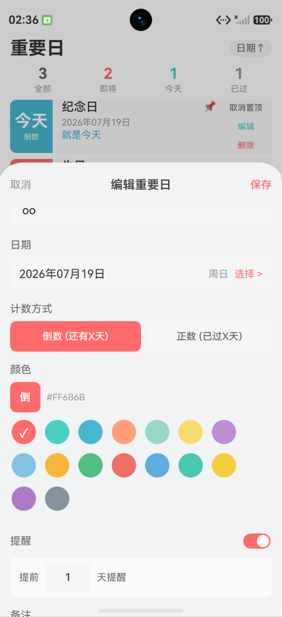
本文深入解析 ImportantDays 项目中的前台提醒检查机制,包括为什么需要在 onForeground 中检查提醒、checkAndSendReminders 的完整流程、与 onCreate 中检查的区别、重复通知的处理策略,以及这种机制的优势与局限。
一、为什么需要前台检查?
鸿蒙的后台限制
HarmonyOS 对后台应用有严格限制:
- 后台应用无法主动发送通知
- 后台应用的网络和计算能力受限
- 后台应用可能被系统杀死
因此,ImportantDays 采用"前台检查"策略:应用每次回到前台时检查是否有需要提醒的重要日。
典型场景
时间线:
08:00 用户打开应用,设置重要日(3天后提醒)
08:05 用户退出应用
...(应用在后台)
11:00 重要日进入提醒范围(假设提前3天)
...(应用仍在后台,无法发通知)
14:00 用户重新打开应用
      → onForeground 触发
      → checkAndSendReminders()
      → 发送通知!
如果没有前台检查,用户在 11:00 到 14:00 之间不会收到任何提醒。
二、检查的三个触发点
1. onCreate(冷启动)
async onCreate(want: Want, launchParam: AbilityConstant.LaunchParam): Promise<void> {
  PreferenceUtil.init(this.context);
  ImportantDayManager.getInstance().init();  // init 内部调用 checkAndSendReminders

  const hasPermission = await NotificationUtil.checkPermission();
  if (hasPermission) {
    await ImportantDayManager.getInstance().checkAndSendReminders();  // 再次检查
  }
}
2. init()(Manager 初始化)
init(): void {
  if (this.initialized) return;
  this.allDays = PreferenceUtil.loadImportantDays();
  this.rebuildDayMap();
  this.initialized = true;
  this.checkAndSendReminders();  // 初始化时检查
}
3. onForeground(回到前台)
onForeground(): void {
  ImportantDayManager.getInstance().checkAndSendReminders();
}
三个触发点的关系
冷启动:
  onCreate → init() → checkAndSendReminders (第1次)
           → checkPermission → checkAndSendReminders (第2次)
           → onForeground → checkAndSendReminders (第3次)

热启动(从后台恢复):
  onForeground → checkAndSendReminders (唯一一次)

通知点击启动:
  onCreate → init() → checkAndSendReminders
           → onForeground → checkAndSendReminders
为什么冷启动会检查三次?
init()中的检查:确保数据加载后立即检查onCreate中的检查:确保权限确认后再次检查onForeground中的检查:系统标准回调
这三次检查是冗余的(checkAndSendReminders 内部有权限检查),但确保了可靠性。
三、checkAndSendReminders 完整流程
async checkAndSendReminders(): Promise<void> {
  // 第一步:获取需要提醒的重要日
  const needReminder = this.getDaysNeedReminder();

  // 第二步:检查通知权限
  const hasPermission = await NotificationUtil.checkPermission();
  if (!hasPermission) {
    return;  // 无权限则退出
  }

  // 第三步:逐个发送通知
  for (const day of needReminder) {
    const title = day.isToday() ? `今天:${day.title}` : `即将到来:${day.title}`;
    const content = day.getDisplayText();
    await NotificationUtil.publishBasic(title, content, this.getNotificationId(day.dayID));
  }
}
流程图
checkAndSendReminders()
    ↓
getDaysNeedReminder()
    ↓ 过滤:reminderEnabled && diff >= 0 && diff <= reminderDaysBefore
    ↓
needReminder = [...]
    ↓
needReminder 为空?
    ├── 是 → 结束
    └── 否 ↓

checkPermission()
    ↓
有权限?
    ├── 否 → 结束
    └── 是 ↓

遍历 needReminder
    ↓
对每个 day:
    ├── 计算 title(今天/即将到来)
    ├── 计算 content(getDisplayText)
    └── publishBasic(title, content, notificationId)
    ↓
完成
四、getDaysNeedReminder 的筛选逻辑
getDaysNeedReminder(): ImportantDay[] {
  return this.allDays.filter(d => d.shouldRemind());
}
shouldRemind 的条件
shouldRemind(): boolean {
  if (!this.reminderEnabled) return false;       // 条件1:启用提醒
  const diff = this.getDaysDiff();
  return diff >= 0 && diff <= this.reminderDaysBefore;  // 条件2:在范围内
}
筛选示例
重要日列表:
1. 妈妈生日(reminderEnabled=true, reminderDaysBefore=3, diff=2)→ 需要
2. 结婚纪念日(reminderEnabled=true, reminderDaysBefore=7, diff=10)→ 不需要(超出范围)
3. 旅行计划(reminderEnabled=false, diff=1)→ 不需要(未启用)
4. 考试日期(reminderEnabled=true, reminderDaysBefore=1, diff=-2)→ 不需要(已过期)
5. 今天会议(reminderEnabled=true, reminderDaysBefore=1, diff=0)→ 需要

needReminder = [妈妈生日, 今天会议]
五、通知标题策略
const title = day.isToday() ? `今天:${day.title}` : `即将到来:${day.title}`;
const content = day.getDisplayText();
标题分类
| 场景 | 标题格式 | 示例 |
|---|---|---|
| 今天 | 今天:${title} |
“今天:妈妈生日” |
| 即将到来 | 即将到来:${title} |
“即将到来:妈妈生日” |
内容
content = day.getDisplayText();
// 输出:"还有 2 天" / "就是今天" / "已过 3 天"
六、重复通知的处理
问题
每次 onForeground 都会发送通知,可能导致同一重要日被多次通知。
解决方案:稳定的通知 ID
private getNotificationId(dayID: string): number {
  let hash = 0;
  for (let i = 0; i < dayID.length; i++) {
    hash = ((hash << 5) - hash) + dayID.charCodeAt(i);
    hash |= 0;
  }
  return Math.abs(hash) % 100000 + ImportantDayManager.notificationIdBase;
}
ID 稳定性
同一个 dayID 总是生成相同的通知 ID。当使用相同 ID 发布通知时,新通知会覆盖旧通知。
覆盖行为
第一次 onForeground:
  → publishBasic("即将到来:妈妈生日", "还有 2 天", 10234)
  → 通知栏显示通知

第二次 onForeground(2小时后):
  → publishBasic("即将到来:妈妈生日", "还有 2 天", 10234)
  → 同 ID → 覆盖旧通知(不会出现两条)
跨天场景
Day 1 (diff=2):
  → 通知内容:"还有 2 天"

Day 2 (diff=1):
  → 通知内容:"还有 1 天"(覆盖前一天的)
由于 getDaysDiff() 基于当前时间计算,不同日期的通知内容会自动更新。
七、与 scheduleReminder 的对比
scheduleReminder(单个提醒)
private async scheduleReminder(day: ImportantDay): Promise<void> {
  const diff = day.getDaysDiff();
  if (diff < 0) return;

  if (diff <= day.reminderDaysBefore) {
    const title = day.isToday() ? `今天:${day.title}` : `即将到来:${day.title}`;
    const content = day.getDisplayText();
    await NotificationUtil.publishBasic(title, content, this.getNotificationId(day.dayID));
  }
}
调用时机对比
| 方法 | 调用时机 | 场景 |
|---|---|---|
scheduleReminder |
添加/更新重要日后 | 用户刚设置了提醒 |
checkAndSendReminders |
启动/回前台 | 定期检查所有重要日 |
逻辑对比
| 特性 | scheduleReminder | checkAndSendReminders |
|---|---|---|
| 检查单个 | 是 | 否(检查所有) |
| 检查权限 | 否 | 是 |
| 调用频率 | 低(用户操作时) | 高(每次回前台) |
scheduleReminder 不检查权限是因为它通常在用户明确设置提醒后调用,此时用户应该已授权。
八、权限检查的时序
应用启动
    ↓
onCreate
    ↓
init() → checkAndSendReminders()
              ↓
              checkPermission() → false(首次使用未授权)
              ↓
              return(不发通知)
    ↓
checkPermission() → false
    ↓
跳过 checkAndSendReminders
    ↓
用户进入"我的"页面
    ↓
打开通知开关 → requestPermission() → 授权成功
    ↓
onForeground(下次回前台时)
    ↓
checkAndSendReminders()
    ↓
checkPermission() → true
    ↓
发送通知!
九、机制的优势与局限
优势
- 简单可靠:不需要后台任务或定时器
- 零额外资源:不消耗后台 CPU 和电量
- 实时性好:用户打开应用立即检查
- 无权限要求:不需要特殊后台权限
局限
- 依赖用户打开应用:如果用户长时间不打开应用,无法发送提醒
- 非实时:提醒延迟到用户打开应用时
- 无精确定时:无法在特定时间点(如早上8点)发送通知
改进方向
如果需要精确定时提醒,可以使用鸿蒙的后台任务:
// 概念性改进(需要后台任务权限)
import { backgroundTaskManager } from '@kit.BackgroundTasksKit';

// 注册延迟提醒任务
backgroundTaskManager.startBackgroundRunning(context, ...)
但这需要额外的权限申请和更复杂的实现。
十、总结
前台提醒检查机制的设计体现了以下原则:
- 务实选择:在后台限制下选择最简单可行的方案
- 三重保障:onCreate + init + onForeground 确保不遗漏
- 权限先行:每次检查前确认权限
- 防重复:稳定通知 ID 实现覆盖而非追加
- 内容自更新:基于当前时间计算内容,通知随时间推移自动更新
这套机制虽然简单,但在不需要精确定时的场景下完全够用,是鸿蒙应用通知提醒的务实之选。

作为“人工智能6S店”的官方数字引擎,为AI开发者与企业提供一个覆盖软硬件全栈、一站式门户。
更多推荐

 3
3 0
0- 0


 已为社区贡献10条内容

所有评论(0)