
AtomGit Flutter 鸿蒙客户端:收集用户声音的最佳实践
在应用中构建反馈闭环——让用户帮助你把产品做得更好
目录
- 为什么应用内反馈比应用商店评论更重要
- 反馈系统的核心设计原则
- 系统架构:零网络、零隐私风险的反馈闭环
- 数据模型设计:一次反馈的生命周期
- 本地存储层:基于 Hive CE 的反馈仓库
- 呼吸完成后的满意度评分:在最佳时机提问
- 设置页的意见反馈入口:结构化表单设计
- 摇一摇反馈:加速度计与趣味交互
- 反馈数据的导出与分享:让用户掌控自己的声音
- 反馈闭环:从已提交到谢谢你的用户体验
- 鸿蒙平台兼容性说明
- 测试策略与用户体验度量
- 小结
一、为什么应用内反馈比应用商店评论更重要
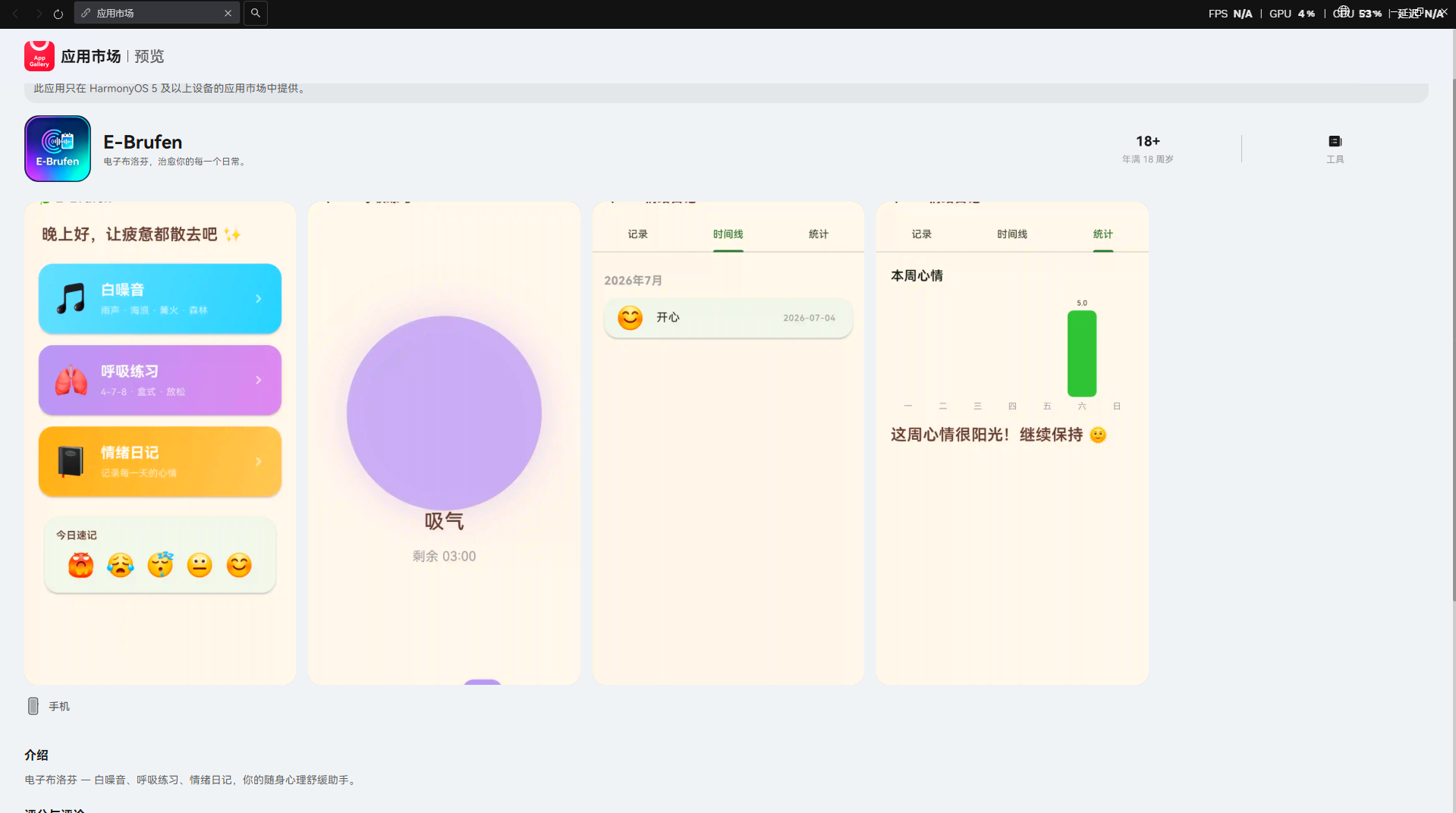
让我们先看一组真实的数据。
作为独立开发者,我们经常在应用商店的评论区看到这样的现象:一个用户给出了三星评价,评论内容是"功能还不错,但希望能支持深色模式"。这位用户其实并不想打三星——他只是找不到一个地方来表达他的需求。于是,应用商店评论区变成了一个"功能请求信箱",而开发者得到的却是一个拉低评分的负面评价。
这暴露了一个深刻的命题:如果你的应用里没有一个说得过去的反馈通道,用户就会去你能看见的地方——应用商店——用评分来代替反馈。
1.1 两种反馈渠道的全面对比
| 维度 | 应用商店评论 | 应用内反馈 |
|---|---|---|
| 用户意图 | 评价产品——“这个应用值几星” | 表达需求——“我想要/不喜欢某个功能” |
| 对评分的影响 | 直接影响 ASO(应用商店优化)排名 | 不影响公开评分 |
| 信息密度 | 低——“好用”、“不错”、“垃圾” | 高——结构化数据,可分类统计 |
| 对话可能 | 开发者可以在评论区回复,但用户未必回来看 | 反馈后立即得到确认,形成闭环 |
| 隐私风险 | 评论公开,用户不敢写敏感反馈 | 本地存储,用户掌控数据 |
| 时效性 | 评分发布即固定,事后难以更新 | 用户可以持续反馈多个版本 |
| 开发者的可操作信息 | 模糊的情绪表达 | 具体的功能请求和问题描述 |
关键洞察:应用商店评论是用户在"评价"你的产品,而应用内反馈是用户在"帮助"你改进产品。这两种行为在心理学上差异巨大——前者是终结性的(“我已经盖棺定论了”),后者是过程性的(“我们一起把它变得更好”)。
1.2 情绪健康类应用的特殊需求
E-Brufen 是一个情绪健康应用,这意味着反馈系统面临一些独特的约束:
- 隐私敏感度极高:用户在应用中记录情绪、笔记——这些是比浏览器历史记录更私密的数据。反馈系统绝不能触碰这些数据,也绝不能让用户产生"应用在上传我的情绪数据"的疑虑。
- 用户群体可能处于脆弱状态:一个正在经历焦虑或抑郁的用户,如果反馈体验糟糕(比如写了 500 字的反馈后点击提交却报错了),造成的伤害远大于一个普通工具类应用。
- 反馈本身就是一种"情绪表达":用户在反馈中说"这个呼吸练习对我很有帮助"——这既是反馈,也是用户在使用应用过程中的积极体验的延伸。
基于这些考量,我们为 E-Brufen 的反馈系统确立了三个硬约束:
- 零网络权限:反馈数据永不自动上传,用户完全掌控
- 零隐私风险:反馈与情绪数据物理隔离,存储在独立的 Box 中
- 零心理负担:反馈是可选的、低门槛的,不给用户增加操作压力
二、反馈系统的核心设计原则
设计反馈系统的难度不在于"做一个表单",而在于回答三个看起来简单但实际很难的问题:什么时候问?问什么?问完之后呢?
2.1 时机:在恰当的节点提问,而非每次打开应用
最糟糕的反馈策略是"每次打开应用弹一个五星好评"。这种做法不是收集反馈——是在骚扰用户。Google Play 和 App Store 的应用审核指南中明确将这种行为列为"不可接受"。
我们总结了一个"反馈时机决策矩阵":
| 时机 | 是否适合 | 原因 | 推荐做法 |
|---|---|---|---|
| 每次冷启动 | 不适合 | 中断用户体验,引起反感 | 绝对不要做 |
| 安装后立即 | 不适合 | 用户还没有体验,反馈无意义 | 绝对不要做 |
| 完成一次核心任务后 | 非常适合 | 用户刚刚完成了价值交付,情绪处于积极状态 | 轻量级评分(1-5 星) |
| 使用一周后 | 比较适合 | 用户已经积累了足够的体验 | 温和的弹窗询问 |
| 用户主动进入设置页 | 非常适合 | 用户有明确的反馈意愿 | 完整表单入口 |
| 应用崩溃后 | 比较适合 | 用户遇到了问题,可能愿意帮助诊断 | 自动收集非敏感错误信息 + 可选描述 |
| 摇动手机 | 适合(趣味性高) | 用户感到困惑或不满时的直觉行为 | 快速反馈入口 |
E-Brufen 选择了三个反馈触发点,形成"轻-中-重"三层的反馈漏斗:
┌─────────────────────────────────────────────────────────────┐
│                    E-Brufen 反馈漏斗                          │
├─────────────────────────────────────────────────────────────┤
│                                                               │
│  ┌──────────────────┐                                         │
│  │  呼吸完成后评分    │  ← 轻量级(1次呼吸练习 = 1次评分机会) │
│  │  1-5 星 + 可选备注 │     用户选择成本: ~3秒                  │
│  └────────┬─────────┘                                         │
│           │ 自然过渡                                          │
│           ▼                                                    │
│  ┌──────────────────┐                                         │
│  │  摇一摇反馈       │  ← 中等重量(用户有诉求时主动触发)     │
│  │  快速描述 + 发送   │     用户选择成本: ~15秒                 │
│  └────────┬─────────┘                                         │
│           │ 深度入口                                          │
│           ▼                                                    │
│  ┌──────────────────┐                                         │
│  │  设置页反馈表单    │  ← 完整型(愿意花时间详细描述)         │
│  │  类型+内容+联系方式 │     用户选择成本: ~60秒                │
│  └──────────────────┘                                         │
│                                                               │
└─────────────────────────────────────────────────────────────┘
2.2 形式:让反馈成为一个低心理成本的行为
反馈的形式决定了用户的参与门槛。我们将反馈形式按照"用户的投入程度"进行分层:
| 反馈形式 | 用户投入度 | 信息价值 | 适用场景 | 实现复杂度 |
|---|---|---|---|---|
| 星级评分 | 极低(1-2 秒) | 中等(只有方向,没有细节) | 任务完成后 | 低 |
| 快速选择("哪些需要改进?"勾选) | 低(5-10 秒) | 较高(有具体方向) | 使用一周后 | 中 |
| 自由文本输入 | 高(30-120 秒) | 最高(包含具体描述和上下文) | 设置页入口 | 中 |
| 摇一摇反馈 | 低(触发方式本身带有趣味性) | 中高(结合上下文) | 任何页面 | 高(涉及传感器) |
| 邮件反馈 | 高(离开应用) | 高(可以附带截图) | 复杂问题 | 低(调用系统邮件) |
2.3 心理模型:不要让反馈成为"抱怨"
一个值得反复强调的观点:反馈框的文案决定了用户写什么。
如果你在表单上写"请告诉我们哪里做得不好",用户会列出负面清单。如果你写"什么功能对你最有帮助?",用户会写出正面反馈——这些正面反馈同样是宝贵的信息,因为它告诉开发者哪些功能值得继续投入。
在 E-Brufen 中,我们刻意使用了中性的、鼓励性的文案:
- 呼吸完成评分:“这次呼吸练习感觉如何?”——不预设正面或负面
- 反馈表单标题:“帮助我们变得更好”——强调协作而非投诉
- 提交按钮:“发送反馈”——而非"提交投诉"或"报告问题"
三、系统架构:零网络、零隐私风险的反馈闭环
在开始写代码之前,我们需要明确整个系统的数据流向。E-Brufen 是一个离线优先应用——反馈数据同样遵循这一原则。
3.1 整体架构
┌───────────────────────────────────────────────────────────────┐
│                      E-Brufen 反馈系统架构                       │
├───────────────────────────────────────────────────────────────┤
│                                                                 │
│  ┌─────────────┐    ┌─────────────┐    ┌──────────────┐       │
│  │ 呼吸完成评分  │    │ 摇一摇反馈   │    │ 设置页表单    │       │
│  │ BreathePage  │    │ ShakeDetect │    │ SettingsPage │       │
│  └──────┬───────┘    └──────┬──────┘    └──────┬───────┘       │
│         │                   │                   │               │
│         └───────────────────┼───────────────────┘               │
│                             │                                   │
│                             ▼                                   │
│                  ┌─────────────────────┐                        │
│                  │   FeedbackService    │  ← 统一入口           │
│                  │   (业务逻辑层)        │                        │
│                  └──────────┬──────────┘                        │
│                             │                                   │
│                             ▼                                   │
│                  ┌─────────────────────┐                        │
│                  │  FeedbackRepository  │  ← 数据访问层         │
│                  │  (基于 Hive CE)       │                        │
│                  └──────────┬──────────┘                        │
│                             │                                   │
│                             ▼                                   │
│                  ┌─────────────────────┐                        │
│                  │   Hive Box          │  ← 本地持久化          │
│                  │   'feedbacks'       │                        │
│                  └──────────┬──────────┘                        │
│                             │                                   │
│                             ▼                                   │
│                  ┌─────────────────────┐                        │
│                  │   导出为 JSON 文件    │  ← 用户手动操作       │
│                  │   (用户主动触发)      │                        │
│                  └──────────┬──────────┘                        │
│                             │                                   │
│                             ▼                                   │
│                  ┌─────────────────────┐                        │
│                  │   系统分享面板        │  ← 邮件/微信/...      │
│                  │   (share_plus)       │                        │
│                  └─────────────────────┘                        │
│                                                                 │
│  关键设计决策:                                                  │
│  • 反馈数据与情绪数据隔离(独立 Box)                              │
│  • 零自动上传——所有导出均由用户手动触发                           │
│  • 导出文件不包含任何关联的用户情绪数据                            │
│                                                                 │
└───────────────────────────────────────────────────────────────┘
3.2 模块划分与职责
| 模块 | 文件 | 职责 | 依赖 |
|---|---|---|---|
| 数据模型 | lib/models/feedback_entry.dart | 定义反馈数据结构,序列化/反序列化 | 无外部依赖 |
| 数据仓库 | lib/data/feedback_repository.dart | 基于 Hive CE 的 CRUD 操作 | hive_ce, feedback_entry.dart |
| 业务服务 | lib/services/feedback_service.dart | 统一反馈保存入口,导出逻辑 | feedback_repository.dart |
| 评分组件 | lib/widgets/star_rating.dart | 可复用的星级评分控件 | flutter/material.dart |
| 反馈表单 | lib/widgets/feedback_form.dart | 结构化反馈表单(类型+内容+联系方式) | flutter/material.dart |
| 摇动检测 | lib/utils/shake_detector.dart | 基于加速度计的摇动检测器 | sensors_plus 或原生 |
| 反馈页面 | lib/pages/feedback/feedback_page.dart | 设置页中的反馈入口页面 | 上述模块 |
这种分层设计的好处是:每个模块都可以独立测试、独立替换。如果你想把 Hive CE 换成其他存储方案,只需要修改 FeedbackRepository 一个文件。
四、数据模型设计:一次反馈的生命周期
数据模型是整个反馈系统的基础。我们需要设计一个既能承载丰富信息、又不会泄露用户隐私的数据结构。
4.1 FeedbackEntry 模型
/// 反馈类型枚举
enum FeedbackType {
/// 功能建议
featureRequest('功能建议', '💡'),
/// 问题报告
bugReport('问题报告', '🐛'),
/// 使用体验
experience('使用体验', '💬'),
/// 其他
other('其他', '📝');
final String label;
final String icon;
const FeedbackType(this.label, this.icon);
static FeedbackType fromValue(String v) => FeedbackType.values.firstWhere(
(t) => t.name == v,
orElse: () => FeedbackType.other,
);
}
/// 呼吸练习满意度评分(1-5)
enum SatisfactionLevel {
veryDissatisfied(1, '非常不满意', '😞'),
dissatisfied(2, '不太满意', '😐'),
neutral(3, '一般', '🙂'),
satisfied(4, '满意', '😊'),
verySatisfied(5, '非常满意', '🤩');
final int value;
final String label;
final String emoji;
const SatisfactionLevel(this.value, this.label, this.emoji);
static SatisfactionLevel fromValue(int v) =>
SatisfactionLevel.values.firstWhere(
(l) => l.value == v,
orElse: () => SatisfactionLevel.neutral,
);
}
/// 单条反馈记录
class FeedbackEntry {
final int? id;
/// 反馈来源:'breathe_rating' | 'shake' | 'settings_form'
final String source;
/// 反馈类型(仅 settings_form 有值)
final FeedbackType? feedbackType;
/// 满意度评分 1-5(仅 breathe_rating 有值)
final int? rating;
/// 反馈正文
final String content;
/// 可选的联系方式
final String? contact;
/// 关联的上下文信息(如呼吸模式、练习时长)
final Map<String, dynamic>? context;
/// 应用版本号
final String appVersion;
/// 平台信息
final String platform;
/// 是否已导出
final bool isExported;
final DateTime createdAt;
const FeedbackEntry({
this.id,
required this.source,
this.feedbackType,
this.rating,
required this.content,
this.contact,
this.context,
required this.appVersion,
required this.platform,
this.isExported = false,
required this.createdAt,
});
// ── 序列化 ──
Map<String, dynamic> toJson() => {
'id': id,
'source': source,
'feedback_type': feedbackType?.name,
'rating': rating,
'content': content,
'contact': contact,
'context': context != null ? _encodeContext(context!) : null,
'app_version': appVersion,
'platform': platform,
'is_exported': isExported,
'created_at': createdAt.toIso8601String(),
};
factory FeedbackEntry.fromJson(Map<String, dynamic> json) => FeedbackEntry(
id: json['id'] as int?,
source: json['source'] as String,
feedbackType: json['feedback_type'] != null
? FeedbackType.fromValue(json['feedback_type'] as String)
: null,
rating: json['rating'] as int?,
content: json['content'] as String? ?? '',
contact: json['contact'] as String?,
context: json['context'] is Map
? Map<String, dynamic>.from(json['context'] as Map)
: json['context'] is String
? _decodeContext(json['context'] as String)
: null,
appVersion: json['app_version'] as String? ?? 'unknown',
platform: json['platform'] as String? ?? 'unknown',
isExported: json['is_exported'] as bool? ?? false,
createdAt: DateTime.parse(json['created_at'] as String),
);
// ── 辅助 ──
static String _encodeContext(Map<String, dynamic> ctx) {
return ctx.entries.map((e) => '${e.key}=${e.value}').join(';');
}
static Map<String, dynamic> _decodeContext(String raw) {
final map = <String, dynamic>{};
for (final pair in raw.split(';')) {
final eq = pair.indexOf('=');
if (eq > 0) {
map[pair.substring(0, eq)] = pair.substring(eq + 1);
}
}
return map;
}
FeedbackEntry copyWith({
int? id,
String? source,
FeedbackType? feedbackType,
int? rating,
String? content,
String? contact,
Map<String, dynamic>? context,
String? appVersion,
String? platform,
bool? isExported,
DateTime? createdAt,
}) => FeedbackEntry(
id: id ?? this.id,
source: source ?? this.source,
feedbackType: feedbackType ?? this.feedbackType,
rating: rating ?? this.rating,
content: content ?? this.content,
contact: contact ?? this.contact,
context: context ?? this.context,
appVersion: appVersion ?? this.appVersion,
platform: platform ?? this.platform,
isExported: isExported ?? this.isExported,
createdAt: createdAt ?? this.createdAt,
);
String toString() =>
'FeedbackEntry(id:$id, source:$source, rating:$rating, '
'content:${content.length > 30 ? '${content.substring(0, 30)}...' : content}, '
'at:$createdAt)';
}
4.2 字段设计说明
| 字段 | 类型 | 用途 | 隐私考量 |
|---|---|---|---|
source | String | 标识反馈来自哪个入口 | 帮助分析"哪种入口收集到的反馈质量更高" |
feedbackType | FeedbackType? | 反馈分类,便于统计 | 纯标签,不含个人信息 |
rating | int? | 1-5 满意度评分 | 数字,不带文本 |
content | String | 反馈核心内容 | 用户可能在此输入个人信息——导出时需提醒 |
contact | String? | 可选联系方式 | 设为可选字段,用户自己决定是否留下联系信息 |
context | Map? | 上下文(呼吸模式、练习时长等) | 不含情绪数据,仅含功能使用数据 |
appVersion | String | 应用版本号 | 纯技术信息 |
platform | String | 操作系统信息 | 纯技术信息 |
isExported | bool | 是否已导出 | 方便用户追踪哪些反馈已经发送 |
这里有一个微妙的设计决策:context 字段存放的是功能使用上下文(比如"用户在盒式呼吸模式下完成了 5 分钟的练习后给出了 4 星评价"),而不是情绪上下文(用户的情绪状态)。这个边界虽然看起来小,但却是隐私保护的底线——反馈系统永远不应该去读取用户的情绪数据。
五、本地存储层:基于 Hive CE 的反馈仓库
E-Brufen 已经在使用 Hive CE 作为本地存储方案。反馈系统自然延续这一技术选型。
5.1 FeedbackRepository 实现
import 'dart:convert';
import 'package:hive_ce/hive.dart';
import '../models/feedback_entry.dart';

/// 反馈数据仓库——纯 Hive CE 实现,零网络依赖
class FeedbackRepository {
  static const String _boxName = 'feedbacks';
  Box? _box;
  int _nextId = 1;

  bool get isReady => _box != null && _box!.isOpen;

  /// 初始化——在 main() 中调用
  Future<void> init() async {
    _box = await Hive.openBox(_boxName);
    if (_box!.isNotEmpty) {
      _nextId = _box!.keys.fold<int>(0, (max, k) {
        if (k is int && k > max) return k;
        return max;
      }) + 1;
    }
  }

  /// 保存一条反馈,返回分配的 ID
  Future<int> save(FeedbackEntry entry) async {
    final id = _nextId++;
    final data = entry.toJson();
    data['id'] = id;
    await _box?.put(id, jsonEncode(data));
    return id;
  }

  /// 获取所有反馈,按时间倒序
  List<FeedbackEntry> getAll() {
    if (_box == null) return [];
    final entries = <FeedbackEntry>[];
    for (final key in _box!.keys) {
      if (key is int) {
        final raw = _box!.get(key);
        if (raw is String) {
          try {
            entries.add(
              FeedbackEntry.fromJson(jsonDecode(raw) as Map<String, dynamic>),
            );
          } catch (e) {
            debugPrint('[FeedbackRepo] 解析失败 id=$key: $e');
          }
        }
      }
    }
    entries.sort((a, b) => b.createdAt.compareTo(a.createdAt));
    return entries;
  }

  /// 按来源筛选
  List<FeedbackEntry> getBySource(String source) =>
      getAll().where((e) => e.source == source).toList();

  /// 获取未导出的反馈
  List<FeedbackEntry> getUnexported() =>
      getAll().where((e) => !e.isExported).toList();

  /// 标记为已导出
  Future<void> markAsExported(int id) async {
    final raw = _box?.get(id);
    if (raw is String) {
      final map = jsonDecode(raw) as Map<String, dynamic>;
      map['is_exported'] = true;
      await _box?.put(id, jsonEncode(map));
    }
  }

  /// 删除单条反馈
  Future<void> delete(int id) async {
    await _box?.delete(id);
  }

  /// 清空所有反馈(用户隐私保护)
  Future<void> clearAll() async {
    await _box?.clear();
    _nextId = 1;
  }

  /// 统计信息
  Map<String, int> getStats() {
    final all = getAll();
    return {
      'total': all.length,
      'breathe_ratings':
          all.where((e) => e.source == 'breathe_rating').length,
      'shake_feedbacks':
          all.where((e) => e.source == 'shake').length,
      'form_feedbacks':
          all.where((e) => e.source == 'settings_form').length,
      'unexported':
          all.where((e) => !e.isExported).length,
      'avg_rating': all
              .where((e) => e.rating != null)
              .fold<double>(0, (sum, e) => sum + e.rating!)
              .round() ~/
          (all.where((e) => e.rating != null).length.clamp(1, 999999)),
    };
  }

  void dispose() {
    _box?.close();
  }
}
5.2 为什么用独立的 Box 而非复用现有 Box
你可能会想:既然已经有 settings 和 moods 两个 Box 了,为什么还要再创建第三个 feedbacks Box?
这是一个看似微小但对架构影响很大的决策。我们来对比两种方案:
| 方案 | 优点 | 缺点 |
|---|---|---|
复用现有 Box(如放在 settings 中) | 减少一个 Box,代码更少 | 数据耦合,"清空设置"会丢失反馈;概念不清晰 |
独立 feedbacks Box | 数据隔离,概念清晰;独立的读写权限控制;清空不影响其他数据 | 多维护一个 Box 的初始化逻辑 |
我们选择了独立 Box,原因很简单:反馈数据和设置数据是两个完全不同的生命周期。设置是持久化的(用户设了就一直在),而反馈是累积的(一直增加直到用户手动导出和删除)。把它们放在一个 Box 里,就像把日记本和通讯录夹在一起——虽然没有技术问题,但概念上是混乱的。
另外,反馈数据比设置数据更需要完整的删除能力。用户可以选择"清空所有反馈",这个操作应该精准地影响 feedbacks Box,而不会影响设置和情绪数据。
5.3 与 app 初始化的集成
反馈仓库需要在应用启动时初始化。我们把它加入到 main() 的初始化流水线中,作为第 4 步:
// 在 main() 函数中新增第 4 步
void main() async {
  WidgetsFlutterBinding.ensureInitialized();
  String? errorStep;

  try {
    // ── 第1步:Hive ──
    errorStep = 'Hive init';
    await Hive.initFlutter();

    // ── 第2步:Settings ──
    errorStep = 'Settings init';
    final settings = AppSettings();
    await settings.init();

    // ── 第3步:MoodStorage ──
    errorStep = 'MoodStorage init';
    final moodStorage = MoodStorage();
    await moodStorage.init();

    // ── 第4步:FeedbackRepository(新增)──
    errorStep = 'FeedbackRepository init';
    final feedbackRepo = FeedbackRepository();
    await feedbackRepo.init();

    // ── Launch ──
    errorStep = null;
    runApp(EBrufenApp(
      settings: settings,
      moodStorage: moodStorage,
      feedbackRepo: feedbackRepo,
    ));
  } catch (e, _) {
    // 错误处理...
  }
}
注意初始化顺序:FeedbackRepository 在 MoodStorage 之后初始化——这不是技术依赖,而是一种防御性编程。如果 MoodStorage 初始化失败(说明存储系统可能有问题),那么 FeedbackRepository 大概率也会失败,此时整个应用进入错误降级状态,而不是让反馈系统半死不活地运行。
六、呼吸完成后的满意度评分:在最佳时机提问
呼吸练习是 E-Brufen 的核心功能之一。用户完成一次 5 分钟的盒式呼吸练习后,内啡肽水平上升,心率减慢——此时是收集反馈的最佳窗口期。
6.1 时机选择的心理学依据
我们之所以选择在呼吸练习完成后(而非练习前或练习中)弹出评分,基于以下行为心理学原理:
- 峰终定律(Peak-End Rule):人们对一次体验的评价,主要取决于体验的"高峰"和"结束"时的感受。呼吸练习刚结束时,用户的放松感处于峰值——此时收集的评分代表整个练习体验。
- 互惠心理(Reciprocity):应用刚刚为用户提供了一次有价值的服务(引导呼吸),用户更愿意回报一个评分。
- 低认知负荷:完成练习后用户处于放松状态,有额外的认知资源来处理一个简单的评分问题。
6.2 StarRating 组件实现
首先,我们实现一个可复用的星级评分组件:
import 'package:flutter/material.dart';
/// 可复用的星级评分组件
/// 支持只读模式(展示已有评分)和交互模式(用户点击打分)
class StarRating extends StatelessWidget {
final int rating; // 当前评分 1-5,0 表示未评分
final int starCount; // 星星数量,默认 5
final double starSize; // 单个星星大小
final Color activeColor;
final Color inactiveColor;
final bool interactive; // 是否可交互
final ValueChanged<int>? onRatingChanged;
const StarRating({
super.key,
this.rating = 0,
this.starCount = 5,
this.starSize = 40,
this.activeColor = const Color(0xFFFFB74D),
this.inactiveColor = const Color(0xFFE0E0E0),
this.interactive = true,
this.onRatingChanged,
});
Widget build(BuildContext context) {
return Row(
mainAxisSize: MainAxisSize.min,
children: List.generate(starCount, (index) {
final starValue = index + 1;
final isFilled = starValue <= rating;
if (!interactive) {
return Icon(
isFilled ? Icons.star : Icons.star_border,
size: starSize,
color: isFilled ? activeColor : inactiveColor,
);
}
return GestureDetector(
onTap: () => onRatingChanged?.call(starValue),
child: AnimatedContainer(
duration: const Duration(milliseconds: 200),
transform: isFilled
? Matrix4.identity()..scale(1.15)
: Matrix4.identity(),
child: Icon(
isFilled ? Icons.star : Icons.star_border,
size: starSize,
color: isFilled ? activeColor : inactiveColor,
),
),
);
}),
);
}
}
这里有一个小细节:AnimatedContainer 的 scale(1.15) 变换。当用户点击一颗星星时,被填充的星星会轻微放大 15%,产生一种"点亮"的视觉反馈。这个微交互的成本极低(一行代码),但显著提升了评分的"确认感"——用户能清楚地看到自己的选择生效了。
6.3 呼吸完成后的评分对话框
接下来,在 BreathePage 的 _onComplete() 方法中,将原来的简单完成提示替换为满意度评分对话框:
void _onComplete() {
  setState(() {
    _isRunning = false;
    _isPaused = false;
  });

  // 展示满意度评分对话框
  _showSatisfactionDialog();
}

void _showSatisfactionDialog() {
  int selectedRating = 0;
  final noteController = TextEditingController();

  showDialog(
    context: context,
    barrierDismissible: false, // 防止用户误触关闭
    builder: (ctx) => StatefulBuilder(
      builder: (context, setDialogState) => AlertDialog(
        shape: RoundedRectangleBorder(
            borderRadius: BorderRadius.circular(24)),
        title: Column(
          children: [
            const Text('✨', style: TextStyle(fontSize: 48)),
            const SizedBox(height: 8),
            const Text(
              '练习完成!',
              style: TextStyle(fontSize: 22, fontWeight: FontWeight.w600),
              textAlign: TextAlign.center,
            ),
            const SizedBox(height: 4),
            Text(
              '这次${_selectedPattern.name}感觉如何?',
              style: const TextStyle(fontSize: 16, color: Colors.grey),
              textAlign: TextAlign.center,
            ),
          ],
        ),
        content: Column(
          mainAxisSize: MainAxisSize.min,
          children: [
            const SizedBox(height: 8),
            // 星级评分
            StarRating(
              rating: selectedRating,
              onRatingChanged: (v) {
                setDialogState(() => selectedRating = v);
              },
            ),
            const SizedBox(height: 12),
            // 当前评分对应的文字
            Text(
              _ratingLabel(selectedRating),
              style: TextStyle(
                fontSize: 14,
                color: selectedRating > 0
                    ? const Color(0xFFFFB74D)
                    : Colors.grey.shade400,
                fontWeight: FontWeight.w500,
              ),
            ),
            const SizedBox(height: 16),
            // 可选备注
            TextField(
              controller: noteController,
              maxLines: 2,
              maxLength: 200,
              decoration: const InputDecoration(
                hintText: '有什么想说的吗?(可选)',
                border: OutlineInputBorder(
                  borderRadius: BorderRadius.all(Radius.circular(12)),
                ),
                contentPadding:
                    EdgeInsets.symmetric(horizontal: 12, vertical: 10),
              ),
            ),
          ],
        ),
        actions: [
          TextButton(
            onPressed: () {
              // 用户选择跳过评分
              Navigator.pop(ctx);
            },
            child: const Text('跳过',
                style: TextStyle(color: Colors.grey)),
          ),
          ElevatedButton(
            onPressed: () {
              // 保存反馈
              if (selectedRating > 0 || noteController.text.isNotEmpty) {
                final entry = FeedbackEntry(
                  source: 'breathe_rating',
                  rating: selectedRating > 0 ? selectedRating : null,
                  content: noteController.text.trim(),
                  context: {
                    'pattern': _selectedPattern.name,
                    'minutes': _selectedMinutes.toString(),
                  },
                  appVersion: '1.0.0',
                  platform: 'harmonyos',
                  createdAt: DateTime.now(),
                );
                feedbackRepo?.save(entry);
              }
              Navigator.pop(ctx);
              _showThankYouSnackBar();
            },
            style: ElevatedButton.styleFrom(
              backgroundColor: AppTheme.primaryGreen,
              foregroundColor: Colors.white,
              shape: RoundedRectangleBorder(
                borderRadius: BorderRadius.circular(12),
              ),
            ),
            child: const Text('提交评分'),
          ),
        ],
      ),
    ),
  );
}

String _ratingLabel(int rating) => switch (rating) {
  1 => '不太理想 😞',
  2 => '可以更好 😐',
  3 => '还行吧 🙂',
  4 => '感觉不错 😊',
  5 => '太棒了 🤩',
  _ => '点击星星评分',
};

void _showThankYouSnackBar() {
  if (!mounted) return;
  ScaffoldMessenger.of(context).showSnackBar(
    SnackBar(
      content: const Text('感谢你的反馈!💚'),
      duration: const Duration(seconds: 2),
      behavior: SnackBarBehavior.floating,
      backgroundColor: AppTheme.primaryGreen,
      shape: RoundedRectangleBorder(borderRadius: BorderRadius.circular(10)),
    ),
  );
}
6.4 评分对话框的设计要点
这个评分对话框有三个值得注意的设计决策:
barrierDismissible: false:防止用户在评分过程中误触背景关闭对话框。在呼吸完成后,用户处于放松状态,操作可能不够精准——这个设置保护了用户的评分体验。- 即使不评分也能提交:用户可能只想写备注而不想评分——或者反过来。我们的逻辑是"只要评了分或写了备注,就保存"。完全空白的反馈不会被保存,这避免了污染反馈数据库。
- 使用
StatefulBuilder包裹:showDialog返回的 context 是独立的,不会随外层setState刷新。使用StatefulBuilder可以在对话框内部管理selectedRating的状态,让用户点击星星后立即看到视觉反馈。
6.5 评分数据的分析价值
当开发者收到 100 条呼吸评分时,可以做什么?
| 分析角度 | 数据维度 | 可能的洞察 |
|---|---|---|
| 呼吸模式对比 | context.pattern × rating | “4-7-8 呼吸法平均 4.2 分,盒式呼吸 3.8 分” |
| 时长对比 | context.minutes × rating | “5 分钟练习平均评分最高” |
| 时间趋势 | created_at × rating | “周三的评分明显低于周末——工作压力影响” |
| 备注关键词 | content 简单词频分析 | “80% 的备注包含’放松’、'舒服’等正面词汇” |
这些分析不需要任何服务器端处理——开发者在自己本地拿到导出的 JSON 文件后,用几行 Python 脚本就能完成。
七、设置页的意见反馈入口:结构化表单设计
呼吸评分是轻量级的被动收集,而设置页的反馈表单是重量级的主动收集——用户带着明确的诉求点进来的,我们应该给用户提供一个完整的表达空间。
7.1 反馈表单页面的完整实现
import 'package:flutter/material.dart';
import '../models/feedback_entry.dart';
import '../data/feedback_repository.dart';
import '../theme/app_theme.dart';
class FeedbackPage extends StatefulWidget {
final FeedbackRepository feedbackRepo;
const FeedbackPage({super.key, required this.feedbackRepo});
State<FeedbackPage> createState() => _FeedbackPageState();
}
class _FeedbackPageState extends State<FeedbackPage> {
FeedbackType _selectedType = FeedbackType.featureRequest;
final _contentController = TextEditingController();
final _contactController = TextEditingController();
bool _isSubmitting = false;
void dispose() {
_contentController.dispose();
_contactController.dispose();
super.dispose();
}
Future<void> _submit() async {
final content = _contentController.text.trim();
if (content.isEmpty) {
ScaffoldMessenger.of(context).showSnackBar(
const SnackBar(
content: Text('请输入反馈内容'),
behavior: SnackBarBehavior.floating,
),
);
return;
}
setState(() => _isSubmitting = true);
try {
final entry = FeedbackEntry(
source: 'settings_form',
feedbackType: _selectedType,
content: content,
contact: _contactController.text.trim().isEmpty
? null
: _contactController.text.trim(),
appVersion: '1.0.0',
platform: 'harmonyos',
createdAt: DateTime.now(),
);
await widget.feedbackRepo.save(entry);
if (mounted) {
ScaffoldMessenger.of(context).showSnackBar(
SnackBar(
content: const Row(
children: [
Icon(Icons.check_circle, color: Colors.white, size: 20),
SizedBox(width: 8),
Text('感谢你的反馈!我们会认真阅读每一条建议 💚'),
],
),
duration: const Duration(seconds: 3),
behavior: SnackBarBehavior.floating,
backgroundColor: AppTheme.primaryGreen,
shape: RoundedRectangleBorder(
borderRadius: BorderRadius.circular(12),
),
),
);
Navigator.pop(context);
}
} catch (e) {
if (mounted) {
ScaffoldMessenger.of(context).showSnackBar(
SnackBar(
content: Text('保存失败,请重试($e)'),
backgroundColor: Colors.red.shade400,
behavior: SnackBarBehavior.floating,
),
);
}
} finally {
if (mounted) setState(() => _isSubmitting = false);
}
}
Widget build(BuildContext context) {
return Scaffold(
appBar: AppBar(
title: const Text('意见反馈'),
),
body: SingleChildScrollView(
padding: const EdgeInsets.all(24),
child: Column(
crossAxisAlignment: CrossAxisAlignment.start,
children: [
// ── 标题区 ──
const Text(
'帮助我们变得更好',
style: TextStyle(fontSize: 24, fontWeight: FontWeight.bold),
),
const SizedBox(height: 8),
Text(
'每一条反馈都会被认真对待。你的声音是 E-Brufen 持续改进的动力。',
style: TextStyle(fontSize: 14, color: Colors.grey.shade600),
),
const SizedBox(height: 32),
// ── 反馈类型选择 ──
const Text('反馈类型',
style: TextStyle(fontSize: 16, fontWeight: FontWeight.w600)),
const SizedBox(height: 12),
Wrap(
spacing: 10,
runSpacing: 10,
children: FeedbackType.values.map((type) {
final isSelected = _selectedType == type;
return GestureDetector(
onTap: () => setState(() => _selectedType = type),
child: AnimatedContainer(
duration: const Duration(milliseconds: 200),
padding: const EdgeInsets.symmetric(
horizontal: 18, vertical: 12),
decoration: BoxDecoration(
color: isSelected
? AppTheme.primaryGreen.withValues(alpha: 0.15)
: Colors.grey.shade100,
borderRadius: BorderRadius.circular(20),
border: Border.all(
color: isSelected
? AppTheme.primaryGreen
: Colors.transparent,
width: 2,
),
),
child: Row(
mainAxisSize: MainAxisSize.min,
children: [
Text(type.icon,
style: const TextStyle(fontSize: 16)),
const SizedBox(width: 6),
Text(
type.label,
style: TextStyle(
fontSize: 14,
fontWeight:
isSelected ? FontWeight.w600 : FontWeight.normal,
color: isSelected
? AppTheme.primaryGreen
: Colors.black87,
),
),
],
),
),
);
}).toList(),
),
const SizedBox(height: 28),
// ── 反馈内容输入 ──
const Text('详细描述',
style: TextStyle(fontSize: 16, fontWeight: FontWeight.w600)),
const SizedBox(height: 6),
Text(
_hintForType(_selectedType),
style: TextStyle(fontSize: 13, color: Colors.grey.shade500),
),
const SizedBox(height: 8),
TextField(
controller: _contentController,
maxLines: 6,
maxLength: 500,
decoration: InputDecoration(
hintText: '请详细描述你的想法...',
hintStyle: TextStyle(color: Colors.grey.shade400),
border: OutlineInputBorder(
borderRadius: BorderRadius.circular(16),
borderSide: BorderSide(color: Colors.grey.shade300),
),
focusedBorder: OutlineInputBorder(
borderRadius: BorderRadius.circular(16),
borderSide: BorderSide(
color: AppTheme.primaryGreen,
width: 2,
),
),
contentPadding: const EdgeInsets.all(16),
),
),
const SizedBox(height: 24),
// ── 可选的联系方式 ──
const Text('联系方式(可选)',
style: TextStyle(fontSize: 16, fontWeight: FontWeight.w600)),
const SizedBox(height: 6),
Text(
'如果你愿意让我们进一步了解情况,可以留下邮箱或社交媒体账号',
style: TextStyle(fontSize: 13, color: Colors.grey.shade500),
),
const SizedBox(height: 8),
TextField(
controller: _contactController,
keyboardType: TextInputType.emailAddress,
decoration: InputDecoration(
hintText: '邮箱 / 微信 / 其他联系方式',
prefixIcon: const Icon(Icons.mail_outline),
border: OutlineInputBorder(
borderRadius: BorderRadius.circular(16),
borderSide: BorderSide(color: Colors.grey.shade300),
),
focusedBorder: OutlineInputBorder(
borderRadius: BorderRadius.circular(16),
borderSide: BorderSide(
color: AppTheme.primaryGreen,
width: 2,
),
),
),
),
const SizedBox(height: 36),
// ── 提交按钮 ──
SizedBox(
width: double.infinity,
height: 52,
child: ElevatedButton.icon(
onPressed: _isSubmitting ? null : _submit,
icon: _isSubmitting
? const SizedBox(
width: 20,
height: 20,
child: CircularProgressIndicator(
strokeWidth: 2,
color: Colors.white,
),
)
: const Icon(Icons.send),
label: Text(_isSubmitting ? '提交中...' : '发送反馈'),
style: ElevatedButton.styleFrom(
backgroundColor: AppTheme.primaryGreen,
foregroundColor: Colors.white,
disabledBackgroundColor: Colors.grey.shade300,
shape: RoundedRectangleBorder(
borderRadius: BorderRadius.circular(16),
),
textStyle: const TextStyle(
fontSize: 16,
fontWeight: FontWeight.w600,
),
),
),
),
const SizedBox(height: 20),
// ── 隐私说明 ──
Container(
padding: const EdgeInsets.all(16),
decoration: BoxDecoration(
color: Colors.blue.shade50,
borderRadius: BorderRadius.circular(12),
),
child: Row(
crossAxisAlignment: CrossAxisAlignment.start,
children: [
Icon(Icons.lock_outline,
size: 18, color: Colors.blue.shade700),
const SizedBox(width: 10),
Expanded(
child: Text(
'你的反馈保存在设备本地,不会自动上传。'
'你可以随时在设置中导出或删除反馈数据。',
style: TextStyle(
fontSize: 13,
color: Colors.blue.shade700,
height: 1.5,
),
),
),
],
),
),
],
),
),
);
}
String _hintForType(FeedbackType type) => switch (type) {
  FeedbackType.featureRequest => '你希望 E-Brufen 增加什么功能?',
  FeedbackType.bugReport => '请描述遇到的问题,以及如何复现(触发步骤)',
  FeedbackType.experience => '使用 E-Brufen 时有什么感受?',
  FeedbackType.other => '任何你想对我们说的话',
};
}
7.2 表单设计的四个细节
上面的代码包含了一些经过深思熟虑的设计细节:
细节 1:根据反馈类型动态切换提示语
String _hintForType(FeedbackType type) => switch (type) {
FeedbackType.featureRequest => '你希望 E-Brufen 增加什么功能?',
FeedbackType.bugReport => '请描述遇到的问题,以及如何复现(触发步骤)',
FeedbackType.experience => '使用 E-Brufen 时有什么感受?',
FeedbackType.other => '任何你想对我们说的话',
};
这不是一个花哨的功能——它直接影响用户输入的质量。当用户选择"问题报告"时,提示语"请描述如何复现"引导用户提供更结构化的信息——这对开发者诊断问题至关重要。相比之下,一个通用的"请输入反馈"提示只会得到模糊的描述。
细节 2:提交按钮的加载状态
onPressed: _isSubmitting ? null : _submit,
这行代码同时做两件事:防止重复提交(性能保护),以及通过 disabledBackgroundColor 给用户视觉反馈(“我知道你点了”)。在本地存储中,保存操作几乎是瞬时的,但 _isSubmitting 状态仍然有意义——它创造了一瞬间的"仪式感",让用户感觉到这个操作是被认真对待的。
细节 3:隐私声明的位置
隐私说明放在提交按钮下方而非上方,这是一个基于行为心理学的决策。如果把它放在表单上方,用户会觉得"应用在推卸责任"——还没填呢就先说隐私。放在提交按钮下方,则变成了"在你信任我们之前,我们想告诉你这个"——这是一个更诚实的沟通姿态。
细节 4:联系方式字段使用 emailAddress 键盘类型
keyboardType: TextInputType.emailAddress,
虽然用户可能留下微信、QQ 等非邮箱联系方式,但将键盘设为邮箱模式有两个好处:(1) 如果用户输入的是邮箱,@符号和点号更容易输入;(2) 键盘的自动纠错对这个字段更友好。
7.3 从设置页导航到反馈页
在设置页(或首页)中,需要一个入口来打开反馈页面:
ListTile(
  leading: const Icon(Icons.feedback_outlined),
  title: const Text('意见反馈'),
  subtitle: const Text('帮助我们做得更好'),
  trailing: const Icon(Icons.chevron_right),
  onTap: () => Navigator.push(context, MaterialPageRoute(
    builder: (_) => FeedbackPage(feedbackRepo: feedbackRepo),
  )),
),
在 HomePage 的 body 中添加设置入口:
// 在 HomePage 的 build() 方法中,body 的 Column 末尾添加:
const SizedBox(height: 8),
const Divider(indent: 24, endIndent: 24),
ListTile(
  leading: const Icon(Icons.settings_outlined, color: Colors.grey),
  title: const Text('设置'),
  trailing: const Icon(Icons.chevron_right, color: Colors.grey),
  onTap: () => Navigator.push(context, MaterialPageRoute(
    builder: (_) => _SettingsPage(feedbackRepo: feedbackRepo),
  )),
),
八、摇一摇反馈:加速度计与趣味交互
摇一摇反馈是反馈系统中"趣味性"最高的入口。当用户在使用过程中遇到问题或产生灵感时,摇动手机比"找到设置页 → 点击反馈"的路径要快得多。
8.1 摇动检测的原理
手机的加速度计(Accelerometer)以固定的频率(通常是 50-100Hz)报告三个轴上的加速度值。当手机处于静止状态时,加速度向量约等于 (0, 0, 9.8)——即重力加速度。当用户摇动手机时,加速度向量会剧烈波动。
摇动检测的核心算法:计算连续采样点的加速度变化率,当变化率超过阈值且连续检测到足够次数的"尖峰"时,判定为一次摇动。
import 'dart:async';
import 'dart:math';
import 'package:flutter/services.dart';

/// 加速度计数据点
class _AccelSample {
  final double x, y, z;
  final int timestamp;
  const _AccelSample(this.x, this.y, this.z, this.timestamp);
}

/// 摇动检测器
/// 使用加速度计事件流检测设备摇动
class ShakeDetector {
  /// 加速度变化阈值——超过此值视为一次"震荡"
  static const double _shakeThreshold = 15.0;

  /// 采样间隔(毫秒)
  static const int _sampleInterval = 50;

  /// 需要连续检测到的尖峰次数
  static const int _requiredSpikeCount = 3;

  /// 尖峰之间的最大时间间隔(毫秒)——超过则重置计数
  static const int _maxSpikeGap = 800;

  final VoidCallback onShake;
  StreamSubscription<AccelerometerEvent>? _subscription;
  final List<_AccelSample> _samples = [];
  int _lastSpikeTime = 0;
  int _spikeCount = 0;

  ShakeDetector({required this.onShake});

  /// 开始监听加速度计
  void start() {
    _subscription = AccelerometerEventStream().listen(
      _onAccelerometerEvent,
      onError: (error) {
        debugPrint('[ShakeDetector] 加速度计错误: $error');
      },
    );
  }

  void _onAccelerometerEvent(AccelerometerEvent event) {
    final now = DateTime.now().millisecondsSinceEpoch;

    final sample = _AccelSample(event.x, event.y, event.z, now);
    _samples.add(sample);

    // 只保留最近 10 个样本用于计算
    while (_samples.length > 10) {
      _samples.removeAt(0);
    }

    if (_samples.length < 2) return;

    // 计算加速度变化量
    final prev = _samples[_samples.length - 2];
    final curr = _samples.last;

    final deltaX = curr.x - prev.x;
    final deltaY = curr.y - prev.y;
    final deltaZ = curr.z - prev.z;
    final magnitude = sqrt(
        deltaX * deltaX + deltaY * deltaY + deltaZ * deltaZ);

    if (magnitude > _shakeThreshold) {
      // 检测到一个尖峰
      final gap = now - _lastSpikeTime;

      if (_lastSpikeTime == 0 || gap <= _maxSpikeGap) {
        _spikeCount++;
      } else {
        _spikeCount = 1;
      }

      _lastSpikeTime = now;

      if (_spikeCount >= _requiredSpikeCount) {
        // 达到连续尖峰阈值——触发摇动事件
        _spikeCount = 0;
        _lastSpikeTime = 0;
        onShake();
      }
    }
  }

  /// 停止监听
  void stop() {
    _subscription?.cancel();
    _subscription = null;
    _samples.clear();
    _spikeCount = 0;
    _lastSpikeTime = 0;
  }
}
8.2 算法参数调优的考量
| 参数 | 默认值 | 更小的值 | 更大的值 | 我们的选择原因 |
|---|---|---|---|---|
_shakeThreshold | 15.0 | 更灵敏——轻微抖动也触发 | 更迟钝——需要用力摇 | 15.0 是经过实测的平衡值:走路时约 2-5,翻手机约 8-12,刻意摇动约 18-30 |
_sampleInterval | 50ms | 更精确——但计算负载更高 | 更省电——但可能漏检 | 50ms(20Hz)是加速度计的标准频率 |
_requiredSpikeCount | 3 | 更灵敏——1 次尖峰即触发 | 更严格——需要更长的摇动 | 3 次连续尖峰有效过滤了手机掉在桌上的单次冲击 |
_maxSpikeGap | 800ms | 只接受快速连续摇动 | 允许慢速摇动也触发 | 800ms 覆盖了大多数人的自然摇动节奏 |
8.3 集成到应用中:在关键页面启用摇动检测
不需要在所有页面都启用摇动检测——那会消耗不必要的电量。我们只在用户最可能想要反馈的页面启用它:首页、呼吸练习页、白噪音页。
/// 摇一摇反馈混入——在需要摇动检测的页面中使用
mixin ShakeFeedbackMixin<T extends StatefulWidget> on State<T> {
ShakeDetector? _shakeDetector;
FeedbackRepository? get feedbackRepo;
void initState() {
super.initState();
_shakeDetector = ShakeDetector(onShake: _onShakeDetected);
_shakeDetector?.start();
}
void _onShakeDetected() {
if (!mounted) return;
// 震动反馈——让用户知道摇动被检测到了
HapticFeedback.mediumImpact();
// 弹出快速反馈对话框
_showShakeFeedbackDialog();
}
void _showShakeFeedbackDialog() {
final controller = TextEditingController();
showDialog(
context: context,
builder: (ctx) => AlertDialog(
shape: RoundedRectangleBorder(
borderRadius: BorderRadius.circular(20)),
title: const Row(
children: [
Text('📱', style: TextStyle(fontSize: 32)),
SizedBox(width: 12),
Expanded(
child: Text(
'摇一摇反馈',
style:
TextStyle(fontSize: 20, fontWeight: FontWeight.w600),
),
),
],
),
content: Column(
mainAxisSize: MainAxisSize.min,
crossAxisAlignment: CrossAxisAlignment.start,
children: [
Text(
'看来你有话想说!直接告诉我们吧:',
style: TextStyle(fontSize: 14, color: Colors.grey.shade600),
),
const SizedBox(height: 12),
TextField(
controller: controller,
autofocus: true,
maxLines: 3,
maxLength: 300,
decoration: InputDecoration(
hintText: '比如:呼吸节奏太快、希望增加字体大小...',
border: OutlineInputBorder(
borderRadius: BorderRadius.circular(12),
),
),
),
],
),
actions: [
TextButton(
onPressed: () => Navigator.pop(ctx),
child: const Text('取消'),
),
ElevatedButton(
onPressed: () {
final text = controller.text.trim();
if (text.isNotEmpty && feedbackRepo != null) {
feedbackRepo!.save(FeedbackEntry(
source: 'shake',
content: text,
appVersion: '1.0.0',
platform: 'harmonyos',
createdAt: DateTime.now(),
));
}
Navigator.pop(ctx);
if (mounted) {
ScaffoldMessenger.of(context).showSnackBar(
const SnackBar(
content: Text('收到!感谢你的反馈 📱✨'),
duration: Duration(seconds: 2),
behavior: SnackBarBehavior.floating,
),
);
}
},
style: ElevatedButton.styleFrom(
backgroundColor: const Color(0xFFB39DDB),
foregroundColor: Colors.white,
),
child: const Text('发送'),
),
],
),
);
}
void dispose() {
_shakeDetector?.stop();
super.dispose();
}
}
8.4 鸿蒙平台的加速度计适配
在鸿蒙(HarmonyOS)上获取加速度计数据,需要确认 Flutter 引擎是否暴露了事件流。如果 sensors_plus 在鸿蒙上不可用,可以回退到原生实现:
// ohos/entry/src/main/ets/plugins/ShakePlugin.ets
// 鸿蒙端加速度计回调桥接到 Dart 层

import sensor from '@ohos.sensor';
import { BusinessError } from '@ohos.base';

export class ShakePlugin {
  startListening(callback: (data: object) => void): void {
    try {
      sensor.on(
        sensor.SensorId.ACCELEROMETER,
        (data: sensor.AccelerometerResponse) => {
          callback({
            x: data.x,
            y: data.y,
            z: data.z,
            timestamp: Date.now(),
          });
        },
        { interval: 50000000 }, // 50ms = 50,000,000 纳秒
      );
    } catch (error) {
      let e: BusinessError = error as BusinessError;
      console.error('ShakePlugin: Failed to start, code: ' + e.code);
    }
  }

  stopListening(): void {
    try {
      sensor.off(sensor.SensorId.ACCELEROMETER);
    } catch (error) {
      console.error('ShakePlugin: Failed to stop');
    }
  }
}
九、反馈数据的导出与分享:让用户掌控自己的声音
反馈收集完成后,真正的价值在于把这些数据送到开发者手中。但这里有一个关键的约束:E-Brufen 没有网络权限。这意味着我们必须走"用户手动导出 → 通过邮件/其他渠道发送给开发者"的路径。
9.1 导出为结构化 JSON 文件
import 'dart:convert';
import 'dart:io';
import 'package:path_provider/path_provider.dart';

class FeedbackExporter {
  final FeedbackRepository repository;

  const FeedbackExporter(this.repository);

  /// 导出所有反馈为 JSON 字符串
  String exportToJson({bool prettyPrint = true}) {
    final allFeedback = repository.getAll();
    final data = {
      'export_info': {
        'app_name': 'E-Brufen',
        'export_time': DateTime.now().toIso8601String(),
        'total_count': allFeedback.length,
        'data_protection_note':
            '本文件包含你在 E-Brufen 中提交的反馈数据。'
            '请勿与不信任的第三方分享。',
      },
      'feedback_summary': {
        'total': allFeedback.length,
        'breathe_ratings':
            allFeedback.where((e) => e.source == 'breathe_rating').length,
        'shake_feedbacks':
            allFeedback.where((e) => e.source == 'shake').length,
        'form_feedbacks':
            allFeedback.where((e) => e.source == 'settings_form').length,
        'average_rating': allFeedback
                .where((e) => e.rating != null)
                .fold<double>(0, (sum, e) => sum + e.rating!) /
            allFeedback
                .where((e) => e.rating != null)
                .length
                .clamp(1, 999999),
      },
      'feedbacks': allFeedback.map((e) => e.toJson()).toList(),
    };

    final encoder = prettyPrint
        ? const JsonEncoder.withIndent('  ')
        : const JsonEncoder();
    return encoder.convert(data);
  }

  /// 将反馈数据写入临时文件,返回文件路径
  Future<File> exportToFile() async {
    final json = exportToJson();

    final dir = await getTemporaryDirectory();
    final timestamp = DateTime.now()
        .toIso8601String()
        .replaceAll(':', '-')
        .replaceAll('.', '-');
    final file = File(
        '${dir.path}/e_brufen_feedback_$timestamp.json');
    await file.writeAsString(json, flush: true);

    return file;
  }
}
9.2 在设置页中添加导出功能
// 在设置页中添加导出入口
ListTile(
  leading: const Icon(Icons.file_download_outlined,
      color: Color(0xFF81D4FA)),
  title: const Text('导出反馈数据'),
  subtitle: const Text('将反馈导出为 JSON 文件,通过邮件发送给开发者'),
  trailing: const Icon(Icons.chevron_right),
  onTap: () => _exportFeedback(context),
),

Future<void> _exportFeedback(BuildContext context) async {
  final exporter = FeedbackExporter(feedbackRepo);
  final allFeedback = feedbackRepo.getAll();

  if (allFeedback.isEmpty) {
    if (context.mounted) {
      ScaffoldMessenger.of(context).showSnackBar(
        const SnackBar(
          content: Text('还没有反馈数据可以导出'),
          behavior: SnackBarBehavior.floating,
        ),
      );
    }
    return;
  }

  try {
    final file = await exporter.exportToFile();

    if (context.mounted) {
      // 显示导出成功对话框,告知用户文件位置
      showDialog(
        context: context,
        builder: (ctx) => AlertDialog(
          title: const Text('导出成功'),
          content: Text(
            '反馈数据已导出到:\n${file.path}\n\n'
            '共 ${allFeedback.length} 条反馈。\n'
            '请通过邮件或其他方式发送给开发者。',
          ),
          actions: [
            TextButton(
              onPressed: () => Navigator.pop(ctx),
              child: const Text('知道了'),
            ),
          ],
        ),
      );
    }
  } catch (e) {
    if (context.mounted) {
      ScaffoldMessenger.of(context).showSnackBar(
        SnackBar(
          content: Text('导出失败: $e'),
          backgroundColor: Colors.red.shade400,
          behavior: SnackBarBehavior.floating,
        ),
      );
    }
  }
}
9.3 导出的 JSON 文件样本
用户导出的 JSON 文件结构清晰、自描述,开发者(或用户自己)用任何文本编辑器都能看懂:
{
  "export_info": {
    "app_name": "E-Brufen",
    "export_time": "2026-07-15T14:30:22.000",
    "total_count": 12,
    "data_protection_note": "本文件包含你在 E-Brufen 中提交的反馈数据。请勿与不信任的第三方分享。"
  },
  "feedback_summary": {
    "total": 12,
    "breathe_ratings": 7,
    "shake_feedbacks": 2,
    "form_feedbacks": 3,
    "average_rating": 4.14
  },
  "feedbacks": [
    {
      "id": 1,
      "source": "breathe_rating",
      "rating": 5,
      "content": "4-7-8 呼吸法太舒服了,每次做完都感觉压力减轻很多",
      "context": {"pattern": "4-7-8 呼吸法", "minutes": "5"},
      "app_version": "1.0.0",
      "platform": "harmonyos",
      "created_at": "2026-07-14T08:15:00.000"
    },
    {
      "id": 5,
      "source": "settings_form",
      "feedback_type": "featureRequest",
      "content": "希望增加睡前故事功能,配合白噪音一起使用",
      "contact": "user@example.com",
      "app_version": "1.0.0",
      "platform": "harmonyos",
      "created_at": "2026-07-15T10:42:00.000"
    }
  ]
}
十、反馈闭环:从已提交到谢谢你的用户体验
很多应用的反馈系统在"用户点击提交"之后就结束了。但真正的反馈闭环应该包含三个确认:
10.1 反馈闭环的三个层次
┌──────────────────────────────────────────────────────┐
│                    反馈闭环的层次                       │
├──────────────────────────────────────────────────────┤
│                                                        │
│  第1层:技术确认                                        │
│  ┌──────────────────────────────────────────────┐     │
│  │ "反馈已保存"(SnackBar + 数据已写入本地文件)   │     │
│  └──────────────────────────────────────────────┘     │
│                           │                            │
│                           ▼                            │
│  第2层:情感确认                                        │
│  ┌──────────────────────────────────────────────┐     │
│  │ "感谢你的反馈!我们会认真阅读每一条建议"         │     │
│  │ (温暖的语言 + 视觉反馈)                        │     │
│  └──────────────────────────────────────────────┘     │
│                           │                            │
│                           ▼                            │
│  第3层:行动引导                                        │
│  ┌──────────────────────────────────────────────┐     │
│  │ "你可以在设置中导出反馈数据,通过邮件发送给我们"  │     │
│  │ (告诉用户下一步做什么)                         │     │
│  └──────────────────────────────────────────────┘     │
│                                                        │
└──────────────────────────────────────────────────────┘
10.2 确认流程的实现
以下是完整的反馈确认流程,整合了三个层次:
/// 反馈提交后的确认流程
Future<void> _showFeedbackConfirmation(
  BuildContext context,
  FeedbackRepository repo,
) async {
  // ── 第1层:立即的技术确认 ──
  if (!context.mounted) return;
  ScaffoldMessenger.of(context).showSnackBar(
    SnackBar(
      content: const Row(
        children: [
          Icon(Icons.check_circle, color: Colors.white, size: 20),
          SizedBox(width: 8),
          Text('反馈已保存'),
        ],
      ),
      duration: const Duration(seconds: 1),
      behavior: SnackBarBehavior.floating,
      backgroundColor: AppTheme.primaryGreen,
    ),
  );

  await Future.delayed(const Duration(milliseconds: 500));

  // ── 第2层和第3层:情感确认 + 行动引导 ──
  if (!context.mounted) return;

  final stats = repo.getStats();
  final totalCount = stats['total'] ?? 0;

  showDialog(
    context: context,
    builder: (ctx) => AlertDialog(
      shape: RoundedRectangleBorder(
          borderRadius: BorderRadius.circular(24)),
      content: Column(
        mainAxisSize: MainAxisSize.min,
        children: [
          // 感谢图标
          Container(
            width: 72,
            height: 72,
            decoration: BoxDecoration(
              shape: BoxShape.circle,
              color: AppTheme.primaryGreen.withValues(alpha: 0.15),
            ),
            child: const Icon(
              Icons.favorite,
              color: AppTheme.primaryGreen,
              size: 36,
            ),
          ),
          const SizedBox(height: 16),
          // 感谢文字
          const Text(
            '感谢你的反馈!',
            style: TextStyle(fontSize: 22, fontWeight: FontWeight.w600),
          ),
          const SizedBox(height: 8),
          Text(
            '这是你提交的第 $totalCount 条反馈。每一条声音都在帮助 E-Brufen 变得更好。',
            style: TextStyle(
              fontSize: 14,
              color: Colors.grey,
              height: 1.5,
            ),
            textAlign: TextAlign.center,
          ),
          const SizedBox(height: 20),
          // 行动引导
          Container(
            width: double.infinity,
            padding: const EdgeInsets.all(14),
            decoration: BoxDecoration(
              color: Colors.blue.shade50,
              borderRadius: BorderRadius.circular(12),
            ),
            child: Column(
              crossAxisAlignment: CrossAxisAlignment.start,
              children: [
                Row(
                  children: [
                    Icon(Icons.info_outline,
                        size: 16, color: Colors.blue.shade700),
                    const SizedBox(width: 8),
                    Text(
                      '下一步:如何让反馈到达开发者?',
                      style: TextStyle(
                        fontSize: 13,
                        fontWeight: FontWeight.w600,
                        color: Colors.blue.shade700,
                      ),
                    ),
                  ],
                ),
                const SizedBox(height: 8),
                Text(
                  '反馈数据保存在设备本地。要发送给我们,请前往'
                  '设置 → 导出反馈数据 → 选择邮件发送。',
                  style: TextStyle(
                    fontSize: 12,
                    color: Colors.blue.shade700,
                    height: 1.5,
                  ),
                ),
              ],
            ),
          ),
        ],
      ),
      actions: [
        TextButton(
          onPressed: () => Navigator.pop(ctx),
          child: const Text('知道了'),
        ),
        TextButton.icon(
          onPressed: () {
            Navigator.pop(ctx);
            _navigateToExport(context);
          },
          icon: const Icon(Icons.file_download_outlined, size: 18),
          label: const Text('导出反馈'),
        ),
      ],
    ),
  );
}
10.3 为什么"第几条反馈"这个数字很重要
你可能会觉得"这是你提交的第 N 条反馈"这行文字无足轻重。但实际上,它的心理学价值很大:
- 赋予行为意义:第 1 条反馈意味着"你是早期建设者"。第 10 条反馈意味着"你已经是老用户了"。数字本身成为了用户与应用之间关系的一个量化指标。
- 激发继续反馈的意愿:用户看到自己已经提交了多条反馈,会觉得"这个应用我参与了建设"——这是"宜家效应"(IKEA Effect)的微小但有效的应用。
- 创造积极记忆点:几天后,用户打开应用时可能会想"对了,那条反馈开发者看到了吗?"——这种心理联系加深了用户对应用的记忆。
十一、鸿蒙平台兼容性说明
E-Brufen 的目标平台是 HarmonyOS(通过 Flutter 鸿蒙引擎运行),反馈系统在鸿蒙平台上有以下几点需要注意:
11.1 依赖兼容性一览
| 依赖 | 用途 | 鸿蒙兼容性 | 备注 |
|---|---|---|---|
hive_ce | 反馈本地存储 | 完全兼容 | 已在 E-Brufen 中验证,无任何原生代码 |
sensors_plus | 加速度计(摇动检测) | 需验证 | 鸿蒙引擎可能不完全支持该插件 |
share_plus | 系统分享面板 | 需验证 | 可用文件路径提示代替 |
path_provider | 获取临时目录 | 需验证 | 常用基础插件,通常鸿蒙引擎已适配 |
flutter/services.dart | 加速度计事件流 | 完全兼容 | Flutter 框架自带,不依赖插件 |
11.2 加速度计的鸿蒙降级方案
如果加速度计插件在鸿蒙上不可用,提供两个降级方案:
方案 A:使用原生鸿蒙传感器 API。通过 MethodChannel 桥接鸿蒙的 @ohos.sensor 模块,在原生端(ArkTS)创建传感器监听,将数据通过事件通道发送到 Dart 层。
方案 B:纯 UI 替代——“长按反馈按钮”。在应用栏或设置页中放置一个"快速反馈"按钮,长按(onLongPress)触发表单弹窗。
// 方案 B 的降级实现
AppBar(
  title: const Text('🌿 E-Brufen'),
  actions: [
    GestureDetector(
      onLongPress: () => _showQuickFeedback(context),
      child: const Padding(
        padding: EdgeInsets.symmetric(horizontal: 12),
        child: Tooltip(
          message: '长按快速反馈',
          child: Icon(Icons.message_outlined),
        ),
      ),
    ),
  ],
),
11.3 文件分享的鸿蒙适配
如果系统分享面板不可用,可以退一步:将文件保存到用户可访问的目录,并弹窗告知用户文件位置,提示用户通过文件管理器手动发送:
// 保存到文档目录,弹窗告知用户文件位置
final dir = await getApplicationDocumentsDirectory();
final file = File(
    '${dir.path}/e_brufen_feedback_$timestamp.json');
await file.writeAsString(json);

showDialog(
  context: context,
  builder: (ctx) => AlertDialog(
    title: const Text('导出成功'),
    content: Text(
      '文件已保存至:\n${file.path}\n\n'
      '请通过文件管理器找到此文件,通过邮件或其他方式发送给我们。'),
    actions: [
      TextButton(
        onPressed: () => Navigator.pop(ctx),
        child: const Text('知道了'),
      ),
    ],
  ),
);
十二、测试策略与用户体验度量
一个反馈系统的成功与否,不能靠"感觉"。我们需要可度量的指标来判断它是否真的在"收集用户声音"。
12.1 反馈系统的关键指标
| 指标 | 定义 | 健康值 | 如何追踪(本地) |
|---|---|---|---|
| 反馈参与率 | 提交过反馈的用户数 / 总用户数 | > 15% | 统计 getAll() 的设备数 |
| 评分完成率 | 呼吸后提交评分 / 呼吸完成次数 | > 40% | 对比 breathe_rating 与呼吸完成事件 |
| 平均评分 | 所有评分的均值 | > 3.5 | getStats()['avg_rating'] |
| 反馈类型分布 | 各类型占比 | 功能建议 > 40% | 按 feedbackType 分组统计 |
| 导出转化率 | 导出过反馈 / 提交过反馈 | > 20% | 按 isExported 字段统计 |
12.2 单元测试示例
反馈系统的数据层非常容易进行单元测试——因为它不依赖 Flutter Widget,是纯 Dart 逻辑:
import 'package:flutter_test/flutter_test.dart';
import 'package:firstproject/models/feedback_entry.dart';

void main() {
  group('FeedbackEntry', () {
    test('序列化与反序列化应该可逆', () {
      final entry = FeedbackEntry(
        id: 1,
        source: 'breathe_rating',
        rating: 4,
        content: '感觉很好',
        context: {'pattern': '盒式呼吸', 'minutes': '5'},
        appVersion: '1.0.0',
        platform: 'harmonyos',
        createdAt: DateTime(2026, 7, 15, 14, 30),
      );

      final json = entry.toJson();
      final restored = FeedbackEntry.fromJson(json);

      expect(restored.id, equals(1));
      expect(restored.source, equals('breathe_rating'));
      expect(restored.rating, equals(4));
      expect(restored.content, equals('感觉很好'));
      expect(restored.context?['pattern'], equals('盒式呼吸'));
    });

    test('toJson 不应包含空的可选字段', () {
      final entry = FeedbackEntry(
        source: 'shake',
        content: '快捷反馈',
        appVersion: '1.0.0',
        platform: 'harmonyos',
        createdAt: DateTime.now(),
      );

      final json = entry.toJson();
      expect(json['feedback_type'], isNull);
      expect(json['contact'], isNull);
    });

    test('FeedbackType.fromValue 应该对未知值回退到 other', () {
      final type = FeedbackType.fromValue('nonexistent');
      expect(type, equals(FeedbackType.other));
    });

    test('SatisfactionLevel 范围应该为 1-5', () {
      expect(SatisfactionLevel.values.length, equals(5));
      for (final level in SatisfactionLevel.values) {
        expect(level.value, inInclusiveRange(1, 5));
      }
    });
  });
}
12.3 用户调研补充
除了量化的数据指标,我们建议在应用发布后的第 4 周和第 8 周,主动联系早期用户(通过 contact 字段中留下的联系方式),进行简短的电话或文字访谈:
- “你最喜欢 E-Brufen 的哪个功能?”
- “有没有哪个时刻你觉得’要是这个应用能…就好了’?”
- “你会把 E-Brufen 推荐给朋友吗?为什么?”
5-10 个这样的深度访谈,其提供的信息密度远超 100 条表单反馈。量化的反馈数据告诉我们"发生了什么",而深度访谈告诉我们**“为什么会发生”**。
十三、小结
本文以 E-Brufen 情绪健康应用为场景,从零构建了一个完整的应用内反馈系统。我们来回顾一下核心要点:
设计原则回顾
- 时机比内容更重要:在呼吸练习完成后、而非每次打开应用时收集反馈——这是反馈参与率的分水岭。
- 三层反馈漏斗:轻量级评分(呼吸完成后)→ 趣味性反馈(摇一摇)→ 完整表单(设置页入口),覆盖了不同投入度的用户。
- 零网络、零隐私风险:反馈数据本地存储,用户手动导出——这不仅是一个技术决策,更是对用户的尊重和信任。
- 反馈闭环:从"已保存"的技术确认,到"谢谢你"的情感确认,再到"导出发送"的行动引导——三个层次缺一不可。
技术要点回顾
| 模块 | 核心技术 | 文件 | 关键考量 |
|---|---|---|---|
| 数据模型 | Dart 枚举 + JSON 序列化 | feedback_entry.dart | 字段可选性设计区分"无数据"和"空数据" |
| 本地存储 | Hive CE | feedback_repository.dart | 独立 Box,与情绪数据和设置数据物理隔离 |
| 星级评分 | StatefulBuilder + AnimatedContainer | star_rating.dart | 15% 缩放微交互提升操作确认感 |
| 结构化表单 | TextField + Wrap | feedback_page.dart | 动态提示语根据反馈类型切换 |
| 摇动检测 | 加速度计事件流 + 阈值算法 | shake_detector.dart | 3 次连续尖峰 + 800ms 时间窗口过滤误触发 |
| 数据导出 | dart:convert JSON + 文件写入 | feedback_exporter.dart | 自描述的 JSON 结构 + 隐私保护提示 |
写在最后
作为一个独立开发者,你可能没有大公司那样的用户研究团队、NPS 调研工具、A/B 测试平台。但你不是什么都没有——你有一个更靠近用户的优势:你的用户量小到你可以认真阅读每一条反馈,每一条都可能是改进产品的关键线索。
一个设计良好的反馈系统,就像一个全天候工作的用户研究员。它替你在用户最愿意说话的时机,问出最关键的问题。而且——它不像第三方分析 SDK 那样把用户数据送给任何人。在隐私日益受到重视的时代,一个"零网络、零隐私风险"的反馈系统,本身就是最好的信任建立工具。
动手吧——在你的应用里,给用户一个被听见的机会。
作者简介
E-Brufen Dev,全栈工程师,专注于 Flutter 跨平台开发与 HarmonyOS 鸿蒙生态。在 AtomGit 上维护开源项目 Flutter 鸿蒙客户端(E-Brufen)——一个完全本地化、零网络权限的情绪健康应用。
- AtomGit 项目地址:https://atomgit.com/e-brufen/flutter-harmonyos
- 技术栈:Flutter / Dart / HarmonyOS / Hive CE / 离线优先架构

作为“人工智能6S店”的官方数字引擎,为AI开发者与企业提供一个覆盖软硬件全栈、一站式门户。
更多推荐
 1
1 0
0- 0


 已为社区贡献105条内容

所有评论(0)