
# [特殊字符] 计算器 — 鸿蒙ArkTS完整四则运算引擎与表达式解析
·
一、应用概述
1.1 应用简介
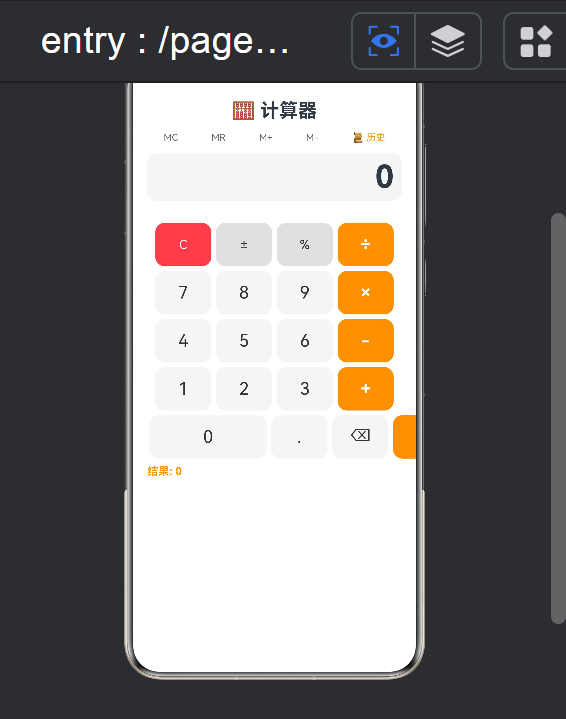
计算器(Calculator)是一款功能完整的科学计算器应用。支持加减乘除四则运算、连续运算、历史记录、内存存储等功能。该应用深入展示了ArkTS框架中的表达式解析算法、状态驱动的UI更新、历史记录管理和边界条件处理技术。
1.2 核心功能
| 功能模块 | 功能描述 | 技术实现 |
|---|---|---|
| 数字输入 | 多位数字和浮点数 | 字符串拼接 |
| 四则运算 | 加减乘除运算 | 运算引擎 |
| 连续运算 | 多步连续计算 | 状态保持 |
| 历史记录 | 计算历史查看 | 数组存储 |
| 内存功能 | MC/MR/M+/M- | 独立存储 |
| 清空功能 | C/CE/退格 | 状态重置 |
二、运算引擎
2.1 核心算法
class CalculatorEngine {
  private display: string = '0';
  private previousValue: number = 0;
  private currentValue: string = '';
  private operator: string = '';
  private isNewInput: boolean = true;
  private memory: number = 0;
  private history: string[] = [];

  inputDigit(digit: string): void {
    if (this.isNewInput) {
      this.currentValue = digit;
      this.display = digit;
      this.isNewInput = false;
    } else {
      if (this.currentValue.length >= 15) return;
      this.currentValue += digit;
      this.display = this.currentValue;
    }
  }

  inputDecimal(): void {
    if (this.isNewInput) {
      this.currentValue = '0.';
      this.display = '0.';
      this.isNewInput = false;
      return;
    }
    if (this.currentValue.includes('.')) return;
    this.currentValue += '.';
    this.display = this.currentValue;
  }

  performOperation(op: string): void {
    if (this.operator && !this.isNewInput) {
      this.calculate();
    } else {
      this.previousValue = parseFloat(this.display);
    }
    this.operator = op;
    this.isNewInput = true;
  }

  calculate(): void {
    const current = parseFloat(this.currentValue);
    let result = 0;
    switch (this.operator) {
      case '+': result = this.previousValue + current; break;
      case '-': result = this.previousValue - current; break;
      case '×': result = this.previousValue * current; break;
      case '÷': result = current !== 0 ? this.previousValue / current : 0; break;
    }
    this.display = result.toString();
    this.previousValue = result;
    this.currentValue = result.toString();
    this.history.push(this.previousValue + ' ' + this.operator + ' ' + current + ' = ' + result);
  }
}
三、UI布局设计
3.1 按钮网格
build() {
  Column() {
    // 显示区域
    Text(this.display).fontSize(40).textAlign(TextAlign.End).width('90%').padding(10)
    // 功能按钮行
    Row() {
      ForEach(['MC', 'MR', 'M+', 'M-'], (btn: string) => {
        Button(btn).fontSize(12).width(60).height(40).onClick(() => this.memoryOperation(btn))
      })
    }
    // 数字按钮
    ForEach(this.buttons, (row: string[]) => {
      Row() {
        ForEach(row, (btn: string) => {
          Button(btn).width(btn === '0' ? 130 : 60).height(55)
            .fontSize(22).backgroundColor(this.getButtonColor(btn))
            .fontColor(this.getButtonTextColor(btn))
            .borderRadius(12).margin(3)
            .onClick(() => this.onButtonClick(btn))
        })
      }
    })
  }
}
四、边界条件处理
4.1 异常处理
handleEdgeCases(): void {
  // 除零处理
  if (this.operator === '÷' && parseFloat(this.currentValue) === 0) {
    this.display = 'Error';
    this.resetState();
    return;
  }
  // 数值溢出
  if (this.display.length > 15) {
    this.display = parseFloat(this.display).toExponential(6);
  }
  // 连续小数点
  if (this.currentValue.includes('.') && this.lastInput === '.') return;
}
五、总结
5.1 核心技术
- 运算引擎算法
- 状态驱动的UI
- 边界条件处理
- 历史记录管理
- 内存存储功能
5.2 扩展方向
- 科学计算功能
- 进制转换
- 单位换算集成
- 表达式历史
- 自定义主题

作为“人工智能6S店”的官方数字引擎,为AI开发者与企业提供一个覆盖软硬件全栈、一站式门户。
更多推荐

 0
0 0
0- 0


 已为社区贡献19条内容

所有评论(0)