
HarmonyOS ArkUI Select 与 TextPicker 选择器:下拉、滚筒与省市联动
·
系列:鸿蒙 HarmonyOS 6.1 新特性实战 · 第 38 篇
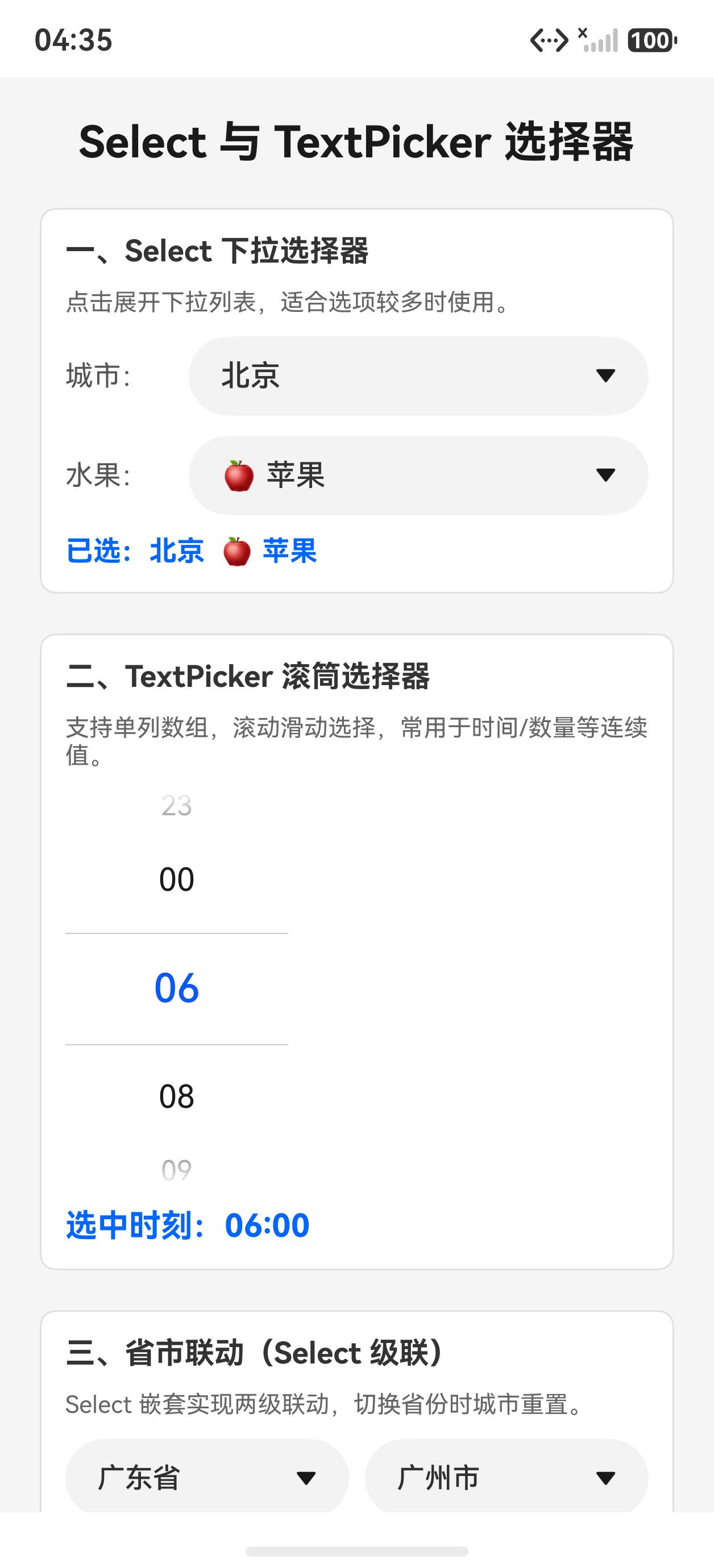
Select(下拉选择器)和 TextPicker(滚筒选择器)是两种互补的选择组件:Select 适合选项多、界面紧凑的场景;TextPicker 适合连续值或较少选项的滚动选择。本篇还演示了用两个 Select 联动实现省市级联的实用模式。
运行效果
初始状态,展示 Select 下拉和 TextPicker 滚筒:
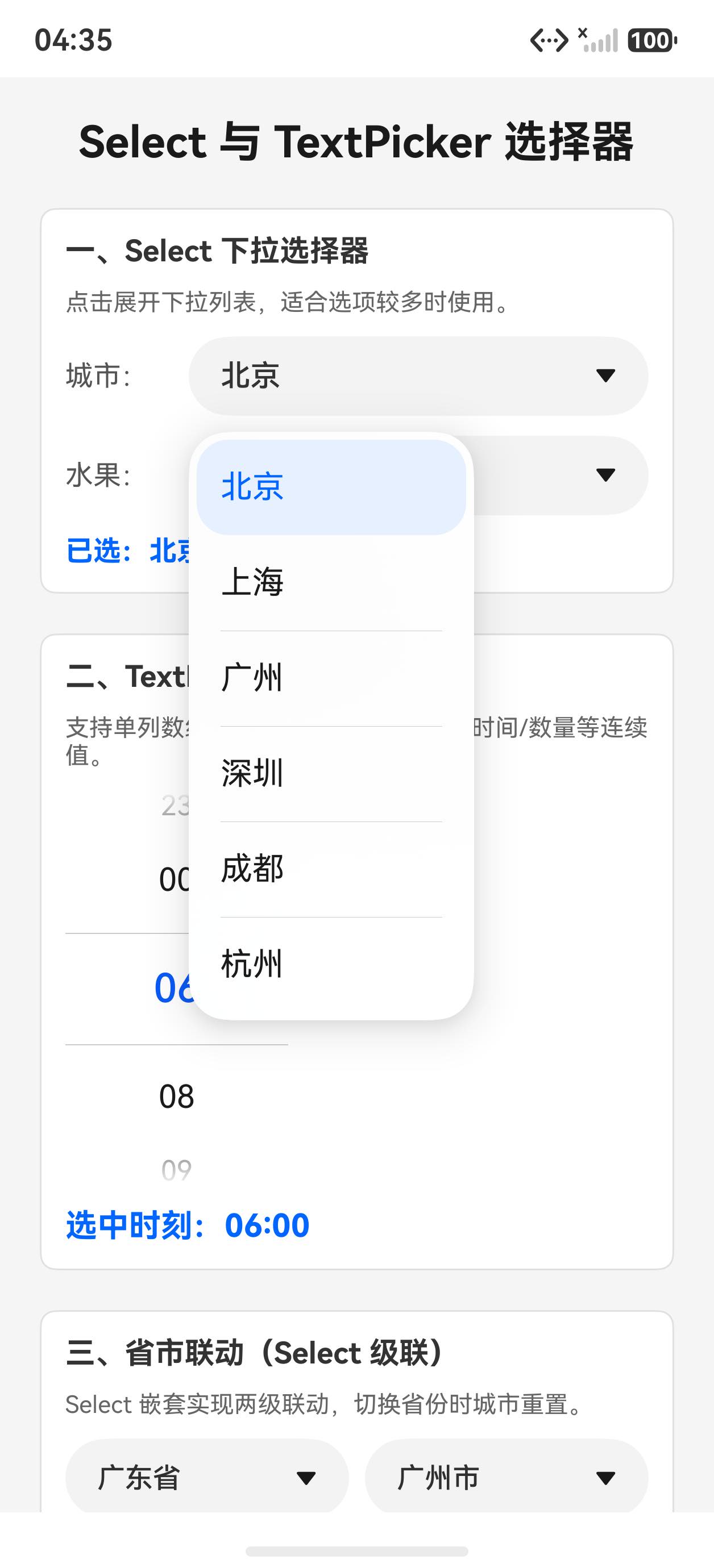
点击城市 Select 展开下拉列表:
一、Select 下拉选择器
private cities: SelectOption[] = [
  { value: '北京' }, { value: '上海' }, { value: '广州' },
  { value: '深圳' }, { value: '成都' }, { value: '杭州' }
]

@State selectedCity: number = 0

Select(this.cities)
  .selected(this.selectedCity)
  .value(this.cities[this.selectedCity].value as string)  // 显示当前选中项
  .font({ size: 15 })
  .fontColor('#333')
  .selectedOptionBgColor('#e8f0ff')        // 已选项背景色
  .selectedOptionFontColor('#0066ff')      // 已选项文字色
  .onSelect((idx: number) => {
    this.selectedCity = idx
  })
注意:属性名是 selectedOptionBgColor(不是 selectedOptionBackgroundColor),selectedOptionFontColor 也没有驼峰缩写问题,但实测 optionBgColor 不存在(可以在 DevEco 中 . 触发自动补全确认可用属性)。
二、TextPicker 滚筒选择器
private hours: string[] = ['00', '06', '08', '09', '10', '12', '14', '16', '18', '20', '22', '23']
@State timePickerIdx: number = 1
@State textPickerVal: string = ''

TextPicker({ range: this.hours, selected: this.timePickerIdx })
  .onChange((val: string | string[], idx: number | number[]) => {
    if (typeof val === 'string') {
      this.textPickerVal = val
      this.timePickerIdx = typeof idx === 'number' ? idx : 0
    }
  })

Text('选中时刻:' + (this.textPickerVal.length > 0 ? this.textPickerVal : this.hours[this.timePickerIdx]) + ':00')
  .fontSize(16).fontColor('#0066ff').fontWeight(FontWeight.Bold)
回调类型注意:onChange 的参数类型是 string | string[](联合类型),单列选择时是 string,需要类型判断后使用。
三、省市联动(Select 级联)
用两个 Select 联动实现省市两级选择:
private provinces: string[] = ['广东省', '浙江省', '四川省']
private provinceCities: string[][] = [
  ['广州市', '深圳市', '佛山市', '东莞市'],
  ['杭州市', '宁波市', '温州市'],
  ['成都市', '绵阳市', '德阳市']
]

@State cascadeProvince: number = 0
@State cascadeCity: number = 0

Row({ space: 8 }) {
  // 省份 Select
  Select(this.provinces.map((p: string): SelectOption => ({ value: p })))
    .selected(this.cascadeProvince)
    .value(this.provinces[this.cascadeProvince])
    .font({ size: 14 }).layoutWeight(1)
    .onSelect((idx: number) => {
      this.cascadeProvince = idx
      this.cascadeCity = 0  // 切换省份时重置城市
    })

  // 城市 Select(根据省份动态变化)
  Select(this.provinceCities[this.cascadeProvince].map((c: string): SelectOption => ({ value: c })))
    .selected(this.cascadeCity)
    .value(this.provinceCities[this.cascadeProvince][this.cascadeCity])
    .font({ size: 14 }).layoutWeight(1)
    .onSelect((idx: number) => { this.cascadeCity = idx })
}
关键点:城市 Select 的数据源 this.provinceCities[this.cascadeProvince] 是响应式的,省份变化时自动更新城市列表。
完整代码
@Entry
@Component
struct Index {
  @State selectedCity: number = 0
  @State selectedFruit: number = 0
  @State textPickerVal: string = ''
  @State timePickerIdx: number = 1
  @State cascadeProvince: number = 0
  @State cascadeCity: number = 0

  private cities: SelectOption[] = [
    { value: '北京' }, { value: '上海' }, { value: '广州' },
    { value: '深圳' }, { value: '成都' }, { value: '杭州' }
  ]
  private fruits: SelectOption[] = [
    { value: '🍎 苹果' }, { value: '🍌 香蕉' }, { value: '🍊 橙子' },
    { value: '🍇 葡萄' }, { value: '🍓 草莓' }
  ]
  private hours: string[] = ['00', '06', '08', '09', '10', '12', '14', '16', '18', '20', '22', '23']
  private provinces: string[] = ['广东省', '浙江省', '四川省']
  private provinceCities: string[][] = [
    ['广州市', '深圳市', '佛山市', '东莞市'],
    ['杭州市', '宁波市', '温州市'],
    ['成都市', '绵阳市', '德阳市']
  ]

  build() {
    Scroll() {
      Column({ space: 20 }) {
        Text('Select 与 TextPicker 选择器')
          .fontSize(22).fontWeight(FontWeight.Bold).fontColor('#1a1a1a')

        // Select
        Column({ space: 10 }) {
          Text('一、Select 下拉选择器').fontSize(15).fontWeight(FontWeight.Bold).fontColor('#333')
          Row({ space: 12 }) {
            Text('城市:').fontSize(14).fontColor('#555').width(50)
            Select(this.cities)
              .selected(this.selectedCity)
              .value(this.cities[this.selectedCity].value as string)
              .font({ size: 15 }).fontColor('#333')
              .selectedOptionBgColor('#e8f0ff').selectedOptionFontColor('#0066ff')
              .onSelect((idx: number) => { this.selectedCity = idx })
              .layoutWeight(1)
          }
          .width('100%').alignItems(VerticalAlign.Center)
          Text(`已选:${this.cities[this.selectedCity].value}`)
            .fontSize(14).fontColor('#0066ff').fontWeight(FontWeight.Bold)
        }
        .padding(12).backgroundColor('#fff').borderRadius(8).width('100%')
        .border({ width: 1, color: '#e0e0e0' }).alignItems(HorizontalAlign.Start)

        // TextPicker
        Column({ space: 10 }) {
          Text('二、TextPicker 滚筒选择器').fontSize(15).fontWeight(FontWeight.Bold).fontColor('#333')
          TextPicker({ range: this.hours, selected: this.timePickerIdx })
            .onChange((val: string | string[], idx: number | number[]) => {
              if (typeof val === 'string') {
                this.textPickerVal = val
                this.timePickerIdx = typeof idx === 'number' ? idx : 0
              }
            })
          Text('选中时刻:' + (this.textPickerVal.length > 0 ? this.textPickerVal : this.hours[this.timePickerIdx]) + ':00')
            .fontSize(16).fontColor('#0066ff').fontWeight(FontWeight.Bold)
        }
        .padding(12).backgroundColor('#fff').borderRadius(8).width('100%')
        .border({ width: 1, color: '#e0e0e0' }).alignItems(HorizontalAlign.Start)

        // 省市联动
        Column({ space: 10 }) {
          Text('三、省市联动(Select 级联)').fontSize(15).fontWeight(FontWeight.Bold).fontColor('#333')
          Row({ space: 8 }) {
            Select(this.provinces.map((p: string): SelectOption => ({ value: p })))
              .selected(this.cascadeProvince).value(this.provinces[this.cascadeProvince])
              .font({ size: 14 }).layoutWeight(1)
              .onSelect((idx: number) => { this.cascadeProvince = idx; this.cascadeCity = 0 })
            Select(this.provinceCities[this.cascadeProvince].map((c: string): SelectOption => ({ value: c })))
              .selected(this.cascadeCity)
              .value(this.provinceCities[this.cascadeProvince][this.cascadeCity])
              .font({ size: 14 }).layoutWeight(1)
              .onSelect((idx: number) => { this.cascadeCity = idx })
          }
          .width('100%').alignItems(VerticalAlign.Center)
          Text(`选中:${this.provinces[this.cascadeProvince]} ${this.provinceCities[this.cascadeProvince][this.cascadeCity]}`)
            .fontSize(14).fontColor('#0066ff').fontWeight(FontWeight.Bold)
        }
        .padding(12).backgroundColor('#fff').borderRadius(8).width('100%')
        .border({ width: 1, color: '#e0e0e0' }).alignItems(HorizontalAlign.Start)
      }
      .padding(20).width('100%')
    }
    .width('100%').height('100%').backgroundColor('#f5f5f5')
  }
}
API 速查
| 组件/属性 | 说明 |
|---|---|
Select(options: SelectOption[]) |
下拉选择,options 为 {value: string}[] |
.selected(idx) |
初始选中索引 |
.value('显示文字') |
未展开时显示的文本 |
.selectedOptionBgColor('#e8f0ff') |
已选项背景色 |
.selectedOptionFontColor('#0066ff') |
已选项文字色 |
.onSelect((idx: number) => {}) |
选中回调 |
TextPicker({ range: string[], selected: idx }) |
滚筒选择 |
.onChange((val, idx) => {}) |
滚动变化回调,val 是 string | string[] |
小结
- 属性名要精确:
selectedOptionBgColor而非selectedOptionBackgroundColor,用 DevEco 自动补全确认 - TextPicker onChange 处理联合类型:
typeof val === 'string'判断后再使用 - 级联靠响应式数据:城市 Select 的 range 直接用
this.provinceCities[province],省份变化自动刷新 - 切换父级别时重置子级索引:
this.cascadeCity = 0防止越界

作为“人工智能6S店”的官方数字引擎,为AI开发者与企业提供一个覆盖软硬件全栈、一站式门户。
更多推荐
 2
2 0
0- 0


 已为社区贡献11条内容

所有评论(0)