
软总线连接模块三大核心机制深度解析
一、总述(Overview)
在鸿蒙软总线(SoftBus)的蓝牙连接模块中,有三个关键机制共同保障了数据传输的稳定性、可靠性和高效性:
| 机制 | 作用 | 类比 |
|---|---|---|
| 基于ACK的滑动窗口拥塞控制 | 根据网络质量动态调整发送速率 | 高速公路上的车流控制 |
| 流量控制 | 限制单位时间内的发送总量 | 水龙头的流量调节 |
| ACL碰撞处理 | 处理蓝牙底层连接冲突 | 交通路口的冲突协调 |
这三个机制分别解决了不同层面的问题:
- 拥塞控制:解决"发太快对方收不过来"的问题
- 流量控制:解决"单位时间发太多"的问题
- ACL碰撞处理:解决"蓝牙连接冲突"的问题
二、基于ACK的滑动窗口拥塞控制(ACK-based Sliding Window Congestion Control)
2.1 设计思路
想象你在高速公路上开车,前方路况好时可以加速,路况差时需要减速。滑动窗口拥塞控制就是这个原理:
网络质量好 → 窗口增大 → 发送更多数据 → 提高吞吐量
网络质量差 → 窗口减小 → 减少发送量   → 避免拥塞
2.2 核心数据结构
在 ConnBrConnection 结构体中定义了四个关键参数:
typedef struct {
    // ... 其他字段

    // 拥塞控制相关参数(Congestion Control Parameters)
    int32_t window;          // 滑动窗口大小,控制每批发送的数据包数量
    int64_t sequence;        // 当前发送序列号,记录已发送的数据包序号
    int64_t waitSequence;    // 等待确认的序列号,标记需要等待ACK的位置
    int32_t ackTimeoutCount; // ACK超时计数器,记录连续超时次数
} ConnBrConnection;
2.3 窗口参数定义
在 softbus_conn_br_trans.h 中定义了窗口的边界:
#define MIN_WINDOW     10   // 最小窗口:网络最差时至少发送10个包
#define MAX_WINDOW     80   // 最大窗口:网络最好时最多发送80个包
#define DEFAULT_WINDOW 20   // 默认窗口:初始值为20个包
#define ACK_FAILED_TIMES 3  // ACK失败阈值:连续失败3次触发恢复
#define TIMEOUT_TIMES    2  // 超时次数阈值:每2次超时减少窗口
2.4 工作流程详解
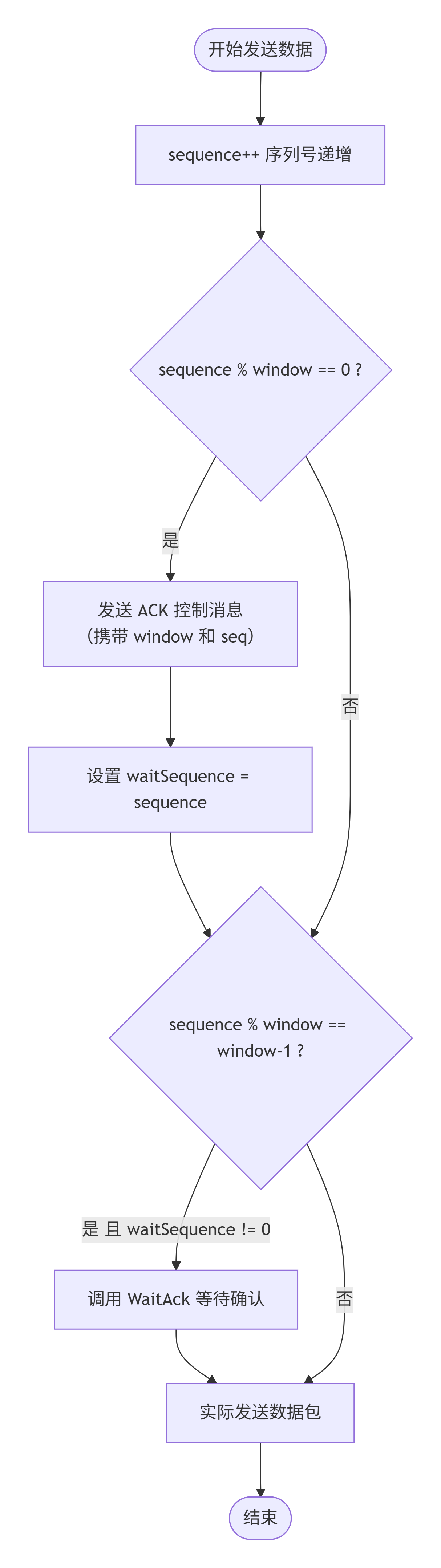
阶段一:发送数据并触发ACK请求
在 SendHandlerLoop 发送循环中:
// 序列号递增(Sequence Number Increment)
connection->sequence += 1;

// 当序列号是窗口的整数倍时,发送ACK请求
// When sequence number is a multiple of window, send ACK request
if (connection->sequence % connection->window == 0) {
    if (SendAck(connection, socketHandle) == SOFTBUS_OK) {
        connection->waitSequence = connection->sequence;  // 记录等待确认的序列号
    }
}
每个包都有序列号,当前待发送的序列号是窗口的整数倍时候,发送ack请求。
通俗理解:
假设 window = 20:
  发送第20个包 → 发送ACK请求,等待对方确认
  发送第40个包 → 发送ACK请求,等待对方确认
  发送第60个包 → 发送ACK请求,等待对方确认
  ...
阶段二:等待ACK响应
// 当发送了window-1个包且有待确认的ACK时,阻塞等待
// When window-1 packets sent and ACK pending, block and wait
if (window > 1 && sequence % window == window - 1 && waitSequence != 0) {
    WaitAck(connection);  // 等待ACK确认
}
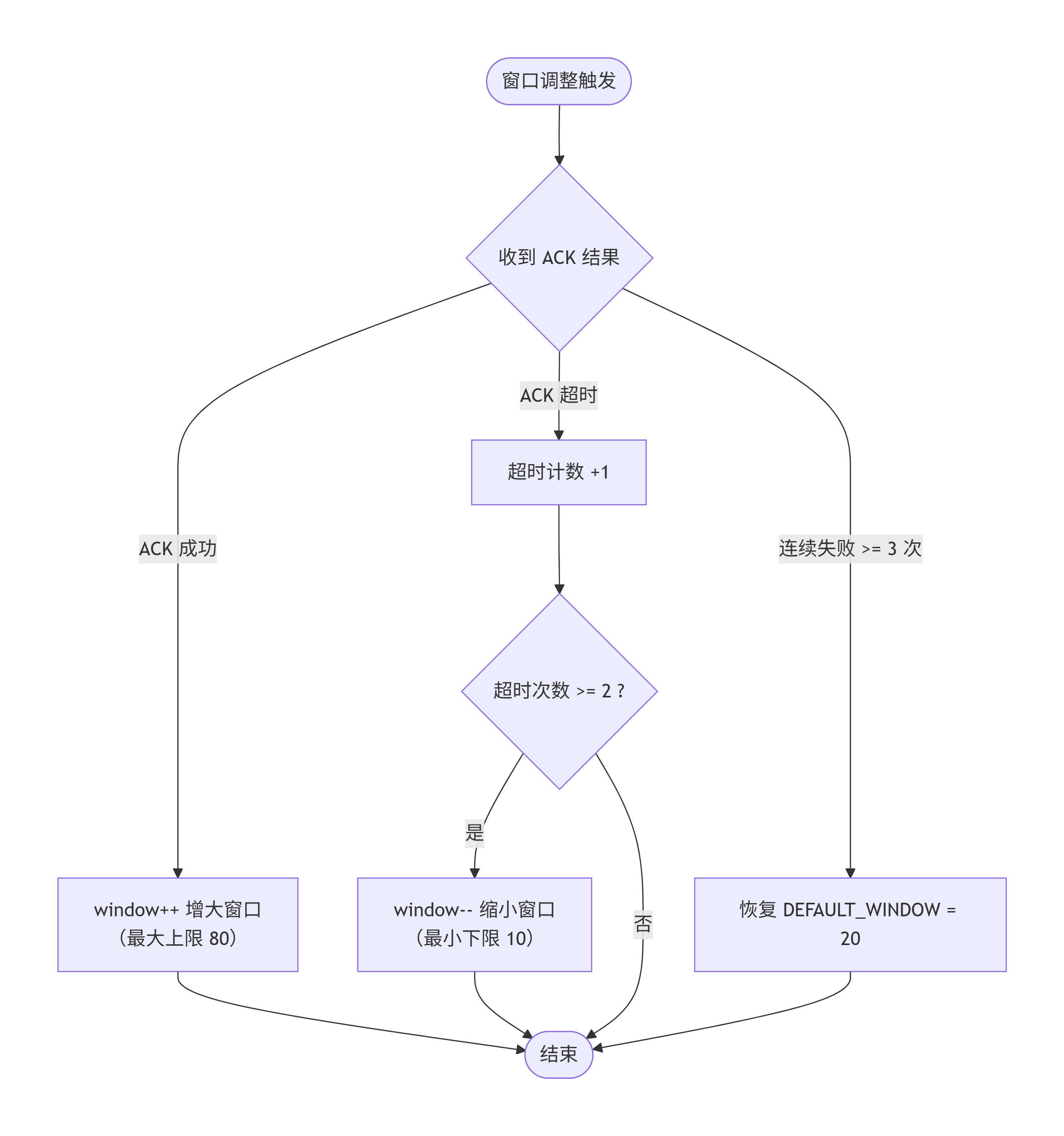
阶段三:根据ACK结果调整窗口
在 WaitAck 函数中实现窗口调整逻辑:
static void WaitAck(ConnBrConnection *connection)
{
    // 等待ACK响应,超时时间为100毫秒
    // Wait for ACK response, timeout is 100ms
    int32_t ret = ConnBrGetBrPendingPacket(..., WAIT_ACK_TIMEOUT_MILLS, ...);

    switch (ret) {
        case SOFTBUS_ALREADY_TRIGGERED:  // ACK成功收到(ACK Successfully Received)
            connection->ackTimeoutCount = 0;  // 重置超时计数
            // 窗口增大,但不超过最大值
            // Window increases, but not exceeding maximum
            connection->window = connection->window < MAX_WINDOW ?
                                 connection->window + 1 : MAX_WINDOW;
            break;

        case SOFTBUS_TIMOUT:             // ACK超时(ACK Timeout)
            connection->ackTimeoutCount += 1;  // 超时计数加1
            // 每TIMEOUT_TIMES次超时,窗口减1
            // Every TIMEOUT_TIMES timeouts, decrease window by 1
            if (connection->window > MIN_WINDOW &&
                connection->ackTimeoutCount % TIMEOUT_TIMES == 0) {
                connection->window = connection->window - 1;
            }
            // 如果窗口过小且连续失败,恢复到默认值
            // If window too small and continuous failures, restore to default
            if (connection->window < DEFAULT_WINDOW &&
                connection->ackTimeoutCount > ACK_FAILED_TIMES) {
                connection->window = DEFAULT_WINDOW;
            }
            break;
    }
}
这里ack响应处理分两种情况:
1.成功收到。将超时计时器重置,如果窗口小于最大窗口预设值,窗口大小+1.如果已经增大到上线了,就只能是MAX_WINDOW 80
2.如果ack超时了,这里设置的是每2次超时把窗口大小-1。如果窗口大小小于默认大小并且超时次数大于ACK_FAILED_TIMES(3次),把窗口大小重置为默认大小(20),这里不是很理解,按道理是设置最小值MIN_WINDOW(10)
2.5 ACK控制消息格式
ACK请求和响应通过JSON格式的控制消息传递:
// ACK消息序列化上下文(ACK Message Serialization Context)
typedef struct {
    uint32_t connectionId;     // 连接ID
    int32_t flag;              // 优先级标志
    enum BrCtlMessageMethod method;  // 消息类型

    union {
        struct {
            int32_t window;    // 当前窗口大小
            int64_t seq;       // 当前序列号
        } ackRequestResponse;
    };
} BrCtlMessageSerializationContext;
消息类型定义:
enum BrCtlMessageMethod {
    BR_METHOD_NOTIFY_REQUEST = 1,   // 通知请求
    BR_METHOD_NOTIFY_RESPONSE = 2,  // 通知响应
    BR_METHOD_NOTIFY_ACK = 4,       // ACK通知
    BR_METHOD_ACK_RESPONSE = 5,     // ACK响应
};
2.6 完整流程图
发送数据流程
窗口调整流程
三、流量控制(Flow Control)
3.1 设计思路
如果说拥塞控制是"根据路况调整车速",那么流量控制就是"限制每小时的总行驶里程"。它基于时间窗口和配额两个维度进行限制。
3.2 核心数据结构
在 softbus_conn_flow_control.h 中定义:
// 流量控制参数范围(Flow Control Parameter Range)
#define MIN_WINDOW_IN_MILLIS 100               // 最小时间窗口:100毫秒
#define MAX_WINDOW_IN_MILLIS 2000              // 最大时间窗口:2秒
#define MIN_QUOTA_IN_BYTES   (10 * 1024)       // 最小配额:10KB
#define MAX_QUOTA_IN_BYTES   (2 * 1024 * 1024) // 最大配额:2MB

struct ConnSlideWindowController {
    // 核心接口(Core Interfaces)
    int32_t (*apply)(struct ConnSlideWindowController *self, int32_t expect);
    int32_t (*enable)(struct ConnSlideWindowController *self, int32_t windowInMillis, int32_t quotaInBytes);
    int32_t (*disable)(struct ConnSlideWindowController *self);

    // 受锁保护的字段(Lock-Protected Fields)
    SoftBusMutex lock;
    bool active;              // 是否激活流量控制
    int32_t windowInMillis;   // 时间窗口大小(毫秒)
    int32_t quotaInBytes;     // 配额大小(字节)
    ListNode histories;       // 历史记录链表
};
3.3 工作原理
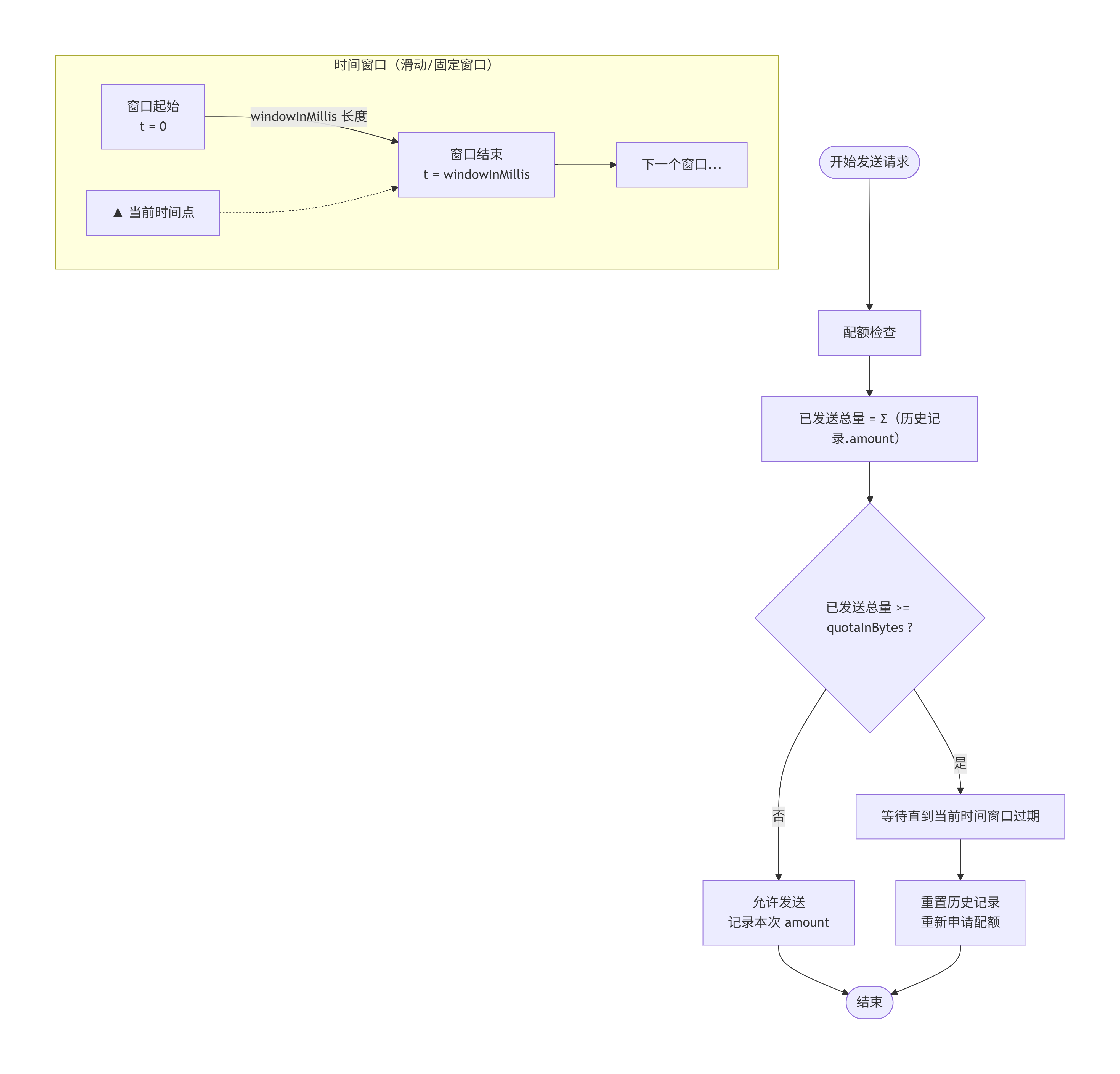
3.4 Apply方法核心逻辑
在 Apply 函数中实现:
static int32_t Apply(struct ConnSlideWindowController *self, int32_t expect)
{
    // 如果未激活,直接返回期望值(不限制)
    // If not active, return expected value directly (no limit)
    if (!self->active) {
        return expect;
    }

    // 清理过期记录,计算当前窗口内的已发送总量
    // Clean expired records, calculate total sent in current window
    int32_t appliedTotal = 0;
    timestamp_t now = SoftBusGetSysTimeMs();
    timestamp_t expiredTimestamp = now - (timestamp_t)self->windowInMillis;

    LIST_FOR_EACH_ENTRY_SAFE(it, next, &self->histories, ...) {
        if (it->timestamp > expiredTimestamp) {
            appliedTotal += it->amount;  // 累加有效记录
        } else {
            ListDelete(&it->node);       // 删除过期记录
            SoftBusFree(it);
        }
    }

    // 如果已发送量达到配额,等待后重试
    // If sent amount reaches quota, wait and retry
    if (self->quotaInBytes <= appliedTotal) {
        unsigned int sleepMs = self->windowInMillis - (now - currentWindowStartTimestamp);
        SoftBusSleepMs(sleepMs);
        return Apply(self, expect);  // 递归重试
    }

    // 计算实际可发送量
    // Calculate actual sendable amount
    int32_t remain = self->quotaInBytes - appliedTotal;
    int32_t amount = remain > expect ? expect : remain;

    // 记录本次发送历史
    // Record this send history
    struct HistoryNode *history = SoftBusCalloc(sizeof(*history));
    history->amount = amount;
    history->timestamp = now;
    ListAdd(&self->histories, &history->node);

    return amount;
}
3.5 在发送流程中的应用
在 BrTransSend 函数中:
int32_t BrTransSend(uint32_t connectionId, int32_t socketHandle, uint32_t mtu,
                    const uint8_t *data, uint32_t dataLen)
{
    uint32_t waitWriteLen = dataLen;
    while (waitWriteLen > 0) {
        // 计算本次期望发送量
        // Calculate expected send amount for this time
        uint32_t expect = waitWriteLen > mtu ? mtu : waitWriteLen;

        // 通过流量控制器申请实际可发送量
        // Apply for actual sendable amount through flow controller
        int32_t amount = g_flowController->apply(g_flowController, (int32_t)expect);

        // 实际写入数据
        // Actually write data
        int32_t writeLen = g_sppDriver->Write(socketHandle, data, amount);

        data += writeLen;
        waitWriteLen -= (uint32_t)writeLen;
    }
    return SOFTBUS_OK;
}
3.6 配置接口
通过 ConnBrTransConfigPostLimit 进行配置:
int32_t ConnBrTransConfigPostLimit(const LimitConfiguration *configuration)
{
    if (!configuration->active) {
        // 禁用流量控制
        // Disable flow control
        ret = g_flowController->disable(g_flowController);
    } else {
        // 启用流量控制,设置时间窗口和配额
        // Enable flow control, set time window and quota
        ret = g_flowController->enable(g_flowController,
                                       configuration->windowInMillis,
                                       configuration->quotaInBytes);
    }
}
四、ACL碰撞处理(ACL Collision Handling)
4.1 什么是ACL碰撞?
ACL(Asynchronous Connection-Less,异步无连接)是蓝牙的一种数据传输模式。当两个设备同时尝试建立连接时,就会发生ACL碰撞,导致连接失败。
4.2 碰撞检测条件
在 AuthenticationFailedAndRetry 函数中定义:
static int32_t AuthenticationFailedAndRetry(ConnBrConnection *connection,
                                            ConnBrDevice *connectingDevice,
                                            const char *anomizeAddress)
{
    bool collision = false;

    // 遍历底层连接状态列表
    // Iterate through underlying connection status list
    LIST_FOR_EACH_ENTRY(it, &connection->connectProcessStatus->list, ...) {
        // 判断是否为碰撞相关错误
        // Check if it's a collision-related error
        if (it->result == CONN_BR_CONNECT_UNDERLAYER_ERROR_CONNECTION_EXISTS ||  // 连接已存在
            it->result == CONN_BR_CONNECT_UNDERLAYER_ERROR_CONTROLLER_BUSY ||    // 控制器忙
            it->result == CONN_BR_CONNECT_UNDERLAYER_ERROR_CONN_SDP_BUSY ||      // SDP忙
            it->result == CONN_BR_CONNECT_UNDERLAYER_ERROR_CONN_AUTH_FAILED ||   // 认证失败
            it->result == CONN_BR_CONNECT_UNDERLAYER_ERROR_CONN_RFCOM_DM) {      // RFCOMM断开
            connection->retryCount += 1;  // 重试计数加1
            collision = true;
            break;
        }
    }
}
4.3 碰撞处理策略
// 碰撞处理超时定义(Collision Handling Timeout Definitions)
#define BR_CONNECTION_ACL_RETRY_CONNECT_COLLISION_MILLIS (3 * 1000)  // RFCOMM错误:等待3秒
#define BR_CONNECTION_ACL_CONNECT_COLLISION_MILLIS       (6 * 1000)  // 其他错误:等待6秒
#define MAX_RETRY_COUNT                                  2           // 最大重试次数

if (collision && connection->retryCount < MAX_RETRY_COUNT) {
    CONN_LOGW(CONN_BR, "acl collision, wait for retry...");

    // 根据错误类型选择等待时间
    // Choose wait time based on error type
    uint32_t time = (it->result == CONN_BR_CONNECT_UNDERLAYER_ERROR_CONN_RFCOM_DM) ?
        BR_CONNECTION_ACL_RETRY_CONNECT_COLLISION_MILLIS :  // 3秒
        BR_CONNECTION_ACL_CONNECT_COLLISION_MILLIS;         // 6秒

    // 清除正在连接的设备标记
    // Clear the connecting device flag
    g_brManager.connecting = NULL;

    // 处理ACL碰撞异常
    // Process ACL collision exception
    ProcessAclCollisionException(connectingDevice, anomizeAddress, time);
    return SOFTBUS_OK;
}
4.4 碰撞处理流程
在 ProcessAclCollisionException 函数中:
static void ProcessAclCollisionException(ConnBrDevice *device,
                                         const char *anomizeAddress,
                                         uint32_t duration)
{
    CONN_LOGI(CONN_BR, "addr=%{public}s, duration=%{public}u", anomizeAddress, duration);

    // 构造连接选项
    // Construct connection option
    ConnectOption option;
    option.type = CONNECT_BR;
    strcpy_s(option.brOption.brMac, BT_MAC_LEN, device->addr);

    // 将连接请求挂起指定时间
    // Pend the connection request for specified duration
    BrPendConnection(&option, duration);

    // 设置设备状态为挂起
    // Set device state to pending
    device->state = BR_DEVICE_STATE_PENDING;

    // 将设备加入挂起队列
    // Add device to pending queue
    PendingDevice(device, anomizeAddress);
}
4.5 挂起机制
在 BrPendConnection 中实现:
static int32_t BrPendConnection(const ConnectOption *option, uint32_t time)
{
    // 验证参数:挂起时间不能超过最大值
    // Validate parameters: pend time cannot exceed maximum
    CONN_CHECK_AND_RETURN_RET_LOGW(time <= BR_CONNECTION_PEND_TIMEOUT_MAX_MILLIS, ...);

    // 查找或创建挂起记录
    // Find or create pending record
    BrPending *target = NULL;
    LIST_FOR_EACH_ENTRY(it, &g_brManager.pendings->list, BrPending, node) {
        if (StrCmpIgnoreCase(it->addr, option->brOption.brMac) == 0) {
            target = it;
            break;
        }
    }

    if (target != NULL) {
        // 更新挂起时间
        // Update pending time
        target->pendInfo->duration = time;
    } else {
        // 创建新的挂起记录
        // Create new pending record
        BrPending *pending = SoftBusCalloc(sizeof(BrPending));
        strcpy_s(pending->addr, BT_MAC_LEN, option->brOption.brMac);
        ListTailInsert(&g_brManager.pendings->list, &pending->node);
    }
}
4.6 完整处理流程
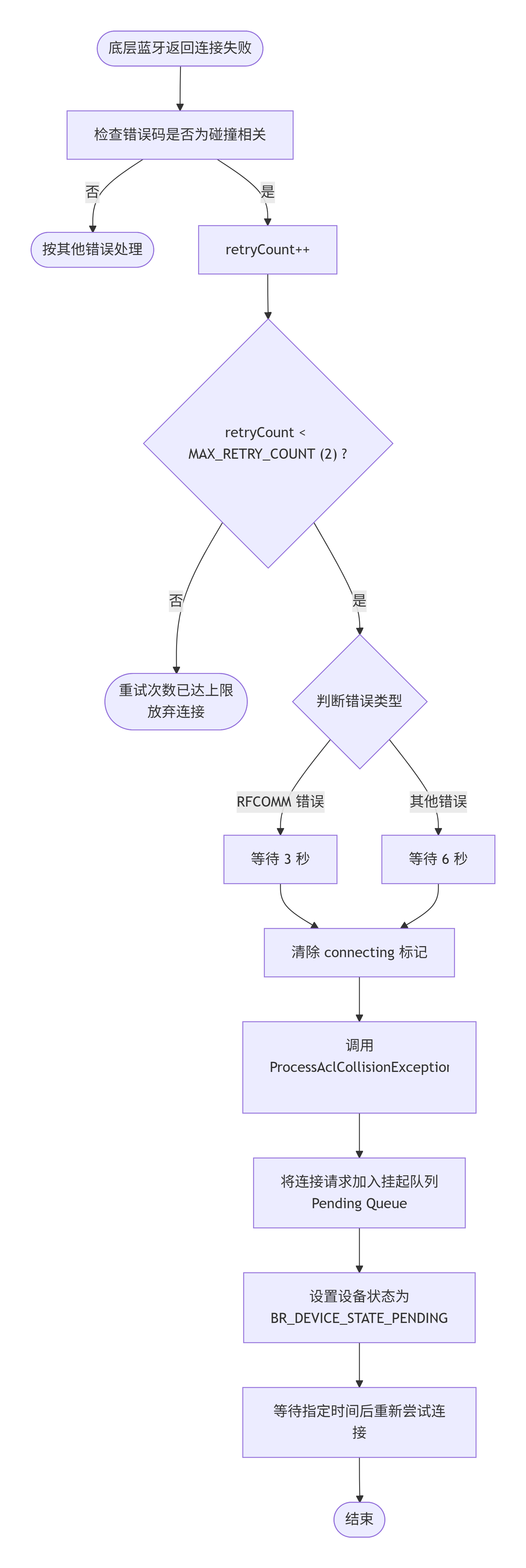
五、三大机制的协同工作(Collaboration of Three Mechanisms)
5.1 数据发送完整流程
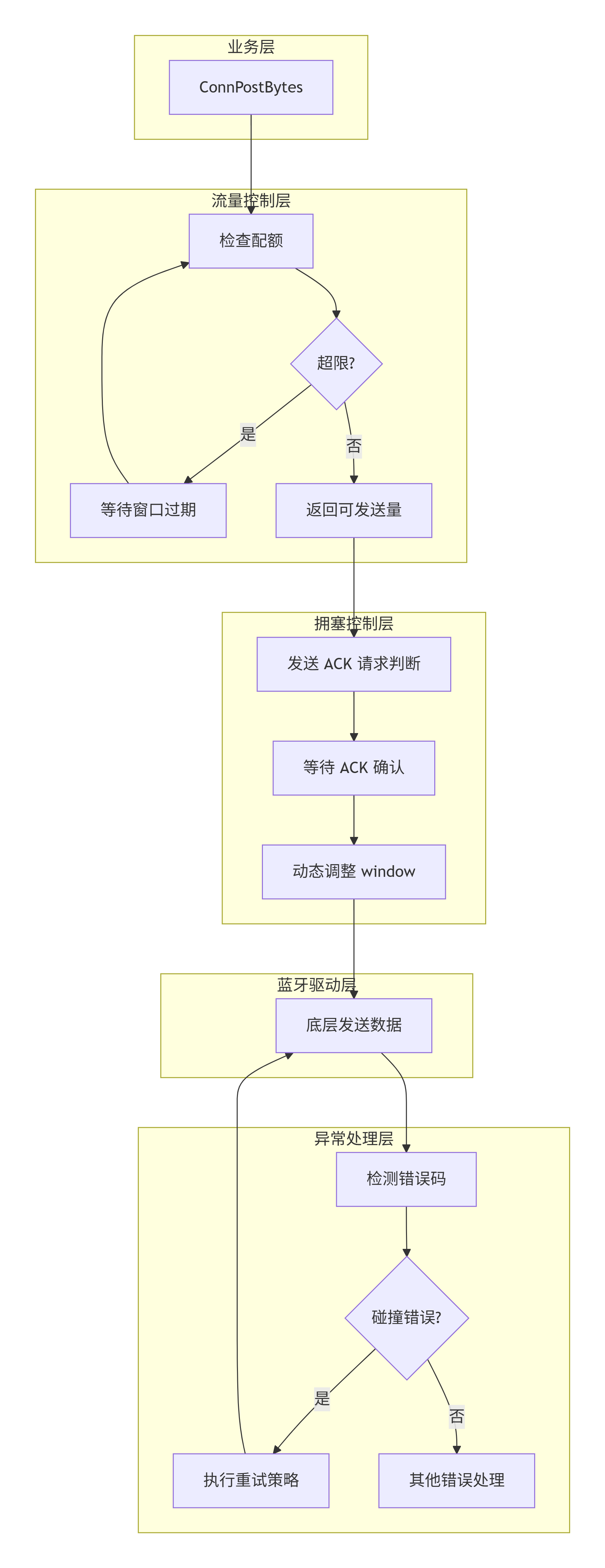
5.2 机制对比
| 维度 | 流量控制 | 拥塞控制 | ACL碰撞处理 |
|---|---|---|---|
| 控制目标 | 限制发送速率 | 适应网络质量 | 处理连接冲突 |
| 时间尺度 | 毫秒级(100ms-2s) | 包级别(每100ms) | 秒级(3-6s) |
| 调整依据 | 时间窗口+配额 | ACK成功率 | 底层错误码 |
| 作用范围 | 全局 | 单个连接 | 单个连接 |
| 实现位置 | flow_control.c | br_trans.c | br_manager.c |
六、总结(Conclusion)
软总线连接模块的这三个核心机制体现了以下设计哲学:
6.1 分层控制(Layered Control)

6.2 自适应调节(Adaptive Adjustment)
- 拥塞控制:根据ACK反馈动态调整窗口大小
- 流量控制:根据时间窗口自动清理过期记录
- ACL碰撞处理:根据错误类型智能选择重试策略
6.3 容错设计(Fault Tolerance)
- 最大重试次数:防止无限重试
- 超时保护:避免永久阻塞
- 状态恢复:失败后恢复到默认状态
6.4 核心设计原则
| 原则 | 体现 |
|---|---|
| 防御性编程 | 参数校验、边界检查、错误处理 |
| 资源管理 | 历史记录清理、内存释放、锁保护 |
| 可配置性 | 窗口大小、超时时间、配额均可配置 |
| 可观测性 | 详细的日志记录、审计信息上报 |
通过这三个机制的协同工作,软蓝牙连接模块能够在复杂的网络环境下保持高效、稳定、可靠的数据传输能力。

作为“人工智能6S店”的官方数字引擎,为AI开发者与企业提供一个覆盖软硬件全栈、一站式门户。
更多推荐



 5
5 0
0- 0


 已为社区贡献3条内容

所有评论(0)