
HarmonyOS ArkUI Text 组件全解析:样式、截断与 Span 内联富文本
·
系列:鸿蒙 HarmonyOS 6.1 新特性实战 · 第 31 篇
Text 是 ArkUI 中使用频率最高的基础组件,也是最容易被轻视的组件。掌握它的完整 API,能让你用最少的代码写出专业的文字展示效果。本篇覆盖样式链、多行截断、Span 内联富文本、对齐行高四大核心用法,代码均在鸿蒙模拟器验证通过。
运行效果
初始状态,展示各类文字样式:
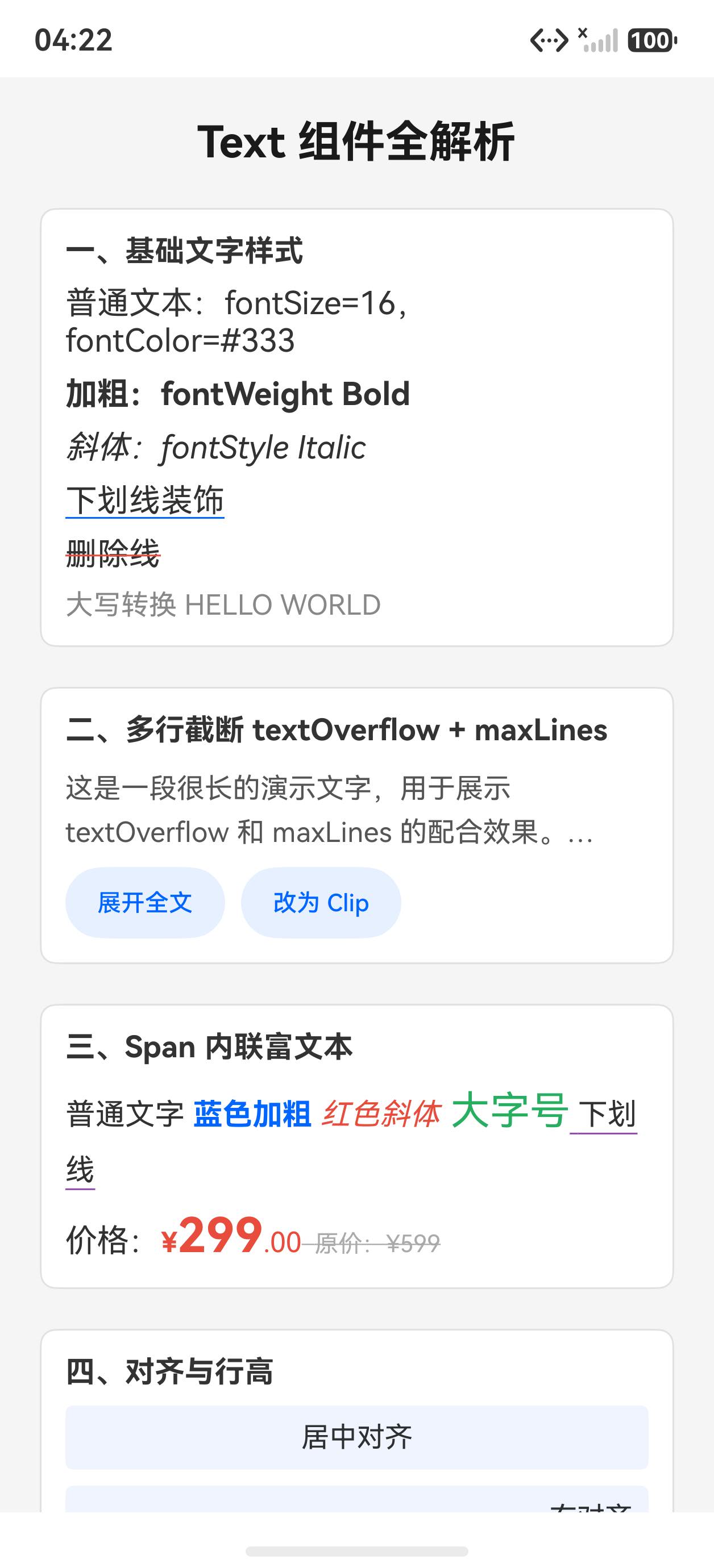
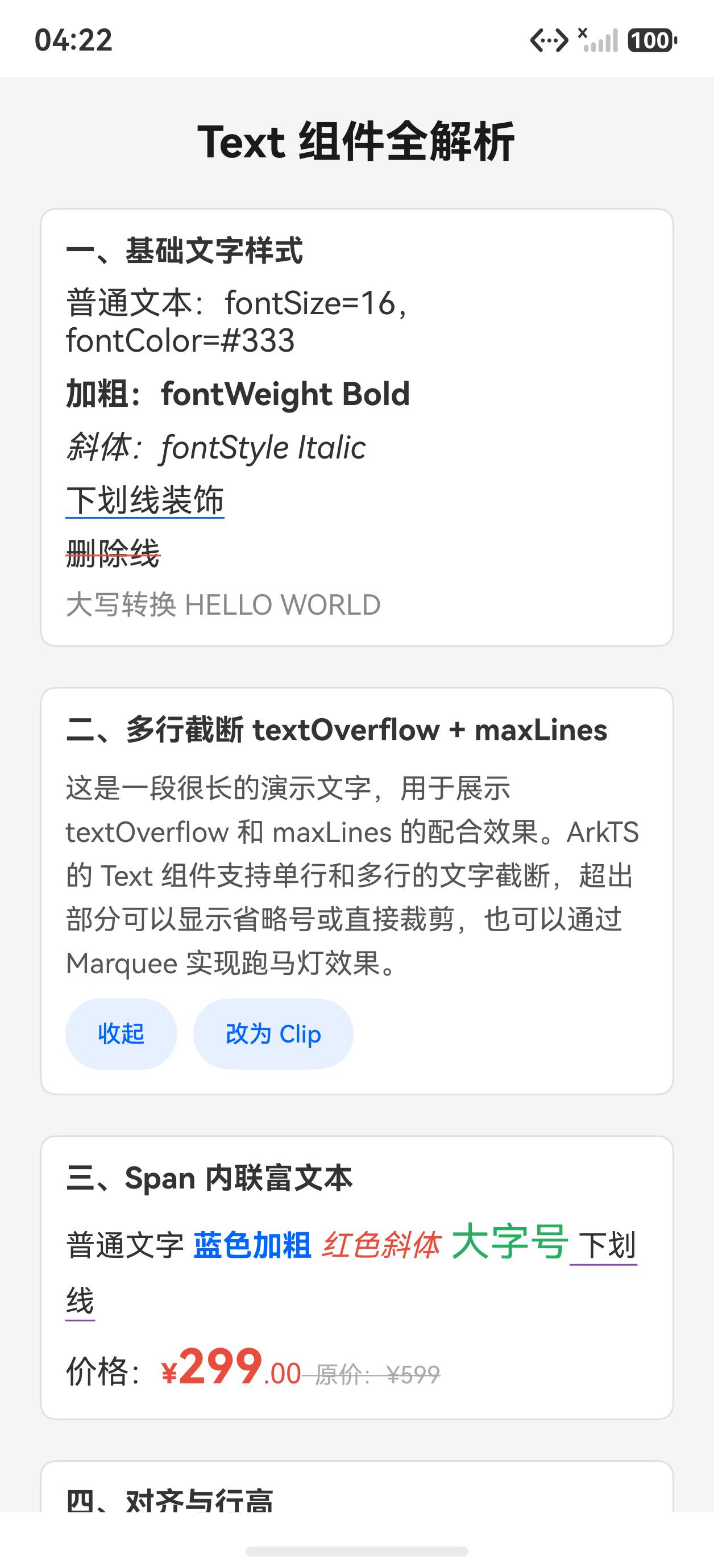
点击“展开全文“展开长文本,切换 Overflow 模式:
一、基础文字样式链
Text 的样式属性全部通过方法链调用,支持流式叠加:
Text('加粗文字')
  .fontSize(16)
  .fontWeight(FontWeight.Bold)
  .fontColor('#333')
  .fontStyle(FontStyle.Italic)

// 文字装饰线
Text('下划线').decoration({
  type: TextDecorationType.Underline,
  color: '#0066ff'
})

Text('删除线').decoration({
  type: TextDecorationType.LineThrough,
  color: '#e74c3c'
})

// 大写转换
Text('hello world')
  .textCase(TextCase.UpperCase)  // → HELLO WORLD
TextDecorationType 的取值:None、Underline、Overline、LineThrough。
二、多行截断:maxLines + textOverflow
超长文本的常见需求是“展开/收起“,配合 @State 控制行数:
@State maxLines: number = 2
@State overflow: TextOverflow = TextOverflow.Ellipsis

Text('这是一段很长的演示文字……ArkTS 的 Text 组件支持单行和多行的文字截断……')
  .maxLines(this.maxLines)
  .textOverflow({ overflow: this.overflow })
  .lineHeight(22)

Button(this.maxLines === 2 ? '展开全文' : '收起')
  .onClick(() => {
    this.maxLines = this.maxLines === 2 ? 999 : 2
  })
TextOverflow 的取值:
Ellipsis:超出用…省略(最常用)Clip:直接裁剪None:不截断
注意:textOverflow 必须配合 maxLines 才生效,单独设置无效。
三、Span 内联富文本
当一段文字需要混合多种样式时,用 Span 子组件替代多个 Text:
Text() {
  Span('普通文字 ')
  Span('蓝色加粗')
    .fontColor('#0066ff')
    .fontWeight(FontWeight.Bold)
  Span(' 红色斜体')
    .fontColor('#e74c3c')
    .fontStyle(FontStyle.Italic)
  Span(' 大字号')
    .fontSize(20)
    .fontColor('#27ae60')
  Span(' 下划线')
    .decoration({ type: TextDecorationType.Underline, color: '#8e44ad' })
}
.fontSize(15)
.lineHeight(28)
实战场景:价格展示
Text() {
  Span('价格:')
  Span('¥').fontSize(14).fontColor('#e74c3c').fontWeight(FontWeight.Bold)
  Span('299').fontSize(24).fontColor('#e74c3c').fontWeight(FontWeight.Bold)
  Span('.00').fontSize(14).fontColor('#e74c3c')
  Span('  原价:¥599').fontSize(12).fontColor('#aaa')
    .decoration({ type: TextDecorationType.LineThrough, color: '#aaa' })
}
这种写法比多个 Text 横向排列更精确,不会有换行问题。
四、对齐与行高
// 水平对齐
Text('居中').textAlign(TextAlign.Center).width('100%')
Text('右对齐').textAlign(TextAlign.End).width('100%')

// 行高(提升阅读舒适度)
Text('正文内容……')
  .lineHeight(32)
  .fontSize(14)
TextAlign 的取值:Start(默认)、Center、End、JUSTIFY(两端对齐)。
完整代码
@Entry
@Component
struct Index {
  @State maxLines: number = 2
  @State overflow: TextOverflow = TextOverflow.Ellipsis

  build() {
    Scroll() {
      Column({ space: 20 }) {
        Text('Text 组件全解析')
          .fontSize(22).fontWeight(FontWeight.Bold).fontColor('#1a1a1a')

        // 基础样式
        Column({ space: 8 }) {
          Text('一、基础文字样式').fontSize(15).fontWeight(FontWeight.Bold).fontColor('#333')
          Text('普通文本:fontSize=16,fontColor=#333')
            .fontSize(16).fontColor('#333').width('100%')
          Text('加粗:fontWeight Bold').fontSize(16).fontWeight(FontWeight.Bold).width('100%')
          Text('斜体:fontStyle Italic').fontSize(16).fontStyle(FontStyle.Italic).width('100%')
          Text('下划线装饰').fontSize(16)
            .decoration({ type: TextDecorationType.Underline, color: '#0066ff' }).width('100%')
          Text('删除线').fontSize(16)
            .decoration({ type: TextDecorationType.LineThrough, color: '#e74c3c' }).width('100%')
          Text('大写转换 hello world').fontSize(14)
            .textCase(TextCase.UpperCase).fontColor('#888').width('100%')
        }
        .padding(12).backgroundColor('#fff').borderRadius(8).width('100%')
        .border({ width: 1, color: '#e0e0e0' }).alignItems(HorizontalAlign.Start)

        // 多行截断
        Column({ space: 8 }) {
          Text('二、多行截断').fontSize(15).fontWeight(FontWeight.Bold).fontColor('#333')
          Text('这是一段很长的演示文字,用于展示 textOverflow 和 maxLines 的配合效果。ArkTS 的 Text 组件支持单行和多行的文字截断,超出部分可以显示省略号或直接裁剪,也可以通过 Marquee 实现跑马灯效果。')
            .fontSize(14).fontColor('#555').width('100%').lineHeight(22)
            .maxLines(this.maxLines)
            .textOverflow({ overflow: this.overflow })

          Row({ space: 8 }) {
            Button(this.maxLines === 2 ? '展开全文' : '收起')
              .fontSize(12).height(36).backgroundColor('#e8f0ff').fontColor('#0066ff')
              .onClick(() => { this.maxLines = this.maxLines === 2 ? 999 : 2 })
            Button(this.overflow === TextOverflow.Ellipsis ? '改为 Clip' : '改为省略号')
              .fontSize(12).height(36).backgroundColor('#e8f0ff').fontColor('#0066ff')
              .onClick(() => {
                this.overflow = this.overflow === TextOverflow.Ellipsis
                  ? TextOverflow.Clip : TextOverflow.Ellipsis
              })
          }
        }
        .padding(12).backgroundColor('#fff').borderRadius(8).width('100%')
        .border({ width: 1, color: '#e0e0e0' }).alignItems(HorizontalAlign.Start)

        // Span 内联富文本
        Column({ space: 8 }) {
          Text('三、Span 内联富文本').fontSize(15).fontWeight(FontWeight.Bold).fontColor('#333')
          Text() {
            Span('普通文字 ')
            Span('蓝色加粗').fontColor('#0066ff').fontWeight(FontWeight.Bold)
            Span(' 红色斜体').fontColor('#e74c3c').fontStyle(FontStyle.Italic)
            Span(' 大字号').fontSize(20).fontColor('#27ae60')
            Span(' 下划线').decoration({ type: TextDecorationType.Underline, color: '#8e44ad' })
          }
          .fontSize(15).width('100%').lineHeight(28)

          Text() {
            Span('价格:')
            Span('¥').fontSize(14).fontColor('#e74c3c').fontWeight(FontWeight.Bold)
            Span('299').fontSize(24).fontColor('#e74c3c').fontWeight(FontWeight.Bold)
            Span('.00').fontSize(14).fontColor('#e74c3c')
            Span('  原价:¥599').fontSize(12).fontColor('#aaa')
              .decoration({ type: TextDecorationType.LineThrough, color: '#aaa' })
          }
          .width('100%')
        }
        .padding(12).backgroundColor('#fff').borderRadius(8).width('100%')
        .border({ width: 1, color: '#e0e0e0' }).alignItems(HorizontalAlign.Start)
      }
      .padding(20).width('100%')
    }
    .width('100%').height('100%').backgroundColor('#f5f5f5')
  }
}
API 速查
| 属性/方法 | 说明 |
|---|---|
.fontSize(16) |
字号(fp 单位) |
.fontWeight(FontWeight.Bold) |
字重:Lighter / Normal / Medium / Bold |
.fontColor('#333') |
字色 |
.fontStyle(FontStyle.Italic) |
斜体 |
.decoration({type, color}) |
装饰线:Underline / LineThrough / Overline |
.textCase(TextCase.UpperCase) |
大小写转换 |
.maxLines(2) |
最大行数 |
.textOverflow({overflow}) |
超出截断方式 |
.lineHeight(24) |
行高 |
.textAlign(TextAlign.Center) |
水平对齐 |
Text(){ Span(...) } |
内联混合样式 |
小结
- 样式全链式:所有样式属性都支持链式调用,无需 style 对象
- 截断必须搭配:
textOverflow需要maxLines配合才生效 - Span 替代多 Text:混合样式用 Span 子组件,避免布局对齐问题
- 行高改善阅读:正文推荐
lineHeight为fontSize的 1.5~2 倍
上一篇:AppStorage / PersistentStorage 全局状态管理 | 下一篇:Image 组件完全指南:objectFit、占位图与加载回调

作为“人工智能6S店”的官方数字引擎,为AI开发者与企业提供一个覆盖软硬件全栈、一站式门户。
更多推荐


 4
4 0
0- 0


 已为社区贡献6条内容

所有评论(0)