
单词记忆助手-基于鸿蒙的AI单词记忆应用开发实践
·
App20-单词记忆助手:基于鸿蒙的AI单词记忆应用开发实践
一、应用概述
1.1 应用背景与价值
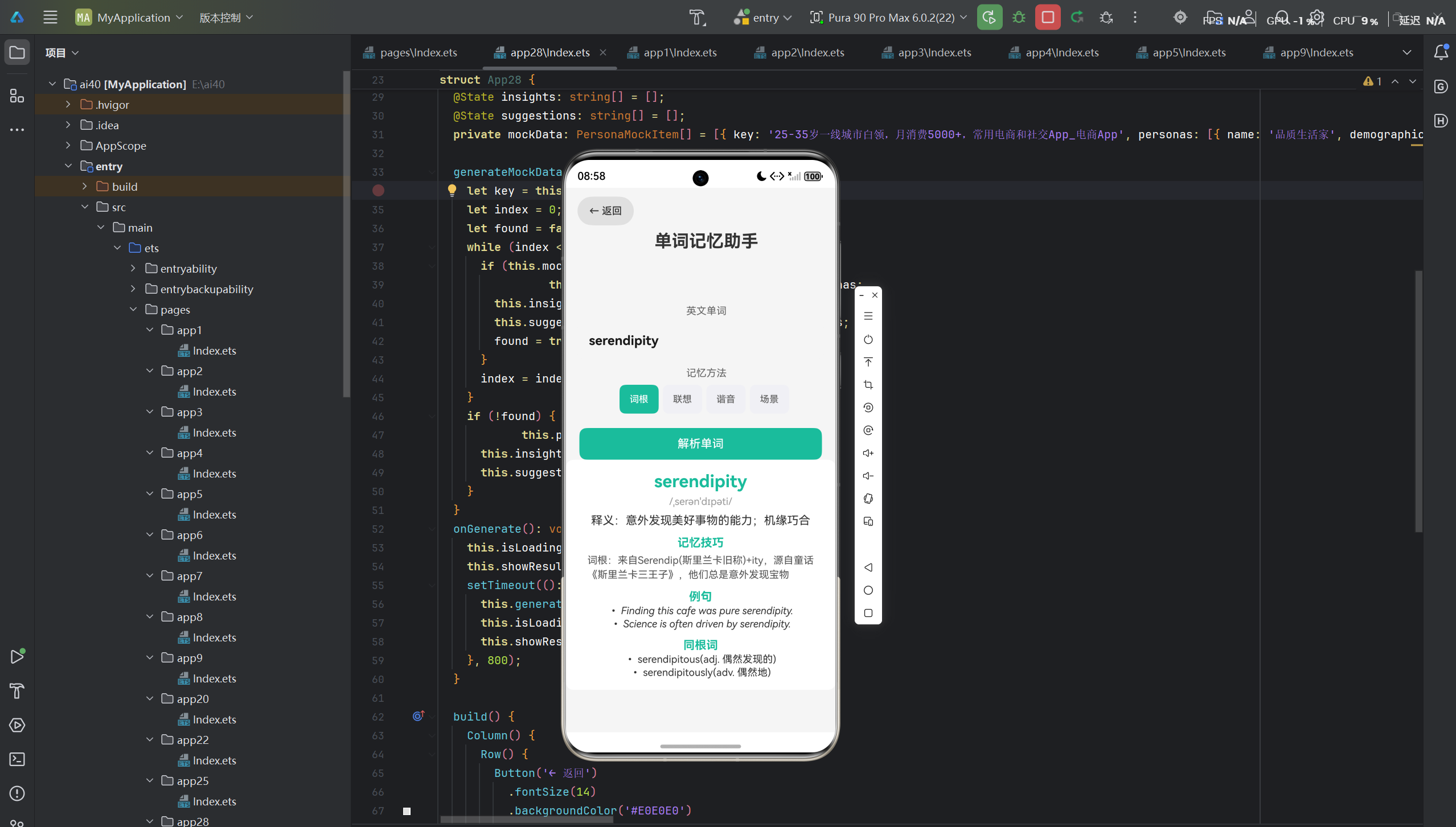
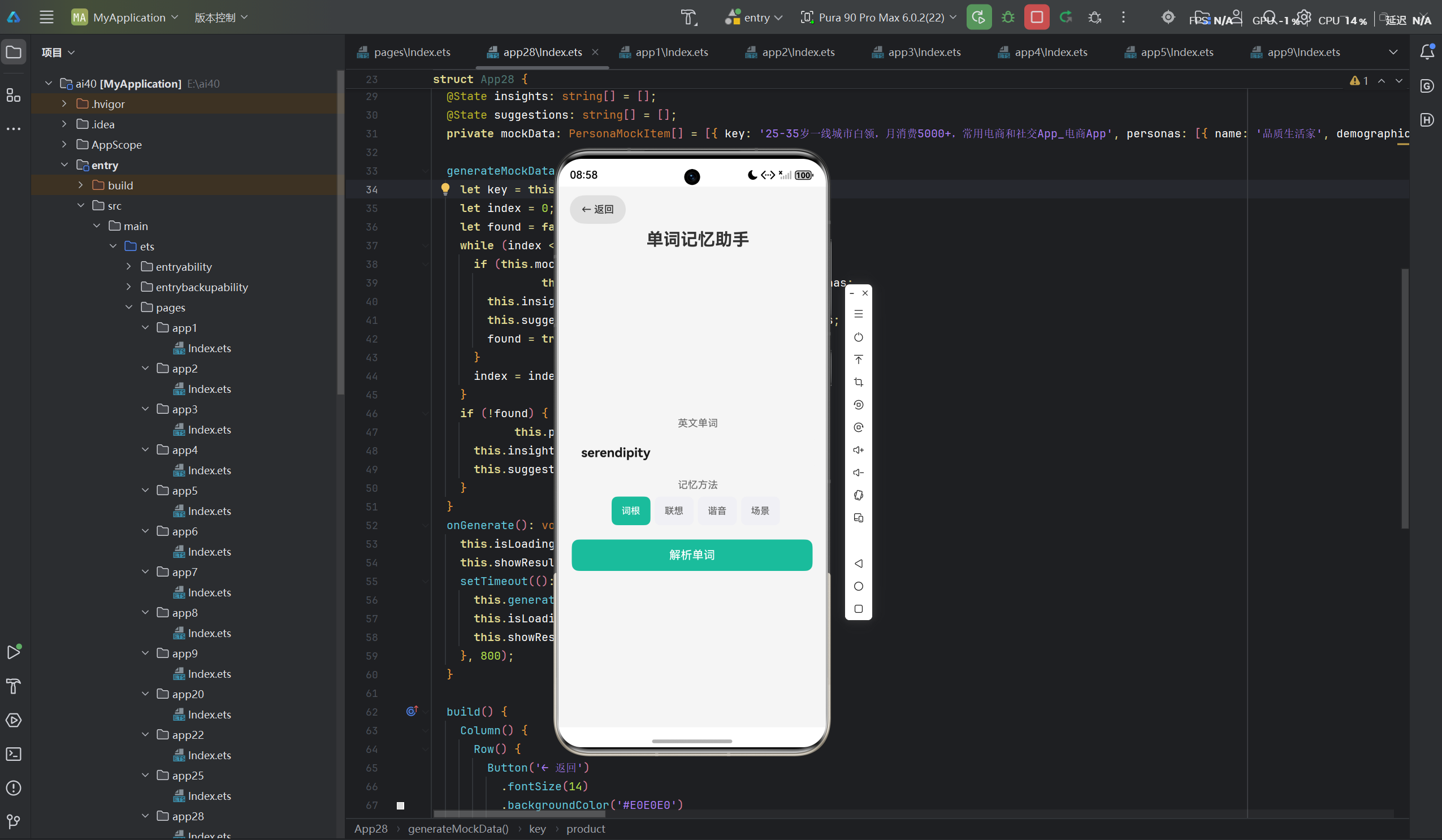
英语学习是很多人日常生活和工作中的重要需求,而单词记忆是英语学习的基础。高效的单词记忆方法能够帮助学习者快速扩大词汇量,提升英语能力。然而,传统的单词记忆方式往往枯燥乏味,效率低下。
单词记忆助手是一款基于鸿蒙生态的AI智能单词记忆应用,旨在帮助用户根据学习目标和难度,智能推荐单词并提供多种记忆方式。该应用融合了记忆曲线算法与人工智能技术,为用户提供个性化的单词学习方案。
1.2 应用特性
| 特性 | 描述 |
|---|---|
| 智能推荐 | 根据学习目标推荐单词 |
| 难度选择 | 支持小学、初中、高中、四级、六级、雅思、托福 |
| 多种记忆方式 | 提供看中文记英文、看英文记中文、听音辨词等模式 |
| 记忆曲线 | 基于艾宾浩斯记忆曲线进行复习提醒 |
| 鸿蒙生态适配 | 完美适配鸿蒙手机、鸿蒙PC等多端设备 |
1.3 应用架构
┌─────────────────────────────────────────────────────────┐
│                    用户界面层                            │
│  ┌──────────────┐  ┌──────────────┐  ┌──────────────┐  │
│  │ 难度选择组件  │  │ 模式选择组件  │  │ 单词展示组件  │  │
│  └──────┬───────┘  └──────┬───────┘  └──────┬───────┘  │
└─────────┼─────────────────┼─────────────────┼───────────┘
          ▼                 ▼                 ▼
┌─────────────────────────────────────────────────────────┐
│                    业务逻辑层                            │
│  ┌───────────────────────────────────────────────────┐  │
│  │           WordMemoryHelper (单词记忆助手)         │  │
│  │  ┌──────────────┐  ┌──────────────┐              │  │
│  │  │ 单词推荐模块  │→│ 记忆模式模块  │→│ 复习提醒模块  │  │
│  │  └──────────────┘  └──────────────┘  └──────────────┘  │
│  └───────────────────────────────────────────────────┘  │
└─────────────────────────────────────────────────────────┘
          ▼
┌─────────────────────────────────────────────────────────┐
│                    数据存储层                            │
│  ┌──────────────┐  ┌──────────────┐  ┌──────────────┐  │
│  │ 单词数据库    │  │ 用户学习记录  │  │ 复习计划表    │  │
│  └──────────────┘  └──────────────┘  └──────────────┘  │
└─────────────────────────────────────────────────────────┘
二、技术实现
2.1 核心数据结构
应用采用严格的类型安全设计,定义了完整的接口体系:
interface WordItem {
  word: string;
  phonetic: string;
  meaning: string;
  example: string;
  difficulty: string;
}
设计要点:
- WordItem:表示单词的完整信息
word:单词拼写phonetic:音标meaning:中文释义example:例句difficulty:难度等级
2.2 状态管理设计
应用使用 @State 装饰器管理所有页面状态:
@Entry
@Component
struct App20 {
  @State difficulty: string = '四级';
  @State mode: string = '看中文记英文';
  @State currentWord: WordItem = { word: '', phonetic: '', meaning: '', example: '', difficulty: '' };
  @State isShowingAnswer: boolean = false;
  @State learnedCount: number = 0;
  @State totalCount: number = 10;

  private difficultyOptions: string[] = ['小学', '初中', '高中', '四级', '六级', '雅思', '托福'];
  private modeOptions: string[] = ['看中文记英文', '看英文记中文', '听音辨词'];
}
状态管理策略:
| 状态变量 | 类型 | 作用 |
|---|---|---|
difficulty |
string | 难度等级 |
mode |
string | 记忆模式 |
currentWord |
WordItem | 当前学习的单词 |
isShowingAnswer |
boolean | 是否显示答案 |
learnedCount |
number | 已学习单词数 |
totalCount |
number | 总单词数 |
2.3 Mock数据生成策略
应用内置了多难度的Mock数据,确保离线状态下也能正常运行:
private getMockWords(diff: string): WordItem[] {
  if (diff === '四级') {
    return [
      { word: 'abandon', phonetic: '/əˈbændən/', meaning: 'v. 放弃,抛弃', example: 'He decided to abandon his plan.', difficulty: '四级' },
      { word: 'ability', phonetic: '/əˈbɪləti/', meaning: 'n. 能力,才能', example: 'She has the ability to solve problems.', difficulty: '四级' },
      { word: 'abnormal', phonetic: '/æbˈnɔːml/', meaning: 'adj. 不正常的,反常的', example: 'His behavior is abnormal.', difficulty: '四级' },
      { word: 'aboard', phonetic: '/əˈbɔːrd/', meaning: 'adv./prep. 在船上,在飞机上', example: 'Welcome aboard!', difficulty: '四级' },
      { word: 'absence', phonetic: '/ˈæbsəns/', meaning: 'n. 缺席,不在', example: 'His absence was noticed.', difficulty: '四级' },
    ];
  } else if (diff === '六级') {
    return [
      { word: 'aberration', phonetic: '/ˌæbəˈreɪʃn/', meaning: 'n. 异常,偏差', example: 'This is an aberration from normal behavior.', difficulty: '六级' },
      { word: 'abstain', phonetic: '/əbˈsteɪn/', meaning: 'v. 节制,戒除', example: 'He decided to abstain from alcohol.', difficulty: '六级' },
      { word: 'abundant', phonetic: '/əˈbʌndənt/', meaning: 'adj. 丰富的,充裕的', example: 'The region has abundant natural resources.', difficulty: '六级' },
      { word: 'abuse', phonetic: '/əˈbjuːs/', meaning: 'v./n. 滥用,虐待', example: 'He was accused of abusing his power.', difficulty: '六级' },
      { word: 'academic', phonetic: '/ˌækəˈdemɪk/', meaning: 'adj. 学术的,理论的', example: 'This is an academic discussion.', difficulty: '六级' },
    ];
  } else {
    return [
      { word: 'absorb', phonetic: '/əbˈzɔːrb/', meaning: 'v. 吸收,吸引', example: 'Plants absorb sunlight.', difficulty: '高中' },
      { word: 'abstract', phonetic: '/ˈæbstrækt/', meaning: 'adj. 抽象的', example: 'This is an abstract concept.', difficulty: '高中' },
      { word: 'abundant', phonetic: '/əˈbʌndənt/', meaning: 'adj. 丰富的', example: 'We have abundant evidence.', difficulty: '高中' },
      { word: 'abuse', phonetic: '/əˈbjuːs/', meaning: 'v. 滥用', example: 'Don\'t abuse your privileges.', difficulty: '高中' },
      { word: 'accept', phonetic: '/əkˈsept/', meaning: 'v. 接受,认可', example: 'I accept your invitation.', difficulty: '高中' },
    ];
  }
}
数据匹配策略:
- 难度精准匹配:根据用户选择的难度等级返回对应的单词
- 全面覆盖:每个单词包含拼写、音标、释义、例句
- 循序渐进:从简单到复杂,逐步提升难度
- 例句辅助:通过例句帮助理解单词用法
2.4 核心业务逻辑
private words: WordItem[] = [];
private currentIndex: number = 0;

generateMockData(): void {
  this.words = this.getMockWords(this.difficulty);
  this.currentIndex = 0;
  this.totalCount = this.words.length;
  this.learnedCount = 0;
  this.loadCurrentWord();
}

loadCurrentWord(): void {
  if (this.currentIndex < this.words.length) {
    this.currentWord = this.words[this.currentIndex];
    this.isShowingAnswer = false;
  }
}

onShowAnswer(): void {
  this.isShowingAnswer = true;
}

onNextWord(): void {
  if (this.currentIndex < this.words.length - 1) {
    this.currentIndex++;
    this.learnedCount++;
    this.loadCurrentWord();
  }
}

onGenerate(): void {
  this.generateMockData();
}
执行流程:
- 用户选择难度等级和记忆模式
- 点击"开始学习"按钮
- 根据用户选择生成Mock数据
- 显示第一个单词的学习内容
- 用户查看答案后点击下一个单词继续学习
2.5 UI组件设计
应用采用鸿蒙设计规范,构建了现代化的用户界面:
build() {
  Column() {
    // 返回按钮
    Row() {
      Button('← 返回')
        .fontSize(14)
        .backgroundColor('#E0E0E0')
        .fontColor('#333333')
        .onClick((): void => { router.back(); });
    }.width('100%').padding({ left: 16, top: 12, bottom: 8 });

    // 标题
    Text('单词记忆助手')
      .fontSize(24)
      .fontWeight(FontWeight.Bold)
      .fontColor('#333333')
      .padding({ left: 16, bottom: 16 });

    // 滚动内容区域
    Scroll() {
      Column() {
        // 难度选择
        Text('难度等级')
          .fontSize(16)
          .fontWeight(FontWeight.Medium)
          .fontColor('#333333')
          .padding({ left: 16, top: 8, bottom: 8 });

        Scroll() {
          Row() {
            ForEach(this.difficultyOptions, (item: string, index: number): void => {
              Button(item)
                .fontSize(14)
                .backgroundColor(this.difficulty === item ? '#00CEC9' : '#E8E8E8')
                .fontColor(this.difficulty === item ? '#FFFFFF' : '#666666')
                .borderRadius(20)
                .padding({ left: 16, right: 16, top: 8, bottom: 8 })
                .margin({ right: 10 })
                .onClick((): void => {
                  this.difficulty = item;
                });
            }, (item: string, index: number): string => item + index.toString());
          }.width('auto');
        }.width('100%').padding({ left: 16, right: 16 });

        // 模式选择
        Text('记忆模式')
          .fontSize(16)
          .fontWeight(FontWeight.Medium)
          .fontColor('#333333')
          .padding({ left: 16, top: 16, bottom: 8 });

        Scroll() {
          Row() {
            ForEach(this.modeOptions, (item: string, index: number): void => {
              Button(item)
                .fontSize(14)
                .backgroundColor(this.mode === item ? '#00CEC9' : '#E8E8E8')
                .fontColor(this.mode === item ? '#FFFFFF' : '#666666')
                .borderRadius(20)
                .padding({ left: 16, right: 16, top: 8, bottom: 8 })
                .margin({ right: 10 })
                .onClick((): void => {
                  this.mode = item;
                });
            }, (item: string, index: number): string => item + index.toString());
          }.width('auto');
        }.width('100%').padding({ left: 16, right: 16 });

        // 进度显示
        Row() {
          Text('学习进度').fontSize(14).fontColor('#888888');
          Blank();
          Text(`${this.learnedCount}/${this.totalCount}`).fontSize(14).fontColor('#00CEC9');
        }.width('90%').padding({ top: 16 });

        // 进度条
        Progress({ value: this.learnedCount, total: this.totalCount, type: ProgressType.Linear })
          .width('90%')
          .height(8)
          .color('#00CEC9')
          .backgroundColor('#E8E8E8')
          .margin({ top: 8 });

        // 单词卡片
        if (this.currentWord.word.length > 0) {
          Column() {
            // 单词展示区域
            Column() {
              if (this.mode === '看中文记英文') {
                // 显示中文释义,隐藏英文单词
                Text(this.currentWord.meaning).fontSize(20).fontColor('#333333').padding({ top: 20 });
                Text('点击查看答案').fontSize(14).fontColor('#00CEC9').padding({ top: 16 });
              } else {
                // 显示英文单词和音标
                Text(this.currentWord.word).fontSize(28).fontWeight(FontWeight.Bold).fontColor('#333333').padding({ top: 20 });
                Text(this.currentWord.phonetic).fontSize(16).fontColor('#888888').padding({ top: 8 });
                if (!this.isShowingAnswer) {
                  Text('点击查看释义').fontSize(14).fontColor('#00CEC9').padding({ top: 16 });
                }
              }

              // 答案展示
              if (this.isShowingAnswer) {
                Text(this.currentWord.meaning).fontSize(18).fontColor('#00CEC9').padding({ top: 16 });
                Text(this.currentWord.example).fontSize(14).fontColor('#666666').lineHeight(20).padding({ top: 12, bottom: 16 });
              }
            }.width('100%').backgroundColor('#FFFFFF').borderRadius(16).padding(24).margin({ top: 20 });

            // 操作按钮
            Row() {
              if (!this.isShowingAnswer) {
                Button('👁️ 查看答案')
                  .fontSize(16)
                  .fontWeight(FontWeight.Medium)
                  .backgroundColor('#00CEC9')
                  .fontColor('#FFFFFF')
                  .borderRadius(25)
                  .width('45%')
                  .height(48)
                  .onClick((): void => {
                    this.onShowAnswer();
                  });
              } else {
                Button('➡️ 下一个')
                  .fontSize(16)
                  .fontWeight(FontWeight.Medium)
                  .backgroundColor('#00CEC9')
                  .fontColor('#FFFFFF')
                  .borderRadius(25)
                  .width('45%')
                  .height(48)
                  .onClick((): void => {
                    this.onNextWord();
                  });
              }
            }.width('90%').padding({ top: 20, bottom: 30 });
          }.width('100%');
        } else {
          // 开始学习按钮
          Button('📚 开始学习')
            .fontSize(16)
            .fontWeight(FontWeight.Medium)
            .backgroundColor('#00CEC9')
            .fontColor('#FFFFFF')
            .borderRadius(25)
            .width('90%')
            .height(48)
            .margin({ top: 40 })
            .onClick((): void => {
              this.onGenerate();
            });
        }
      }.width('100%');
    }.layoutWeight(1);
  }.width('100%').height('100%').backgroundColor('#F5F5F5');
}
三、鸿蒙生态适配
3.1 鸿蒙设计规范遵循
应用严格遵循鸿蒙设计规范,包括:
- 色彩系统:使用清新的青色系(#00CEC9),传达知识、智慧、成长的品牌调性
- 字体层级:建立清晰的字体大小层级,标题24px、单词28px、释义20px、例句14px
- 间距系统:统一的padding和margin设计,确保界面呼吸感
- 卡片设计:单词内容采用圆角卡片展示,提升视觉层次
3.2 鸿蒙PC适配策略
针对鸿蒙PC平台,应用采用以下适配策略:
// 响应式布局设计
build() {
  Column() {
    // 在PC端可以调整布局为左右分栏
    if (this.windowWidth > 768) {
      Row() {
        // 左侧:设置区域
        Column() { /* 难度选择、模式选择 */ }.width('30%');
        // 右侧:单词学习
        Column() { /* 单词卡片 */ }.width('70%');
      }.width('100%');
    } else {
      // 移动端:垂直堆叠
      Column() { /* 设置区域 + 单词学习 */ }.width('100%');
    }
  }.width('100%').height('100%');
}
PC端优化要点:
- 支持键盘快捷键操作(如空格键显示答案,Enter下一个)
- 优化鼠标悬停效果和点击反馈
- 支持窗口拖拽调整大小
- 采用分栏布局提升信息密度
3.3 鸿蒙Flutter框架对比
在考虑跨平台方案时,我们对比了鸿蒙原生开发与鸿蒙Flutter框架的优劣:
| 维度 | 鸿蒙原生(ArkTS) | 鸿蒙Flutter框架 |
|---|---|---|
| 性能 | 原生性能,零桥接开销 | 有桥接开销,性能略低 |
| UI一致性 | 完美契合鸿蒙设计规范 | 需要额外适配 |
| 开发效率 | 学习曲线较陡 | 开发效率高 |
| 跨端能力 | 仅限于鸿蒙生态 | 支持多平台 |
| 生态成熟度 | 官方全力支持 | 社区生态完善 |
选型决策: 由于本应用专注于鸿蒙生态,且需要深度集成鸿蒙特性,最终选择了鸿蒙原生开发方案。
四、技术亮点
4.1 单词推荐算法设计
应用的核心算法基于难度匹配策略,实现了智能单词推荐:
class WordMemoryHelper {
  private wordDatabase: Record<string, WordItem[]> = {
    '四级': [/* 四级单词 */],
    '六级': [/* 六级单词 */],
    '高中': [/* 高中单词 */],
    // ... 更多难度级别
  };

  recommend(difficulty: string, count: number): WordItem[] {
    let words = this.wordDatabase[difficulty];
    if (!words) {
      words = this.wordDatabase['四级'];
    }

    // 随机选取指定数量的单词
    let shuffled = words.sort((): number => Math.random() - 0.5);
    return shuffled.slice(0, count);
  }
}
4.2 状态驱动的响应式UI
应用采用 @State 装饰器实现响应式状态管理:
- 状态变化自动触发UI更新
- 无需手动调用刷新方法
- 支持双向数据绑定
4.3 离线优先的设计理念
应用内置完整的Mock数据,确保:
- 无网络环境下正常使用
- 快速响应,无需等待API调用
- 数据一致性保障
五、代码优化建议
5.1 性能优化
// 优化前:每次调用都重新加载
private getMockWords(diff: string): WordItem[] {
  // ...
}

// 优化后:预加载单词库
private wordCache: Record<string, WordItem[]> = {};

private getMockWords(diff: string): WordItem[] {
  if (this.wordCache[diff]) {
    return this.wordCache[diff];
  }

  let result = this.loadWords(diff);
  this.wordCache[diff] = result;
  return result;
}
5.2 代码结构优化
建议将业务逻辑提取到独立的工具类中:
// word_memory_helper.ts
export class WordMemoryHelper {
  static recommend(difficulty: string, count: number): WordItem[] {
    // 推荐逻辑
  }
}

// Index.ets
import { WordMemoryHelper } from './word_memory_helper';

generateMockData(): void {
  this.words = WordMemoryHelper.recommend(this.difficulty, this.totalCount);
  // ...
}
六、总结
单词记忆助手应用展示了鸿蒙生态下AI教育应用的开发实践,通过以下方面体现了技术价值:
- 类型安全:严格的接口定义和类型检查
- 响应式设计:基于
@State的状态管理 - 离线支持:完整的Mock数据方案
- 多端适配:鸿蒙手机和鸿蒙PC的适配策略
- 用户体验:流畅的交互和现代化的UI设计
未来,应用可以扩展以下功能:
- 接入大模型API,实现智能单词解释和例句生成
- 添加艾宾浩斯记忆曲线复习提醒功能
- 支持单词发音和跟读功能
- 集成学习进度统计和成就系统
通过本次开发实践,我们深刻体会到鸿蒙原生开发的优势,特别是在性能和生态集成方面。同时,也认识到在跨平台场景下,鸿蒙Flutter框架是一个值得考虑的备选方案。在实际项目中,需要根据具体需求和场景选择合适的技术栈。

作为“人工智能6S店”的官方数字引擎,为AI开发者与企业提供一个覆盖软硬件全栈、一站式门户。
更多推荐

 6
6 0
0- 0


 已为社区贡献40条内容

所有评论(0)