
AtomGit Flutter 鸿蒙客户端:可插拔的呼吸算法
用策略模式实现可动态切换的呼吸模式——让代码对扩展开放,对修改关闭
目录
- 从数据驱动的呼吸模型说起
- 当前方案的局限性:当"配置"不够用
- 策略模式的核心思想与结构
- 设计 BreathingStrategy 抽象接口
- 实现四种具体策略类
- 策略工厂:从枚举到策略的映射
- 重构 BreathingCircle 接入策略模式
- 动态切换:运行时无缝替换策略对象
- 开闭原则的胜利:新增 5-5 等长呼吸策略
- 策略模式与数据驱动方案的对比
- 策略模式在单元测试中的优势
- 鸿蒙平台的兼容性说明
- 总结:什么时候用策略模式
一、从数据驱动的呼吸模型说起
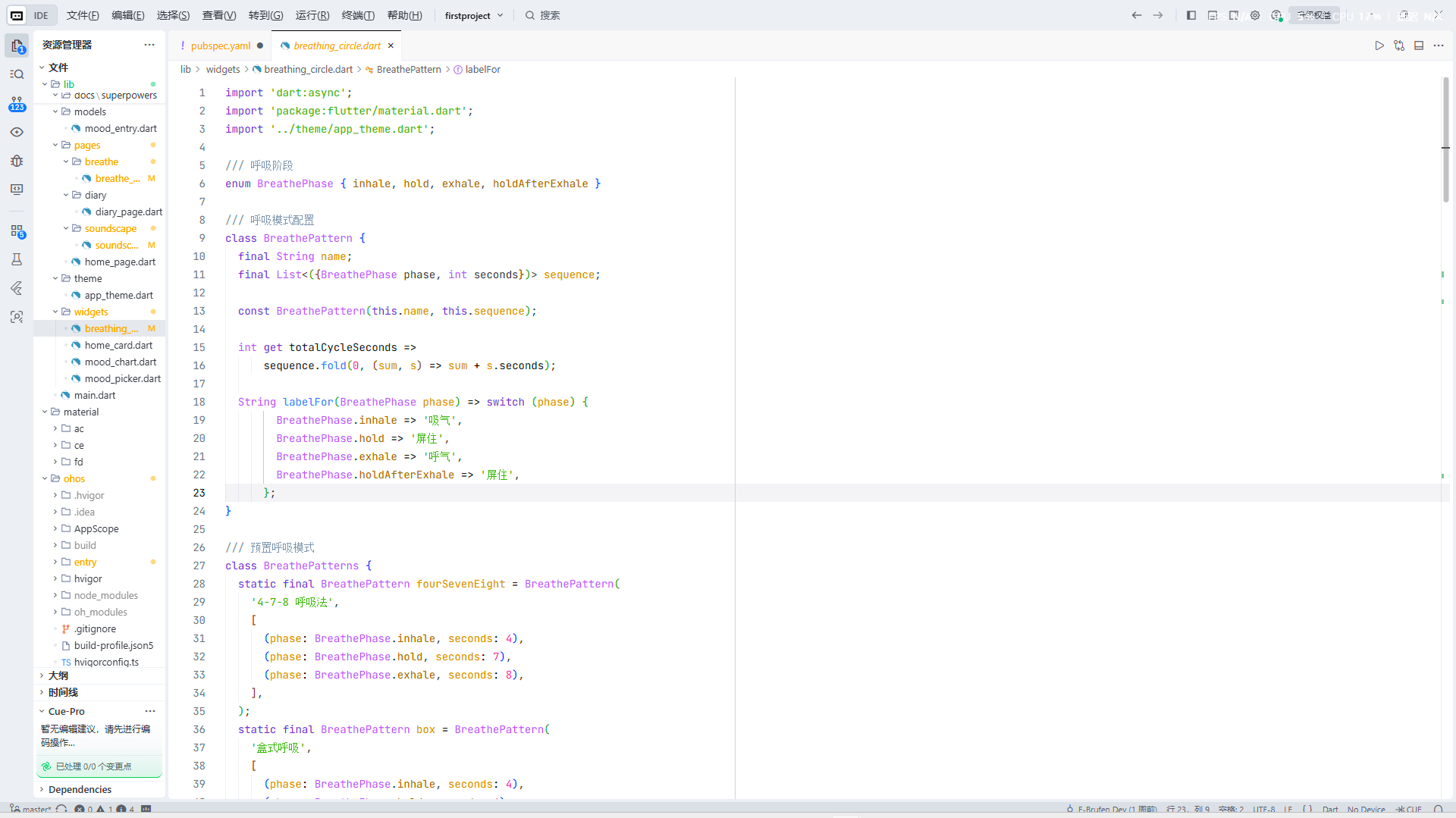
在 E-Brufen 项目的 v1.0 版本中,呼吸练习模块的设计非常简洁——我们用一个 BreathePattern 数据类和一个 BreathePatterns 静态工厂来定义所有呼吸模式:
// 当前方案:数据驱动的呼吸模式定义
// lib/widgets/breathing_circle.dart

enum BreathePhase { inhale, hold, exhale, holdAfterExhale }

class BreathePattern {
  final String name;
  final List<({BreathePhase phase, int seconds})> sequence;

  const BreathePattern(this.name, this.sequence);

  int get totalCycleSeconds =>
      sequence.fold(0, (sum, s) => sum + s.seconds);

  String labelFor(BreathePhase phase) => switch (phase) {
        BreathePhase.inhale => '吸气',
        BreathePhase.hold => '屏住',
        BreathePhase.exhale => '呼气',
        BreathePhase.holdAfterExhale => '屏住',
      };
}

class BreathePatterns {
  static final BreathePattern fourSevenEight = BreathePattern(
    '4-7-8 呼吸法',
    [
      (phase: BreathePhase.inhale, seconds: 4),
      (phase: BreathePhase.hold, seconds: 7),
      (phase: BreathePhase.exhale, seconds: 8),
    ],
  );

  static final BreathePattern box = BreathePattern(
    '盒式呼吸',
    [
      (phase: BreathePhase.inhale, seconds: 4),
      (phase: BreathePhase.hold, seconds: 4),
      (phase: BreathePhase.exhale, seconds: 4),
      (phase: BreathePhase.holdAfterExhale, seconds: 4),
    ],
  );

  static final BreathePattern relaxed = BreathePattern(
    '放松呼吸',
    [
      (phase: BreathePhase.inhale, seconds: 4),
      (phase: BreathePhase.exhale, seconds: 6),
    ],
  );

  static final List<BreathePattern> all = [fourSevenEight, box, relaxed];
}
这种设计在项目初期非常高效。一个数据类加上一个静态工厂,三种呼吸模式,总共不到 30 行代码。对于"吸气几步、屏气几步、呼气几步"这种高度结构化的需求,数据驱动的方式天然匹配——所有的呼吸法本质上都是一个阶段序列,区别只在于每阶段持续多少秒。
在 BreathingCircle 组件中,动画逻辑遍历这个 sequence 列表,按顺序执行每个阶段。呼吸球在吸气阶段放大(forward),在呼气和屏气阶段缩小(reverse)。整个流程像一个简单的状态机:轮询当前阶段、累计秒数、到时间后切换到下一个阶段。这个设计支撑了 E-Brufen 的前三个版本发布,用户反馈也很好。
但是,当产品经理找到我们,提出了一个新需求时,这个方案的脆弱性就暴露出来了。
二、当前方案的局限性:当"配置"不够用
新需求是这样的:我们计划在 v2.0 中引入一种叫"引导式呼吸"(Guided Breathing)的模式。它与现有三种模式有一个关键区别——每个吸气和呼气阶段之间,需要播放一段语音引导文案。比如吸气前说"现在,请深深吸一口气",呼气前说"慢慢地,把气呼出去"。并且,这个引导文案需要支持国际化——中文版和英文版说着不同的语句。
问题在于,当前的 BreathePattern 是一个纯数据容器。它的 sequence 字段只能携带"什么阶段 + 几秒钟"这两个信息。如果想加入"语音引导",我们有几个选择,但都不理想:
选择 A:往 BreathePattern 里加字段。 比如加一个 Map<BreathePhase, String> guideTexts。但这样做会让这个类变得越来越臃肿。每来一个新需求——语音引导、震动反馈、背景音乐变化、屏幕亮度调节——都要往里面加字段。当字段超过 5 个,BreathePattern 就不再是"呼吸模式的配置",而是一个"什么都管的上帝对象"。
选择 B:在 BreathingCircle 里写 if-else 判断。 比如 if (widget.pattern == BreathePatterns.fourSevenEight) { ... } else if ...。这是最差的方案,因为每新增一种模式,你就要打开 BreathingCircle 的源码,在 200 行代码中找到正确的分支点,加一行 else-if。违反开闭原则不说,光是记住所有分支点的位置就够让人头疼了。
选择 C:承认"呼吸模式"是一个行为概念,不是一个数据概念。 既然不同的呼吸模式有不同的行为(不同阶段数、不同引导方式、不同动画效果),那就应该用行为抽象来建模——这正是策略模式的用武之地。
这三种选择的优劣,用一个表格来直观对比:
| 方案 | 新增模式的改动范围 | 是否修改现有代码 | 是否符合 OCP | 代码可测试性 |
|---|---|---|---|---|
| A:数据容器加字段 | 修改 BreathePattern 类,修改所有使用方(字段可能为 null 需要判空) | 是 | 否 | 中(mock 字段值) |
| B:if-else 分支 | 修改 BreathingCircle 中的每一个分支点 | 是 | 否 | 差(必须构造特定 BreathePattern + 穷举分支) |
| C:策略模式 | 新增一个策略类文件 | 否 | 是 | 优(独立测试每个策略对象) |
三、策略模式的核心思想与结构
策略模式(Strategy Pattern)是 GoF(Gang of Four)二十三种经典设计模式之一,属于行为型模式。它的定义非常精确:
定义一系列算法,把它们一个个封装起来,并使它们可以互相替换。策略模式让算法的变化独立于使用算法的客户端。
这句话有三个关键词:
- 封装算法:每个算法(在这里是每种呼吸模式的行为逻辑)被封装成一个独立的类。
- 互相替换:客户端可以在运行时切换不同的策略对象,而不需要修改自己的代码。
- 独立变化:新增算法不影响已有算法,修改一个算法不影响其他算法。
映射到我们的呼吸练习场景,架构图如下:
┌──────────────────────────────────────────────────────────────────┐
│                         BreathePage                               │
│  (用户选择呼吸模式 → 通知 BreathingCircle 切换策略)                │
└────────────────────────────┬─────────────────────────────────────┘
                             │
                             ▼
┌──────────────────────────────────────────────────────────────────┐
│                     BreathingCircle                               │
│  (持有 BreathingStrategy 引用,调用 strategy.getPhases() 获取     │
│   阶段序列,调用 strategy.getGuideText() 获取引导文案)             │
│                                                                   │
│  不依赖任何具体策略类 —— 只依赖 BreathingStrategy 抽象接口          │
└────────────────────────────┬─────────────────────────────────────┘
                             │ uses
                             ▼
┌──────────────────────────────────────────────────────────────────┐
│           <<abstract>> BreathingStrategy                          │
│  ┌─────────────────────────────────────────────────────────────┐ │
│  │ + String get name                                            │ │
│  │ + String get description                                     │ │
│  │ + List<BreathingPhaseConfig> get phases                      │ │
│  │ + String getGuideText(BreathePhase phase, Locale locale)     │ │
│  │ + int get totalCycleSeconds                                  │ │
│  │ + HapticFeedbackLevel get vibrationLevel(BreathePhase phase) │ │
│  └─────────────────────────────────────────────────────────────┘ │
└──────┬──────────────────┬───────────────────┬─────────────────────┘
       │                  │                   │
       ▼                  ▼                   ▼
┌──────────────┐  ┌──────────────┐  ┌──────────────┐  ┌──────────────┐
│ FourSeven    │  │ BoxBreathing │  │ RelaxBreath  │  │ EqualBreath  │
│ EightStrategy│  │ Strategy     │  │ ingStrategy  │  │ ingStrategy  │
│              │  │              │  │              │  │ (新增)      │
│ 4-7-8 呼吸法 │  │ 盒式呼吸     │  │ 放松呼吸     │  │ 5-5 等长呼吸  │
└──────────────┘  └──────────────┘  └──────────────┘  └──────────────┘
这个架构的优雅之处在于:BreathingCircle 不再关心"这是什么呼吸法"——它只知道"我有一个策略对象,我从它那里获取阶段列表和引导文案,然后按列表执行就行了"。具体是什么呼吸法,是 BreathePage 在创建策略对象时决定的。BreathingCircle 对新增的模式完全不知情。
四、设计 BreathingStrategy 抽象接口
策略模式的第一步,也是最重要的一步,是设计一个足够好的抽象接口。一个欠考虑的接口会导致后续所有策略类都要跟着改,得不偿失。
在设计 BreathingStrategy 时,我们考虑了 E-Brufen 当前和未来可能的需求,最终确定了以下方法契约:
// lib/strategies/breathing_strategy.dart

import 'dart:ui';

/// 呼吸阶段配置 —— 比原始 enum 携带更多上下文信息
class BreathingPhaseConfig {
  final BreathePhase phase;
  final int durationSeconds;

  /// 该阶段的展示名称(中文:吸气/屏住/呼气)
  final String label;

  /// 该阶段的引导文案(可为 null,表示不需要引导)
  final String? guideText;

  /// 该阶段的振动强度(null 表示不振动)
  final HapticFeedbackLevel? hapticLevel;

  const BreathingPhaseConfig({
    required this.phase,
    required this.durationSeconds,
    required this.label,
    this.guideText,
    this.hapticLevel,
  });
}

/// 触觉反馈等级
enum HapticFeedbackLevel { light, medium, heavy }

/// 呼吸策略抽象接口
///
/// 每一种呼吸法都是一个具体的策略实现类。
/// 客户端(BreathingCircle)通过此接口获取阶段序列和辅助信息,
/// 完全不关心具体是哪种呼吸法。
abstract class BreathingStrategy {
  /// 呼吸法名称(用于 UI 展示,如"4-7-8 呼吸法")
  String get name;

  /// 简短描述,展示在模式选择卡片上
  String get description;

  /// 完整循环的阶段序列
  ///
  /// 例如 4-7-8 呼吸法返回:
  /// [吸气 4s, 屏住 7s, 呼气 8s]
  List<BreathingPhaseConfig> get phases;

  /// 一个完整循环的总秒数
  int get totalCycleSeconds =>
      phases.fold(0, (sum, p) => sum + p.durationSeconds);

  /// 获取特定阶段的引导文案(支持国际化)
  ///
  /// [phase] 当前阶段
  /// [locale] 当前语言环境
  ///
  /// 返回 null 表示该阶段不需要引导文案
  String? getGuideText(BreathePhase phase, Locale locale);

  /// 获取特定阶段的振动等级(控制触觉反馈)
  ///
  /// 返回 null 表示该阶段不触发振动
  HapticFeedbackLevel? getVibrationLevel(BreathePhase phase);
}
这个接口的设计有几个值得展开说明的决策:
为什么把 totalCycleSeconds 放在接口里而不是单独计算? 因为不同的策略可能有不同的计算逻辑。比如将来如果有一个"金字塔呼吸法"——它的一次完整循环可能需要"去程 + 回程"才算一次,而不是简单的 phases 求和。把它放在接口层,子类可以覆写。Dart 提供了 getter 的默认实现作为兜底,大多数策略不需要覆写。
为什么 getGuideText 需要传入 Locale? 因为 E-Brufen 计划支持中英文双语。策略对象本身应该是无状态的——它不应该持有"当前语言"这个状态。把 Locale 作为参数传入,由客户端(BreathingCircle 或 BreathePage)负责提供当前语言环境,策略只负责"给定语言,返回对应文案"。
为什么要有 getVibrationLevel? 这是从 E-Brufen 实际产品需求出发的考量。4-7-8 呼吸法中的"屏住"阶段(7 秒)较长,用户容易走神,我们希望在这个阶段提供轻微的震动提醒;而放松呼吸法中不应该有任何震动打扰。不同的呼吸模式有不同的振动需求——这正是策略模式应该封装的行为差异。
五、实现四种具体策略类
有了接口,我们来逐一实现三种已有模式,以及一种新增模式。
5.1 4-7-8 呼吸法策略
4-7-8 呼吸法由哈佛医学博士 Andrew Weil 推广,其核心是吸气 4 秒、屏住 7 秒、呼气 8 秒。它通过延长呼气时间来激活副交感神经系统,从而降低心率和血压。
// lib/strategies/four_seven_eight_strategy.dart
import 'dart:ui';
import 'breathing_strategy.dart';
class FourSevenEightStrategy implements BreathingStrategy {
String get name => '4-7-8 呼吸法';
String get description => '吸气4秒 · 屏住7秒 · 呼气8秒,适合睡前放松和缓解焦虑';
List<BreathingPhaseConfig> get phases => [
BreathingPhaseConfig(
phase: BreathePhase.inhale,
durationSeconds: 4,
label: '吸气',
hapticLevel: null, // 吸气阶段不振动
),
BreathingPhaseConfig(
phase: BreathePhase.hold,
durationSeconds: 7,
label: '屏住',
hapticLevel: HapticFeedbackLevel.light, // 屏气时间较长,轻微振动提醒
),
BreathingPhaseConfig(
phase: BreathePhase.exhale,
durationSeconds: 8,
label: '呼气',
hapticLevel: null,
),
];
String? getGuideText(BreathePhase phase, Locale locale) {
final isZh = locale.languageCode == 'zh';
return switch (phase) {
BreathePhase.inhale => isZh
? '缓缓吸气,感受空气充满你的肺部'
: 'Breathe in slowly, feel the air fill your lungs',
BreathePhase.hold => isZh
? '屏住呼吸,保持平静'
: 'Hold your breath, stay calm',
BreathePhase.exhale => isZh
? '慢慢地呼出,释放所有的紧张'
: 'Exhale slowly, release all the tension',
_ => null,
};
}
HapticFeedbackLevel? getVibrationLevel(BreathePhase phase) {
// 只在屏气阶段提供轻微振动
return phase == BreathePhase.hold
? HapticFeedbackLevel.light
: null;
}
}
5.2 盒式呼吸策略
盒式呼吸(Box Breathing)是 Navy SEALs 部队使用的压力管理技术,四个阶段等长各 4 秒:吸气→屏住→呼气→屏住。它的对称结构让练习者容易掌握节奏。
// lib/strategies/box_breathing_strategy.dart
import 'dart:ui';
import 'breathing_strategy.dart';
class BoxBreathingStrategy implements BreathingStrategy {
String get name => '盒式呼吸';
String get description => '四个阶段各4秒成盒状循环,适合快速集中注意力';
List<BreathingPhaseConfig> get phases => [
BreathingPhaseConfig(
phase: BreathePhase.inhale,
durationSeconds: 4,
label: '吸气',
hapticLevel: null,
),
BreathingPhaseConfig(
phase: BreathePhase.hold,
durationSeconds: 4,
label: '屏住',
hapticLevel: HapticFeedbackLevel.light,
),
BreathingPhaseConfig(
phase: BreathePhase.exhale,
durationSeconds: 4,
label: '呼气',
hapticLevel: null,
),
BreathingPhaseConfig(
phase: BreathePhase.holdAfterExhale,
durationSeconds: 4,
label: '屏住',
hapticLevel: HapticFeedbackLevel.light,
),
];
String? getGuideText(BreathePhase phase, Locale locale) {
final isZh = locale.languageCode == 'zh';
return switch (phase) {
BreathePhase.inhale => isZh ? '吸气 4 秒,跟随圆球的节奏' : 'Inhale for 4, follow the circle',
BreathePhase.hold => isZh ? '屏住,保持专注' : 'Hold, stay focused',
BreathePhase.exhale => isZh ? '呼气 4 秒,释放压力' : 'Exhale for 4, release stress',
BreathePhase.holdAfterExhale => isZh ? '稍作停留,准备下一个循环' : 'Pause, prepare for the next cycle',
};
}
HapticFeedbackLevel? getVibrationLevel(BreathePhase phase) =>
(phase == BreathePhase.hold || phase == BreathePhase.holdAfterExhale)
? HapticFeedbackLevel.light
: null;
}
5.3 放松呼吸策略
放松呼吸法是最简单、最自然的模式:吸气 4 秒,呼气 6 秒。它模仿人体在放松状态下的自然呼吸节奏,不需要屏气。因为没有屏气阶段,所以 phase 序列只有两项。
// lib/strategies/relax_breathing_strategy.dart
import 'dart:ui';
import 'breathing_strategy.dart';
class RelaxBreathingStrategy implements BreathingStrategy {
String get name => '放松呼吸';
String get description => '吸气4秒 · 呼气6秒,最简单的自然放松节奏';
List<BreathingPhaseConfig> get phases => [
BreathingPhaseConfig(
phase: BreathePhase.inhale,
durationSeconds: 4,
label: '吸气',
hapticLevel: null,
),
BreathingPhaseConfig(
phase: BreathePhase.exhale,
durationSeconds: 6,
label: '呼气',
hapticLevel: null,
),
];
String? getGuideText(BreathePhase phase, Locale locale) {
final isZh = locale.languageCode == 'zh';
return switch (phase) {
BreathePhase.inhale => isZh ? '自然地吸气' : 'Breathe in naturally',
BreathePhase.exhale => isZh ? '缓缓呼出' : 'Breathe out gently',
_ => null,
};
}
HapticFeedbackLevel? getVibrationLevel(BreathePhase phase) => null;
}
六、策略工厂:从枚举到策略的映射
有了策略类,我们需要一种方式让用户选择。当前项目的 BreathePage 使用 BreathePattern 作为 RadioListTile 的选项。在策略模式架构中,我们引入一个策略工厂,负责根据用户的枚举选择创建对应的策略实例。
我们同时保留一个 BreathingPattern 枚举,因为枚举在 Dart 中天然适合做下拉选择、比较和序列化:
// lib/strategies/breathing_strategy_factory.dart

/// 呼吸模式枚举 —— 用于 UI 选择、持久化存储
enum BreathingPattern {
  fourSevenEight,
  boxBreathing,
  relaxBreathing,
  equalBreathing, // 新增:5-5 等长呼吸
}

/// 策略工厂:将枚举映射为具体的策略实例
///
/// 这是策略模式的"注册中心"。所有新增的呼吸模式,
/// 都在这里完成枚举值到策略类的映射。
class BreathingStrategyFactory {
  const BreathingStrategyFactory._(); // 工具类,禁止实例化

  /// 根据枚举值创建对应的策略对象
  static BreathingStrategy create(BreathingPattern pattern) {
    return switch (pattern) {
      BreathingPattern.fourSevenEight => FourSevenEightStrategy(),
      BreathingPattern.boxBreathing   => BoxBreathingStrategy(),
      BreathingPattern.relaxBreathing => RelaxBreathingStrategy(),
      BreathingPattern.equalBreathing => EqualBreathingStrategy(),
    };
  }

  /// 获取所有可用的呼吸模式(用于 UI 列表展示)
  static List<({BreathingPattern pattern, BreathingStrategy strategy})>
      get allPatterns => BreathingPattern.values
          .map((p) => (pattern: p, strategy: create(p)))
          .toList();

  /// 从持久化的字符串名称恢复枚举值
  static BreathingPattern fromName(String name) {
    return BreathingPattern.values.firstWhere(
      (p) => p.name == name,
      orElse: () => BreathingPattern.boxBreathing,
    );
  }
}
这个工厂类承担了两个职责:
- 创建策略实例:
create()方法接收枚举值,返回抽象接口BreathingStrategy。调用方不需要知道具体是哪个类。 - 枚举与策略的双向映射:
allPatterns惰性生成所有策略实例,供 UI 列表展示使用;fromName()从持久化的字符串恢复枚举值,用于从 Hive 中读取用户上次选择的模式。
为什么用 switch 表达式而不是 map?因为 Dart 3 的 switch 表达式具有穷举性检查(exhaustiveness check)——如果你新增了一个枚举值但没有在 switch 中添加对应分支,编译器会直接报错。这是一种编译期的安全保障,确保你不会漏掉任何新模式的工厂注册。
七、重构 BreathingCircle 接入策略模式
现在,让我们重构 BreathingCircle,将它与策略接口对接。核心变化是:BreathingCircle 不再接收 BreathePattern 数据对象,而是接收一个 BreathingStrategy 接口实例。
// lib/widgets/breathing_circle.dart (重构后)
import 'dart:async';
import 'dart:ui';
import 'package:flutter/material.dart';
import '../strategies/breathing_strategy.dart';
import '../theme/app_theme.dart';
enum BreathePhase { inhale, hold, exhale, holdAfterExhale }
/// 呼吸球动画组件(策略模式重构版)
///
/// 此组件只依赖 BreathingStrategy 抽象接口,
/// 不依赖任何具体的呼吸法实现类。
class BreathingCircle extends StatefulWidget {
/// 呼吸策略(可在运行时替换)
final BreathingStrategy strategy;
/// 练习总时长(分钟)
final int totalMinutes;
/// 完成回调
final VoidCallback onComplete;
/// 阶段变化回调(传递中文阶段名,用于 UI 展示)
final ValueChanged<String> onPhaseChange;
/// 每秒回调(携带已流逝的总秒数)
final ValueChanged<int>? onTick;
/// 当前语言环境(用于引导文案的国际化)
final Locale locale;
const BreathingCircle({
super.key,
required this.strategy,
required this.totalMinutes,
required this.onComplete,
required this.onPhaseChange,
required this.locale,
this.onTick,
});
State<BreathingCircle> createState() => BreathingCircleState();
}
class BreathingCircleState extends State<BreathingCircle>
with SingleTickerProviderStateMixin {
late AnimationController _controller;
int _phaseIndex = 0;
int _secondsInPhase = 0;
int _totalElapsedSeconds = 0;
Timer? _timer;
bool _isPaused = false;
/// 当前的引导文案(可能为 null)
String? _currentGuideText;
void initState() {
super.initState();
_controller = AnimationController(
vsync: this,
duration: const Duration(seconds: 1),
);
WidgetsBinding.instance.addPostFrameCallback((_) {
if (mounted) _startCycle();
});
}
void _startCycle() {
_timer?.cancel();
_phaseIndex = 0;
_secondsInPhase = 0;
final phases = widget.strategy.phases;
if (phases.isEmpty) return;
final phase = phases[_phaseIndex];
_animatePhase(phase.durationSeconds);
// 通知外部当前阶段名称和引导文案
widget.onPhaseChange(phase.label);
_currentGuideText = widget.strategy.getGuideText(
phase.phase,
widget.locale,
);
}
void _animatePhase(int durationSec) {
_controller.stop();
final currentPhase =
widget.strategy.phases[_phaseIndex].phase;
final isInhale = currentPhase == BreathePhase.inhale;
if (isInhale) {
_controller.forward(from: 0.0);
} else {
_controller.reverse(from: 1.0);
}
_startTimer(durationSec);
}
void _startTimer(int durationSec) {
_timer?.cancel();
_secondsInPhase = 0;
_timer = Timer.periodic(const Duration(seconds: 1), (timer) {
if (_isPaused) return;
_secondsInPhase++;
_totalElapsedSeconds++;
widget.onTick?.call(_totalElapsedSeconds);
// 检查总时长
final totalSec = widget.totalMinutes * 60;
if (_totalElapsedSeconds >= totalSec) {
timer.cancel();
_timer = null;
widget.onComplete();
return;
}
// 当前阶段结束,进入下一阶段
if (_secondsInPhase >= durationSec) {
_phaseIndex++;
final phases = widget.strategy.phases;
if (_phaseIndex >= phases.length) {
_phaseIndex = 0;
}
final nextPhase = phases[_phaseIndex];
_animatePhase(nextPhase.durationSeconds);
widget.onPhaseChange(nextPhase.label);
_currentGuideText = widget.strategy.getGuideText(
nextPhase.phase,
widget.locale,
);
}
});
}
void pause() => setState(() => _isPaused = true);
void resume() => setState(() => _isPaused = false);
void dispose() {
_timer?.cancel();
_controller.dispose();
super.dispose();
}
Widget build(BuildContext context) {
return Column(
mainAxisSize: MainAxisSize.min,
children: [
// 引导文案
if (_currentGuideText != null)
Padding(
padding: const EdgeInsets.only(bottom: 16),
child: Text(
_currentGuideText!,
style: const TextStyle(
fontSize: 15,
color: Colors.grey,
fontStyle: FontStyle.italic,
),
textAlign: TextAlign.center,
),
),
// 呼吸球
AnimatedBuilder(
animation: _controller,
builder: (context, child) {
final scale = 1.0 + (_controller.value * 0.5);
final opacity = 0.3 + (_controller.value * 0.4);
return Transform.scale(
scale: scale,
child: Container(
width: 180,
height: 180,
decoration: BoxDecoration(
shape: BoxShape.circle,
color: AppTheme.gentlePurple.withValues(alpha: opacity),
boxShadow: [
BoxShadow(
color: AppTheme.gentlePurple.withValues(alpha: 0.3),
blurRadius: 30,
spreadRadius: 5,
),
],
),
),
);
},
),
],
);
}
}
重构的核心变化有三处:
变化一:依赖方向反转。 重构前,BreathingCircle 依赖具体的数据类 BreathePattern;重构后,它只依赖抽象接口 BreathingStrategy。这是依赖倒置原则(DIP)的直接体现。
变化二:引导文案由策略提供。 原来的 BreathingCircle 只知道"吸气"、"呼气"等阶段名,现在它通过 strategy.getGuideText(phase, locale) 获取每个阶段的自定义引导文案。不同的策略可以提供完全不同的文案,而 BreathingCircle 不需要任何修改。
变化三:增加了 locale 参数。 为了支持国际化,组件需要知道当前语言环境。这个 locale 由 BreathePage 传入(通常从 Localizations.localeOf(context) 获取),组件本身不负责国际化逻辑,只负责传递。
八、动态切换:运行时无缝替换策略对象
策略模式最强大的能力之一是运行时替换。用户不需要重启应用,不需要重新进入页面——在练习过程中切换呼吸模式,新的策略对象立即生效。
在 BreathePage 中实现这个能力:
// lib/pages/breathe/breathe_page.dart (重构后核心逻辑)
import 'package:flutter/material.dart';
import '../theme/app_theme.dart';
import '../widgets/breathing_circle.dart';
import '../strategies/breathing_strategy.dart';
import '../strategies/breathing_strategy_factory.dart';
import '../data/settings.dart';
class BreathePage extends StatefulWidget {
final AppSettings settings;
const BreathePage({super.key, required this.settings});
State<BreathePage> createState() => _BreathePageState();
}
class _BreathePageState extends State<BreathePage> {
late BreathingPattern _selectedPattern;
late int _selectedMinutes;
bool _isRunning = false;
bool _isPaused = false;
String _currentPhase = '';
int _remainingSeconds = 0;
final GlobalKey<BreathingCircleState> _circleKey = GlobalKey();
final List<int> _durations = [1, 3, 5, 10];
/// 当前的策略对象 —— 每次切换模式都会创建新实例
BreathingStrategy _currentStrategy;
void initState() {
super.initState();
// 从持久化设置中恢复上次的选择
final savedMode = widget.settings.breatheMode;
_selectedPattern = BreathingStrategyFactory.fromName(savedMode);
_selectedMinutes = widget.settings.breatheMinutes;
// 初始化策略对象
_currentStrategy =
BreathingStrategyFactory.create(_selectedPattern);
}
/// 用户切换呼吸模式时调用
void _onPatternChanged(BreathingPattern newPattern) {
setState(() {
_selectedPattern = newPattern;
_currentStrategy =
BreathingStrategyFactory.create(newPattern);
// 如果正在练习中,通过重建 BreathingCircle 来应用新模式
// Flutter 会检测到 strategy 参数变化并重新初始化状态
});
}
void _startSession() {
setState(() {
_isRunning = true;
_isPaused = false;
_remainingSeconds = _selectedMinutes * 60;
// 持久化当前选择
widget.settings.breatheMode = _selectedPattern.name;
widget.settings.breatheMinutes = _selectedMinutes;
});
}
void _exitSession() {
showDialog(
context: context,
builder: (_) => AlertDialog(
title: const Text('结束练习'),
content: const Text('确定结束本次呼吸练习吗?'),
actions: [
TextButton(
onPressed: () => Navigator.pop(context),
child: const Text('继续'),
),
TextButton(
onPressed: () {
Navigator.pop(context);
setState(() => _isRunning = false);
},
child: const Text('确定结束'),
),
],
),
);
}
void _onComplete() {
setState(() {
_isRunning = false;
_isPaused = false;
});
showDialog(
context: context,
builder: (_) => AlertDialog(
shape: RoundedRectangleBorder(
borderRadius: BorderRadius.circular(20),
),
content: Column(
mainAxisSize: MainAxisSize.min,
children: [
const Text('✨', style: TextStyle(fontSize: 48)),
const SizedBox(height: 12),
const Text('练习完成!',
style: TextStyle(fontSize: 22, fontWeight: FontWeight.w600)),
const SizedBox(height: 4),
Text('你完成了${_currentStrategy.name}练习,感觉好一点了吗?'),
],
),
actions: [
TextButton(
onPressed: () => Navigator.pop(context),
child: const Text('结束'),
),
],
),
);
}
Widget build(BuildContext context) {
final locale = Localizations.localeOf(context);
return Scaffold(
appBar: AppBar(title: const Text('呼吸练习')),
body: _isRunning
? _buildSessionView(locale)
: _buildSetupView(),
);
}
Widget _buildSetupView() {
final allPatterns = BreathingStrategyFactory.allPatterns;
return SingleChildScrollView(
padding: const EdgeInsets.all(24),
child: Column(
crossAxisAlignment: CrossAxisAlignment.start,
children: [
const Text('选择呼吸模式',
style: TextStyle(fontSize: 16, fontWeight: FontWeight.w600)),
const SizedBox(height: 12),
...allPatterns.map((entry) {
final strategy = entry.strategy;
return Card(
child: RadioListTile<BreathingPattern>(
value: entry.pattern,
groupValue: _selectedPattern,
title: Text(strategy.name),
subtitle: Text(strategy.description),
onChanged: (v) {
if (v != null) _onPatternChanged(v);
},
shape: RoundedRectangleBorder(
borderRadius: BorderRadius.circular(16),
),
),
);
}),
const SizedBox(height: 24),
const Text('选择时长',
style: TextStyle(fontSize: 16, fontWeight: FontWeight.w600)),
const SizedBox(height: 12),
Row(
children: _durations.map((d) => Padding(
padding: const EdgeInsets.only(right: 8),
child: ChoiceChip(
label: Text('$d 分钟'),
selected: _selectedMinutes == d,
onSelected: (_) => setState(() => _selectedMinutes = d),
),
)).toList(),
),
const SizedBox(height: 40),
Center(
child: ElevatedButton.icon(
onPressed: _startSession,
icon: const Icon(Icons.play_arrow),
label: const Text('开始练习'),
style: ElevatedButton.styleFrom(
padding: const EdgeInsets.symmetric(
horizontal: 40, vertical: 16),
backgroundColor: AppTheme.gentlePurple,
foregroundColor: Colors.white,
shape: RoundedRectangleBorder(
borderRadius: BorderRadius.circular(20),
),
),
),
),
],
),
);
}
Widget _buildSessionView(Locale locale) {
return Padding(
padding: const EdgeInsets.all(24),
child: Column(
mainAxisAlignment: MainAxisAlignment.center,
children: [
const Spacer(),
BreathingCircle(
key: _circleKey, // 关键:key 保证了切换策略时组件会重建
strategy: _currentStrategy,
totalMinutes: _selectedMinutes,
locale: locale,
onComplete: _onComplete,
onPhaseChange: (phase) {
setState(() => _currentPhase = phase);
},
onTick: (elapsed) {
setState(() {
_remainingSeconds = (_selectedMinutes * 60) - elapsed;
if (_remainingSeconds < 0) _remainingSeconds = 0;
});
},
),
const SizedBox(height: 40),
Text(_currentPhase, style: AppTheme.guideTextStyle),
const SizedBox(height: 16),
Text(
_formatTime(_remainingSeconds),
style: const TextStyle(fontSize: 18, color: Colors.grey),
),
const Spacer(),
Row(
mainAxisAlignment: MainAxisAlignment.center,
children: [
TextButton.icon(
onPressed: _exitSession,
icon: const Icon(Icons.close),
label: const Text('退出'),
),
const SizedBox(width: 24),
FloatingActionButton(
onPressed: () {
setState(() {
_isPaused = !_isPaused;
if (_isPaused) {
_circleKey.currentState?.pause();
} else {
_circleKey.currentState?.resume();
}
});
},
backgroundColor: AppTheme.gentlePurple,
child: Icon(
_isPaused ? Icons.play_arrow : Icons.pause,
color: Colors.white,
),
),
],
),
],
),
);
}
String _formatTime(int seconds) {
final m = seconds ~/ 60;
final s = seconds % 60;
return '剩余 ${m.toString().padLeft(2, '0')}:${s.toString().padLeft(2, '0')}';
}
}
注意一个关键细节:_buildSetupView 中不再硬编码三种呼吸模式的信息,而是通过 BreathingStrategyFactory.allPatterns 动态获取。当你新增一种呼吸模式时,不需要修改 BreathePage 的任何一行代码——allPatterns 会自动包含新的枚举值和对应的策略对象。这就是开闭原则在实际开发中的魔力。
九、开闭原则的胜利:新增 5-5 等长呼吸策略
现在来演示策略模式最令人愉悦的时刻——新增一种呼吸模式。假设产品经理要求加入"5-5 等长呼吸法"(Equal Breathing),规则很简单:吸气 5 秒,呼气 5 秒,无限循环。
在策略模式架构下,我们需要做的全部工作就是:
第一步:在枚举中添加新值。
// lib/strategies/breathing_strategy_factory.dart

enum BreathingPattern {
  fourSevenEight,
  boxBreathing,
  relaxBreathing,
  equalBreathing, // ← 新增这一行
}
第二步:编写策略类。
创建一个新文件,实现 BreathingStrategy 接口:
// lib/strategies/equal_breathing_strategy.dart
import 'dart:ui';
import 'breathing_strategy.dart';
/// 5-5 等长呼吸法策略
///
/// Sama Vritti(等长呼吸)是瑜伽中最基础的呼吸法。
/// 吸气和呼气等长,帮助平衡左右脑,适合初学者和日常练习。
class EqualBreathingStrategy implements BreathingStrategy {
String get name => '等长呼吸';
String get description => '吸气5秒 · 呼气5秒,瑜伽基础呼吸法,适合初学者';
List<BreathingPhaseConfig> get phases => [
BreathingPhaseConfig(
phase: BreathePhase.inhale,
durationSeconds: 5,
label: '吸气',
hapticLevel: null,
),
BreathingPhaseConfig(
phase: BreathePhase.exhale,
durationSeconds: 5,
label: '呼气',
hapticLevel: null,
),
];
String? getGuideText(BreathePhase phase, Locale locale) {
final isZh = locale.languageCode == 'zh';
return switch (phase) {
BreathePhase.inhale => isZh
? '深吸一口气,保持均匀的节奏'
: 'Take a deep breath in, keep an even rhythm',
BreathePhase.exhale => isZh
? '慢慢呼出,感受身体的放松'
: 'Exhale slowly, feel your body relax',
_ => null,
};
}
HapticFeedbackLevel? getVibrationLevel(BreathePhase phase) => null;
}
第三步:在工厂中注册。
// 在 BreathingStrategyFactory.create() 中添加一个分支
static BreathingStrategy create(BreathingPattern pattern) {
  return switch (pattern) {
    BreathingPattern.fourSevenEight => FourSevenEightStrategy(),
    BreathingPattern.boxBreathing   => BoxBreathingStrategy(),
    BreathingPattern.relaxBreathing => RelaxBreathingStrategy(),
    BreathingPattern.equalBreathing => EqualBreathingStrategy(), // ← 新增
  };
}
完成了。这就是全部改动。我们来盘点一下这次新增涉及的代码变更:
| 文件 | 操作 | 改动行数 | 说明 |
|---|---|---|---|
equal_breathing_strategy.dart |
新增 | 约 50 行 | 新建策略类文件 |
breathing_strategy_factory.dart |
修改 | 2 行 | 枚举加 1 个值,switch 加 1 个分支 |
breathing_circle.dart |
不修改 | 0 | 策略模式的优势:客户端代码零改动 |
breathe_page.dart |
不修改 | 0 | allPatterns 自动包含新模式 |
breathing_strategy.dart |
不修改 | 0 | 抽象接口不需要变化 |
总计:1 个新文件 + 1 个文件改 2 行。而 BreathingCircle 和 BreathePage 这两个核心组件完全没有被触及。
现在来看看,如果不用策略模式,我们要改动什么:
| 文件 | 操作 | 改动行数 | 说明 |
|---|---|---|---|
breathing_circle.dart |
修改 | ~8 行 | 在 labelFor switch 中加分支,在 guiding text 可能加硬编码文案 |
breathe_page.dart |
修改 | ~10 行 | RadioListTile 中加新的 if-else 判断,hardcode subtitle 文案 |
| 新增模式配置 | 修改 | ~5 行 | 在 BreathePatterns 中加静态字段 |
虽然行数看起来不多,但风险分布差异巨大:策略模式下的改动只涉及与新模式直接相关的文件(新文件 + 工厂一行注册),不触摸已有的核心组件;而数据驱动方案下的改动需要侵入已有组件,每次改动都必须重新测试所有已有模式。
用一句软件开发的金句来总结:策略模式让你在"新增功能"时,只需要写新代码,不需要改旧代码。而改旧代码,是所有生产事故的主要来源。
十、策略模式与数据驱动方案的对比
经过上面的完整代码演示,我们来做一个系统的对比分析:
| 维度 | 数据驱动方案(BreathePattern) | 策略模式方案(BreathingStrategy) |
|---|---|---|
| 核心思想 | 呼吸模式 = 阶段序列数据 | 呼吸模式 = 封装了全部行为的对象 |
| 新增模式 | 在 BreathePatterns 中加一个静态实例 + 修改 UI 中的硬编码文案 | 新建一个策略类文件 + 工厂注册一行 |
| 行为扩展性 | 差:只能通过加字段(数据维度)扩展,字段越多越臃肿 | 优:每个策略可以覆写任意接口方法,行为无上限 |
| 国际化支持 | 需在 UI 组件中集中管理翻译映射 | 每条引导文案由策略类自己负责翻译,分散在各策略文件中 |
| 测试独立性 | 需构造特定 BreathePattern 对象 + 模拟 UI 交互 | 每个策略类是纯 Dart 对象,独立实例化,独立测试 |
| OCP 符合度 | 低:每次新增需修改 2-3 个已有文件 | 高:新增只需添加新文件,已有代码零修改 |
| 代码行数 | 少(~50 行覆盖三种模式) | 多(每个策略类约 50 行,三种模式约 150 行 + 工厂 30 行 + 接口 40 行) |
| 适合场景 | 模式数量少(3-5 种),模式间行为差异小,不需要国际化 | 模式数量可预见的持续增长,模式间行为差异大,需要国际化 |
| 学习曲线 | 低 | 中(需要理解抽象接口和多态) |
数据驱动方案并非一无是处。在 E-Brufen v1.0 阶段,只有三种模式,它们的行为高度相似——只是阶段秒数不同,文案使用统一的阶段标签(“吸气”、"呼气"等)。在这种情况下,用策略模式是过度设计。
但随着 v2.0 引入引导文案和国际化的需求,行为差异从"秒数不同"变成了"引导逻辑完全不同",继续使用数据驱动方案会导致 BreathePattern 数据类和 UI 组件不断膨胀。这正是重构到策略模式的最佳时机。
决策规则:当你发现自己在不同的"模式"之间写 if-else 或 switch,并且每个分支的逻辑不仅仅是数据差异,而是行为差异时,就应该考虑抽取策略模式。
十一、策略模式在单元测试中的优势
策略模式最大的实际收益之一,来自于测试的独立性和便捷性。让我们写几个测试用例来感受这种优势。
// test/strategies/breathing_strategies_test.dart

import 'dart:ui';
import 'package:flutter_test/flutter_test.dart';
import 'package:firstproject/strategies/breathing_strategy.dart';
import 'package:firstproject/strategies/four_seven_eight_strategy.dart';
import 'package:firstproject/strategies/box_breathing_strategy.dart';
import 'package:firstproject/strategies/relax_breathing_strategy.dart';
import 'package:firstproject/strategies/equal_breathing_strategy.dart';

void main() {
  const zhLocale = Locale('zh', 'CN');
  const enLocale = Locale('en', 'US');

  group('FourSevenEightStrategy', () {
    final strategy = FourSevenEightStrategy();

    test('应有 3 个阶段', () {
      expect(strategy.phases.length, 3);
    });

    test('总循环时长应为 19 秒 (4+7+8)', () {
      expect(strategy.totalCycleSeconds, 19);
    });

    test('阶段顺序为 inhale → hold → exhale', () {
      expect(strategy.phases[0].phase, BreathePhase.inhale);
      expect(strategy.phases[1].phase, BreathePhase.hold);
      expect(strategy.phases[2].phase, BreathePhase.exhale);
    });

    test('各阶段秒数正确', () {
      expect(strategy.phases[0].durationSeconds, 4);
      expect(strategy.phases[1].durationSeconds, 7);
      expect(strategy.phases[2].durationSeconds, 8);
    });

    test('屏气阶段应有振动反馈', () {
      expect(
        strategy.getVibrationLevel(BreathePhase.hold),
        HapticFeedbackLevel.light,
      );
    });

    test('吸气阶段不应有振动', () {
      expect(
        strategy.getVibrationLevel(BreathePhase.inhale),
        isNull,
      );
    });

    test('中文引导文案不应为空', () {
      final guideText = strategy.getGuideText(
        BreathePhase.inhale, zhLocale,
      );
      expect(guideText, isNotNull);
      expect(guideText, contains('吸气'));
    });

    test('英文引导文案应包含英文关键词', () {
      final guideText = strategy.getGuideText(
        BreathePhase.inhale, enLocale,
      );
      expect(guideText, isNotNull);
      expect(guideText, contains('Breathe'));
    });
  });

  group('BoxBreathingStrategy', () {
    final strategy = BoxBreathingStrategy();

    test('应有 4 个阶段(盒式呼吸包含呼气后屏住)', () {
      expect(strategy.phases.length, 4);
    });

    test('总循环时长应为 16 秒 (4×4)', () {
      expect(strategy.totalCycleSeconds, 16);
    });

    test('最后一个阶段应为呼气后屏住', () {
      expect(strategy.phases.last.phase,
        BreathePhase.holdAfterExhale);
    });

    test('所有阶段均为 4 秒', () {
      for (final phase in strategy.phases) {
        expect(phase.durationSeconds, 4);
      }
    });
  });

  group('RelaxBreathingStrategy', () {
    final strategy = RelaxBreathingStrategy();

    test('应有 2 个阶段(无屏气)', () {
      expect(strategy.phases.length, 2);
    });

    test('总循环时长应为 10 秒 (4+6)', () {
      expect(strategy.totalCycleSeconds, 10);
    });

    test('不应有任何振动反馈', () {
      for (final phase in strategy.phases) {
        expect(
          strategy.getVibrationLevel(phase.phase),
          isNull,
        );
      }
    });
  });

  group('EqualBreathingStrategy', () {
    final strategy = EqualBreathingStrategy();

    test('应有 2 个阶段', () {
      expect(strategy.phases.length, 2);
    });

    test('总循环时长应为 10 秒 (5+5)', () {
      expect(strategy.totalCycleSeconds, 10);
    });

    test('吸气和呼气均为 5 秒', () {
      expect(strategy.phases[0].durationSeconds, 5);
      expect(strategy.phases[1].durationSeconds, 5);
    });

    test('名称应为"等长呼吸"', () {
      expect(strategy.name, '等长呼吸');
    });
  });

  group('所有策略的通用约束', () {
    final allStrategies = [
      FourSevenEightStrategy(),
      BoxBreathingStrategy(),
      RelaxBreathingStrategy(),
      EqualBreathingStrategy(),
    ];

    test('每个策略至少应有 2 个阶段', () {
      for (final s in allStrategies) {
        expect(s.phases.length, greaterThanOrEqualTo(2),
          reason: '${s.name} 的阶段数不应少于 2');
      }
    });

    test('每个策略的名称不应为空', () {
      for (final s in allStrategies) {
        expect(s.name, isNotEmpty,
          reason: '策略必须有名称');
      }
    });

    test('每个策略的总循环时长 > 0', () {
      for (final s in allStrategies) {
        expect(s.totalCycleSeconds, greaterThan(0),
          reason: '${s.name} 的总循环时长必须大于 0');
      }
    });

    test('每个阶段秒数 > 0', () {
      for (final s in allStrategies) {
        for (final p in s.phases) {
          expect(p.durationSeconds, greaterThan(0),
            reason: '${s.name} 的 ${p.label} 阶段秒数必须大于 0');
        }
      }
    });
  });
}
这些测试代码展示了策略模式在测试方面的三个核心优势:
优势一:零依赖初始化。 每个策略对象都可以直接 new 出来,不需要模拟任何外部依赖——不需要 Hive、不需要 BuildContext、不需要 WidgetTester。这意味着测试运行极快,上面 20 个测试用例在一台普通开发机上通常 1 秒内完成。
优势二:独立的验证范围。 每个 group 只测试一种呼吸算法。如果你修改了 BoxBreathingStrategy 的某个参数,你可以确信只有 BoxBreathingStrategy 的测试会失败,其他策略的测试全部通过。这种隔离性让你在修改时充满信心。
优势三:跨策略的通用约束。 最后一个 group 对所有策略执行统一的契约检查——每个策略至少有 2 个阶段,每个阶段秒数大于 0,总循环时长大于 0。当你新增一种策略时,这些通用约束会自动覆盖它,确保新策略不会违反基本的业务规则。
对比数据驱动方案:如果要测试 BreathePattern,你需要构造一个 List<({BreathePhase, int})>,然后测试 BreathingCircle 在收到这个数据后的行为。这实际上是把"策略算法的测试"和"UI 组件的测试"混在了一起——任何一个测试失败,你都无法立刻判断是算法逻辑错了还是 UI 渲染逻辑错了。
十二、鸿蒙平台的兼容性说明
策略模式的实现完全基于 Dart 语言特性——抽象类、多态、枚举、switch 表达式——这些不依赖任何平台特定的 API。因此,本文中的所有代码在 Flutter for Android、Flutter for iOS 和 Flutter for HarmonyOS 上都可以直接运行,零适配成本。
不过,有一个与鸿蒙平台相关的设计考量值得单独说明:Hive CE 与策略模式数据的持久化。
在 E-Brufen 中,用户选择的呼吸模式通过 AppSettings 保存到 Hive CE。关键点是:我们持久化的是枚举值的字符串名(BreathingPattern.boxBreathing.name),而不是策略对象本身。这样做有两个好处:
// lib/data/settings.dart 中的呼吸模式持久化

// 存储 — 只存枚举名,不存策略对象
String get breatheMode {
  if (_box == null || !_box!.isOpen) return 'boxBreathing';
  return _box!.get(_keyBreatheMode, defaultValue: 'boxBreathing');
}

set breatheMode(String v) {
  if (_box != null && _box!.isOpen) _box!.put(_keyBreatheMode, v);
}

// 读取时 — 通过枚举名重建策略
// 在 BreathePage.initState() 中:
final savedMode = widget.settings.breatheMode;
_selectedPattern = BreathingStrategyFactory.fromName(savedMode);
_currentStrategy = BreathingStrategyFactory.create(_selectedPattern);
为什么要分开存储和创建? 因为在跑在鸿蒙平台的 Flutter 应用中,Hive CE 的 Box 只能存储基本类型(int, double, String, bool, List)和它们的基本组合。策略对象包含 Locale 参数逻辑、switch 表达式闭包、自定义 getter 等,这些都无法直接序列化。使用枚举名作为"钥匙",在应用启动时重建策略对象,是一种经典且安全的做法。
此外,在鸿蒙设备上,应用可能被系统挂起(suspended)后恢复。由于我们的策略对象是无状态、轻量的(每个实例约占用极小的堆内存),恢复后重新创建策略对象的开销可以忽略不计。
十三、总结:什么时候用策略模式
回顾整篇文章,我们从一个真实项目(E-Brufen)的呼吸练习功能出发,经历了"数据驱动方案不够用"的痛点,引入策略模式作为解决方案,完整实现了抽象接口、四种具体策略、工厂映射、组件重构和单元测试。
这篇文章不是一篇纯粹的设计模式教科书文章——教科书会告诉你"策略模式有 Context、Strategy 和 ConcreteStrategy 三个角色",而我们会告诉你"当产品经理要求每个呼吸模式弹出不同的引导文案时,你应该意识到:if-else 的路走到头了。"
总结一下策略模式在呼吸练习模块中的收益:
| 收益 | 具体表现 |
|---|---|
| 开闭原则 | 新增一种呼吸法只需新建一个策略类文件,已有代码零修改 |
| 单一职责 | 每个策略类只负责一种呼吸法的行为,不关心 UI 渲染或定时器管理 |
| 可测试性 | 每个策略类可独立实例化、独立测试,测试运行时间以毫秒计 |
| 运行时切换 | 用户切换模式时创建新的策略对象,无缝替换 |
| 国际化支持 | 引导文案散落在各策略类中,由策略自己负责翻译,UI 组件不感知语言 |
| 团队协作 | 多个开发者可以并行开发不同的呼吸策略,互不冲突 |
什么时候该用策略模式? 给出一个实用的判断框架:
- 你的系统中有多种"模式"、“算法"或"策略”,它们完成相同的目标但行为不同。
- 这些模式之间的差异不仅体现在数据(参数值)上,更体现在行为逻辑上(不同的计算方式、不同的副作用、不同的交互方式)。
- 你预期未来会新增更多的模式——新增频率超过每季度一次。
- 你希望每种模式可以独立测试,而不是嵌入在一个巨大的组件中。
如果以上 4 条中满足 3 条以上,策略模式就是你的最优解。
什么时候不该用? 如果只有 2-3 种模式且它们的差异纯粹是参数不同(比如只是秒数不同,没有不同的引导逻辑或振动反馈),那么数据驱动方案更简单、代码更少。过度设计也是坏味道——不是每个 switch-case 都需要被重构为策略模式。
E-Brufen 的呼吸练习模块经过策略模式重构后,扩展能力大幅提升。我们计划在 v2.0 中再引入三种呼吸法(包括 Wim Hof 呼吸法和交替鼻孔呼吸法),现在我们对这个计划充满信心——因为每一次添加,都只是一个新文件加上一行工厂注册。
作者简介
E-Brufen Dev,Flutter 和鸿蒙(HarmonyOS)开发者。专注于跨平台移动应用开发,致力于将 Flutter 生态引入鸿蒙平台。E-Brufen 情绪健康应用作者,AtomGit Flutter 鸿蒙客户端项目维护者。
- AtomGit 项目主页:https://atomgit.com/e-brufen/firstproject
- CSDN 博客:关注 Flutter 鸿蒙实战系列,每周更新深度技术文章

作为“人工智能6S店”的官方数字引擎,为AI开发者与企业提供一个覆盖软硬件全栈、一站式门户。
更多推荐

 3
3 0
0- 0


 已为社区贡献105条内容

所有评论(0)