
简易版鸿蒙元服务局域网多人聊天室
概要
技术:
ArkTS + ArkUI(MVVM架构)| WebSocket(JSON消息体)|
Node.js + ws(服务端广播)| 华为AccountKit认证|创建元服务
页码:
-
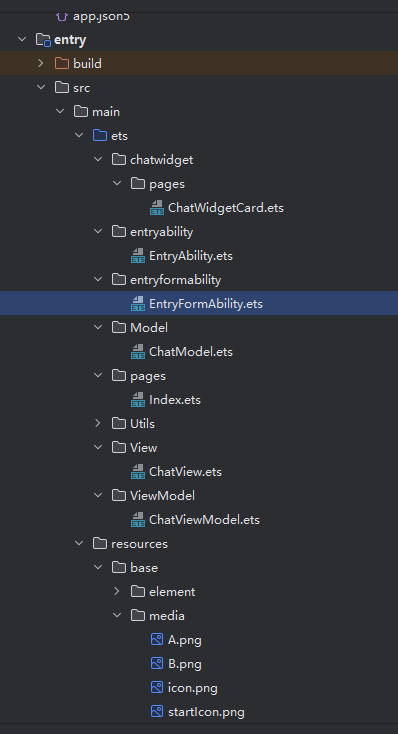
Index — 首页,昵称/IP输入,华为账号登录,路由跳转
-
ChatView — 聊天界面,消息左右布局,输入发送,自动滚底
-
ChatViewModel — 连接管理,消息收发与senderID去重,UI回调
-
ChatModel — 消息模型(头像、昵称、内容、是否自己)
-
WsChatClient — 封装鸿蒙原生WebSocket API
-
server.js — Node.js服务端,连接池管理,广播转发
-
EntryFormAbility — 元服务入口,承载页面生命周期
-
整体架构流程
用户启动元服务
       ↓
 EntryFormAbility(入口承载)
       ↓
 Index 首页
   ├── 华为账号登录 → 获取用户标识
   ├── 输入昵称、服务器IP
   └── 点击加入 → router.pushUrl 传参跳转
       ↓
 ChatView 聊天界面
   ├── 接收路由参数(userName, userID, serverIP)
   ├── 初始化 ChatViewModel
   ├── connectToServer(ip, port) → 创建 WsChatClient
   └── 设置回调:收到消息 → 刷新列表 → 自动滚底
       ↓
 WsChatClient(WebSocket连接)
   └── ws://IP:3000 → 连接 Node.js 服务端
       ↓
 server.js(服务端)
   ├── 新连接加入连接池
   ├── 收到消息 → 广播给所有客户端
   └── 断线 → 清理连接池
       ↓
 消息收发流程:
   发送:输入框 → sendMessage() → 本地list.push + ws.send(JSON)
   接收:ws.onmessage → JSON解析 → senderID判断是否自己
         → 不是自己则list.push → 回调通知ChatView刷新
技术名词解释
| ArkTS | 鸿蒙原生开发语言,TypeScript的超集,用于编写元服务 |
| ArkUI | 鸿蒙声明式UI框架,通过组件化方式构建界面 |
| MVVM | Model-View-ViewModel架构,数据驱动视图,解耦UI与逻辑 |
| WebSocket | 全双工通信协议,客户端与服务端建立长连接实时收发消息 |
| JSON | 轻量级数据交换格式,消息体序列化/反序列化 |
| AccountKit | 华为账号服务,提供登录授权获取用户标识 |
| EntryFormAbility | 元服务入口Ability,承载页面生命周期和路由 |
| router.pushUrl | 鸿蒙路由API,页面间跳转并传递参数 |
| @Entry | 装饰器,标记页面入口组件 |
| @ComponentV2 | 装饰器,声明自定义组件(V2版本) |
| @Local | 装饰器,组件级响应式状态变量 |
| senderID | 消息发送者唯一标识,用于判断消息是否为自己所发 |
| ws | Node.js的WebSocket库,用于搭建服务端 |
| Scroller | 鸿蒙滚动控制器,控制列表滚动到底部 |
技术细节
ChatModel:
export class ChatModel {
  img: Resource;
  name: string;
  text: string;
  isMe: boolean;

  constructor(img: Resource, name: string, text: string, isMe: boolean = false) {
    this.img = img;
    this.name = name;
    this.text = text;
    this.isMe = isMe;
  }
}
WsChatClient:
import { webSocket } from '@kit.NetworkKit';
import { BusinessError } from '@kit.BasicServicesKit';
import { util } from '@kit.ArkTS';

export class WsChatClient {
  private ws: webSocket.WebSocket | null = null;
  private url: string;
  private onMessage: ((msg: string) => void) | null = null;
  private onStatus: ((status: string) => void) | null = null;
  private isConnected: boolean = false;

  constructor(url: string) {
    this.url = url;
  }

  connect(onMessage: (msg: string) => void, onStatus?: (status: string) => void): void {
    this.onMessage = onMessage;
    this.onStatus = onStatus || null;

    this.ws = webSocket.createWebSocket();

    this.ws.on('open', (err: BusinessError, value: Object) => {
      if (!err) {
        this.isConnected = true;
        this.onStatus?.('已连接');
      } else {
        this.onStatus?.('连接失败:' + JSON.stringify(err));
      }
    });

    this.ws.on('message', (err: BusinessError, value: string | ArrayBuffer) => {
      if (!err && this.onMessage) {
        let msg: string;
        if (typeof value === 'string') {
          msg = value;
        } else {
          let decoder = new util.TextDecoder();
          msg = decoder.decodeWithStream(new Uint8Array(value));
        }
        this.onMessage(msg);
      }
    });

    this.ws.on('close', (err: BusinessError, value: webSocket.CloseResult) => {
      this.isConnected = false;
      this.onStatus?.('已断开');
    });

    this.ws.on('error', (err: BusinessError) => {
      this.onStatus?.('错误:' + JSON.stringify(err));
    });

    this.ws.connect(this.url, (err: BusinessError, value: boolean) => {
      if (err) {
        this.onStatus?.('连接失败:' + JSON.stringify(err));
      }
    });
  }

  send(msg: string): void {
    if (this.ws && this.isConnected) {
      this.ws.send(msg, (err: BusinessError, value: boolean) => {
        if (err) {
          console.error('发送失败:' + JSON.stringify(err));
        }
      });
    }
  }

  close(): void {
    if (this.ws) {
      this.ws.close();
      this.ws = null;
      this.isConnected = false;
    }
  }
}
ChatViewModel:
import { ChatModel } from '../Model/ChatModel';
import { WsChatClient } from '../Utils/WsChatClient';

interface MessageData {
  sender: string;
  senderID: string;
  text: string;
  time: number;
}

export class ChatViewModel {
  list: Array<ChatModel> = [];
  private wsClient: WsChatClient | null = null;
  private myName: string = '我';
  private myID: string = '';
  private onListChanged: (() => void) | null = null;

  constructor() {
    this.list = [];
  }

  // 设置列表更新回调
  setOnListChanged(callback: () => void): void {
    this.onListChanged = callback;
  }

  // 设置用户信息
  setMyName(name: string): void {
    this.myName = name;
  }

  setMyID(id: string): void {
    this.myID = id;
  }

  // 启动服务器(创建房间)
  startServer(): void {
    console.info('启动聊天服务器');
  }

  // 连接WebSocket服务器
  connectToServer(ip: string, port: number = 3000): void {
    let url: string = `ws://${ip}:${port}`;
    this.wsClient = new WsChatClient(url);

    this.wsClient.connect(
      (msg: string): void => {
        this.handleReceivedMessage(msg);
      },
      (status: string): void => {
        console.info('连接状态:' + status);
      }
    );
  }

  // 处理接收到的消息
  private handleReceivedMessage(msg: string): void {
    try {
      let messageData: MessageData = JSON.parse(msg) as MessageData;

      // 通过senderID判断是否是自己发的消息
      let isMe: boolean = messageData.senderID === this.myID;

      // 如果是自己发的消息就不重复添加(因为在sendMessage中已经添加了)
      if (isMe) {
        return;
      }

      let chatMsg: ChatModel = new ChatModel(
        $r('app.media.A'),
        messageData.sender,
        messageData.text,
        false  // 别人发的
      );
      this.list.push(chatMsg);

      // 通知视图更新
      this.onListChanged?.();

    } catch (e) {
      let chatMsg: ChatModel = new ChatModel(
        $r('app.media.A'),
        '对方',
        msg,
        false
      );
      this.list.push(chatMsg);

      // 通知视图更新
      this.onListChanged?.();
    }
  }

  // 发送消息
  sendMessage(text: string): void {
    this.list.push(new ChatModel($r('app.media.B'), this.myName, text, true));

    if (this.wsClient) {
      let messageData: MessageData = {
        sender: this.myName,
        senderID: this.myID,
        text: text,
        time: new Date().getTime()
      };
      this.wsClient.send(JSON.stringify(messageData));
    }
  }

  // 断开连接
  disconnect(): void {
    if (this.wsClient) {
      this.wsClient.close();
      this.wsClient = null;
    }
  }
}
ChatView
// view/chatView.ets
import { ChatModel } from '../Model/ChatModel';
import { ChatViewModel } from '../ViewModel/ChatViewModel';
import { router } from '@kit.ArkUI';

interface RouterParams {
  userName: string;
  userID: string;
  isHost: boolean;
  serverIP?: string;
}
@Entry
@ComponentV2
export struct ChatView {
  @Local chatList: ChatModel[] = [];
  @Local inputText: string = '';
  private viewModel: ChatViewModel = new ChatViewModel();
  private scroller: Scroller = new Scroller();
  private userName: string = '';
  private userID: string = '';
  private isHost: boolean = false;

  aboutToAppear(): void {
    // 获取路由参数
    const params: RouterParams = router.getParams() as RouterParams;
    this.userName = params.userName;
    this.userID = params.userID;
    this.isHost = params.isHost;

    // 设置用户信息
    this.viewModel.setMyName(this.userName);
    this.viewModel.setMyID(this.userID);

    // 设置列表更新回调,当收到新消息时自动刷新UI
    this.viewModel.setOnListChanged(() => {
      this.chatList = this.viewModel.list;
      // 滚到底部
      this.scroller.scrollEdge(Edge.Bottom);
    });

    // 连接服务器
    if (this.isHost) {
      this.viewModel.startServer();
    } else {
      const ip: string = params.serverIP || '192.168.1.100';
      this.viewModel.connectToServer(ip);
    }

    // 初始化数据
    this.chatList = this.viewModel.list;
  }

  build() {
    Column() {
      // ========== 顶部标题栏 ==========
      Row() {
        Button('← 返回')
          .fontSize(14)
          .fontColor('#007AFF')
          .backgroundColor(Color.Transparent)
          .onClick(() => {
            this.viewModel.disconnect();
            router.back();
          })

        Text('聊天室')
          .fontSize(18)
          .fontWeight(FontWeight.Bold)
          .layoutWeight(1)
          .textAlign(TextAlign.Center)

        Text(this.userName)
          .fontSize(12)
          .fontColor('#888888')
          .padding({ right: 12 })
      }
      .width('100%')
      .height(48)
      .backgroundColor('#FFFFFF')
      .padding({ left: 8 })

      // ========== 消息列表区域 ==========
      List({ scroller: this.scroller }) {
        ForEach(this.chatList, (item: ChatModel, index: number) => {
          ListItem() {
            Row() {
              if (item.isMe) {
                // ----- 自己发的消息 -----
                Blank()
                Column({ space: 4 }) {
                  Text(item.text)
                    .fontSize(16)
                    .padding(12)
                    .borderRadius(12)
                    .backgroundColor('#007AFF')
                    .fontColor(Color.White)
                    .constraintSize({ maxWidth: '70%' })
                }
                Image(item.img)
                  .width(40)
                  .height(40)
                  .borderRadius(20)
                  .objectFit(ImageFit.Cover)
                  .margin({ left: 8 })
              } else {
                // ----- 别人发的消息 -----
                Image(item.img)
                  .width(40)
                  .height(40)
                  .borderRadius(20)
                  .objectFit(ImageFit.Cover)
                  .margin({ right: 8 })
                Column({ space: 4 }) {
                  Text(item.name)
                    .fontSize(12)
                    .fontColor('#888888')
                    .padding({ left: 4 })
                  Text(item.text)
                    .fontSize(16)
                    .padding(12)
                    .borderRadius(12)
                    .backgroundColor('#E5E5EA')
                    .fontColor(Color.Black)
                    .constraintSize({ maxWidth: '70%' })
                }
              }
            }
            .width('100%')
            .padding({ left: 12, right: 12, top: 6, bottom: 6 })
            .alignItems(VerticalAlign.Top)
          }
        }, (item: ChatModel, index: number) => index.toString())
      }
      .layoutWeight(1)
      .backgroundColor('#FAFAFA')

      // ========== 底部输入区域 ==========
      Row({ space: 10 }) {
        TextInput({ placeholder: '输入消息...', text: this.inputText })
          .layoutWeight(1)
          .height(44)
          .padding({ left: 12, right: 12 })
          .backgroundColor('#FFFFFF')
          .borderRadius(22)
          .border({ width: 1, color: '#E0E0E0' })
          .onChange((value: string) => {
            this.inputText = value;
          })

        Button('发送')
          .height(44)
          .padding({ left: 16, right: 16 })
          .borderRadius(22)
          .backgroundColor('#007AFF')
          .fontColor(Color.White)
          .fontSize(14)
          .onClick(() => {
            if (this.inputText.trim() !== '') {
              this.viewModel.sendMessage(this.inputText.trim());
              // 更新列表
              this.chatList = this.viewModel.list;
              this.inputText = '';
              this.scroller.scrollEdge(Edge.Bottom);
            }
          })
      }
      .width('100%')
      .padding({ left: 12, right: 12, top: 8, bottom: 8 })
      .backgroundColor('#F5F5F5')
    }
    .width('100%')
    .height('100%')
  }
}
ChatWidgetCard:
@Entry
@Component
struct ChatWidgetCard {
  /*
   * The title.
   */
  readonly title: string = '局域网多人聊天';
  /*
   * The action type.
   */
  readonly actionType: string = 'router';
  /*
   * The ability name.
   */
  readonly abilityName: string = 'EntryAbility';
  /*
   * The message.
   */
  readonly message: string = 'add detail';
  /*
   * The width percentage setting.
   */
  readonly fullWidthPercent: string = '100%';
  /*
   * The height percentage setting.
   */
  readonly fullHeightPercent: string = '100%';

  build() {
    Row() {
      Column() {
        Text(this.title)
          .fontSize($r('app.float.font_size'))
          .fontWeight(FontWeight.Medium)
          .fontColor($r('sys.color.font'))
      }
      .width(this.fullWidthPercent)
    }
    .height(this.fullHeightPercent)
    .backgroundColor($r('sys.color.comp_background_primary'))
    .onClick(() => {
      postCardAction(this, {
        action: this.actionType,
        abilityName: this.abilityName,
        params: {
          targetPage: 'pages/Index'
        }
      });
    })
  }
}
Index:
import { authentication } from '@kit.AccountKit';
import { BusinessError } from '@kit.BasicServicesKit';
import { hilog } from '@kit.PerformanceAnalysisKit';
import router from '@ohos.router';

const DOMAIN = 0x0000;

@Entry
@ComponentV2
struct Index {
  @Local inputIP: string = '192.168.3.237';
  @Local userName: string = '';

  build() {
    Column({ space: 30 }) {
      Text('局域网聊天室')
        .fontSize(32)
        .fontWeight(FontWeight.Bold)
        .fontColor('#333333')
        .margin({ top: 80, bottom: 20 })

      // 用户昵称
      Column({ space: 8 }) {
        Text('你的昵称')
          .fontSize(14)
          .fontColor('#888888')
          .alignSelf(ItemAlign.Start)
          .padding({ left: 5 })

        TextInput({ placeholder: '请输入昵称', text: this.userName })
          .width('75%')
          .height(48)
          .fontSize(16)
          .borderRadius(12)
          .backgroundColor('#F5F5F5')
          .padding({ left: 16 })
          .onChange((value: string) => {
            this.userName = value;
          })
      }

      // 服务器IP
      Column({ space: 8 }) {
        Text('服务器IP地址')
          .fontSize(14)
          .fontColor('#888888')
          .alignSelf(ItemAlign.Start)
          .padding({ left: 5 })

        TextInput({ placeholder: '请输入服务器IP', text: this.inputIP })
          .width('75%')
          .height(48)
          .fontSize(16)
          .borderRadius(12)
          .backgroundColor('#F5F5F5')
          .padding({ left: 16 })
          .onChange((value: string) => {
            this.inputIP = value;
          })
      }

      // 加入按钮
      Button('加入聊天室')
        .width('60%')
        .height(50)
        .fontSize(18)
        .fontWeight(FontWeight.Medium)
        .backgroundColor('#007AFF')
        .fontColor(Color.White)
        .borderRadius(25)
        .margin({ top: 20 })
        .onClick(() => {
          const name: string = this.userName.trim() || '用户' + Math.floor(Math.random() * 1000);
          const ip: string = this.inputIP.trim() || '192.168.3.237';

          router.pushUrl({
            url: 'View/ChatView',
            params: {
              userName: name,
              userID: 'user_' + Date.now(),
              serverIP: ip
            }
          }).catch((err: BusinessError) => {
            hilog.error(DOMAIN, 'testTag', '跳转失败: %{public}s', JSON.stringify(err));
          });
        })

      Text('提示:手机和电脑需连接同一WiFi。')
        .fontSize(12)
        .fontColor('#BBBBBB')
        .margin({ top: 20 })
      Text('需在终端安装依赖 npm install ws')
        .fontSize(12)
        .fontColor('#BBBBBB')
        .margin({ top: 5 })
      Text('需在终端开启服务端 node server.js。')
        .fontSize(12)
        .fontColor('#BBBBBB')
        .margin({ top: 5 })
      Text('房主可在终端输入 ipconfig 查看IPv4地址')
        .fontSize(12)
        .fontColor('#BBBBBB')
        .margin({ top: 5 })
    }
    .width('100%')
    .height('100%')
    .alignItems(HorizontalAlign.Center)
  }

  aboutToAppear(): void {
    hilog.info(DOMAIN, 'testTag', '%{public}s', 'Ability onCreate');
    this.loginWithHuaweiID();
  }

  private loginWithHuaweiID(): void {
    const loginRequest: authentication.HuaweiIDProvider = new authentication.HuaweiIDProvider();
    const request: authentication.LoginWithHuaweiIDRequest = loginRequest.createLoginWithHuaweiIDRequest();
    request.forceLogin = false;

    const controller: authentication.AuthenticationController = new authentication.AuthenticationController();
    controller.executeRequest(request).then((data: authentication.LoginWithHuaweiIDResponse) => {
      const authCode: string = data.data?.authorizationCode || '';
      // 用华为账号信息作为用户名
      if (authCode) {
        this.userName = 'HW_' + authCode.substring(0, 6);
      }
      hilog.info(DOMAIN, 'testTag', '登录成功');
    }).catch((error: BusinessError) => {
      hilog.error(DOMAIN, 'testTag', 'error: %{public}s', JSON.stringify(error));
      // 登录失败用默认昵称
      this.userName = '用户' + Math.floor(Math.random() * 1000);
    });
  }
}
EntryFormAbility:
import { formBindingData, FormExtensionAbility, formInfo } from '@kit.FormKit';
import { Want } from '@kit.AbilityKit';

export default class EntryFormAbility extends FormExtensionAbility {
  onAddForm(want: Want) {
    // Called to return a FormBindingData object.
    const formData = '';
    return formBindingData.createFormBindingData(formData);
  }

  onCastToNormalForm(formId: string) {
    // Called when the form provider is notified that a temporary form is successfully
    // converted to a normal form.
  }

  onUpdateForm(formId: string) {
    // Called to notify the form provider to update a specified form.
  }

  onFormEvent(formId: string, message: string) {
    // Called when a specified message event defined by the form provider is triggered.
  }

  onRemoveForm(formId: string) {
    // Called to notify the form provider that a specified form has been destroyed.
  }

  onAcquireFormState(want: Want) {
    // Called to return a {@link FormState} object.
    return formInfo.FormState.READY;
  }
}
小结
本项目实现了一个基于鸿蒙元服务的局域网多人聊天室,采用 ArkTS + ArkUI 构建客户端,通过 WebSocket 与 Node.js 服务端实时通信。
核心成果
-
实现了用户登录、房间加入、消息收发、界面刷新等完整聊天流程
-
采用 MVVM 架构分离视图与逻辑,代码结构清晰
-
通过 senderID 去重机制避免消息重复显示
-
支持华为账号认证获取用户身份
存在问题
-
端口配置不统一(服务端3000 / 客户端8080)
-
缺少连接状态提示、自动重连、心跳保活
-
服务端广播包含发送者自身,浪费带宽
-
我没有其它手机验证能不能连成功
改进方向
-
统一端口配置并增加连接状态UI
-
添加断线重连与心跳机制
-
优化服务端广播逻辑,排除发送者

作为“人工智能6S店”的官方数字引擎,为AI开发者与企业提供一个覆盖软硬件全栈、一站式门户。
更多推荐


 1
1 0
0- 0


 已为社区贡献3条内容

所有评论(0)