
鸿蒙应用开发实战【71】— 数据统计分析多维度计数
鸿蒙应用开发实战【71】— 数据统计分析多维度计数
本文是「号码助手全栈开发系列」第 71 篇,持续更新中…
开源社区:https://openharmonycrossplatform.csdn.net
前言
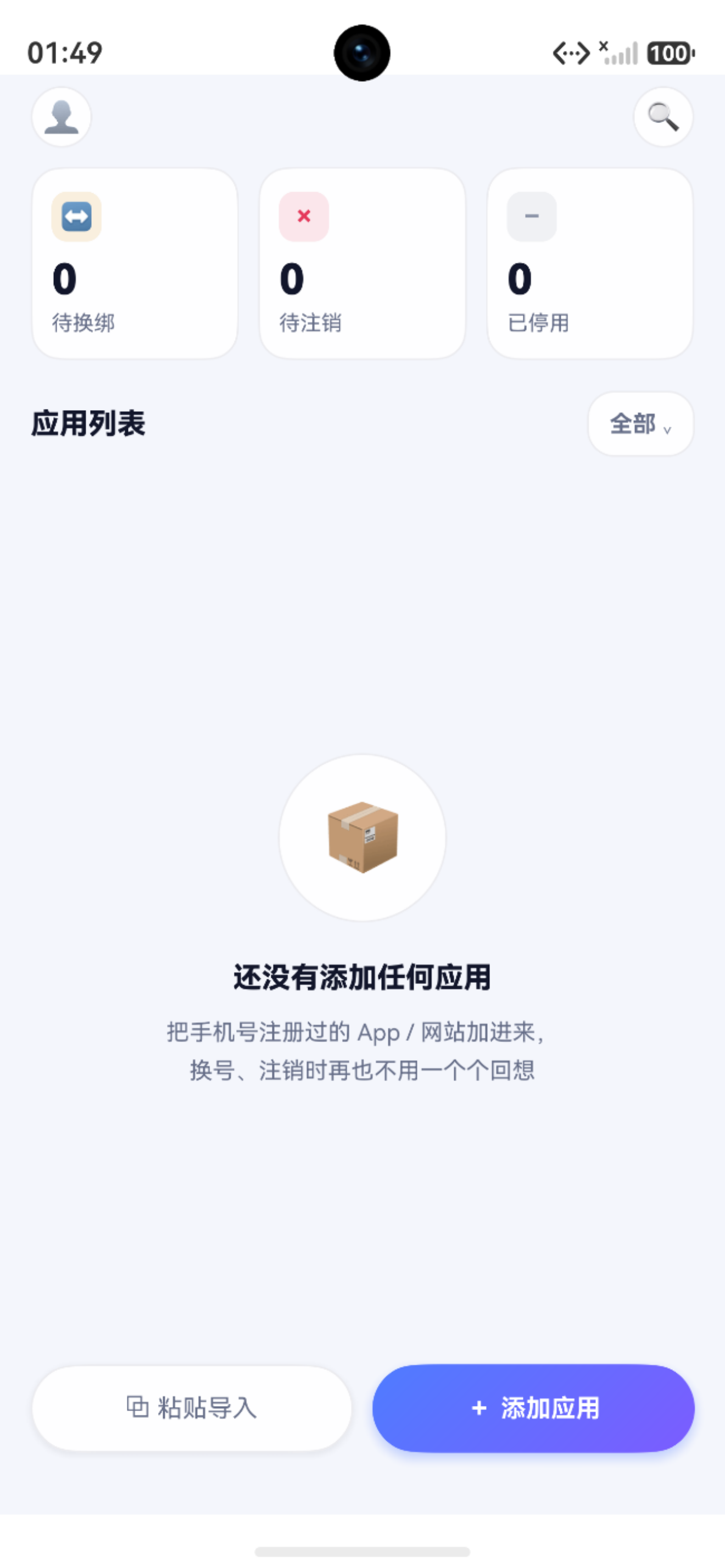
首页的统计卡片不是简单的硬编码占位符,它们背后是 DAO 层多维度的聚合查询体系——按状态统计绑定数、按类别统计应用分布、按卡号统计绑定密度。本篇以 AppBindingDao.countByStatus() 为核心,系统讲解数据统计分析的设计与实现。
本文涵盖:StatusCount 接口设计、countByStatus 聚合查询实现、四状态枚举体系、按应用类别多维度统计、按卡号维度统计、RdbPredicates 聚合查询技巧、Promise.all 并行聚合、首页统计卡片数据绑定、自定义查询构建器模式。
一、StatusCount 接口设计
1.1 接口定义
统计查询的返回结果需要一个标准化的数据结构。StatusCount 接口表达了"某个状态对应多少条记录"这一语义:
// AppBindingDao.ets — 状态统计接口
export interface StatusCount {
  status: string;  // 状态值,如 '使用中'、'待换绑'、'待注销'、'已停用'
  count: number;   // 该状态下的记录数
}
在其他需要按不同维度聚合的场景中,可以复用相同的模式:
// 按类别统计
export interface CategoryCount {
  category: string;
  count: number;
}

// 按卡号统计
export interface CardBindingCount {
  cardId: number;
  cardLabel: string;
  phoneNumber: string;
  bindingCount: number;
}
1.2 四状态枚举
号码助手定义了四种应用绑定状态:
| 状态值 | 枚举常量 | 语义 | 颜色标识 |
|---|---|---|---|
使用中 | ACTIVE | 正常使用的应用绑定 | 绿色 #4CAF50 |
待换绑 | PENDING_SWITCH | 需要更换绑定的号码 | 橙色 #FF7A1E |
待注销 | PENDING_CANCEL | 需要注销的应用绑定 | 红色 #E5395B |
已停用 | DISABLED | 已停用的绑定记录 | 灰色 #A0A0B0 |
四种状态对应首页的四个统计维度,也对应 StatusListPage 的筛选标签。
二、countByStatus 聚合查询
2.1 SQL 语义
countByStatus 等价于以下 SQL 语句:
SELECT status, COUNT(*) AS count
FROM app_binding
GROUP BY status
ORDER BY status ASC;
其返回结果示例:
| status | count |
|---|---|
| 使用中 | 12 |
| 待换绑 | 3 |
| 待注销 | 1 |
| 已停用 | 5 |
2.2 完整实现
// AppBindingDao.ets — countByStatus 聚合查询
import { relationalStore } from '@kit.ArkData';
import { hilog } from '@kit.PerformanceAnalysisKit';

const TAG = 'AppBindingDao';

export class AppBindingDao {
  private store: relationalStore.RdbStore;

  constructor(store: relationalStore.RdbStore) {
    this.store = store;
  }

  /**
   * 按状态分组统计绑定数量
   * @returns StatusCount[] 状态计数数组
   */
  async countByStatus(): Promise<StatusCount[]> {
    const predicates = new relationalStore.RdbPredicates('app_binding');
    const resultSet: relationalStore.ResultSet =
      await this.store.query(predicates, ['status', 'COUNT(*) AS count']);

    const counts: StatusCount[] = [];

    try {
      while (resultSet.goToNextRow()) {
        const status = resultSet.getString(
          resultSet.getColumnIndex('status')
        );
        const count = resultSet.getLong(
          resultSet.getColumnIndex('count')
        );
        counts.push({ status, count });
      }
      return counts;
    } catch (error) {
      hilog.error(0x0000, TAG, 'countByStatus failed: %{public}s',
        (error as Error).message);
      throw error;
    } finally {
      resultSet.close();
    }
  }
}
2.3 关键要点
| 要点 | 说明 |
|---|---|
| 列投影 | ['status', 'COUNT(*) AS count'] 只查询需要的列 |
| GROUP BY 隐式 | RdbPredicates 不显式支持 GROUP BY,但列投影中使用聚合函数时自动生效 |
resultSet.close() | 必须在 finally 块中关闭,避免 ResultSet 泄漏 |
getColumnIndex | 通过列名获取索引,避免硬编码位置 |
三、单状态计数
3.1 基础 count
除了分组统计,还需要对单个表进行无条件计数:
// AppBindingDao.ets — 基础计数
async count(): Promise<number> {
  const predicates = new relationalStore.RdbPredicates('app_binding');
  const resultSet = await this.store.query(
    predicates,
    ['COUNT(*) AS count']
  );

  try {
    if (resultSet.rowCount === 0) return 0;
    resultSet.goToFirstRow();
    return resultSet.getLong(0);
  } finally {
    resultSet.close();
  }
}
等价 SQL:SELECT COUNT(*) FROM app_binding
3.2 条件计数
// AppBindingDao.ets — 带条件的计数
async countBySingleStatus(status: string): Promise<number> {
  const predicates = new relationalStore.RdbPredicates('app_binding');
  predicates.equalTo('status', status);
  const resultSet = await this.store.query(
    predicates,
    ['COUNT(*) AS count']
  );

  try {
    resultSet.goToFirstRow();
    return resultSet.getLong(0);
  } finally {
    resultSet.close();
  }
}
等价 SQL:SELECT COUNT(*) FROM app_binding WHERE status = '使用中'
四、多维度统计
4.1 按应用类别统计
除了按状态统计,还可以按应用类别进行分组:
// AppBindingDao.ets — 按类别统计
async countByCategory(): Promise<CategoryCount[]> {
  const predicates = new relationalStore.RdbPredicates('app_binding');
  const resultSet = await this.store.query(
    predicates,
    ['category', 'COUNT(*) AS count']
  );

  const counts: CategoryCount[] = [];

  try {
    while (resultSet.goToNextRow()) {
      counts.push({
        category: resultSet.getString(
          resultSet.getColumnIndex('category')
        ),
        count: resultSet.getLong(
          resultSet.getColumnIndex('count')
        ),
      });
    }
    return counts;
  } finally {
    resultSet.close();
  }
}
应用类别体系:
| 类别值 | 含义 | 典型应用 |
|---|---|---|
social | 社交 | 微信、QQ、微博 |
shopping | 购物 | 淘宝、京东、拼多多 |
finance | 金融 | 支付宝、银行App |
utility | 工具 | 美团、滴滴、地图 |
other | 其他 | 未分类的应用 |
4.2 按卡号统计绑定密度
统计每张 SIM 卡下绑定了多少应用,帮助用户识别"最繁忙"的号码:
// AppBindingDao.ets — 按卡号统计
async countByCard(): Promise<CardBindingCount[]> {
  // 使用原始 SQL 进行 JOIN 查询
  const sql = `
    SELECT b.card_id, c.label AS card_label, c.phone_number,
           COUNT(b.id) AS binding_count
    FROM app_binding b
    LEFT JOIN cards c ON b.card_id = c.id
    GROUP BY b.card_id
    ORDER BY binding_count DESC
  `;

  const resultSet = await this.store.querySql(sql);

  const counts: CardBindingCount[] = [];

  try {
    while (resultSet.goToNextRow()) {
      counts.push({
        cardId: resultSet.getLong(
          resultSet.getColumnIndex('card_id')
        ),
        cardLabel: resultSet.getString(
          resultSet.getColumnIndex('card_label')
        ),
        phoneNumber: resultSet.getString(
          resultSet.getColumnIndex('phone_number')
        ),
        bindingCount: resultSet.getLong(
          resultSet.getColumnIndex('binding_count')
        ),
      });
    }
    return counts;
  } finally {
    resultSet.close();
  }
}
4.3 维度对比
| 维度 | 分组字段 | 查询方式 | 用途 |
|---|---|---|---|
| 按状态 | status | RdbPredicates 投影 | 首页统计卡片 |
| 按类别 | category | RdbPredicates 投影 | 类别分布分析 |
| 按卡号 | card_id | querySql + JOIN | 卡号负载分析 |
| 按应用 | app_name | RdbPredicates 投影 | 应用去重检查 |
五、查询构建器模式
5.1 链式 predicates
当聚合查询的条件变得复杂时,可以利用 RdbPredicates 的链式调用:
// 复杂场景:统计某张卡下特定类别中非"已停用"状态的绑定数
async countComplex(params: {
  cardId: number;
  category?: string;
  excludeStatus?: string;
}): Promise<number> {
  const predicates = new relationalStore.RdbPredicates('app_binding');
  predicates.equalTo('card_id', params.cardId);
  if (params.category) {
    predicates.equalTo('category', params.category);
  }
  if (params.excludeStatus) {
    predicates.notEqualTo('status', params.excludeStatus);
  }

  const resultSet = await this.store.query(
    predicates,
    ['COUNT(*) AS count']
  );

  try {
    resultSet.goToFirstRow();
    return resultSet.getLong(0);
  } finally {
    resultSet.close();
  }
}
5.2 时间范围统计
// 统计一段时间内的新增绑定
async countByTimeRange(start: number, end: number): Promise<number> {
  const predicates = new relationalStore.RdbPredicates('app_binding');
  predicates.greaterThanOrEqualTo('created_at', start);
  predicates.lessThanOrEqualTo('created_at', end);

  const resultSet = await this.store.query(
    predicates,
    ['COUNT(*) AS count']
  );

  try {
    resultSet.goToFirstRow();
    return resultSet.getLong(0);
  } finally {
    resultSet.close();
  }
}
六、DashboardStats 聚合服务
6.1 服务类设计
将多个维度的统计组合成一个统一的服务接口:
// service/DashboardStats.ets — 聚合统计服务
import { AppBindingDao, StatusCount } from './dao/AppBindingDao';
import { CardDao } from './dao/CardDao';
import { SmsCandidateDao } from './dao/SmsCandidateDao';

export interface DashboardData {
  totalCards: number;
  totalBindings: number;
  statusCounts: StatusCount[];
  categoryCounts: CategoryCount[];
  pendingCandidates: number;
}

export class DashboardStats {
  private cardDao: CardDao;
  private bindingDao: AppBindingDao;
  private candidateDao: SmsCandidateDao;

  constructor(
    cardDao: CardDao,
    bindingDao: AppBindingDao,
    candidateDao: SmsCandidateDao
  ) {
    this.cardDao = cardDao;
    this.bindingDao = bindingDao;
    this.candidateDao = candidateDao;
  }

  async getAllStats(): Promise<DashboardData> {
    const [
      totalCards,
      totalBindings,
      statusCounts,
      categoryCounts,
      pendingCandidates,
    ] = await Promise.all([
      this.cardDao.count(),
      this.bindingDao.count(),
      this.bindingDao.countByStatus(),
      this.bindingDao.countByCategory(),
      this.candidateDao.countUnimported(),
    ]);

    return {
      totalCards,
      totalBindings,
      statusCounts,
      categoryCounts,
      pendingCandidates,
    };
  }
}
6.2 Promise.all 并行化
所有统计查询互不依赖,通过 Promise.all 并行执行:
| 并行查询数 | 串行耗时(估算) | 并行耗时(估算) | 提速比 |
|---|---|---|---|
| 5 个 | 50ms × 5 = 250ms | max(50ms) = 50ms | 5x |
| 3 个 | 50ms × 3 = 150ms | max(50ms) = 50ms | 3x |
七、首页统计卡片数据绑定
7.1 页面状态定义
// HomePage.ets — 统计卡片数据驱动
@Entry
@Component
struct HomePage {
  @State stats: DashboardData = {
    totalCards: 0,
    totalBindings: 0,
    statusCounts: [],
    categoryCounts: [],
    pendingCandidates: 0,
  };

  private statsService: DashboardStats = new DashboardStats(
    new CardDao(store),
    new AppBindingDao(store),
    new SmsCandidateDao(store)
  );

  async aboutToAppear(): Promise<void> {
    await this.refreshStats();
  }

  onPageShow(): void {
    // 从子页面返回时刷新
    this.refreshStats();
  }

  async refreshStats(): Promise<void> {
    try {
      this.stats = await this.statsService.getAllStats();
    } catch (error) {
      hilog.error(0x0000, 'HomePage',
        'Failed to load stats: %{public}s', (error as Error).message);
    }
  }
}
7.2 状态到 UI 的映射
// 从统计数据中提取各状态计数
get statusCountMap(): Record<string, number> {
  const map: Record<string, number> = {
    '使用中': 0,
    '待换绑': 0,
    '待注销': 0,
    '已停用': 0,
  };
  for (const item of this.stats.statusCounts) {
    if (item.status in map) {
      map[item.status] = item.count;
    }
  }
  return map;
}

// 待处理总数 = 待换绑 + 待注销
get pendingTotal(): number {
  return this.statusCountMap['待换绑'] + this.statusCountMap['待注销'];
}
7.3 统计卡片组件
@Builder
StatCard(icon: string, num: number, label: string, bgColor: ResourceColor, fgColor: ResourceColor) {
  Column() {
    Text(icon)
      .fontSize(16)
      .fontColor(fgColor)
      .backgroundColor(bgColor)
      .width(32).height(32)
      .borderRadius(8)
      .textAlign(TextAlign.Center)

    Text(`${num}`)
      .fontSize(22)
      .fontWeight(FontWeight.Bold)
      .fontColor('#1A1A2E')
      .margin({ top: 8 })

    Text(label)
      .fontSize(12)
      .fontColor('#68708A')
      .margin({ top: 4 })
  }
  .layoutWeight(1)
  .padding(12)
  .backgroundColor('#FFFFFF')
  .borderRadius(12)
  .shadow({ radius: 4, color: '#0D000000', offsetY: 2 })
}
八、缓存与刷新策略
8.1 内存缓存
// service/StatsCache.ets — 统计缓存
export class StatsCache {
  private cached: { data: DashboardData | null; timestamp: number } = {
    data: null,
    timestamp: 0,
  };

  private readonly TTL = 3000; // 3 秒缓存

  async getOrFetch(fetcher: () => Promise<DashboardData>): Promise<DashboardData> {
    const now = Date.now();
    if (this.cached.data && (now - this.cached.timestamp) < this.TTL) {
      return this.cached.data;
    }
    this.cached.data = await fetcher();
    this.cached.timestamp = now;
    return this.cached.data;
  }

  invalidate(): void {
    this.cached.data = null;
    this.cached.timestamp = 0;
  }
}
8.2 写操作后失效
// 在添加/修改/删除操作后使缓存失效
async onAddBinding(newBinding: AppBinding): Promise<void> {
  await this.bindingDao.insert(newBinding);
  statsCache.invalidate();  // 缓存失效
  await this.refreshStats(); // 重新加载
}
小结
| 要点 | 实现 | 说明 |
|---|---|---|
| StatusCount 接口 | { status, count } | 标准化统计返回结构 |
| countByStatus | 分组聚合查询 | 列投影 + GROUP BY 语义 |
| 多维度统计 | 状态/类别/卡号 | 三种不同维度的统计 |
| RdbPredicates 链式 | equalTo.notEqualTo | 复杂条件聚合 |
| DashboardStats | Promise.all 并行 | 5 个聚合查询并行执行 |
| 数据绑定 | @State + refreshStats | 首页卡片自动刷新 |
| 缓存策略 | StatsCache + TTL | 3 秒缓存避免频繁查询 |
| 缓存失效 | invalidate() | 写操作后主动刷新 |

如果这篇文章对你有帮助,欢迎点赞👍、收藏⭐、关注🔔,你的支持是我持续创作的动力!
相关资源:
- openHarmony 跨平台社区:https://openharmonycrossplatform.csdn.net
- HarmonyOS RDB 聚合查询官方文档:https://developer.huawei.com/consumer/cn/doc/harmonyos-guides/data-persistence-by-rdb-store-0000001820880581
- 号码助手源码参考:https://gitee.com/example/haomazhushou

作为“人工智能6S店”的官方数字引擎,为AI开发者与企业提供一个覆盖软硬件全栈、一站式门户。
更多推荐



 5
5 0
0- 0


 已为社区贡献21条内容

所有评论(0)