
鸿蒙应用开发:网络请求三种方式详解(http / rcp / axios)
文章目录
这是一个使用鸿蒙技术开发的本地原生记账应用,非常适合大家用来练手。相关源码已上传至 Github,点击此处查看项目。欢迎大家交流、指正,也欢迎提交 PR。
一、引言
在鸿蒙应用开发中,网络请求是应用与后端服务交互的核心能力。官方提供了 @kit.NetworkKit(http 模块)和 @kit.RemoteCommunicationKit(rcp 模块),同时社区也封装了 @ohos/axios 三方库。三者各有特点:
- http 模块(
@kit.NetworkKit):基础底层 API,功能全面但需手动管理资源; - rcp 模块(
@kit.RemoteCommunicationKit,HarmonyOS 5.0+):基于 Promise 的现代网络请求,支持拦截器和流式读取; - @ohos/axios(三方库):API 与 Web 端 axios 一致,使用最便捷。
本文将从权限声明开始,分别介绍这三种网络请求方式,并附带完整可运行示例,帮助你快速上手鸿蒙网络开发。
二、共同前提:网络权限声明
所有网络请求都需要在 module.json5 中声明网络权限:
"requestPermissions": [
  { "name": "ohos.permission.INTERNET" }
]
注意:示例中使用
https://jsonplaceholder.typicode.com作为测试 API。若你使用http://明文协议,需在module.json5中配置networkSecurity安全策略(不推荐在生产环境使用明文 HTTP)。
三、@kit.NetworkKit(http 模块)
这是鸿蒙系统原生的 HTTP/HTTPS 请求模块,支持 GET、POST 等方法,适合对请求过程有精细控制的场景。使用前需导入 @kit.NetworkKit。
3.1 完整示例(GET + POST)
import { http } from '@kit.NetworkKit';
import { BusinessError } from '@kit.BasicServicesKit';

@Entry
@Component
struct Index {
  @State getResult: string = ''
  @State postResult: string = ''
  @State loading: boolean = false

  // GET 请求
  async httpGetExample() {
    this.loading = true;
    const httpRequest = http.createHttp();
    try {
      const response = await httpRequest.request(
        'https://jsonplaceholder.typicode.com/posts',
        {
          method: http.RequestMethod.GET,
          header: { 'Content-Type': 'application/json' },
          expectDataType: http.HttpDataType.STRING, // 指定返回数据类型
          connectTimeout: 60000,
          readTimeout: 60000,
        }
      );
      if (typeof response.result === 'string') {
        this.getResult = response.result;
        console.info('GET 响应码:', response.responseCode);
      }
    } catch (err) {
      console.error('GET 请求失败:', (err as BusinessError).message);
    } finally {
      // 必须调用 destroy() 释放资源,否则内存泄漏
      httpRequest.destroy();
      this.loading = false;
    }
  }

  // POST 请求
  async httpPostExample() {
    this.loading = true;
    const httpRequest = http.createHttp();
    try {
      const extraData = JSON.stringify({
        username: 'admin',
        password: '123456',
      });
      const response = await httpRequest.request(
        'https://jsonplaceholder.typicode.com/posts',
        {
          method: http.RequestMethod.POST,
          header: { 'Content-Type': 'application/json' },
          extraData: extraData,
          expectDataType: http.HttpDataType.OBJECT, // 期望返回 JSON 对象
        }
      );
      this.postResult = JSON.stringify(response.result);
    } catch (err) {
      console.error('POST 请求失败:', (err as BusinessError).message);
    } finally {
      httpRequest.destroy();
      this.loading = false;
    }
  }

  build() {
    Column() {
      Text('http 网络请求示例')
        .fontSize(24)
        .fontWeight(FontWeight.Bold)
        .margin({ bottom: 20 })

      Button('发送 GET 请求')
        .width('80%')
        .height(48)
        .margin({ bottom: 10 })
        .onClick(() => this.httpGetExample())

      Text('GET 请求结果:')
        .fontSize(16)
        .fontWeight(FontWeight.Medium)
        .width('90%')
        .textAlign(TextAlign.Start)

      Text(this.getResult)
        .fontSize(20)
        .width('90%')
        .height(200)
        .padding(8)
        .border({ width: 1, color: '#ccc', radius: 6 })
        .margin({ bottom: 20 })
        .maxLines(6)
        .textOverflow({ overflow: TextOverflow.Ellipsis })
        .ellipsisMode(EllipsisMode.END)

      Button('发送 POST 请求')
        .width('80%')
        .height(48)
        .margin({ bottom: 10 })
        .onClick(() => this.httpPostExample())

      Text('POST 请求结果:')
        .fontSize(16)
        .fontWeight(FontWeight.Medium)
        .width('90%')
        .textAlign(TextAlign.Start)

      Text(this.postResult)
        .fontSize(20)
        .width('90%')
        .height(200)
        .padding(8)
        .border({ width: 1, color: '#ccc', radius: 6 })
        .margin({ bottom: 20 })

      if (this.loading) {
        LoadingProgress()
          .width(32)
          .height(32)
          .margin({ top: 10 })
      }
    }
    .width('100%')
    .height('100%')
    .padding(16)
    .alignItems(HorizontalAlign.Center)
    .justifyContent(FlexAlign.Start)
  }
}
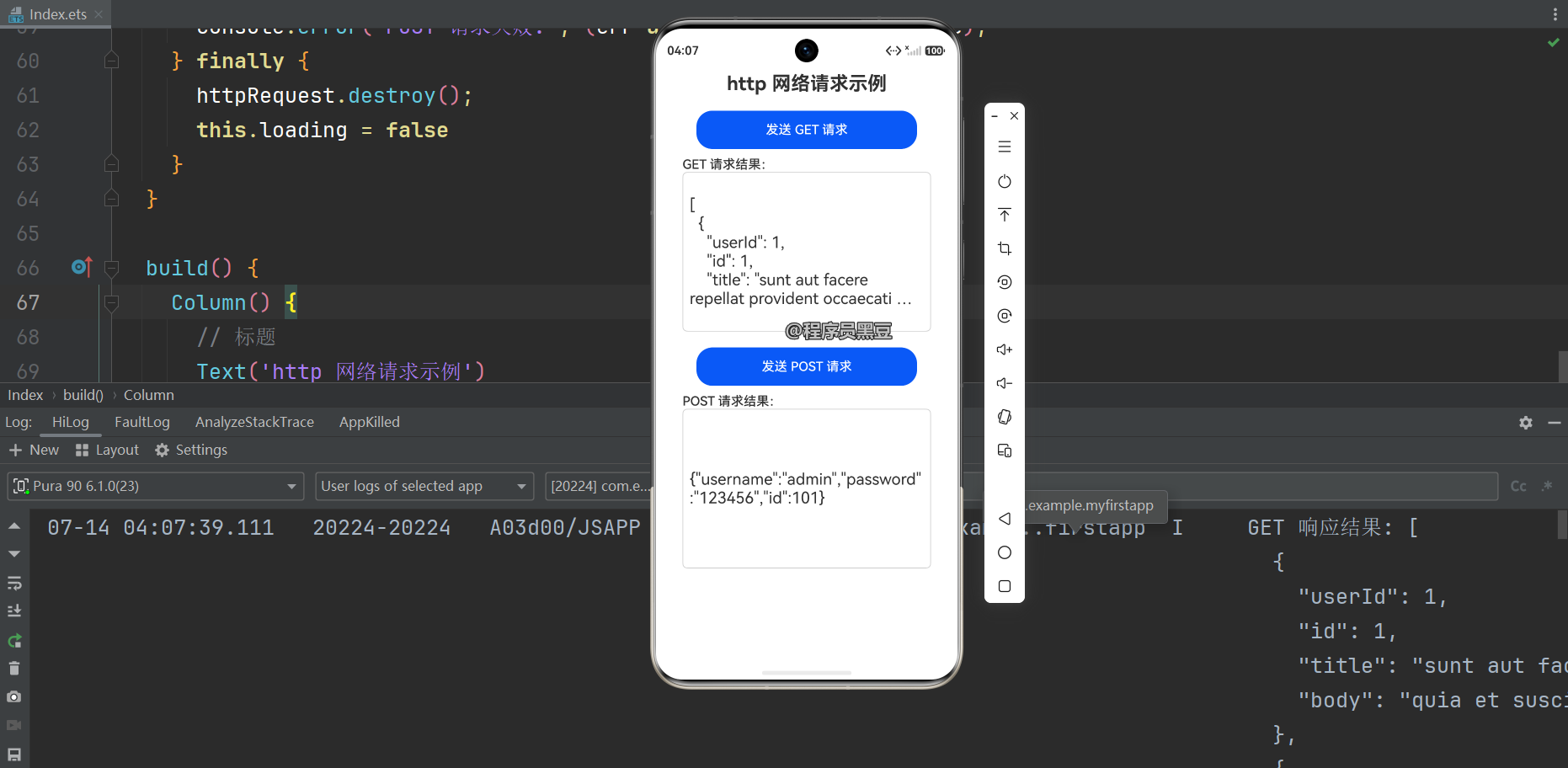
运行效果:
3.2 使用方式与注意事项
- 对象生命周期:每个
createHttp()创建的对象必须调用destroy()释放,否则会导致内存泄漏。 - extraData 字段:POST/PUT 请求时,请求体传入
extraData,支持string、Object或ArrayBuffer类型。如发送 JSON 建议使用JSON.stringify()转成字符串。若无请求体(如 GET)不应设置此字段。 - expectDataType:根据响应数据类型设定。设为
HttpDataType.OBJECT时,若返回数据超过 65536 个字符,会自动降级为STRING类型返回。 - 错误处理:需区分网络错误(如超时)和服务端返回错误(如 404),建议在
catch中统一处理并给出用户提示。
更多详见官方文档:使用 HTTP 访问网络
四、@kit.RemoteCommunicationKit(rcp 模块)
rcp(Remote Communication Protocol)是 HarmonyOS 5.0(API 12+)新增的现代网络请求模块,基于 Promise 和 async/await,支持流式读取、拦截器,使用更简洁。相比 http 模块,rcp 无需手动管理请求对象生命周期。
注意:rcp 属于
@kit.RemoteCommunicationKit,而非@kit.NetworkKit。
4.1 完整示例(GET + POST)
import { rcp } from '@kit.RemoteCommunicationKit';

// ── 自定义响应拦截器 ──
class ResponseInterceptor implements rcp.Interceptor {
  async intercept(
    context: rcp.RequestContext,
    next: rcp.RequestHandler
  ): Promise<rcp.Response> {
    const request: rcp.Request = context.request;
    console.info('[Interceptor] 请求 URL:', request.url);

    // 执行实际请求
    const response: rcp.Response = await next.handle(context);

    console.info('[Interceptor] 响应状态码:', response.statusCode);

    // 统一处理 HTTP 错误
    if (response.statusCode === 401) {
      console.error('[Interceptor] 未授权(401),建议刷新 token 或跳转登录');
    } else if (response.statusCode >= 500) {
      console.error('[Interceptor] 服务端错误:', response.statusCode);
    }

    return response;
  }
}

// ── 工具方法:创建带拦截器的 Session ──
function createSession(): rcp.Session {
  return rcp.createSession({
    interceptors: [new ResponseInterceptor()],
    // 可选:全局基础配置
    // requestConfiguration: {
    //   connectTimeout: 10000,
    //   transferTimeout: 30000,
    // },
  });
}

@Entry
@Component
struct Index {
  @State getResult: string | null = ''
  @State postResult: string | null = ''
  @State loading: boolean = false

  // ── GET 请求 ──
  async rcpGetExample(): Promise<void> {
    this.loading = true;
    const session = createSession();
    try {
      const response: rcp.Response = await session.get(
        'https://jsonplaceholder.typicode.com/posts'
      );
      // 使用 toString() 直接获取字符串响应
      this.getResult = response.toString();
      console.info('GET 响应码:', response.statusCode);
    } catch (err) {
      const error = err as Error;
      console.error('GET 请求失败:', error.message);
      this.getResult = '请求失败: ' + error.message;
    } finally {
      session.close();
      this.loading = false;
    }
  }

  // ── POST 请求 ──
  async rcpPostExample(): Promise<void> {
    this.loading = true;
    const session = createSession();
    try {
      const response: rcp.Response = await session.post(
        'https://jsonplaceholder.typicode.com/posts',
        JSON.stringify({
          title: 'HarmonyOS RCP 示例',
          body: '通过 rcp post 创建的帖子',
          userId: 1,
        })
      );
      // 也可使用 response.body?.text() 获取字符串
      this.postResult = response.toString();
      console.info('POST 响应码:', response.statusCode);
    } catch (err) {
      const error = err as Error;
      console.error('POST 请求失败:', error.message);
      this.postResult = '请求失败: ' + error.message;
    } finally {
      session.close();
      this.loading = false;
    }
  }

  build() {
    Column() {
      Text('RCP 网络请求示例')
        .fontSize(24)
        .fontWeight(FontWeight.Bold)
        .margin({ bottom: 20 })

      Button('发送 GET 请求')
        .width('80%')
        .height(48)
        .margin({ bottom: 10 })
        .onClick(() => this.rcpGetExample())

      Text('GET 请求结果:')
        .fontSize(16)
        .fontWeight(FontWeight.Medium)
        .width('90%')
        .textAlign(TextAlign.Start)

      Text(this.getResult)
        .fontSize(20)
        .width('90%')
        .height(200)
        .padding(8)
        .border({ width: 1, color: '#ccc', radius: 6 })
        .margin({ bottom: 20 })
        .maxLines(6)
        .textOverflow({ overflow: TextOverflow.Ellipsis })
        .ellipsisMode(EllipsisMode.END)

      Button('发送 POST 请求')
        .width('80%')
        .height(48)
        .margin({ bottom: 10 })
        .onClick(() => this.rcpPostExample())

      Text('POST 请求结果:')
        .fontSize(16)
        .fontWeight(FontWeight.Medium)
        .width('90%')
        .textAlign(TextAlign.Start)

      Text(this.postResult)
        .fontSize(20)
        .width('90%')
        .height(200)
        .padding(8)
        .border({ width: 1, color: '#ccc', radius: 6 })

      if (this.loading) {
        LoadingProgress()
          .width(32)
          .height(32)
          .margin({ top: 10 })
      }
    }
    .width('100%')
    .height('100%')
    .padding(16)
    .alignItems(HorizontalAlign.Center)
    .justifyContent(FlexAlign.Start)
  }
}
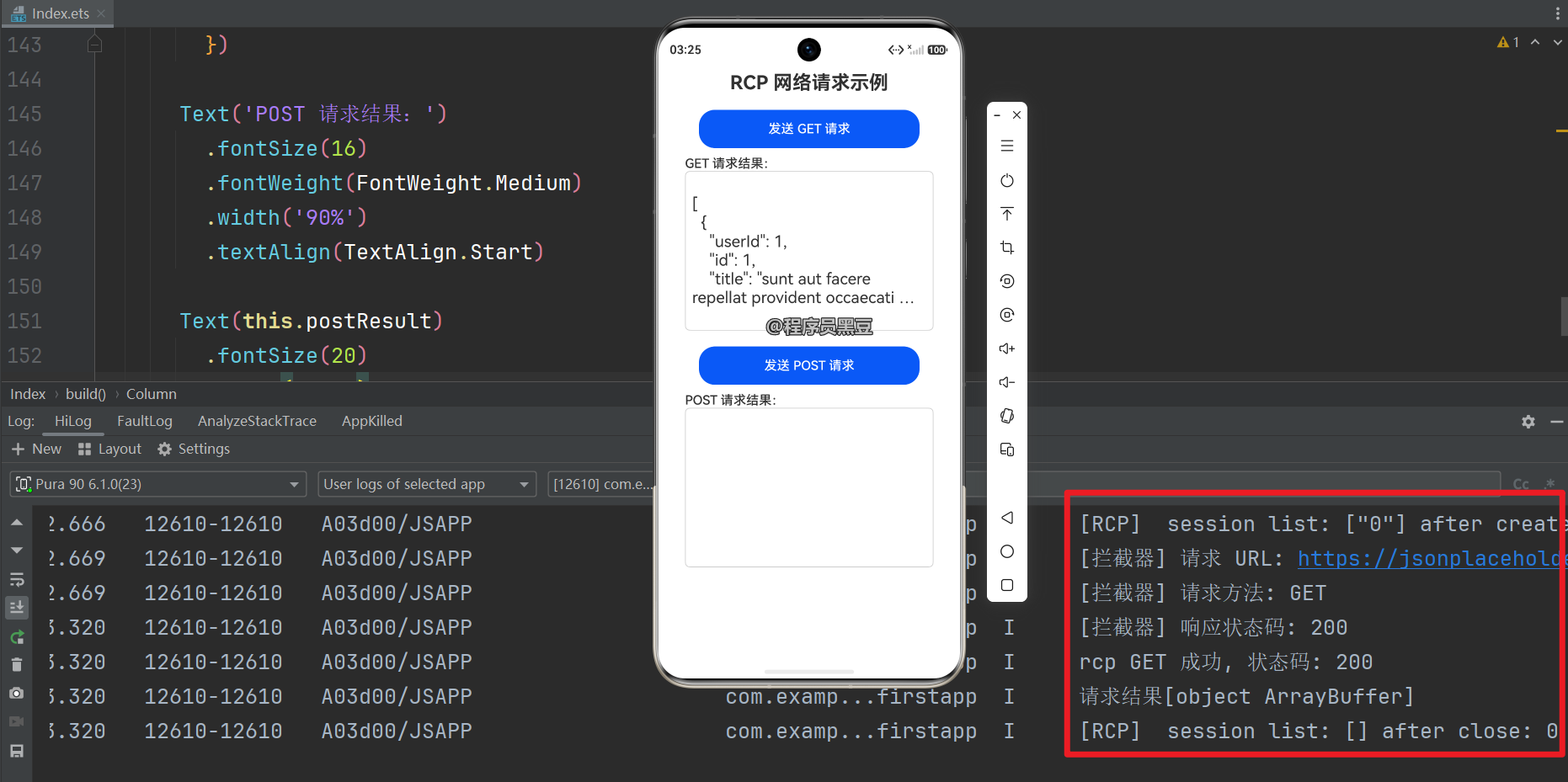
运行效果:
4.2 使用方式与注意事项
- 版本依赖:仅支持 API 12(HarmonyOS 5.0.0)及以上版本,低版本无法使用。
- Session 复用:
rcp.createSession()创建的 session 可在多次请求中复用以提高性能。不再使用时调用session.close()释放资源。 - 响应体读取方式:推荐使用以下方法之一(无需手动解码二进制):
response.toString()— 直接获取完整字符串响应response.toJSON()— 解析为 JSON 对象await response.body?.text()— 通过 ResponseBody 流式读取await response.body?.arrayBuffer()— 获取二进制数据
- 超时设置:可在
SessionConfiguration的requestConfiguration中设置connectTimeout和transferTimeout(单位毫秒)。
五、@ohos/axios(三方库)
@ohos/axios 是社区封装的三方库,API 与 Web 端 axios 几乎一致,支持拦截器、请求/响应转换、自动 JSON 序列化,是大多数项目中最便捷的选择。如果你有 Web 端开发经验,几乎可以零成本上手。
5.1 安装
在项目根目录执行:
ohpm install @ohos/axios
5.2 完整示例(GET + POST)
import axios, { AxiosResponse } from '@ohos/axios';

// ArkTS 严格模式下,对象字面量必须对应已声明的接口/类
// 因此需要显式声明以下类型
interface LoginBody {
  username: string;
  password: string;
}

@Entry
@Component
struct Index {
  @State getResult: string | null = ''
  @State postResult: string | null = ''
  @State loading: boolean = false

  async axiosGetExample(): Promise<void> {
    this.loading = true;
    try {
      const response: AxiosResponse<string> = await axios.get(
        'https://jsonplaceholder.typicode.com/posts',
        {
          params: { page: 1, limit: 10 },
          headers: { 'Authorization': 'Bearer token' },
          timeout: 60000,
        }
      );
      this.getResult = JSON.stringify(response.data);
    } catch (err) {
      const error = err as Error;
      console.error('axios GET 失败:', error.message);
    } finally {
      this.loading = false;
    }
  }

  async axiosPostExample(): Promise<void> {
    this.loading = true;
    try {
      // ✅ 使用已声明的 LoginBody 接口,避免 arkts-no-untyped-obj-literals 错误
      const body: LoginBody = { username: 'admin', password: '123456' };
      const response: AxiosResponse<Record<string, object>> = await axios.post(
        'https://jsonplaceholder.typicode.com/posts',
        body,
        {
          headers: { 'Content-Type': 'application/json' },
          timeout: 30000,
        }
      );
      this.postResult = JSON.stringify(response.data);
    } catch (err) {
      const error = err as Error;
      console.error('axios POST 失败:', error.message);
    } finally {
      this.loading = false;
    }
  }

  build() {
    Column() {
      Text('axios 网络请求示例')
        .fontSize(24)
        .fontWeight(FontWeight.Bold)
        .margin({ bottom: 20 })

      Button('发送 GET 请求')
        .width('80%')
        .height(48)
        .margin({ bottom: 10 })
        .onClick(() => this.axiosGetExample())

      Text('GET 请求结果:')
        .fontSize(16)
        .fontWeight(FontWeight.Medium)
        .width('90%')
        .textAlign(TextAlign.Start)

      Text(this.getResult)
        .fontSize(20)
        .width('90%')
        .height(200)
        .padding(8)
        .border({ width: 1, color: '#ccc', radius: 6 })
        .margin({ bottom: 20 })
        .maxLines(6)
        .textOverflow({ overflow: TextOverflow.Ellipsis })
        .ellipsisMode(EllipsisMode.END)

      Button('发送 POST 请求')
        .width('80%')
        .height(48)
        .margin({ bottom: 10 })
        .onClick(() => this.axiosPostExample())

      Text('POST 请求结果:')
        .fontSize(16)
        .fontWeight(FontWeight.Medium)
        .width('90%')
        .textAlign(TextAlign.Start)

      Text(this.postResult)
        .fontSize(20)
        .width('90%')
        .height(200)
        .padding(8)
        .border({ width: 1, color: '#ccc', radius: 6 })

      if (this.loading) {
        LoadingProgress()
          .width(32)
          .height(32)
          .margin({ top: 10 })
      }
    }
    .width('100%')
    .height('100%')
    .padding(16)
    .alignItems(HorizontalAlign.Center)
    .justifyContent(FlexAlign.Start)
  }
}
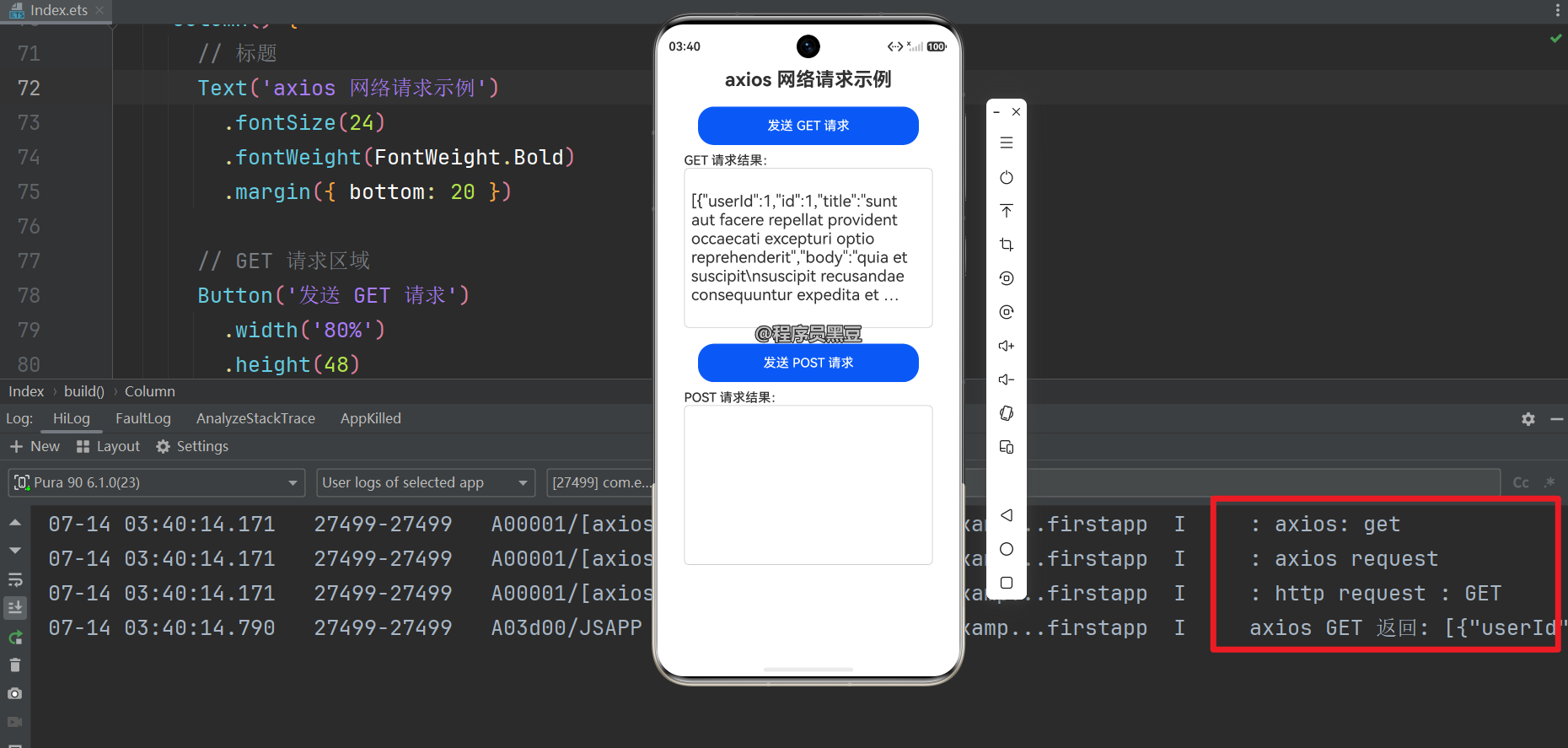
运行效果:
5.3 使用方式与注意事项
- params 参数:GET 请求的查询参数使用
params字段,axios 会自动拼接到 URL(如?page=1&limit=10)。POST 请求的请求体放在第二个参数(data)中,不要放params里。 - 响应类型:使用
AxiosResponse<T>泛型指定响应数据类型,response.data即为服务端返回的解析结果。 - 拦截器:可全局设置请求/响应拦截器,用于统一加 token、处理错误等:
axios.interceptors.request.use((config) => {
  config.headers['Authorization'] = 'Bearer token';
  return config;
});
- 错误处理:catch 中的 err 对象包含
response、request和message属性,可判断服务器是否返回响应,分别处理网络异常和业务错误。 - 版本说明:
@ohos/axios是鸿蒙原生适配的三方库,建议使用@ohos/axios@2.x及以上版本。@ohos/axios版本号与 Web 端 axios 独立管理。
六、总结与选择建议
| 方式 | 所属 Kit | 版本要求 | 易用性 | 资源管理 | 适用场景 |
|---|---|---|---|---|---|
| @kit.NetworkKit (http) | @kit.NetworkKit |
API 6+ | 中等 | 需手动 destroy() |
需要底层控制、兼容低版本、轻量级需求 |
| @kit.RemoteCommunicationKit (rcp) | @kit.RemoteCommunicationKit |
API 12+ | 高 | close() 可选 |
新项目、偏爱现代 Promise 语法、流式处理 |
| @ohos/axios | 三方库 | 无严格限制 | 很高 | 自动管理 | 追求开发效率、习惯 Web 端 axios 风格 |
- 如果项目目标设备均为 API 12+,推荐 rcp 模块,语法简洁且性能优秀。
- 如果希望代码与 Web 端通用或团队熟悉 axios,使用
@ohos/axios最高效。 - 如果仅需简单请求且想避免引入三方库,使用基础的 http 模块即可。

作为“人工智能6S店”的官方数字引擎,为AI开发者与企业提供一个覆盖软硬件全栈、一站式门户。
更多推荐



 4
4 0
0- 0


 已为社区贡献45条内容

所有评论(0)