
鸿蒙应用开发实战【23】— 三态 UI:Loading / Error / Normal
·
鸿蒙应用开发实战【23】— 三态 UI:Loading / Error / Normal
前言
欢迎加入开源鸿蒙跨平台社区:https://openharmonycrossplatform.csdn.net
移动 App 中加载数据是一个异步过程:开始加载 → 加载完成(成功/失败)。不能假设数据一定能加载成功,也不能在数据加载完成前展示空白界面。好的用户体验需要在加载中(Loading)、加载失败(Error)、加载成功(Normal) 三种状态下分别展示合适的 UI,这就是三态 UI 模式。
本篇涵盖:三态状态机设计、@State 驱动条件渲染、LoadingProgress 组件详解、ErrorState @Builder 实现、骨架屏(Skeleton)初步、loadData 异步流程、try/catch/finally 的错误处理。
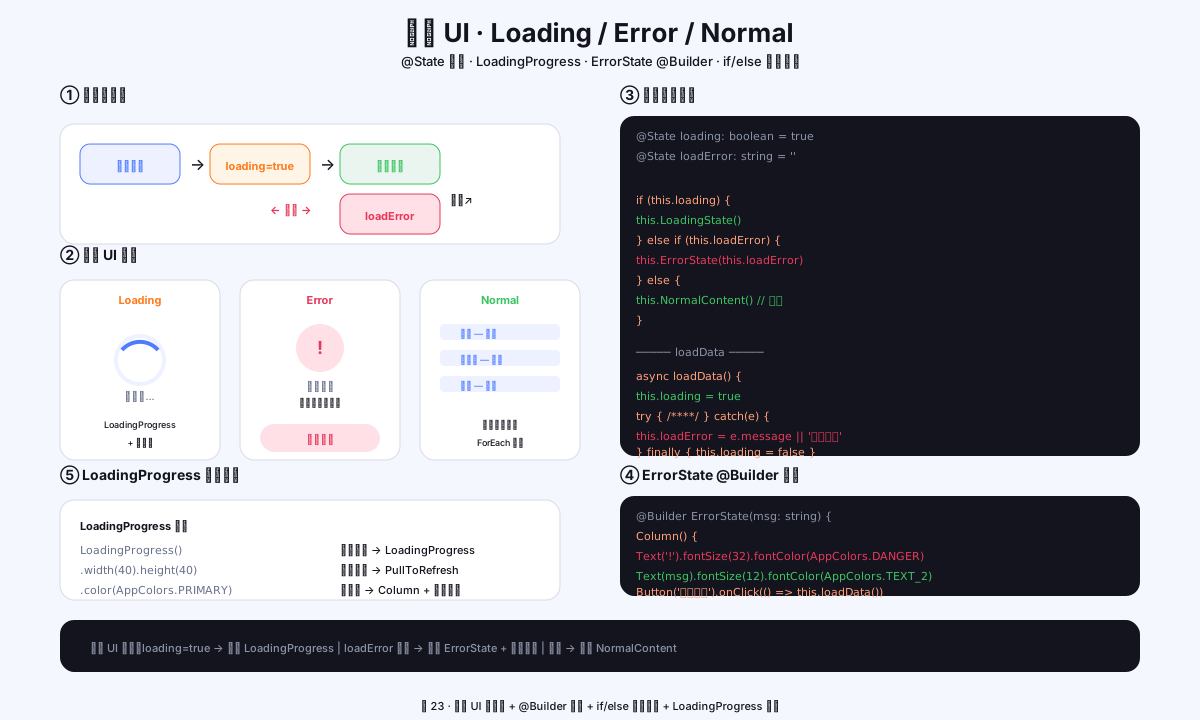
图1:三态 UI 状态机 + @Builder 组件 + if/else 条件渲染 + LoadingProgress 配置
一、三态状态机
1.1 状态定义
// 三个状态变量管理
@State loading: boolean = true     // 是否正在加载
@State loadError: string = ''       // 错误消息(空字符串表示无错误)
// 数据数组(正常内容)
@State rows: AppRow[] = []
// 注:Error 和 Normal 是互斥的,由 loadError 是否为空决定
1.2 状态流转
初始加载 ──→ loading = true ──→ 加载成功 ──→ Normal(展示内容)
                                   │
                                   └──→ 加载失败 ──→ loadError = 'xxx'(展示错误)
                                                          │
                                                          └──→ 点击重试 → 回到 loading
1.3 三态模板
build() {
  Column() {
    TitleBar()
    if (this.loading) {
      this.LoadingState()
    } else if (this.loadError !== '') {
      this.ErrorState(this.loadError)
    } else {
      this.NormalContent()
    }
  }
  .height('100%')
}
二、Loading 状态
2.1 LoadingProgress 组件
// 最基本的加载状态
@Builder
private LoadingState() {
  Column() {
    LoadingProgress()
      .width(40)
      .height(40)
      .color(AppColors.PRIMARY)    // 设为应用的蓝色主题色
      .margin({ bottom: 16 })

    Text('加载中...')
      .fontSize(12)
      .fontColor(AppColors.TEXT_2)
  }
  .width('100%')
  .layoutWeight(1)
  .justifyContent(FlexAlign.Center)
  .alignItems(HorizontalAlign.Center)
}
2.2 LoadingProgress 属性
| 属性 | 类型 | 说明 |
|---|---|---|
| width/height | Length | 控制图标大小,一般 32~48vp |
| color | ResourceColor | 加载图标颜色,默认跟随主题 |
| enableLoading | boolean | 是否显示加载动画(默认 true) |
2.3 骨架屏(Skeleton)
对于更精致的加载效果,可以用灰色色块模拟内容布局:
// 简易骨架屏
@Builder
private SkeletonState() {
  Column() {
    ForEach([1, 2, 3, 4], (_: number) => {
      Row() {
        // 头像占位
        Column()
          .width(40).height(40).borderRadius(12)
          .backgroundColor('#F0F2FF')

        // 文本占位
        Column({ space: 6 }) {
          Column()
            .width(100).height(10).borderRadius(5)
            .backgroundColor('#F0F2FF')
          Column()
            .width(160).height(8).borderRadius(4)
            .backgroundColor('#F0F2FF')
        }
        .alignItems(HorizontalAlign.Start)
      }
      .width('100%')
      .padding({ left: 16, right: 16 })
      .margin({ bottom: 12 })
    }, (_: number) => `${_}`)
  }
  .width('100%')
  .padding({ top: 8 })
}
三、Error 状态
3.1 ErrorState @Builder
@Builder
private ErrorState(msg: string) {
  Column() {
    // 错误图标
    Text('!')
      .fontSize(32)
      .fontColor(AppColors.DANGER)
      .fontWeight(AppFonts.WEIGHT_BOLD)
      .margin({ bottom: 12 })

    // 错误消息
    Text(msg)
      .fontSize(12)
      .fontColor(AppColors.TEXT_2)
      .textAlign(TextAlign.Center)
      .margin({ bottom: 20 })

    // 重试按钮
    Button('重新加载', { type: ButtonType.Normal })
      .fontSize(12)
      .fontColor(AppColors.DANGER)
      .backgroundColor(AppColors.DANGER_BG)
      .borderRadius(14)
      .height(32)
      .width(120)
      .onClick(() => this.loadData())    // 重试触发 reload
  }
  .width('100%')
  .layoutWeight(1)
  .justifyContent(FlexAlign.Center)
  .alignItems(HorizontalAlign.Center)
}
3.2 常见错误场景
| 错误类型 | loadError 文案 | 可能原因 |
|---|---|---|
| 数据库异常 | 数据库初始化失败,请重启应用 | RDB 创建失败 |
| 网络异常 | 网络连接异常,请检查网络 | 远程数据加载 |
| 解析错误 | 数据格式异常,请联系开发者 | 数据损坏 |
| 权限拒绝 | 权限不足,请在设置中授权 | 未授予存储权限 |
四、Normal 状态
4.1 正常内容展示
@Builder
private NormalContent() {
  // 判断是否有数据
  if (this.rows.length === 0) {
    // 数据为空 → 展示 EmptyState(见第 22 篇)
    this.EmptyStatePage()
  } else {
    // 有数据 → 展示列表
    Scroll() {
      Column() {
        ForEach(this.rows, (row: AppRow) => {
          AppListItem({ ... })
        }, (row: AppRow) => `${row.binding.id ?? 0}`)

        Text('').height(90)    // 底部留空
      }
      .padding({ left: 16, right: 16 })
    }
    .layoutWeight(1)
  }
}
五、loadData 完整流程
5.1 async/await 加载模式
private async loadData(): Promise<void> {
  // ① 开始加载
  this.loading = true
  this.loadError = ''     // 清除之前的错误

  try {
    // ② 执行数据加载
    const data = await AppBindingDao.listAll()
    this.rows = data

    // ③ 加载成功(loading = false, loadError = '')

  } catch (e) {
    // ④ 加载失败:记录错误信息
    this.loadError = e instanceof Error
      ? e.message
      : JSON.stringify(e)
    console.error('loadData failed:', this.loadError)

  } finally {
    // ⑤ 无论成功失败,都结束 loading 状态
    this.loading = false
  }
}

// 页面显示时自动加载
onPageShow(): void {
  if (this.rows.length === 0) {
    this.loadData()    // 首次加载
  }
}
5.2 页面内手动刷新
// 下拉刷新或点击重试时重新加载
private onRefresh(): void {
  this.loading = true           // 如果是「刷新」而非首次加载
  this.loadData()
}
5.3 流程时序
| 时序 | loading | loadError | UI 展示 |
|---|---|---|---|
| 进入页面 | true | ‘’ | LoadingProgress / 骨架屏 |
| 加载成功 | false | ‘’ | 列表内容 / EmptyState |
| 加载失败 | false | ‘错误消息’ | ErrorState + 重试按钮 |
六、本篇小结
| 知识点 | 核心要点 |
|---|---|
| 三态状态机 | loading=true → loading=false 后再判断 loadError |
| LoadingProgress | 40vp 大小 + 主题色,配合「加载中」文字 |
| 骨架屏 | 灰色色块模拟内容布局,体验优于转圈 |
| ErrorState | 错误图标 + 消息 + 重试按钮 @Builder |
| try/catch/finally | catch 设 loadError,finally 设 loading=false |
| onPageShow | 首次加载触发 loadData 的入口 |
参考资料
- 鸿蒙应用开发实战【22】— 空状态引导页
- 鸿蒙应用开发实战【18】— Scroll + ForEach 列表
- LoadingProgress API
- @Builder 装饰器
- ArkTS async/await
如果这篇文章对你有帮助,欢迎点赞👍、收藏⭐、关注🔔,你的支持是我持续创作的动力!
相关资源:

作为“人工智能6S店”的官方数字引擎,为AI开发者与企业提供一个覆盖软硬件全栈、一站式门户。
更多推荐

 7
7 0
0- 0


 已为社区贡献5条内容

所有评论(0)