
鸿蒙应用开发实战【02】— ArkTS 语法基础与工程结构解析
鸿蒙应用开发实战【02】— ArkTS 语法基础与工程结构解析
前言
欢迎加入开源鸿蒙跨平台社区:https://openharmonycrossplatform.csdn.net
ArkTS 是 HarmonyOS NEXT 的官方开发语言,它以 TypeScript 为基础,通过严格模式约束和声明式 UI 扩展,打造出一套专为移动端优化的开发体验。如果你有 TypeScript 或 JavaScript 基础,会发现 ArkTS 既熟悉又有些"陌生"——那些被 TypeScript 允许的"灵活"写法,在 ArkTS 中可能是编译错误。
本篇作为系列第 02 篇,深入讲解 ArkTS 核心语法、与标准 TypeScript 的关键区别,以及号码助手项目中实际用到的语法模式。
本篇涵盖:装饰器体系(@Entry / @Component / @State / @Prop / @Builder)、ArkTS 严格模式规则、interface 声明规范、async/await 使用规范。
一、ArkTS 与 TypeScript 的关系
1.1 ArkTS 是什么
ArkTS = TypeScript 严格子集 + ArkUI 声明式 UI 扩展
| 特性 | TypeScript | ArkTS |
|---|---|---|
| 语法基础 | ES6+ 超集 | TS 严格子集 |
any 类型 | 支持 | ❌ 禁止 |
| 对象字面量无类型 | 支持 | ❌ 必须有 interface |
| 动态属性访问 | 支持 | ❌ 编译期报错 |
| UI 声明 | 无内置 | ✅ @Component struct |
| 响应式状态 | 无内置 | ✅ @State / @Prop |
| 装饰器 | 实验性 | ✅ 核心语言特性 |
1.2 为什么 ArkTS 比 TypeScript 更严格
ArkTS 在鸿蒙设备上运行时,需要极高的运行时性能和内存安全性。通过在编译期强制类型检查,可以:
- 消除运行时类型检查开销
- 支持 AOT(Ahead of Time)编译优化
- 减少内存分配,降低 GC 压力
// ❌ TypeScript 允许,但 ArkTS 编译报错
const obj = { name: '微信', status: '使用中' }  // 无类型注解的对象字面量

// ✅ ArkTS 正确写法:先声明 interface
interface AppInfo {
  name: string
  status: string
}
const obj: AppInfo = { name: '微信', status: '使用中' }
二、ArkUI 核心装饰器详解
2.1 @Entry — 页面入口声明
@Entry 标记一个组件为页面入口,每个页面文件(在 main_pages.json 中注册的)有且只有一个 @Entry 组件。
import { AppColors } from '../common/theme/AppColors'

@Entry                          // 声明为页面入口
@Component                      // 声明为 ArkUI 组件
struct LoginPage {
  build() {                     // build() 是唯一的 UI 描述入口
    Column() {
      Text('号码助手')
        .fontSize(28)
        .fontColor(AppColors.TEXT)
    }
    .width('100%')
    .height('100%')
    .justifyContent(FlexAlign.Center)
  }
}
注意:
@Entry只能与@Component一起使用,且必须先写@Entry再写@Component。
2.2 @Component — 组件声明
@Component 将一个 ArkTS struct 声明为 ArkUI 组件。每个文件只能有一个 @Entry,但可以有多个 @Component。
// 可复用的子组件 — StatusBadge.ets
@Component
export struct StatusBadge {
  @Prop status: string = '使用中'   // @Prop 接收父组件传入的属性

  private getBadgeColor(): string {
    switch (this.status) {
      case '使用中': return '#3CC463'
      case '待换绑': return '#FF7A1E'
      case '待注销': return '#FF2E4D'
      case '已停用': return '#999999'
      default:       return '#999999'
    }
  }

  build() {
    Text(this.status)
      .fontSize(11)
      .fontColor('#FFFFFF')
      .backgroundColor(this.getBadgeColor())
      .padding({ left: 8, right: 8, top: 3, bottom: 3 })
      .borderRadius(8)
  }
}
子组件使用方式:
// 在父组件的 build() 中直接调用
StatusBadge({ status: '待换绑' })
2.3 @State — 响应式状态
@State 是 ArkUI 最基础的状态装饰器。被 @State 修饰的变量发生变化时,关联的 UI 会自动刷新。
@Entry
@Component
struct HomePage {
  @State loading: boolean = true            // 加载状态
  @State rows: AppRow[] = []               // 列表数据
  @State selectMode: boolean = false        // 多选模式

  build() {
    Column() {
      if (this.loading) {
        // loading 为 true 时渲染 LoadingProgress
        LoadingProgress().width(40).height(40)
      } else if (this.rows.length === 0) {
        // 空状态
        Text('暂无数据').fontColor('#999999')
      } else {
        // 正常列表
        ForEach(this.rows, (row: AppRow) => {
          Text(row.binding.app_name)
        }, (row: AppRow) => `${row.binding.id ?? 0}`)
      }
    }
  }
}
@State 核心规则:
- 只能在
@Componentstruct 内部使用- 不能被
const/let替代,必须使用@State- 修改时直接赋值即可触发 UI 刷新(
this.loading = false)
2.4 @Prop — 父传子单向绑定
@Prop 接收父组件传入的只读属性,不能从子组件修改父组件的状态。
@Component
export struct AppListItem {
  @Prop appName: string = ''          // 必须提供默认值
  @Prop status: string = '使用中'
  @Prop bindingId: number = 0

  build() {
    Row() {
      Text(this.appName).fontSize(14)
      StatusBadge({ status: this.status })
    }
  }
}
父组件传递:
AppListItem({
  appName: row.binding.app_name,
  status: row.binding.status,
  bindingId: row.binding.id ?? 0
})
2.5 @Builder — 可复用 UI 片段
@Builder 方法是 ArkUI 中的轻量级 UI 片段,类似 React 中的函数组件,但不支持独立状态。
@Entry
@Component
struct HomePage {
  // @Builder 方法:定义可复用的 UI 片段
  @Builder
  private StatCard(icon: string, num: number, label: string) {
    Column() {
      Text(icon).fontSize(16)
      Text(`${num}`).fontSize(22).fontWeight(FontWeight.Bold)
      Text(label).fontSize(11)
    }
    .padding(12)
    .backgroundColor('#E6FFFFFF')
    .borderRadius(16)
  }

  build() {
    Row({ space: 10 }) {
      // 调用 @Builder 方法,像普通函数一样调用
      this.StatCard('↔', 3, '待换绑')
      this.StatCard('×', 1, '待注销')
      this.StatCard('–', 2, '已停用')
    }
  }
}
@Builder 限制:方法内部不能声明变量(
const/let),只能有 UI 描述代码。如果需要逻辑处理,应将计算结果作为参数传入。
三、ArkTS 严格模式常见规则
3.1 对象字面量必须对应已声明类型
// ❌ 编译错误:Object literal must correspond to some declared class or interface
router.pushUrl({
  url: 'pages/StatusListPage',
  params: { status: status }     // { status: status } 没有对应的类型声明
})

// ✅ 正确:先声明 interface
interface StatusRouteParams {
  status: string
}
const params: StatusRouteParams = { status: status }
router.pushUrl({ url: 'pages/StatusListPage', params })
3.2 禁止 any 类型
// ❌ 编译错误:'any' type is not allowed
function processData(data: any) { ... }

// ✅ 使用具体类型或 unknown + 类型守卫
function processData(data: Record<string, string>) { ... }

// ✅ 或使用 Object 作为通用类型
function processData(data: Object) { ... }
3.3 interface 不支持声明合并
// ❌ 编译错误:Declaration merging is not supported
interface MenuButton { text: string }
interface MenuButton { color: string }  // 同名 interface 重复声明

// ✅ 合并到同一个 interface
interface MenuButton {
  text: string
  color: string
}
3.4 异步回调必须有 try/catch
// ❌ 危险:async 回调中没有 try/catch,异常被静默吞掉
.onClick(async () => {
  const cards = await CardDao.listAll()
  this.navigate('pages/AddAppPage')
})

// ✅ 正确:方案一:提取为 async 方法,onClick 调用
private async handleAddClick(): Promise<void> {
  try {
    const cards = await CardDao.listAll()
    this.navigate('pages/AddAppPage')
  } catch (e) {
    promptAction.showToast({ message: '操作失败,请重试' })
  }
}

.onClick(() => { this.handleAddClick() })

// ✅ 正确:方案二:使用已加载的 @State 数据,避免 async onClick
.onClick(() => {
  if (this.cards.length === 0) {
    this.navigate('pages/CardManagePage')
    return
  }
  this.navigate('pages/AddAppPage')
})
四、ArkTS 类型系统在项目中的实践
4.1 数据模型定义规范
号码助手项目的所有数据模型定义在 features/data/Models.ets 中:
// Models.ets — 所有业务数据类型的统一声明

// 卡号颜色枚举(使用 type alias 而非 enum)
export type CardColor = 'blue' | 'purple' | 'green' | 'orange' | 'pink'

// 绑定状态枚举
export type BindingStatus = '使用中' | '待换绑' | '待注销' | '已停用'

// 应用分类枚举
export type AppCategory = 'APP' | '网站' | '小程序'

// 卡号实体接口
export interface CardEntity {
  id?: number           // 可选,新建时为 undefined
  label: string         // 用户自定义标签(如"主卡")
  phone: string         // 手机号码
  carrier: string       // 运营商(移动/联通/电信)
  color: CardColor      // 颜色主题
  created_at: number    // 创建时间戳(毫秒)
  updated_at: number    // 更新时间戳(毫秒)
}

// 应用绑定实体接口
export interface AppBindingEntity {
  id?: number
  app_name: string
  icon_key: string           // 图标颜色(用颜色 hex 代替图片)
  category: AppCategory
  card_id: number            // 关联的卡号 ID
  status: BindingStatus
  remark: string
  source: string             // 来源(手动/粘贴导入/短信导入)
  created_at: number
  updated_at: number
}
4.2 DAO 方法的返回类型规范
// AppBindingDao.ets 中的方法签名示例
export class AppBindingDao {
  // 返回 Promise<AppBindingEntity[]>,明确泛型类型
  static async listAll(): Promise<AppBindingEntity[]> {
    const rdb = DatabaseService.getStore()
    const predicates = new relationalStore.RdbPredicates('app_bindings')
    predicates.orderByDesc('created_at')
    const rs = await rdb.query(predicates)
    // ... 解析结果集
    return results
  }

  // 查询单条记录,可能返回 null
  static async findById(id: number): Promise<AppBindingEntity | null> {
    // ...
    return rs.getRowCount() > 0 ? this.parseRow(rs) : null
  }
}
4.3 路由参数类型安全
// 接收路由参数的标准写法
import { router } from '@kit.ArkUI'

@Entry
@Component
struct AppDetailPage {
  @StorageProp('current_binding_id') bindingId: number = 0

  aboutToAppear(): void {
    // router.getParams() 返回 Object 类型,需要类型断言
    const params = router.getParams() as Record<string, number>
    if (params && params['bindingId']) {
      // 注意:@StorageProp 会覆盖 params,这里只是备用读取
    }
  }
}
五、工程目录结构深度解析
5.1 源码目录树
entry/src/main/ets/
├── EntryAbility.ets              # UIAbility 入口(应用生命周期)
│
├── common/                        # 通用层(跨页面复用)
│   ├── components/
│   │   ├── AppListItem.ets        # 应用列表行组件
│   │   ├── AvatarBadge.ets        # 头像徽标组件
│   │   └── StatusBadge.ets        # 状态标签组件
│   └── theme/
│       ├── AppColors.ets          # 颜色设计令牌
│       ├── AppFonts.ets           # 字体设计令牌
│       └── AppAnimations.ets      # 动画设计令牌
│
├── features/                      # 功能模块
│   └── data/                      # 数据层
│       ├── Models.ets             # 数据模型定义
│       ├── DatabaseService.ets    # 数据库初始化
│       ├── CardDao.ets            # 卡号 DAO
│       ├── AppBindingDao.ets      # 应用绑定 DAO
│       └── SmsCandidateDao.ets    # 短信候选 DAO
│
└── pages/                         # 页面层
    ├── LoginPage.ets              # 登录页
    ├── HomePage.ets               # 首页(主页)
    ├── CardManagePage.ets         # 卡号管理
    ├── AddCardPage.ets            # 添加卡号
    ├── CardDetailPage.ets         # 卡号详情
    ├── AddAppPage.ets             # 添加应用
    ├── AppDetailPage.ets          # 应用详情
    ├── SearchPage.ets             # 搜索页
    └── ... (其他页面)
5.2 依赖关系图
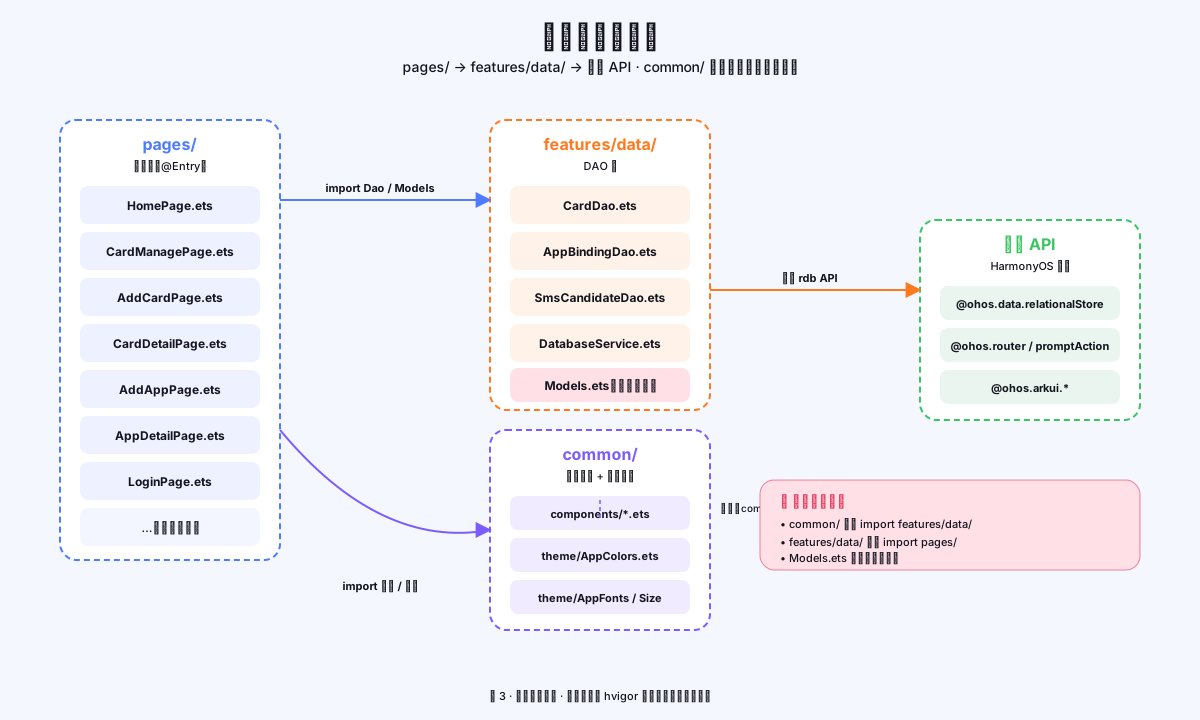
图1:号码助手模块依赖关系 — 页面依赖 DAO,DAO 依赖 DatabaseService,通用组件无依赖
pages/ ──→ features/data/     (import DAO 和 Models)
pages/ ──→ common/            (import 组件和主题)
common/components/ ──→ common/theme/  (import AppColors/AppFonts)
features/data/ ──→ (系统 API)  (@ohos.data.relationalStore)
设计原则:
common/目录下的文件不应依赖features/data/,保持通用组件的纯粹性。
六、import 规范
6.1 系统 API 导入
// ArkUI 相关 API(UI、路由、弹窗等)
import { promptAction, router } from '@kit.ArkUI'

// 性能分析和日志
import { hilog } from '@kit.PerformanceAnalysisKit'

// 应用能力(UIAbility 等)
import { UIAbility, Want } from '@kit.AbilityKit'

// 窗口管理
import { window } from '@kit.ArkUI'

// 关系型数据库
import { relationalStore } from '@ohos.data.relationalStore'
6.2 模块内相对路径导入
// 同级目录
import { AppColors } from '../common/theme/AppColors'
import { AppFonts } from '../common/theme/AppFonts'

// 数据层
import { CardDao } from '../features/data/CardDao'
import { CardEntity, CardColor } from '../features/data/Models'

// 子组件
import { AvatarBadge } from '../common/components/AvatarBadge'
6.3 避免循环依赖
// ❌ 错误:AppListItem 不应反向依赖 pages/
// common/components/AppListItem.ets
import { AppDetailPage } from '../../pages/AppDetailPage'  // 循环依赖!

// ✅ 正确:使用路由字符串解耦,不直接 import 目标页面
import { router } from '@kit.ArkUI'
router.pushUrl({ url: 'pages/AppDetailPage', params: { ... } })
七、本篇总结与踩坑记录
7.1 关键点回顾
| 知识点 | 核心规则 |
|---|---|
| @Entry | 每个页面文件只有一个,标记页面根组件 |
| @Component | 声明 ArkUI 组件,可以在任意页面中复用 |
| @State | 响应式状态,修改即触发 UI 刷新 |
| @Prop | 父传子单向绑定,子组件只读 |
| @Builder | 可复用 UI 片段,内部不能有变量声明 |
| interface | 所有对象字面量必须对应已声明的 interface |
7.2 常见踩坑
- @Builder 内部不能声明变量:把逻辑提到 private 方法,结果传给 @Builder 参数
- interface 不支持重名声明:出现第二个同名 interface 时编译报错,需合并或改名
- async onClick 无 catch:异常被 Promise 静默吞掉,应提取为 async 方法后在 onClick 中调用
- 对象字面量报错:所有
{ key: value }形式的对象都必须有对应 interface 声明
八、参考资料
本系列相关文章:
官方文档:
如果这篇文章对你有帮助,欢迎点赞👍、收藏⭐、关注🔔,你的支持是我持续创作的动力!
相关资源:

作为“人工智能6S店”的官方数字引擎,为AI开发者与企业提供一个覆盖软硬件全栈、一站式门户。
更多推荐


 5
5 0
0- 0


 已为社区贡献31条内容

所有评论(0)