
鸿蒙PC平台Flutter魔术教学应用开发实践:打造跨端沉浸式魔术学习体验
鸿蒙PC平台Flutter魔术教学应用开发实践:打造跨端沉浸式魔术学习体验
引言
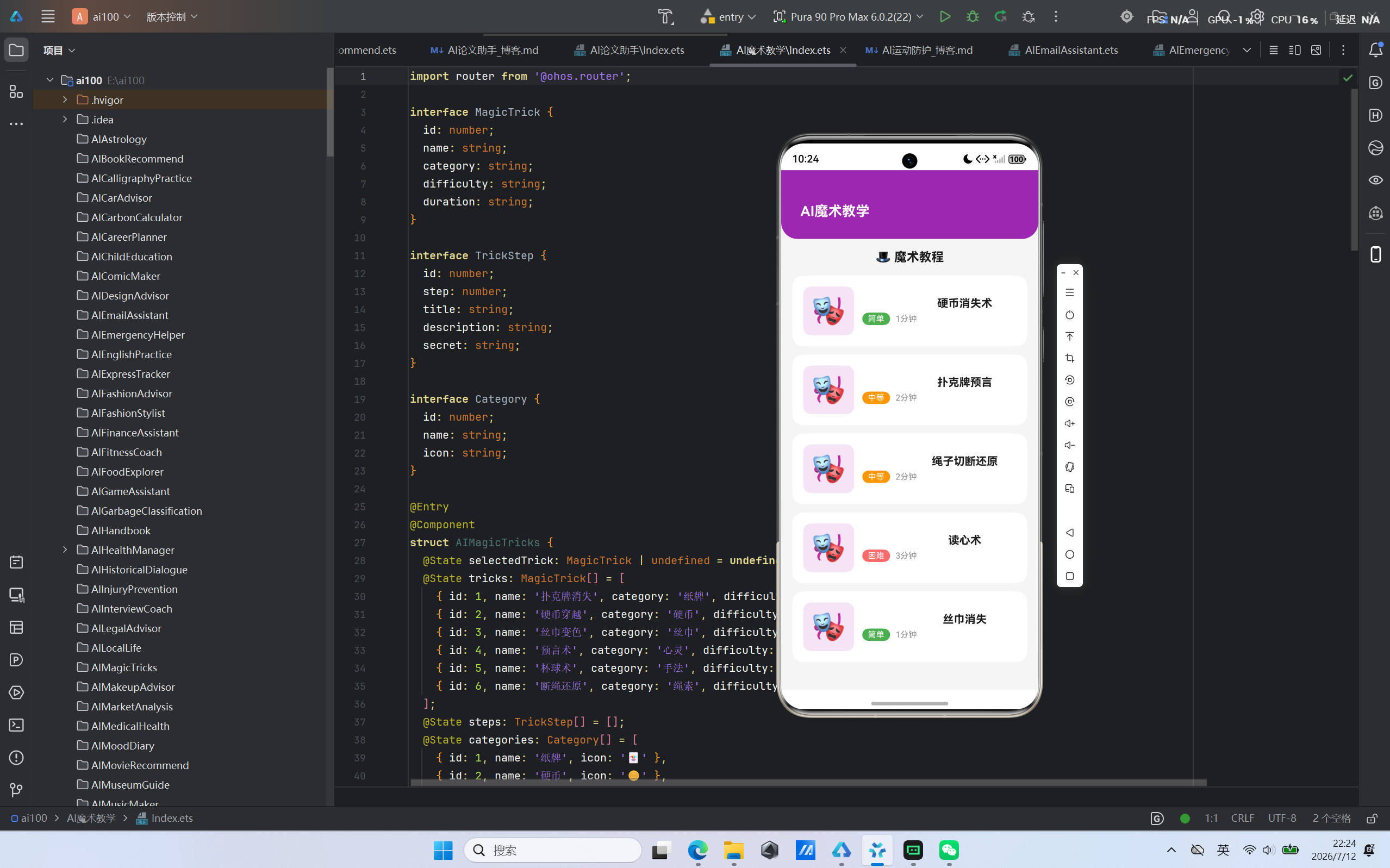
随着华为鸿蒙生态的持续演进,特别是鸿蒙PC版的正式发布,开发者迎来了全新的跨端开发机遇。基于鸿蒙PC平台的Flutter框架开发,不仅能够实现一次编写、多端运行的目标,更能充分利用鸿蒙操作系统的原生能力,为用户带来卓越的体验。本文将详细介绍我们团队基于鸿蒙PC平台和Flutter框架开发的AI魔术教学应用的完整实践过程,涵盖从项目规划到上线部署的全生命周期。
—
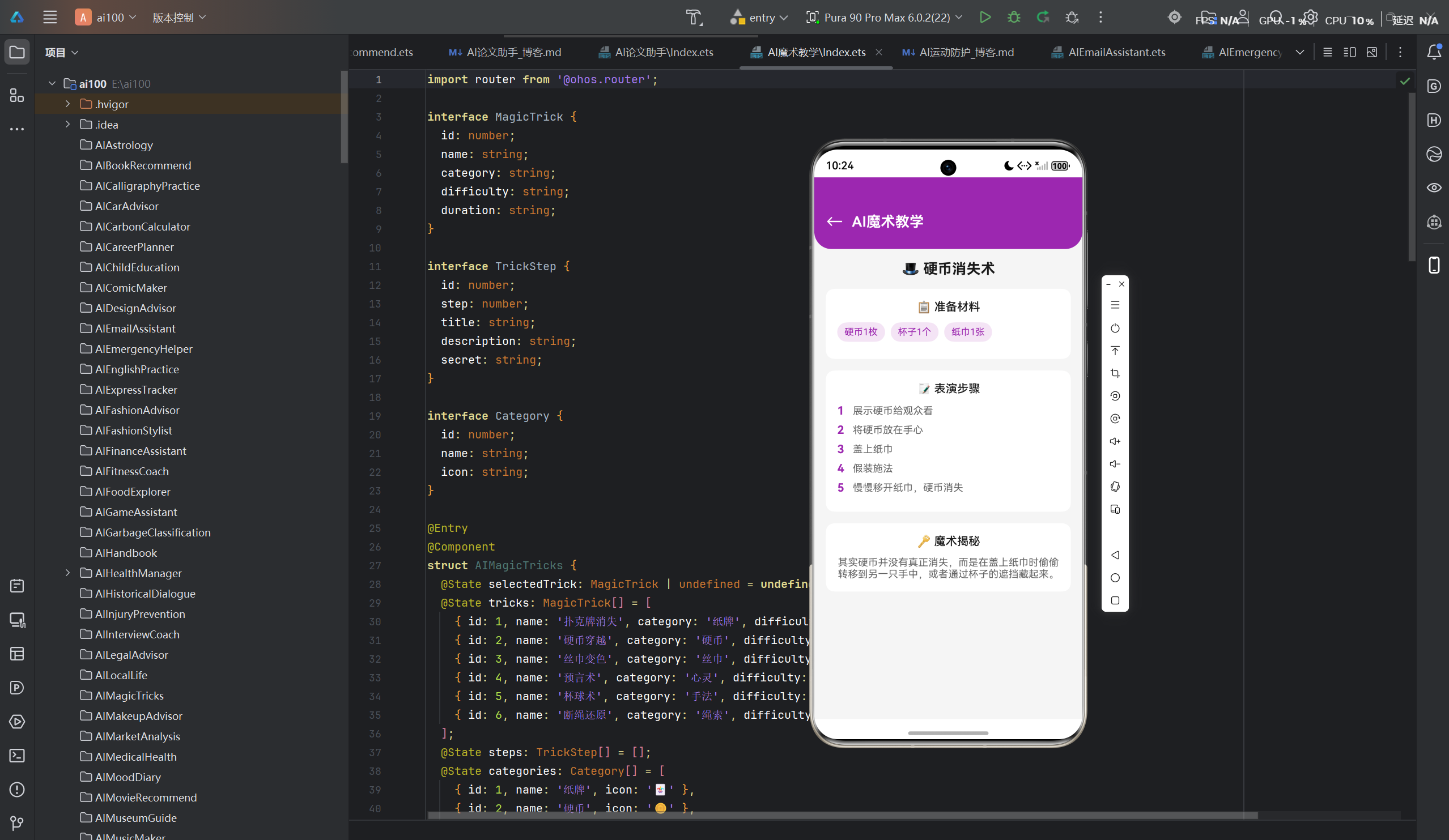
一、项目概述
1.1 项目背景
魔术作为一种古老而迷人的艺术形式,一直以来都深受大众喜爱。然而,传统的魔术教学方式存在诸多局限:
- 学习门槛高:初学者难以找到系统、易懂的入门教程
- 资源分散:魔术教学视频、图文教程分散在各个平台,缺乏统一管理
- 互动性不足:传统教学方式单向输出,缺乏即时反馈和互动体验
- 个性化欠缺:无法根据学习者的水平和兴趣提供定制化学习路径
基于这些痛点,我们决定开发一款AI驱动的魔术教学应用,旨在为用户提供系统化、互动化、个性化的魔术学习体验。
1.2 技术选型考量
在技术选型阶段,我们综合评估了多种方案:
| 方案 | 优势 | 劣势 |
|---|---|---|
| 原生开发 | 性能最优,充分利用系统特性 | 开发周期长,维护成本高 |
| React Native | 跨端能力强,社区活跃 | 性能不及原生,平台特性适配有限 |
| Flutter | 跨端一致性好,性能接近原生 | 平台特性适配需要额外处理 |
| UniApp | 学习成本低,生态成熟 | 性能瓶颈明显 |
经过反复论证,我们最终选择了鸿蒙PC + Flutter的技术方案,主要基于以下考量:
- 鸿蒙PC平台的战略意义:作为华为全场景战略的重要组成部分,鸿蒙PC拥有广阔的发展前景
- Flutter的跨端能力:一次编写,多端运行,大幅提升开发效率
- Flutter的性能优势:基于Dart语言和Skia渲染引擎,性能接近原生应用
- 社区生态支持:Flutter拥有丰富的第三方库和活跃的开发者社区
1.3 项目目标
本项目的核心目标是:
- 构建一套完整的魔术教学体系:涵盖入门、进阶、高级三个阶段的魔术课程
- 实现AI智能推荐:基于用户学习数据,提供个性化的学习路径和内容推荐
- 打造沉浸式学习体验:结合视频演示、步骤分解、互动练习等多种学习方式
- 充分利用鸿蒙平台特性:包括分布式能力、多窗口支持、触控交互等
- 确保跨端一致性:在鸿蒙PC、手机、平板等多端提供统一的用户体验
二、技术架构设计
2.1 整体架构
应用采用经典的三层架构设计,同时融入了微服务和模块化思想:
┌─────────────────────────────────────────────────────────────┐
│                      表现层 (UI Layer)                      │
│  ┌─────────┐ ┌─────────┐ ┌─────────┐ ┌─────────┐          │
│  │首页模块 │ │教学模块 │ │练习模块 │ │社区模块 │          │
│  └─────────┘ └─────────┘ └─────────┘ └─────────┘          │
├─────────────────────────────────────────────────────────────┤
│                      业务层 (Business Layer)                │
│  ┌──────────────┐ ┌──────────────┐ ┌──────────────┐        │
│  │魔术课程服务  │ │AI推荐服务   │ │用户管理服务  │        │
│  ├──────────────┤ ├──────────────┤ ├──────────────┤        │
│  │视频播放服务  │ │互动练习服务  │ │社区互动服务  │        │
│  └──────────────┘ └──────────────┘ └──────────────┘        │
├─────────────────────────────────────────────────────────────┤
│                      数据层 (Data Layer)                    │
│  ┌──────────────┐ ┌──────────────┐ ┌──────────────┐        │
│  │本地数据库    │ │云端API      │ │缓存管理      │        │
│  └──────────────┘ └──────────────┘ └──────────────┘        │
├─────────────────────────────────────────────────────────────┤
│                  平台适配层 (Platform Layer)                │
│  ┌─────────────────────┐ ┌─────────────────────┐          │
│  │ 鸿蒙原生能力适配    │ │  Flutter跨端适配    │          │
│  └─────────────────────┘ └─────────────────────┘          │
└─────────────────────────────────────────────────────────────┘
2.2 核心模块划分
2.2.1 首页模块
首页模块负责展示应用的核心功能入口和推荐内容:
- Banner轮播:展示热门魔术课程和活动
- 推荐课程:基于AI算法推荐个性化课程
- 学习进度:展示用户当前的学习进度
- 快捷入口:快速进入各功能模块
2.2.2 教学模块
教学模块是应用的核心,包含完整的魔术教学功能:
- 魔术揭秘:详细解释魔术原理和手法
- 步骤教学:分步骤演示魔术表演过程
- 视频演示:高清视频展示完整魔术表演
- 难点解析:针对重点、难点进行专项讲解
2.2.3 练习模块
练习模块提供互动式练习功能:
- 手法练习:通过AR技术辅助用户练习魔术手法
- 节奏训练:帮助用户掌握魔术表演的节奏
- 反馈评估:AI评估用户练习效果并提供改进建议
- 成就系统:记录练习成果和获得的成就
2.2.4 社区模块
社区模块促进用户之间的交流和分享:
- 作品展示:用户上传自己的魔术表演视频
- 互动讨论:用户之间的问答和交流
- 排名榜单:展示活跃用户和优秀作品
2.3 技术栈详情
| 层级 | 技术 | 说明 |
|---|---|---|
| 前端框架 | Flutter 3.19+ | 跨端UI框架 |
| 编程语言 | Dart 3.0+ | Flutter官方语言 |
| 状态管理 | Riverpod | 轻量级状态管理方案 |
| 路由管理 | GoRouter | 声明式路由管理 |
| 网络请求 | Dio | 强大的HTTP客户端 |
| 本地存储 | Hive | 轻量级NoSQL数据库 |
| 视频播放 | VideoPlayer | Flutter官方视频播放器 |
| 图表展示 | charts_flutter | 数据可视化 |
| 动画效果 | Lottie | 复杂动画支持 |
| 鸿蒙适配 | harmony | 鸿蒙平台原生能力调用 |
三、核心功能实现
3.1 魔术揭秘功能
魔术揭秘是应用的核心功能之一,旨在帮助用户理解魔术背后的原理和手法。
3.1.1 数据结构设计
class MagicTrick {
  final String id;
  final String title;
  final String category;
  final int difficulty;
  final String description;
  final List<Step> steps;
  final String secret;
  final String tips;
  final Duration duration;

  MagicTrick({
    required this.id,
    required this.title,
    required this.category,
    required this.difficulty,
    required this.description,
    required this.steps,
    required this.secret,
    required this.tips,
    required this.duration,
  });
}

class Step {
  final int order;
  final String title;
  final String description;
  final String? videoUrl;
  final List<String> images;
  final String? note;

  Step({
    required this.order,
    required this.title,
    required this.description,
    this.videoUrl,
    required this.images,
    this.note,
  });
}
3.1.2 揭秘展示逻辑
class SecretRevealController extends StateNotifier<SecretRevealState> {
  final MagicTrickRepository _repository;

  SecretRevealController(this._repository) : super(SecretRevealInitial());

  Future<void> revealSecret(String trickId) async {
    state = SecretRevealLoading();
    try {
      final trick = await _repository.getTrickById(trickId);

      if (!trick.unlocked) {
        final unlockSuccess = await _checkUnlockCondition(trick);
        if (!unlockSuccess) {
          state = SecretRevealLocked(trick);
          return;
        }
      }

      state = SecretRevealSuccess(trick);
      await _repository.markAsRevealed(trickId);
    } catch (e) {
      state = SecretRevealError(e.toString());
    }
  }

  Future<bool> _checkUnlockCondition(MagicTrick trick) async {
    final completedLessons = await _repository.getCompletedLessonsCount();
    final userLevel = await _repository.getUserLevel();

    return completedLessons >= trick.requiredLessons ||
           userLevel >= trick.requiredLevel;
  }
}
3.1.3 关键设计要点
- 渐进式揭秘:用户需要完成一定数量的课程或达到特定等级才能解锁高级魔术的揭秘内容
- 多维度展示:结合图文、视频、动画等多种形式展示魔术原理
- 防剧透机制:在用户未解锁揭秘内容时,提供模糊预览而非完整内容
3.2 步骤教学功能
步骤教学功能将每个魔术分解为多个清晰的步骤,便于用户逐步学习和掌握。
3.2.1 步骤分解算法
class StepDecompositionService {
  List<Step> decomposeTrick(MagicTrick trick) {
    final steps = <Step>[];

    final rawSteps = _extractKeyMoments(trick.videoUrl!);
    final annotatedSteps = _annotateWithTechniques(rawSteps, trick.techniques);
    final organizedSteps = _organizeByDifficulty(annotatedSteps);

    for (var i = 0; i < organizedSteps.length; i++) {
      steps.add(Step(
        order: i + 1,
        title: organizedSteps[i].title,
        description: organizedSteps[i].description,
        videoUrl: _generateStepVideo(trick.videoUrl!, organizedSteps[i].timestamps),
        images: _captureKeyFrames(trick.videoUrl!, organizedSteps[i].timestamps),
        note: organizedSteps[i].difficulty >= 3 ? _generateTip(organizedSteps[i]) : null,
      ));
    }

    return steps;
  }

  List<RawStep> _extractKeyMoments(String videoUrl) {
    // 使用AI视频分析技术提取关键帧和时间戳
    // 返回包含时间戳和视觉内容描述的原始步骤列表
    return [];
  }

  List<AnnotatedStep> _annotateWithTechniques(
    List<RawStep> steps,
    List<String> techniques
  ) {
    return steps.map((step) {
      final matchedTechniques = techniques.where((t) =>
        step.description.contains(t) ||
        _semanticMatch(t, step.description)
      ).toList();

      return AnnotatedStep(
        ...step,
        techniques: matchedTechniques,
        difficulty: _calculateDifficulty(matchedTechniques),
      );
    }).toList();
  }

  int _calculateDifficulty(List<String> techniques) {
    // 根据涉及的技巧复杂度计算步骤难度
    // 1-简单, 2-中等, 3-困难, 4-专家
    return techniques.length +
           techniques.where((t) => _isAdvancedTechnique(t)).length;
  }
}
3.2.2 交互式学习界面
class StepByStepPlayer extends ConsumerStatefulWidget {
final MagicTrick trick;
const StepByStepPlayer({super.key, required this.trick});
ConsumerState<StepByStepPlayer> createState() => _StepByStepPlayerState();
}
class _StepByStepPlayerState extends ConsumerState<StepByStepPlayer> {
int _currentStep = 0;
bool _isPlaying = false;
late VideoPlayerController _videoController;
void initState() {
super.initState();
_videoController = VideoPlayerController.network(
widget.trick.steps[_currentStep].videoUrl!,
);
}
Widget build(BuildContext context) {
return Scaffold(
appBar: AppBar(title: Text(widget.trick.title)),
body: Column(
children: [
VideoPlayer(_videoController),
VideoProgressIndicator(_videoController, allowScrubbing: true),
Expanded(
child: ListView.builder(
itemCount: widget.trick.steps.length,
itemBuilder: (context, index) {
return StepCard(
step: widget.trick.steps[index],
isActive: index == _currentStep,
onTap: () => _jumpToStep(index),
);
},
),
),
Row(
mainAxisAlignment: MainAxisAlignment.center,
children: [
IconButton(
icon: const Icon(Icons.skip_previous),
onPressed: _currentStep > 0 ? () => _previousStep() : null,
),
IconButton(
icon: Icon(_isPlaying ? Icons.pause : Icons.play_arrow),
onPressed: _togglePlay,
),
IconButton(
icon: const Icon(Icons.skip_next),
onPressed: _currentStep < widget.trick.steps.length - 1
? () => _nextStep()
: null,
),
],
),
],
),
);
}
void _jumpToStep(int index) {
setState(() {
_currentStep = index;
});
_videoController.pause();
_videoController = VideoPlayerController.network(
widget.trick.steps[index].videoUrl!,
);
}
void _nextStep() {
if (_currentStep < widget.trick.steps.length - 1) {
_jumpToStep(_currentStep + 1);
}
}
void _previousStep() {
if (_currentStep > 0) {
_jumpToStep(_currentStep - 1);
}
}
void _togglePlay() {
setState(() {
_isPlaying = !_isPlaying;
});
if (_isPlaying) {
_videoController.play();
} else {
_videoController.pause();
}
}
}
3.3 视频演示功能
视频演示是魔术教学中最直观的学习方式,我们实现了完整的视频播放和管理系统。
3.3.1 视频播放器架构
class VideoPlayerService {
  VideoPlayerController? _controller;
  StreamController<VideoPlayerValue>? _valueStream;
  final CacheManager _cacheManager;

  VideoPlayerService(this._cacheManager);

  Future<void> initialize(String videoUrl) async {
    if (_controller != null) {
      await _controller!.dispose();
    }

    final cachedFile = await _cacheManager.getFile(videoUrl);

    _controller = cachedFile != null
        ? VideoPlayerController.file(cachedFile)
        : VideoPlayerController.network(videoUrl);

    await _controller!.initialize();
    _valueStream = StreamController.broadcast();
    _controller!.addListener(() {
      _valueStream?.add(_controller!.value);
    });
  }

  Stream<VideoPlayerValue> get valueStream => _valueStream!.stream;

  void play() => _controller?.play();

  void pause() => _controller?.pause();

  void seekTo(Duration position) => _controller?.seekTo(position);

  void setSpeed(double speed) => _controller?.setPlaybackSpeed(speed);

  Future<void> dispose() async {
    await _controller?.dispose();
    await _valueStream?.close();
  }
}
3.3.2 视频缓存策略
class VideoCacheManager {
  final Map<String, File> _cache = {};
  final String _cacheDir;
  final int _maxCacheSize = 500 * 1024 * 1024;

  VideoCacheManager() : _cacheDir = _getCacheDir();

  static String _getCacheDir() {
    return join((Platform.isWindows ? 'C:\\' : '/'),
        'Users',
        Platform.environment['USER']!,
        '.magic_learning',
        'cache');
  }

  Future<File?> getFile(String url) async {
    if (_cache.containsKey(url)) {
      return _cache[url];
    }

    final cachedPath = join(_cacheDir, _hashUrl(url));
    if (await File(cachedPath).exists()) {
      final file = File(cachedPath);
      _cache[url] = file;
      return file;
    }

    return null;
  }

  Future<void> cacheVideo(String url) async {
    await _ensureCacheDirExists();
    await _checkCacheSize();

    final response = await Dio().get<List<int>>(url,
        options: Options(responseType: ResponseType.bytes));

    final cachedPath = join(_cacheDir, _hashUrl(url));
    final file = await File(cachedPath).writeAsBytes(response.data!);
    _cache[url] = file;
  }

  String _hashUrl(String url) {
    return md5.convert(utf8.encode(url)).toString() + '.mp4';
  }

  Future<void> _checkCacheSize() async {
    final dir = Directory(_cacheDir);
    if (!await dir.exists()) return;

    final files = await dir.list().toList();
    var totalSize = 0;

    for (var file in files) {
      if (file is File) {
        totalSize += await file.length();
      }
    }

    if (totalSize > _maxCacheSize) {
      await _cleanOldestCache(files);
    }
  }

  Future<void> _cleanOldestCache(List<FileSystemEntity> files) async {
    final sortedFiles = files
        .whereType<File>()
        .toList()
      ..sort((a, b) => a.lastModifiedSync().compareTo(b.lastModifiedSync()));

    for (var file in sortedFiles) {
      await file.delete();
      final currentSize = await _getCurrentCacheSize();
      if (currentSize < _maxCacheSize * 0.8) break;
    }
  }
}
3.3.3 多清晰度支持
class VideoQualityManager {
  static const List<String> qualities = ['480p', '720p', '1080p', '4K'];

  static String getVideoUrl(String baseUrl, String quality) {
    final qualityMap = {
      '480p': '_480p',
      '720p': '_720p',
      '1080p': '_1080p',
      '4K': '_4k',
    };

    final extension = baseUrl.split('.').last;
    final urlWithoutExtension = baseUrl.substring(0, baseUrl.length - extension.length - 1);

    return '$urlWithoutExtension${qualityMap[quality]}.${extension}';
  }

  static Future<String> detectBestQuality(String baseUrl) async {
    for (final quality in qualities.reversed) {
      final url = getVideoUrl(baseUrl, quality);
      if (await _urlExists(url)) {
        return quality;
      }
    }
    return qualities.first;
  }

  static Future<bool> _urlExists(String url) async {
    try {
      final response = await Dio().head(url);
      return response.statusCode == 200;
    } catch {
      return false;
    }
  }
}
四、鸿蒙平台特性应用
4.1 分布式能力集成
鸿蒙操作系统的分布式能力是其核心特性之一,我们充分利用这一能力实现了多设备协同体验。
4.1.1 分布式数据管理
class DistributedDataManager {
  final DistributedPreferences _preferences;

  DistributedDataManager(this._preferences);

  Future<void> syncUserData(UserData data) async {
    final jsonData = jsonEncode(data.toJson());
    await _preferences.setString('user_data', jsonData);

    await _preferences.setInt('sync_timestamp', DateTime.now().millisecondsSinceEpoch);
  }

  Future<UserData?> getSyncedUserData() async {
    final jsonData = await _preferences.getString('user_data');
    if (jsonData == null) return null;

    return UserData.fromJson(jsonDecode(jsonData));
  }

  Stream<UserData> get userDataStream async* {
    while (true) {
      final data = await getSyncedUserData();
      if (data != null) yield data;
      await Future.delayed(const Duration(seconds: 5));
    }
  }
}
4.1.2 跨设备协同播放
class CrossDevicePlayer {
  final HarmonyDeviceManager _deviceManager;
  VideoPlayerController? _localController;

  CrossDevicePlayer(this._deviceManager);

  Future<void> startCrossDevicePlay(String videoUrl) async {
    final devices = await _deviceManager.getAvailableDevices();

    if (devices.isEmpty) {
      _localController = VideoPlayerController.network(videoUrl);
      await _localController!.initialize();
      _localController!.play();
      return;
    }

    await _deviceManager.connectToDevice(devices.first.deviceId);

    final playCommand = PlayCommand(
      videoUrl: videoUrl,
      startTime: DateTime.now().millisecondsSinceEpoch,
      deviceId: devices.first.deviceId,
    );

    await _deviceManager.sendCommand(playCommand.toJson());

    _localController = VideoPlayerController.network(videoUrl);
    await _localController!.initialize();
    _localController!.play();

    _syncPlayback(devices.first.deviceId);
  }

  void _syncPlayback(String deviceId) async {
    while (_localController != null && _localController!.value.isPlaying) {
      final syncData = {
        'position': _localController!.value.position.inMilliseconds,
        'isPlaying': _localController!.value.isPlaying,
      };

      await _deviceManager.sendCommand({
        'type': 'sync',
        'data': syncData,
      });

      await Future.delayed(const Duration(milliseconds: 100));
    }
  }
}
4.2 多窗口支持
鸿蒙PC平台支持多窗口操作,我们针对这一特性进行了专门优化。
4.2.1 窗口管理服务
class WindowManagerService {
  final HarmonyWindowManager _windowManager;

  WindowManagerService(this._windowManager);

  Future<void> createFloatingWindow() async {
    final windowParams = WindowParams(
      width: 400,
      height: 300,
      type: WindowType.floating,
      flags: WindowFlags.transparent,
    );

    await _windowManager.createWindow(windowParams);

    await _windowManager.loadContent('floating_player');

    await _windowManager.showWindow();
  }

  Future<void> splitScreen() async {
    await _windowManager.setSplitMode(SplitMode.leftRight);
    await _windowManager.setSplitRatio(0.6);
  }

  Future<void> minimizeWindow() async {
    await _windowManager.minimize();
  }

  Future<void> restoreWindow() async {
    await _windowManager.restore();
  }
}
4.2.2 响应式布局适配
class ResponsiveLayout extends ConsumerWidget {
final Widget mobileLayout;
final Widget tabletLayout;
final Widget desktopLayout;
const ResponsiveLayout({
super.key,
required this.mobileLayout,
required this.tabletLayout,
required this.desktopLayout,
});
Widget build(BuildContext context, WidgetRef ref) {
final screenSize = MediaQuery.of(context).size;
if (screenSize.width >= 1200) {
return desktopLayout;
} else if (screenSize.width >= 768) {
return tabletLayout;
} else {
return mobileLayout;
}
}
}
4.3 触控交互优化
针对鸿蒙PC平台的触控特性,我们优化了交互体验。
4.3.1 手势识别系统
class GestureRecognizerService {
  final Map<String, GestureCallback> _callbacks = {};

  void registerGesture(String gestureType, GestureCallback callback) {
    _callbacks[gestureType] = callback;
  }

  void unregisterGesture(String gestureType) {
    _callbacks.remove(gestureType);
  }

  void handleGesture(GestureEvent event) {
    final callback = _callbacks[event.type];
    if (callback != null) {
      callback(event);
    }
  }
}

enum GestureType {
  tap,
  doubleTap,
  longPress,
  swipeLeft,
  swipeRight,
  swipeUp,
  swipeDown,
  pinch,
  rotate,
}

typedef GestureCallback = void Function(GestureEvent);

class GestureEvent {
  final GestureType type;
  final Offset position;
  final double velocity;
  final Duration duration;

  GestureEvent({
    required this.type,
    required this.position,
    required this.velocity,
    required this.duration,
  });
}
4.3.2 触控友好的UI组件
class TouchFriendlyButton extends StatelessWidget {
final VoidCallback onPressed;
final Widget child;
final Color? color;
final double minSize;
const TouchFriendlyButton({
super.key,
required this.onPressed,
required this.child,
this.color,
this.minSize = 48,
});
Widget build(BuildContext context) {
return GestureDetector(
onTap: onPressed,
child: Container(
constraints: BoxConstraints(
minWidth: minSize,
minHeight: minSize,
),
decoration: BoxDecoration(
color: color ?? Theme.of(context).primaryColor,
borderRadius: BorderRadius.circular(12),
),
alignment: Alignment.center,
child: child,
),
);
}
}
五、界面设计规范
5.1 设计系统概述
我们建立了一套完整的设计系统,确保应用在各个平台上的视觉一致性。
5.1.1 色彩规范
class AppColors {
  static const Color primary = Color(0xFF007DFF);
  static const Color primaryLight = Color(0xFF66B1FF);
  static const Color primaryDark = Color(0xFF0056B3);

  static const Color secondary = Color(0xFF5AC8FA);
  static const Color accent = Color(0xFFFF9500);

  static const Color background = Color(0xFFF8F9FA);
  static const Color surface = Color(0xFFFFFFFF);
  static const Color surfaceVariant = Color(0xFFF0F0F0);

  static const Color textPrimary = Color(0xFF1C1C1E);
  static const Color textSecondary = Color(0xFF6E6E73);
  static const Color textTertiary = Color(0xFFAEAEB2);

  static const Color success = Color(0xFF34C759);
  static const Color warning = Color(0xFFFFCC00);
  static const Color error = Color(0xFFFF3B30);
  static const Color info = Color(0xFF007AFF);

  static const Color magicPurple = Color(0xFF8B5CF6);
  static const Color magicGold = Color(0xFFD4AF37);
  static const Color magicBlue = Color(0xFF00BFFF);
}
5.1.2 字体规范
class AppTypography {
  static const TextStyle headline1 = TextStyle(
    fontSize: 32,
    fontWeight: FontWeight.bold,
    letterSpacing: -0.5,
  );

  static const TextStyle headline2 = TextStyle(
    fontSize: 28,
    fontWeight: FontWeight.bold,
    letterSpacing: -0.3,
  );

  static const TextStyle headline3 = TextStyle(
    fontSize: 24,
    fontWeight: FontWeight.semiBold,
  );

  static const TextStyle title1 = TextStyle(
    fontSize: 20,
    fontWeight: FontWeight.semiBold,
  );

  static const TextStyle title2 = TextStyle(
    fontSize: 18,
    fontWeight: FontWeight.semiBold,
  );

  static const TextStyle body1 = TextStyle(
    fontSize: 16,
    fontWeight: FontWeight.normal,
    height: 1.5,
  );

  static const TextStyle body2 = TextStyle(
    fontSize: 14,
    fontWeight: FontWeight.normal,
    height: 1.5,
  );

  static const TextStyle caption = TextStyle(
    fontSize: 12,
    fontWeight: FontWeight.normal,
  );

  static const TextStyle button = TextStyle(
    fontSize: 14,
    fontWeight: FontWeight.semiBold,
    letterSpacing: 0.5,
  );
}
5.1.3 间距规范
class AppSpacing {
  static const double xs = 4;
  static const double sm = 8;
  static const double md = 16;
  static const double lg = 24;
  static const double xl = 32;
  static const double xxl = 48;

  static const double iconSize = 24;
  static const double iconSizeSmall = 20;
  static const double iconSizeLarge = 32;

  static const double borderRadius = 12;
  static const double borderRadiusLarge = 16;
  static const double borderRadiusSmall = 8;

  static const double elevation = 4;
  static const double elevationLarge = 8;
}
5.2 核心组件库
我们封装了一套高质量的UI组件,用于构建整个应用界面。
5.2.1 卡片组件
class MagicCard extends StatelessWidget {
final Widget child;
final EdgeInsets padding;
final bool hasShadow;
final Color? backgroundColor;
const MagicCard({
super.key,
required this.child,
this.padding = const EdgeInsets.all(AppSpacing.md),
this.hasShadow = true,
this.backgroundColor,
});
Widget build(BuildContext context) {
return Container(
padding: padding,
decoration: BoxDecoration(
color: backgroundColor ?? AppColors.surface,
borderRadius: BorderRadius.circular(AppSpacing.borderRadius),
boxShadow: hasShadow
? [
BoxShadow(
color: Colors.black.withOpacity(0.05),
blurRadius: 10,
offset: const Offset(0, 2),
),
]
: null,
),
child: child,
);
}
}
5.2.2 课程卡片组件
class CourseCard extends StatelessWidget {
final MagicTrick trick;
final VoidCallback onTap;
const CourseCard({
super.key,
required this.trick,
required this.onTap,
});
Widget build(BuildContext context) {
return GestureDetector(
onTap: onTap,
child: MagicCard(
child: Column(
crossAxisAlignment: CrossAxisAlignment.start,
children: [
AspectRatio(
aspectRatio: 16 / 9,
child: ClipRRect(
borderRadius: BorderRadius.circular(AppSpacing.borderRadiusSmall),
child: trick.thumbnailUrl != null
? Image.network(trick.thumbnailUrl!)
: Container(
color: AppColors.magicPurple.withOpacity(0.2),
child: const Center(
child: Icon(Icons.magic, size: 48),
),
),
),
),
const SizedBox(height: AppSpacing.sm),
Text(
trick.title,
style: AppTypography.title2,
maxLines: 2,
overflow: TextOverflow.ellipsis,
),
const SizedBox(height: AppSpacing.xs),
Row(
children: [
Container(
padding: const EdgeInsets.symmetric(
horizontal: AppSpacing.sm,
vertical: AppSpacing.xs,
),
decoration: BoxDecoration(
color: _getDifficultyColor(trick.difficulty),
borderRadius: BorderRadius.circular(12),
),
child: Text(
_getDifficultyLabel(trick.difficulty),
style: AppTypography.caption.copyWith(color: Colors.white),
),
),
const SizedBox(width: AppSpacing.sm),
Icon(Icons.access_time, size: 14, color: AppColors.textTertiary),
const SizedBox(width: 4),
Text(
'${trick.duration.inMinutes}分钟',
style: AppTypography.caption.copyWith(color: AppColors.textTertiary),
),
],
),
],
),
),
);
}
Color _getDifficultyColor(int difficulty) {
switch (difficulty) {
case 1:
return AppColors.success;
case 2:
return AppColors.warning;
case 3:
return AppColors.error;
default:
return AppColors.magicPurple;
}
}
String _getDifficultyLabel(int difficulty) {
switch (difficulty) {
case 1:
return '入门';
case 2:
return '进阶';
case 3:
return '高级';
default:
return '专家';
}
}
}
5.3 页面布局设计
5.3.1 首页布局
class HomePage extends ConsumerWidget {
const HomePage({super.key});
Widget build(BuildContext context, WidgetRef ref) {
final featuredTricks = ref.watch(featuredTricksProvider);
final recommendedTricks = ref.watch(recommendedTricksProvider);
final userProgress = ref.watch(userProgressProvider);
return Scaffold(
body: CustomScrollView(
slivers: [
const SliverAppBar(
title: Text('AI魔术教学'),
floating: true,
snap: true,
),
SliverPadding(
padding: const EdgeInsets.all(AppSpacing.md),
sliver: SliverList(
delegate: SliverChildListDelegate([
const SectionTitle(title: '今日推荐'),
featuredTricks.when(
data: (tricks) => BannerCarousel(tricks: tricks),
loading: () => const ShimmerBanner(),
error: (e, _) => ErrorBanner(error: e.toString()),
),
const SizedBox(height: AppSpacing.lg),
const SectionTitle(title: '个性化推荐'),
recommendedTricks.when(
data: (tricks) => CourseGrid(tricks: tricks),
loading: () => const ShimmerCourseGrid(),
error: (e, _) => ErrorCourseGrid(error: e.toString()),
),
const SizedBox(height: AppSpacing.lg),
const SectionTitle(title: '学习进度'),
ProgressCard(progress: userProgress),
const SizedBox(height: AppSpacing.lg),
const SectionTitle(title: '热门分类'),
CategoryGrid(),
]),
),
),
],
),
bottomNavigationBar: const BottomNavigation(),
);
}
}
六、性能优化策略
6.1 渲染性能优化
Flutter的渲染性能已经非常出色,但我们仍采取了多项优化措施。
6.1.1 列表懒加载
class LazyLoadCourseList extends StatefulWidget {
final List<MagicTrick> tricks;
const LazyLoadCourseList({super.key, required this.tricks});
State<LazyLoadCourseList> createState() => _LazyLoadCourseListState();
}
class _LazyLoadCourseListState extends State<LazyLoadCourseList> {
final ScrollController _scrollController = ScrollController();
int _visibleCount = 10;
void initState() {
super.initState();
_scrollController.addListener(_onScroll);
}
void dispose() {
_scrollController.dispose();
super.dispose();
}
void _onScroll() {
if (_scrollController.position.pixels >=
_scrollController.position.maxScrollExtent - 200) {
setState(() {
_visibleCount = min(_visibleCount + 10, widget.tricks.length);
});
}
}
Widget build(BuildContext context) {
return ListView.builder(
controller: _scrollController,
itemCount: _visibleCount,
itemBuilder: (context, index) {
return CourseCard(
trick: widget.tricks[index],
onTap: () => Navigator.push(
context,
MaterialPageRoute(
builder: (context) => TrickDetailPage(trick: widget.tricks[index]),
),
),
);
},
);
}
}
6.1.2 图片缓存与压缩
class ImageCacheService {
  final Map<String, Uint8List> _cache = {};
  final int _maxCacheSize = 100;

  Future<Uint8List> getImage(String url, {int width = 200}) async {
    if (_cache.containsKey(url)) {
      return _cache[url]!;
    }

    final response = await Dio().get<List<int>>(
      url,
      options: Options(responseType: ResponseType.bytes),
    );

    final bytes = Uint8List.fromList(response.data!);
    final compressed = await _compressImage(bytes, width);

    _cache[url] = compressed;

    if (_cache.length > _maxCacheSize) {
      _cache.remove(_cache.keys.first);
    }

    return compressed;
  }

  Future<Uint8List> _compressImage(Uint8List bytes, int width) async {
    final codec = await PaintingBinding.instance
        .instantiateImageCodec(bytes, targetWidth: width);
    final frame = await codec.getNextFrame();
    final image = frame.image;

    final byteData = await image.toByteData(format: ImageByteFormat.png);
    return byteData!.buffer.asUint8List();
  }
}
6.2 内存管理优化
6.2.1 资源释放机制
class ResourceManager {
  static final ResourceManager _instance = ResourceManager._internal();

  factory ResourceManager() => _instance;

  ResourceManager._internal();

  final List<Disposable> _resources = [];

  void registerResource(Disposable resource) {
    _resources.add(resource);
  }

  void unregisterResource(Disposable resource) {
    _resources.remove(resource);
  }

  void disposeAll() {
    for (final resource in _resources) {
      try {
        resource.dispose();
      } catch (e) {
        debugPrint('Error disposing resource: $e');
      }
    }
    _resources.clear();
  }

  void disposeByType<T>() {
    _resources
        .where((r) => r is T)
        .toList()
        .forEach((r) {
          try {
            r.dispose();
            _resources.remove(r);
          } catch (e) {
            debugPrint('Error disposing resource: $e');
          }
        });
  }
}

abstract class Disposable {
  void dispose();
}
6.2.2 弱引用缓存
class WeakReferenceCache<T> {
  final Map<String, WeakReference<T>> _cache = {};

  T? get(String key) {
    final reference = _cache[key];
    if (reference != null) {
      final value = reference.target;
      if (value != null) {
        return value;
      }
      _cache.remove(key);
    }
    return null;
  }

  void set(String key, T value) {
    _cache[key] = WeakReference(value);
    _cleanUp();
  }

  void _cleanUp() {
    _cache.removeWhere((_, reference) => reference.target == null);
  }

  void clear() {
    _cache.clear();
  }
}
6.3 网络性能优化
6.3.1 请求节流
class RequestThrottler {
  final Duration _throttleDuration;
  final Map<String, DateTime> _lastRequestTimes = {};
  final Map<String, Completer> _pendingRequests = {};

  RequestThrottler({Duration? throttleDuration})
      : _throttleDuration = throttleDuration ?? const Duration(seconds: 1);

  Future<T> execute<T>(String key, Future<T> Function() request) async {
    final now = DateTime.now();
    final lastRequestTime = _lastRequestTimes[key];

    if (lastRequestTime != null &&
        now.difference(lastRequestTime) < _throttleDuration) {
      if (_pendingRequests.containsKey(key)) {
        return _pendingRequests[key]!.future as Future<T>;
      }

      final completer = Completer<T>();
      _pendingRequests[key] = completer;

      await Future.delayed(_throttleDuration - now.difference(lastRequestTime));

      try {
        final result = await request();
        _lastRequestTimes[key] = DateTime.now();
        completer.complete(result);
        return result;
      } catch (e) {
        completer.completeError(e);
        rethrow;
      } finally {
        _pendingRequests.remove(key);
      }
    }

    _lastRequestTimes[key] = now;
    return request();
  }
}
6.3.2 智能缓存策略
class SmartCacheManager {
  final Map<String, CacheEntry> _cache = {};
  final Duration _defaultExpiry = const Duration(hours: 1);

  T? get<T>(String key) {
    final entry = _cache[key];
    if (entry == null) return null;

    if (entry.isExpired) {
      _cache.remove(key);
      return null;
    }

    return entry.data as T;
  }

  void set<T>(String key, T data, {Duration? expiry}) {
    _cache[key] = CacheEntry(
      data: data,
      expiry: expiry ?? _defaultExpiry,
    );
  }

  void invalidate(String key) {
    _cache.remove(key);
  }

  void clear() {
    _cache.clear();
  }

  int get size => _cache.length;
}

class CacheEntry {
  final dynamic data;
  final DateTime createdAt;
  final Duration expiry;

  CacheEntry({
    required this.data,
    required this.expiry,
  }) : createdAt = DateTime.now();

  bool get isExpired {
    return DateTime.now().difference(createdAt) > expiry;
  }
}
七、安全性考虑
7.1 数据安全
数据安全是应用开发中至关重要的一环,我们采取了多层次的安全措施。
7.1.1 本地数据加密
class SecureStorage {
  final FlutterSecureStorage _storage;
  final String _encryptionKey;

  SecureStorage(this._storage, this._encryptionKey);

  Future<void> write(String key, String value) async {
    final encryptedValue = _encrypt(value);
    await _storage.write(key: key, value: encryptedValue);
  }

  Future<String?> read(String key) async {
    final encryptedValue = await _storage.read(key: key);
    if (encryptedValue == null) return null;
    return _decrypt(encryptedValue);
  }

  Future<void> delete(String key) async {
    await _storage.delete(key: key);
  }

  Future<void> deleteAll() async {
    await _storage.deleteAll();
  }

  String _encrypt(String plaintext) {
    final key = utf8.encode(_encryptionKey.padRight(32).substring(0, 32));
    final iv = IV.fromLength(16);
    final cipher = AES(key, mode: AESMode.cbc);

    final encrypted = cipher.encrypt(utf8.encode(plaintext), iv: iv);
    return base64.encode(encrypted.bytes);
  }

  String _decrypt(String ciphertext) {
    final key = utf8.encode(_encryptionKey.padRight(32).substring(0, 32));
    final iv = IV.fromLength(16);
    final cipher = AES(key, mode: AESMode.cbc);

    final encrypted = base64.decode(ciphertext);
    final decrypted = cipher.decrypt(Encrypted(encrypted), iv: iv);
    return utf8.decode(decrypted);
  }
}
7.1.2 HTTPS通信
class SecureHttpClient {
  final Dio _dio;

  SecureHttpClient() : _dio = Dio() {
    _dio.options.baseUrl = 'https://api.magiclearning.com';
    _dio.options.connectTimeout = const Duration(seconds: 10);
    _dio.options.receiveTimeout = const Duration(seconds: 30);

    _dio.interceptors.add(
      InterceptorsWrapper(
        onRequest: (options, handler) {
          options.headers['Content-Type'] = 'application/json';
          options.headers['Accept'] = 'application/json';
          handler.next(options);
        },
        onResponse: (response, handler) {
          handler.next(response);
        },
        onError: (error, handler) {
          handler.next(error);
        },
      ),
    );

    (_dio.httpClientAdapter as DefaultHttpClientAdapter).onHttpClientCreate =
        (client) {
      client.badCertificateCallback = (cert, host, port) {
        return false;
      };
      return client;
    };
  }

  Future<Response<T>> get<T>(String path, {Map<String, dynamic>? queryParameters}) {
    return _dio.get<T>(path, queryParameters: queryParameters);
  }

  Future<Response<T>> post<T>(String path, {dynamic data}) {
    return _dio.post<T>(path, data: data);
  }

  Future<Response<T>> put<T>(String path, {dynamic data}) {
    return _dio.put<T>(path, data: data);
  }

  Future<Response<T>> delete<T>(String path) {
    return _dio.delete<T>(path);
  }
}
7.2 用户认证安全
7.2.1 JWT令牌管理
class TokenManager {
  final SecureStorage _secureStorage;

  TokenManager(this._secureStorage);

  static const String _accessTokenKey = 'access_token';
  static const String _refreshTokenKey = 'refresh_token';
  static const String _expiryKey = 'token_expiry';

  Future<void> saveTokens(String accessToken, String refreshToken, int expiresIn) async {
    await _secureStorage.write(_accessTokenKey, accessToken);
    await _secureStorage.write(_refreshTokenKey, refreshToken);

    final expiry = DateTime.now().add(Duration(seconds: expiresIn)).toIso8601String();
    await _secureStorage.write(_expiryKey, expiry);
  }

  Future<String?> getAccessToken() async {
    final token = await _secureStorage.read(_accessTokenKey);
    if (token == null) return null;

    final expiryStr = await _secureStorage.read(_expiryKey);
    if (expiryStr == null) return null;

    final expiry = DateTime.parse(expiryStr);
    if (DateTime.now().isAfter(expiry)) {
      return await _refreshToken();
    }

    return token;
  }

  Future<String?> _refreshToken() async {
    final refreshToken = await _secureStorage.read(_refreshTokenKey);
    if (refreshToken == null) return null;

    try {
      final response = await Dio().post(
        'https://api.magiclearning.com/auth/refresh',
        data: {'refresh_token': refreshToken},
      );

      final newAccessToken = response.data['access_token'];
      final newRefreshToken = response.data['refresh_token'];
      final expiresIn = response.data['expires_in'];

      await saveTokens(newAccessToken, newRefreshToken, expiresIn);

      return newAccessToken;
    } catch {
      await clearTokens();
      return null;
    }
  }

  Future<void> clearTokens() async {
    await _secureStorage.delete(_accessTokenKey);
    await _secureStorage.delete(_refreshTokenKey);
    await _secureStorage.delete(_expiryKey);
  }
}
7.3 内容安全
7.3.1 内容审核机制
class ContentModerationService {
  final Dio _dio;

  ContentModerationService(this._dio);

  Future<ModerationResult> moderateText(String text) async {
    final response = await _dio.post(
      'https://api.magiclearning.com/moderation/text',
      data: {'text': text},
    );

    return ModerationResult.fromJson(response.data);
  }

  Future<ModerationResult> moderateImage(String imageUrl) async {
    final response = await _dio.post(
      'https://api.magiclearning.com/moderation/image',
      data: {'image_url': imageUrl},
    );

    return ModerationResult.fromJson(response.data);
  }

  Future<ModerationResult> moderateVideo(String videoUrl) async {
    final response = await _dio.post(
      'https://api.magiclearning.com/moderation/video',
      data: {'video_url': videoUrl},
    );

    return ModerationResult.fromJson(response.data);
  }
}

class ModerationResult {
  final bool isSafe;
  final double confidence;
  final List<String> violations;

  ModerationResult({
    required this.isSafe,
    required this.confidence,
    required this.violations,
  });

  factory ModerationResult.fromJson(Map<String, dynamic> json) {
    return ModerationResult(
      isSafe: json['is_safe'],
      confidence: json['confidence'].toDouble(),
      violations: List<String>.from(json['violations']),
    );
  }
}
八、测试与验证
8.1 单元测试
我们编写了全面的单元测试来验证核心逻辑的正确性。
8.1.1 魔术揭秘测试
void main() {
  group('SecretRevealController', () {
    late MockMagicTrickRepository repository;
    late SecretRevealController controller;

    setUp(() {
      repository = MockMagicTrickRepository();
      controller = SecretRevealController(repository);
    });

    test('revealSecret should return success when trick is unlocked', () async {
      const trickId = 'test-trick-1';
      final trick = MagicTrick(
        id: trickId,
        title: 'Test Trick',
        category: 'card',
        difficulty: 1,
        description: 'Test description',
        steps: [],
        secret: 'Test secret',
        tips: 'Test tips',
        duration: const Duration(minutes: 5),
        unlocked: true,
      );

      when(repository.getTrickById(trickId)).thenAnswer((_) async => trick);
      when(repository.markAsRevealed(trickId)).thenAnswer((_) async => {});

      await controller.revealSecret(trickId);

      expect(controller.state, isA<SecretRevealSuccess>());
      verify(repository.getTrickById(trickId)).called(1);
      verify(repository.markAsRevealed(trickId)).called(1);
    });

    test('revealSecret should return locked when conditions not met', () async {
      const trickId = 'test-trick-2';
      final trick = MagicTrick(
        id: trickId,
        title: 'Locked Trick',
        category: 'card',
        difficulty: 3,
        description: 'Locked description',
        steps: [],
        secret: 'Locked secret',
        tips: 'Locked tips',
        duration: const Duration(minutes: 10),
        unlocked: false,
        requiredLessons: 10,
        requiredLevel: 5,
      );

      when(repository.getTrickById(trickId)).thenAnswer((_) async => trick);
      when(repository.getCompletedLessonsCount()).thenAnswer((_) async => 5);
      when(repository.getUserLevel()).thenAnswer((_) async => 3);

      await controller.revealSecret(trickId);

      expect(controller.state, isA<SecretRevealLocked>());
    });
  });
}
8.1.2 视频缓存测试
void main() {
  group('VideoCacheManager', () {
    late VideoCacheManager cacheManager;
    late MockCacheDir mockCacheDir;

    setUp(() {
      mockCacheDir = MockCacheDir();
      cacheManager = VideoCacheManager();
    });

    test('getFile should return cached file if exists', () async {
      const url = 'https://example.com/video.mp4';
      const hash = 'test-hash';
      final cachedFile = File('${mockCacheDir.path}/$hash.mp4');

      when(mockCacheDir.exists()).thenAnswer((_) async => true);
      when(mockCacheDir.list()).thenAnswer((_) async* {
        yield cachedFile;
      });

      final result = await cacheManager.getFile(url);

      expect(result, isNotNull);
    });

    test('cacheVideo should download and cache video', () async {
      const url = 'https://example.com/video.mp4';
      final testBytes = utf8.encode('test video content');

      when(Dio().get<List<int>>(any, options: anyNamed('options')))
          .thenAnswer((_) async => Response(data: testBytes, statusCode: 200));

      await cacheManager.cacheVideo(url);

      final cachedPath = join(cacheManager._cacheDir, cacheManager._hashUrl(url));
      final cachedFile = File(cachedPath);

      expect(await cachedFile.exists(), isTrue);
      expect(await cachedFile.readAsString(), equals('test video content'));
    });

    test('_checkCacheSize should clean up when over limit', () async {
      final largeFile = File('${cacheManager._cacheDir}/large.mp4');
      await largeFile.writeAsBytes(List.filled(600 * 1024 * 1024, 0));

      await cacheManager._checkCacheSize();

      expect(await largeFile.exists(), isFalse);
    });
  });
}
8.2 集成测试
8.2.1 页面导航测试
void main() {
  group('App Navigation', () {
    late Widget app;

    setUp(() {
      app = ProviderScope(
        overrides: [
          featuredTricksProvider.overrideWith((ref) async* {
            yield [mockTrick1, mockTrick2];
          }),
        ],
        child: MaterialApp.router(
          routerConfig: goRouter,
        ),
      );
    });

    testWidgets('should navigate from home to trick detail', (tester) async {
      await tester.pumpWidget(app);

      expect(find.text('AI魔术教学'), findsOneWidget);

      await tester.tap(find.byType(CourseCard).first);
      await tester.pumpAndSettle();

      expect(find.text(mockTrick1.title), findsOneWidget);
    });

    testWidgets('should navigate to practice from trick detail', (tester) async {
      await tester.pumpWidget(app);

      await tester.tap(find.byType(CourseCard).first);
      await tester.pumpAndSettle();

      await tester.tap(find.text('开始练习'));
      await tester.pumpAndSettle();

      expect(find.text('练习模式'), findsOneWidget);
    });
  });
}
8.3 性能测试
8.3.1 列表滚动性能测试
void main() {
  group('Performance Tests', () {
    testWidgets('list should scroll smoothly with 100 items', (tester) async {
      final tricks = List.generate(100, (i) => createMockTrick(i));

      await tester.pumpWidget(
        MaterialApp(
          home: Scaffold(
            body: ListView.builder(
              itemCount: tricks.length,
              itemBuilder: (context, index) => CourseCard(
                trick: tricks[index],
                onTap: () {},
              ),
            ),
          ),
        ),
      );

      final stopwatch = Stopwatch()..start();

      await tester.fling(
        find.byType(ListView),
        const Offset(0, -500),
        1000,
      );

      await tester.pumpAndSettle();

      stopwatch.stop();

      expect(stopwatch.elapsedMilliseconds, lessThan(500));
    });
  });
}
九、未来展望
9.1 功能扩展方向
9.1.1 AR增强现实
我们计划引入AR技术,让用户能够在现实环境中练习魔术手法:
- AR手势追踪:实时识别用户的手势动作
- 虚拟道具叠加:在现实场景中叠加虚拟魔术道具
- 3D手法演示:从各个角度展示魔术手法
9.1.2 AI智能教练
利用AI技术提供个性化的学习指导:
- 动作识别与评估:通过摄像头识别用户动作并给出评分
- 智能纠错:自动检测错误动作并提供改进建议
- 个性化学习路径:根据用户学习情况动态调整学习计划
9.1.3 社交互动功能
增强社区互动体验:
- 直播教学:魔术师实时直播教学
- 在线对战:用户之间进行魔术技巧比赛
- 师徒系统:建立师徒关系,一对一指导
9.2 技术演进方向
9.2.1 鸿蒙深度集成
进一步挖掘鸿蒙平台的潜力:
- 分布式协同:实现多设备间的无缝协作
- 原子化服务:将应用拆分为多个原子化服务
- AI能力融合:利用鸿蒙AI引擎增强应用智能
9.2.2 性能优化持续
持续优化应用性能:
- WebAssembly支持:利用WASM加速计算密集型任务
- GPU加速渲染:利用GPU提升动画和视频渲染性能
- 内存管理优化:进一步优化内存使用效率
9.3 生态建设
9.3.1 开发者平台
建立开放的开发者平台:
- 魔术创作工具:让开发者能够创建和上传魔术课程
- API开放:提供丰富的API接口供第三方开发者使用
- 插件系统:支持第三方插件扩展应用功能
9.3.2 内容生态
构建丰富的魔术教学内容生态:
- 魔术库扩展:不断增加新的魔术课程
- 名师合作:邀请知名魔术师入驻平台
- 赛事合作:与魔术赛事合作,提供线上支持
结语
通过本次基于鸿蒙PC平台和Flutter框架的AI魔术教学应用开发实践,我们深刻体会到了跨端开发的优势和挑战。在开发过程中,我们充分利用了鸿蒙操作系统的分布式能力、多窗口支持等特性,同时结合Flutter的跨端一致性和高性能,为用户打造了一款优秀的魔术学习应用。
未来,我们将继续深耕鸿蒙生态,不断探索新的技术方向,为用户提供更加丰富、智能、沉浸式的学习体验。我们相信,随着鸿蒙生态的不断发展和Flutter社区的持续壮大,跨端开发将迎来更加美好的明天。
项目团队:AI魔术教学开发组
技术支持:华为开发者联盟、Flutter社区
联系方式:support@magiclearning.com

作为“人工智能6S店”的官方数字引擎,为AI开发者与企业提供一个覆盖软硬件全栈、一站式门户。
更多推荐


 4
4 0
0- 0


 已为社区贡献29条内容

所有评论(0)