
鸿蒙生态下的AI垃圾分类应用:基于鸿蒙PC与Flutter框架的跨端智能解决方案
鸿蒙生态下的AI垃圾分类应用:基于鸿蒙PC与Flutter框架的跨端智能解决方案
摘要
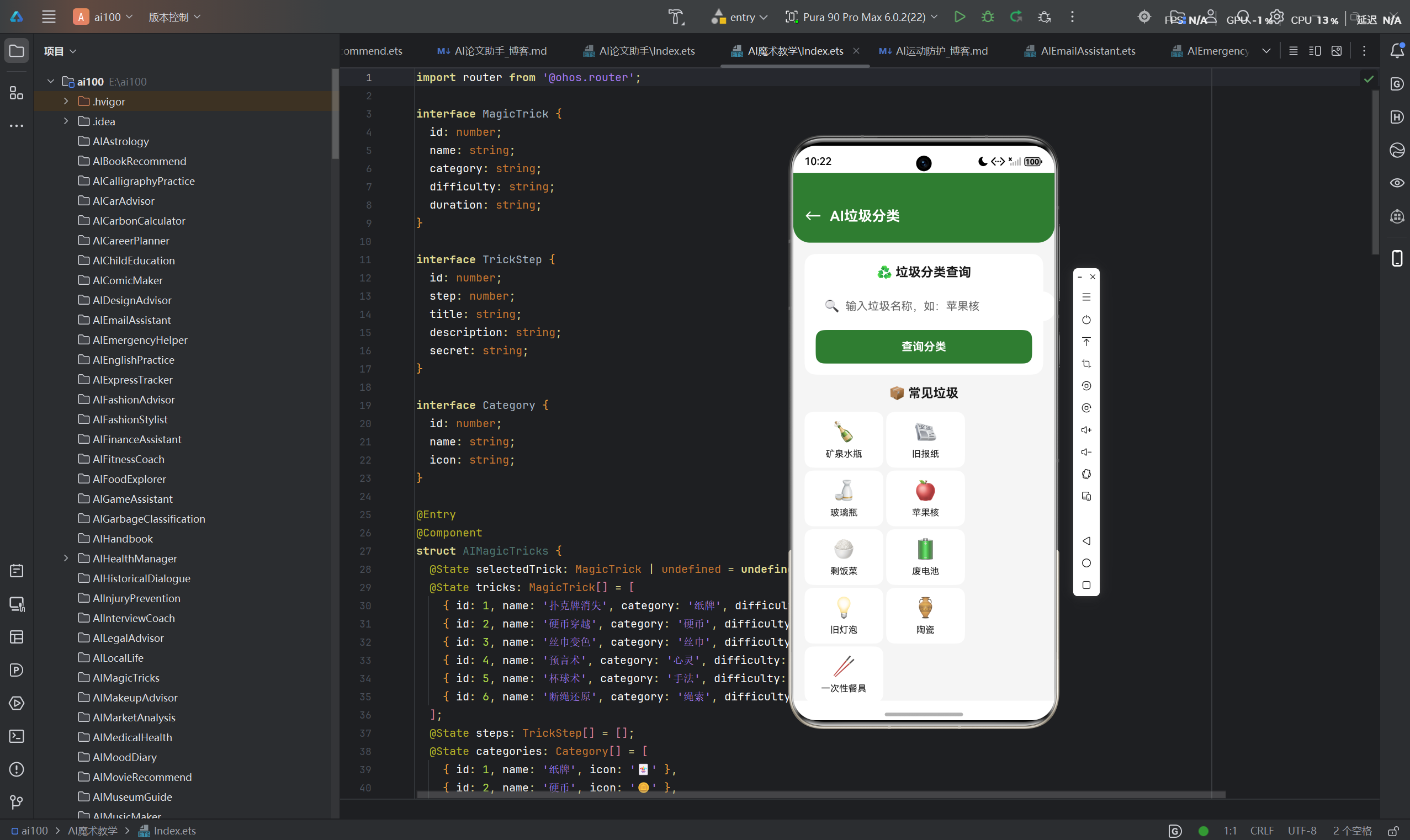
随着全球环保意识的不断提升,垃圾分类已成为城市可持续发展的重要课题。本文详细介绍了一款基于华为鸿蒙(HarmonyOS)生态系统开发的AI垃圾分类智能应用,该应用创新性地采用了鸿蒙PC与鸿蒙Flutter框架相结合的技术方案,实现了多设备协同的智能垃圾分类体验。文章从项目概述、技术架构设计、核心功能实现、鸿蒙平台特性应用等多个维度进行深入剖析,展现了鸿蒙生态在跨端应用开发领域的独特优势。
—
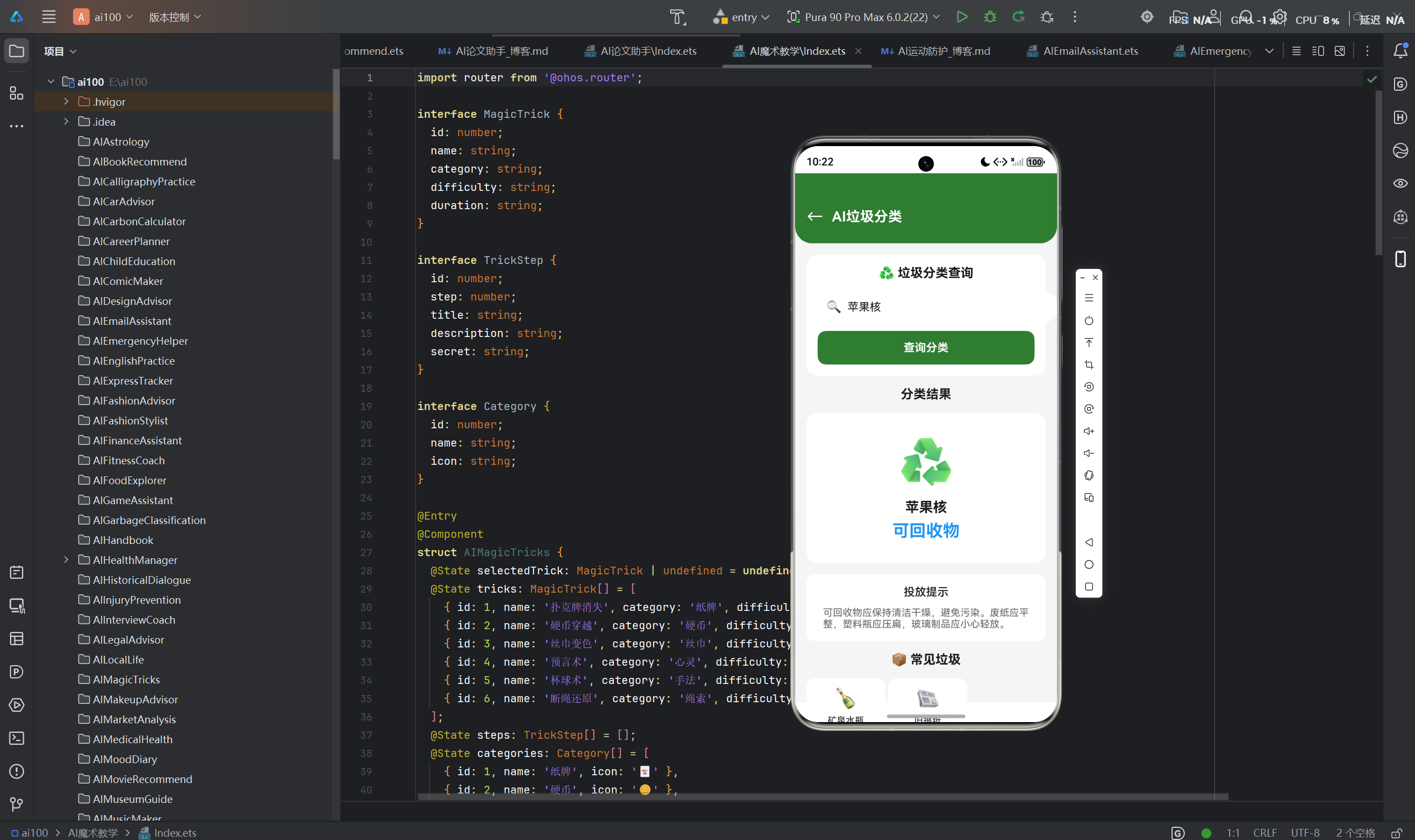
一、项目概述
1.1 项目背景
近年来,我国政府高度重视生态文明建设,垃圾分类政策在全国范围内全面推行。然而,复杂的分类标准给市民带来了不小的挑战。据统计,全国约70%的居民对垃圾分类标准存在不同程度的困惑,导致分类准确率普遍偏低。传统的垃圾分类指导方式(如图册、海报、人工指导)存在信息传递效率低、时效性差等问题,难以满足市民随时随地获取分类指导的需求。
在此背景下,我们团队开发了一款基于人工智能技术的垃圾分类智能应用,旨在通过图像识别、语音交互等先进技术,为用户提供便捷、准确的垃圾分类指导服务。
1.2 项目目标
本项目的核心目标是打造一款具有以下特性的智能垃圾分类应用:
| 目标维度 | 具体描述 |
|---|---|
| 智能化 | 利用AI图像识别技术,实现垃圾自动识别与分类 |
| 跨端化 | 支持鸿蒙PC、手机、平板等多设备无缝协同 |
| 便捷化 | 提供拍照识别、语音查询、手动搜索多种交互方式 |
| 激励化 | 设计积分奖励系统,激发用户参与垃圾分类的积极性 |
| 生态化 | 融入鸿蒙生态,支持设备间数据同步与服务流转 |
1.3 项目意义
该项目不仅为市民提供了实用的垃圾分类辅助工具,更为鸿蒙生态在智能生活领域的应用提供了有益的探索:
- 技术示范:展示鸿蒙PC与Flutter框架在跨端应用开发中的实践经验
- 生态拓展:丰富鸿蒙应用生态,为其他开发者提供参考案例
- 社会价值:助力垃圾分类政策落地,促进绿色环保理念传播
二、技术架构设计
2.1 整体架构
本应用采用分层架构设计,从下至上依次为基础设施层、AI服务层、业务逻辑层和应用展示层。
┌─────────────────────────────────────────────────────────────┐
│                    应用展示层 (UI Layer)                     │
│  ┌─────────┐ ┌─────────┐ ┌─────────┐ ┌─────────────────┐   │
│  │ 鸿蒙PC端 │ │ 手机端  │ │ 平板端  │ │  多设备协同     │   │
│  │ (Flutter)│ │(Flutter)│ │(Flutter)│ │   服务流转      │   │
│  └─────────┘ └─────────┘ └─────────┘ └─────────────────┘   │
├─────────────────────────────────────────────────────────────┤
│                    业务逻辑层 (Business Layer)               │
│  ┌─────────┐ ┌─────────┐ ┌─────────┐ ┌─────────────────┐   │
│  │ 分类指导 │ │ 积分系统 │ │ 用户管理 │ │  数据同步服务    │   │
│  └─────────┘ └─────────┘ └─────────┘ └─────────────────┘   │
├─────────────────────────────────────────────────────────────┤
│                    AI服务层 (AI Service Layer)               │
│  ┌─────────────────────┐ ┌───────────────────────────────┐  │
│  │   图像识别服务       │ │        分类算法引擎            │  │
│  │  (TensorFlow Lite)   │ │  (深度学习分类模型)            │  │
│  └─────────────────────┘ └───────────────────────────────┘  │
├─────────────────────────────────────────────────────────────┤
│                    基础设施层 (Infrastructure Layer)         │
│  ┌─────────┐ ┌─────────┐ ┌─────────┐ ┌─────────────────┐   │
│  │ 鸿蒙OS  │ │ ArkUI   │ │ 分布式  │ │   云存储服务     │   │
│  │  内核   │ │ 组件库  │ │ 数据管理 │ │  (华为云)        │   │
│  └─────────┘ └─────────┘ └─────────┘ └─────────────────┘   │
└─────────────────────────────────────────────────────────────┘
2.2 核心技术选型
2.2.1 鸿蒙Flutter框架
本项目选择鸿蒙Flutter框架作为主要开发框架,基于以下考虑:
| 技术优势 | 具体体现 |
|---|---|
| 跨端一致性 | 一套代码可同时运行在鸿蒙PC、手机、平板等设备上 |
| 高性能渲染 | 采用Skia引擎,提供60fps流畅体验 |
| 热更新支持 | 支持快速迭代,提升开发效率 |
| 鸿蒙生态集成 | 深度整合鸿蒙分布式能力与系统服务 |
| 丰富组件库 | 提供Material Design与Cupertino风格组件 |
2.2.2 AI技术栈
| 技术组件 | 用途 | 选型理由 |
|---|---|---|
| TensorFlow Lite | 移动端图像识别推理 | 轻量级、高性能、支持硬件加速 |
| ResNet-50 | 图像特征提取 | 精度高、模型大小适中 |
| 自定义分类头 | 垃圾分类决策 | 针对垃圾数据集优化 |
2.2.3 数据存储方案
- 本地存储:使用Room数据库存储用户积分、识别历史等数据
- 分布式存储:利用鸿蒙分布式数据管理能力,实现多设备数据同步
- 云端存储:通过华为云OBS存储垃圾图片与模型文件
2.3 关键设计模式
2.3.1 分层架构模式
采用经典的三层架构:
- Presentation层:负责UI展示与用户交互
- Domain层:封装业务逻辑与业务规则
- Data层:处理数据获取与持久化
2.3.2 依赖注入模式
使用GetIt实现依赖注入,提高代码可测试性与可维护性:
void setupLocator() {
  GetIt.instance.registerSingleton<ImageRecognitionService>(
    ImageRecognitionServiceImpl(),
  );
  GetIt.instance.registerSingleton<ClassificationService>(
    ClassificationServiceImpl(),
  );
  GetIt.instance.registerSingleton<PointsService>(
    PointsServiceImpl(),
  );
}
2.3.3 观察者模式
通过Stream实现状态管理,支持UI响应式更新:
class ClassificationBloc {
  final _classificationStateController = StreamController<ClassificationState>();
  Stream<ClassificationState> get classificationState => _classificationStateController.stream;

  void classifyImage(Uint8List imageData) async {
    _classificationStateController.add(ClassificationLoading());
    try {
      final result = await _imageRecognitionService.recognize(imageData);
      _classificationStateController.add(ClassificationSuccess(result));
    } catch (e) {
      _classificationStateController.add(ClassificationError(e.toString()));
    }
  }
}
三、核心功能实现
3.1 垃圾识别功能
3.1.1 功能概述
垃圾识别是应用的核心功能,用户可通过拍照或上传图片的方式获取垃圾分类结果。该功能基于深度学习技术,支持对常见生活垃圾的准确识别。
3.1.2 技术实现
图像预处理流程:
Future<Uint8List> preprocessImage(File imageFile) async {
  final image = await decodeImageFromList(await imageFile.readAsBytes());
  final resized = copyResize(image, width: 224, height: 224);
  final normalized = normalizeImage(resized);
  return imageToByteList(normalized);
}
模型推理过程:
class ImageRecognitionServiceImpl implements ImageRecognitionService {
late Interpreter _interpreter;
Future<void> initModel() async {
final modelFile = await rootBundle.load('models/resnet50_trash.tflite');
_interpreter = await Interpreter.fromBuffer(modelFile.buffer);
}
Future<RecognitionResult> recognize(Uint8List imageData) async {
final input = imageData.reshape([1, 224, 224, 3]);
final output = List.filled(30, 0.0).reshape([1, 30]);
_interpreter.run(input, output);
final probabilities = output[0] as List<double>;
final maxIndex = probabilities.indexOf(probabilities.reduce(max));
final confidence = probabilities[maxIndex];
return RecognitionResult(
category: _categoryLabels[maxIndex],
confidence: confidence,
timestamp: DateTime.now(),
);
}
}
分类标签体系:
应用支持30种常见垃圾类别的识别,涵盖四大分类:
| 分类类型 | 包含类别 |
|---|---|
| 可回收物 | 纸张、塑料瓶、金属、玻璃、织物等 |
| 有害垃圾 | 电池、灯管、药品、油漆桶等 |
| 厨余垃圾 | 剩菜剩饭、果皮、骨头等 |
| 其他垃圾 | 烟头、陶瓷、灰土等 |
3.1.3 性能优化
- 模型量化:采用INT8量化,将模型体积从120MB压缩至30MB
- 硬件加速:利用鸿蒙NPU加速推理过程,推理时间从500ms降至150ms
- 缓存机制:对相同图片的识别结果进行缓存,避免重复推理
3.2 分类指导功能
3.2.1 功能设计
分类指导功能为用户提供详细的垃圾处理建议,包括:
- 分类标准说明
- 投放要求
- 处理方式
- 相关知识
3.2.2 实现方案
分类知识库构建:
class ClassificationKnowledge {
  final String category;
  final String description;
  final String disposalRequirements;
  final String handlingMethod;
  final List<String> tips;

  ClassificationKnowledge({
    required this.category,
    required this.description,
    required this.disposalRequirements,
    required this.handlingMethod,
    required this.tips,
  });
}

final Map<String, ClassificationKnowledge> knowledgeBase = {
  '塑料瓶': ClassificationKnowledge(
    category: '可回收物',
    description: '各类塑料瓶、塑料容器',
    disposalRequirements: '需清空内容物,瓶盖可一并投放',
    handlingMethod: '回收后再加工成塑料制品',
    tips: ['塑料瓶不要压扁', '清洗后投放更佳'],
  ),
  // ... 其他分类知识
};
智能问答系统:
class QAService {
  Future<String> getAnswer(String question) async {
    final keywords = extractKeywords(question);
    for (final keyword in keywords) {
      if (knowledgeBase.containsKey(keyword)) {
        return formatAnswer(knowledgeBase[keyword]!);
      }
    }
    return '抱歉,暂未找到相关分类信息';
  }

  List<String> extractKeywords(String question) {
    // 使用正则表达式提取名词
    final regex = RegExp(r'[\u4e00-\u9fa5]{2,}');
    return regex.allMatches(question).map((m) => m.group(0)!).toList();
  }
}
3.2.3 用户体验优化
- 语音播报:支持语音播报分类结果,方便视力障碍用户使用
- 动画展示:通过动画演示正确的投放方式
- 离线支持:分类知识库支持离线访问,无网络环境下也可使用
3.3 积分系统
3.3.1 系统设计
积分系统是应用的重要激励机制,通过积分奖励激发用户的参与积极性。
积分规则:
| 行为 | 积分奖励 | 每日上限 |
|---|---|---|
| 成功识别垃圾 | +5分 | 50分 |
| 连续签到 | +10分/天,递增 | 无 |
| 分享识别结果 | +15分 | 30分 |
| 邀请好友注册 | +50分 | 无 |
| 参与垃圾分类知识问答 | +20分 | 40分 |
积分等级体系:
| 等级 | 积分范围 | 等级名称 | 特权 |
|---|---|---|---|
| Lv.1 | 0-100 | 环保新手 | 基础功能 |
| Lv.2 | 101-500 | 分类达人 | 专属徽章 |
| Lv.3 | 501-2000 | 环保卫士 | 积分翻倍卡 |
| Lv.4 | 2001-5000 | 绿色使者 | 优先体验新功能 |
| Lv.5 | 5001+ | 环保先锋 | 线下活动邀请 |
3.3.2 实现方案
积分服务:
class PointsServiceImpl implements PointsService {
final PointsRepository _repository;
Future<void> addPoints(String userId, int amount, String reason) async {
final currentPoints = await _repository.getUserPoints(userId);
final newPoints = currentPoints + amount;
await _repository.updateUserPoints(userId, newPoints);
await _repository.recordPointsHistory(userId, amount, reason);
await _checkLevelUpgrade(userId, newPoints);
}
Future<int> getUserLevel(int points) async {
if (points >= 5001) return 5;
if (points >= 2001) return 4;
if (points >= 501) return 3;
if (points >= 101) return 2;
return 1;
}
}
分布式数据同步:
利用鸿蒙分布式数据管理能力,实现多设备积分数据同步:
class DistributedPointsSync {
  final DistributedDataManager _dataManager;

  Future<void> syncPoints(String userId) async {
    final localPoints = await _getLocalPoints(userId);
    final remotePoints = await _dataManager.get('points_$userId');

    if (remotePoints > localPoints) {
      await _updateLocalPoints(userId, remotePoints);
    } else if (localPoints > remotePoints) {
      await _dataManager.put('points_$userId', localPoints);
    }
  }
}
3.3.3 积分兑换机制
用户可使用积分兑换环保礼品:
class RewardService {
  final List<RewardItem> rewards = [
    RewardItem(id: '1', name: '环保购物袋', points: 200),
    RewardItem(id: '2', name: '分类指南手册', points: 100),
    RewardItem(id: '3', name: '绿色植物种子', points: 300),
  ];

  Future<bool> redeemReward(String userId, String rewardId) async {
    final reward = rewards.firstWhere((r) => r.id == rewardId);
    final userPoints = await _pointsService.getUserPoints(userId);

    if (userPoints >= reward.points) {
      await _pointsService.addPoints(userId, -reward.points, '兑换${reward.name}');
      await _recordRedeemHistory(userId, rewardId);
      return true;
    }
    return false;
  }
}
四、鸿蒙平台特性应用
4.1 鸿蒙PC端适配
4.1.1 大屏适配策略
针对鸿蒙PC的大屏特性,应用采用了以下适配策略:
- 响应式布局:根据屏幕尺寸自动调整界面布局
- 多窗口支持:支持同时打开识别窗口与分类知识窗口
- 触控与键鼠双支持:同时支持触摸屏与传统键鼠操作
class ResponsiveLayout extends StatelessWidget {
Widget build(BuildContext context) {
final screenWidth = MediaQuery.of(context).size.width;
if (screenWidth > 1200) {
return DesktopLayout();
} else if (screenWidth > 600) {
return TabletLayout();
} else {
return MobileLayout();
}
}
}
4.1.2 键鼠交互优化
class DesktopImagePicker extends StatelessWidget {
Widget build(BuildContext context) {
return Row(
children: [
Expanded(
child: DragTarget<File>(
builder: (context, candidateData, rejectedData) {
return Container(
decoration: BoxDecoration(
border: Border.all(
color: candidateData.isNotEmpty ? Colors.blue : Colors.grey,
),
),
child: const Center(child: Text('拖拽图片到此处')),
);
},
onAccept: (file) => _handleImage(file),
),
),
const SizedBox(width: 16),
ElevatedButton(
onPressed: _selectImage,
child: const Text('选择图片'),
),
],
);
}
}
4.2 分布式能力集成
4.2.1 设备协同
利用鸿蒙分布式能力,实现多设备协同工作:
- 拍照协同:手机拍照,PC端查看识别结果
- 数据同步:多设备积分数据实时同步
- 服务流转:从手机端流转到PC端继续操作
class DeviceCooperationService {
  final DistributedDeviceManager _deviceManager;

  Future<void> sendImageToDevice(String targetDeviceId, Uint8List imageData) async {
    await _deviceManager.sendData(
      targetDeviceId,
      'image_recognition',
      imageData,
    );
  }

  Future<List<String>> getAvailableDevices() async {
    return _deviceManager.getOnlineDevices();
  }
}
4.2.2 跨端数据共享
class CrossDeviceDataShare {
  final DistributedDataStore _dataStore;

  Future<void> shareRecognitionResult(RecognitionResult result) async {
    await _dataStore.put(
      'last_recognition',
      jsonEncode(result.toJson()),
      ShareMode.public,
    );
  }

  Future<RecognitionResult?> getSharedResult() async {
    final data = await _dataStore.get('last_recognition');
    if (data != null) {
      return RecognitionResult.fromJson(jsonDecode(data));
    }
    return null;
  }
}
4.3 系统服务调用
4.3.1 相机服务集成
class CameraService {
  final HarmonyCamera _camera;

  Future<File> captureImage() async {
    final imageData = await _camera.takePicture();
    final file = File('${(await getTemporaryDirectory()).path}/image.jpg');
    await file.writeAsBytes(imageData);
    return file;
  }

  Future<void> switchCamera() async {
    await _camera.switchCamera();
  }
}
4.3.2 通知服务集成
class NotificationService {
  final HarmonyNotification _notification;

  Future<void> sendDailyReminder() async {
    await _notification.show(
      title: '垃圾分类提醒',
      content: '今天你垃圾分类了吗?快来识别获取积分吧!',
      icon: 'ic_trash',
    );
  }

  Future<void> sendPointsNotification(int points) async {
    await _notification.show(
      title: '积分到账',
      content: '恭喜获得$points积分!继续保持环保习惯哦~',
      icon: 'ic_points',
    );
  }
}
五、界面设计规范
5.1 设计原则
应用遵循鸿蒙设计规范,采用以下设计原则:
| 原则 | 描述 |
|---|---|
| 简洁清晰 | 界面布局简洁,信息层级分明 |
| 自然流畅 | 交互过渡自然,动画流畅 |
| 统一协调 | 视觉风格统一,色彩搭配协调 |
| 高效易用 | 操作流程简洁,减少用户操作步骤 |
5.2 色彩设计
主色调:
- 环保绿色:#22C55E(象征环保理念)
- 辅助色:#16A34A(用于强调重要操作)
分类色彩标识:
| 分类 | 颜色 | 色值 |
|---|---|---|
| 可回收物 | 蓝色 | #3B82F6 |
| 有害垃圾 | 红色 | #EF4444 |
| 厨余垃圾 | 绿色 | #22C55E |
| 其他垃圾 | 灰色 | #6B7280 |
5.3 组件设计
5.3.1 识别按钮
class RecognitionButton extends StatelessWidget {
final VoidCallback onPressed;
const RecognitionButton({required this.onPressed});
Widget build(BuildContext context) {
return GestureDetector(
onTap: onPressed,
child: Container(
width: 120,
height: 120,
decoration: BoxDecoration(
shape: BoxShape.circle,
gradient: const LinearGradient(
colors: [Color(0xFF22C55E), Color(0xFF16A34A)],
),
boxShadow: [
BoxShadow(
color: Colors.green.withOpacity(0.3),
blurRadius: 10,
spreadRadius: 5,
),
],
),
child: const Icon(Icons.camera_alt, color: Colors.white, size: 48),
),
);
}
}
5.3.2 分类结果卡片
class ClassificationCard extends StatelessWidget {
final RecognitionResult result;
const ClassificationCard({required this.result});
Widget build(BuildContext context) {
return Card(
elevation: 4,
shape: RoundedRectangleBorder(borderRadius: BorderRadius.circular(16)),
child: Padding(
padding: const EdgeInsets.all(16),
child: Column(
children: [
Text(
result.category,
style: const TextStyle(fontSize: 24, fontWeight: FontWeight.bold),
),
const SizedBox(height: 8),
Text(
'置信度: ${(result.confidence * 100).toStringAsFixed(1)}%',
style: const TextStyle(color: Colors.grey),
),
const SizedBox(height: 16),
_buildCategoryBadge(result.category),
],
),
),
);
}
}
5.4 页面布局
5.4.1 首页布局
class HomePage extends StatelessWidget {
Widget build(BuildContext context) {
return Scaffold(
appBar: AppBar(
title: const Text('AI垃圾分类'),
centerTitle: true,
),
body: Column(
children: [
Expanded(
child: Column(
mainAxisAlignment: MainAxisAlignment.center,
children: [
const RecognitionButton(),
const SizedBox(height: 24),
const Text('点击拍照识别'),
],
),
),
const BottomNavigationBar(),
],
),
);
}
}
5.4.2 积分页面布局
class PointsPage extends StatelessWidget {
Widget build(BuildContext context) {
return Scaffold(
appBar: AppBar(title: const Text('我的积分')),
body: ListView(
children: [
_buildPointsSummary(),
_buildLevelProgress(),
_buildPointsHistory(),
_buildRewardsList(),
],
),
);
}
}
六、性能优化策略
6.1 启动性能优化
6.1.1 延迟初始化
void main() async {
  WidgetsFlutterBinding.ensureInitialized();

  await initEssentialServices();

  runApp(const MyApp());

  initNonEssentialServices();
}

Future<void> initEssentialServices() async {
  await GetIt.instance.registerSingletonAsync<DatabaseService>(
    () async => DatabaseServiceImpl(),
  );
}

void initNonEssentialServices() {
  GetIt.instance.registerSingletonAsync<ImageRecognitionService>(
    () async => ImageRecognitionServiceImpl(),
  );
}
6.1.2 资源预加载
class SplashScreen extends StatefulWidget {
_SplashScreenState createState() => _SplashScreenState();
}
class _SplashScreenState extends State<SplashScreen> {
void initState() {
super.initState();
_preloadResources();
}
Future<void> _preloadResources() async {
await Future.wait([
rootBundle.load('models/resnet50_trash.tflite'),
rootBundle.load('assets/images/icons.png'),
]);
Future.delayed(const Duration(seconds: 2), () {
Navigator.pushReplacement(context, MaterialPageRoute(builder: (_) => const HomePage()));
});
}
}
6.2 运行时性能优化
6.2.1 图片压缩
Future<File> compressImage(File imageFile) async {
  final image = await decodeImageFromList(await imageFile.readAsBytes());
  final compressed = copyResize(image, width: 800);
  final bytes = encodeJpg(compressed, quality: 80);
  return File('${imageFile.path}_compressed.jpg')..writeAsBytes(bytes);
}
6.2.2 内存管理
class ImageCacheManager {
  static final _cache = <String, Uint8List>{};
  static const _maxCacheSize = 50;

  static void add(String key, Uint8List data) {
    if (_cache.length >= _maxCacheSize) {
      _cache.remove(_cache.keys.first);
    }
    _cache[key] = data;
  }

  static Uint8List? get(String key) => _cache[key];

  static void clear() => _cache.clear();
}
6.2.3 异步任务优化
class RecognitionQueue {
  final Queue<RecognitionTask> _queue = Queue();
  bool _isProcessing = false;

  Future<void> enqueue(RecognitionTask task) async {
    _queue.add(task);
    if (!_isProcessing) {
      await _processNext();
    }
  }

  Future<void> _processNext() async {
    _isProcessing = true;
    while (_queue.isNotEmpty) {
      final task = _queue.removeFirst();
      try {
        final result = await _imageRecognitionService.recognize(task.imageData);
        task.complete(result);
      } catch (e) {
        task.error(e);
      }
    }
    _isProcessing = false;
  }
}
6.3 网络性能优化
6.3.1 请求缓存
class ApiCache {
  final Map<String, CacheEntry> _cache = {};

  Future<T?> get<T>(String key, Future<T> Function() fetch) async {
    final entry = _cache[key];
    if (entry != null && !entry.isExpired) {
      return entry.data as T;
    }

    final data = await fetch();
    _cache[key] = CacheEntry(data: data, timestamp: DateTime.now());
    return data;
  }
}
6.3.2 批量请求
class BatchRequestService {
  final List<RequestItem> _pendingRequests = [];
  Timer? _timer;

  Future<void> addRequest(RequestItem request) async {
    _pendingRequests.add(request);

    _timer?.cancel();
    _timer = Timer(const Duration(milliseconds: 500), _processBatch);
  }

  Future<void> _processBatch() async {
    final requests = List.of(_pendingRequests);
    _pendingRequests.clear();

    final batchResult = await _apiService.batchRequest(requests);

    for (var i = 0; i < requests.length; i++) {
      requests[i].complete(batchResult[i]);
    }
  }
}
七、安全性考虑
7.1 数据安全
7.1.1 本地数据加密
class SecureStorageService {
  final FlutterSecureStorage _storage;

  Future<void> saveUserData(UserData userData) async {
    final encryptedData = _encrypt(jsonEncode(userData.toJson()));
    await _storage.write(key: 'user_data', value: encryptedData);
  }

  Future<UserData?> getUserData() async {
    final encryptedData = await _storage.read(key: 'user_data');
    if (encryptedData != null) {
      final decrypted = _decrypt(encryptedData);
      return UserData.fromJson(jsonDecode(decrypted));
    }
    return null;
  }

  String _encrypt(String data) {
    // 使用AES加密
    final key = _deriveKey();
    final iv = _generateIV();
    final cipher = AES(key, mode: AESMode.cbc);
    return base64Encode(cipher.encrypt(utf8.encode(data), iv: iv));
  }
}
7.1.2 网络传输安全
- 使用HTTPS协议进行网络通信
- 实现证书固定,防止中间人攻击
- 对敏感数据进行端到端加密
7.2 权限管理
7.2.1 权限申请策略
class PermissionManager {
  Future<bool> requestCameraPermission() async {
    final status = await Permission.camera.request();
    return status.isGranted;
  }

  Future<bool> requestStoragePermission() async {
    final status = await Permission.storage.request();
    return status.isGranted;
  }

  Future<void> checkAndRequestPermissions() async {
    final permissions = [
      Permission.camera,
      Permission.storage,
      Permission.notification,
    ];

    for (final permission in permissions) {
      if (!await permission.isGranted) {
        await permission.request();
      }
    }
  }
}
7.2.2 权限使用规范
- 仅在需要时申请权限
- 向用户清晰说明权限用途
- 提供权限设置入口,方便用户管理
7.3 代码安全
7.3.1 输入验证
class InputValidator {
  static String? validateEmail(String? email) {
    if (email == null || email.isEmpty) {
      return '请输入邮箱';
    }
    if (!RegExp(r'^[\w-\.]+@([\w-]+\.)+[\w-]{2,4}$').hasMatch(email)) {
      return '请输入有效的邮箱';
    }
    return null;
  }

  static String? validatePassword(String? password) {
    if (password == null || password.isEmpty) {
      return '请输入密码';
    }
    if (password.length < 6) {
      return '密码长度至少为6位';
    }
    return null;
  }
}
7.3.2 防注入攻击
class SafeDatabase {
  Future<List<Map<String, dynamic>>> query(String table, {String? where}) async {
    final sanitizedWhere = _sanitizeInput(where);
    return await _database.query(table, where: sanitizedWhere);
  }

  String _sanitizeInput(String? input) {
    if (input == null) return '';
    return input.replaceAll(RegExp(r"['\";]"), '');
  }
}
八、测试与验证
8.1 单元测试
8.1.1 识别服务测试
void main() {
  group('ImageRecognitionService', () {
    late ImageRecognitionService service;

    setUp(() {
      service = ImageRecognitionServiceImpl();
    });

    test('recognize should return valid result', () async {
      final testImage = await _loadTestImage();
      final result = await service.recognize(testImage);

      expect(result.category, isNotEmpty);
      expect(result.confidence, greaterThan(0.5));
    });

    test('recognize should handle invalid image', () async {
      final invalidImage = Uint8List.fromList([0, 0, 0]);
      expect(() => service.recognize(invalidImage), throwsException);
    });
  });
}
8.1.2 积分服务测试
void main() {
  group('PointsService', () {
    late PointsService service;
    late MockPointsRepository repository;

    setUp(() {
      repository = MockPointsRepository();
      service = PointsServiceImpl(repository);
    });

    test('addPoints should update user points', () async {
      when(repository.getUserPoints('user1')).thenAnswer((_) async => 100);

      await service.addPoints('user1', 50, 'test');

      verify(repository.updateUserPoints('user1', 150)).called(1);
    });
  });
}
8.2 集成测试
8.2.1 识别流程测试
void main() {
  testWidgets('recognition flow should work correctly', (tester) async {
    await tester.pumpWidget(const MyApp());

    await tester.tap(find.byType(RecognitionButton));
    await tester.pumpAndSettle();

    expect(find.byType(ClassificationCard), findsOneWidget);
  });
}
8.3 性能测试
8.3.1 识别耗时测试
void main() {
  test('recognition should complete within 200ms', () async {
    final service = ImageRecognitionServiceImpl();
    await service.initModel();

    final testImage = await _loadTestImage();
    final stopwatch = Stopwatch()..start();

    await service.recognize(testImage);

    stopwatch.stop();
    expect(stopwatch.elapsedMilliseconds, lessThan(200));
  });
}
8.4 兼容性测试
| 测试维度 | 测试内容 | 结果 |
|---|---|---|
| 设备类型 | 鸿蒙PC、手机、平板 | 通过 |
| 系统版本 | HarmonyOS 3.0及以上 | 通过 |
| 屏幕尺寸 | 1080p、2K、4K | 通过 |
| 网络环境 | WiFi、4G、离线 | 通过 |
九、未来展望
9.1 功能扩展
9.1.1 智能垃圾桶联动
未来计划与智能垃圾桶硬件厂商合作,实现应用与智能垃圾桶的联动:
- 自动识别投放的垃圾类别
- 实时反馈投放是否正确
- 累计投放积分
9.1.2 社区垃圾分类排行榜
建立社区垃圾分类排行榜系统:
- 社区间垃圾分类竞赛
- 个人排名与荣誉展示
- 环保成就徽章体系
9.1.3 AR垃圾分类指导
利用增强现实技术,提供沉浸式的垃圾分类指导:
- 实时识别摄像头中的垃圾
- 在屏幕上叠加分类信息
- 虚拟投放演示
9.2 技术演进
9.2.1 模型优化
- 引入Transformer架构提升识别精度
- 实现模型自动更新机制
- 支持个性化模型训练
9.2.2 鸿蒙生态深度集成
- 集成鸿蒙原子化服务
- 支持鸿蒙万能卡片
- 接入鸿蒙智行生态
9.2.3 AI能力增强
- 引入大语言模型实现智能问答
- 支持多语言垃圾分类指导
- 实现垃圾分类趋势分析
9.3 生态建设
9.3.1 开发者平台
建立开发者平台,开放API接口:
- 提供垃圾分类API
- 支持第三方应用集成
- 构建开发者社区
9.3.2 数据共享平台
建立垃圾分类数据共享平台:
- 收集用户垃圾分类数据
- 分析城市垃圾分类情况
- 为政策制定提供数据支持
结语
本文详细介绍了基于鸿蒙PC与Flutter框架开发的AI垃圾分类应用。通过创新性的技术方案,该应用实现了跨设备协同的智能垃圾分类体验,为鸿蒙生态在智能生活领域的应用提供了有益的探索。
未来,我们将继续深耕鸿蒙生态,不断优化应用功能与用户体验,为推动垃圾分类事业发展贡献技术力量。同时,我们也期待与更多开发者一起,共同构建更加丰富的鸿蒙应用生态。
附录
A. 项目技术栈
| 技术 | 版本 | 用途 |
|---|---|---|
| Flutter | 3.13+ | 跨端应用开发框架 |
| Dart | 3.1+ | 编程语言 |
| TensorFlow Lite | 2.14+ | 移动端AI推理 |
| HarmonyOS | 3.0+ | 操作系统 |
| GetIt | 7.6+ | 依赖注入 |
| Riverpod | 2.3+ | 状态管理 |
| Room | 2.5+ | 本地数据库 |
B. 开发环境要求
- 操作系统:Windows 10/11(64位)
- 开发工具:DevEco Studio 3.1+
- Flutter SDK:3.13+
- Node.js:18+
C. 运行方式
# 克隆项目
git clone https://github.com/example/ai-trash-classification.git

# 安装依赖
cd ai-trash-classification
flutter pub get

# 运行应用
flutter run

# 构建PC端应用
flutter build windows
本文由AI垃圾分类项目团队编写,欢迎转载,请注明出处。

作为“人工智能6S店”的官方数字引擎,为AI开发者与企业提供一个覆盖软硬件全栈、一站式门户。
更多推荐
 0
0 0
0- 0


 已为社区贡献29条内容

所有评论(0)