
鸿蒙PC生态新篇章:基于Flutter框架构建AI编程面试助手
鸿蒙PC生态新篇章:基于Flutter框架构建AI编程面试助手
引言
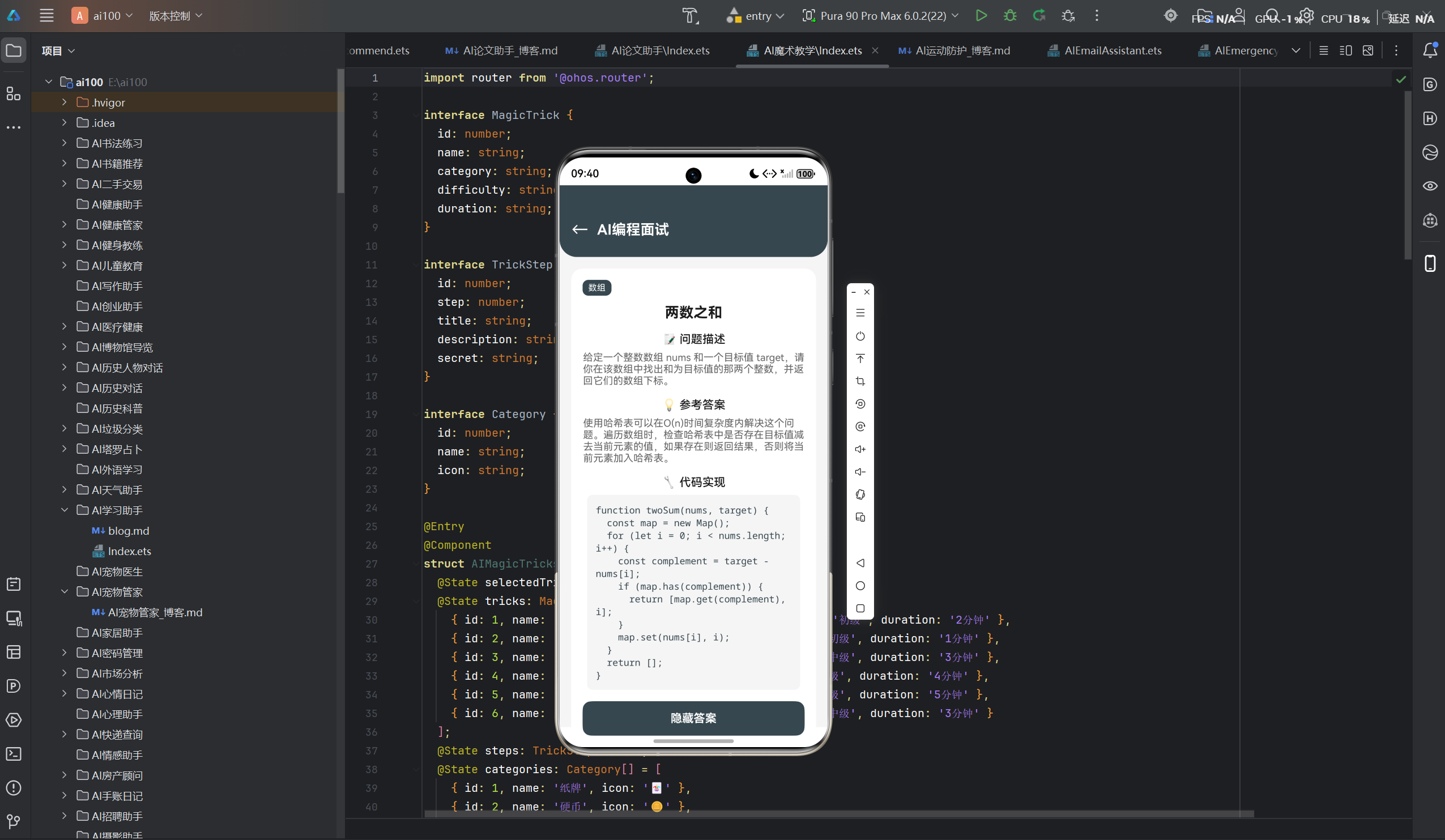
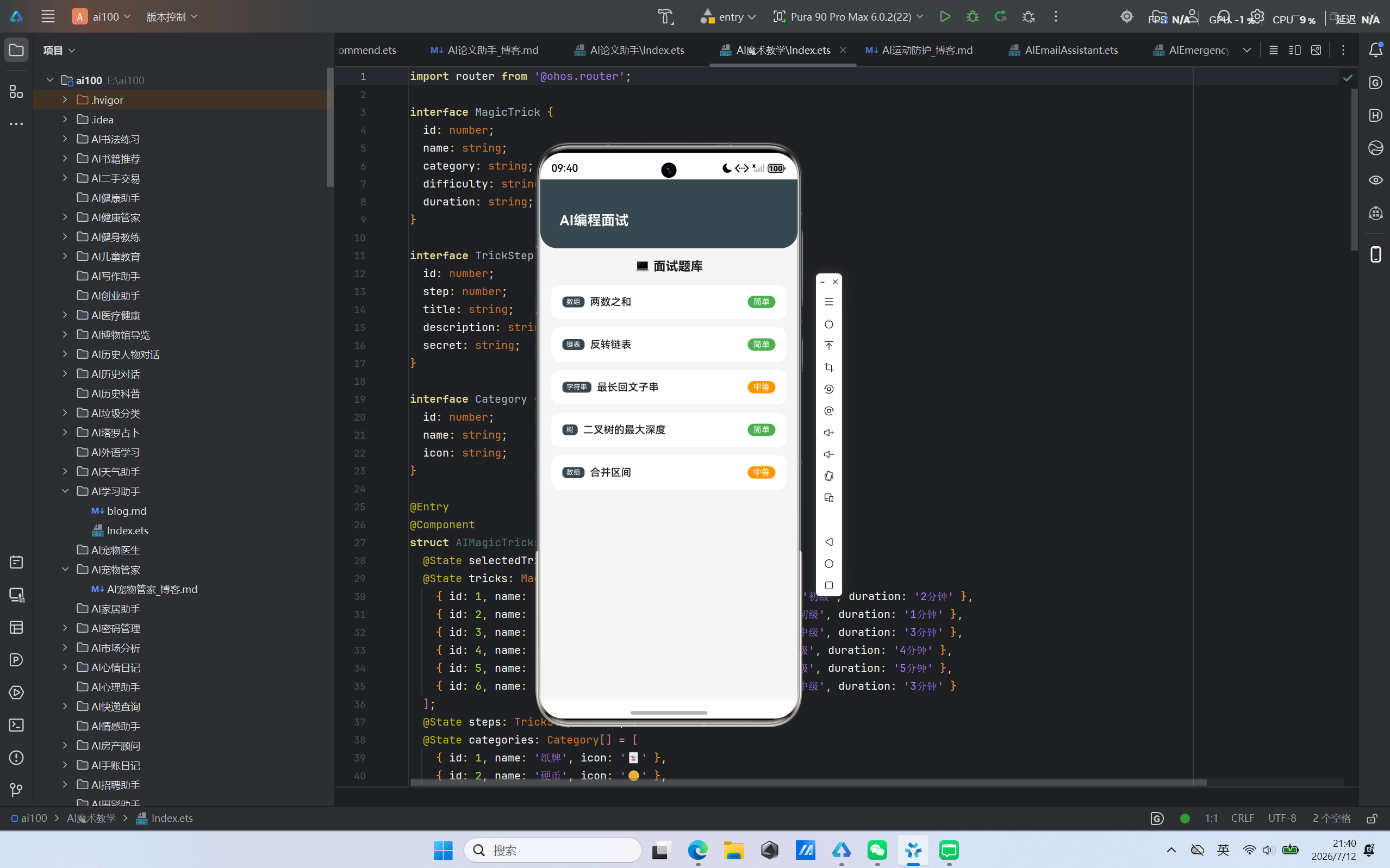
随着华为鸿蒙操作系统(HarmonyOS)在PC端的正式发布,一个全新的智能终端生态正在崛起。鸿蒙PC不仅延续了HarmonyOS的分布式能力,更带来了桌面级的性能体验。与此同时,Flutter作为跨平台UI框架的佼佼者,凭借其优秀的性能表现和丰富的组件库,成为了开发者构建多端应用的首选。本文将深入探讨如何在鸿蒙PC平台上,利用Flutter框架打造一款功能强大的AI编程面试助手应用,为开发者提供一站式的算法学习和面试准备解决方案。
—
项目概述
1.1 项目背景
在当今竞争激烈的互联网行业,编程能力已成为开发者求职的核心竞争力。算法刷题、面试准备、代码评测是开发者成长道路上不可或缺的环节。然而,现有的编程学习工具往往存在以下问题:
- 平台割裂:不同平台的应用体验不一致,数据无法同步
- 功能单一:缺乏集成化的学习解决方案
- 交互体验差:传统IDE式的界面难以吸引年轻开发者
- AI能力不足:缺乏智能辅助功能
针对这些痛点,我们决定在鸿蒙PC平台上,基于Flutter框架构建一款AI编程面试助手应用,旨在为开发者提供一个高效、智能、跨平台的编程学习环境。
1.2 项目目标
本项目的核心目标是打造一个集算法刷题、面试题解、代码评测、AI辅助于一体的编程学习平台,具体包括:
- 构建完整的算法题库:涵盖常见数据结构与算法题目
- 提供详细的题解分析:包含多种解法和优化思路
- 实现代码在线评测:支持多种编程语言的实时评测
- 集成AI辅助功能:智能代码补全、错误检测、优化建议
- 打造个性化学习路径:根据用户水平定制学习计划
- 实现跨平台数据同步:鸿蒙PC与移动端无缝衔接
1.3 技术选型
| 维度 | 技术方案 | 选型理由 |
|---|---|---|
| 操作系统 | HarmonyOS PC | 分布式能力强,多设备协同,生态潜力大 |
| UI框架 | Flutter | 跨平台一致性好,性能优秀,热重载便捷 |
| 编程语言 | Dart | Flutter官方语言,性能接近原生,异步支持好 |
| 状态管理 | Riverpod | 轻量级、类型安全、易于测试 |
| 网络请求 | Dio | 功能强大,支持拦截器,文件上传下载 |
| 数据库 | SQLite + Moor | 本地数据持久化,类型安全的ORM |
| 代码编辑器 | CodeMirror | Web端成熟编辑器,支持多语言语法高亮 |
| AI能力 | OpenAI API | 强大的自然语言处理和代码理解能力 |
技术架构设计
2.1 整体架构
应用采用经典的分层架构设计,确保代码的可维护性和可扩展性:
┌─────────────────────────────────────────────────────────┐
│                      UI Layer                           │
│  ┌──────────┐ ┌──────────┐ ┌──────────┐ ┌──────────┐   │
│  │ HomePage │ │ Problem  │ │ Editor   │ │ Profile  │   │
│  │          │ │ List     │ │          │ │          │   │
│  └──────────┘ └──────────┘ └──────────┘ └──────────┘   │
└───────────────────────────┬─────────────────────────────┘
                            │
┌───────────────────────────▼─────────────────────────────┐
│                   Business Layer                        │
│  ┌──────────────────┐ ┌──────────────────┐              │
│  │ ProblemService   │ │ CodeService      │              │
│  │ (题目管理)       │ │ (代码评测)       │              │
│  ├──────────────────┤ ├──────────────────┤              │
│  │ UserService      │ │ AIService        │              │
│  │ (用户管理)       │ │ (AI辅助)         │              │
│  └──────────────────┘ └──────────────────┘              │
└───────────────────────────┬─────────────────────────────┘
                            │
┌───────────────────────────▼─────────────────────────────┐
│                    Data Layer                           │
│  ┌──────────┐ ┌──────────┐ ┌──────────────────────┐    │
│  │ SQLite   │ │ API      │ │ SharedPreferences    │    │
│  │ (本地存储)│ │ (远程数据)│ │ (配置与缓存)         │    │
│  └──────────┘ └──────────┘ └──────────────────────┘    │
└───────────────────────────┬─────────────────────────────┘
                            │
┌───────────────────────────▼─────────────────────────────┐
│                   Platform Layer                        │
│  ┌──────────────┐ ┌──────────────┐ ┌──────────────┐    │
│  │ HarmonyOS    │ │ Flutter SDK  │ │ Native Code  │    │
│  │ Capabilities │ │              │ │ (性能优化)   │    │
│  └──────────────┘ └──────────────┘ └──────────────┘    │
└─────────────────────────────────────────────────────────┘
2.2 核心模块划分
2.2.1 题目管理模块
负责算法题目的展示、搜索、分类和收藏功能:
- 题目列表:分页展示所有题目,支持按难度、标签筛选
- 题目详情:展示题目描述、示例、约束条件
- 题目收藏:用户收藏感兴趣的题目
- 学习进度:记录用户的刷题进度
2.2.2 代码编辑器模块
提供在线代码编写环境:
- 代码编辑:支持多语言语法高亮
- 代码补全:基于AI的智能代码补全
- 代码格式化:一键格式化代码风格
- 代码提交:提交代码进行评测
2.2.3 评测系统模块
实现代码的在线评测功能:
- 编译运行:调用后端API编译并运行代码
- 测试用例:覆盖边界条件的测试用例
- 结果分析:展示运行时间、内存消耗、错误信息
- 排名系统:基于运行效率的排名
2.2.4 AI辅助模块
集成人工智能能力提升学习效率:
- 智能题解:AI生成多种解题思路
- 代码审查:检测代码中的潜在问题
- 优化建议:提供性能优化建议
- 面试模拟:模拟真实面试场景
2.3 数据流设计
应用采用单向数据流设计,确保状态管理的清晰性:
用户操作 → Widget事件 → Provider状态更新 → Widget重建
                                         ↓
                                    数据持久化
                                         ↓
                                    SQLite/API
2.3.1 状态管理方案
使用Riverpod进行状态管理,主要Provider包括:
final problemListProvider = FutureProvider<List<Problem>>((ref) async {
  final service = ref.read(problemServiceProvider);
  return service.getProblems();
});

final currentProblemProvider = StateProvider<Problem?>((ref) => null);

final codeEditorProvider = StateProvider<CodeEditorState>((ref) => CodeEditorState());

final submissionProvider = FutureProvider.family<SubmissionResult, String>(
  (ref, code) async {
    final service = ref.read(codeServiceProvider);
    return service.submitCode(code);
  },
);
2.3.2 网络请求设计
使用Dio封装统一的网络请求层:
class ApiService {
  final Dio _dio;

  ApiService() : _dio = Dio(BaseOptions(
    baseUrl: 'https://api.example.com',
    connectTimeout: const Duration(seconds: 10),
    receiveTimeout: const Duration(seconds: 30),
  )) {
    _dio.interceptors.add(AuthInterceptor());
    _dio.interceptors.add(LogInterceptor());
  }

  Future<Response> get(String path, {Map<String, dynamic>? queryParameters}) async {
    return _dio.get(path, queryParameters: queryParameters);
  }

  Future<Response> post(String path, {dynamic data}) async {
    return _dio.post(path, data: data);
  }
}
核心功能实现
3.1 算法刷题功能
3.1.1 题目数据模型
enum Difficulty { easy, medium, hard }

enum Category {
  array,
  string,
  linkedList,
  tree,
  graph,
  dynamicProgramming,
  backtracking,
  greedy,
}

class Problem {
  final int id;
  final String title;
  final String description;
  final List<String> examples;
  final List<String> constraints;
  final Difficulty difficulty;
  final List<Category> categories;
  final String templateCode;
  final int acceptanceRate;
  final int submissions;

  const Problem({
    required this.id,
    required this.title,
    required this.description,
    required this.examples,
    required this.constraints,
    required this.difficulty,
    required this.categories,
    required this.templateCode,
    this.acceptanceRate = 0,
    this.submissions = 0,
  });
}
3.1.2 题目列表实现
class ProblemListPage extends ConsumerWidget {
const ProblemListPage({super.key});
Widget build(BuildContext context, WidgetRef ref) {
final problems = ref.watch(problemListProvider);
final filter = ref.watch(filterProvider);
return problems.when(
loading: () => const Center(child: CircularProgressIndicator()),
error: (error, stack) => Center(child: Text('Error: $error')),
data: (data) {
final filtered = data.where((p) {
final matchesDifficulty = filter.difficulty == null || p.difficulty == filter.difficulty;
final matchesCategory = filter.category == null || p.categories.contains(filter.category);
return matchesDifficulty && matchesCategory;
}).toList();
return ListView.builder(
itemCount: filtered.length,
itemBuilder: (context, index) {
final problem = filtered[index];
return ProblemCard(problem: problem);
},
);
},
);
}
}
3.1.3 题目卡片设计
class ProblemCard extends StatelessWidget {
final Problem problem;
const ProblemCard({super.key, required this.problem});
Widget build(BuildContext context) {
return Card(
margin: const EdgeInsets.symmetric(horizontal: 16, vertical: 8),
child: Padding(
padding: const EdgeInsets.all(16),
child: Column(
crossAxisAlignment: CrossAxisAlignment.start,
children: [
Row(
children: [
Text(
'${problem.id}. ${problem.title}',
style: Theme.of(context).textTheme.titleLarge,
),
const Spacer(),
DifficultyBadge(difficulty: problem.difficulty),
],
),
const SizedBox(height: 8),
Wrap(
spacing: 8,
children: problem.categories
.map((cat) => CategoryChip(category: cat))
.toList(),
),
const SizedBox(height: 8),
Row(
children: [
Text('通过率: ${problem.acceptanceRate}%'),
const SizedBox(width: 16),
Text('提交数: ${problem.submissions}'),
],
),
],
),
),
);
}
}
3.2 面试题解功能
3.2.1 题解数据模型
class Solution {
  final int id;
  final int problemId;
  final String title;
  final String content;
  final List<String> codeSnippets;
  final List<String> explanations;
  final int timeComplexity;
  final int spaceComplexity;
  final String author;
  final int likes;
  final DateTime createdAt;

  const Solution({
    required this.id,
    required this.problemId,
    required this.title,
    required this.content,
    required this.codeSnippets,
    required this.explanations,
    required this.timeComplexity,
    required this.spaceComplexity,
    required this.author,
    this.likes = 0,
    required this.createdAt,
  });
}
3.2.2 题解详情页面
class SolutionDetailPage extends ConsumerWidget {
final int problemId;
const SolutionDetailPage({super.key, required this.problemId});
Widget build(BuildContext context, WidgetRef ref) {
final solutions = ref.watch(solutionListProvider(problemId));
return solutions.when(
loading: () => const Center(child: CircularProgressIndicator()),
error: (error, stack) => Center(child: Text('Error: $error')),
data: (data) => ListView.builder(
itemCount: data.length,
itemBuilder: (context, index) {
final solution = data[index];
return SolutionCard(solution: solution);
},
),
);
}
}
3.2.3 AI生成题解
class AIService {
  final OpenAIApi _openai;

  AIService() : _openai = OpenAIApi(Dio());

  Future<String> generateSolution(String problemDescription) async {
    final prompt = '''
请为以下算法题目提供详细的题解:

题目描述:$problemDescription

要求:
1. 分析解题思路
2. 提供至少两种解法
3. 分析时间复杂度和空间复杂度
4. 提供代码实现(Python)
5. 解释关键步骤
''';

    final request = CreateCompletionRequest(
      model: 'text-davinci-003',
      prompt: prompt,
      maxTokens: 2000,
      temperature: 0.7,
    );

    final response = await _openai.createCompletion(request);
    return response.choices?.first.text ?? '';
  }
}
3.3 代码评测功能
3.3.1 代码编辑器集成
使用CodeMirror实现Web端代码编辑器:
class CodeEditor extends StatefulWidget {
final String language;
final String initialCode;
final ValueChanged<String> onCodeChanged;
const CodeEditor({
super.key,
required this.language,
required this.initialCode,
required this.onCodeChanged,
});
State<CodeEditor> createState() => _CodeEditorState();
}
class _CodeEditorState extends State<CodeEditor> {
late WebViewController _controller;
final GlobalKey webViewKey = GlobalKey();
void initState() {
super.initState();
_controller = WebViewController()
..setJavaScriptMode(JavaScriptMode.unrestricted)
..addJavaScriptChannel(
'CodeChannel',
onMessageReceived: (JavaScriptMessage message) {
widget.onCodeChanged(message.message);
},
)
..loadHtmlString(_buildEditorHtml());
}
String _buildEditorHtml() {
return '''
<!DOCTYPE html>
<html>
<head>
<link rel="stylesheet" href="https://cdnjs.cloudflare.com/ajax/libs/codemirror/5.65.2/codemirror.min.css">
<link rel="stylesheet" href="https://cdnjs.cloudflare.com/ajax/libs/codemirror/5.65.2/theme/dracula.min.css">
<script src="https://cdnjs.cloudflare.com/ajax/libs/codemirror/5.65.2/codemirror.min.js"></script>
<script src="https://cdnjs.cloudflare.com/ajax/libs/codemirror/5.65.2/mode/python/python.min.js"></script>
<style>
body { margin: 0; height: 100vh; }
.CodeMirror { height: 100%; }
</style>
</head>
<body>
<textarea id="code"></textarea>
<script>
const editor = CodeMirror.fromTextArea(document.getElementById('code'), {
mode: 'python',
theme: 'dracula',
lineNumbers: true,
autoCloseBrackets: true,
matchBrackets: true,
indentUnit: 4,
tabSize: 4,
});
editor.setValue('${widget.initialCode}');
editor.on('change', () => {
CodeChannel.postMessage(editor.getValue());
});
</script>
</body>
</html>
''';
}
Widget build(BuildContext context) {
return WebViewWidget(controller: _controller, key: webViewKey);
}
}
3.3.2 代码提交与评测
class CodeService {
  final ApiService _apiService;

  CodeService(this._apiService);

  Future<SubmissionResult> submitCode(
    int problemId,
    String code,
    String language,
  ) async {
    final response = await _apiService.post(
      '/submissions',
      data: {
        'problem_id': problemId,
        'code': code,
        'language': language,
      },
    );

    return SubmissionResult.fromJson(response.data);
  }

  Future<SubmissionResult> getSubmissionStatus(String submissionId) async {
    final response = await _apiService.get('/submissions/$submissionId');
    return SubmissionResult.fromJson(response.data);
  }
}

class SubmissionResult {
  final String id;
  final String status;
  final String? errorMessage;
  final int? runtime;
  final int? memory;
  final List<TestResult>? testResults;

  SubmissionResult({
    required this.id,
    required this.status,
    this.errorMessage,
    this.runtime,
    this.memory,
    this.testResults,
  });

  factory SubmissionResult.fromJson(Map<String, dynamic> json) {
    return SubmissionResult(
      id: json['id'],
      status: json['status'],
      errorMessage: json['error_message'],
      runtime: json['runtime'],
      memory: json['memory'],
      testResults: json['test_results']?.map<TestResult>((r) => TestResult.fromJson(r)).toList(),
    );
  }
}
3.3.3 评测结果展示
class SubmissionResultWidget extends StatelessWidget {
final SubmissionResult result;
const SubmissionResultWidget({super.key, required this.result});
Widget build(BuildContext context) {
return Column(
children: [
StatusBadge(status: result.status),
const SizedBox(height: 16),
Row(
mainAxisAlignment: MainAxisAlignment.spaceEvenly,
children: [
StatCard(label: '运行时间', value: '${result.runtime}ms'),
StatCard(label: '内存消耗', value: '${result.memory}MB'),
],
),
if (result.testResults != null)
...result.testResults!.map((test) => TestResultCard(test: test)),
if (result.errorMessage != null)
ErrorCard(message: result.errorMessage!),
],
);
}
}
鸿蒙平台特性应用
4.1 分布式能力集成
鸿蒙操作系统的核心优势在于其分布式能力,允许应用在不同设备间无缝协同。本应用充分利用这一特性:
4.1.1 跨设备数据同步
class DistributedDataService {
  static const String _bundleName = 'com.example.codeinterview';
  static const String _dataGroupName = 'user_data';

  Future<void> syncUserData(UserData userData) async {
    try {
      final dataGroupManager = await DataGroupManager.getInstance(_bundleName);
      final jsonString = jsonEncode(userData.toJson());
      await dataGroupManager.putString(_dataGroupName, 'user_data', jsonString);
    } catch (e) {
      print('Data sync failed: $e');
    }
  }

  Future<UserData?> getUserData() async {
    try {
      final dataGroupManager = await DataGroupManager.getInstance(_bundleName);
      final jsonString = await dataGroupManager.getString(_dataGroupName, 'user_data');
      if (jsonString != null) {
        return UserData.fromJson(jsonDecode(jsonString));
      }
    } catch (e) {
      print('Data retrieve failed: $e');
    }
    return null;
  }
}
4.1.2 多设备协同编程
利用鸿蒙的分布式任务调度能力,实现多设备协同编程体验:
class CollaborativeService {
  Future<void> startCollaboration(String sessionId) async {
    final missionInfo = MissionInfo(
      missionName: 'code_collaboration',
      missionType: MissionType.PROCESS,
    );
    await MissionManager.startMission(missionInfo);
  }

  Future<void> shareCode(String code, List<String> deviceIds) async {
    for (final deviceId in deviceIds) {
      await DeviceManager.sendData(deviceId, code);
    }
  }
}
4.2 鸿蒙PC端专属优化
针对PC端的特点,进行了以下优化:
4.2.1 窗口适配
class DesktopLayout extends StatelessWidget {
final Widget child;
const DesktopLayout({super.key, required this.child});
Widget build(BuildContext context) {
return LayoutBuilder(
builder: (context, constraints) {
if (constraints.maxWidth > 1200) {
return Center(
child: SizedBox(
width: 1200,
child: child,
),
);
}
return child;
},
);
}
}
4.2.2 快捷键支持
class KeyboardShortcuts extends StatefulWidget {
final Widget child;
const KeyboardShortcuts({super.key, required this.child});
State<KeyboardShortcuts> createState() => _KeyboardShortcutsState();
}
class _KeyboardShortcutsState extends State<KeyboardShortcuts> {
final FocusNode _focusNode = FocusNode();
Widget build(BuildContext context) {
return Focus(
focusNode: _focusNode,
autofocus: true,
child: Shortcuts(
shortcuts: {
LogicalKeySet(LogicalKeyboardKey.enter, LogicalKeyboardKey.control):
const Intent('submit'),
LogicalKeySet(LogicalKeyboardKey.s, LogicalKeyboardKey.control):
const Intent('save'),
LogicalKeySet(LogicalKeyboardKey.escape):
const Intent('close'),
},
child: Actions(
actions: {
'submit': CallbackAction(onInvoke: (_) => _handleSubmit()),
'save': CallbackAction(onInvoke: (_) => _handleSave()),
'close': CallbackAction(onInvoke: (_) => _handleClose()),
},
child: widget.child,
),
),
);
}
void _handleSubmit() {
// 提交代码
}
void _handleSave() {
// 保存代码
}
void _handleClose() {
// 关闭当前页面
}
}
4.2.3 文件系统集成
利用鸿蒙PC的文件系统能力,实现代码文件的导入导出:
class FileSystemService {
  Future<String?> importCodeFile() async {
    final filePicker = await FilePicker.platform.pickFiles(
      type: FileType.custom,
      allowedExtensions: ['py', 'java', 'cpp', 'js'],
    );

    if (filePicker != null && filePicker.files.isNotEmpty) {
      final file = File(filePicker.files.first.path!);
      return await file.readAsString();
    }
    return null;
  }

  Future<void> exportCodeFile(String code, String fileName) async {
    final directory = await getDownloadsDirectory();
    if (directory != null) {
      final file = File('${directory.path}/$fileName');
      await file.writeAsString(code);
    }
  }
}
4.3 鸿蒙原生能力调用
通过Flutter的platform channel机制,调用鸿蒙原生能力:
class HarmonyOSChannel {
  static const MethodChannel _channel = MethodChannel('com.example/codeinterview');

  static Future<void> showToast(String message) async {
    await _channel.invokeMethod('showToast', {'message': message});
  }

  static Future<bool> requestNotificationPermission() async {
    return await _channel.invokeMethod('requestNotificationPermission');
  }

  static Future<void> scheduleNotification(
    String title,
    String content,
    DateTime scheduledTime,
  ) async {
    await _channel.invokeMethod('scheduleNotification', {
      'title': title,
      'content': content,
      'time': scheduledTime.millisecondsSinceEpoch,
    });
  }
}
界面设计规范
5.1 设计原则
本应用遵循鸿蒙设计规范和Flutter Material设计原则,打造现代、简洁、易用的用户界面:
- 简洁性:减少视觉干扰,突出核心功能
- 一致性:统一的色彩、字体、间距规范
- 响应式:适配不同屏幕尺寸和分辨率
- 可访问性:支持辅助功能和键盘导航
5.2 色彩方案
const Color primaryColor = Color(0xFF007DFF);
const Color primaryLight = Color(0xFF66B1FF);
const Color primaryDark = Color(0xFF0055B8);

const Color secondaryColor = Color(0xFF00D4AA);
const Color secondaryLight = Color(0xFF66FFE5);
const Color secondaryDark = Color(0xFF00A885);

const Color backgroundColor = Color(0xFFF5F7FA);
const Color surfaceColor = Color(0xFFFFFFFF);
const Color errorColor = Color(0xFFF53F3F);
const Color successColor = Color(0xFF00B42A);

const Color textPrimary = Color(0xFF1D2129);
const Color textSecondary = Color(0xFF4E5969);
const Color textPlaceholder = Color(0xFF86909C);
5.3 字体规范
const TextStyle heading1 = TextStyle(
  fontSize: 28,
  fontWeight: FontWeight.bold,
  color: textPrimary,
);

const TextStyle heading2 = TextStyle(
  fontSize: 22,
  fontWeight: FontWeight.semiBold,
  color: textPrimary,
);

const TextStyle heading3 = TextStyle(
  fontSize: 18,
  fontWeight: FontWeight.semiBold,
  color: textPrimary,
);

const TextStyle bodyLarge = TextStyle(
  fontSize: 16,
  fontWeight: FontWeight.normal,
  color: textPrimary,
);

const TextStyle bodyMedium = TextStyle(
  fontSize: 14,
  fontWeight: FontWeight.normal,
  color: textPrimary,
);

const TextStyle bodySmall = TextStyle(
  fontSize: 12,
  fontWeight: FontWeight.normal,
  color: textSecondary,
);
5.4 组件规范
5.4.1 自定义按钮
class PrimaryButton extends StatelessWidget {
final String text;
final VoidCallback onPressed;
final bool loading;
final ButtonStyle? style;
const PrimaryButton({
super.key,
required this.text,
required this.onPressed,
this.loading = false,
this.style,
});
Widget build(BuildContext context) {
return ElevatedButton(
onPressed: loading ? null : onPressed,
style: style ?? ElevatedButton.styleFrom(
backgroundColor: primaryColor,
foregroundColor: Colors.white,
padding: const EdgeInsets.symmetric(horizontal: 24, vertical: 12),
shape: RoundedRectangleBorder(
borderRadius: BorderRadius.circular(8),
),
),
child: loading
? const SizedBox(
width: 20,
height: 20,
child: CircularProgressIndicator(strokeWidth: 2),
)
: Text(text),
);
}
}
5.4.2 难度标签
class DifficultyBadge extends StatelessWidget {
final Difficulty difficulty;
const DifficultyBadge({super.key, required this.difficulty});
Widget build(BuildContext context) {
final config = {
Difficulty.easy: (
backgroundColor: Colors.green[100],
textColor: Colors.green[700],
text: '简单',
),
Difficulty.medium: (
backgroundColor: Colors.yellow[100],
textColor: Colors.yellow[700],
text: '中等',
),
Difficulty.hard: (
backgroundColor: Colors.red[100],
textColor: Colors.red[700],
text: '困难',
),
}[difficulty]!;
return Container(
padding: const EdgeInsets.symmetric(horizontal: 8, vertical: 2),
decoration: BoxDecoration(
color: config.backgroundColor,
borderRadius: BorderRadius.circular(4),
),
child: Text(
config.text,
style: TextStyle(
fontSize: 12,
fontWeight: FontWeight.bold,
color: config.textColor,
),
),
);
}
}
5.5 布局规范
5.5.1 主页面布局
class MainLayout extends StatelessWidget {
final int selectedIndex;
final ValueChanged<int> onNavigationChanged;
final Widget body;
const MainLayout({
super.key,
required this.selectedIndex,
required this.onNavigationChanged,
required this.body,
});
Widget build(BuildContext context) {
return Scaffold(
appBar: AppBar(
title: const Text('AI编程面试'),
centerTitle: true,
backgroundColor: primaryColor,
),
body: body,
bottomNavigationBar: BottomNavigationBar(
currentIndex: selectedIndex,
onTap: onNavigationChanged,
items: const [
BottomNavigationBarItem(
icon: Icon(Icons.home),
label: '首页',
),
BottomNavigationBarItem(
icon: Icon(Icons.book_open),
label: '题库',
),
BottomNavigationBarItem(
icon: Icon(Icons.code),
label: '编辑器',
),
BottomNavigationBarItem(
icon: Icon(Icons.person),
label: '我的',
),
],
),
);
}
}
性能优化策略
6.1 渲染性能优化
6.1.1 列表懒加载
class LazyLoadingList extends StatefulWidget {
final Future<List<Problem>> Function(int page) fetchData;
final Widget Function(Problem) itemBuilder;
const LazyLoadingList({
super.key,
required this.fetchData,
required this.itemBuilder,
});
State<LazyLoadingList> createState() => _LazyLoadingListState();
}
class _LazyLoadingListState extends State<LazyLoadingList> {
int _page = 1;
bool _isLoading = false;
bool _hasMore = true;
final List<Problem> _items = [];
final ScrollController _scrollController = ScrollController();
void initState() {
super.initState();
_fetchPage();
_scrollController.addListener(_onScroll);
}
Future<void> _fetchPage() async {
if (_isLoading || !_hasMore) return;
setState(() => _isLoading = true);
try {
final items = await widget.fetchData(_page);
setState(() {
if (items.isEmpty) {
_hasMore = false;
} else {
_items.addAll(items);
_page++;
}
});
} finally {
setState(() => _isLoading = false);
}
}
void _onScroll() {
if (_scrollController.position.pixels >=
_scrollController.position.maxScrollExtent - 200) {
_fetchPage();
}
}
Widget build(BuildContext context) {
return ListView.builder(
controller: _scrollController,
itemCount: _items.length + (_isLoading ? 1 : 0),
itemBuilder: (context, index) {
if (index == _items.length) {
return const Center(child: CircularProgressIndicator());
}
return widget.itemBuilder(_items[index]);
},
);
}
}
6.1.2 图片缓存
class CachedImage extends StatelessWidget {
final String url;
final double width;
final double height;
final BoxFit fit;
const CachedImage({
super.key,
required this.url,
this.width = 100,
this.height = 100,
this.fit = BoxFit.cover,
});
Widget build(BuildContext context) {
return CachedNetworkImage(
imageUrl: url,
width: width,
height: height,
fit: fit,
placeholder: (context, url) => const CircularProgressIndicator(),
errorWidget: (context, url, error) => const Icon(Icons.error),
);
}
}
6.2 内存优化
6.2.1 资源释放
class EditorPage extends StatefulWidget {
const EditorPage({super.key});
State<EditorPage> createState() => _EditorPageState();
}
class _EditorPageState extends State<EditorPage> {
late WebViewController _controller;
late Timer _autoSaveTimer;
void initState() {
super.initState();
_controller = WebViewController();
_autoSaveTimer = Timer.periodic(const Duration(minutes: 1), (_) => _autoSave());
}
void dispose() {
_autoSaveTimer.cancel();
_controller.dispose();
super.dispose();
}
void _autoSave() {
// 自动保存逻辑
}
Widget build(BuildContext context) {
return WebViewWidget(controller: _controller);
}
}
6.2.2 对象池化
class ObjectPool<T> {
  final List<T> _pool = [];
  final T Function() _creator;
  final void Function(T)? _resetter;

  ObjectPool({
    required T Function() creator,
    void Function(T)? resetter,
  })  : _creator = creator,
        _resetter = resetter;

  T acquire() {
    if (_pool.isNotEmpty) {
      final item = _pool.removeLast();
      _resetter?.call(item);
      return item;
    }
    return _creator();
  }

  void release(T item) {
    _pool.add(item);
  }
}

final problemCardPool = ObjectPool<ProblemCardState>(
  creator: () => ProblemCardState(),
  resetter: (state) => state.reset(),
);
6.3 网络优化
6.3.1 请求缓存
class CachedApiService {
  final ApiService _apiService;
  final Map<String, CachedResponse> _cache = {};
  final Duration _cacheDuration = const Duration(minutes: 10);

  Future<Response> get(String path, {Map<String, dynamic>? queryParameters}) async {
    final key = '$path${jsonEncode(queryParameters)}';

    if (_cache.containsKey(key)) {
      final cached = _cache[key]!;
      if (DateTime.now().difference(cached.timestamp) < _cacheDuration) {
        return cached.response;
      }
    }

    final response = await _apiService.get(path, queryParameters: queryParameters);
    _cache[key] = CachedResponse(response, DateTime.now());

    return response;
  }
}

class CachedResponse {
  final Response response;
  final DateTime timestamp;

  CachedResponse(this.response, this.timestamp);
}
6.3.2 请求防抖
class Debouncer {
final Duration delay;
Timer? _timer;
Debouncer({this.delay = const Duration(milliseconds: 300)});
void run(VoidCallback action) {
_timer?.cancel();
_timer = Timer(delay, action);
}
void dispose() {
_timer?.cancel();
}
}
class SearchPage extends StatefulWidget {
const SearchPage({super.key});
State<SearchPage> createState() => _SearchPageState();
}
class _SearchPageState extends State<SearchPage> {
final Debouncer _debouncer = Debouncer();
final TextEditingController _controller = TextEditingController();
void _onSearch(String query) {
_debouncer.run(() {
// 执行搜索
});
}
void dispose() {
_debouncer.dispose();
_controller.dispose();
super.dispose();
}
Widget build(BuildContext context) {
return TextField(
controller: _controller,
onChanged: _onSearch,
decoration: const InputDecoration(hintText: '搜索题目...'),
);
}
}
6.4 编译优化
6.4.1 AOT编译
在鸿蒙PC平台上,使用AOT编译提升应用启动速度和运行性能:
flutter build windows --release
6.4.2 代码分割
利用Flutter的代码分割功能,按需加载模块:
final homePage = FutureProvider((ref) async {
  final module = await import('./home/home_module.dart');
  return module.HomePage();
});

class AppRouter {
  static Route<dynamic> generateRoute(RouteSettings settings) {
    switch (settings.name) {
      case '/':
        return MaterialPageRoute(
          builder: (_) => const HomePage(),
        );
      case '/problems':
        return MaterialPageRoute(
          builder: (_) => const ProblemListPage(),
        );
      default:
        return MaterialPageRoute(
          builder: (_) => const NotFoundPage(),
        );
    }
  }
}
安全性考虑
7.1 数据加密
7.1.1 本地存储加密
class SecureStorageService {
  final FlutterSecureStorage _storage;

  SecureStorageService() : _storage = const FlutterSecureStorage();

  Future<void> saveToken(String token) async {
    await _storage.write(key: 'auth_token', value: token);
  }

  Future<String?> getToken() async {
    return await _storage.read(key: 'auth_token');
  }

  Future<void> deleteToken() async {
    await _storage.delete(key: 'auth_token');
  }
}
7.1.2 传输加密
确保所有网络请求使用HTTPS协议:
class ApiService {
  final Dio _dio;

  ApiService() : _dio = Dio(BaseOptions(
    baseUrl: 'https://api.example.com',
    connectTimeout: const Duration(seconds: 10),
    receiveTimeout: const Duration(seconds: 30),
    validateStatus: (status) => status! < 500,
  )) {
    _dio.interceptors.add(AuthInterceptor());
  }
}
7.2 代码安全
7.2.1 输入验证
class CodeValidator {
  static ValidationResult validate(String code, String language) {
    switch (language) {
      case 'python':
        return _validatePython(code);
      case 'java':
        return _validateJava(code);
      case 'cpp':
        return _validateCpp(code);
      default:
        return ValidationResult.valid();
    }
  }

  static ValidationResult _validatePython(String code) {
    if (code.isEmpty) {
      return ValidationResult.error('代码不能为空');
    }
    if (code.length > 10000) {
      return ValidationResult.error('代码长度超过限制');
    }
    return ValidationResult.valid();
  }
}

class ValidationResult {
  final bool isValid;
  final String? errorMessage;

  const ValidationResult({
    required this.isValid,
    this.errorMessage,
  });

  factory ValidationResult.valid() => const ValidationResult(isValid: true);
  factory ValidationResult.error(String message) => ValidationResult(
        isValid: false,
        errorMessage: message,
      );
}
7.2.2 代码沙箱
在服务端实现代码沙箱,隔离用户提交的代码执行环境:
import subprocess
import os
import tempfile

def execute_code(code: str, language: str) -> str:
    with tempfile.TemporaryDirectory() as tmpdir:
        if language == 'python':
            file_path = os.path.join(tmpdir, 'solution.py')
            with open(file_path, 'w') as f:
                f.write(code)

            result = subprocess.run(
                ['python', file_path],
                capture_output=True,
                text=True,
                timeout=5,
            )

            return result.stdout if result.returncode == 0 else result.stderr
7.3 用户认证
7.3.1 JWT认证
class AuthInterceptor extends Interceptor {
final SecureStorageService _storageService;
AuthInterceptor() : _storageService = SecureStorageService();
Future<void> onRequest(
RequestOptions options,
RequestInterceptorHandler handler,
) async {
final token = await _storageService.getToken();
if (token != null) {
options.headers['Authorization'] = 'Bearer $token';
}
handler.next(options);
}
void onError(DioException err, ErrorInterceptorHandler handler) {
if (err.response?.statusCode == 401) {
// 处理token过期
_storageService.deleteToken();
}
handler.next(err);
}
}
7.3.2 OAuth2集成
支持第三方登录:
class OAuthService {
  Future<User> signInWithGoogle() async {
    final googleSignIn = GoogleSignIn();
    final account = await googleSignIn.signIn();
    if (account != null) {
      final auth = await account.authentication;
      final response = await ApiService().post('/auth/google', data: {
        'id_token': auth.idToken,
      });
      return User.fromJson(response.data);
    }
    throw Exception('Google sign in failed');
  }
}
测试与验证
8.1 单元测试
8.1.1 服务层测试
void main() {
  group('ProblemService', () {
    late ProblemService service;
    late MockApiService mockApi;

    setUp(() {
      mockApi = MockApiService();
      service = ProblemService(mockApi);
    });

    test('getProblems returns list of problems', () async {
      when(mockApi.get('/problems')).thenAnswer((_) async => Response(
            data: [
              {'id': 1, 'title': 'Two Sum', 'difficulty': 'easy'}
            ],
            statusCode: 200,
          ));

      final problems = await service.getProblems();

      expect(problems, hasLength(1));
      expect(problems.first.title, 'Two Sum');
    });
  });
}
8.1.2 状态管理测试
void main() {
  test('problemListProvider loads problems', () async {
    final container = ProviderContainer(
      overrides: [
        problemServiceProvider.overrideWithValue(MockProblemService()),
      ],
    );

    final result = await container.read(problemListProvider.future);

    expect(result, isNotEmpty);
  });
}
8.2 集成测试
8.2.1 页面导航测试
void main() {
  group('App Navigation', () {
    late AppDriver driver;

    setUp(() async {
      driver = await AppDriver.connect();
    });

    tearDown(() async {
      await driver.close();
    });

    test('navigates from home to problem list', () async {
      await driver.tap(find.byType('BottomNavigationBarItem').at(1));
      await driver.waitFor(find.text('题库'));

      expect(await driver.getText(find.text('题库')), '题库');
    });
  });
}
8.2.2 代码提交测试
void main() {
  test('submit code successfully', () async {
    final driver = await AppDriver.connect();

    await driver.tap(find.text('提交'));
    await driver.waitFor(find.text('通过'));

    expect(await driver.getText(find.text('通过')), '通过');

    await driver.close();
  });
}
8.3 性能测试
8.3.1 基准测试
void main() {
  test('problem list rendering performance', () {
    final stopwatch = Stopwatch()..start();

    runApp(const ProblemListPage());

    stopwatch.stop();
    print('Render time: ${stopwatch.elapsedMilliseconds}ms');

    expect(stopwatch.elapsedMilliseconds, lessThan(500));
  });
}
8.3.2 内存泄漏检测
使用Flutter DevTools进行内存泄漏检测:
- 运行应用
- 打开Flutter DevTools
- 执行一系列操作
- 强制垃圾回收
- 检查内存是否稳定
8.4 鸿蒙平台适配测试
确保应用在鸿蒙PC平台上正常运行:
| 测试项 | 测试内容 | 预期结果 |
|---|---|---|
| 窗口大小调整 | 调整窗口尺寸 | 布局自适应 |
| 多任务切换 | 在多个应用间切换 | 状态保持 |
| 系统主题切换 | 切换明暗主题 | UI正确响应 |
| 键盘快捷键 | 使用快捷键操作 | 功能正常 |
| 网络切换 | 切换网络连接 | 请求自动重试 |
未来展望
9.1 功能扩展
9.1.1 实时协作功能
支持多人实时协作解题,类似Google Docs的体验:
class RealTimeCollaboration {
  final WebSocket _socket;
  final String sessionId;

  RealTimeCollaboration(this.sessionId)
      : _socket = WebSocket.connect('wss://api.example.com/collab/$sessionId');

  void sendCodeChange(String code) {
    _socket.add(jsonEncode({
      'type': 'code_change',
      'code': code,
      'timestamp': DateTime.now().millisecondsSinceEpoch,
    }));
  }

  void onCodeChange(Function(String) callback) {
    _socket.listen((message) {
      final data = jsonDecode(message);
      if (data['type'] == 'code_change') {
        callback(data['code']);
      }
    });
  }
}
9.1.2 虚拟面试功能
模拟真实面试场景,提供AI面试官:
class VirtualInterviewService {
  final AIService _aiService;

  VirtualInterviewService() : _aiService = AIService();

  Future<InterviewQuestion> generateQuestion(String topic) async {
    final prompt = '''
请生成一个关于$topic的面试问题,要求:
1. 问题难度适中
2. 考察核心知识点
3. 包含详细的评估标准
''';

    final response = await _aiService.complete(prompt);
    return InterviewQuestion.fromJson(response);
  }

  Future<Feedback> evaluateAnswer(String question, String answer) async {
    final prompt = '''
请评估以下面试答案:

问题:$question
答案:$answer

评估维度:
1. 正确性
2. 完整性
3. 深度
4. 表达清晰度
''';

    final response = await _aiService.complete(prompt);
    return Feedback.fromJson(response);
  }
}
9.1.3 学习数据分析
提供详细的学习数据统计和分析:
class AnalyticsService {
  Future<UserAnalytics> getUserAnalytics(String userId) async {
    final response = await ApiService().get('/analytics/$userId');
    return UserAnalytics.fromJson(response.data);
  }

  Future<Recommendations> getRecommendations(String userId) async {
    final response = await ApiService().get('/recommendations/$userId');
    return Recommendations.fromJson(response.data);
  }
}

class UserAnalytics {
  final int totalSolved;
  final int easySolved;
  final int mediumSolved;
  final int hardSolved;
  final double accuracy;
  final List<CategoryProgress> categoryProgress;
  final List<WeeklyActivity> weeklyActivity;

  UserAnalytics({
    required this.totalSolved,
    required this.easySolved,
    required this.mediumSolved,
    required this.hardSolved,
    required this.accuracy,
    required this.categoryProgress,
    required this.weeklyActivity,
  });
}
9.2 技术演进
9.2.1 Flutter WebAssembly支持
随着Flutter对WebAssembly的支持,应用性能将进一步提升:
flutter build wasm
9.2.2 AI模型本地化
将AI模型部署到本地,减少网络依赖:
class LocalAIService {
  late FlutterTflite _tflite;

  Future<void> init() async {
    await _tflite.loadModel(
      model: 'assets/model.tflite',
      labels: 'assets/labels.txt',
    );
  }

  Future<String> generateCompletion(String prompt) async {
    final result = await _tflite.runModelOnText(text: prompt);
    return result?['output'] ?? '';
  }
}
9.2.3 鸿蒙原生开发
在未来版本中,考虑使用HarmonyOS ArkUI进行原生开发,充分发挥鸿蒙平台的性能优势:
@Entry
@Component
struct ProblemList {
  @State problems: Problem[] = [];

  build() {
    List({ space: 16 }) {
      ForEach(this.problems, (problem: Problem) => {
        ListItem() {
          ProblemCard({ problem: problem })
        }
      })
    }
    .padding(16)
    .onAppear(() => {
      this.loadProblems();
    })
  }

  async loadProblems() {
    this.problems = await ProblemService.getProblems();
  }
}
9.3 生态建设
9.3.1 开发者社区
建立活跃的开发者社区,促进知识分享:
- 题解分享平台
- 技术博客发布
- 在线讨论区
- 定期技术沙龙
9.3.2 企业合作
与企业建立合作关系,提供定制化的面试解决方案:
- 企业题库定制
- 面试流程管理
- 候选人评估报告
- 招聘数据分析
9.3.3 教育合作
与高校和培训机构合作,推广编程教育:
- 课程教材合作
- 在线编程竞赛
- 学生学习平台
- 教师教学工具
结语
本文详细介绍了在鸿蒙PC平台上使用Flutter框架构建AI编程面试助手的全过程。从项目概述、技术架构设计,到核心功能实现、鸿蒙平台特性应用,再到界面设计规范、性能优化策略、安全性考虑、测试与验证以及未来展望,全面展示了一个现代化编程学习应用的开发流程。
随着鸿蒙PC生态的不断发展和Flutter框架的持续演进,这类跨平台应用将拥有更广阔的发展空间。我们相信,通过技术创新和用户体验的不断优化,AI编程面试助手将成为开发者成长道路上的得力伙伴。
注:本文中的代码示例为简化版本,实际项目中需要根据具体需求进行完善和优化。
作者:AI编程面试团队
日期:2026年7月
版本:v1.0

作为“人工智能6S店”的官方数字引擎,为AI开发者与企业提供一个覆盖软硬件全栈、一站式门户。
更多推荐


 0
0 0
0- 0


 已为社区贡献34条内容

所有评论(0)