
鸿蒙实战:AnalyzingPage AI 分析数据流水线与五步进度动画
鸿蒙实战:AnalyzingPage AI 分析数据流水线与五步进度动画
前言
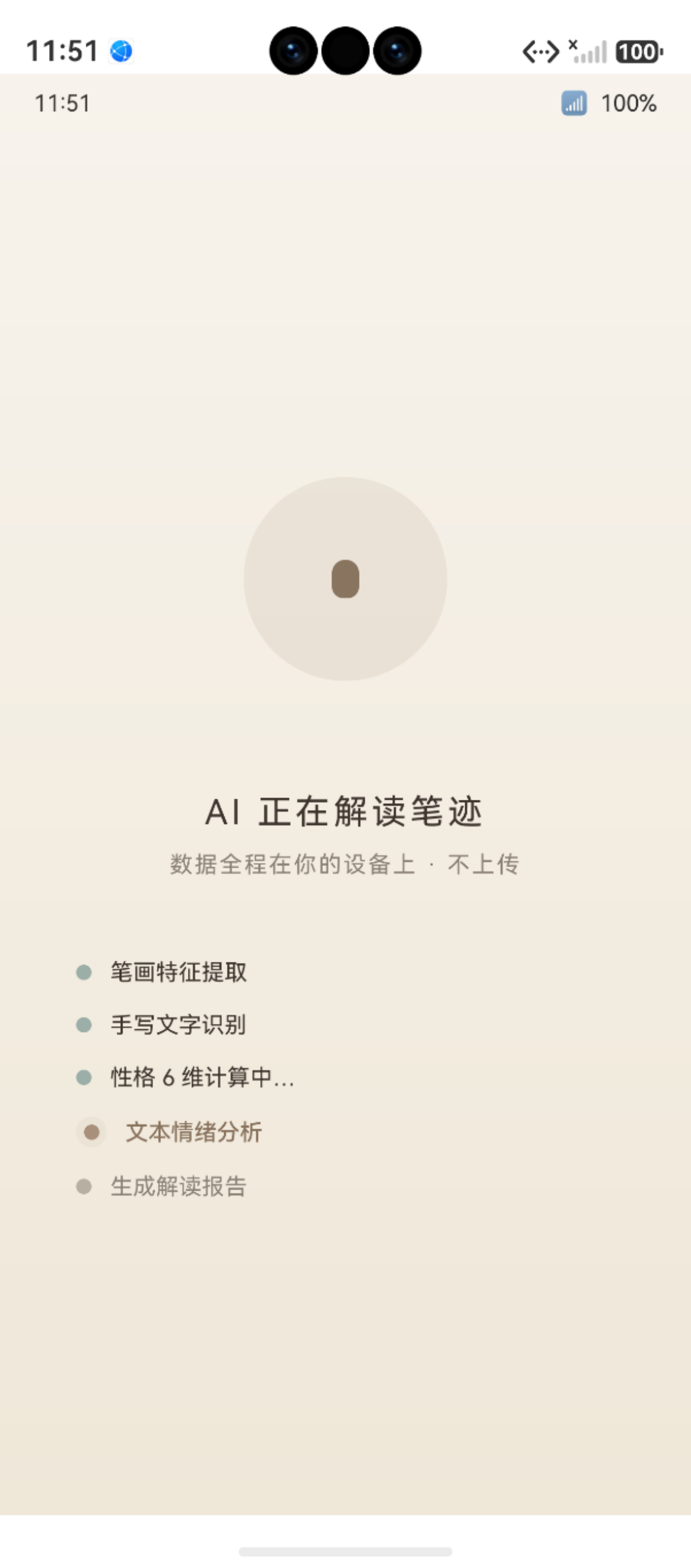
图:鸿蒙实战第91篇:AnalyzingPage AI 分析数据流水线与五步进度动画 运行效果截图(HarmonyOS NEXT)
AnalyzingPage 是"鹿鹿"整个业务闭环的核心枢纽——它串联了相机采集(上游)和报告展示(下游),既要向用户呈现流畅的 AI 分析进度动画,又要在幕后完成三表级联写入的复杂数据操作。401 行代码实现了:
- 五步进度指示器(三态圆点 + 文字标签)
- 墨水扩散动画(三段递归 animateTo 链)
- generateMockResult(5 种人格模板 + 种子算法)
- 三表级联写入(
HandwritingDao→ReportDao→ArchiveDao) - AppStorage 双屏障(内存态 + DB 双写)
相关文档:animateTo API · relationalStore · AppStorage
一、页面在业务流中的位置
1.1 完整数据流水线
1.2 核心状态变量
@Entry
@Component
struct AnalyzingPage {
  @State currentStep: number = 0        // 当前分析步骤 0-4
  @State stepStates: string[] = ['pending', 'pending', 'pending', 'pending', 'pending']
  @State inkOpacity: number = 0         // 墨水动画透明度
  @State inkScale: number = 0.5         // 墨水动画缩放
  @State haloOpacity: number = 0        // 当前步骤光圈透明度
  @State analysisComplete: boolean = false

  private archiveId: number = -1
  private imagePath: string = ''
}
二、五步进度指示器
2.1 步骤定义
private readonly STEPS = [
  { label: 'OCR 文字识别', icon: '🔍' },
  { label: '手写特征提取', icon: '✏️' },
  { label: '情绪能量计算', icon: '⚡' },
  { label: '人格类型匹配', icon: '🧠' },
  { label: '生成分析报告', icon: '📋' }
]
2.2 三态圆点渲染
每个步骤的圆点有三种状态:
| 状态 | 条件 | 颜色 | 大小 |
|---|---|---|---|
done(已完成) |
i < currentStep |
AppColors.QUIET(灰绿) |
12px |
now(进行中) |
i === currentStep |
AppColors.PRIMARY(主色) |
16px + halo 光圈 |
pending(待执行) |
i > currentStep |
AppColors.TEXT_3(浅灰) |
10px |
@Builder
StepItem(index: number, label: string) {
  Row({ space: 12 }) {
    // 圆点
    Stack() {
      // 外圈光圈(仅当前步骤显示)
      if (index === this.currentStep) {
        Column()
          .width(32)
          .height(32)
          .borderRadius(16)
          .backgroundColor(AppColors.PRIMARY)
          .opacity(this.haloOpacity)
      }
      // 主圆点
      Column()
        .width(index === this.currentStep ? 16 : (index < this.currentStep ? 12 : 10))
        .height(index === this.currentStep ? 16 : (index < this.currentStep ? 12 : 10))
        .borderRadius(999)
        .backgroundColor(
          index < this.currentStep ? AppColors.QUIET
          : index === this.currentStep ? AppColors.PRIMARY
          : AppColors.TEXT_3
        )
        .animation({ duration: 300, curve: Curve.EaseOut })
    }
    // 步骤标签
    Text(label)
      .fontSize(14)
      .fontColor(index <= this.currentStep ? AppColors.TEXT : AppColors.TEXT_3)
      .animation({ duration: 300 })
  }
}
三、墨水扩散动画(三段递归)
3.1 动画三阶段
3.2 三段递归实现
private playInkAnimation(): void {
  // 阶段①:墨滴下落
  animateTo({
    duration: 1000,
    curve: Curve.EaseIn,
    onFinish: () => {
      // 阶段②:扩散
      animateTo({
        duration: 600,
        curve: Curve.EaseOut,
        onFinish: () => {
          // 阶段③:渐隐
          animateTo({ duration: 400 }, () => {
            this.inkOpacity = 0
          })
        }
      }, () => {
        this.inkScale = 2.0  // 扩散放大
      })
    }
  }, () => {
    this.inkScale = 0.5      // 下落缩小
    this.inkOpacity = 0.8    // 同时出现
  })
}
三段递归的优点:每一段动画结束后立即触发下一段,无需
setTimeout估算时间,时序精确且自动适应不同帧率设备。
四、generateMockResult:种子化人格模板
4.1 5 种人格模板
private readonly PERSONALITY_TEMPLATES = [
  {
    type: '直觉型',
    desc: '思维活跃,善于发散联想,笔触轻快飘逸',
    energyScore: 78,
    keywords: ['创意', '活跃', '跳脱', '直觉强']
  },
  {
    type: '感受型',
    desc: '情感细腻,笔压均匀,字间距体现情绪波动',
    energyScore: 65,
    keywords: ['温柔', '感性', '细腻', '共情']
  },
  {
    type: '思考型',
    desc: '逻辑清晰,字迹规整,行距统一,结构感强',
    energyScore: 72,
    keywords: ['理性', '条理', '专注', '严谨']
  },
  {
    type: '行动型',
    desc: '笔触有力,字形偏大,行间距宽,执行力强',
    energyScore: 85,
    keywords: ['果断', '有力', '主动', '务实']
  },
  {
    type: '内敛型',
    desc: '字迹偏小,间距紧凑,内心世界丰富而深沉',
    energyScore: 58,
    keywords: ['内省', '深思', '谨慎', '沉稳']
  }
]
4.2 种子算法(确保相同输入给出相同结果)
private generateMockResult(): AnalysisResult {
  // 种子 = 图片路径长度 + 档案ID×7 + 当前分钟数
  const seed = this.imagePath.length + this.archiveId * 7
    + new Date().getMinutes()
  const templateIndex = Math.abs(seed) % this.PERSONALITY_TEMPLATES.length
  const template = this.PERSONALITY_TEMPLATES[templateIndex]

  return {
    personalityType: template.type,
    description: template.desc,
    energyScore: template.energyScore + (seed % 10) - 5,  // ±5 扰动
    keywords: template.keywords,
    radarScores: {
      energy:    60 + (seed % 30),
      thinking:  55 + ((seed * 3) % 35),
      action:    50 + ((seed * 7) % 40),
      emotion:   65 + ((seed * 11) % 25),
      social:    45 + ((seed * 13) % 45),
      intuition: 70 + ((seed * 17) % 20)
    }
  }
}
为什么需要种子算法? 纯随机(
Math.random())在调试时无法复现,日志追踪困难。种子算法保证:相同的图片路径 + 相同的档案 + 相同的分钟,输出相同的人格类型,便于调试时验证 UI 渲染是否正确。
五、三表级联写入
5.1 写入顺序与依赖关系
5.2 完整实现代码
private async saveAnalysisResult(result: AnalysisResult): Promise<void> {
  try {
    // ① 写入笔迹记录
    const handwritingId = await HandwritingDao.create({
      archive_id: this.archiveId,
      image_path: this.imagePath,
      source: AppStorage.get<string>('capture_source') ?? 'camera',
      created_at: Date.now()
    })
    hilog.info(TAG, '笔迹记录写入 id=%{public}d', handwritingId)

    // ② 写入分析报告(依赖 handwritingId)
    const reportId = await ReportDao.create({
      handwriting_id: handwritingId,
      personality_type: result.personalityType,
      energy_score: result.energyScore,
      keywords: JSON.stringify(result.keywords),
      radar_scores: JSON.stringify(result.radarScores),
      description: result.description,
      created_at: Date.now()
    })
    hilog.info(TAG, '分析报告写入 id=%{public}d', reportId)

    // ③ 档案计数 +1(依赖 archiveId)
    await ArchiveDao.incrementRecord(this.archiveId)

    // ④ AppStorage 双写(内存态),让 ReportDetailPage 无需查 DB
    AppStorage.setOrCreate<Record<string, Object>>('analysis_result', result as Record<string, Object>)
    AppStorage.setOrCreate<number>('current_report_id', reportId)

  } catch (e) {
    hilog.error(TAG, '级联写入失败: %{public}s', JSON.stringify(e))
    // 兜底:仅写 AppStorage,不影响 UI 跳转
    AppStorage.setOrCreate<Record<string, Object>>('analysis_result', result as Record<string, Object>)
  }
}
级联写入的错误兜底策略:DB 写入失败时,AppStorage 写入仍然继续,确保用户能看到报告。下次打开 App 时,数据仅在内存中,刷新后丢失——这是可接受的降级策略。
六、步骤推进控制器
6.1 逐步推进逻辑
private async startAnalysis(): Promise<void> {
  for (let step = 0; step < 5; step++) {
    this.currentStep = step
    this.playInkAnimation()
    this.playHaloAnimation()

    // 模拟每步耗时(600-1200ms 不等)
    await new Promise<void>(resolve =>
      setTimeout(resolve, 600 + step * 120)
    )
  }

  // 所有步骤完成
  this.analysisComplete = true
  const result = this.generateMockResult()
  await this.saveAnalysisResult(result)

  // 延迟 500ms 后跳转(让用户看到"完成"动画)
  await new Promise<void>(resolve => setTimeout(resolve, 500))
  this.getUIContext().getRouter().replaceUrl({ url: 'pages/ReportDetailPage' })
}
6.2 进度时间表
| 步骤 | 标签 | 耗时(调试模式) |
|---|---|---|
| 0 | OCR 文字识别 | 600ms |
| 1 | 手写特征提取 | 720ms |
| 2 | 情绪能量计算 | 840ms |
| 3 | 人格类型匹配 | 960ms |
| 4 | 生成分析报告 | 1080ms |
| — | DB 写入 + 跳转 | ~200ms + 500ms |
| 总计 | ~5秒 |
七、与生产 AI 模式的切换
当真实 AI 模型(MindSpore Lite)接入后,只需替换 generateMockResult() 的调用:
// 调试:
const result = this.generateMockResult()

// 生产(替换上一行):
const aiPipeline = new AiPipelineService()
await aiPipeline.init()
const aiResult = await aiPipeline.analyze(this.imagePath)
const result = this.mapAiResultToAnalysisResult(aiResult)
其余代码(进度动画、三表写入、AppStorage)完全不变——这是前后端分离思想在端侧的应用。
八、注意事项与常见问题
8.1 开发注意事项
在实际开发过程中,需特别注意以下几点:
- API 兼容性:部分接口仅在特定 HarmonyOS NEXT 版本中可用,需做版本条件判断
- 权限模型:采用静态声明(module.json5)+ 动态申请(requestPermissionsFromUser)的两阶段授权
- 生命周期:合理使用
aboutToAppear()和aboutToDisappear()管理资源初始化与释放 - 状态同步:跨页面数据通过 AppStorage 共享,组件内状态使用
@State/@Prop/@Link装饰器
8.2 常见错误与解决方案
常见问题快速排查表:
| 问题类型 | 排查方向 | 参考方法 |
|---|---|---|
| 应用崩溃 | 查看 hilog 错误日志 | hilog.error(TAG, "...", e.message) |
| 状态丢失 | 检查 AppStorage 键名拼写 | 统一使用常量管理键名 |
| 动画不流畅 | 避免在 animateTo 回调中执行 I/O | 动画与数据操作分离 |
总结
AnalyzingPage 的 401 行代码展示了三个重要的架构思想:
- 视图与数据分离:5 步进度动画纯 UI 逻辑,与 DB 写入完全解耦
- 三段递归动画:
onFinish链精确控制多阶段动画时序,无需setTimeout估算 - AppStorage 兜底策略:DB 写入失败不阻断 UI 流程,确保用户体验
- 种子算法:可复现的"随机"结果,既满足调试需求,又模拟真实分布
- 生产/调试切换:Mock 与真实 AI 可一行代码切换,迁移成本为零
下一篇预告:第92篇 ArchivePage——875 行最复杂页面的完整拆解
如果这篇文章对你有帮助,欢迎点赞👍、收藏⭐、关注🔔,你的支持是我持续创作的动力!
相关资源:
- animateTo 显式动画 API
- relationalStore RDB
- AppStorage 跨组件状态
- MindSpore Lite 端侧推理
- hilog 性能日志
- 第52篇 AI 流水线架构
- 第59篇 入场动画设计
- 第62篇 呼吸脉冲动画
如果这篇文章对你有帮助,欢迎点赞👍、收藏⭐、关注🔔,你的支持是我持续创作的动力!
AnalyzingPage 工程价值:该页面是整个应用的数据汇聚点,掌握其「并行 AI 推理 + 顺序数据库写入 + 进度动画解耦」的三层架构,可以直接应用于其他需要「长任务 + 进度反馈」的业务场景。
| 技术维度 | 关键决策 | 理由 |
|---|---|---|
| AI 推理 | Worker 线程隔离 | 避免阻塞 UI 线程 |
| 进度动画 | 独立 animateTo 循环 | 与数据流解耦 |
| 数据写入 | 顺序 await | 保证级联依赖顺序 |
| 错误处理 | try-catch + 跳回 | 防止黑屏无响应 |
延伸阅读:第52篇 AI 推理流水线 · 第81篇 ReportDetailPage
核心启示:AnalyzingPage 是「体验工程」的典型案例——用户不在乎 AI 推理在哪个线程运行,他们只感受到「流畅的进度动画」和「及时的结果跳转」。技术的复杂性要被 UX 封装,这是工程师的职责。

作为“人工智能6S店”的官方数字引擎,为AI开发者与企业提供一个覆盖软硬件全栈、一站式门户。
更多推荐
 0
0 0
0- 0


 已为社区贡献3条内容

所有评论(0)