
鸿蒙新特性:@ohos.net.http 网络请求实战
前言
移动应用的本质是数据消费——从服务器获取数据、提交表单、上传文件,这一切都依赖 HTTP 网络请求。HarmonyOS 提供了 @ohos.net.http 模块,封装了完整的 HTTP 客户端能力,支持 GET/POST 等常见方法、自定义请求头、超时控制、响应解析等核心功能。
相比 Web 端的 fetch / XMLHttpRequest,HarmonyOS 的 HTTP 模块采用了更接近原生网络栈的设计——createHttp() 创建请求任务、request() 发起请求、destroy() 释放资源。这种显式的生命周期管理让开发者对网络连接有更精细的控制。
本文通过一个可交互的 API 请求调试器 Demo,深入讲解 @ohos.net.http 的全部核心 API,涵盖请求配置、响应处理、错误捕获和资源释放。
导入与基础概念
@ohos.net.http 从 @kit.NetworkKit 导入,模块核心是 http 命名空间下的三个关键元素:
import { http } from '@kit.NetworkKit';
| 元素 | 类型 | 说明 |
|---|---|---|
http.createHttp() | 函数 | 创建 HTTP 请求任务实例 |
http.HttpRequest | 接口 | 请求任务对象,提供 request、destroy 等方法 |
http.HttpResponse | 接口 | 响应对象,包含 result、responseCode、header |
createHttp() —— 创建请求任务
一切 HTTP 请求的起点是 createHttp(),它返回一个 HttpRequest 实例:
let httpRequest: http.HttpRequest = http.createHttp();
每个 HttpRequest 实例代表一个独立的网络任务。多次调用 createHttp() 会创建多个互不干扰的任务实例,可以并发发送多个请求。
创建实例后必须在使用完毕后调用 destroy() 释放底层 socket 等系统资源,否则会造成资源泄漏。
HttpRequest.request() —— 发送请求
基础用法(GET 请求)
let httpRequest = http.createHttp();
let response: http.HttpResponse = await httpRequest.request('https://api.example.com/data');
httpRequest.destroy();
不带 options 参数时,默认使用 GET 方法。返回的 HttpResponse 对象包含完整的响应数据。
完整配置(指定方法和请求头)
let httpRequest = http.createHttp();
let options: http.HttpRequestOptions = {
  method: http.RequestMethod.GET,
  connectTimeout: 10000,
  readTimeout: 10000,
  header: {
    'Content-Type': 'application/json',
    'User-Agent': 'HarmonyOS-App/1.0'
  }
};

let response: http.HttpResponse = await httpRequest.request(url, options);
HttpRequestOptions 详细参数
HttpRequestOptions 接口提供了丰富的请求配置选项:
interface HttpRequestOptions {
  method?: RequestMethod;        // 请求方法,默认 GET
  header?: Object;               // 自定义请求头
  extraData?: string | Object | ArrayBuffer; // POST 请求体
  connectTimeout?: number;       // 连接超时(毫秒),默认 60000
  readTimeout?: number;          // 读取超时(毫秒),默认 60000
  expectDataType?: HttpDataType; // 期望的响应数据类型
  usingProtocol?: HttpProtocol;  // 协议类型(HTTP/1.1 或 HTTP/2.0)
  usingCache?: boolean;          // 是否使用缓存
  priority?: number;             // 请求优先级 0-10
  multiFormDataList?: MultiFormData[]; // 多表单数据
  certificatePinning?: CertificatePinning; // 证书锁定
  dnsPrefetch?: string[];        // DNS 预解析
  clientCert?: ClientCert;       // 客户端证书
}
RequestMethod 枚举
enum RequestMethod {
  OPTIONS = 'OPTIONS',
  GET = 'GET',
  HEAD = 'HEAD',
  POST = 'POST',
  PUT = 'PUT',
  DELETE = 'DELETE',
  TRACE = 'TRACE',
  CONNECT = 'CONNECT'
}
POST 请求
发送 POST 请求需要设置 method 和 extraData:
let httpRequest = http.createHttp();
let options: http.HttpRequestOptions = {
  method: http.RequestMethod.POST,
  header: {
    'Content-Type': 'application/json'
  },
  extraData: JSON.stringify({
    title: 'foo',
    body: 'bar',
    userId: 1
  })
};

let response = await httpRequest.request('https://jsonplaceholder.typicode.com/posts', options);
httpRequest.destroy();
extraData 支持三种数据类型:
- string:纯文本或 JSON 字符串
- Object:JavaScript 对象(框架会自动序列化)
- ArrayBuffer:二进制数据(适合上传文件)
超时控制
connectTimeout 控制建立 TCP 连接的最大等待时间,readTimeout 控制等待服务器响应的最大时间。两者都应合理设置——太短会导致慢网络环境下请求频繁失败,太长会让用户等待过久。
let options: http.HttpRequestOptions = {
  connectTimeout: 5000,   // 连接超时 5 秒
  readTimeout: 15000      // 读取超时 15 秒
};
对于需要快速响应的接口(如搜索建议),可以设置更短的超时;对于上传大文件的接口,应该设置更长的超时。

HttpResponse —— 响应处理
响应字段
interface HttpResponse {
  result: string | Object | ArrayBuffer; // 响应体
  resultType: HttpDataType;              // 响应体类型标识
  responseCode: number;                  // HTTP 状态码
  header: Object;                        // 响应头
  cookies: string;                       // Cookie 字符串
}
响应体的三种数据类型
result 的类型由 expectDataType 控制:
enum HttpDataType {
  STRING = 0,      // 字符串(默认)
  OBJECT = 1,      // JSON 对象
  ARRAY_BUFFER = 2 // 二进制数据
}
字符串(STRING):最常见的情况,API 返回 JSON 文本时使用。直接用 JSON.parse() 解析:
if (typeof response.result === 'string') {
  let data = JSON.parse(response.result as string);
}
对象(OBJECT):设置 expectDataType: http.HttpDataType.OBJECT 后,框架自动将 JSON 响应解析为对象。通过下标访问字段:
let options: http.HttpRequestOptions = {
  expectDataType: http.HttpDataType.OBJECT
};
let response = await httpRequest.request(url, options);
let result: Object = response.result;
let userId = (result as Record<string, Object>)['userId'];
二进制(ARRAY_BUFFER):适合下载图片、文件等二进制数据。结合 util.TextDecoder 可以转回文本:
import { util } from '@kit.ArkTS';

if (response.result instanceof ArrayBuffer) {
  let decoder = util.TextDecoder.create('utf-8');
  let text = decoder.decodeWithStream(
    new Uint8Array(response.result as ArrayBuffer),
    undefined
  );
}
状态码检查
responseCode 是 HTTP 标准状态码:200 表示成功,2xx 系列均表示成功;4xx 表示客户端错误;5xx 表示服务器错误。
if (response.responseCode === 200) {
  // 成功
} else if (response.responseCode >= 400) {
  // 错误处理
}
注意:HTTP 层面的错误(如 404、500)不会抛出异常,request() 仍然正常返回 HttpResponse,只是 responseCode 不是 2xx。只有网络层面的错误(如 DNS 解析失败、连接超时、TLS 握手失败)才会通过异常抛出。
响应头解析
response.header 是一个键值对对象,通过下标访问:
let header: Object = response.header;
let contentType = (header as Record<string, string>)['content-type'];
let server = (header as Record<string, string>)['server'];
HttpRequest.destroy() —— 资源释放
这是最重要的 API 之一,但开发者经常忽略。每个 HttpRequest 实例持有底层 socket 连接,不及时 destroy() 会导致:
- 内存泄漏——未释放的 socket 占用内存
- 连接耗尽——系统文件描述符有限,泄露过多会导致新请求失败
- 性能退化——后台积累的僵尸连接影响网络栈性能
最佳实践:在 try-finally 中确保始终调用 destroy():
async function fetchData(url: string): Promise<http.HttpResponse | null> {
  let httpRequest: http.HttpRequest | null = null;
  try {
    httpRequest = http.createHttp();
    let response = await httpRequest.request(url);
    return response;
  } catch (err) {
    console.error('请求失败');
    return null;
  } finally {
    if (httpRequest) {
      httpRequest.destroy();
    }
  }
}
on(‘headersReceive’) —— 响应头事件
在请求过程中,可以在 request() 之前注册 headersReceive 事件监听器,在服务器返回响应头(但响应体尚未接收完毕)时触发:
let httpRequest = http.createHttp();

httpRequest.on('headersReceive', (header: Object) => {
  console.info('收到响应头');
  let contentType = (header as Record<string, string>)['content-type'];
});

let response = await httpRequest.request(url);
httpRequest.destroy();
这个事件在以下场景非常有用:
- 根据
content-type提前决定如何解析响应体 - 根据
content-length计算下载进度 - 记录请求耗时(在事件中计算与请求开始的时间差)
错误处理
HTTP 模块的异常分为两类:
1. 网络层异常(抛出错误)
以下情况会通过 catch 捕获:
try {
  let response = await httpRequest.request(url);
} catch (err) {
  let errObj = err as Object;
  let rec = errObj as Record<string, Object>;
  let message = rec['message'] as string;
  // 常见错误信息:
  // - "Couldn't resolve host name" → DNS 解析失败
  // - "Timeout was reached" → 超时
  // - "SSL certificate problem" → TLS 证书问题
  // - "Failed to connect to" → 服务器不可达
}
2. HTTP 层错误(正常响应)
4xx 和 5xx 状态码不会抛出异常,需要检查 responseCode:
let response = await httpRequest.request(url);
if (response.responseCode >= 200 && response.responseCode < 300) {
  // 成功处理
} else if (response.responseCode === 404) {
  // 资源不存在
} else if (response.responseCode >= 500) {
  // 服务器错误
}
性能与安全建议
1. 实例复用
同一个域名下的多次请求可以复用 HttpRequest 实例,底层会复用 TCP 连接(HTTP Keep-Alive):
// 推荐:复用同一个实例
let httpRequest = http.createHttp();
for (let url of urls) {
  let response = await httpRequest.request(url);
}
httpRequest.destroy();

// 不推荐:每次都创建新实例(浪费连接)
for (let url of urls) {
  let req = http.createHttp();
  let response = await req.request(url);
  req.destroy();
}
2. HTTPS 证书安全
生产环境应当严格验证 HTTPS 证书。HarmonyOS 默认启用系统 CA 证书库验证,这是最安全的配置。开发阶段如果遇到自签名证书,可以在测试环境使用以下配置,但绝对不能用于生产环境:
// 仅开发调试用,切勿在生产代码中使用
let options: http.HttpRequestOptions = {
  remoteValidation: 'skip' // 跳过证书验证(危险!)
};
3. DNS 预解析
对于已知的目标域名,可以在应用启动时预解析 DNS,减少首次请求的延迟:
let options: http.HttpRequestOptions = {
  dnsPrefetch: ['api.example.com', 'cdn.example.com']
};
4. 请求优先级
当同时发起多个请求时,可以设置优先级让重要请求优先获得网络资源:
let options: http.HttpRequestOptions = {
  priority: 5  // 0(最低)到 10(最高)
};
Demo:API 请求调试器
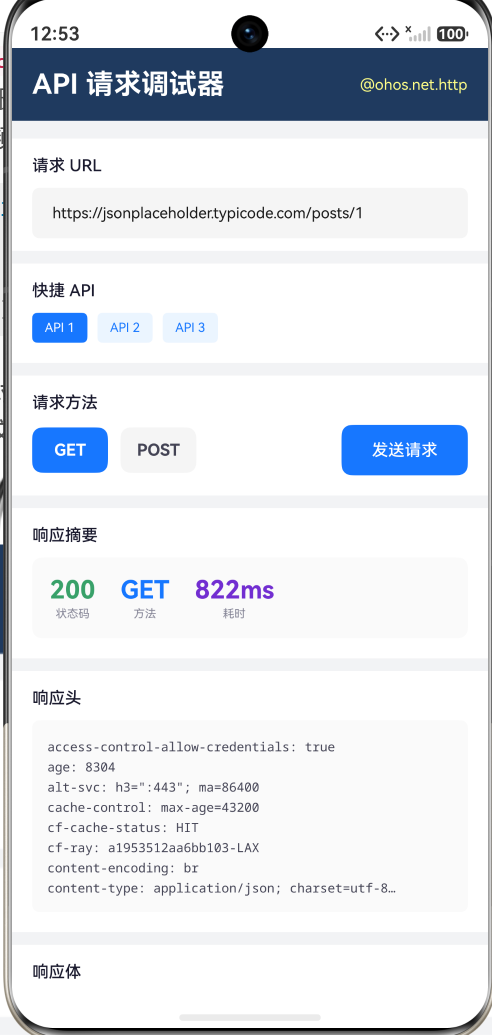
我们构建了一个完整的 HTTP 请求调试工具,可以在真机或模拟器上实际发送网络请求并查看响应。
功能模块
- URL 输入与快捷 API:输入任意 URL,或点击预设的 3 个 JSONPlaceholder API 快速填充
- GET/POST 方法切换:可视化按钮切换,GET 蓝色、POST 粉色
- 发送请求与加载状态:按钮在请求中显示"请求中…"并禁用,防止重复发送
- 响应摘要卡片:展示状态码(绿色=2xx,红色=错误,橙色=其他)、请求方法、耗时
- 响应头显示:解析并显示前 10 个响应头
- 响应体预览:等宽字体、可滚动文本框,超过 2000 字符自动截断并标注完整长度
- 请求历史:记录最近 15 条请求的序号、方法、URL、状态码和时间
核心发送逻辑
async sendRequest(): Promise<void> {
  this.isLoading = true;
  let startTime: number = Date.now();
  let httpRequest: http.HttpRequest | null = null;

  try {
    httpRequest = http.createHttp();
    let options: http.HttpRequestOptions = {
      method: this.methods[this.methodIndex] === 'POST'
        ? http.RequestMethod.POST : http.RequestMethod.GET,
      connectTimeout: 10000,
      readTimeout: 10000,
      header: {
        'Content-Type': 'application/json',
        'User-Agent': 'HarmonyOS-HttpDemo/1.0'
      }
    };

    let response: http.HttpResponse = await httpRequest.request(
      this.urlInput.trim(), options
    );
    let elapsed: number = Date.now() - startTime;

    this.statusCode = response.responseCode.toString();
    this.responseTime = elapsed + 'ms';

    // 解析响应体
    if (typeof response.result === 'string') {
      this.responseBody = response.result as string;
    } else if (response.result instanceof ArrayBuffer) {
      let decoder = util.TextDecoder.create('utf-8');
      this.responseBody = decoder.decodeWithStream(
        new Uint8Array(response.result as ArrayBuffer), undefined
      );
    } else {
      this.responseBody = JSON.stringify(response.result);
    }

    // 解析响应头
    if (response.header) {
      let hdr: Object = response.header;
      let headerStr: string = '';
      let keys: string[] = Object.keys(hdr);
      for (let i = 0; i < Math.min(keys.length, 10); i++) {
        headerStr += keys[i] + ': ' +
          (hdr as Record<string, string>)[keys[i]] + '\n';
      }
      this.responseHeaders = headerStr;
    }

    this.addHistory(this.methods[this.methodIndex],
      this.urlInput.trim(), response.responseCode.toString());

  } catch (err) {
    this.statusCode = 'ERROR';
    let rec: Record<string, Object> = err as Record<string, Object>;
    this.responseBody = '错误: ' + (rec['message'] as string);
    this.addHistory(this.methods[this.methodIndex],
      this.urlInput.trim(), 'FAIL');
  } finally {
    if (httpRequest) {
      httpRequest.destroy();
    }
    this.isLoading = false;
  }
}
请求历史管理
使用不可变状态更新模式维护最近 15 条记录:
addHistory(method: string, url: string, status: string): void {
  this.historyIndex++;
  let record = new RequestRecord(
    this.historyIndex, method, url, status,
    new Date().toLocaleTimeString()
  );
  let newHistory: RequestRecord[] = [record].concat(this.history);
  if (newHistory.length > 15) {
    newHistory.pop();
  }
  this.history = newHistory;
}
注意事项
Demo 使用的 jsonplaceholder.typicode.com 是一个公开的测试 API,返回模拟数据。在实际应用开发中,你需要:
- 申请网络权限:在
module.json5中添加ohos.permission.INTERNET - 配置网络安全:生产环境使用 HTTPS,开发调试可在
module.json5中配置networkSecurity - 处理大响应:Demo 截断 2000 字符以上的响应,实际应用中应流式处理大文件下载
总结
本文详细讲解了 HarmonyOS @ohos.net.http 模块的核心 API:
- createHttp() — 创建请求任务,返回 HttpRequest 实例
- HttpRequest.request() — 发送请求,支持 GET/POST 等方法、自定义请求头、超时控制
- HttpResponse — 响应处理,支持字符串/对象/二进制三种数据类型
- HttpRequest.destroy() — 资源释放,务必在请求完成后调用
- on(‘headersReceive’) — 响应头事件,提前获取元数据
- 错误处理 — 区分网络层异常(catch)和 HTTP 层错误(responseCode)
HarmonyOS 的 HTTP 模块提供了完整的网络请求能力,其 API 设计强调显式资源管理,通过 createHttp/destroy 配对确保不泄露系统资源。结合 Promise 异步模型,可以写出清晰、可维护的网络层代码。
API 请求调试器 Demo 是一个实用的开发工具,不仅展示 HTTP 模块的使用方式,本身也可以用于日常调试第三方 API 接口。

作为“人工智能6S店”的官方数字引擎,为AI开发者与企业提供一个覆盖软硬件全栈、一站式门户。
更多推荐



 4
4 0
0- 0


 已为社区贡献286条内容

所有评论(0)