
鸿蒙 ArkTS 近场通信实战:NearLink(星闪)服务发现与 SSAP 握手
文章目录
前言
在万物互联的时代,设备间的连接速度与稳定性是决定用户体验的关键。华为推出的星闪(NearLink)技术,作为新一代近距离无线连接技术,旨在解决传统蓝牙和 Wi-Fi 在时延、功耗和连接数上的痛点。
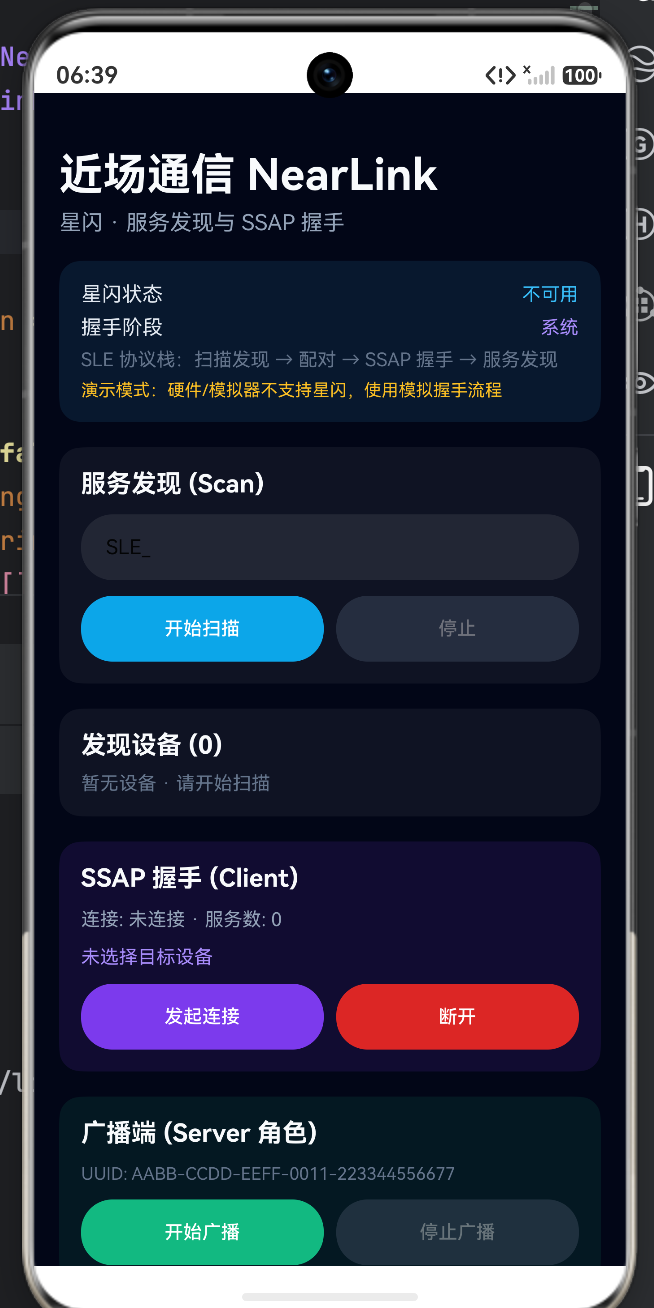
本文将基于你提供的 ArkTS 代码,深入拆解如何在 HarmonyOS 应用中实现 NearLink 的核心功能:服务发现(扫描)、SSAP 握手(连接)以及广播服务(Server 端)。我们将构建一个完整的“近场通信”调试面板,直观地展示从扫描设备到建立连接的底层逻辑。
📡 一、核心架构:状态管理与上下文绑定
在深入功能之前,我们需要理解该 Demo 的数据流向。代码使用了 @StorageLink 进行全局状态管理,这意味着即使页面刷新或跳转,连接状态和设备列表也能保持一致。
1. 关键状态定义
代码中定义了一系列与 NearLink 生命周期强相关的状态变量:
| 状态变量 | 类型 | 作用 |
|---|---|---|
nearLinkScanning |
boolean | 标记当前是否正在扫描设备 |
nearLinkAdvertising |
boolean | 标记当前是否正在广播(作为服务端) |
nearLinkDevices |
Array | 存储扫描到的设备列表 |
nearLinkConnectionState |
string | 当前 SSAP 连接状态 |
nearLinkHandshakePhase |
string | 握手阶段(如:配对中、连接中) |
2. 上下文初始化
在页面即将出现时(aboutToAppear),必须绑定上下文并刷新能力,这是调用 NearLink 系统能力的前提:
aboutToAppear(): void {
  // 绑定 UIAbility 上下文,使 NearLinkSession 能访问系统服务
  NearLinkSession.bindContext(this.context)
  // 检查并刷新当前设备的星闪硬件能力
  NearLinkSession.refreshCapability()
}
🔍 二、服务发现:扫描与过滤
服务发现是近场通信的第一步。客户端需要扫描周围的广播包,找到目标设备。
1. 扫描控制逻辑
代码通过 TextInput 允许用户输入过滤前缀(默认为 SLE_),这在设备密集的环境中非常有用。
- 开始扫描:调用
NearLinkSession.startScan(filter)。 - 停止扫描:调用
NearLinkSession.stopScan()。
// 扫描控制区逻辑
Button(this.scanning ? '扫描中…' : '开始扫描')
  .onClick(() => {
    NearLinkSession.startScan(this.scanFilter)
    this.statusText = 'scan.startScan + deviceFound 回调收集中…'
  })
2. 设备列表渲染
扫描到的设备存储在 devices 数组中。UI 使用 ForEach 进行渲染,并提供了“选择”功能,将选中的设备地址存入 selectedAddress,为后续的连接做准备。
// 设备列表渲染片段
ForEach(this.devices, (item: NearLinkDeviceItem) => {
  Row({ space: 10 }) {
    Column({ space: 2 }) {
      Text(item.name) // 设备名称
      Text(`${item.address} · RSSI ${item.rssi}`) // 地址与信号强度
    }
    Button('选择')
      .backgroundColor(this.selectedAddress === item.address ? '#22C55E' : '#6366F1')
      .onClick(() => {
        this.selectedAddress = item.address // 记录目标设备
      })
  }
})
🤝 三、SSAP 握手:建立连接
SSAP(StarLink Service Access Point)是星闪技术中用于服务访问的核心协议。一旦选定了目标设备,就可以发起握手。
1. 客户端连接流程
代码展示了标准的客户端连接逻辑:
- 发起连接:调用
NearLinkSession.connectSelected()。 - 状态监听:系统底层会经历
createClient->connect->connectionStateChange的过程。
// 握手控制区
Button('发起连接')
  .onClick(() => {
    NearLinkSession.connectSelected()
    this.statusText = 'ssap.createClient → connect → connectionStateChange'
  })
2. 连接状态可视化
UI 实时展示连接状态和服务数量,帮助开发者判断握手是否成功。
Text(`连接: ${this.connectionState} · 服务数: ${this.serviceCount}`)
📡 四、广播服务:Server 端模拟
为了形成一个完整的通信闭环,设备不仅需要能“连别人”,还需要能“被别人连”。代码中的 AdvertiseSection 实现了服务端广播功能。
- 服务 UUID:使用固定的
DEMO_SERVICE_UUID标识服务。 - 广播控制:通过
startAdvertising和stopAdvertising控制广播的开启与关闭。
// 广播端逻辑
Button(this.advertising ? '广播中…' : '开始广播')
  .onClick(() => NearLinkSession.startAdvertising())
注意:在实际开发中,作为 Server 端时,还需要处理客户端的连接请求回调,而不仅仅是开启广播。
📊 五、底层链路可视化与日志
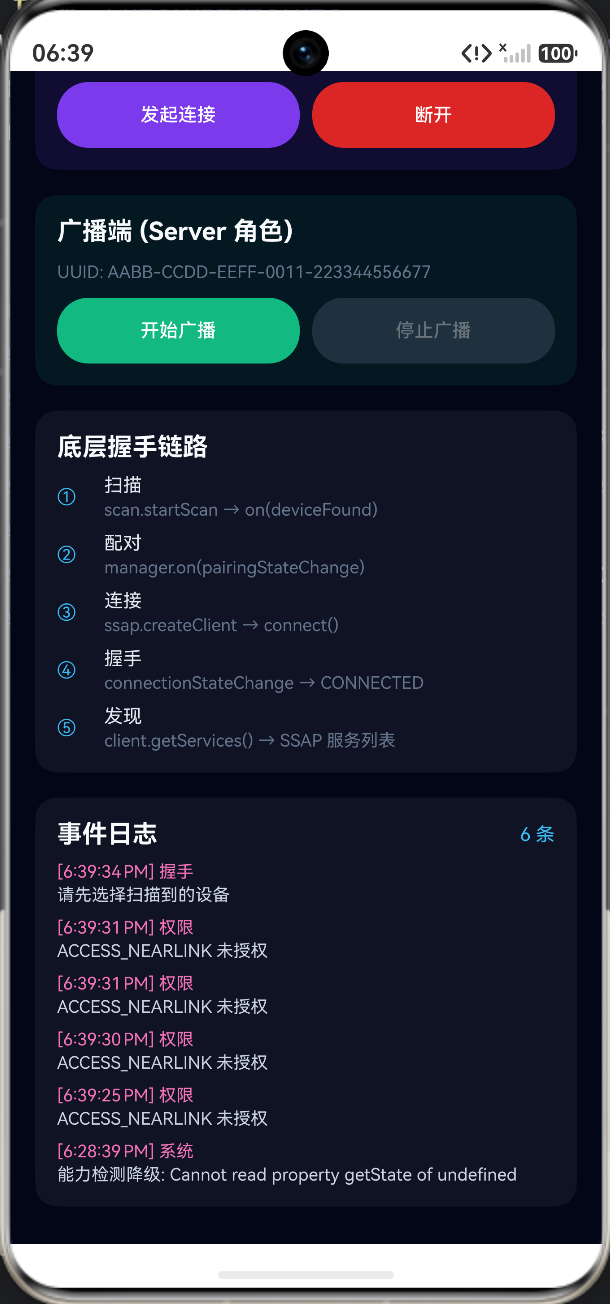
调试近场通信最困难的部分在于其“不可见性”。该 Demo 通过 FlowSection 和 LogSection 将底层协议栈的状态变化具象化。
1. 握手链路图谱
代码清晰地定义了星闪连接的五个关键阶段,这对于理解协议状态机非常有帮助:
- 扫描:
scan.startScan→on(deviceFound) - 配对:
manager.on(pairingStateChange) - 连接:
ssap.createClient→connect() - 握手:
connectionStateChange→CONNECTED - 发现:
client.getServices()→ 获取服务列表
2. 演示模式(Demo Mode)
代码中特别加入了 demoMode 的判断。如果硬件不支持星闪(如在普通模拟器上运行),系统会提示“演示模式”,并模拟握手流程。这是一种非常优秀的容错设计,保证了代码在没有专用硬件时依然可以演示 UI 逻辑。
if (this.demoMode) {
  Text('演示模式:硬件/模拟器不支持星闪,使用模拟握手流程')
    .fontColor('#FBBF24')
}
完整代码
import { common } from '@kit.AbilityKit'
import { DEMO_SERVICE_UUID } from '../nearlink/NearLinkTypes'
import { NearLinkBridge, NearLinkSession } from '../nearlink/NearLinkSession'
import { NearLinkDeviceItem, NearLinkLogItem } from '../nearlink/NearLinkTypes'
struct NearLinkDemo {
('nearLinkSupported') nearLinkSupported: boolean = false
('nearLinkState') nearLinkState: string = ''
('nearLinkScanning') scanning: boolean = false
('nearLinkAdvertising') advertising: boolean = false
('nearLinkHandshakePhase') handshakePhase: string = ''
('nearLinkConnectionState') connectionState: string = ''
('nearLinkDevices') devices: NearLinkDeviceItem[] = []
('nearLinkSelectedAddress') selectedAddress: string = ''
('nearLinkServiceCount') serviceCount: number = 0
('nearLinkLogs') logs: NearLinkLogItem[] = []
('nearLinkDemoMode') demoMode: boolean = false
scanFilter: string = 'SLE_'
statusText: string = 'SLE 协议栈:扫描发现 → 配对 → SSAP 握手 → 服务发现'
private context = this.getUIContext().getHostContext() as common.UIAbilityContext
aboutToAppear(): void {
NearLinkSession.bindContext(this.context)
NearLinkSession.refreshCapability()
}
build() {
Scroll() {
Column({ space: 16 }) {
this.HeaderSection()
this.StatusSection()
this.ScanSection()
this.DeviceSection()
this.HandshakeSection()
this.AdvertiseSection()
this.FlowSection()
this.LogSection()
}
.width('100%')
.padding({ top: 36, left: 16, right: 16, bottom: 24 })
}
.width('100%')
.height('100%')
.backgroundColor('#020617')
.scrollBar(BarState.Off)
}
HeaderSection() {
Column({ space: 6 }) {
Text('近场通信 NearLink')
.fontSize(28)
.fontWeight(FontWeight.Bold)
.fontColor('#F8FAFC')
Text('星闪 · 服务发现与 SSAP 握手')
.fontSize(14)
.fontColor('#94A3B8')
}
.width('100%')
.alignItems(HorizontalAlign.Start)
}
StatusSection() {
Column({ space: 6 }) {
Row() {
Text('星闪状态')
.fontSize(13)
.fontColor('#E2E8F0')
Blank()
Text(this.nearLinkState)
.fontSize(12)
.fontColor('#38BDF8')
}
.width('100%')
Row() {
Text('握手阶段')
.fontSize(13)
.fontColor('#E2E8F0')
Blank()
Text(this.handshakePhase)
.fontSize(12)
.fontColor('#A78BFA')
}
.width('100%')
Text(this.statusText)
.fontSize(12)
.fontColor('#64748B')
.width('100%')
if (this.demoMode) {
Text('演示模式:硬件/模拟器不支持星闪,使用模拟握手流程')
.fontSize(11)
.fontColor('#FBBF24')
.width('100%')
}
}
.width('100%')
.padding(14)
.backgroundColor('rgba(56,189,248,0.1)')
.borderRadius(14)
}
ScanSection() {
Column({ space: 10 }) {
Text('服务发现 (Scan)')
.fontSize(16)
.fontWeight(FontWeight.Bold)
.fontColor('#F8FAFC')
.width('100%')
TextInput({ text: this.scanFilter, placeholder: '设备名过滤(可选)' })
.height(42)
.fontSize(13)
.backgroundColor('rgba(255,255,255,0.08)')
.onChange((v: string) => this.scanFilter = v)
Row({ space: 8 }) {
Button(this.scanning ? '扫描中…' : '开始扫描')
.layoutWeight(1)
.height(42)
.fontSize(12)
.backgroundColor('#0EA5E9')
.enabled(!this.scanning)
.onClick(() => {
NearLinkSession.startScan(this.scanFilter)
this.statusText = 'scan.startScan + deviceFound 回调收集中…'
})
Button('停止')
.layoutWeight(1)
.height(42)
.fontSize(12)
.backgroundColor('#475569')
.enabled(this.scanning)
.onClick(() => NearLinkSession.stopScan())
}
.width('100%')
}
.width('100%')
.padding(14)
.backgroundColor('rgba(255,255,255,0.05)')
.borderRadius(14)
.alignItems(HorizontalAlign.Start)
}
DeviceSection() {
Column({ space: 8 }) {
Text(`发现设备 (${this.devices.length})`)
.fontSize(16)
.fontWeight(FontWeight.Bold)
.fontColor('#F8FAFC')
.width('100%')
if (this.devices.length === 0) {
Text('暂无设备 · 请开始扫描')
.fontSize(12)
.fontColor('#64748B')
} else {
ForEach(this.devices, (item: NearLinkDeviceItem) => {
Row({ space: 10 }) {
Column({ space: 2 }) {
Text(item.name)
.fontSize(13)
.fontColor('#F8FAFC')
Text(`${item.address} · RSSI ${item.rssi}`)
.fontSize(11)
.fontColor('#94A3B8')
}
.alignItems(HorizontalAlign.Start)
.layoutWeight(1)
Button('选择')
.height(32)
.fontSize(11)
.backgroundColor(this.selectedAddress === item.address ? '#22C55E' : '#6366F1')
.onClick(() => {
this.selectedAddress = item.address
NearLinkBridge.appendLog('选择', `${item.name} · ${item.address}`)
})
}
.width('100%')
.padding(10)
.backgroundColor('rgba(255,255,255,0.04)')
.borderRadius(8)
}, (item: NearLinkDeviceItem) => item.id)
}
}
.width('100%')
.padding(14)
.backgroundColor('rgba(255,255,255,0.05)')
.borderRadius(14)
.alignItems(HorizontalAlign.Start)
}
HandshakeSection() {
Column({ space: 10 }) {
Text('SSAP 握手 (Client)')
.fontSize(16)
.fontWeight(FontWeight.Bold)
.fontColor('#F8FAFC')
.width('100%')
Text(`连接: ${this.connectionState} · 服务数: ${this.serviceCount}`)
.fontSize(12)
.fontColor('#94A3B8')
.width('100%')
Text(this.selectedAddress.length > 0 ? `目标: ${this.selectedAddress}` : '未选择目标设备')
.fontSize(12)
.fontColor('#A78BFA')
.width('100%')
Row({ space: 8 }) {
Button('发起连接')
.layoutWeight(1)
.height(42)
.fontSize(12)
.backgroundColor('#7C3AED')
.onClick(() => {
NearLinkSession.connectSelected()
this.statusText = 'ssap.createClient → connect → connectionStateChange'
})
Button('断开')
.layoutWeight(1)
.height(42)
.fontSize(12)
.backgroundColor('#DC2626')
.onClick(() => NearLinkSession.disconnect())
}
.width('100%')
}
.width('100%')
.padding(14)
.backgroundColor('rgba(124,58,237,0.12)')
.borderRadius(14)
.alignItems(HorizontalAlign.Start)
}
AdvertiseSection() {
Column({ space: 10 }) {
Text('广播端 (Server 角色)')
.fontSize(16)
.fontWeight(FontWeight.Bold)
.fontColor('#F8FAFC')
.width('100%')
Text(`UUID: ${DEMO_SERVICE_UUID}`)
.fontSize(11)
.fontColor('#64748B')
.width('100%')
Row({ space: 8 }) {
Button(this.advertising ? '广播中…' : '开始广播')
.layoutWeight(1)
.height(42)
.fontSize(12)
.backgroundColor('#10B981')
.enabled(!this.advertising)
.onClick(() => NearLinkSession.startAdvertising())
Button('停止广播')
.layoutWeight(1)
.height(42)
.fontSize(12)
.backgroundColor('#475569')
.enabled(this.advertising)
.onClick(() => NearLinkSession.stopAdvertising())
}
.width('100%')
}
.width('100%')
.padding(14)
.backgroundColor('rgba(16,185,129,0.1)')
.borderRadius(14)
.alignItems(HorizontalAlign.Start)
}
FlowSection() {
Column({ space: 8 }) {
Text('底层握手链路')
.fontSize(16)
.fontWeight(FontWeight.Bold)
.fontColor('#F8FAFC')
.width('100%')
this.FlowRow('①', '扫描', 'scan.startScan → on(deviceFound)')
this.FlowRow('②', '配对', 'manager.on(pairingStateChange)')
this.FlowRow('③', '连接', 'ssap.createClient → connect()')
this.FlowRow('④', '握手', 'connectionStateChange → CONNECTED')
this.FlowRow('⑤', '发现', 'client.getServices() → SSAP 服务列表')
}
.width('100%')
.padding(14)
.backgroundColor('rgba(255,255,255,0.05)')
.borderRadius(14)
.alignItems(HorizontalAlign.Start)
}
LogSection() {
Column({ space: 8 }) {
Row() {
Text('事件日志')
.fontSize(16)
.fontWeight(FontWeight.Bold)
.fontColor('#F8FAFC')
Blank()
Text(`${this.logs.length} 条`)
.fontSize(12)
.fontColor('#38BDF8')
}
.width('100%')
if (this.logs.length === 0) {
Text('等待操作…')
.fontSize(12)
.fontColor('#64748B')
} else {
ForEach(this.logs, (item: NearLinkLogItem) => {
Column({ space: 2 }) {
Text(`[${item.time}] ${item.phase}`)
.fontSize(11)
.fontColor('#F472B6')
Text(item.message)
.fontSize(11)
.fontColor('#CBD5E1')
}
.width('100%')
.alignItems(HorizontalAlign.Start)
}, (item: NearLinkLogItem) => item.id)
}
}
.width('100%')
.padding(14)
.backgroundColor('rgba(255,255,255,0.05)')
.borderRadius(14)
.alignItems(HorizontalAlign.Start)
}
FlowRow(index: string, title: string, detail: string) {
Row({ space: 10 }) {
Text(index)
.fontSize(12)
.fontColor('#38BDF8')
.width(20)
Column({ space: 2 }) {
Text(title)
.fontSize(12)
.fontColor('#E2E8F0')
Text(detail)
.fontSize(11)
.fontColor('#64748B')
}
.alignItems(HorizontalAlign.Start)
.layoutWeight(1)
}
.width('100%')
}
}
总结
这份 ArkTS 代码不仅仅是一个简单的 UI 页面,它是一个完整的 NearLink 协议调试器。它涵盖了从上下文绑定、设备扫描过滤、SSAP 连接握手到服务端广播的全链路逻辑。
对于开发者而言,理解这段代码的关键在于掌握 NearLinkSession 的调用时机以及如何处理异步的连接状态回调。通过这套逻辑,你可以构建出低时延、高可靠的星闪互联应用。

作为“人工智能6S店”的官方数字引擎,为AI开发者与企业提供一个覆盖软硬件全栈、一站式门户。
更多推荐

 0
0 0
0- 0


 已为社区贡献115条内容

所有评论(0)