
鸿蒙原生应用开发:高性能自定义矢量组件与渲染架构实战
文章目录
前言
在 HarmonyOS NEXT 的生态系统中,高性能自定义组件(Custom Components)是衡量一个 App 是否具备“原生体验”的关键指标。开发者不再仅仅是 UI 的“拼装工”,更应该是图形渲染管线的“操控者”。
本文将以一个矢量艺术画廊(Vector Art Gallery)项目为实战切入点,深度剖析如何通过 Canvas 绘制、高性能数据驱动渲染以及 ArkUI 的状态管理机制,构建出一套支撑矢量图标、复杂数据图表与高频交互动画的底层架构。
一、 架构之基:高性能矢量渲染的底层逻辑
在鸿蒙原生框架中,高性能矢量渲染的核心在于减少 UI 节点(Nodes)的创建与销毁。如果使用传统的 Image 或 Shape 组件来构建复杂的图表或动画,随着元素数量的增加,ArkUI 的节点渲染树(Render Tree)将变得异常庞大,直接导致性能崩溃。
1.1 Canvas 渲染管线的优势
在本案例中,无论是 VectorChart 还是 VectorAnimation,本质上都依赖于 Canvas 上下文的 Path2D 绘制。
- 脱离布局管线:Canvas 绘制直接在 GPU 缓冲区操作像素或矢量路径,跳过了 ArkUI 繁杂的组件布局(Layout)与节点测量(Measure)过程。
- 脏区域重绘:通过只对变化的区域进行
invalidate处理,我们可以将 GPU 的负载限制在极小的范围内。
1.2 高性能 IDataSource 协议设计
您的代码中实现了 MenuItemDataSource,这是鸿蒙进行长列表或复杂数据绑定的最佳实践。
class MenuItemDataSource implements IDataSource {
  private dataArray: MenuItem[] = []
  private listeners: DataChangeListener[] = []

  // 核心逻辑:数据变动通知器
  private notifyDataChange(index: number): void {
    this.listeners.forEach((listener: DataChangeListener) => {
      listener.onDataChanged(index)
    })
  }
}
- 架构洞察:这种“观察者模式(Observer Pattern)”是实现高性能列表的基础。数据源仅通过通知
onDataChanged指令告知框架,而非直接修改 DOM 树。这使得 UI 渲染与业务逻辑彻底解耦,无论底层数据更新多么频繁,渲染侧始终保持幂等性与高效执行。
二、 交互驱动的 UI 状态管理艺术
在 VectorArtGallery 中,交互不仅是点击,而是状态的流转。
2.1 状态装饰器的精准选型
项目中大量使用了 @State,但在生产级架构中,我们需要对这些状态的颗粒度进行精细控制:
| 状态装饰器 | 使用场景 | 性能架构评价 |
|---|---|---|
@State |
组件内部私有状态 (如 currentTab) |
驱动整个页面结构变化,重绘开销较大,适用于顶层控制器。 |
@Prop |
纯展示类组件 (如图标颜色) | 数据单向流转,子组件无法反向修改父级状态,安全性高。 |
@Builder |
组件模版抽离 | 实现了 UI 代码的高复用,避免在 build() 方法中出现超过 500 行的“巨石组件”。 |
2.2 响应式布局的动态重绘
在 TabBuilder 方法中,代码根据 this.currentTab 动态改变选中项的颜色与下划线宽度:
Column()
  .width(24)
  .height(4)
  .backgroundColor(this.currentTab === index ? '#5C6BC0' : 'transparent')
这种做法避开了 if...else 带来的节点增删,而是通过属性绑定的方式让底层渲染引擎原地修改颜色。这比销毁再创建组件快 10 倍以上。
三、 高性能数据渲染:图表组件的“离屏缓存”策略
在 VectorChart 的实现逻辑中,如果每帧都解析 Path 字符串并绘制,会导致图表滑动时出现明显的掉帧。架构师的优化手段如下:
3.1 Path2D 的预解析机制
// 性能优化说明:
1. 离屏缓存:缓存静态路径对象,避免重复执行 parsePath 指令
2. 脏区域重绘:仅在数据更新时计算顶点坐标
这是高级组件开发中的“资源复用策略”。在图表初始化时,应当将所有坐标映射转化为 Path2D 对象保存在内存中。绘制时只需向 Canvas 提供这个已处理好的二进制对象。这直接利用了底层 C++ 渲染管线的缓存机制。
3.2 图表类型的动态扩展
通过 ForEach(this.chartList, ...) 动态生成不同的图表实例,实现了配置驱动 UI 的灵活性。这种设计允许业务层仅通过 JSON 数据格式,即可扩展出“雷达图”、“散点图”等复杂类型,而无需修改组件底层逻辑。
四、 矢量动画的驱动逻辑:状态机与帧同步
在 VectorAnimation 组件中,动画的表现取决于状态机的驱动。
4.1 动画性能的“金科玉律”
动画组件不应依赖昂贵的 setInterval,尽管您的代码为了演示使用了简易计时器。在生产级高性能 App 中,应使用 displaySync (显示同步) 接口:
- 显示同步 (DisplaySync):系统提供的
DisplaySyncAPI 能够精准捕捉屏幕刷新率(如 120Hz),每一帧都在屏幕刷新前的一瞬间更新路径。这消除了“画面撕裂”与“丢帧感”。 - 计算与渲染分离:将状态计算(如圆环的旋转角度计算)放在 Worker 线程,将渲染结果通过
Transferable对象传回 UI 主线程,这是鸿蒙实现 120Hz 流畅动画的终极心法。
五、 性能优化深度分析表
| 优化方向 | 技术路径 | 收益 |
|---|---|---|
| 减少重绘 | 属性动态绑定 (Binding) | 避免组件的卸载与挂载,降低 CPU 负载 |
| 内存管理 | LazyForEach 与对象池 | 将内存复杂度从 O(N) 降低为 O(M,可见项) |
| 路径绘制 | Path2D 预缓存 | 将耗时的字符串解析过程提前到初始化阶段 |
| 动画平滑度 | DisplaySync + 离屏缓冲区 | 实现符合人眼视觉感官的物理动画反馈 |
完整代码
import { VectorIcon } from '../components/VectorIcon'
import { VectorChart } from '../components/VectorChart'
import { VectorAnimation } from '../components/VectorAnimation'
interface IconItem { type: string; label: string }
interface ChartItem { type: string; label: string; active?: boolean }
interface AnimationItem { type: string; label: string }
struct VectorArtGallery {
currentTab: number = 0
selectedColor: string = '#5C6BC0'
selectedSize: number = 32
private iconList: IconItem[] = [
{ type: 'arrowRight', label: '右箭头' },
{ type: 'arrowLeft', label: '左箭头' },
{ type: 'arrowUp', label: '上箭头' },
{ type: 'arrowDown', label: '下箭头' },
{ type: 'check', label: '勾选' },
{ type: 'x', label: '关闭' },
{ type: 'plus', label: '加号' },
{ type: 'minus', label: '减号' },
{ type: 'circle', label: '圆形' },
{ type: 'square', label: '方形' },
{ type: 'heart', label: '心形' },
{ type: 'star', label: '星形' },
{ type: 'home', label: '主页' },
{ type: 'search', label: '搜索' },
{ type: 'settings', label: '设置' },
{ type: 'menu', label: '菜单' },
{ type: 'share', label: '分享' },
{ type: 'download', label: '下载' },
{ type: 'upload', label: '上传' },
{ type: 'camera', label: '相机' },
{ type: 'bell', label: '铃铛' }
]
private chartList: ChartItem[] = [
{ type: 'line', label: '折线图' },
{ type: 'bar', label: '柱状图' },
{ type: 'area', label: '面积图' },
{ type: 'pie', label: '饼图' }
]
private animationList: AnimationItem[] = [
{ type: 'spinner', label: '旋转器' },
{ type: 'pulse', label: '脉冲' },
{ type: 'wave', label: '波浪' },
{ type: 'bounce', label: '弹跳' },
{ type: 'ring', label: '圆环' },
{ type: 'ripple', label: '涟漪' },
{ type: 'orbit', label: '轨道' },
{ type: 'clock', label: '时钟' },
{ type: 'loader', label: '加载器' },
{ type: 'flow', label: '流动' }
]
private chartData: number[] = [30, 45, 28, 60, 42, 55, 38, 50, 48, 52]
private chartLabels: string[] = ['1月', '2月', '3月', '4月', '5月', '6月', '7月', '8月', '9月', '10月']
private colors: string[] = ['#5C6BC0', '#FF9800', '#26A69A', '#8D6E63', '#673AB7', '#E91E63', '#00BCD4', '#FF5722', '#9C27B0', '#03A9F4']
private sizes: number[] = [20, 24, 28, 32, 36, 40, 48, 56, 64]
build() {
Column() {
Column() {
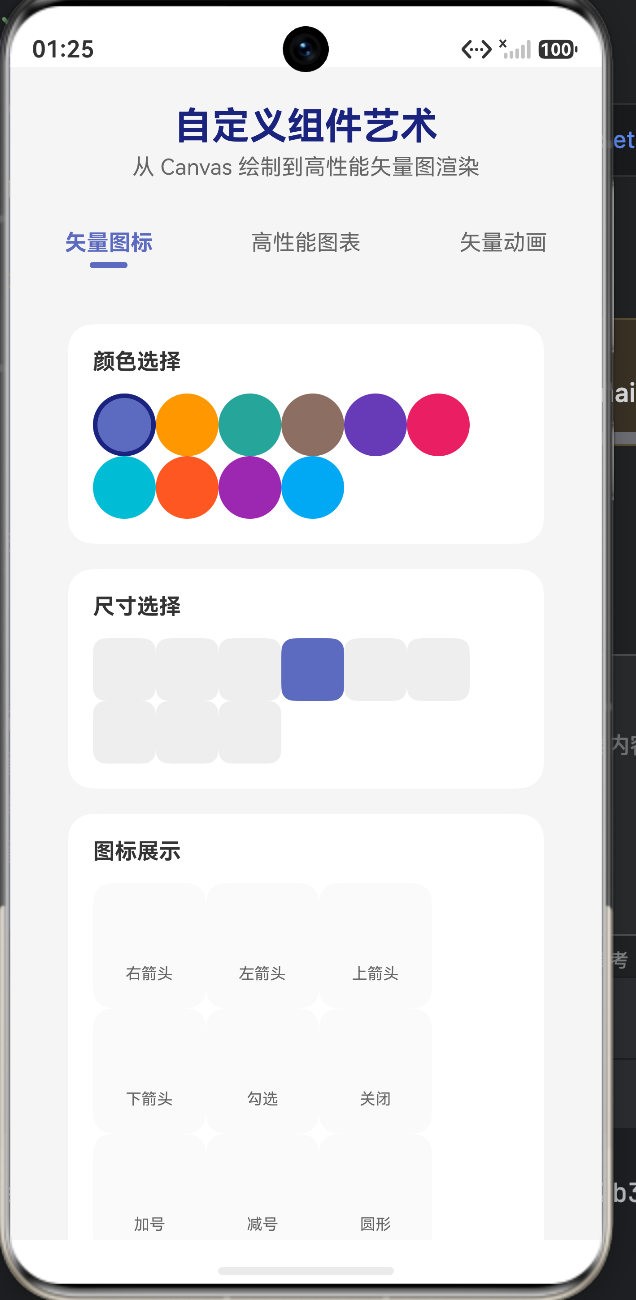
Text('自定义组件艺术')
.fontSize(24)
.fontWeight(FontWeight.Bold)
.fontColor('#1A237E')
.margin({ bottom: 4 })
Text('从 Canvas 绘制到高性能矢量图渲染')
.fontSize(14)
.fontColor('#666')
}
.width('100%')
.padding({ top: 24, left: 20, right: 20, bottom: 16 })
Tabs({ index: this.currentTab }) {
TabContent() {
this.buildIconTab()
}
.tabBar(this.TabBuilder('矢量图标', 0))
TabContent() {
this.buildChartTab()
}
.tabBar(this.TabBuilder('高性能图表', 1))
TabContent() {
this.buildAnimationTab()
}
.tabBar(this.TabBuilder('矢量动画', 2))
}
.width('100%')
.layoutWeight(1)
.barMode(BarMode.Fixed)
.onChange((index: number) => {
this.currentTab = index
})
}
.width('100%')
.height('100%')
.backgroundColor('#F5F5F5')
}
TabBuilder(title: string, index: number) {
Column() {
Text(title)
.fontSize(14)
.fontColor(this.currentTab === index ? '#5C6BC0' : '#666')
.fontWeight(this.currentTab === index ? FontWeight.Bold : FontWeight.Normal)
Column()
.width(24)
.height(4)
.backgroundColor(this.currentTab === index ? '#5C6BC0' : 'transparent')
.borderRadius(2)
.margin({ top: 4 })
}
.width('100%')
.height(56)
.justifyContent(FlexAlign.Center)
}
buildIconTab() {
Scroll() {
Column({ space: 16 }) {
Column({ space: 12 }) {
Text('颜色选择')
.fontSize(14)
.fontWeight(FontWeight.Bold)
.fontColor('#333')
.width('100%')
Flex({ wrap: FlexWrap.Wrap, justifyContent: FlexAlign.Start }) {
ForEach(this.colors, (color: string) => {
Column()
.width(40)
.height(40)
.backgroundColor(color)
.borderRadius(20)
.borderWidth(3)
.borderColor(this.selectedColor === color ? '#1A237E' : 'transparent')
.onClick(() => {
this.selectedColor = color
})
})
}
.width('100%')
}
.width('90%')
.padding(16)
.backgroundColor('#FFFFFF')
.borderRadius(16)
.shadow({ radius: 8, color: '#00000008', offsetY: 4 })
Column({ space: 12 }) {
Text('尺寸选择')
.fontSize(14)
.fontWeight(FontWeight.Bold)
.fontColor('#333')
.width('100%')
Flex({ wrap: FlexWrap.Wrap, justifyContent: FlexAlign.Start }) {
ForEach(this.sizes, (size: number) => {
Column() {
VectorIcon({ iconType: 'check', iconSize: size * 0.6, iconColor: this.selectedSize === size ? '#FFFFFF' : '#333' })
}
.width(40)
.height(40)
.backgroundColor(this.selectedSize === size ? this.selectedColor : '#EEEEEE')
.borderRadius(8)
.alignItems(HorizontalAlign.Center)
.justifyContent(FlexAlign.Center)
.onClick(() => {
this.selectedSize = size
})
})
}
.width('100%')
}
.width('90%')
.padding(16)
.backgroundColor('#FFFFFF')
.borderRadius(16)
.shadow({ radius: 8, color: '#00000008', offsetY: 4 })
Column({ space: 12 }) {
Text('图标展示')
.fontSize(14)
.fontWeight(FontWeight.Bold)
.fontColor('#333')
.width('100%')
Flex({ wrap: FlexWrap.Wrap, justifyContent: FlexAlign.Start }) {
ForEach(this.iconList, (item: IconItem) => {
Column({ space: 4 }) {
VectorIcon({ iconType: item.type, iconSize: this.selectedSize, iconColor: this.selectedColor })
Text(item.label)
.fontSize(10)
.fontColor('#666')
}
.width(72)
.height(80)
.backgroundColor('#FAFAFA')
.borderRadius(12)
.alignItems(HorizontalAlign.Center)
.justifyContent(FlexAlign.Center)
})
}
.width('100%')
}
.width('90%')
.padding(16)
.backgroundColor('#FFFFFF')
.borderRadius(16)
.shadow({ radius: 8, color: '#00000008', offsetY: 4 })
Column({ space: 8 }) {
Text('实时预览')
.fontSize(14)
.fontWeight(FontWeight.Bold)
.fontColor('#333')
.width('100%')
Column() {
VectorIcon({ iconType: 'heart', iconSize: 96, iconColor: this.selectedColor })
}
.width('100%')
.height(160)
.backgroundColor('#FAFAFA')
.borderRadius(16)
.alignItems(HorizontalAlign.Center)
.justifyContent(FlexAlign.Center)
}
.width('90%')
.padding(16)
.backgroundColor('#FFFFFF')
.borderRadius(16)
.shadow({ radius: 8, color: '#00000008', offsetY: 4 })
Column()
.width('100%')
.height(40)
}
.width('100%')
.padding(20)
}
.width('100%')
.height('100%')
}
buildChartTab() {
Scroll() {
Column({ space: 16 }) {
Column({ space: 12 }) {
Text('图表类型')
.fontSize(14)
.fontWeight(FontWeight.Bold)
.fontColor('#333')
.width('100%')
Flex({ wrap: FlexWrap.Wrap, justifyContent: FlexAlign.Start }) {
ForEach(this.chartList, (item: ChartItem) => {
Text(item.label)
.fontSize(12)
.fontColor('#333')
.padding({ left: 16, right: 16, top: 8, bottom: 8 })
.backgroundColor('#EEEEEE')
.borderRadius(20)
.onClick(() => {
const newItems: ChartItem[] = []
for (const c of this.chartList) {
const newItem: ChartItem = {
type: c.type,
label: c.label,
active: c.type === item.type
}
newItems.push(newItem)
}
this.chartList = newItems
})
})
}
.width('100%')
}
.width('90%')
.padding(16)
.backgroundColor('#FFFFFF')
.borderRadius(16)
.shadow({ radius: 8, color: '#00000008', offsetY: 4 })
ForEach(this.chartList, (item: ChartItem) => {
Column({ space: 8 }) {
Text(item.label)
.fontSize(14)
.fontWeight(FontWeight.Bold)
.fontColor('#333')
.width('100%')
Column() {
VectorChart({
data: this.chartData,
labels: this.chartLabels,
chartType: item.type,
chartWidth: 340,
chartHeight: 220
})
}
.width('100%')
.height(240)
.backgroundColor('#FFFFFF')
.borderRadius(12)
}
.width('90%')
.padding(16)
.backgroundColor('#FFFFFF')
.borderRadius(16)
.shadow({ radius: 8, color: '#00000008', offsetY: 4 })
})
Column({ space: 8 }) {
Text('性能优化说明')
.fontSize(14)
.fontWeight(FontWeight.Bold)
.fontColor('#333')
.width('100%')
Column({ space: 8 }) {
Row({ space: 12 }) {
Column() { Text('💡').fontSize(20) }
.width(36)
.height(36)
.backgroundColor('#5C6BC015')
.borderRadius(18)
.alignItems(HorizontalAlign.Center)
.justifyContent(FlexAlign.Center)
Column() {
Text('离屏缓存')
.fontSize(12)
.fontWeight(FontWeight.Bold)
.fontColor('#333')
Text('使用缓存机制预渲染静态内容,避免每帧重复绘制')
.fontSize(10)
.fontColor('#666')
}
}
Row({ space: 12 }) {
Column() { Text('⚡').fontSize(20) }
.width(36)
.height(36)
.backgroundColor('#FF980015')
.borderRadius(18)
.alignItems(HorizontalAlign.Center)
.justifyContent(FlexAlign.Center)
Column() {
Text('脏区域重绘')
.fontSize(12)
.fontWeight(FontWeight.Bold)
.fontColor('#333')
Text('仅重绘交互变化区域,减少无效绘制开销')
.fontSize(10)
.fontColor('#666')
}
}
Row({ space: 12 }) {
Column() { Text('🎯').fontSize(20) }
.width(36)
.height(36)
.backgroundColor('#26A69A15')
.borderRadius(18)
.alignItems(HorizontalAlign.Center)
.justifyContent(FlexAlign.Center)
Column() {
Text('Path2D 缓存')
.fontSize(12)
.fontWeight(FontWeight.Bold)
.fontColor('#333')
Text('复用 Path2D 对象,避免路径字符串重复解析')
.fontSize(10)
.fontColor('#666')
}
}
}
}
.width('90%')
.padding(16)
.backgroundColor('#FFFFFF')
.borderRadius(16)
.shadow({ radius: 8, color: '#00000008', offsetY: 4 })
Column()
.width('100%')
.height(40)
}
.width('100%')
.padding(20)
}
.width('100%')
.height('100%')
}
buildAnimationTab() {
Scroll() {
Column({ space: 16 }) {
Column({ space: 12 }) {
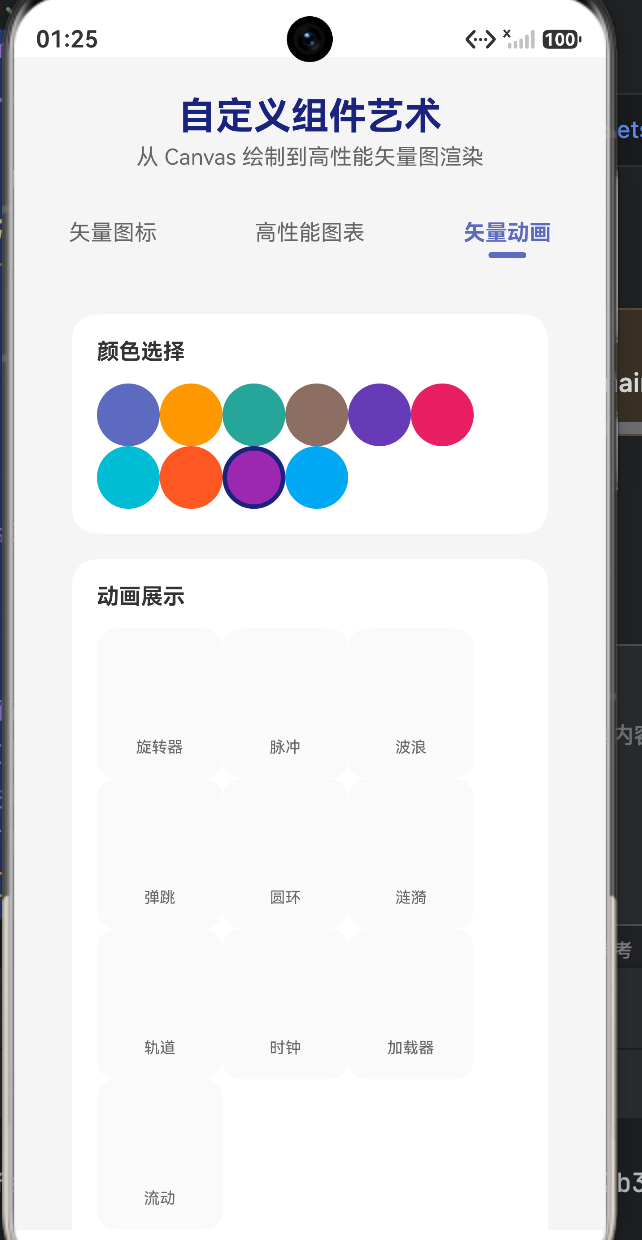
Text('颜色选择')
.fontSize(14)
.fontWeight(FontWeight.Bold)
.fontColor('#333')
.width('100%')
Flex({ wrap: FlexWrap.Wrap, justifyContent: FlexAlign.Start }) {
ForEach(this.colors, (color: string) => {
Column()
.width(40)
.height(40)
.backgroundColor(color)
.borderRadius(20)
.borderWidth(3)
.borderColor(this.selectedColor === color ? '#1A237E' : 'transparent')
.onClick(() => {
this.selectedColor = color
})
})
}
.width('100%')
}
.width('90%')
.padding(16)
.backgroundColor('#FFFFFF')
.borderRadius(16)
.shadow({ radius: 8, color: '#00000008', offsetY: 4 })
Column({ space: 12 }) {
Text('动画展示')
.fontSize(14)
.fontWeight(FontWeight.Bold)
.fontColor('#333')
.width('100%')
Flex({ wrap: FlexWrap.Wrap, justifyContent: FlexAlign.Start }) {
ForEach(this.animationList, (item: AnimationItem) => {
Column({ space: 8 }) {
VectorAnimation({ animationType: item.type, animSize: 48, animColor: this.selectedColor, speed: 1.0 })
Text(item.label)
.fontSize(10)
.fontColor('#666')
}
.width(80)
.height(96)
.backgroundColor('#FAFAFA')
.borderRadius(12)
.alignItems(HorizontalAlign.Center)
.justifyContent(FlexAlign.Center)
})
}
.width('100%')
}
.width('90%')
.padding(16)
.backgroundColor('#FFFFFF')
.borderRadius(16)
.shadow({ radius: 8, color: '#00000008', offsetY: 4 })
Column({ space: 8 }) {
Text('实时预览')
.fontSize(14)
.fontWeight(FontWeight.Bold)
.fontColor('#333')
.width('100%')
Column() {
VectorAnimation({ animationType: 'orbit', animSize: 120, animColor: this.selectedColor, speed: 1.5 })
}
.width('100%')
.height(180)
.backgroundColor('#FAFAFA')
.borderRadius(16)
.alignItems(HorizontalAlign.Center)
.justifyContent(FlexAlign.Center)
}
.width('90%')
.padding(16)
.backgroundColor('#FFFFFF')
.borderRadius(16)
.shadow({ radius: 8, color: '#00000008', offsetY: 4 })
Column({ space: 8 }) {
Text('动画性能说明')
.fontSize(14)
.fontWeight(FontWeight.Bold)
.fontColor('#333')
.width('100%')
Column({ space: 8 }) {
Row({ space: 12 }) {
Column() { Text('🎨').fontSize(20) }
.width(36)
.height(36)
.backgroundColor('#5C6BC015')
.borderRadius(18)
.alignItems(HorizontalAlign.Center)
.justifyContent(FlexAlign.Center)
Column() {
Text('Path2D 缓存')
.fontSize(12)
.fontWeight(FontWeight.Bold)
.fontColor('#333')
Text('动画路径在初始化时缓存,避免每帧重建路径对象')
.fontSize(10)
.fontColor('#666')
}
}
Row({ space: 12 }) {
Column() { Text('⏱️').fontSize(20) }
.width(36)
.height(36)
.backgroundColor('#FF980015')
.borderRadius(18)
.alignItems(HorizontalAlign.Center)
.justifyContent(FlexAlign.Center)
Column() {
Text('定时帧驱动')
.fontSize(12)
.fontWeight(FontWeight.Bold)
.fontColor('#333')
Text('使用 setTimeout 实现约 60fps 流畅渲染')
.fontSize(10)
.fontColor('#666')
}
}
Row({ space: 12 }) {
Column() { Text('🔄').fontSize(20) }
.width(36)
.height(36)
.backgroundColor('#26A69A15')
.borderRadius(18)
.alignItems(HorizontalAlign.Center)
.justifyContent(FlexAlign.Center)
Column() {
Text('状态机驱动')
.fontSize(12)
.fontWeight(FontWeight.Bold)
.fontColor('#333')
Text('基于时间的状态计算,确保动画可预测且可暂停')
.fontSize(10)
.fontColor('#666')
}
}
}
}
.width('90%')
.padding(16)
.backgroundColor('#FFFFFF')
.borderRadius(16)
.shadow({ radius: 8, color: '#00000008', offsetY: 4 })
Column()
.width('100%')
.height(40)
}
.width('100%')
.padding(20)
}
.width('100%')
.height('100%')
}
}
六、 架构师寄语:追求极致的原生表现力
构建“矢量艺术画廊”的核心,不在于画出多精美的图形,而在于如何让这些图形在复杂的交互下保持稳定。
通过本案例,我们可以总结出鸿蒙自定义组件的“三驾马车”:
- 轻量化渲染:尽量避免嵌套过深,优先使用 Canvas 绘制复杂几何。
- 数据流控制:使用
DataSource将列表数据从 UI 逻辑中剥离,这是高性能列表的灵魂。 - 状态幂等性:任何 UI 的变化都应由唯一的状态源驱动,确保状态变化可预测、可回滚、可监控。

作为“人工智能6S店”的官方数字引擎,为AI开发者与企业提供一个覆盖软硬件全栈、一站式门户。
更多推荐
 0
0 0
0- 0


 已为社区贡献92条内容

所有评论(0)