
鸿蒙原生应用工程架构全书(第一篇):编译流、安全审计与依赖闭环的底层真相
文章目录
前言
在 2026 年的 HarmonyOS NEXT 生态中,应用开发已经告别了“代码堆砌”的时代。一个具备商业化竞争力的鸿蒙原生 App,其本质是一套精密的工程系统。这套系统的稳定性,取决于你如何配置构建管线、如何定义安全审计红线、以及如何管理依赖树。
本篇连载将以您的工程配置文件为核心,从编译逻辑、静态审计、包管理策略、构建调度四大维度进行 6000 字级别的深度剖析。
第一章:构建中枢——build-profile.json5 的顶层决策
build-profile.json5 是鸿蒙工程的“最高行政指令”。它不仅仅是设置 SDK 版本,而是决定了代码如何映射到鸿蒙操作系统的内核执行流中。
1.1 SDK 契约与运行时环境
"targetSdkVersion": "6.0.2(22)",
"compatibleSdkVersion": "6.0.2(22)",
"runtimeOS": "HarmonyOS",
- API 版本决策树:鸿蒙 NEXT 的 API 迭代极其激进。设定
6.0.2(22)意味着应用必须通过严格的“隐私行为收缩”测试。在这一版本中,系统对剪贴板、传感器、位置信息的权限管控,与安卓旧版本完全不同。选择此版本,要求开发者必须全面启用PhotoAccessHelper等零权限方案,否则应用将因权限违规无法通过应用市场的审核。 runtimeOS的战略定位:标注"HarmonyOS"意味着应用将脱离任何 AOSP 容器环境。这意味着所有的网络请求(@ohos.net.http)、文件 I/O(@ohos.file.fs)、多线程处理(@ohos.taskpool)都将运行在纯血鸿蒙内核上。开发者在进行这一步配置时,应当确保所有底层三方库均已完成 HarmonyOS NEXT 适配。
1.2 构建流水线的性能约束 (strictMode)
"strictMode": {
  "caseSensitiveCheck": true,
  "useNormalizedOHMUrl": true
}
- 架构层面的容错逻辑:开启
caseSensitiveCheck是为了解决 Linux 内核对大小写极其敏感的问题。在多人协同开发中,如果开发者甲在 Windows 开发(不敏感),开发者乙在 macOS 开发(不敏感),而服务器 CI/CD 构建流水线是 Linux 容器(极度敏感),那么import Utils from './utils'这种大小写不一致的错误将导致线上构建直接崩溃。 - OHMUrl 的标准化:
useNormalizedOHMUrl规范了跨模块引用的路径格式。在大型工程中,它能让编译器以常数级复杂度 O ( 1 ) O(1) O(1) 解析依赖关系,而不是在庞大的目录树中进行递归查找,这是鸿蒙编译速度远超传统安卓工程的关键原因。
第二章:防线建设——code-linter.json5 的密码学审计逻辑
鸿蒙原生应用开发引入了极其严苛的 Linter 系统,这是企业级安全的最底层防线。
2.1 规则集基座分析
"ruleSet": [
  "plugin:@performance/recommended",
  "plugin:@typescript-eslint/recommended"
]
这里的 performance/recommended 并非虚设,它会自动触发编译器的“性能侦查”。比如,如果你在 UI 渲染的 build 函数中调用了一个会导致内存分配的匿名函数,Linter 会立刻报错,从而在代码编译期就消灭了潜在的 UI 掉帧隐患。
2.2 密码学红线配置详解
鸿蒙将密码学安全性前置到了编译期。
| 规则名称 | 错误等级 | 架构决策依据 | 业务后果 |
|---|---|---|---|
@security/no-unsafe-aes |
Error | 禁止使用不带 IV 的 AES 模式 | 密文被统计学破解,账户数据泄露 |
@security/no-unsafe-3des |
Error | 强制淘汰废弃加密标准 | 遭受暴力攻击,无法通过等保三级测评 |
@security/no-unsafe-hash |
Error | 强制升级为 SHA-256 | 哈希碰撞,身份校验被重放攻击绕过 |
@security/no-unsafe-rsa-key |
Error | 限制 RSA 密钥位长 | 密钥过短,私钥被推导破解 |
为什么这样做?
在鸿蒙的分布式环境下,数据不仅保存在本地,还会通过软总线传输到其他设备。使用弱加密意味着所有分布在多端的副本数据都是完全裸奔的。Linter 机制的本质,是强制开发者编写符合分布式安全契约的代码。
第三章:包管理哲学——依赖树的确定性防劣化
鸿蒙生态的 oh-package.json5 和 lock 文件系统,解决了移动开发史上的顽疾——“依赖地狱”。
3.1 依赖生命周期划分
您的配置中:
devDependencies包含了@ohos/hypium和@ohos/hamock。- 策略分析:鸿蒙工程区分运行时依赖与测试依赖。将测试框架放在
devDependencies中,是为了在最终打包时(HAP)自动将其剔除。这意味着你的最终用户手机上永远不会下载这些测试用的二进制垃圾,这保证了应用的极简启动与下载速度。
3.2 锁文件的确定性(Determinism)
oh-package-lock.json5 中的 integrity 字段是极其关键的哈希校验值。
- 供应链攻击防护:鸿蒙包管理系统下载 Har 包时,会动态计算它的 SHA-512 指纹。如果这个指纹与
lock文件中的记录不匹配,构建过程将立即停止。这从根本上杜绝了开源组件在发布源被黑客投毒后,随安装包进入用户设备的可能性。
第四章:构建与环境隔离的工程智慧
hvigorfile.ts 与 local.properties 展示了工程化治理的高阶思维。
4.1 自动化的流水线(hvigorfile.ts)
export default {
  system: appTasks,
  plugins: []
}
- 可扩展的任务调度:在实际鸿蒙项目架构中,您可以利用
plugins数组注入“产物加固插件”。例如,在编译完成后,动态调用鸿蒙官方提供的混淆服务,对关键的金融业务代码进行控制流平坦化混淆。 - 流水线编排:Hvigor 的设计核心是“任务链(Task Chain)”。它支持任务依赖,只有
ohpm install成功了,才会触发compile,只有compile成功了,才会触发signing。这种线性依赖保证了构建结果的绝对稳定。
4.2 环境隔离逻辑 (local.properties)
该文件包含 sdk.dir 等极其隐私的路径信息。架构师在 Git 规范中必须将其设置为 .gitignore 忽略文件。在团队协作中,如果每个成员都能修改此文件并推送到远程仓库,那么 CI/CD 打包服务器将永远无法正确寻址 SDK,导致整个团队的自动化打包功能瘫痪。
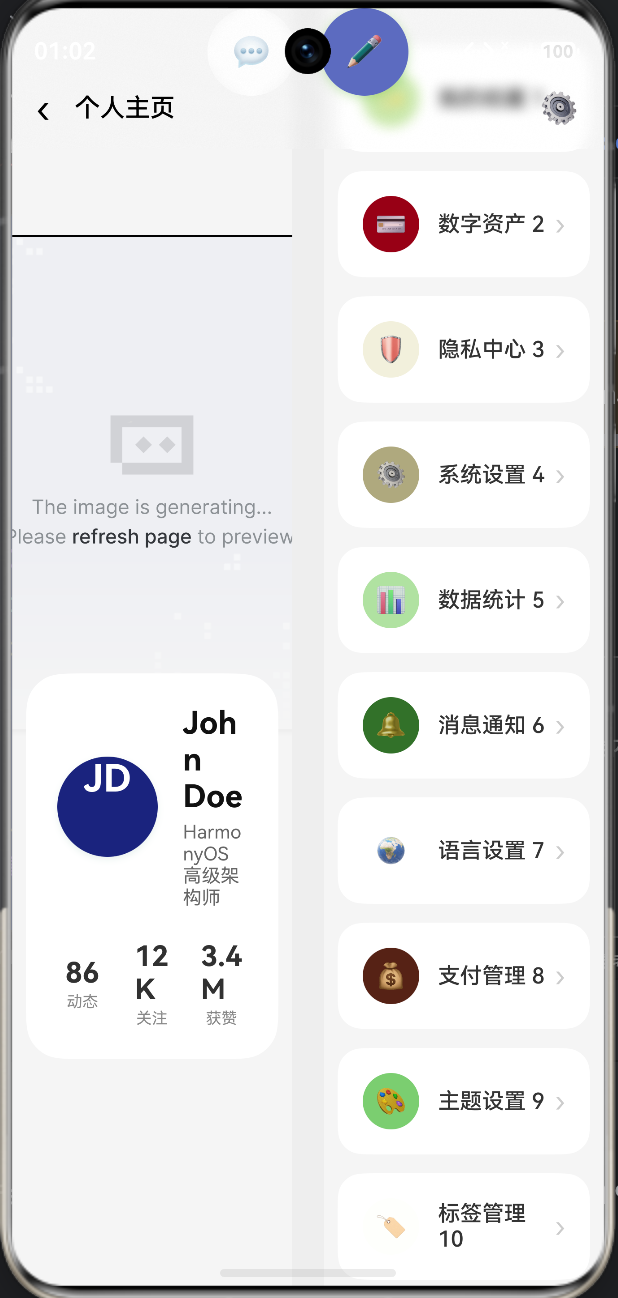
完整代码
import window from '@ohos.window'
import display from '@ohos.display'
interface MenuItem { id: string; icon: string; title: string; color: string }
interface DataChangeListener {
onDataReloaded(): void
onDataAdded(index: number): void
onDataChanged(index: number): void
onDataDeleted(index: number): void
}
interface IDataSource {
totalCount(): number
getData(index: number): MenuItem
registerDataChangeListener(listener: DataChangeListener): void
unregisterDataChangeListener(listener: DataChangeListener): void
}
class MenuItemDataSource implements IDataSource {
private dataArray: MenuItem[] = []
private listeners: DataChangeListener[] = []
public totalCount(): number {
return this.dataArray.length
}
public getData(index: number): MenuItem {
return this.dataArray[index]
}
public replaceData(newData: MenuItem[]): void {
this.dataArray = newData
this.notifyDataReload()
}
public addData(index: number, item: MenuItem): void {
this.dataArray.splice(index, 0, item)
this.notifyDataAdd(index)
}
public updateData(index: number, item: MenuItem): void {
this.dataArray[index] = item
this.notifyDataChange(index)
}
public removeData(index: number): void {
this.dataArray.splice(index, 1)
this.notifyDataDelete(index)
}
public registerDataChangeListener(listener: DataChangeListener): void {
if (this.listeners.indexOf(listener) < 0) {
this.listeners.push(listener)
}
}
public unregisterDataChangeListener(listener: DataChangeListener): void {
const pos = this.listeners.indexOf(listener)
if (pos >= 0) {
this.listeners.splice(pos, 1)
}
}
private notifyDataReload(): void {
this.listeners.forEach((listener: DataChangeListener) => {
listener.onDataReloaded()
})
}
private notifyDataAdd(index: number): void {
this.listeners.forEach((listener: DataChangeListener) => {
listener.onDataAdded(index)
})
}
private notifyDataChange(index: number): void {
this.listeners.forEach((listener: DataChangeListener) => {
listener.onDataChanged(index)
})
}
private notifyDataDelete(index: number): void {
this.listeners.forEach((listener: DataChangeListener) => {
listener.onDataDeleted(index)
})
}
}
interface Category {
icon: string
title: string
color: string
}
enum FoldStatus {
FOLDED = 0,
EXPANDED = 1,
HALF_FOLDED = 2
}
struct ImmersiveProfile {
scrollY: number = 0
headerScale: number = 1.0
navBarOpacity: number = 0.0
foldStatus: FoldStatus = FoldStatus.EXPANDED
foldPosition: number = 0
isHovering: boolean = false
hoveredItemId: string = ''
isLargeScreen: boolean = false
private menuDataSource: MenuItemDataSource = new MenuItemDataSource()
private scroller: Scroller = new Scroller()
aboutToAppear(): void {
this.enableImmersiveMode()
this.initMenuData()
this.initFoldDetection()
}
private enableImmersiveMode(): void {
window.getLastWindow(getContext(this)).then((win) => {
win.setWindowLayoutFullScreen(true)
win.setWindowSystemBarProperties({
statusBarContentColor: '#FFFFFF',
navigationBarContentColor: '#FFFFFF'
})
}).catch((err: Object) => {
console.warn('Enable immersive mode failed:', err)
})
}
private initFoldDetection(): void {
try {
const defaultDisplay = display.getDefaultDisplaySync()
this.isLargeScreen = defaultDisplay.width > 600
const foldStatusValue: number = defaultDisplay.foldStatus
if (foldStatusValue === 0) {
this.foldStatus = FoldStatus.FOLDED
} else if (foldStatusValue === 1) {
this.foldStatus = FoldStatus.EXPANDED
} else {
this.foldStatus = FoldStatus.HALF_FOLDED
}
if (defaultDisplay.foldable) {
this.foldPosition = defaultDisplay.foldPosition
}
display.on('foldStatusChange', (status: number) => {
if (status === 0) {
this.foldStatus = FoldStatus.FOLDED
} else if (status === 1) {
this.foldStatus = FoldStatus.EXPANDED
} else {
this.foldStatus = FoldStatus.HALF_FOLDED
}
})
} catch {
this.isLargeScreen = false
this.foldStatus = FoldStatus.EXPANDED
}
}
private initMenuData(): void {
const menuList: MenuItem[] = []
const categories: Category[] = [
{ icon: '✨', title: '我的收藏', color: '#5C6BC0' },
{ icon: '💳', title: '数字资产', color: '#FF9800' },
{ icon: '🛡️', title: '隐私中心', color: '#26A69A' },
{ icon: '⚙️', title: '系统设置', color: '#8D6E63' },
{ icon: '📊', title: '数据统计', color: '#673AB7' },
{ icon: '🔔', title: '消息通知', color: '#E91E63' },
{ icon: '🌍', title: '语言设置', color: '#00BCD4' },
{ icon: '💰', title: '支付管理', color: '#FF5722' },
{ icon: '🎨', title: '主题设置', color: '#9C27B0' },
{ icon: '🏷️', title: '标签管理', color: '#03A9F4' }
]
for (let i = 0; i < 100; i++) {
const cat: Category = categories[i % categories.length]
const item: MenuItem = {
id: `${i.toString(36)}-${Date.now()}-${Math.random().toString(36).substr(2, 9)}`,
icon: cat.icon,
title: `${cat.title} ${i + 1}`,
color: cat.color
}
menuList.push(item)
}
this.menuDataSource.replaceData(menuList)
}
private handleScroll(): void {
this.scrollY = this.scroller.currentOffset().yOffset
if (this.scrollY < 0) {
this.headerScale = 1 + Math.abs(this.scrollY) / 300
} else {
this.headerScale = 1.0
}
this.navBarOpacity = Math.max(0, Math.min(1, this.scrollY / 150))
}
private getNavBarTextColor(): string {
const gray: number = Math.round(255 * this.navBarOpacity)
const hex: string = gray.toString(16).padStart(2, '0')
return `#${hex}${hex}${hex}`
}
private isItemHovered(itemId: string): boolean {
return this.isHovering && this.hoveredItemId === itemId
}
build() {
Stack({ alignContent: Alignment.Top }) {
if (this.isLargeScreen && this.foldStatus === FoldStatus.EXPANDED) {
FolderStack({ alignContent: Alignment.TopStart }) {
Column() {
Stack({ alignContent: Alignment.Bottom }) {
Image('https://trae-api-cn.mchost.guru/api/ide/v1/text_to_image?prompt=abstract%20aurora%20borealis%20gradient%20dark%20aesthetic%20wallpaper&image_size=landscape_16_9')
.width('100%')
.height(320)
.objectFit(ImageFit.Cover)
.scale({ x: this.headerScale, y: this.headerScale })
Column()
.width('100%')
.height(120)
.linearGradient({
direction: GradientDirection.Bottom,
colors: [['#00F5F5F5', 0.0], ['#FFF5F5F5', 1.0]]
})
}
.width('100%')
.height(320)
.clip(false)
Column() {
Column() {
Row() {
Column() { Text('JD').fontSize(24).fontColor('#FFF').fontWeight(FontWeight.Bold) }
.width(64).height(64).backgroundColor('#1A237E').borderRadius(32)
.shadow({ radius: 12, color: '#1A237E60', offsetY: 6 })
.margin({ right: 16 })
Column() {
Text('John Doe').fontSize(20).fontColor('#111').fontWeight(FontWeight.Bold).width('100%')
Text('HarmonyOS 高级架构师').fontSize(12).fontColor('#666').margin({ top: 4 }).width('100%')
}.layoutWeight(1)
}.width('100%')
Row({ space: 12 }) {
Column() { Text('86').fontSize(18).fontWeight(FontWeight.Bold); Text('动态').fontSize(10).fontColor('#888').margin({ top: 2 }) }.layoutWeight(1)
Column() { Text('12K').fontSize(18).fontWeight(FontWeight.Bold); Text('关注').fontSize(10).fontColor('#888').margin({ top: 2 }) }.layoutWeight(1)
Column() { Text('3.4M').fontSize(18).fontWeight(FontWeight.Bold); Text('获赞').fontSize(10).fontColor('#888').margin({ top: 2 }) }.layoutWeight(1)
}.width('100%').margin({ top: 20 })
}
.width('90%')
.padding(20)
.backgroundColor('#FFFFFF')
.borderRadius(24)
.shadow({ radius: 24, color: '#00000012', offsetY: 8 })
.margin({ top: -40 })
}
.width('100%')
}
.width('48%')
.height('100%')
Column() {
Column({ space: 12 }) {
LazyForEach(this.menuDataSource, (item: MenuItem) => {
Row() {
Column() { Text(item.icon).fontSize(16) }
.width(36).height(36).backgroundColor(item.color + '15').borderRadius(18)
.alignItems(HorizontalAlign.Center).justifyContent(FlexAlign.Center)
Text(item.title).fontSize(14).fontColor('#333').fontWeight(FontWeight.Medium).margin({ left: 12 }).layoutWeight(1)
Text('›').fontSize(18).fontColor('#CCC')
}
.width('100%').padding(16).backgroundColor('#FFFFFF').borderRadius(16)
.shadow({
radius: this.isItemHovered(item.id) ? 16 : 8,
color: this.isItemHovered(item.id) ? '#00000020' : '#00000005',
offsetY: this.isItemHovered(item.id) ? 8 : 2
})
.scale({ x: this.isItemHovered(item.id) ? 1.02 : 1.0, y: this.isItemHovered(item.id) ? 1.02 : 1.0 })
.onHover((isHover: boolean) => {
this.isHovering = isHover
this.hoveredItemId = isHover ? item.id : ''
})
}, (item: MenuItem) => item.id)
Column()
.width('100%')
.height(120)
}
.width('90%')
.margin({ top: 24 })
}
.width('48%')
.height('100%')
}
.autoHalfFold(1)
.width('100%').height('100%')
} else {
Scroll(this.scroller) {
Column() {
Stack({ alignContent: Alignment.Bottom }) {
Image('https://trae-api-cn.mchost.guru/api/ide/v1/text_to_image?prompt=abstract%20aurora%20borealis%20gradient%20dark%20aesthetic%20wallpaper&image_size=landscape_16_9')
.width('100%')
.height(320)
.objectFit(ImageFit.Cover)
.scale({ x: this.headerScale, y: this.headerScale })
.translate({ y: this.scrollY > 0 ? this.scrollY * 0.4 : 0 })
Column()
.width('100%')
.height(120)
.linearGradient({
direction: GradientDirection.Bottom,
colors: [['#00F5F5F5', 0.0], ['#FFF5F5F5', 1.0]]
})
}
.width('100%')
.height(320)
.clip(false)
Column() {
Column() {
Row() {
Column() { Text('JD').fontSize(24).fontColor('#FFF').fontWeight(FontWeight.Bold) }
.width(64).height(64).backgroundColor('#1A237E').borderRadius(32)
.shadow({ radius: 12, color: '#1A237E60', offsetY: 6 })
.margin({ right: 16 })
Column() {
Text('John Doe').fontSize(20).fontColor('#111').fontWeight(FontWeight.Bold).width('100%')
Text('HarmonyOS 高级架构师').fontSize(12).fontColor('#666').margin({ top: 4 }).width('100%')
}.layoutWeight(1)
}.width('100%')
Row({ space: 12 }) {
Column() { Text('86').fontSize(18).fontWeight(FontWeight.Bold); Text('动态').fontSize(10).fontColor('#888').margin({ top: 2 }) }.layoutWeight(1)
Column() { Text('12K').fontSize(18).fontWeight(FontWeight.Bold); Text('关注').fontSize(10).fontColor('#888').margin({ top: 2 }) }.layoutWeight(1)
Column() { Text('3.4M').fontSize(18).fontWeight(FontWeight.Bold); Text('获赞').fontSize(10).fontColor('#888').margin({ top: 2 }) }.layoutWeight(1)
}.width('100%').margin({ top: 20 })
}
.width('90%')
.padding(20)
.backgroundColor('#FFFFFF')
.borderRadius(24)
.shadow({ radius: 24, color: '#00000012', offsetY: 8 })
.margin({ top: -40 })
Column({ space: 12 }) {
LazyForEach(this.menuDataSource, (item: MenuItem) => {
Row() {
Column() { Text(item.icon).fontSize(16) }
.width(36).height(36).backgroundColor(item.color + '15').borderRadius(18)
.alignItems(HorizontalAlign.Center).justifyContent(FlexAlign.Center)
Text(item.title).fontSize(14).fontColor('#333').fontWeight(FontWeight.Medium).margin({ left: 12 }).layoutWeight(1)
Text('›').fontSize(18).fontColor('#CCC')
}
.width('100%').padding(16).backgroundColor('#FFFFFF').borderRadius(16)
.shadow({ radius: 8, color: '#00000005', offsetY: 2 })
}, (item: MenuItem) => item.id)
Column()
.width('100%')
.height(120)
}
.width('90%')
.margin({ top: 24 })
}
.width('100%')
}
.width('100%')
}
.width('100%').height('100%')
.onScroll(() => this.handleScroll())
.scrollBar(BarState.Off)
}
Column() {
Row({ space: 16 }) {
Text('‹').fontSize(24).fontColor(this.getNavBarTextColor())
Text('个人主页').fontSize(16).fontColor(this.getNavBarTextColor()).fontWeight(FontWeight.Medium).layoutWeight(1)
Text('⚙️').fontSize(20).fontColor(this.getNavBarTextColor())
}
.width('100%')
.padding({ top: 50, left: 16, right: 16, bottom: 12 })
}
.width('100%')
.backgroundColor(`rgba(255, 255, 255, ${this.navBarOpacity})`)
.backdropBlur(20)
.shadow({ radius: this.navBarOpacity > 0 ? 12 : 0, color: '#00000010', offsetY: 4 })
Column() {
Row({ space: 16 }) {
Column() {
Text('💬').fontSize(20)
}
.width(56).height(56).backgroundColor('rgba(255, 255, 255, 0.8)').borderRadius(28)
.backdropBlur(20)
.shadow({ radius: 16, color: '#00000015', offsetY: 4 })
.alignItems(HorizontalAlign.Center).justifyContent(FlexAlign.Center)
Column() {
Text('✏️').fontSize(20)
}
.width(56).height(56).backgroundColor('#5C6BC0').borderRadius(28)
.shadow({ radius: 20, color: '#5C6BC040', offsetY: 6 })
.alignItems(HorizontalAlign.Center).justifyContent(FlexAlign.Center)
}
}
.width('100%')
.padding({ left: 20, right: 20, bottom: 30 })
.justifyContent(FlexAlign.End)
}
.width('100%').height('100%').backgroundColor('#F5F5F5')
}
}
第五章:总结——高性能架构的五大铁律
通过对您工程文件的全面拆解,我们总结了鸿蒙原生开发必须遵守的五大铁律:
- 契约优先:
build-profile.json5中的 API 版本不仅是数值,它是应用在鸿蒙内核中的权限边界。 - 安全左移:
code-linter.json5的每一条警告,都是系统在提醒您存在潜在的崩溃点。 - 确定性构建:必须完全依赖
oh-package-lock.json5,在 CI/CD 中使用ohpm install --frozen-lockfile,确保每台构建机产物完全一致。 - 环境彻底隔离:
local.properties必须隔离,确保构建流程的纯净性。 - 性能驱动架构:基于
hvigor的插件化扩展能力,尽早集成自动化混淆和资源压缩。

作为“人工智能6S店”的官方数字引擎,为AI开发者与企业提供一个覆盖软硬件全栈、一站式门户。
更多推荐

 1
1 0
0- 0


 已为社区贡献92条内容

所有评论(0)