
《鸿蒙网络请求实战:Axios/Http模块封装与天气查询App实现》:ArkTS 异步编程与动态 UI 渲染全景解析

文章目录
前言
在移动应用开发的学习路径中,如果说“待办清单(ToDo List)”是掌握状态管理的敲门砖,那么“天气查询应用(Weather App)”绝对是跨入网络编程与真实数据交互大门的“Hello World”。
一个优秀的现代 App 绝不是一座孤岛,它需要源源不断地从云端获取数据。在 HarmonyOS 的 ArkTS 开发生态中,处理网络请求不仅涉及底层 API(如原生 @ohos.net.http 或第三方 Axios 库)的调用,更考验开发者对异步流控制(Promise/async-await)、异常边界处理以及状态驱动动态 UI 的综合架构能力。
本文将基于一段完整、高保真的 ArkUI 天气查询应用实战源码,为您进行像素级与架构级的深度剖析。我们将补齐隐藏在 UI 背后的网络服务封装层(WeatherService),并深度解构数据是如何从云端 JSON 报文,一步步流转并化作屏幕上随天气变幻的绚丽渐变色背景与精美图标的。
一、 架构基石:网络能力声明与 HTTP/Axios 选型
在代码的第一行,我们看到了 import WeatherService from '../services/WeatherService'。在深入 UI 之前,我们必须先构建这座数据桥梁。
1. 必不可少的能力声明
在 HarmonyOS 中,网络访问属于敏感能力。在编写任何网络代码前,必须在项目的 module.json5 文件中声明网络权限,否则所有的请求都会被底层操作系统无情拦截:
"requestPermissions": [
  {
    "name": "ohos.permission.INTERNET"
  }
]
2. 底层网络引擎选型:原生 HTTP vs Axios
在鸿蒙生态中,发起网络请求通常有两种主流选择。
| 评估维度 | @ohos.net.http (鸿蒙原生) |
ohos/axios (第三方移植库) |
架构师建议 |
|---|---|---|---|
| 引入方式 | 系统内置,无需安装。 | 需通过 ohpm install @ohos/axios 安装。 |
极简项目首选原生;企业级重度项目首选 Axios。 |
| API 友好度 | 偏底层,需手动处理流和 JSON 解析,拦截器实现较复杂。 | 极其成熟,支持请求/响应拦截器、自动 JSON 转换、取消请求。 | 前端开发者对 Axios 拥有极高的心智认同,上手零成本。 |
| 跨端复用性 | 仅限 HarmonyOS。 | 业务代码可与 Web/React Native 等多端项目高度共享。 | 有跨端(一套代码编多端)需求时,Axios 是唯一解。 |
二、 核心服务层:封装 WeatherService
为了让外部的 UI 组件保持纯洁,我们需要将所有的网络请求细节封闭在 WeatherService 类中。以下是结合鸿蒙原生 @ohos.net.http 模块的工业级封装示例:
import http from '@ohos.net.http';

// 领域数据契约定义
export interface WeatherCondition {
  temp_C: string;
  feelsLikeC: string;
  humidity: string;
  windspeedKmph: string;
  visibility: string;
  uvIndex: string;
  cloudcover: string;
  pressure: string;
  lang_zh?: string;
}

export interface WeatherDaily {
  date: string;
  maxtempC: string;
  mintempC: string;
  hourly: Array<{ weatherDesc: Array<{ value: string }> }>;
}

export default class WeatherService {
  // 假设使用开源天气 API (如 wttr.in)
  private baseUrl: string = 'https://wttr.in/';

  public async getWeather(city: string): Promise<any> {
    const httpRequest = http.createHttp();
    // 构造请求 URL,附加 format=j1 参数要求返回 JSON 格式,lang=zh 设定中文
    const url = `${this.baseUrl}${encodeURIComponent(city)}?format=j1&lang=zh`;

    try {
      const response = await httpRequest.request(url, {
        method: http.RequestMethod.GET,
        connectTimeout: 10000, // 10秒超时防线
        readTimeout: 10000
      });

      if (response.responseCode === 200) {
        // 原生 HTTP 返回的是字符串,需要手动反序列化
        return JSON.parse(response.result as string);
      } else {
        throw new Error(`网络异常, 状态码: ${response.responseCode}`);
      }
    } catch (error) {
      console.error('[WeatherService] Fetch error:', error);
      throw error;
    } finally {
      // 极其关键:释放底层 socket 连接资源
      httpRequest.destroy();
    }
  }

  public formatDate(dateStr: string): string {
    const date = new Date(dateStr);
    return `${date.getMonth() + 1}/${date.getDate()}`;
  }
}
网络层架构深度解析:
async/await异步流控制:网络请求是典型的耗时 I/O 操作。在 ArkTS 中,严格使用async/await代替古老的 Callback 地狱,保证了代码的线性和可读性。- 防御性编程 (
destroy):在finally块中调用httpRequest.destroy()是使用鸿蒙原生 HTTP 模块的铁律。如果不释放,很快就会耗尽系统底层的 TCP 并发连接池,导致后续所有网络请求卡死。 - URL 编码 (
encodeURIComponent):当用户在搜索框输入中文城市名(如“北京”)时,直接拼接入 URL 会引发 HTTP 协议错误。必须进行标准编码。
三、 状态机引擎:异步数据与 UI 的生命周期交响乐
回到主 UI 视图 WeatherApp,我们来看看这些从网络获取的数据是如何驱动界面渲染的。
  @State currentWeather: WeatherCondition | null = null
  @State isLoading: boolean = false
  @State errorMsg: string = ''

  private async fetchWeather(city: string): Promise<void> {
    // 1. 状态重置与开启 Loading 面板
    this.isLoading = true
    this.errorMsg = ''

    try {
      // 2. 发起网络调用,挂起当前协程等待数据
      const data = await this.weatherService.getWeather(city)

      // 3. 数据解析与状态绑定
      if (data.current_condition && data.current_condition.length > 0) {
        this.currentWeather = data.current_condition[0]
        this.cityName = data.nearest_area[0]?.areaName[0]?.value || city
      }
      if (data.weather && data.weather.length > 0) {
        this.dailyForecast = data.weather.slice(0, 5) // 仅截取未来5天
      }
    } catch (error) {
      // 4. 异常捕获与降级处理
      console.error('Fetch weather failed:', error)
      this.errorMsg = '获取天气失败,请检查网络'
    } finally {
      // 5. 闭环:关闭 Loading 状态
      this.isLoading = false
    }
  }
UX(用户体验)状态管理准则:
这段代码展示了标准的企业级异步数据获取全生命周期。
在网络请求发出前,将 @State isLoading 设为 true。此时,ArkUI 引擎会捕捉到状态变化,瞬间卸载原有内容,挂载一个包含 Text('加载中...') 的占位屏。
如果遭遇弱网或断网,进入 catch 分支,errorMsg 被赋值,UI 自动切换为“❌ 获取天气失败,请检查网络”的错误回退页(Fallback UI),并且允许用户点击重试。
这种“初始 -> 加载 -> 成功/失败”的完整状态流转,是防止应用出现“白屏死机”假象的核心护城河。
四、 视觉算法:基于数据的动态美学重构
天气应用最吸引人的地方在于:它的背景和图标会随着窗外的真实天气而变幻。这段代码中提供了极其精妙的基于文本匹配的算法体系。
1. 天气颜色渐变映射引擎 (getBackground)
  private getBackground(): string {
    if (!this.currentWeather) {
      return 'linear-gradient(135deg, #4facfe 0%, #00f2fe 100%)' // 默认蓝天
    }
    const condition: string = this.currentWeather.lang_zh || ''

    // 渐变色彩语义学映射字典
    const gradientMap: Record<string, string> = {
      'sunny': 'linear-gradient(135deg, #4facfe 0%, #00f2fe 100%)', // 晴天:明亮蓝
      'partly cloudy': 'linear-gradient(135deg, #43e97b 0%, #38f9d7 100%)', // 多云:微光绿
      'heavy rain': 'linear-gradient(135deg, #0f2027 0%, #203a43 50%, #2c5364 100%)', // 暴雨:压抑深灰
      'thunder': 'linear-gradient(135deg, #0f0c29 0%, #302b63 50%, #24243e 100%)' // 雷暴:紫黑色
      // ...
    }

    const lowerCondition: string = condition.toLowerCase()
    for (const key of Object.keys(gradientMap)) {
      if (lowerCondition.includes(key)) {
        return gradientMap[key]
      }
    }
    return 'linear-gradient(135deg, #4facfe 0%, #00f2fe 100%)'
  }
2. UI 底层挂载
    .backgroundImage(this.getBackground(), ImageRepeat.NoRepeat)
    .backgroundImageSize(ImageSize.Cover)
视觉算法解析:
- 面向字典编程(Dictionary-Driven):我们没有使用无穷无尽的
if-else来判断天气。而是构建了一个Record<string, string>字典。这极大地提升了代码的可维护性,后续新增“沙尘暴”或“雾霾”天气,只需在字典中新增一行键值对即可。 - 模糊匹配 (
includes):真实的网络 API 返回的天气描述往往是不确定的(可能是“大暴雨”,也可能是“局部阵雨”)。通过转化为小写并使用includes包含性匹配,大幅提升了图标和背景映射的容错率。
五、 UI 布局解析:层次分明的气象仪表盘
通过 ArkUI 声明式组件,我们构建了一个拥有极高信息密度但毫不杂乱的气象展示面板。
1. 顶部搜索中枢 (Interactive Search Bar)
        Row({ space: 8 }) {
          TextInput({ text: this.searchText, placeholder: '搜索城市...' })
            .onChange((val: string) => { this.searchText = val })
            .layoutWeight(1).height(44)
            .backgroundColor('rgba(255,255,255,0.2)').borderRadius(22) // 毛玻璃半透明质感
            .onSubmit(() => this.handleSearch())

          Column() { Text('🔍').fontSize(16) }
          .width(44).height(44).backgroundColor('rgba(255,255,255,0.3)').borderRadius(22)
          .onClick(() => this.handleSearch())
        }
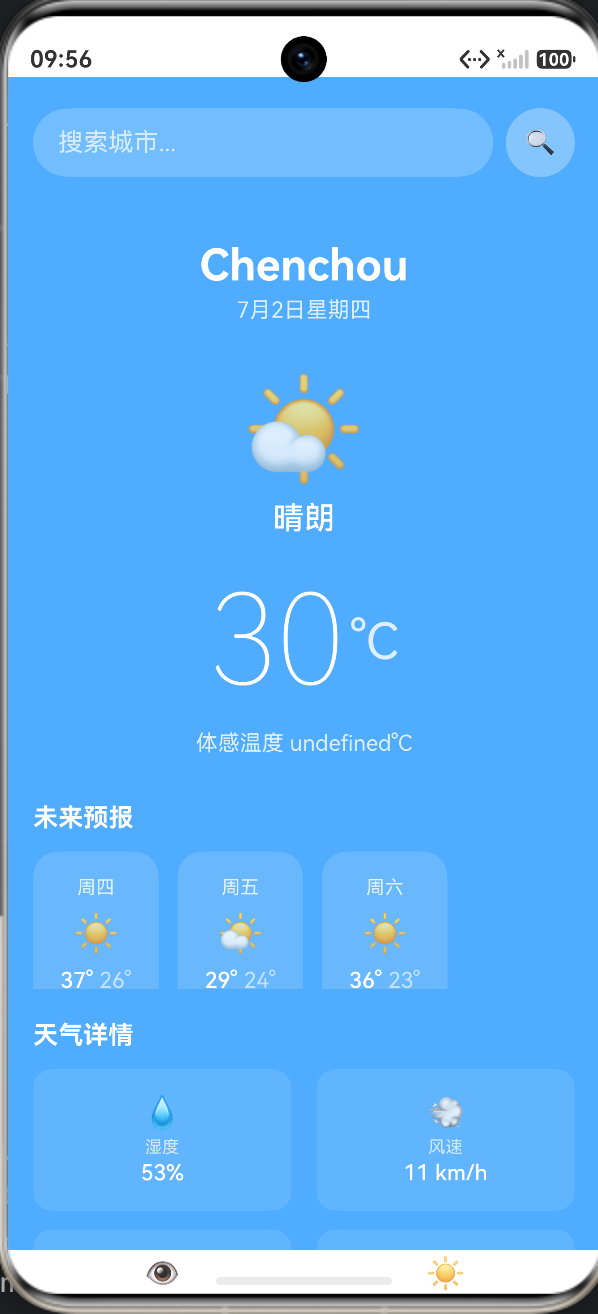
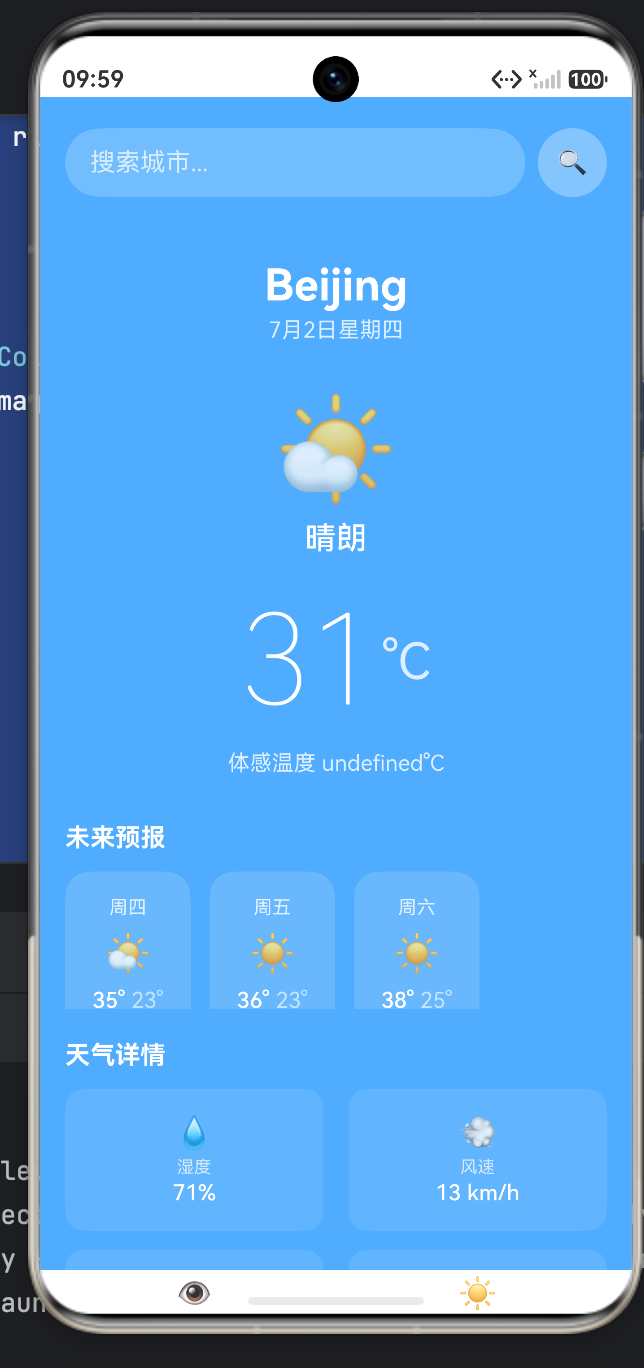
利用 rgba 结合白色和透明度,在绚丽的渐变背景上营造出一种亚克力毛玻璃(Glassmorphism)的高级质感。TextInput 的 onSubmit 与按钮的 onClick 绑定了同一个事件,确保了用户无论习惯按键盘上的回车,还是点击搜索按钮,都能触发网络请求。
2. 核心气象巨幕 (Hero Display)
          Row() {
            Text(this.currentWeather.temp_C).fontSize(80).fontWeight(FontWeight.Lighter)
            Text('°C').fontSize(32).fontColor('rgba(255,255,255,0.8)').margin({ left: 4 })
          }
在主温度显示区,采用了 80vp 的超大字号配合 FontWeight.Lighter(极细字重)。这种“大而细”的排版是现代 iOS 和原生鸿蒙设计语言中的标志性元素,使得核心数据极具冲击力而又不显笨重。
3. 横向滚动预报 (Horizontal Scroll Forecast)
          Scroll() {
            Row({ space: 12 }) {
              ForEach(this.dailyForecast, (day: WeatherDaily) => {
                Column() {
                  Text(this.weatherService.formatDate(day.date))
                  Text(this.getWeatherIcon(day.hourly[0]?.weatherDesc[0]?.value || ''))
                  Row({ space: 4 }) {
                    Text(day.maxtempC + '°')
                    Text(day.mintempC + '°').fontColor('rgba(255,255,255,0.6)')
                  }
                }
                .width(80).padding({ top: 16, bottom: 16 })
                .backgroundColor('rgba(255,255,255,0.15)').borderRadius(16)
              })
            }
          }
          .scrollBar(BarState.Off) // 隐藏横向滚动条,保证视觉纯净
利用 Scroll 容器包裹 Row,轻松实现未来 5 天预报的横向滑动卡片阵列。注意对最低温使用了 0.6 的透明度衰减,与最高温形成信息主次对比。
4. 高复用微粒组件 (@Component struct WeatherDetailItem)
@Component
struct WeatherDetailItem {
  @Prop icon: string = ''
  @Prop label: string = ''
  @Prop value: string = ''

  build() {
    Column() {
      Text(this.icon).fontSize(20)
      Text(this.label).fontSize(11).fontColor('rgba(255,255,255,0.7)').margin({ top: 4 })
      Text(this.value).fontSize(14).fontColor('#FFFFFF').fontWeight(FontWeight.Medium).margin({ top: 2 })
    }
    .layoutWeight(1).padding(16).backgroundColor('rgba(255,255,255,0.1)').borderRadius(12)
  }
}
对于底部的湿度、风速、气压等 6 个属性方块,如果硬编码将会产生巨量的冗余代码。作者抽象出了 WeatherDetailItem,通过 @Prop 接收数据。在外层只需使用 Row({ space: 16 }) 包裹两个 WeatherDetailItem,由于内部使用了 layoutWeight(1),它们会自动完美均分屏幕宽度。
完整代码
import WeatherService from '../services/WeatherService'
import type { WeatherCondition, WeatherDaily } from '../services/WeatherService'
struct WeatherApp {
city: string = 'Beijing'
searchText: string = ''
currentWeather: WeatherCondition | null = null
dailyForecast: WeatherDaily[] = []
cityName: string = ''
isLoading: boolean = false
errorMsg: string = ''
private weatherService: WeatherService = new WeatherService()
aboutToAppear(): void {
this.fetchWeather(this.city)
}
private async fetchWeather(city: string): Promise<void> {
this.isLoading = true
this.errorMsg = ''
try {
const data = await this.weatherService.getWeather(city)
if (data.current_condition && data.current_condition.length > 0) {
this.currentWeather = data.current_condition[0]
this.cityName = data.nearest_area[0]?.areaName[0]?.value || city
}
if (data.weather && data.weather.length > 0) {
this.dailyForecast = data.weather.slice(0, 5)
}
} catch (error) {
console.error('Fetch weather failed:', error)
this.errorMsg = '获取天气失败,请检查网络'
} finally {
this.isLoading = false
}
}
private handleSearch(): void {
if (this.searchText.trim()) {
this.city = this.searchText.trim()
this.fetchWeather(this.city)
this.searchText = ''
}
}
private getBackground(): string {
if (!this.currentWeather) {
return 'linear-gradient(135deg, #4facfe 0%, #00f2fe 100%)'
}
const condition: string = this.currentWeather.lang_zh || ''
const gradientMap: Record<string, string> = {
'sunny': 'linear-gradient(135deg, #4facfe 0%, #00f2fe 100%)',
'clear': 'linear-gradient(135deg, #4facfe 0%, #00f2fe 100%)',
'partly cloudy': 'linear-gradient(135deg, #43e97b 0%, #38f9d7 100%)',
'cloudy': 'linear-gradient(135deg, #667eea 0%, #764ba2 100%)',
'overcast': 'linear-gradient(135deg, #232526 0%, #414345 100%)',
'mist': 'linear-gradient(135deg, #a8edea 0%, #fed6e3 100%)',
'fog': 'linear-gradient(135deg, #a8edea 0%, #fed6e3 100%)',
'light rain': 'linear-gradient(135deg, #667eea 0%, #764ba2 100%)',
'moderate rain': 'linear-gradient(135deg, #2c3e50 0%, #34495e 100%)',
'heavy rain': 'linear-gradient(135deg, #0f2027 0%, #203a43 50%, #2c5364 100%)',
'light snow': 'linear-gradient(135deg, #e0c3fc 0%, #8ec5fc 100%)',
'moderate snow': 'linear-gradient(135deg, #e0c3fc 0%, #8ec5fc 100%)',
'heavy snow': 'linear-gradient(135deg, #e0c3fc 0%, #8ec5fc 100%)',
'thunder': 'linear-gradient(135deg, #0f0c29 0%, #302b63 50%, #24243e 100%)',
'drizzle': 'linear-gradient(135deg, #667eea 0%, #764ba2 100%)',
'hail': 'linear-gradient(135deg, #0f0c29 0%, #302b63 50%, #24243e 100%)'
}
const lowerCondition: string = condition.toLowerCase()
for (const key of Object.keys(gradientMap)) {
if (lowerCondition.includes(key)) {
return gradientMap[key]
}
}
return 'linear-gradient(135deg, #4facfe 0%, #00f2fe 100%)'
}
private getWeatherIcon(condition: string): string {
const iconMap: Record<string, string> = {
'sunny': '☀️',
'clear': '☀️',
'partly cloudy': '⛅',
'cloudy': '☁️',
'overcast': '☁️',
'mist': '🌫️',
'fog': '🌫️',
'light rain': '🌧️',
'moderate rain': '🌧️',
'heavy rain': '⛈️',
'light snow': '❄️',
'moderate snow': '❄️',
'heavy snow': '❄️',
'thunder': '🌩️',
'drizzle': '🌦️',
'hail': '⛈️'
}
const lowerCondition: string = condition.toLowerCase()
for (const key of Object.keys(iconMap)) {
if (lowerCondition.includes(key)) {
return iconMap[key]
}
}
return '🌤️'
}
build() {
Column() {
Column() {
Row({ space: 8 }) {
TextInput({ text: this.searchText, placeholder: '搜索城市...' })
.onChange((val: string) => { this.searchText = val })
.fontSize(14)
.layoutWeight(1).height(44)
.backgroundColor('rgba(255,255,255,0.2)').borderRadius(22).padding({ left: 16, right: 16 })
.fontColor('#FFFFFF').placeholderColor('rgba(255,255,255,0.7)')
.onSubmit(() => this.handleSearch())
Column() {
Text('🔍').fontSize(16)
}
.width(44).height(44).backgroundColor('rgba(255,255,255,0.3)').borderRadius(22)
.alignItems(HorizontalAlign.Center).justifyContent(FlexAlign.Center)
.onClick(() => this.handleSearch())
}
.width('100%')
}
.width('100%').padding({ left: 16, right: 16, top: 20 })
if (this.isLoading) {
Column() {
Column() {
Text('🌤️').fontSize(32)
}
.width(60).height(60).backgroundColor('rgba(255,255,255,0.2)').borderRadius(30)
.alignItems(HorizontalAlign.Center).justifyContent(FlexAlign.Center)
Text('加载中...').fontSize(14).fontColor('#FFFFFF').margin({ top: 16 })
}
.width('100%').height('60%').alignItems(HorizontalAlign.Center).justifyContent(FlexAlign.Center)
} else if (this.errorMsg) {
Column() {
Column() {
Text('❌').fontSize(32)
}
.width(60).height(60).backgroundColor('rgba(255,255,255,0.2)').borderRadius(30)
.alignItems(HorizontalAlign.Center).justifyContent(FlexAlign.Center)
Text(this.errorMsg).fontSize(14).fontColor('#FFFFFF').margin({ top: 16 })
Text('点击重试').fontSize(12).fontColor('rgba(255,255,255,0.8)').margin({ top: 8 })
}
.width('100%').height('60%').alignItems(HorizontalAlign.Center).justifyContent(FlexAlign.Center)
.onClick(() => this.fetchWeather(this.city))
} else if (this.currentWeather) {
Column() {
Column() {
Text(this.cityName).fontSize(28).fontColor('#FFFFFF').fontWeight(FontWeight.Bold)
Text(new Date().toLocaleDateString('zh-CN', { month: 'long', day: 'numeric', weekday: 'long' })).fontSize(14).fontColor('rgba(255,255,255,0.8)').margin({ top: 4 })
}
.width('100%').alignItems(HorizontalAlign.Center).margin({ top: 20 })
Column() {
Text(this.getWeatherIcon(this.currentWeather.lang_zh || '')).fontSize(64)
Text(this.currentWeather.lang_zh || '晴朗').fontSize(20).fontColor('#FFFFFF').fontWeight(FontWeight.Medium).margin({ top: 8 })
}
.width('100%').alignItems(HorizontalAlign.Center).margin({ top: 30 })
Row() {
Text(this.currentWeather.temp_C).fontSize(80).fontColor('#FFFFFF').fontWeight(FontWeight.Lighter)
Text('°C').fontSize(32).fontColor('rgba(255,255,255,0.8)').margin({ left: 4 })
}
.width('100%').justifyContent(FlexAlign.Center)
.margin({ top: 20 })
Column() {
Text(`体感温度 ${this.currentWeather.feelsLikeC}°C`).fontSize(14).fontColor('rgba(255,255,255,0.8)')
}
.width('100%').alignItems(HorizontalAlign.Center).margin({ top: 10 })
}
.width('100%').padding({ top: 20 })
Column() {
Text('未来预报').fontSize(16).fontColor('#FFFFFF').fontWeight(FontWeight.Bold).width('100%').padding({ left: 16 })
Scroll() {
Row({ space: 12 }) {
ForEach(this.dailyForecast, (day: WeatherDaily) => {
Column() {
Text(this.weatherService.formatDate(day.date)).fontSize(12).fontColor('rgba(255,255,255,0.8)')
Text(this.getWeatherIcon(day.hourly[0]?.weatherDesc[0]?.value || '')).fontSize(24).margin({ top: 8 })
Row({ space: 4 }) {
Text(day.maxtempC + '°').fontSize(14).fontColor('#FFFFFF').fontWeight(FontWeight.Medium)
Text(day.mintempC + '°').fontSize(14).fontColor('rgba(255,255,255,0.6)')
}
.width('100%').justifyContent(FlexAlign.Center).margin({ top: 8 })
}
.width(80).padding({ top: 16, bottom: 16 }).backgroundColor('rgba(255,255,255,0.15)').borderRadius(16)
.alignItems(HorizontalAlign.Center)
}, (day: WeatherDaily) => day.date)
}
.width('100%').padding({ left: 16, right: 16, top: 12 })
}
.height(100).scrollBar(BarState.Off)
}
.width('100%').margin({ top: 30 })
Column() {
Text('天气详情').fontSize(16).fontColor('#FFFFFF').fontWeight(FontWeight.Bold).width('100%').padding({ left: 16 })
Column({ space: 12 }) {
Row({ space: 16 }) {
WeatherDetailItem({ icon: '💧', label: '湿度', value: this.currentWeather.humidity + '%' })
WeatherDetailItem({ icon: '💨', label: '风速', value: this.currentWeather.windspeedKmph + ' km/h' })
}
Row({ space: 16 }) {
WeatherDetailItem({ icon: '👁️', label: '能见度', value: this.currentWeather.visibility + ' km' })
WeatherDetailItem({ icon: '☀️', label: '紫外线', value: this.currentWeather.uvIndex })
}
Row({ space: 16 }) {
WeatherDetailItem({ icon: '🌡️', label: '气压', value: this.currentWeather.pressure + ' hPa' })
WeatherDetailItem({ icon: '🌫️', label: '云量', value: this.currentWeather.cloudcover + '%' })
}
}
.width('100%').padding({ left: 16, right: 16, top: 12 })
}
.width('100%').margin({ top: 20 })
}
}
.width('100%').height('100%').backgroundColor('#4facfe')
.backgroundImage(this.getBackground(), ImageRepeat.NoRepeat)
.backgroundImageSize(ImageSize.Cover)
}
}
struct WeatherDetailItem {
icon: string = ''
label: string = ''
value: string = ''
build() {
Column() {
Text(this.icon).fontSize(20)
Text(this.label).fontSize(11).fontColor('rgba(255,255,255,0.7)').margin({ top: 4 })
Text(this.value).fontSize(14).fontColor('#FFFFFF').fontWeight(FontWeight.Medium).margin({ top: 2 })
}
.layoutWeight(1).padding(16).backgroundColor('rgba(255,255,255,0.1)').borderRadius(12)
.alignItems(HorizontalAlign.Center)
}
}
六、 总结:从静态布局到数据驱动的跨越
纵观整个天气应用的代码架构,我们清晰地看到了现代鸿蒙原生开发的黄金流转链路:
网络权限声明 -> HTTP Service 异步封装 -> 异常与加载状态管控 -> @State 绑定 -> 声明式 UI 渲染 -> 动态色彩美学计算。
通过将繁重、易错的网络请求下沉封装在 WeatherService 领域类中,主 UI 组件保持了极高的阅读纯洁性;通过 try-catch-finally 的严密防护,应用获得了极佳的网络容错韧性。
掌握了这一套网络请求与状态驱动视图的架构范式,您便真正拥有了开启大前端数据交互世界的钥匙。无论是构建电商瀑布流、即时通讯聊天面板,还是复杂的股票分时图,其底层的网络流转规律皆同此理。

作为“人工智能6S店”的官方数字引擎,为AI开发者与企业提供一个覆盖软硬件全栈、一站式门户。
更多推荐


 3
3 0
0- 0


 已为社区贡献136条内容

所有评论(0)