
【共创季稿事节】鸿蒙原生 ArkTS 布局方式之 GestureGroup 组合手势布局:多手势协同的艺术
一、引言
1.1 为什么需要组合手势?
在前两篇文章中,我们分别学习了 TapGesture(点击) 和 PanGesture(拖拽)。但在真实的应用中,一个组件往往需要响应多种手势——
图片查看器:单击预览、双击缩放、双指捏合、拖拽平移
聊天列表:单击进入、长按弹出菜单、滑动删除、拖拽排序
地图组件:单指拖拽、双指缩放、双击放大、旋转
当多种手势作用于同一个组件时,它们之间会发生冲突:我怎么知道用户是想"单击"还是"长按"?是"拖拽"还是"滑动"?
GestureGroup 就是为解决这个问题而生的。
1.2 本文核心内容
模块 内容
GestureGroup 原理 三种模式(Exclusive / Parallel / Sequence)的底层机制
API 详解 完整签名、参数说明、与独立手势的区别
三种模式实战 Exclusive(Tap vs LongPress)、Parallel(Pan+LongPress)、Sequence(LongPress→Pan)
冲突解决 单击 vs 双击、点击 vs 长按、拖拽 vs 滑动 的经典方案
高级组合 GestureGroup 嵌套、与 priorityGesture 配合
二、GestureGroup 设计原理
2.1 手势识别中的"冲突"本质
当多个手势附加到同一个组件上时,ArkUI 的手势识别器需要回答一个问题:
用户的这一次触摸操作,应该被哪个手势识别?
这个问题的答案取决于三种因素:
手势的触发条件(Tap 需要 Down→Up,LongPress 需要 Down→Hold)
手势的配置参数(distance 阈值、手指数量)
手势之间的协作模式(Exclusive / Parallel / Sequence)
GestureGroup 就是第三种因素的控制器。
2.2 GestureGroup 在手势体系中的位置
手势绑定方式(三种)
├── .gesture(gesture) ← 默认优先级
├── .priorityGesture(gesture) ← 高优先级
└── .parallelGesture(gesture) ← 并行
↓
手势类型(GestureType)
├── TapGesture
├── LongPressGesture
├── PanGesture
├── SwipeGesture
├── PinchGesture
├── RotationGesture
└── GestureGroup ← 本文焦点(它本身也是 GestureType!)
├── GestureMode.Exclusive
├── GestureMode.Parallel
└── GestureMode.Sequence
关键洞察:GestureGroup 本身也是一种 GestureType,所以它可以嵌套使用:
.gesture(
GestureGroup(GestureMode.Exclusive,
TapGesture(),
GestureGroup(GestureMode.Parallel,
PanGesture(),
LongPressGesture()
)
)
)
2.3 三种模式的识别策略对比
模式 枚举值 识别策略 典型场景
互斥 GestureMode.Exclusive 同一时间只会有一个手势被识别;先到先得 Tap vs LongPress、单击 vs 双击
并行 GestureMode.Parallel 所有手势各自独立识别,可以同时触发 Pan + LongPress、Pan + Pinch
顺序 GestureMode.Sequence 手势按注册顺序依次识别;前一个成功后后一个才开始 LongPress→Pan(先长按激活再拖拽)
2.4 与 GestureMask 的区别
初学者常把 GestureMode.Exclusive 和 GestureMask 混淆:
概念 作用范围 说明
GestureMode(在 GestureGroup 中) 管理同一个 GestureGroup 内的子手势 组内协调
GestureMask(在 gesture()/priorityGesture() 中) 管理当前组件与父/子组件之间的手势 跨组件协调
简单理解:GestureMode 是组内规则,GestureMask 是跨组件规则。
三、GestureGroup API 详解
3.1 API 签名
基于 HarmonyOS NEXT(API 12+,SDK 6.1.1)gesture.d.ts 的实际声明:
interface GestureGroupInterface {
// 构造函数
(mode: GestureMode, …gesture: GestureType[]): GestureGroupInterface;
// 取消回调(当组合手势被取消时触发)
onCancel(event: () => void): GestureGroupInterface;
}
3.2 GestureMode 枚举
declare enum GestureMode {
Sequence, // 顺序:按注册顺序依次识别
Parallel, // 并行:多个手势同时参与识别
Exclusive // 互斥:只有一种手势可被识别
}
3.3 参数说明
参数 类型 说明
mode GestureMode 组合模式(Exclusive / Parallel / Sequence)
…gesture GestureType[] 变长参数,传入 2 个或更多的子手势
注意:GestureType 是所有基础手势和 GestureGroup 的联合类型:
declare type GestureType = TapGestureInterface
| LongPressGestureInterface
| PanGestureInterface
| PinchGestureInterface
| SwipeGestureInterface
| RotationGestureInterface
| GestureGroupInterface;
3.4 各模式下子手势的触发时序
为了直观理解三种模式,下面用时间线图说明(假设手指操作从 t=0 开始):
Exclusive 互斥模式(Tap vs LongPress):
手指 Down → 等待 500ms → 如果抬起:触发 Tap(LongPress 被取消)
→ 如果未抬起:触发 LongPress(Tap 被取消)
Parallel 并行模式(Pan + LongPress):
手指 Down →
├── 移动超过 5vp:Pan 识别 → onActionStart → onActionUpdate × N
└── 按住 400ms:LongPress 识别 → onAction (两者可同时触发)
Sequence 顺序模式(LongPress → Pan):
手指 Down → 按住 500ms → LongPress 成功
↓
手指不抬起继续移动 → Pan 识别(在 LongPress 成功之后) → 开始拖拽
四、Demo 代码逐层剖析
4.1 项目结构与路由
{
“src”: [“pages/GestureGroupDemo”]
}
GestureGroupDemo.ets 共 556 行,结构清晰:
GestureGroupDemo.ets (556行)
├── interface GestureLogEntry ← 日志条目类型
├── enum DemoMode ← 三种演示模式
├── @Component GestureGroupDemo ← 主组件
│ ├── @State 变量(10个) ← 响应式状态
│ ├── build()
│ │ ├── 标题区
│ │ ├── Stack 交互舞台
│ │ │ ├── 背景网格
│ │ │ ├── if(Exclusive) → buildExclusiveCard()
│ │ │ ├── if(Parallel) → buildParallelCard()
│ │ │ └── if(Sequence) → buildSequenceCard()
│ │ ├── 手势结果文字
│ │ ├── 事件日志面板(ForEach)
│ │ └── 模式切换按钮栏
│ ├── @Builder buildExclusiveCard() ← Exclusive 模式
│ ├── @Builder buildParallelCard() ← Parallel 模式
│ ├── @Builder buildSequenceCard() ← Sequence 模式
│ ├── @Builder modeButton() ← 按钮模板
│ └── 私有辅助方法
4.2 界面布局设计
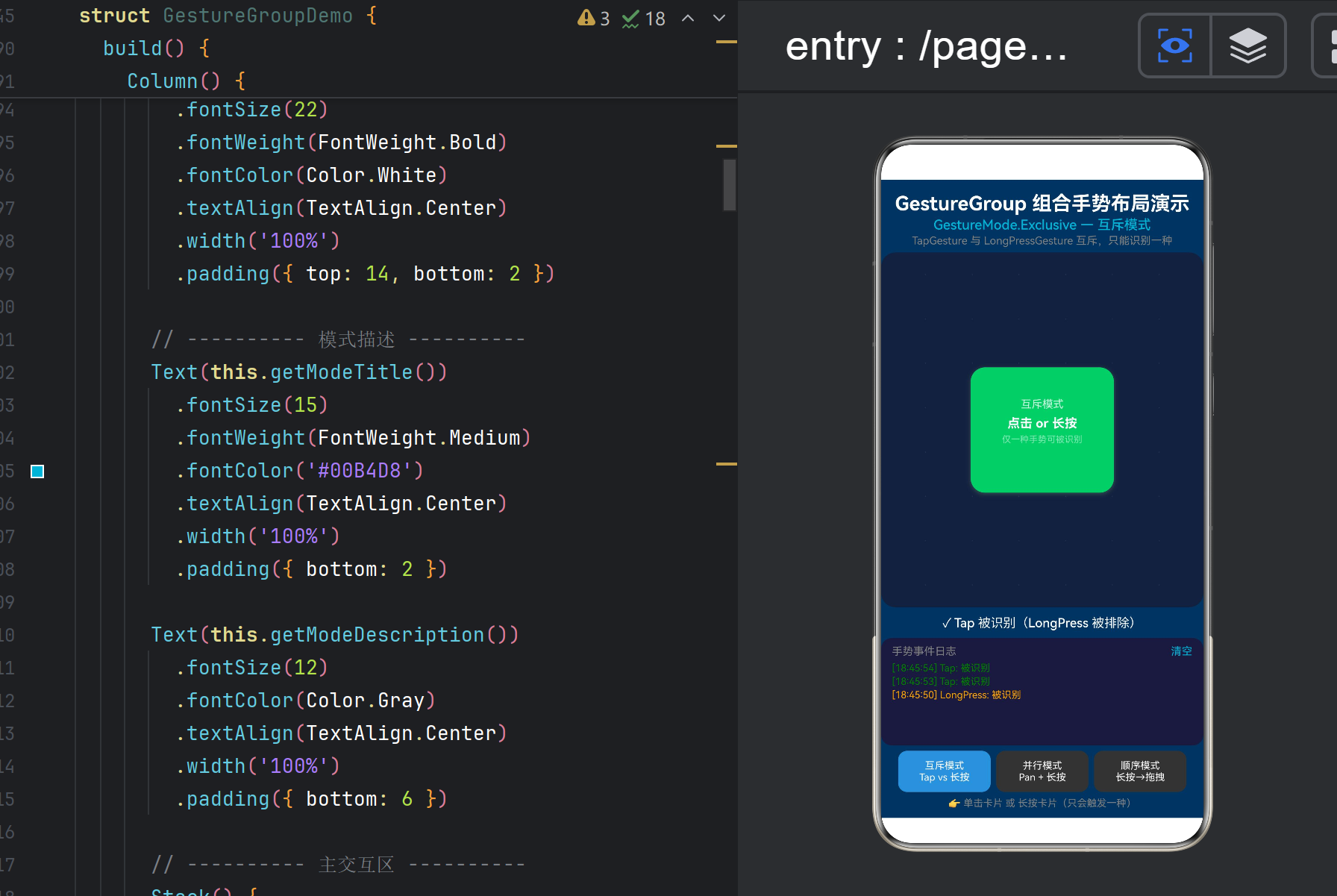
整个页面从上到下分为五个层次:
┌─────────────────────────────────────┐
│ GestureGroup 组合手势布局演示 │ ← 标题
│ GestureMode.Exclusive — 互斥模式 │ ← 模式描述
├─────────────────────────────────────┤
│ │
│ [ 交互卡片区域 ] │ ← Stack 舞台(layoutWeight=1)
│ │
├─────────────────────────────────────┤
│ ✓ Tap 被识别(LongPress 被排除) │ ← 最新结果
├─────────────────────────────────────┤
│ 手势事件日志 清空 │ ← 日志面板(6条)
│ [14:32:05] Tap: 被识别 │
│ [14:32:04] 系统: 切换到互斥模式 │
├─────────────────────────────────────┤
│ [互斥模式] [并行模式] [顺序模式] │ ← 模式切换
│ 👉 单击卡片 或 长按卡片 │ ← 操作提示
└─────────────────────────────────────┘
4.3 十个 @State 变量的分工
// — 模式控制 —
@State private currentMode: DemoMode; // 当前模式(切换三个 Builder)
// — 卡片视觉属性 —
@State private cardColor: Color = Color.Blue; // 颜色反馈
@State private cardX: number = 0; // 拖拽位置 X
@State private cardY: number = 0; // 拖拽位置 Y
@State private cardScale: number = 1.0; // 缩放反馈
@State private cardRotate: number = 0; // 旋转(预留)
// — 手势状态标志 —
@State private isDragging: boolean = false; // 是否正在拖拽
@State private isLongPressing: boolean = false; // 是否正在长按
// — 信息展示 —
@State private lastGestureResult: string; // 最新识别结果
@State private gestureLogs: GestureLogEntry[]; // 历史日志
@State private longPressProgress: number; // 长按进度条
设计原则:每个 @State 变量对应一个独立的 UI 维度。当 isLongPressing 变化时,只有卡片颜色和进度条会重绘,而不影响位置和其他属性。
4.4 模式切换的「三态互斥」实现
if (this.currentMode === DemoMode.EXCLUSIVE_TAP_LONGPRESS) {
this.buildExclusiveCard()
} else if (this.currentMode === DemoMode.PARALLEL_PAN_LONGPRESS) {
this.buildParallelCard()
} else {
this.buildSequenceCard()
}
三个 @Builder 方法分别返回不同的 UI 子树,每个子树上绑定了不同的 GestureGroup。当用户点击底部按钮切换模式时,switchMode() 重置所有状态并更新 currentMode,ArkUI 自动销毁旧的卡片、挂载新的卡片。
4.5 模式一:Exclusive 互斥模式(Tap vs LongPress)
.gesture(
GestureGroup(GestureMode.Exclusive,
TapGesture({ count: 1, fingers: 1 })
.onAction(() => {
this.cardColor = Color.Green;
this.lastGestureResult = ‘✓ Tap 被识别(LongPress 被排除)’;
this.addLog(‘Tap’, ‘被识别’);
}),
LongPressGesture({ fingers: 1, repeat: false, duration: 500 })
.onAction((event: GestureEvent) => {
this.cardColor = Color.Orange;
this.isLongPressing = true;
this.longPressProgress = 1.0;
this.lastGestureResult = ‘✓ LongPress 被识别(Tap 被排除)’;
this.addLog(‘LongPress’, ‘被识别’);
})
.onActionEnd(() => {
this.isLongPressing = false;
this.longPressProgress = 0;
this.cardColor = Color.Blue;
})
.onActionCancel(() => {
this.isLongPressing = false;
this.longPressProgress = 0;
})
)
)
执行时序分析:
用户操作 结果 说明
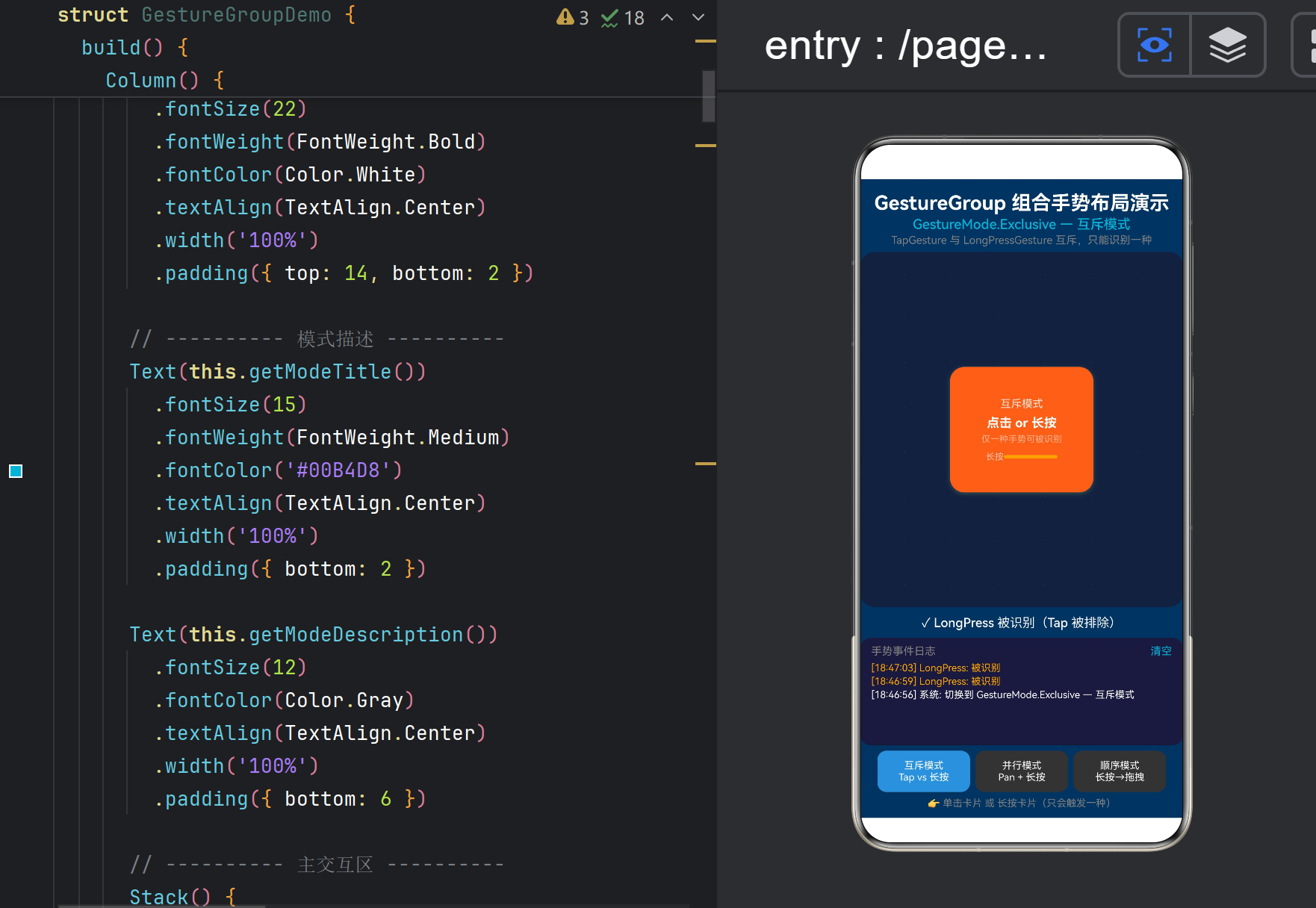
单击 500ms 内抬起 ✅ Tap 被识别 LongPress 被 Exclusive 排除
按住超过 500ms ✅ LongPress 被识别 Tap 被 Exclusive 排除
按住超过 500ms 后抬起 LongPress.onActionEnd 触发 卡片恢复蓝色
长按进度条:longPressProgress 原本设计为从 0 渐变到 1,但 ArkUI 的 LongPressGesture.onAction 只在识别成功时触发(而非持续回调),所以进度条目前只有 0→1 的跳变。要实现真正的平滑进度动画,需要结合 onTouch 事件或自定义计时器。
4.6 模式二:Parallel 并行模式(Pan + LongPress)
.gesture(
GestureGroup(GestureMode.Parallel,
PanGesture({ direction: PanDirection.All, distance: 5, fingers: 1 })
.onActionStart(() => {
this.isDragging = true;
this.cardScale = 1.05;
this.lastPanOffsetX = 0;
this.lastPanOffsetY = 0;
this.addLog(‘Pan’, ‘拖拽开始’);
})
.onActionUpdate((event: GestureEvent) => {
const deltaX: number = event.offsetX - this.lastPanOffsetX;
const deltaY: number = event.offsetY - this.lastPanOffsetY;
this.lastPanOffsetX = event.offsetX;
this.lastPanOffsetY = event.offsetY;
this.cardX += deltaX;
this.cardY += deltaY;
})
.onActionEnd(() => { /* 清理 */ }),
LongPressGesture({ fingers: 1, repeat: false, duration: 400 })
.onAction(() => {
this.isLongPressing = true;
this.lastGestureResult = ‘✓ LongPress + Pan 并行触发!’;
this.addLog(‘LongPress’, ‘被识别(与 Pan 并行)’);
})
.onActionEnd(() => { this.isLongPressing = false; })
)
)
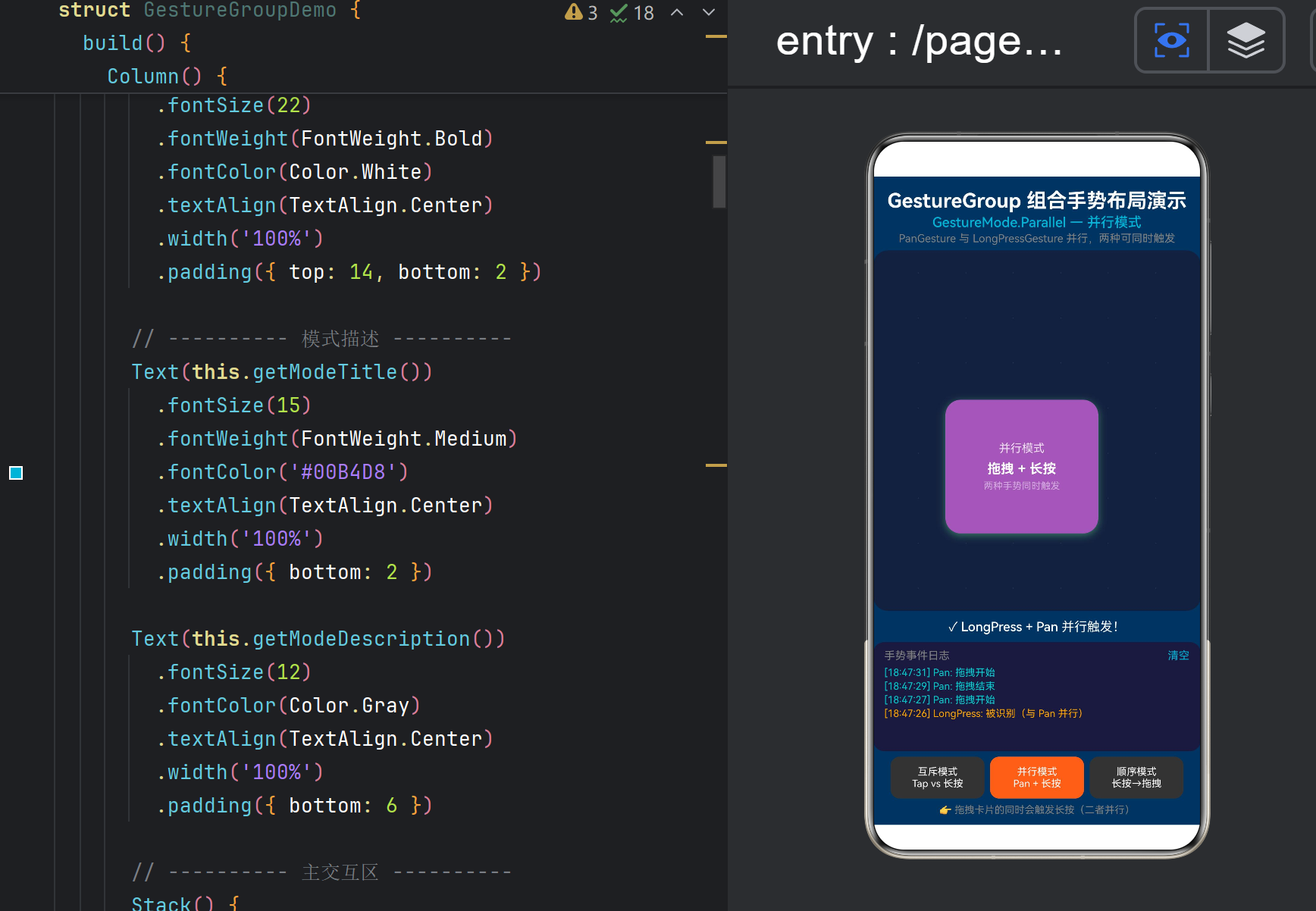
并行模式的关键特性:
PanGesture 和 LongPressGesture 各自独立运行
手指按下后 移动 → Pan 识别;按住不动 → LongPress 识别
可以同时触发:拖拽过程中长按计时器也在走,400ms 后两者同时活跃
视觉效果:
卡片颜色:紫色(#9B59B6)→ 拖拽不变色,长按变橙
卡片位置:跟随手指拖拽
事件日志:同时出现 [Pan] 拖拽开始 和 [LongPress] 被识别
4.7 模式三:Sequence 顺序模式(LongPress → Pan)
.gesture(
GestureGroup(GestureMode.Sequence,
LongPressGesture({ fingers: 1, repeat: false, duration: 500 })
.onAction(() => {
this.isLongPressing = true;
this.cardColor = Color.Green;
this.lastGestureResult = ‘① LongPress 识别成功,可以拖拽了!’;
this.addLog(‘LongPress’, ‘① 已识别(Sequence 第一步)’);
}),
PanGesture({ direction: PanDirection.All, distance: 5, fingers: 1 })
.onActionStart(() => {
if (this.isLongPressing) {
this.isDragging = true;
this.cardScale = 1.1;
this.addLog(‘Pan’, ‘② 开始拖拽(Sequence 第二步)’);
}
})
.onActionUpdate((event: GestureEvent) => {
if (this.isLongPressing && this.isDragging) {
const deltaX = event.offsetX - this.lastSeqOffsetX;
const deltaY = event.offsetY - this.lastSeqOffsetY;
this.lastSeqOffsetX = event.offsetX;
this.lastSeqOffsetY = event.offsetY;
this.cardX += deltaX;
this.cardY += deltaY;
}
})
)
)
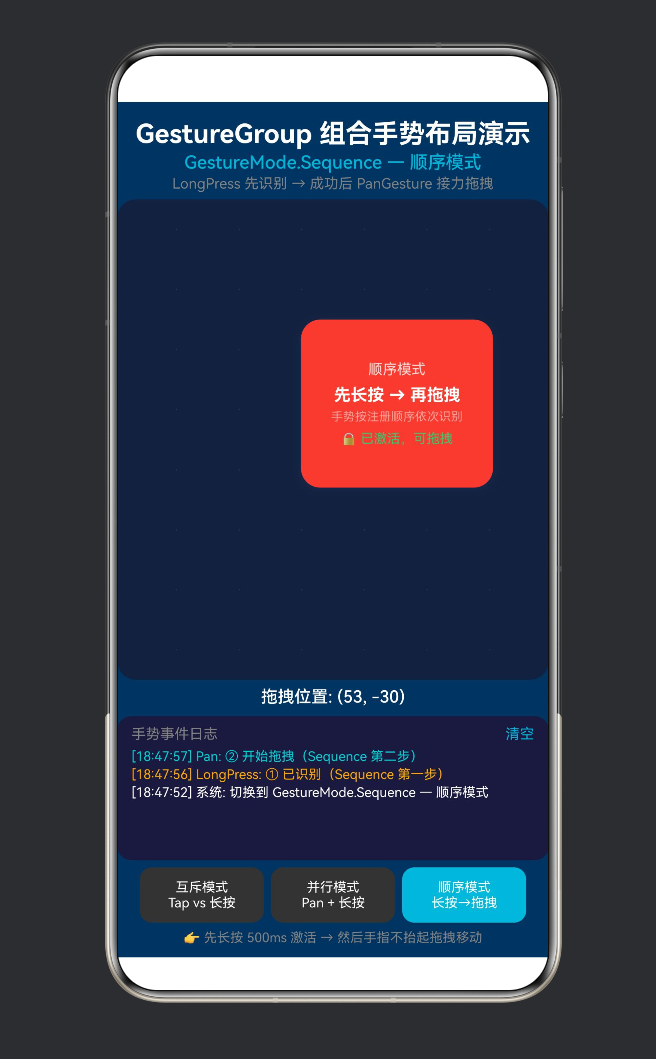
顺序模式的核心机制:
第一步:LongPressGesture 先开始识别。用户按住 500ms,直到 onAction 触发
第二步:一旦 LongPress 成功,PanGesture 才开始参与识别(之前被 Sequence 机制"冻结")
接力:用户手指不抬起,直接移动 → Pan 接手拖拽
这是三种模式中最"神奇"的一种——你会发现必须先长按等卡片变绿,然后才能拖拽。如果不长按就直接拖拽,卡片纹丝不动。
关键配置:
LongPressGesture.duration: 500 — 长按 500ms 才激活
PanGesture.distance: 5 — 激活后移动 5vp 即开始拖拽
isLongPressing 标志 — 确保 Pan 只在激活后工作
4.8 手势事件日志系统
interface GestureLogEntry {
name: string; // 手势名称: ‘Tap’ | ‘LongPress’ | ‘Pan’ | ‘系统’
event: string; // 事件描述
time: string; // 格式化时间戳 HH:MM:SS
}
@State private gestureLogs: GestureLogEntry[] = [];
private addLog(name: string, event: string): void {
const now = new Date();
const time = ${now.getHours().padStart(2,'0')}:...;
const entry: GestureLogEntry = { name, event, time };
this.gestureLogs = [entry, …this.gestureLogs].slice(0, 6);
}
日志面板使用 ForEach 渲染最近的 6 条记录,每种手势用不同颜色区分:
Tap → Color.Green
LongPress → Color.Orange
Pan → #00CED1(青色)
这让用户能直观看到三种模式下手势触发的先后顺序和并行情况。
五、进阶:组合手势的高级用法
5.1 单击 vs 双击共存(GestureGroup.Exclusive)
.gesture(
GestureGroup(GestureMode.Exclusive,
TapGesture({ count: 1 }).onAction(() => {
console.info(‘单击’);
}),
TapGesture({ count: 2 }).onAction(() => {
console.info(‘双击’);
})
)
)
Exclusive 模式中,双击时单击不会被触发——系统会等待 300ms 看是否有第二次点击。如果双击成功,单击被取消;如果超时,单击生效。
5.2 三态互斥:Tap + LongPress + DoubleTap
.gesture(
GestureGroup(GestureMode.Exclusive,
TapGesture({ count: 1 }).onAction(() => { /* 单击 / }),
TapGesture({ count: 2 }).onAction(() => { / 双击 / }),
LongPressGesture({ duration: 500 }).onAction(() => { / 长按 */ })
)
)
三种手势互斥,同一时间只能触发一种。
5.3 Nested GestureGroup(嵌套组合)
.gesture(
GestureGroup(GestureMode.Exclusive,
// 分支 A:单击和长按互斥
GestureGroup(GestureMode.Exclusive,
TapGesture().onAction(() => console.info(‘单击’)),
LongPressGesture().onAction(() => console.info(‘长按’))
),
// 分支 B:双击独立
TapGesture({ count: 2 }).onAction(() => console.info(‘双击’))
)
)
外层 Exclusive 确保"(单击/长按)"与"双击"互斥。内层 Exclusive 确保单击和长按互斥。
5.4 Sequence 中 Pan 的惯性处理
Sequence 模式中,Pan 在 LongPress 成功后接手。为了更好的手感,可以在 onActionEnd 中加入惯性滑动:
PanGesture({ direction: PanDirection.All })
.onActionEnd((event: GestureEvent) => {
// 根据松手速度添加惯性动画
this.getUIContext()?.animateTo({
duration: 300,
curve: curves.decelerate()
}, () => {
this.cardX += event.velocityX * 0.1;
this.cardY += event.velocityY * 0.1;
});
})
5.5 Parallel 中的手势互相调节
在 Parallel 模式下,你可以实现"拖拽时禁用长按的视觉反馈":
LongPressGesture({ duration: 400 })
.onAction(() => {
if (!this.isDragging) { // 拖拽中不触发长按反馈
this.showContextMenu();
}
})
5.6 Sequence + 进度反馈
Sequence 模式的长按阶段可以用计时器制作进度动画:
// 在组件中添加
private longPressTimer: number = 0;
private longPressStartTime: number = 0;
// LongPressGesture 虽然没有 onProgress 回调
// 但可以用 onTouch 事件补充
.onTouch((event: TouchEvent) => {
if (event.type === TouchType.Down) {
this.longPressStartTime = Date.now();
// 启动计时器
this.longPressTimer = setInterval(() => {
const elapsed = Date.now() - this.longPressStartTime;
this.longPressProgress = Math.min(elapsed / 500, 1);
}, 16); // 60fps
} else if (event.type === TouchType.Up) {
clearInterval(this.longPressTimer);
this.longPressProgress = 0;
}
})
六、常见问题与坑点
6.1 Sequence 模式下 Pan 不触发
现象:长按成功(卡片变绿)后,继续移动手指但卡片不跟随。
原因排查:
isDragging 标志未正确设置
PanGesture 的 distance 阈值太高
手指移动太快,Pan 手势还没开始就结束了
解决方案:
PanGesture({
direction: PanDirection.All,
distance: 3, // 降低触发阈值
fingers: 1
})
6.2 Exclusive 模式下两种手势都触发了
现象:单击时既触发了 Tap 又触发了 LongPress。
原因:Exclusive 模式要求子手势在同一线程中竞争,但如果子手势的识别条件不互斥(如 Tap 和 Pan),Exclusive 不会如预期工作。
Exclusive 的互斥规则:
手势组合 Exclusive 是否有效
Tap vs LongPress ✅ 有效(条件互斥)
Tap vs DoubleTap ✅ 有效(等待期互斥)
Pan vs LongPress ⚠️ 需要配合判断
Pan vs Swipe ❌ 不互斥(两者都移动)
6.3 Parallel 模式下的状态竞争
现象:拖拽和长按同时修改同一个 @State 变量,导致 UI 闪烁。
解决方案:
// 给每个手势清晰的状态域
// PanGesture 只修改:cardX, cardY, isDragging
// LongPressGesture 只修改:isLongPressing
// 避免两者修改同一个变量
6.4 Sequence 中手势「粘滞」
现象:第二次尝试 Sequence 时,不需要长按就能直接拖拽。
原因:isLongPressing 状态未正确重置。Sequence 模式下,当第一个手势完成后,状态标志需要手动清理。
修复:
.onActionEnd(() => {
this.isLongPressing = false;
this.isDragging = false;
this.cardColor = Color.Blue;
this.cardScale = 1.0;
this.lastSeqOffsetX = 0;
this.lastSeqOffsetY = 0;
})
6.5 GestureGroup 与 Scroll/List 的冲突
如果在 Scroll 或 List 内部使用 GestureGroup,PanGesture 会与滚动冲突。
解决方案:
// 方式一:限制方向
PanGesture({ direction: PanDirection.Horizontal })
// 方式二:增大触发距离
PanGesture({ distance: 20 })
// 方式三:使用嵌套滚动配置
Scroll() { /* … */ }
.nestedScroll({
scrollForward: NestedScrollMode.PARENT_FIRST,
scrollBackward: NestedScrollMode.SELF_FIRST
})
七、从 Demo 到生产:最佳实践清单
7.1 手势组合策略选择
交互需求 推荐的 GestureMode 手势组合
按钮点击 单独 TapGesture 无需组合
图片查看器 Exclusive Tap(单击预览) vs DoubleTap(缩放)
列表项操作 Exclusive Tap(进入) vs LongPress(菜单) vs Swipe(删除)
地图平移 Parallel Pan(拖拽) + Pinch(缩放) + Rotation(旋转)
长按激活拖拽 Sequence LongPress(激活) → Pan(拖拽)
悬浮球操作 Exclusive + Parallel 嵌套 Exclusive(Tap vs LongPress) + Parallel(Pan)
7.2 状态管理规范
每个手势只修改自己"拥有"的状态变量
├── TapGesture → cardColor, lastGestureResult
├── LongPressGesture → isLongPressing, cardColor, longPressProgress
├── PanGesture → cardX, cardY, isDragging, cardScale
└── 初始化/重置 → switchMode() 统一清理
7.3 调试技巧
// 在每个手势回调中添加日志
.onActionStart(() => this.addLog(‘Pan’, ‘开始’))
.onActionUpdate((event) => this.addLog(‘Pan’, 偏移: ${event.offsetX.toFixed(0)}))
.onActionEnd(() => this.addLog(‘Pan’, ‘结束’))
.onActionCancel(() => this.addLog(‘Pan’, ‘取消’))
日志面板可以清晰看到手势的完整生命周期。
7.4 性能注意事项
避免在 onActionUpdate 中创建新对象(new 操作)
避免在 onActionUpdate 中触发 animateTo
使用非 @State 变量存储手势计算中间值(如 lastOffsetX/Y)
ForEach 渲染日志时控制列表长度(我们使用 .slice(0, 6))
八、与其他平台组合手势的对比
特性 ArkUI (GestureGroup) SwiftUI (simultaneous/ sequenced/ exclusively) Jetpack Compose (手势组合)
互斥模式 ✅ GestureMode.Exclusive ✅ .exclusively(before: After) ✅ forEachGesture 手动实现
并行模式 ✅ GestureMode.Parallel ✅ .simultaneously(with:) ✅ pointerInput + detectMultipleGestures
顺序模式 ✅ GestureMode.Sequence ✅ .sequenced(before: After) ❌ 需手动状态机
嵌套组合 ✅ GestureGroup 可嵌套 ✅ 链式调用 ✅ forEachGesture 可嵌套
取消回调 ✅ onCancel() ❌ 需自定义 ❌ 需自定义
ArkUI 的优势:三种模式通过单一的 GestureGroup + GestureMode 枚举清晰表达,API 设计简洁统一。
ArkUI 的不足:Sequence 模式不如 SwiftUI 的 sequenced(before:after:) 灵活(SwiftUI 可以指定两个手势的先后顺序和参数传递)。
九、结语
9.1 从单手势到多手势的认知跃迁
回顾这个系列的三篇文章,我们走过了这样一条路径:
单一手势 →
TapGesture(点击) ← 第一篇文章
PanGesture(拖拽) ← 第二篇文章
↓
手势组合 →
GestureGroup ← 本文
├── Exclusive(互斥)
├── Parallel(并行)
└── Sequence(顺序)
↓
复杂交互 →
实际应用中的多手势嵌套、冲突管理、状态协调
核心洞察:单独的手势只是一个"传感器",而 GestureGroup 则是一个"仲裁者"——它决定了当多个传感器同时响应时,谁的声音应该被听到。
9.2 三种模式的记忆口诀
Exclusive(互斥):先到先得,你死我活
Parallel(并行):各自为政,互不干扰
Sequence(顺序):排队入场,依次接力
9.3 下一步探索
GestureGroup 与 priorityGesture() / parallelGesture() 的协同策略
自定义手势识别器(GestureRecognizer 子类化)
手势与动画的深度融合(springMotion + 拖拽排序)
手势状态机(从手势状态到 UI 状态的完整映射)
附录 A:完整 Demo 代码
/*
- GestureGroupDemo.ets —— 鸿蒙原生 ArkTS 布局方式之 GestureGroup 组合手势布局
- ===== 核心技术 =====
-
- GestureGroup —— 组合多个手势,管理它们之间的协作与竞争关系
-
- GestureMode.Exclusive —— 互斥模式:同一时刻只有一个手势可被识别
-
- GestureMode.Parallel —— 并行模式:多个手势可同时被识别
-
- GestureMode.Sequence —— 顺序模式:手势按注册顺序依次识别
- ===== 布局要点 =====
-
- GestureGroup 本身也是一种 GestureType,可作为参数传给 .gesture()
-
- 组合手势解决了"单击 vs 双击"“单击 vs 长按”"拖拽 vs 滑动"等经典冲突
-
- 使用一个卡片配合四种不同的手势组合区域,直观展示三种模式的差异
-
- 配合状态面板实时显示 hand 手势识别结果
*/
- 配合状态面板实时显示 hand 手势识别结果
import { curves } from ‘@kit.ArkUI’;
interface GestureLogEntry {
name: string;
event: string;
time: string;
}
enum DemoMode {
EXCLUSIVE_TAP_LONGPRESS,
PARALLEL_PAN_LONGPRESS,
SEQUENCE_LONGPRESS_PAN
}
@Entry
@Component
struct GestureGroupDemo {
@State private currentMode: DemoMode = DemoMode.EXCLUSIVE_TAP_LONGPRESS;
@State private cardColor: Color = Color.Blue;
@State private cardX: number = 0;
@State private cardY: number = 0;
@State private cardScale: number = 1.0;
@State private cardRotate: number = 0;
@State private isDragging: boolean = false;
@State private isLongPressing: boolean = false;
@State private lastGestureResult: string = ‘等待手势操作…’;
@State private gestureLogs: GestureLogEntry[] = [];
@State private longPressProgress: number = 0;
private logCounter: number = 0;
private lastPanOffsetX: number = 0;
private lastPanOffsetY: number = 0;
private lastSeqOffsetX: number = 0;
private lastSeqOffsetY: number = 0;
build() {
Column() {
// 标题
Text(‘GestureGroup 组合手势布局演示’)
.fontSize(22).fontWeight(FontWeight.Bold)
.fontColor(Color.White).textAlign(TextAlign.Center)
.width(‘100%’).padding({ top: 14, bottom: 2 })
  // 模式描述
  Text(this.getModeTitle()).fontSize(15).fontWeight(FontWeight.Medium)
    .fontColor('#00B4D8').textAlign(TextAlign.Center)
    .width('100%').padding({ bottom: 2 })
  Text(this.getModeDescription()).fontSize(12).fontColor(Color.Gray)
    .textAlign(TextAlign.Center).width('100%').padding({ bottom: 6 })

  // 交互舞台
  Stack() {
    Column() {
      ForEach(Array.from({ length: 8 }), () => {
        Row() {
          ForEach(Array.from({ length: 6 }), () => {
            Text('·').fontSize(10).fontColor(Color.Gray).opacity(0.2)
          }, () => '')
        }.width('100%').layoutWeight(1).justifyContent(FlexAlign.SpaceEvenly)
      }, () => '')
    }.width('100%').height('100%')

    // 三选一:根据模式切换不同手势组合
    if (this.currentMode === DemoMode.EXCLUSIVE_TAP_LONGPRESS) {
      this.buildExclusiveCard()
    } else if (this.currentMode === DemoMode.PARALLEL_PAN_LONGPRESS) {
      this.buildParallelCard()
    } else {
      this.buildSequenceCard()
    }
  }
  .width('100%').layoutWeight(1).backgroundColor('#16213e')
  .borderRadius(16).margin({ left: 16, right: 16 }).clip(true)

  // 最新结果
  Text(this.lastGestureResult).fontSize(14).fontColor(Color.White)
    .fontWeight(FontWeight.Medium).textAlign(TextAlign.Center)
    .width('100%').padding({ top: 6, bottom: 4 })
    .animation({ duration: 200 })

  // 日志面板
  Column() {
    Row() {
      Text('手势事件日志').fontSize(12).fontColor(Color.Gray)
      Text('清空').fontSize(12).fontColor('#00B4D8')
        .onClick(() => { this.gestureLogs = []; })
    }.width('100%').justifyContent(FlexAlign.SpaceBetween)
     .padding({ left: 12, right: 12, bottom: 4 })

    Column() {
      ForEach(this.gestureLogs, (log: GestureLogEntry) => {
        Text(`[${log.time}] ${log.name}: ${log.event}`).fontSize(11)
          .fontColor(log.name === 'Tap' ? Color.Green :
                     log.name === 'LongPress' ? Color.Orange :
                     log.name === 'Pan' ? '#00CED1' : Color.White)
          .width('100%').padding({ top: 1, bottom: 1 })
      }, (log: GestureLogEntry) => log.time + log.name)
    }.width('100%').padding({ left: 12, right: 12 })
  }
  .width('100%').height(120).backgroundColor('#1a1a3e')
  .borderRadius(12).padding({ top: 8, bottom: 8 })
  .margin({ left: 16, right: 16, top: 4 })

  // 模式切换
  Row() {
    this.modeButton('互斥\nTap vs 长按', DemoMode.EXCLUSIVE_TAP_LONGPRESS, '#4A90D9')
    this.modeButton('并行\nPan + 长按', DemoMode.PARALLEL_PAN_LONGPRESS, '#FF6B35')
    this.modeButton('顺序\n长按→拖拽', DemoMode.SEQUENCE_LONGPRESS_PAN, '#00B4D8')
  }.width('100%').padding({ left: 16, right: 16, top: 6, bottom: 6 })

  Text(this.getModeHint()).fontSize(11).fontColor(Color.Gray)
    .textAlign(TextAlign.Center).width('100%').padding({ bottom: 10 })
}
.width('100%').height('100%').backgroundColor('#0f3460')
}
// — Exclusive 模式:Tap vs LongPress —
@Builder
buildExclusiveCard() {
Column() {
Text(‘互斥模式’).fontSize(12).fontColor(Color.White).opacity(0.8)
Text(‘点击 or 长按’).fontSize(14).fontColor(Color.White)
.fontWeight(FontWeight.Bold).margin({ top: 6 })
Text(‘仅一种手势可被识别’).fontSize(10).fontColor(Color.White)
.opacity(0.5).margin({ top: 4 })
Row() {
Text(‘长按’).fontSize(10).fontColor(Color.White).opacity(0.6)
Row(){}.width(60 * this.longPressProgress).height(4)
.backgroundColor(Color.Orange).borderRadius(2)
}.width(‘100%’).justifyContent(FlexAlign.Center).margin({ top: 8 })
.opacity(this.isLongPressing ? 1.0 : 0.0)
}
.width(160).height(140)
.backgroundColor(this.isLongPressing ? ‘#FF6B35’ :
this.cardColor === Color.Green ? ‘#2ECC71’ : ‘#4A90D9’)
.borderRadius(16).justifyContent(FlexAlign.Center)
.alignItems(HorizontalAlign.Center)
.shadow({ radius: 12, color: ‘#4A90D980’, offsetY: 4 })
.gesture(
GestureGroup(GestureMode.Exclusive,
TapGesture({ count: 1, fingers: 1 }).onAction(() => {
this.cardColor = Color.Green;
this.lastGestureResult = ‘✓ Tap 被识别(LongPress 被排除)’;
this.addLog(‘Tap’, ‘被识别’);
}),
LongPressGesture({ fingers: 1, repeat: false, duration: 500 })
.onAction(() => {
this.cardColor = Color.Orange;
this.isLongPressing = true;
this.longPressProgress = 1.0;
this.lastGestureResult = ‘✓ LongPress 被识别(Tap 被排除)’;
this.addLog(‘LongPress’, ‘被识别’);
})
.onActionEnd(() => {
this.isLongPressing = false;
this.longPressProgress = 0;
this.cardColor = Color.Blue;
})
.onActionCancel(() => {
this.isLongPressing = false;
this.longPressProgress = 0;
})
)
)
}
// — Parallel 模式:Pan + LongPress —
@Builder
buildParallelCard() {
Column() {
Text(‘并行模式’).fontSize(12).fontColor(Color.White).opacity(0.8)
Text(‘拖拽 + 长按’).fontSize(14).fontColor(Color.White)
.fontWeight(FontWeight.Bold).margin({ top: 6 })
Text(‘两种手势同时触发’).fontSize(10).fontColor(Color.White)
.opacity(0.5).margin({ top: 4 })
}
.width(160).height(140)
.backgroundColor(this.isLongPressing ? ‘#FF6B35’ : ‘#9B59B6’)
.borderRadius(16).justifyContent(FlexAlign.Center)
.alignItems(HorizontalAlign.Center)
.offset({ x: this.cardX, y: this.cardY })
.scale({ x: this.cardScale, y: this.cardScale })
.shadow({ radius: this.isDragging ? 20 : 12, offsetY: this.isDragging ? 6 : 4 })
.gesture(
GestureGroup(GestureMode.Parallel,
PanGesture({ direction: PanDirection.All, distance: 5, fingers: 1 })
.onActionStart(() => {
this.isDragging = true;
this.cardScale = 1.05;
this.lastPanOffsetX = 0;
this.lastPanOffsetY = 0;
this.addLog(‘Pan’, ‘拖拽开始’);
})
.onActionUpdate((event: GestureEvent) => {
const deltaX = event.offsetX - this.lastPanOffsetX;
const deltaY = event.offsetY - this.lastPanOffsetY;
this.lastPanOffsetX = event.offsetX;
this.lastPanOffsetY = event.offsetY;
this.cardX += deltaX;
this.cardY += deltaY;
})
.onActionEnd(() => {
this.isDragging = false;
this.cardScale = 1.0;
this.addLog(‘Pan’, ‘拖拽结束’);
})
.onActionCancel(() => {
this.isDragging = false;
this.cardScale = 1.0;
}),
LongPressGesture({ fingers: 1, repeat: false, duration: 400 })
.onAction(() => {
this.isLongPressing = true;
this.lastGestureResult = ‘✓ LongPress + Pan 并行触发!’;
this.addLog(‘LongPress’, ‘被识别’);
})
.onActionEnd(() => { this.isLongPressing = false; })
.onActionCancel(() => { this.isLongPressing = false; })
)
)
}
// — Sequence 模式:LongPress → Pan —
@Builder
buildSequenceCard() {
Column() {
Text(‘顺序模式’).fontSize(12).fontColor(Color.White).opacity(0.8)
Text(‘先长按 → 再拖拽’).fontSize(14).fontColor(Color.White)
.fontWeight(FontWeight.Bold).margin({ top: 6 })
Text(‘手势按注册顺序依次识别’).fontSize(10).fontColor(Color.White)
.opacity(0.5).margin({ top: 4 })
Text(this.isLongPressing ? ‘🔒 已激活,可拖拽’ : ‘🔴 请先长按’)
.fontSize(11).fontColor(this.isLongPressing ? ‘#2ECC71’ : Color.Gray)
.margin({ top: 6 })
}
.width(160).height(140)
.backgroundColor(this.isLongPressing ? ‘#E74C3C’ : ‘#2C3E50’)
.borderRadius(16).justifyContent(FlexAlign.Center)
.alignItems(HorizontalAlign.Center)
.offset({ x: this.cardX, y: this.cardY })
.shadow({ radius: this.isDragging ? 20 : 12, offsetY: 4 })
.gesture(
GestureGroup(GestureMode.Sequence,
LongPressGesture({ fingers: 1, repeat: false, duration: 500 })
.onAction(() => {
this.isLongPressing = true;
this.cardColor = Color.Green;
this.lastGestureResult = ‘① LongPress 识别成功,可以拖拽了!’;
this.addLog(‘LongPress’, ‘① 已识别’);
})
.onActionEnd(() => {
if (!this.isDragging) {
this.isLongPressing = false;
this.cardColor = Color.Blue;
}
}),
PanGesture({ direction: PanDirection.All, distance: 5, fingers: 1 })
.onActionStart(() => {
if (this.isLongPressing) {
this.isDragging = true;
this.cardScale = 1.1;
this.lastSeqOffsetX = 0;
this.lastSeqOffsetY = 0;
this.addLog(‘Pan’, ‘② 开始拖拽’);
}
})
.onActionUpdate((event: GestureEvent) => {
if (this.isLongPressing && this.isDragging) {
const deltaX = event.offsetX - this.lastSeqOffsetX;
const deltaY = event.offsetY - this.lastSeqOffsetY;
this.lastSeqOffsetX = event.offsetX;
this.lastSeqOffsetY = event.offsetY;
this.cardX += deltaX;
this.cardY += deltaY;
this.lastGestureResult = 拖拽: (${this.cardX.toFixed(0)}, ${this.cardY.toFixed(0)});
}
})
.onActionEnd(() => {
if (this.isDragging) this.addLog(‘Pan’, ‘② 拖拽结束’);
this.isDragging = false;
this.isLongPressing = false;
this.cardScale = 1.0;
this.cardColor = Color.Blue;
})
)
)
}
// — 辅助方法 —
private addLog(name: string, event: string): void {
const now = new Date();
const time = ${now.getHours().toString().padStart(2,'0')}:${ now.getMinutes().toString().padStart(2,'0')}:${ now.getSeconds().toString().padStart(2,'0')};
this.gestureLogs = [{ name, event, time }, …this.gestureLogs].slice(0, 6);
}
@Builder
modeButton(label: string, mode: DemoMode, color: string) {
Button() {
Text(label).fontSize(11).textAlign(TextAlign.Center)
}.height(46)
.backgroundColor(this.currentMode === mode ? color : ‘#333’)
.fontColor(Color.White).borderRadius(10).layoutWeight(1)
.margin({ left: 3, right: 3 })
.gesture(TapGesture().onAction(() => this.switchMode(mode)))
}
private switchMode(mode: DemoMode): void {
this.currentMode = mode;
this.cardX = 0; this.cardY = 0; this.cardScale = 1.0;
this.cardRotate = 0; this.cardColor = Color.Blue;
this.isDragging = false; this.isLongPressing = false;
this.longPressProgress = 0;
this.lastGestureResult = 已切换到「${this.getModeTitle()}」;
this.gestureLogs = [];
this.addLog(‘系统’, 切换到 ${this.getModeTitle()});
}
private getModeTitle(): string {
const titles = [‘GestureMode.Exclusive — 互斥模式’,
‘GestureMode.Parallel — 并行模式’,
‘GestureMode.Sequence — 顺序模式’];
return titles[this.currentMode];
}
private getModeDescription(): string {
const descs = [‘TapGesture 与 LongPressGesture 互斥,只能识别一种’,
‘PanGesture 与 LongPressGesture 并行,两种可同时触发’,
‘LongPress 先识别 → 成功后 PanGesture 接力拖拽’];
return descs[this.currentMode];
}
private getModeHint(): string {
const hints = [‘👉 单击卡片 或 长按卡片(只会触发一种)’,
‘👉 拖拽卡片的同时会触发长按(二者并行)’,
‘👉 先长按 500ms 激活 → 然后手指不抬起拖拽移动’];
return hints[this.currentMode];
}
}
附录 B:参考资料
HarmonyOS NEXT 开发者文档 — 手势组合(GestureGroup)
HarmonyOS NEXT 开发者文档 — GestureGroup API 参考
ArkUI 手势事件 SDK 声明文件 — gesture.d.ts
HarmonyOS NEXT 开发者文档 — 手势与触摸事件最佳实践
版权声明:本文为 HarmonyOS NEXT 技术分享系列的第三篇,遵循 CC BY-NC 4.0 协议。欢迎转载,但请注明出处。
系列文章:
第一篇:TapGesture 点击手势布局
第二篇:PanGesture 拖拽手势布局
第三篇:GestureGroup 组合手势布局(本文)

作为“人工智能6S店”的官方数字引擎,为AI开发者与企业提供一个覆盖软硬件全栈、一站式门户。
更多推荐
 4
4 0
0- 0


 已为社区贡献29条内容

所有评论(0)