
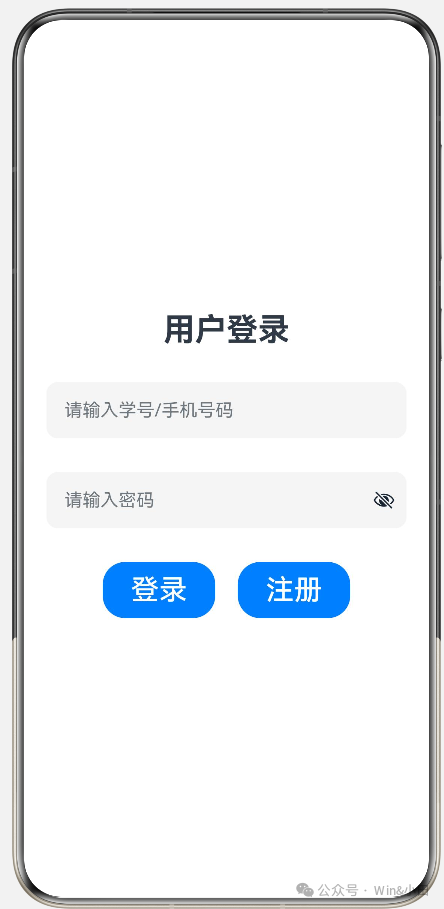
1.用户登录页面
·
1.用户登录页面
@Entry
@Component
struct TextInputDemo {
build() {
Column({ space: 30 }) {
Text('用户登录')
.fontSize(28)
.fontWeight(FontWeight.Bold)

TextInput({ placeholder: "请输入学号/手机号码" })
.width(320)
.height(50)
.backgroundColor(0xf5f5f5)
.fontSize(20)
.borderRadius(10)

TextInput({ placeholder: "请输入密码" })
.type(InputType.Password)
.width(320)
.height(50)
.backgroundColor(0xf5f5f5)
.fontSize(20)
.borderRadius(10)

Row({ space: 20 }) {
Button('登录')
.height(50)
.width(100)
.fontSize(25)

Button('注册')
.height(50)
.width(100)
.fontSize(25)
}
    }
.width('100%')
.height('100%')
.justifyContent(FlexAlign.Center)
.alignItems(HorizontalAlign.Center)
}
}
效果图:
二、信息操作界面
@Entry
@Component
struct ButtonDemo1{
build() {
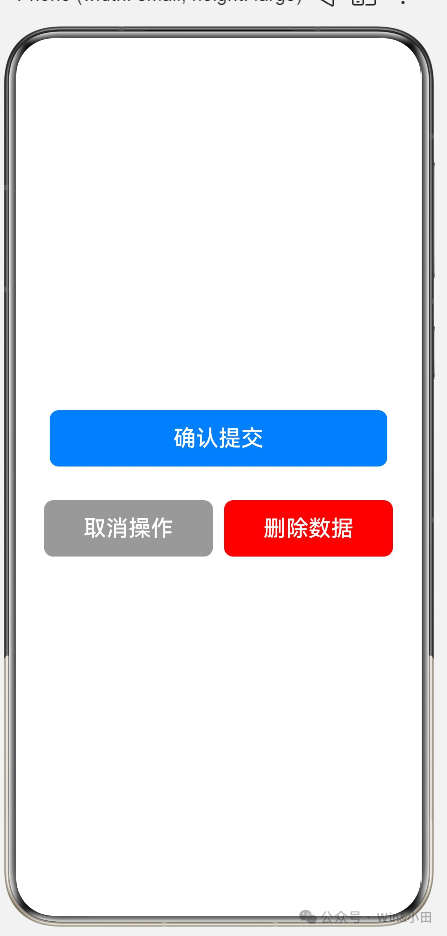
Column({space:30}){
//常见的,用于登录、提交的按钮
Button("确认提交")
.width(300)
.height(50)
.backgroundColor(0x007DFF)
.fontSize(20)
.borderRadius(8)
//灰色按钮,用于取消/返回使用
Row({space:10}){
Button("取消操作")
.width(150)
.height(50)
.backgroundColor(0x999999)
.fontSize(20)
.borderRadius(8)

Button("删除数据")
.width(150)
.height(50)
.backgroundColor(Color.Red)
.fontSize(20)
.borderRadius(8)
}
    }
.height('100%')
.width('100%')
.justifyContent(FlexAlign.Center)
}
}
三、个人信息
@Entry
@Component
struct TextInputDemo {
build() {
Column({ space: 30 }) {
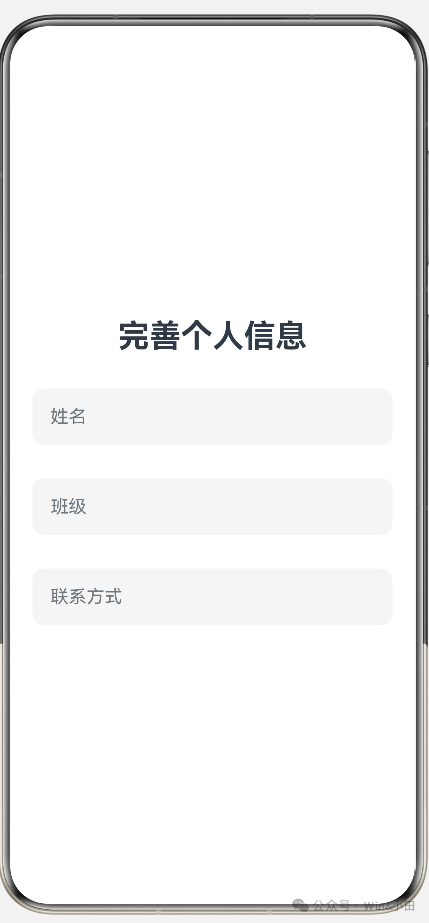
Text('完善个人信息')
.fontSize(28)
.fontWeight(FontWeight.Bold)

TextInput({ placeholder: "姓名" })
.width(320)
.height(50)
.backgroundColor(0xf5f5f5)
.fontSize(20)
.borderRadius(10)

TextInput({ placeholder: "班级" })
.width(320)
.height(50)
.backgroundColor(0xf5f5f5)
.fontSize(20)
.borderRadius(10)

TextInput({ placeholder: "联系方式" })
.width(320)
.height(50)
.backgroundColor(0xf5f5f5)
.fontSize(20)
.borderRadius(10)
/*
      Row({ space: 20 }) {
        Button('确定')
          .height(50)
          .width(100)
          .fontSize(25)

        Button('注册')
          .height(50)
          .width(100)
          .fontSize(25)

      }
      */
}
.width('100%')
.height('100%')
.justifyContent(FlexAlign.Center)
.alignItems(HorizontalAlign.Center)
}
}
四、注册界面
@Entry
@Component
struct TextInputDemo {
build() {
Column({ space: 30 }) {
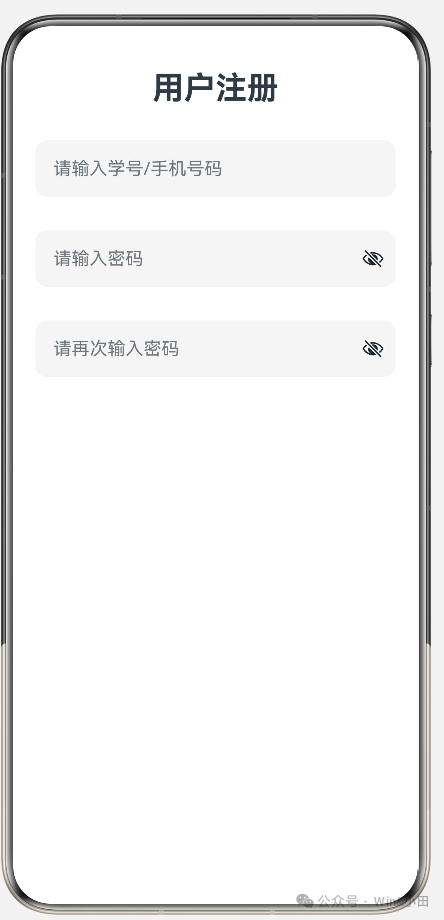
Text('用户注册')
.fontSize(28)
.fontWeight(FontWeight.Bold)

TextInput({ placeholder: "请输入学号/手机号码" })
.width(320)
.height(50)
.backgroundColor(0xf5f5f5)
.fontSize(20)
.borderRadius(10)

TextInput({ placeholder: "请输入密码" })
.type(InputType.Password)
.width(320)
.height(50)
.backgroundColor(0xf5f5f5)
.fontSize(20)
.borderRadius(10)

TextInput({ placeholder: "请再次输入密码" })
.type(InputType.Password)
.width(320)
.height(50)
.backgroundColor(0xf5f5f5)
.fontSize(20)
.borderRadius(10)

}
.width('100%')
.height('100%')
.justifyContent(FlexAlign.Start)
.alignItems(HorizontalAlign.Center)
}
  }
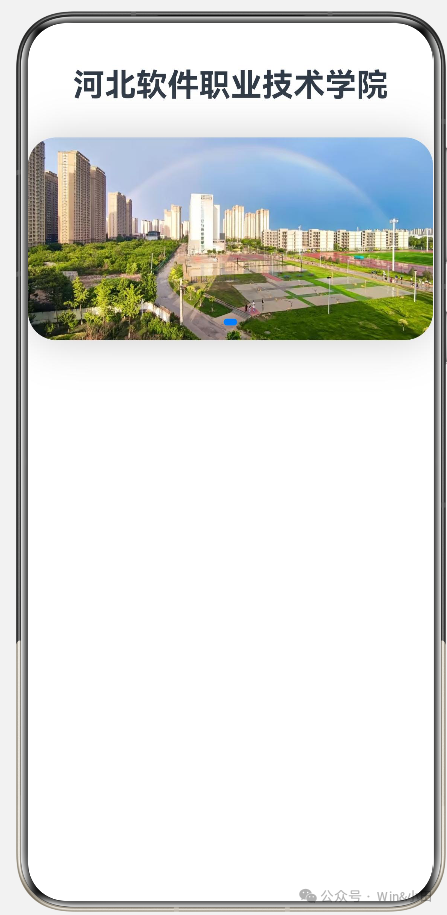
五:轮播展示
import { radio } from '@kit.TelephonyKit'

@Entry
@Component
struct TextInputDemo {
build() {
Column({ space: 30 }) {
Text('河北软件职业技术学院')
.fontSize(28)
.fontWeight(FontWeight.Bold)

// 本地图片轮播 1.jpg ~ 5.jpg
Swiper() {
Image($r("app.media.1")).width('100%').height('200%').objectFit(ImageFit.Cover)
Image($r("app.media.2")).width('100%').height('200%').objectFit(ImageFit.Cover)
Image($r("app.media.3")).width('100%').height('200%').objectFit(ImageFit.Cover)
Image($r("app.media.4")).width('100%').height('200%').objectFit(ImageFit.Cover)
Image($r("app.media.5")).width('100%').height('200%').objectFit(ImageFit.Cover)
}
.width('100%')
.height(180)
.autoPlay(true)
.loop(true)
.interval(3000)
.borderRadius(25)
.shadow({radius:100,color:0xcccccc,offsetX:2,offsetY:2})
}
.width('100%')
.height('100%')
.justifyContent(FlexAlign.Start)
.alignItems(HorizontalAlign.Center)
}
}
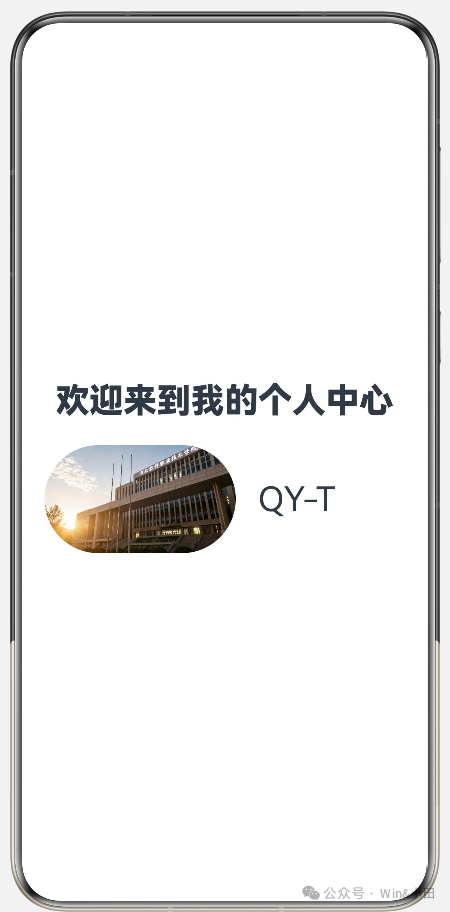
六、个人中心界面
@Entry
@Component
struct UserCardDemo{
build() {
Column({space:20}){
Text("欢迎来到我的个人中心")
.fontSize(30)
.fontWeight(FontWeight.Bolder)

Row({space:20}){
Image($r('app.media.1'))
.width('50%')
.borderRadius(100)

Text('QY-T')
.width('30%')
.fontSize(30)
}
.height(100)
.width('100%')
.padding({left:20})

}
.width('100%')
.height('100%')
.justifyContent(FlexAlign.Center)
.alignItems(HorizontalAlign.Center)
}
}
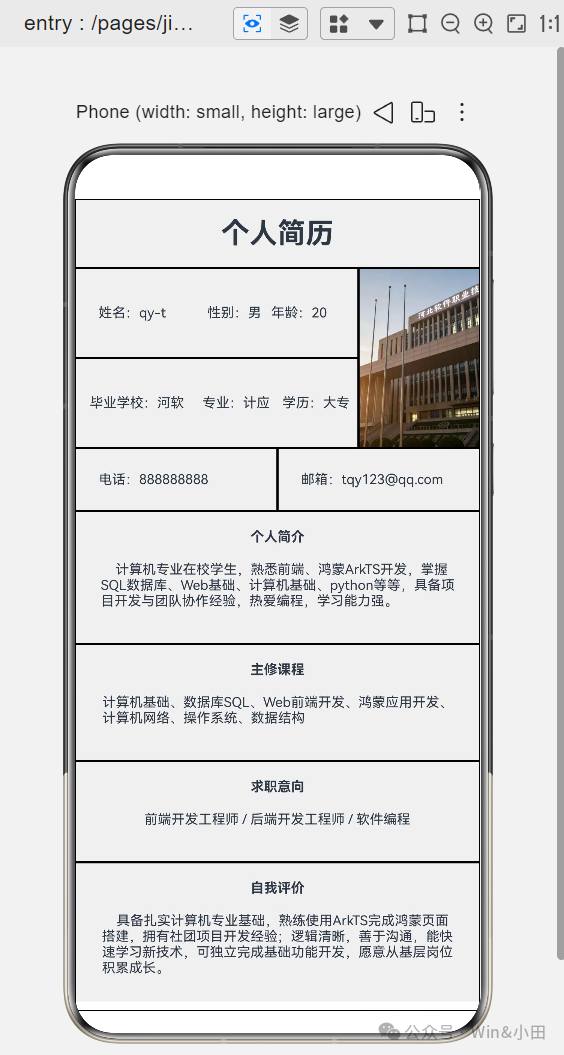
八、个人简历
@Entry
@Component
struct ResumePage {
build() {
Column() {
Text("个人简历")
.width("100%")
.fontSize(25)
.fontWeight(FontWeight.Bold)
.textAlign(TextAlign.Center)
.padding(15)
.border({ width: 1, color: Color.Black })

Row() {
Column() {
Row() {
Text("姓名:QY-T")
.fontSize(12)
.width("46%")
Text("性别:男")
.fontSize(12)
.width("27%")
Text("年龄:20")
.fontSize(12)
.width("27%")
}
.width("100%")
.padding(20)
.border({ width: 1, color: Color.Black }).height(80)

Row({space:10}) {
Text("毕业学校:河软")
.fontSize(12)
.width("40%")
Text("专业:计应")
.fontSize(12)
.width("27%")
Text("学历:博士")
.fontSize(12)
.width("27%")
}
.width("100%")
.padding(12)
.border({ width: 1, color: Color.Black }).height(80)
}
.width("70%")

Image($r("app.media.1"))
.width("30%")
.height(160)
.objectFit(ImageFit.Cover)
.border({ width: 1, color: Color.Black })
}
.width("100%")

Row() {
Text("电话:888888888")
.fontSize(12)
.width("50%")
.padding(20)
.border({ width: 1, color: Color.Black })
Text("邮箱:tuu123@qq.com")
.fontSize(12)
.width("50%")
.padding(20)
.border({ width: 1, color: Color.Black })
}
.width("100%")

Column() {
Text("个人简介")
.fontSize(12)
.fontWeight(FontWeight.Bold)
.padding(15)
Text("    计算机专业在校学生,熟悉前端、鸿蒙ArkTS开发,掌握SQL数据库、Web基础、计算机基础、python等等,具备项目开发与团队协作经验,热爱编程,学习能力强。")
.fontSize(12)
.padding({ left:20, right:20, bottom:30 })
}
.width("100%")
.border({ width: 1, color: Color.Black })

Column() {
Text("主修课程")
.fontSize(12)
.fontWeight(FontWeight.Bold)
.padding(15)
Text("计算机基础、数据库SQL、Web前端开发、鸿蒙应用开发、计算机网络、操作系统、数据结构")
.fontSize(12)
.padding({ left:20, right:20, bottom:30 })
}
.width("100%")
.border({ width: 1, color: Color.Black })

Column() {
Text("求职意向")
.fontSize(12)
.fontWeight(FontWeight.Bold)
.padding(15)
Text("前端开发工程师 / 后端开发工程师 / 软件编程")
.fontSize(12)
.padding({ left:20, right:20, bottom:30 })
}
.width("100%")
.border({ width: 1, color: Color.Black })

Column() {
Text("自我评价")
.fontSize(12)
.fontWeight(FontWeight.Bold)
.padding(15)
Text("    具备扎实计算机专业基础,熟练使用ArkTS完成鸿蒙页面搭建,拥有社团项目开发经验;逻辑清晰,善于沟通,能快速学习新技术,可独立完成基础功能开发,愿意从基层岗位积累成长。")
.fontSize(12)
.padding({ left:20, right:20, bottom:30 })
}
.width("100%")
.border({ width: 1, color: Color.Black })

}
.width("100%")
.height("100%")
.backgroundColor(0xF0F0F0)
}
}

作为“人工智能6S店”的官方数字引擎,为AI开发者与企业提供一个覆盖软硬件全栈、一站式门户。
更多推荐

 6
6 0
0- 0


 已为社区贡献3条内容

所有评论(0)