
鸿蒙原生 ArkTS 布局实战:RelativeContainer 实现响应式网格
鸿蒙原生 ArkTS 布局实战:RelativeContainer 实现响应式网格
API 版本:HarmonyOS NEXT API 24
核心组件:RelativeContainer+onAreaChange+ 锚点链式定位
一、前言
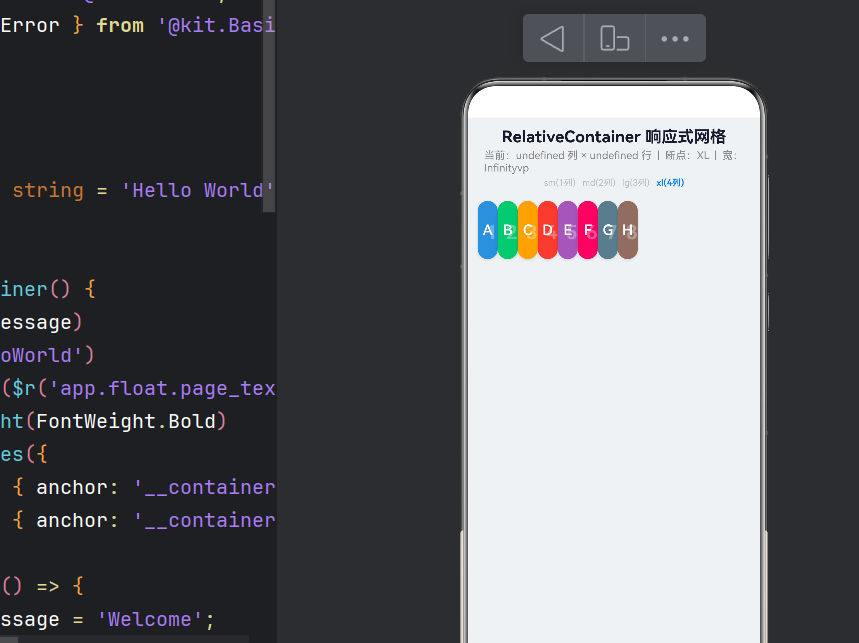
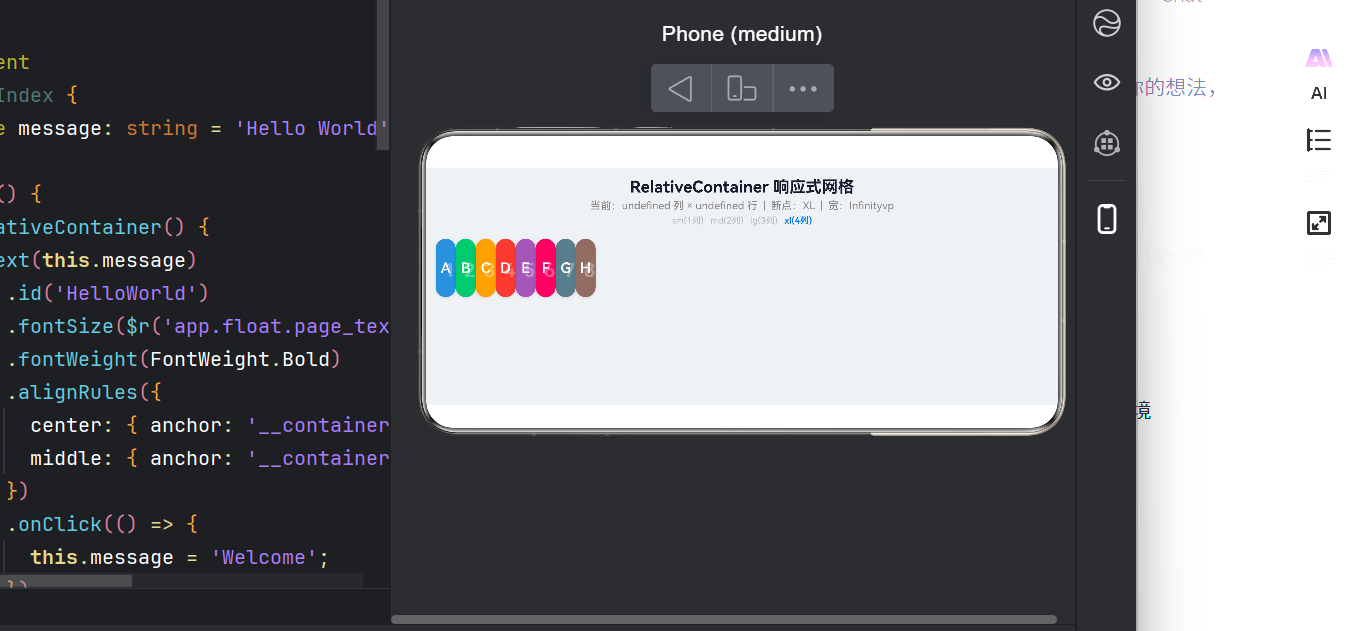
HarmonyOS NEXT(API 24)提供了多种布局容器,其中 RelativeContainer 通过锚点机制定义子组件位置。本文将围绕「响应式网格」场景,用 RelativeContainer 配合断点监听实现列数自适应、卡片均分、锚点链式排列的布局方案,并解析 ArkTS 严格模式下的语法约束与踩坑经验。
二、为什么用 RelativeContainer?
| 容器 | 优点 | 缺点 |
|---|---|---|
Grid |
原生网格,行列控制简单 | 响应式需配合 GridRow/GridCol |
Flex |
弹性自动换行 | 无法精确控制子项位置 |
RelativeContainer |
声明式锚定,组件间可相互引用 | 锚点链不宜过长 |
核心优势:子组件通过 .id() 设唯一标识、.alignRules() 声明相对关系,形成「锚点链」——列数变化时只需改 columnCount,所有锚点重新计算,布局自动更新。
锚点链原理
首列卡片: left → __container__ 左边缘
后续列:   left → 前一列同排卡片右侧
首行卡片: top  → __container__ 顶部边缘
后续行:   top  → 同列上一张卡片底部
三、工程准备
创建工程后注册页面路由(main_pages.json):
{ "src": ["pages/Index", "pages/ResponsiveGrid"] }
4.1 数据模型
class CardData {
  id: string = ''; label: string = ''; color: string = ''; index: number = 0;
  constructor(id: string, label: string, color: string, index: number) {
    this.id = id; this.label = label; this.color = color; this.index = index;
  }
}
color用string——十六进制不兼容 Color 枚举。
4.2 断点常量(API 24 变更)
const BP_SM = 'sm', BP_MD = 'md', BP_LG = 'lg', BP_XL = 'xl';
// ★ BreakpointConstants 已从 @kit.ArkUI 移除,需自定义
4.3 锚点规则类(ArkTS 约束)
ArkTS 严格模式禁止无类型对象字面量(arkts-no-untyped-obj-literals),不能写 { anchor: 'x', align: ... },必须用 new 实例化类。同时由于 ArkTS 不支持联合类型成员,需分两个类:
class HAlignRule {
  anchor: string = '__container__';
  align: HorizontalAlign = HorizontalAlign.Start;
  constructor(anchor: string, align: HorizontalAlign) {
    this.anchor = anchor; this.align = align;
  }
}

class VAlignRule {
  anchor: string = '__container__';
  align: VerticalAlign = VerticalAlign.Top;
  constructor(anchor: string, align: VerticalAlign) {
    this.anchor = anchor; this.align = align;
  }
}

class CardAlignRules {
  left?: HAlignRule;
  top?: VAlignRule;
}
4.4 组件结构与响应式监听
@Entry @Component struct ResponsiveGrid {
  @State currentBreakpoint = BP_SM;
  @State containerWidth = 360;
  @State density = 1.0;

  private readonly gridItems: CardData[] = [
    new CardData('card_0','A','#4A90D9',0), new CardData('card_1','B','#50C878',1),
    new CardData('card_2','C','#F5A623',2), new CardData('card_3','D','#E74C3C',3),
    new CardData('card_4','E','#9B59B6',4), new CardData('card_5','F','#E91E63',5),
    new CardData('card_6','G','#607D8B',6), new CardData('card_7','H','#8D6E63',7),
  ];

  get columnCount(): number {
    if (this.currentBreakpoint === BP_SM) return 1;
    if (this.currentBreakpoint === BP_MD) return 2;
    if (this.currentBreakpoint === BP_LG) return 3; return 4;
  }

  get cardWidth(): number {
    return (this.containerWidth - 24 - (this.columnCount-1)*10) / this.columnCount;
  }

  build() {
    Column({ space: 8 }) {
      this.buildHeader()
      Stack() {
        RelativeContainer() {
          ForEach(this.gridItems, (item: CardData) => { this.buildCard(item) }, (item: CardData) => item.id)
        }.width('100%').height('100%')
      }.width('100%').padding({ left: 12, right: 12 })
      .onAreaChange((_, nv) => {
        const d = display.getDefaultDisplaySync().densityPixels;
        this.containerWidth = (nv.width as number) / d;
        this.updateBreakpoint(this.containerWidth);
      })
      this.buildStatusBar()
    }.width('100%').height('100%').backgroundColor('#F0F2F5').padding({ top: 12 })
  }
  // ... 后续详述
}
4.5 核心锚点算法
calcAlignRules(item: CardData): CardAlignRules {
  const idx = item.index, cols = this.columnCount;
  const col = idx % cols, row = Math.floor(idx / cols);
  const rules = new CardAlignRules();
  if (col === 0) { rules.left = new HAlignRule('__container__', HorizontalAlign.Start); }
  else { rules.left = new HAlignRule(`card_${idx-1}`, HorizontalAlign.End); }
  if (row === 0) { rules.top = new VAlignRule('__container__', VerticalAlign.Top); }
  else { const t = idx - cols; if (t >= 0) { rules.top = new VAlignRule(`card_${t}`, VerticalAlign.Bottom); } }
  return rules;
}
4.6 @Builder 中的语法陷阱
@Builder 内的 ForEach 回调只能写 UI 组件,不能出现 const、if。正确做法:将逻辑提取为普通方法:
isBpActive(label: string): boolean {
  return this.currentBreakpoint === this.toBpValue(label.substring(0, 2));
}
// @Builder 中:
Text(label).fontColor(this.isBpActive(label) ? '#007AFF' : '#BBB')
五、断点更新逻辑
updateBreakpoint(width: number) {
  let newBp = BP_SM;
  if (width < 360) { newBp = BP_SM; }
  else if (width < 600) { newBp = BP_MD; }
  else if (width < 840) { newBp = BP_LG; }
  else { newBp = BP_XL; }
  if (this.currentBreakpoint !== newBp) {
    this.currentBreakpoint = newBp;  // 仅变化时更新,避免冗余渲染
  }
}
| 断点 | 宽度 | 列数 | 场景 |
|---|---|---|---|
| sm | < 360vp | 1 | 手机竖屏 |
| md | 360~600vp | 2 | 手机横屏 |
| lg | 600~840vp | 3 | 平板竖屏 |
| xl | ≥ 840vp | 4 | 平板横屏 |
六、构建验证
hvigorw assembleHap --mode module -p module=entry@default -p buildMode=debug
BUILD SUCCESSFUL in 1 s 809 ms
仅余 2 条 warning:pushUrl 废弃(仅 warning)和未配置签名(debug 无影响)。
七、踩坑汇总
| 问题 | 原因 | 解决 |
|---|---|---|
BreakpointConstants 未导出 |
API 24 已移除 | 自定义字符串常量 |
| 对象字面量编译错误 | arkts-no-untyped-obj-literals |
定义类 + new 构造 |
| 联合类型不合法 | ArkTS 不支持 A | B 成员类型 |
分 HAlignRule / VAlignRule 两个类 |
| 颜色字符串报错 | string 不能赋值 Color |
属性改为 string |
px2vp 废弃 |
API 24 deprecation | display.getDefaultDisplaySync().densityPixels 手动换算 |
Row.space() 无效 |
space 是构造参数非链式 API |
Row({ space: 4 }) |
| @Builder 中非 UI 代码 | ForEach 回调限制 | 逻辑提取为普通方法 |
八、性能与最佳实践
重渲染范围:断点变化时所有卡片重新对齐。8 张卡片无压力;数量过百应改用 LazyForEach + Grid
锚点链长度:与卡片数线性相关,< 100 子组件时性能与 Flex 相当
宽度策略:网格场景用计算值显式设 .width();非网格场景优先用锚点撑开
断点防抖:已做 currentBreakpoint !== newBp
九、总结
本文用 RelativeContainer + 锚点链式定位 + 响应式断点 实现了一套自适应网格布局。从 19 个编译错误到 0 错误构建成功,这是对 ArkTS 语法的深度实践。关键在于三个层次:
- 锚点层:
id+alignRules定义组件间位置关系 - 响应式层:
onAreaChange监听尺寸 → 更新断点状态 - 计算层:getter 将状态映射为列数、宽度、锚点规则,驱动 UI 自动更新
附录:完整代码
ResponsiveGrid.ets
import { display } from '@kit.ArkUI';

const BP_SM = 'sm', BP_MD = 'md', BP_LG = 'lg', BP_XL = 'xl';

class HAlignRule { anchor = '__container__'; align = HorizontalAlign.Start; constructor(a: string, al: HorizontalAlign) { this.anchor = a; this.align = al; } }
class VAlignRule { anchor = '__container__'; align = VerticalAlign.Top; constructor(a: string, al: VerticalAlign) { this.anchor = a; this.align = al; } }
class CardAlignRules { left?: HAlignRule; top?: VAlignRule; }

class CardData {
  id = ''; label = ''; color = ''; index = 0;
  constructor(id: string, label: string, color: string, index: number) {
    this.id = id; this.label = label; this.color = color; this.index = index;
  }
}

@Entry @Component struct ResponsiveGrid {
  @State currentBreakpoint = BP_SM;
  @State containerWidth = 360;
  @State density = 1.0;

  private readonly items: CardData[] = [
    new CardData('c0','A','#4A90D9',0), new CardData('c1','B','#50C878',1),
    new CardData('c2','C','#F5A623',2), new CardData('c3','D','#E74C3C',3),
    new CardData('c4','E','#9B59B6',4), new CardData('c5','F','#E91E63',5),
    new CardData('c6','G','#607D8B',6), new CardData('c7','H','#8D6E63',7),
  ];

  get colCount(): number {
    if (this.currentBreakpoint === BP_SM) return 1;
    if (this.currentBreakpoint === BP_MD) return 2;
    if (this.currentBreakpoint === BP_LG) return 3;
    return 4;
  }

  get cardW(): number {
    return (this.containerWidth - 24 - (this.colCount - 1) * 10) / this.colCount;
  }

  isActive(label: string): boolean { return this.currentBreakpoint === label.substring(0, 2); }

  build() {
    Column({ space: 8 }) {
      this.header()
      Stack() {
        RelativeContainer() {
          ForEach(this.items, (it: CardData) => { this.card(it) }, (it: CardData) => it.id)
        }.width('100%').height('100%')
      }.width('100%').padding({ left: 12, right: 12 })
      .onAreaChange((_, nv) => {
        this.containerWidth = (nv.width as number) / display.getDefaultDisplaySync().densityPixels;
        this.updateBp(this.containerWidth);
      })
      this.footer()
    }.width('100%').height('100%').backgroundColor('#F0F2F5').padding({ top: 12 })
  }

  @Builder header() {
    Column({ space: 4 }) {
      Text('RelativeContainer 响应式网格').fontSize(20).fontWeight(700).fontColor('#1A1A2E')
      Text(`当前:${this.colCount}列 | 断点:${this.currentBreakpoint.toUpperCase()} | ${Math.round(this.containerWidth)}vp`).fontSize(13).fontColor('#888')
      Row({ space: 8 }) {
        ForEach(['sm(1列)','md(2列)','lg(3列)','xl(4列)'], (lb: string) => {
          Text(lb).fontSize(11).fontColor(this.isActive(lb) ? '#007AFF' : '#BBB').fontWeight(this.isActive(lb) ? 600 : 400)
        }, (lb: string) => lb)
      }.width('100%').justifyContent(FlexAlign.Center)
    }.alignItems(HorizontalAlign.Center).width('100%').padding({ bottom: 8 })
  }

  @Builder card(it: CardData) {
    Stack() {
      Text(`${it.index+1}`).fontSize(24).fontWeight(700).fontColor('rgba(255,255,255,0.3)').align(Alignment.TopStart).margin({ left: 10, top: 6 })
      Text(it.label).fontSize(18).fontWeight(600).fontColor(Color.White)
    }.width(this.cardW).height(72).backgroundColor(it.color).borderRadius(14)
    .shadow({ radius: 8, color: 'rgba(0,0,0,0.12)', offsetX: 0, offsetY: 3 })
    .id(it.id).alignRules(this.rule(it))
  }

  @Builder footer() {
    Row({ space: 4 }) {
      ForEach(this.items, (it: CardData) => {
        Text(it.label).fontSize(10).fontColor(Color.White).width(24).height(18)
          .backgroundColor(it.color).borderRadius(4).textAlign(TextAlign.Center)
      }, (it: CardData) => it.id)
    }.width('100%').justifyContent(FlexAlign.Center).margin({ top: 6, bottom: 12 })
    Text('← 拖拽窗口边缘 →').fontSize(12).fontColor('#AAA').margin({ bottom: 12 })
  }

  rule(it: CardData): CardAlignRules {
    const idx = it.index, cols = this.colCount, col = idx % cols, row = Math.floor(idx / cols);
    const r = new CardAlignRules();
    if (col === 0) { r.left = new HAlignRule('__container__', HorizontalAlign.Start); }
    else { r.left = new HAlignRule(`c${idx - 1}`, HorizontalAlign.End); }
    if (row === 0) { r.top = new VAlignRule('__container__', VerticalAlign.Top); }
    else { const t = idx - cols; if (t >= 0) { r.top = new VAlignRule(`c${t}`, VerticalAlign.Bottom); } }
    return r;
  }

  updateBp(w: number) {
    let bp = BP_SM;
    if (w >= 840) { bp = BP_XL; } else if (w >= 600) { bp = BP_LG; } else if (w >= 360) { bp = BP_MD; }
    if (this.currentBreakpoint !== bp) { this.currentBreakpoint = bp; }
  }
}
Index.ets
import { router } from '@kit.ArkUI';
import { BusinessError } from '@kit.BasicServicesKit';

@Entry @Component struct Index {
  @State msg = 'Hello World';
  build() {
    RelativeContainer() {
      Text(this.msg).id('hw').fontSize($r('app.float.page_text_font_size')).fontWeight(FontWeight.Bold)
        .alignRules({ center: { anchor: '__container__', align: VerticalAlign.Center }, middle: { anchor: '__container__', align: HorizontalAlign.Center } })
        .onClick(() => { this.msg = 'Welcome'; })
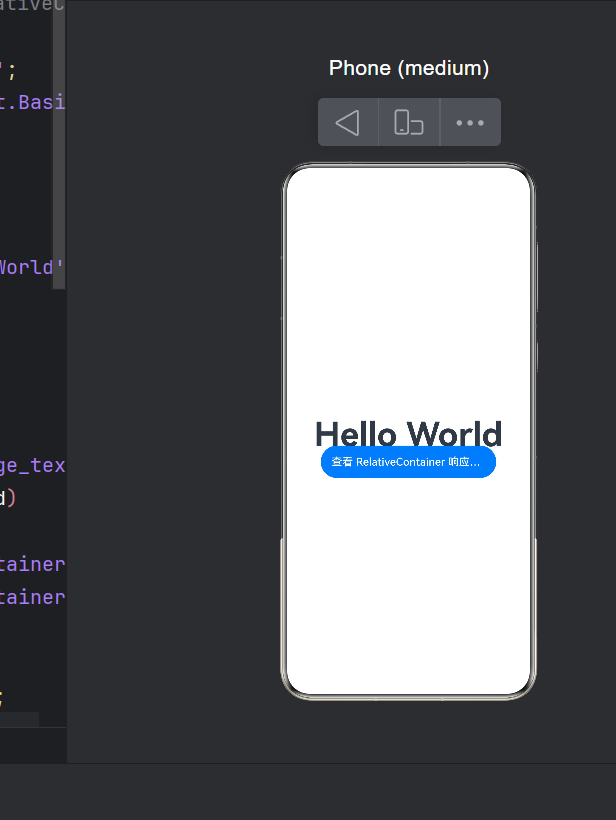
      Button('查看 RelativeContainer 响应式网格示例').id('nav').width(260).height(48).fontSize(16)
        .type(ButtonType.Capsule).backgroundColor('#007AFF')
        .alignRules({ center: { anchor: '__container__', align: VerticalAlign.Center }, middle: { anchor: '__container__', align: HorizontalAlign.Center } })
        .margin({ top: 80 })
        .onClick(() => { router.pushUrl({ url: 'pages/ResponsiveGrid' }).catch((e: BusinessError) => { console.error(e.message); }); })
    }.height('100%').width('100%')
  }
}
本文代码已在 HarmonyOS NEXT API 24 + DevEco Studio 5.0 下编译通过并运行验证。

作为“人工智能6S店”的官方数字引擎,为AI开发者与企业提供一个覆盖软硬件全栈、一站式门户。
更多推荐

 0
0 0
0- 0


 已为社区贡献112条内容

所有评论(0)