
鸿蒙开发三项知识点简述
一、@State
这是 ArkUI 基础状态装饰器,用于给组件内变量赋予响应式特性。变量数值发生变更时,绑定该变量的界面会自动刷新 UI;状态仅在当前自定义组件内生效,弹窗显示开关、输入内容、按钮选中状态这类本地交互逻辑,一般都用它来控制。
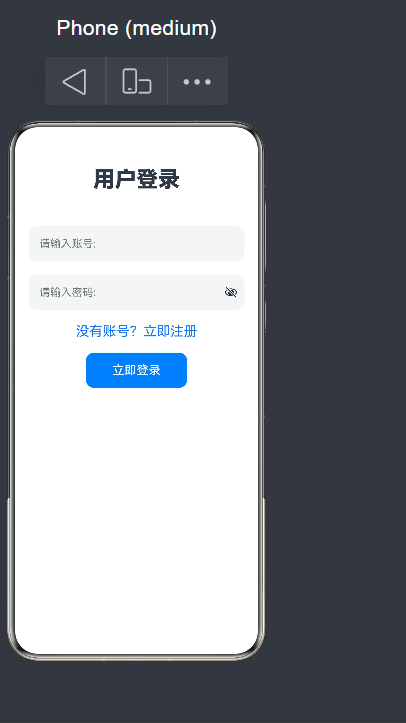
import router from '@ohos.router';
@Entry
@Component
struct Logins{
@State username:string = "" //定义用户名
@State password:string = "" //定义密码
build() {
Column({space:20}){
Text('用户登录')
.fontSize(32)
.fontWeight(FontWeight.Bolder)
.margin({ top: 20, bottom: 30 })
TextInput({text:this.username, placeholder: "请输入账号: " })
.width(320)
.height(52)
.borderRadius(12)
.fontSize(16)
.onChange((value: string) => {
this.username = value
})
TextInput({text:this.password, placeholder: "请输入密码: " })
.type(InputType.Password)
.width(320)
.height(52)
.borderRadius(12)
.fontSize(16)
.onChange((value:string)=>{
this.password = value
})
Text("没有账号?立即注册")
.fontSize(20)
.fontColor(0x1677ff)
.onClick(()=>{
router.pushUrl({
url:'pages/Register' //页面路由 url:'pages/下一页的文件名'
})
})
Row({space:20}) {
Button("立即登录")
.width(150)
.height(52)
.backgroundColor(0x007Dff)
.fontSize(18)
.borderRadius(12)
.margin({ bottom: 80 }) //距离父容器下边缘向上留出 80 像素的距离。
.onClick(() => {
if (this.username == "root" && this.password == "root") {
AlertDialog.show({
title: "登录成功",
message: `欢迎你,${this.username}`
})
}
else {
AlertDialog.show({
title: "登录失败",
message: "用户名或者密码错误" //弹窗
})
}
})
}
}
.width('100%')
.height('100%')
}
}
二、弹窗
属于悬浮于页面上层的交互组件,用来做提示确认、表单录入、选项选择等场景。 常用实现:CustomDialog 自定义弹窗、系统简易提示框 promptAction、底部弹出面板 bindSheet,也可通过路由配置弹窗页面;弹窗的显示隐藏大多依靠 @State 变量控制。
文件main_pages.json
{
"src": [
"pages/Index",
"pages/Second",
"pages/Logins", //第一个文件的名字
"pages/Register", //第二个文件的名字
"pages/RouterDemo",
"pages/PageOne",
"pages/diyiye",
"pages/dierye",
"pages/LoginRouter",
"pages/HomePage"
]
}
三、路由
负责应用多页面跳转、参数传递、页面回退,是多页面应用核心能力。
- 原生 router 模块:pushUrl 打开新页面、back 返回上一页,跳转时可携带页面参数;
- Navigation 导航容器:自带导航栏与切换动画,适配折叠屏、分栏等复杂布局。
import router from '@ohos.router';
@Entry
@Component
struct Register{
build() {
Column({space:20}){
Text('用户注册')
.fontSize(30)
.fontWeight(FontWeight.Bolder)
.margin({top:20,bottom:30})
TextInput({placeholder:"请输入手机号:"})
.width(320)
.height(52)
.borderRadius(12)
.fontSize(16)
TextInput({placeholder:"请输入密码:"})
.type(InputType.Password)
.width(320)
.height(52)
.borderRadius(12)
.fontSize(16)
TextInput({placeholder:"请再输入密码:"})
.type(InputType.Password)
.width(320)
.height(52)
.borderRadius(12)
.fontSize(16)
Text("已有账号?立即登录")
.fontSize(20)
.fontColor(0x1677ff)
.onClick(()=>{
router.back({
url:'pages/Logins' //第一个文件的名字
})
})
Button('注册')
.width(150)
.height(52)
.fontSize(16)
}
.width('100%')
.height('100%')
}
}
三者关系
@State 管控局部界面状态;弹窗是临时悬浮交互窗口;路由用于完整页面间跳转,开发中三者经常搭配使用。

作为“人工智能6S店”的官方数字引擎,为AI开发者与企业提供一个覆盖软硬件全栈、一站式门户。
更多推荐



 8
8 0
0- 0


 已为社区贡献3条内容

所有评论(0)