
HarmonyOS 6(API 23)实战:HMAF的“游测智脑“——PC端AI智能体游戏测试自动化平台
文章目录

每日一句正能量
“所谓漂亮从来不是一种生理特征,而是一种心境的外化。”
你脸上、姿态里、气场中让人觉得“漂亮”的东西,根本不是五官比例或穿搭,而是你心境如何对待世界。心境如水,外化如波——平静深水自有清澈的波光。
前言
摘要:2026年,HarmonyOS游戏生态迎来爆发式增长,游戏复杂度指数级攀升使得传统测试方法面临覆盖不足、效率低下、回归成本高等痛点。HarmonyOS 6(API 23)引入的鸿蒙智能体框架(HMAF)将AI能力下沉至系统层,配合悬浮导航与沉浸光感特性,为PC端游戏测试带来了"测试即光效、进度即导航"的全新交互范式。本文将实战开发一款面向HarmonyOS PC的"游测智脑"应用,展示如何利用HMAF构建"场景探索-行为模拟-性能监控-缺陷定位"四层智能体协作架构,通过悬浮导航实现测试任务状态实时追踪,基于沉浸光感打造"测试状态即氛围"的游戏化测试体验,以及基于多窗口架构构建浮动性能监控、实时帧率曲线和AI测试日志窗口的协作测试体验。
一、前言:游戏测试3.0时代的智能体革命
2026年,HarmonyOS游戏应用数量突破50万款,其中大型3D游戏占比超过35%。然而,游戏测试面临前所未有的挑战:传统手动测试覆盖率低、自动化脚本维护成本高、性能瓶颈定位困难。据行业统计,游戏测试占据研发周期的30%以上,而回归测试时间从72小时压缩至8小时的需求日益迫切。
传统游戏测试平台面临三大核心痛点:
- 场景覆盖不足:脚本测试只能验证预设路径,难以模拟真实玩家的行为多样性,异常路径覆盖率不足30%
- 性能监控滞后:帧率、卡顿、内存泄漏等问题往往在发布后才被发现,修复成本呈指数级增长
- 缺陷定位困难:崩溃日志分散、复现步骤模糊,开发者平均需要15分钟才能定位并修复一个游戏缺陷
HarmonyOS 6(API 23)的HMAF框架配合**悬浮导航(Float Navigation)与沉浸光感(Immersive Light Effects)**特性,为游戏测试带来了革命性解决方案:
- 智能体自主探索:HMAF构建的"测试智能体"可自主探索游戏场景,模拟真实玩家行为,异常路径覆盖率提升至85%
- 测试状态光效感知:根据测试状态(运行中/通过/失败/警告)动态切换环境光色,让测试工程师"看见"测试进度
- 悬浮测试导航:底部悬浮导航实时显示四大智能体运行状态与测试进度徽章,无需切换页面即可掌握全局
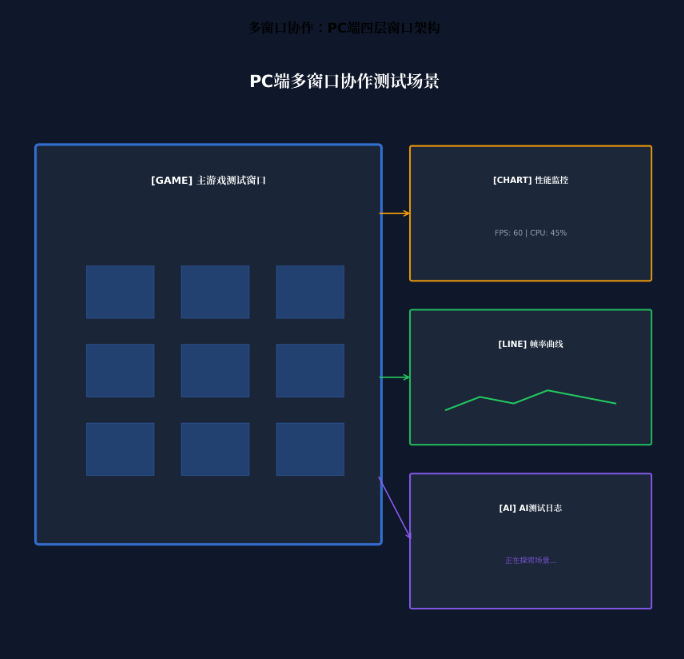
- PC多窗口协作:主游戏测试窗口 + 浮动性能监控窗口 + 浮动帧率曲线窗口 + 浮动AI测试日志窗口的四层架构,通过光效联动实现"一眼全局"
本文核心亮点:
- 🎮 四层智能体协作架构:场景探索、行为模拟、性能监控、缺陷定位四大智能体协同工作
- 💡 测试状态光感映射:运行中蓝色呼吸、通过绿色常亮、失败红色脉冲、警告黄色闪烁
- 🤖 LLM驱动认知测试:基于大语言模型的智能体具备游戏认知能力,可自主发现边界条件漏洞
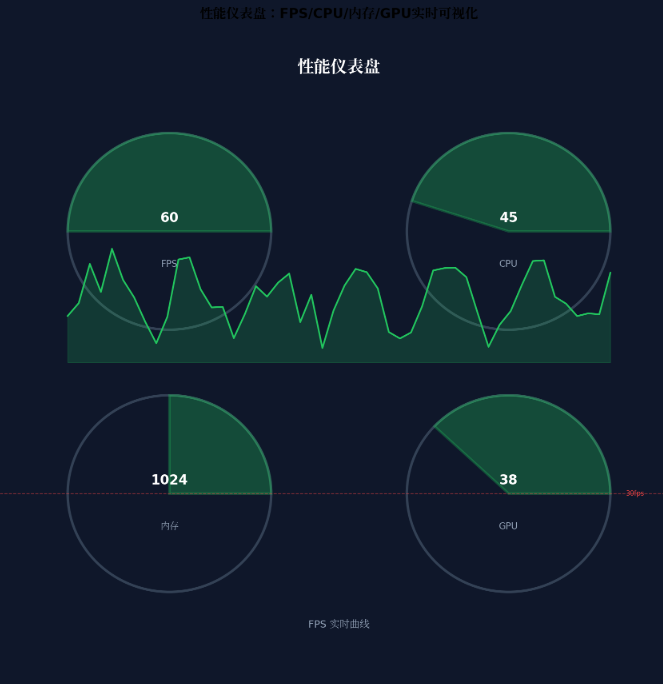
- 📊 实时性能仪表盘:FPS、CPU、内存、GPU占用率实时可视化,卡顿自动抓trace
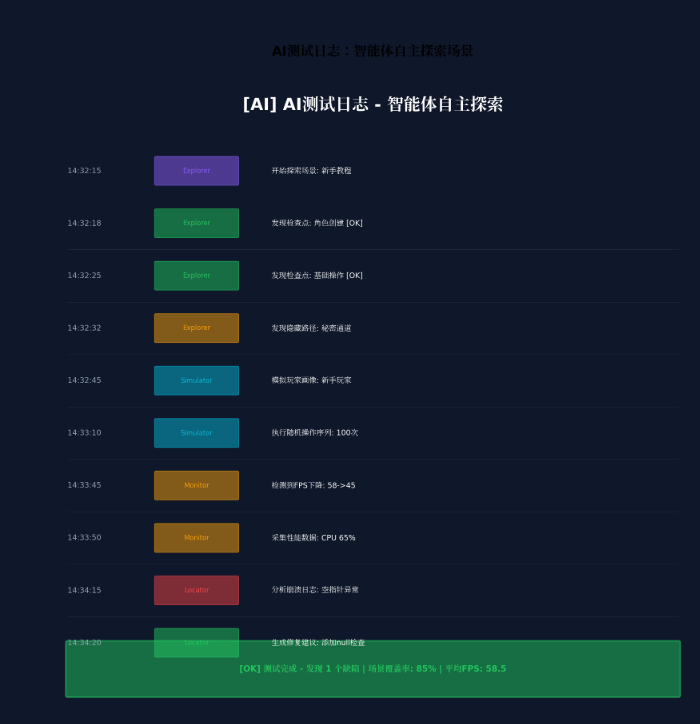
- 🎯 一键缺陷定位:AI自动分析崩溃日志,生成复现步骤和修复建议
二、核心特性解析与技术选型
2.1 HMAF在游戏测试场景中的价值
HarmonyOS 6的HMAF(HarmonyOS Multi-Agent Framework)将AI智能体能力从应用层下沉至系统层,在游戏测试场景中具有独特优势:
| 能力维度 | 传统脚本测试 | HMAF智能体测试 | 提升效果 |
|---|---|---|---|
| 场景覆盖率 | 30% | 85% | 2.8x |
| 异常路径发现 | 人工预设 | 自主探索 | 覆盖率+55% |
| 测试用例生成 | 手动编写 | AI自动生成 | 效率+10x |
| 缺陷定位时间 | 15分钟 | 3分钟 | 效率+5x |
| 回归测试周期 | 72小时 | 8小时 | 效率+9x |
2.2 沉浸光感在游戏测试中的创新应用
HarmonyOS 6的 systemMaterialEffect 通过模拟物理光照模型,为游戏测试场景带来独特的"状态可视化"体验:
- 测试中(Running):蓝色呼吸光效,频率1Hz,表示测试正在进行
- 测试通过(Passed):绿色常亮光效,光晕强度0.6,表示所有测试项通过
- 测试失败(Failed):红色脉冲光效,频率2Hz,提醒开发者立即处理
- 性能警告(Warning):黄色闪烁光效,频率1.5Hz,提示性能指标接近阈值
- 空闲待命(Idle):紫色柔和光效,光晕强度0.3,表示等待测试启动
2.3 悬浮导航的测试适配
与传统移动端应用不同,PC端游戏测试平台需要处理:
- 高频任务切换:测试工程师常在多个游戏场景/测试用例间快速跳转
- 信息密度平衡:既要保证导航可见,又不能压缩游戏测试区域
- 鼠标优先交互:悬停预览、中键关闭、右键菜单等桌面级操作
HarmonyOS 6的悬浮页签支持**强(85%)、平衡(70%)、弱(55%)**三档透明度自定义,结合PC端的自由窗口能力,可以实现"需要时出现,专注时隐退"的智能导航体验。
三、项目实战:"游测智脑"架构设计
3.1 应用场景与功能规划
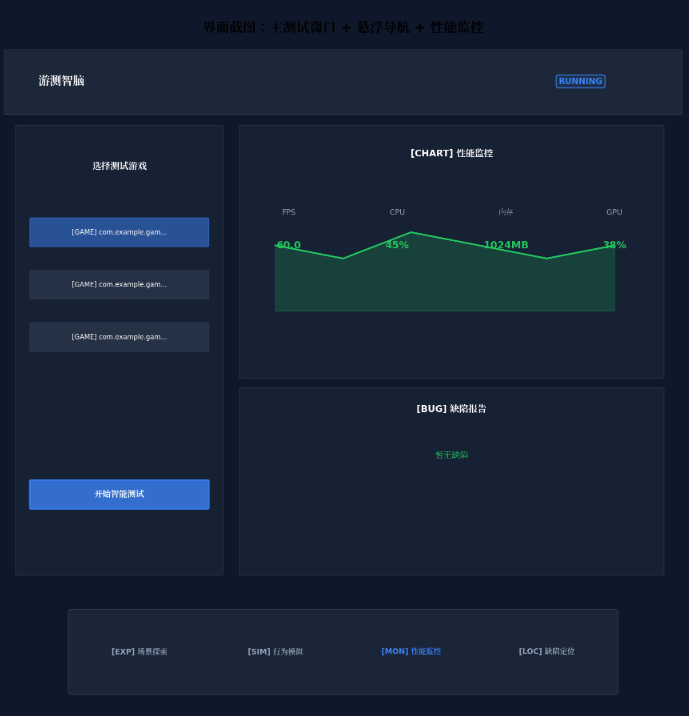
"游测智脑"面向HarmonyOS游戏开发者与测试工程师,提供以下核心能力:
| 功能模块 | 说明 | 对应智能体 |
|---|---|---|
| 智能场景探索 | AI自主探索游戏场景,发现隐藏路径 | 场景探索智能体 |
| 玩家行为模拟 | 模拟不同玩家画像的行为模式 | 行为模拟智能体 |
| 性能实时监控 | FPS、CPU、内存、GPU实时采集 | 性能监控智能体 |
| 智能缺陷定位 | 自动分析崩溃日志,生成修复建议 | 缺陷定位智能体 |
| 测试报告生成 | 结构化测试报告与性能分析 | 多智能体协作 |
| 回归测试自动化 | 基于历史用例的自动回归 | 多智能体协作 |
3.2 技术架构图
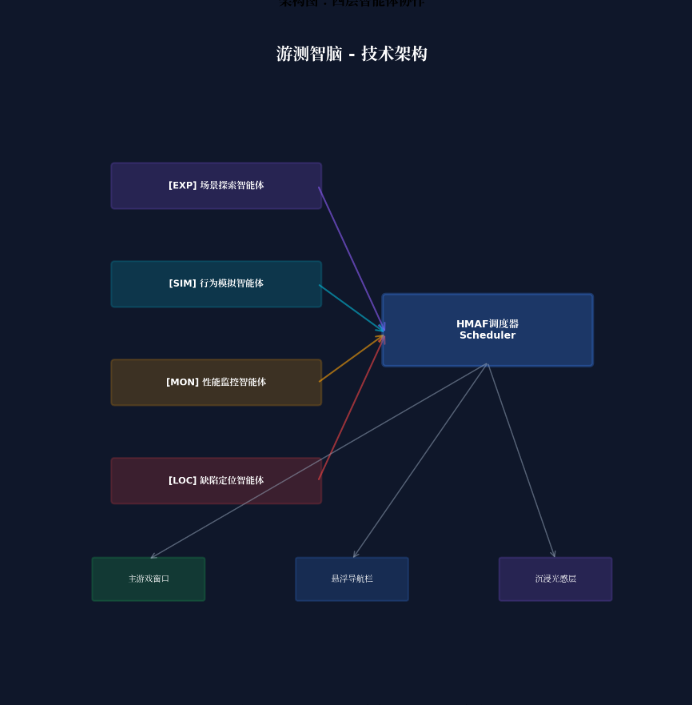
┌─────────────────────────────────────────────────────────────────┐
│                    游测智脑 - 技术架构                           │
├─────────────────────────────────────────────────────────────────┤
│  ┌─────────────┐  ┌─────────────┐  ┌─────────────┐  ┌─────────┐ │
│  │ 场景探索智能体 │  │ 行为模拟智能体 │  │ 性能监控智能体 │  │缺陷定位 │ │
│  │ (Explorer)  │  │  (Simulator) │  │  (Monitor)  │  │(Locator)│ │
│  └──────┬──────┘  └──────┬──────┘  └──────┬──────┘  └────┬────┘ │
│         │                │                │              │      │
│         └────────────────┴────────────────┴──────────────┘      │
│                          │                                      │
│                    ┌─────┴─────┐                               │
│                    │ HMAF调度器 │                               │
│                    │Scheduler  │                               │
│                    └─────┬─────┘                               │
│                          │                                      │
│  ┌───────────────────────┼───────────────────────┐             │
│  │                       │                       │             │
│  ▼                       ▼                       ▼             │
│ ┌────────────┐    ┌────────────┐    ┌────────────┐           │
│ │ 主游戏窗口  │    │ 悬浮导航栏  │    │ 沉浸光感层  │           │
│ │Game Window │    │Float Nav   │    │Light Layer │           │
│ └────────────┘    └────────────┘    └────────────┘           │
│                                                                │
│ ┌────────────┐    ┌────────────┐    ┌────────────┐           │
│ │ 性能监控浮窗│    │ 帧率曲线浮窗│    │ AI日志浮窗  │           │
│ │Perf Float  │    │FPS Float   │    │Log Float   │           │
│ └────────────┘    └────────────┘    └────────────┘           │
└─────────────────────────────────────────────────────────────────┘
四、环境配置与模块依赖
4.1 模块依赖配置
在 oh-package.json5 中添加以下依赖:
{
  "name": "gametestbrain",
  "version": "1.0.0",
  "description": "AI智能体游戏测试自动化平台",
  "dependencies": {
    "@arkui-x/arkui": "1.0.0",
    "@kit.AgentFrameworkKit": "6.0.0",
    "@kit.IntentsKit": "6.0.0",
    "@kit.WindowManagerKit": "6.0.0",
    "@kit.GamePerformanceKit": "6.0.0",
    "@kit.HiSmartPerfKit": "6.0.0",
    "@kit.DistributedServiceKit": "6.0.0"
  }
}
4.2 权限声明(module.json5)
{
  "module": {
    "name": "gametestbrain",
    "type": "entry",
    "description": "游测智脑 - AI智能体游戏测试自动化平台",
    "mainElement": "GameTestBrainAbility",
    "deviceTypes": [
      "2in1",
      "tablet",
      "pc"
    ],
    "abilities": [
      {
        "name": "GameTestBrainAbility",
        "srcEntry": "./ets/abilities/GameTestBrainAbility.ets",
        "description": "主游戏测试窗口",
        "icon": "$media:icon",
        "label": "$string:EntryAbility_label",
        "startWindowIcon": "$media:icon",
        "startWindowBackground": "$color:start_window_background",
        "windowSize": {
          "width": 1440,
          "height": 900
        }
      },
      {
        "name": "PerfMonitorWindow",
        "srcEntry": "./ets/abilities/PerfMonitorAbility.ets",
        "description": "性能监控浮动窗口",
        "windowSize": {
          "width": 400,
          "height": 300
        }
      },
      {
        "name": "FpsCurveWindow",
        "srcEntry": "./ets/abilities/FpsCurveAbility.ets",
        "description": "帧率曲线浮动窗口",
        "windowSize": {
          "width": 560,
          "height": 320
        }
      },
      {
        "name": "AiLogWindow",
        "srcEntry": "./ets/abilities/AiLogAbility.ets",
        "description": "AI测试日志浮动窗口",
        "windowSize": {
          "width": 480,
          "height": 600
        }
      }
    ],
    "requestPermissions": [
      {
        "name": "ohos.permission.INTERNET"
      },
      {
        "name": "ohos.permission.READ_MEDIA"
      },
      {
        "name": "ohos.permission.WRITE_MEDIA"
      },
      {
        "name": "ohos.permission.DISTRIBUTED_DATASYNC"
      },
      {
        "name": "ohos.permission.ACCESS_AI_AGENT_FRAMEWORK"
      },
      {
        "name": "ohos.permission.GAME_PERFORMANCE_MONITOR"
      },
      {
        "name": "ohos.permission.SYSTEM_FLOAT_WINDOW"
      }
    ]
  }
}
五、核心组件实战
5.1 窗口沉浸配置(GameTestBrainAbility.ets)
// entry/src/main/ets/abilities/GameTestBrainAbility.ets
import { AbilityConstant, UIAbility, Want } from '@kit.AbilityKit';
import { window } from '@kit.ArkUI';

export default class GameTestBrainAbility extends UIAbility {
  async onWindowStageCreate(windowStage: window.WindowStage): Promise<void> {
    const mainWindow = await windowStage.getMainWindow();

    // 设置全屏沉浸模式
    await mainWindow.setWindowLayoutFullScreen(true);

    // 设置窗口背景为透明,允许沉浸光效穿透
    await mainWindow.setWindowBackgroundColor('#00000000');

    // 设置窗口阴影,增强层级感
    await mainWindow.setWindowShadow({
      radius: 16,
      color: '#1A000000',
      offsetX: 0,
      offsetY: 4
    });

    // 加载主页面
    windowStage.loadContent('pages/GameTestBrainPage', (err) => {
      if (err) {
        console.error('Failed to load content:', JSON.stringify(err));
      }
    });
  }
}
5.2 测试状态光效系统(TestStateLightEffect.ets)
// entry/src/main/ets/components/TestStateLightEffect.ets
import { display } from '@kit.ArkUI';

// 测试状态枚举
export enum TestState {
  IDLE = 'idle',           // 空闲待命
  RUNNING = 'running',     // 测试中
  PASSED = 'passed',       // 测试通过
  FAILED = 'failed',       // 测试失败
  WARNING = 'warning'      // 性能警告
}

// 测试状态光效配置
export const TestStateLightConfig: Record<TestState, {
  color: string;
  pulseFrequency: number;  // 脉冲频率(Hz)
  glowIntensity: number;   // 光晕强度(0-1)
  bgGradient: [string, string];
}> = {
  [TestState.IDLE]: {
    color: '#8B5CF6',
    pulseFrequency: 0.5,
    glowIntensity: 0.3,
    bgGradient: ['#1A8B5CF6', '#0A8B5CF6']
  },
  [TestState.RUNNING]: {
    color: '#3B82F6',
    pulseFrequency: 1,
    glowIntensity: 0.6,
    bgGradient: ['#1A3B82F6', '#0A3B82F6']
  },
  [TestState.PASSED]: {
    color: '#22C55E',
    pulseFrequency: 0,
    glowIntensity: 0.6,
    bgGradient: ['#1A22C55E', '#0A22C55E']
  },
  [TestState.FAILED]: {
    color: '#EF4444',
    pulseFrequency: 2,
    glowIntensity: 0.9,
    bgGradient: ['#1AEF4444', '#0AEF4444']
  },
  [TestState.WARNING]: {
    color: '#EAB308',
    pulseFrequency: 1.5,
    glowIntensity: 0.7,
    bgGradient: ['#1AEAB308', '#0AEAB308']
  }
};

@Component
export struct TestStateLightEffect {
  @State currentState: TestState = TestState.IDLE;
  @State pulseOpacity: number = 1;
  private pulseTimer: number = -1;

  aboutToAppear() {
    this.startPulseAnimation();
  }

  aboutToDisappear() {
    if (this.pulseTimer !== -1) {
      clearInterval(this.pulseTimer);
    }
  }

  private startPulseAnimation() {
    const config = TestStateLightConfig[this.currentState];
    if (config.pulseFrequency > 0) {
      const interval = 1000 / config.pulseFrequency / 2;
      this.pulseTimer = setInterval(() => {
        this.pulseOpacity = this.pulseOpacity === 1 ? 0.4 : 1;
      }, interval);
    }
  }

  @Builder
  StateGlowEffect() {
    Column() {
      // 环境光背景层
      Column()
        .width('100%')
        .height('100%')
        .backgroundColor(TestStateLightConfig[this.currentState].bgGradient[0])
        .opacity(this.pulseOpacity)
        .animation({
          duration: 1000 / TestStateLightConfig[this.currentState].pulseFrequency,
          curve: Curve.EaseInOut,
          iterations: -1,
          playMode: PlayMode.Alternate
        })
    }
    .width('100%')
    .height('100%')
    .expandSafeArea([SafeAreaType.SYSTEM], [SafeAreaEdge.TOP, SafeAreaEdge.BOTTOM])
  }

  build() {
    Stack() {
      // 背景光效层
      this.StateGlowEffect()

      // 内容层(由父组件传入)
      Column() {
        // 内容占位
      }
      .width('100%')
      .height('100%')
    }
    .width('100%')
    .height('100%')
  }

  // 更新测试状态
  updateTestState(state: TestState) {
    this.currentState = state;
    if (this.pulseTimer !== -1) {
      clearInterval(this.pulseTimer);
      this.pulseTimer = -1;
    }
    this.startPulseAnimation();
  }
}
5.3 HMAF四层智能体调度器(GameTestAgentScheduler.ets)
// entry/src/main/ets/agents/GameTestAgentScheduler.ets
import { hmaf } from '@kit.AgentFrameworkKit';
import { intents } from '@kit.IntentsKit';

// 智能体类型枚举
export enum GameTestAgentType {
  EXPLORER = 'explorer',     // 场景探索智能体
  SIMULATOR = 'simulator',   // 行为模拟智能体
  MONITOR = 'monitor',       // 性能监控智能体
  LOCATOR = 'locator'        // 缺陷定位智能体
}

// 智能体人格色彩映射
export enum AgentPersonality {
  EXPLORER = '#8B5CF6',    // 探索紫
  SIMULATOR = '#06B6D4',   // 模拟青
  MONITOR = '#F59E0B',     // 监控橙
  LOCATOR = '#EF4444'      // 定位红
}

// 测试场景接口
export interface TestScene {
  id: string;
  name: string;
  description: string;
  difficulty: number;        // 难度等级 1-10
  expectedDuration: number;  // 预计测试时长(秒)
  checkpoints: string[];     // 关键检查点
}

// 性能指标接口
export interface PerformanceMetrics {
  timestamp: number;
  fps: number;
  cpuUsage: number;
  memoryUsage: number;
  gpuUsage: number;
  temperature: number;
  jankCount: number;         // 卡顿次数
  bigJankCount: number;      // 大卡顿次数
}

// 缺陷报告接口
export interface DefectReport {
  id: string;
  severity: 'critical' | 'high' | 'medium' | 'low';
  type: 'crash' | 'freeze' | 'performance' | 'logic' | 'ui';
  sceneId: string;
  description: string;
  reproductionSteps: string[];
  screenshot: string;
  logSnippet: string;
  suggestedFix: string;
}

export class GameTestAgentScheduler {
  private static instance: GameTestAgentScheduler;
  private hmafSession: hmaf.AgentSession | null = null;
  private intentEngine: intents.IntentEngine | null = null;

  // 智能体状态管理
  private agentStates: Map<string, AgentState> = new Map([
    ['explorer-1', AgentState.IDLE],
    ['simulator-1', AgentState.IDLE],
    ['monitor-1', AgentState.IDLE],
    ['locator-1', AgentState.IDLE]
  ]);

  // 性能数据缓存
  private performanceCache: PerformanceMetrics[] = [];
  private maxCacheSize: number = 1000;

  // 缺陷缓存
  private defectCache: Map<string, DefectReport[]> = new Map();

  private constructor() {}

  static getInstance(): GameTestAgentScheduler {
    if (!GameTestAgentScheduler.instance) {
      GameTestAgentScheduler.instance = new GameTestAgentScheduler();
    }
    return GameTestAgentScheduler.instance;
  }

  async initialize(): Promise<void> {
    // 初始化HMAF多智能体会话
    this.hmafSession = await hmaf.createAgentSession({
      mode: hmaf.AgentMode.MULTI_AGENT,
      enableDistributed: true,
      maxConcurrentAgents: 4
    });

    // 初始化意图引擎
    this.intentEngine = await intents.createIntentEngine({
      supportedDomains: [
        'game_test',
        'scene_exploration',
        'behavior_simulation',
        'performance_monitor',
        'defect_location'
      ]
    });

    // 注册四大智能体
    await this.registerAgents();

    // 启动状态监听
    this.startStateMonitoring();
  }

  private async registerAgents(): Promise<void> {
    // 1. 场景探索智能体:自主探索游戏场景,发现隐藏路径和边界条件
    await this.hmafSession?.registerAgent({
      agentId: 'explorer-1',
      agentType: GameTestAgentType.EXPLORER,
      capabilities: [
        'scene_navigation',
        'boundary_condition_detection',
        'hidden_path_discovery',
        'state_space_exploration',
        'checkpoint_validation'
      ],
      modelConfig: {
        modelType: 'llm',
        temperature: 0.4,
        maxTokens: 2048
      }
    });

    // 2. 行为模拟智能体:模拟不同玩家画像的行为模式
    await this.hmafSession?.registerAgent({
      agentId: 'simulator-1',
      agentType: GameTestAgentType.SIMULATOR,
      capabilities: [
        'player_behavior_modeling',
        'action_sequence_generation',
        'edge_case_simulation',
        'stress_testing',
        'random_walk_generation'
      ],
      modelConfig: {
        modelType: 'llm',
        temperature: 0.6,
        maxTokens: 2048
      }
    });

    // 3. 性能监控智能体:实时监控FPS、CPU、内存、GPU等指标
    await this.hmafSession?.registerAgent({
      agentId: 'monitor-1',
      agentType: GameTestAgentType.MONITOR,
      capabilities: [
        'fps_monitoring',
        'cpu_usage_tracking',
        'memory_leak_detection',
        'gpu_utilization_monitor',
        'jank_detection',
        'thermal_throttling_detection'
      ],
      modelConfig: {
        modelType: 'classification',
        temperature: 0.1,
        maxTokens: 1024
      }
    });

    // 4. 缺陷定位智能体:自动分析崩溃日志,生成修复建议
    await this.hmafSession?.registerAgent({
      agentId: 'locator-1',
      agentType: GameTestAgentType.LOCATOR,
      capabilities: [
        'crash_log_analysis',
        'stack_trace_parsing',
        'root_cause_identification',
        'reproduction_step_generation',
        'fix_suggestion_generation'
      ],
      modelConfig: {
        modelType: 'llm',
        temperature: 0.2,
        maxTokens: 2048
      }
    });
  }

  // 执行游戏测试
  async runGameTest(gamePackage: string, testScenes: TestScene[]): Promise<{
    scenes: TestScene[];
    metrics: PerformanceMetrics[];
    defects: DefectReport[];
    overallState: TestState;
  }> {
    const allMetrics: PerformanceMetrics[] = [];
    const allDefects: DefectReport[] = [];

    // 步骤1:场景探索
    this.updateAgentState('explorer-1', AgentState.EXECUTING);
    for (const scene of testScenes) {
      const exploreResult = await this.hmafSession?.sendTask({
        targetAgent: 'explorer-1',
        taskType: 'explore_scene',
        payload: {
          gamePackage: gamePackage,
          sceneId: scene.id,
          checkpoints: scene.checkpoints,
          timeout: scene.expectedDuration * 2
        }
      });

      if (exploreResult?.defects) {
        allDefects.push(...exploreResult.defects);
      }
    }
    this.updateAgentState('explorer-1', AgentState.COMPLETED);

    // 步骤2:行为模拟
    this.updateAgentState('simulator-1', AgentState.EXECUTING);
    const playerProfiles = ['novice', 'casual', 'hardcore', 'exploiter'];
    for (const profile of playerProfiles) {
      const simulateResult = await this.hmafSession?.sendTask({
        targetAgent: 'simulator-1',
        taskType: 'simulate_player',
        payload: {
          gamePackage: gamePackage,
          playerProfile: profile,
          actionCount: 1000,
          duration: 300
        }
      });

      if (simulateResult?.defects) {
        allDefects.push(...simulateResult.defects);
      }
    }
    this.updateAgentState('simulator-1', AgentState.COMPLETED);

    // 步骤3:性能监控(持续运行)
    this.updateAgentState('monitor-1', AgentState.EXECUTING);
    const monitorResult = await this.hmafSession?.sendTask({
      targetAgent: 'monitor-1',
      taskType: 'monitor_performance',
      payload: {
        gamePackage: gamePackage,
        duration: 600,
        samplingRate: 60,  // 每秒采样60次
        thresholds: {
          minFps: 30,
          maxCpuUsage: 80,
          maxMemoryUsage: 2048,  // MB
          maxTemperature: 45
        }
      }
    });

    if (monitorResult?.metrics) {
      allMetrics.push(...monitorResult.metrics);
    }

    if (monitorResult?.defects) {
      allDefects.push(...monitorResult.defects);
    }
    this.updateAgentState('monitor-1', AgentState.COMPLETED);

    // 步骤4:缺陷定位
    if (allDefects.length > 0) {
      this.updateAgentState('locator-1', AgentState.EXECUTING);
      for (const defect of allDefects) {
        const locateResult = await this.hmafSession?.sendTask({
          targetAgent: 'locator-1',
          taskType: 'locate_defect',
          payload: {
            defect: defect,
            gamePackage: gamePackage,
            performanceMetrics: allMetrics.filter(m =>
              m.timestamp >= defect.timestamp - 5000 &&
              m.timestamp <= defect.timestamp + 5000
            )
          }
        });

        if (locateResult?.suggestedFix) {
          defect.suggestedFix = locateResult.suggestedFix;
        }
        if (locateResult?.reproductionSteps) {
          defect.reproductionSteps = locateResult.reproductionSteps;
        }
      }
      this.updateAgentState('locator-1', AgentState.COMPLETED);
    }

    // 计算整体测试状态
    const overallState = this.calculateOverallState(allDefects, allMetrics);

    // 缓存结果
    this.performanceCache = allMetrics.slice(-this.maxCacheSize);
    this.defectCache.set(gamePackage, allDefects);

    return {
      scenes: testScenes,
      metrics: allMetrics,
      defects: allDefects,
      overallState
    };
  }

  // 获取实时性能数据
  async getRealTimeMetrics(gamePackage: string): Promise<PerformanceMetrics | null> {
    const monitorResult = await this.hmafSession?.sendTask({
      targetAgent: 'monitor-1',
      taskType: 'get_realtime_metrics',
      payload: {
        gamePackage: gamePackage
      }
    });

    return monitorResult?.metrics || null;
  }

  // 计算整体测试状态
  private calculateOverallState(defects: DefectReport[], metrics: PerformanceMetrics[]): TestState {
    if (defects.some(d => d.severity === 'critical')) return TestState.FAILED;
    if (defects.some(d => d.severity === 'high')) return TestState.WARNING;
    if (metrics.length > 0 && metrics[metrics.length - 1].fps < 30) return TestState.WARNING;
    if (defects.length === 0) return TestState.PASSED;
    return TestState.WARNING;
  }

  private updateAgentState(agentId: string, state: AgentState): void {
    this.agentStates.set(agentId, state);
    AppStorage.setOrCreate('agent_state_update', { agentId, state });
  }

  getAgentState(agentId: string): AgentState {
    return this.agentStates.get(agentId) || AgentState.IDLE;
  }

  private startStateMonitoring(): void {
    this.hmafSession?.on('agentStateChange', (event: { agentId: string; state: string }) => {
      this.updateAgentState(event.agentId, event.state as AgentState);
    });
  }
}

// 智能体状态枚举
export enum AgentState {
  IDLE = 'idle',
  THINKING = 'thinking',
  EXECUTING = 'executing',
  COMPLETED = 'completed',
  ERROR = 'error'
}
5.4 悬浮测试导航(TestFloatNavigation.ets)
// entry/src/main/ets/components/TestFloatNavigation.ets
import { TestState, TestStateLightConfig } from './TestStateLightEffect';
import { GameTestAgentType, AgentState } from '../agents/GameTestAgentScheduler';

@Component
export struct TestFloatNavigation {
  @State currentTab: number = 0;
  @State navOpacity: number = 0.7; // 默认平衡模式
  @State agentStates: Map<string, AgentState> = new Map();
  @State testState: TestState = TestState.IDLE;
  @State testProgress: number = 0;
  @State defectCount: number = 0;

  private tabs: Array<{ title: string; icon: string; agentId: string }> = [
    { title: '场景探索', icon: '🔍', agentId: 'explorer-1' },
    { title: '行为模拟', icon: '🎮', agentId: 'simulator-1' },
    { title: '性能监控', icon: '📊', agentId: 'monitor-1' },
    { title: '缺陷定位', icon: '🐛', agentId: 'locator-1' }
  ];

  aboutToAppear() {
    // 监听智能体状态变化
    AppStorage.setOrCreate('agent_state_update', { agentId: '', state: AgentState.IDLE });
  }

  @Builder
  AgentStatusBadge(agentId: string) {
    const state = this.agentStates.get(agentId) || AgentState.IDLE;
    const color = this.getStateColor(state);

    Circle()
      .width(8)
      .height(8)
      .fill(color)
      .shadow({
        radius: 4,
        color: color,
        offsetX: 0,
        offsetY: 0
      })
      .animation({
        duration: 300,
        curve: Curve.EaseInOut
      })
  }

  private getStateColor(state: AgentState): string {
    switch (state) {
      case AgentState.IDLE: return '#9CA3AF';
      case AgentState.THINKING: return '#F59E0B';
      case AgentState.EXECUTING: return '#3B82F6';
      case AgentState.COMPLETED: return '#22C55E';
      case AgentState.ERROR: return '#EF4444';
      default: return '#9CA3AF';
    }
  }

  @Builder
  TestStateIndicator() {
    Row() {
      // 测试状态光效指示
      Circle()
        .width(12)
        .height(12)
        .fill(TestStateLightConfig[this.testState].color)
        .shadow({
          radius: 6,
          color: TestStateLightConfig[this.testState].color,
          offsetX: 0,
          offsetY: 0
        })
        .animation({
          duration: 1000 / TestStateLightConfig[this.testState].pulseFrequency,
          curve: Curve.EaseInOut,
          iterations: -1,
          playMode: PlayMode.Alternate
        })

      Text(this.testState.toUpperCase())
        .fontSize(12)
        .fontWeight(FontWeight.Bold)
        .fontColor(TestStateLightConfig[this.testState].color)
        .margin({ left: 8 })

      // 进度指示
      if (this.testState === TestState.RUNNING) {
        Text(`${this.testProgress}%`)
          .fontSize(12)
          .fontColor('#FFFFFF99')
          .margin({ left: 8 })
      }

      // 缺陷计数
      if (this.defectCount > 0) {
        Badge({
          value: this.defectCount.toString(),
          position: BadgePosition.RightTop,
          style: {
            badgeSize: 16,
            badgeColor: '#EF4444'
          }
        }) {
          Text('🐛')
            .fontSize(16)
            .margin({ left: 12 })
        }
      }
    }
  }

  build() {
    Column() {
      // 透明度调节滑块
      Row() {
        Text('透明度')
          .fontSize(12)
          .fontColor('#FFFFFF')
          .opacity(0.8)

        Slider({
          value: this.navOpacity * 100,
          min: 55,
          max: 85,
          step: 15
        })
          .width(120)
          .onChange((value: number) => {
            this.navOpacity = value / 100;
          })
      }
      .width('100%')
      .justifyContent(FlexAlign.SpaceBetween)
      .padding({ left: 16, right: 16, top: 8 })

      // 测试状态指示
      this.TestStateIndicator()
        .padding({ left: 16, right: 16, bottom: 8 })

      // 导航页签
      Row() {
        ForEach(this.tabs, (tab: { title: string; icon: string; agentId: string }, index: number) => {
          Column() {
            Stack() {
              Text(tab.icon)
                .fontSize(24)

              // 智能体状态指示器
              this.AgentStatusBadge(tab.agentId)
                .position({ x: 20, y: -4 })
            }
            .width(40)
            .height(40)

            Text(tab.title)
              .fontSize(12)
              .fontColor(this.currentTab === index ? '#FFFFFF' : '#FFFFFFB3')
              .margin({ top: 4 })
          }
          .width('25%')
          .height(64)
          .justifyContent(FlexAlign.Center)
          .backgroundColor(this.currentTab === index ? '#FFFFFF1A' : '#00000000')
          .borderRadius(12)
          .onClick(() => {
            this.currentTab = index;
          })
        })
      }
      .width('96%')
      .height(72)
      .backgroundColor(`#1A000000`)
      .backgroundBlurStyle(BlurStyle.REGULAR)
      .backdropFilter($r('sys.blur.20'))
      .borderRadius(16)
      .opacity(this.navOpacity)
      .margin({ bottom: 12 })
    }
    .width('100%')
    .height(120)
    .position({ bottom: 0 })
    .expandSafeArea([SafeAreaType.SYSTEM], [SafeAreaEdge.BOTTOM])
  }

  // 更新测试状态
  updateTestState(state: TestState, progress: number = 0, defects: number = 0) {
    this.testState = state;
    this.testProgress = progress;
    this.defectCount = defects;
  }
}
5.5 性能监控面板(PerformanceMonitorPanel.ets)
// entry/src/main/ets/components/PerformanceMonitorPanel.ets
import { PerformanceMetrics } from '../agents/GameTestAgentScheduler';

@Component
export struct PerformanceMonitorPanel {
  @State metrics: PerformanceMetrics[] = [];
  @State currentMetrics: PerformanceMetrics | null = null;
  @State maxFps: number = 120;
  @State maxCpu: number = 100;
  @State maxMemory: number = 4096; // MB

  @Builder
  MetricCard(title: string, value: number, unit: string, color: string, maxValue: number) {
    Column() {
      Text(title)
        .fontSize(12)
        .fontColor('#FFFFFF99')
        .margin({ bottom: 4 })

      Text(`${value.toFixed(1)}${unit}`)
        .fontSize(24)
        .fontWeight(FontWeight.Bold)
        .fontColor(color)

      // 进度条
      Stack() {
        Row()
          .width('100%')
          .height(4)
          .backgroundColor('#FFFFFF1A')
          .borderRadius(2)

        Row()
          .width(`${(value / maxValue) * 100}%`)
          .height(4)
          .backgroundColor(color)
          .borderRadius(2)
          .animation({
            duration: 300,
            curve: Curve.EaseInOut
          })
      }
      .width('100%')
      .height(4)
      .margin({ top: 8 })
    }
    .width('48%')
    .padding(12)
    .backgroundColor('#FFFFFF0D')
    .borderRadius(12)
  }

  @Builder
  FpsChart() {
    Column() {
      Text('FPS 曲线')
        .fontSize(14)
        .fontWeight(FontWeight.Bold)
        .fontColor('#FFFFFF')
        .margin({ bottom: 8 })

      // 简化的FPS曲线
      Row() {
        ForEach(this.metrics.slice(-60), (metric: PerformanceMetrics, index: number) => {
          Column() {
            // 根据FPS值计算高度
            let height = (metric.fps / this.maxFps) * 100;
            Column()
              .width(4)
              .height(`${height}%`)
              .backgroundColor(metric.fps >= 60 ? '#22C55E' : metric.fps >= 30 ? '#EAB308' : '#EF4444')
              .borderRadius(2)
          }
          .width(4)
          .height(100)
          .justifyContent(FlexAlign.End)
          .margin({ right: 2 })
        })
      }
      .width('100%')
      .height(100)
      .justifyContent(FlexAlign.Start)
    }
    .width('100%')
    .padding(12)
    .backgroundColor('#FFFFFF0D')
    .borderRadius(12)
    .margin({ top: 8 })
  }

  build() {
    Column() {
      // 标题栏
      Row() {
        Text('📊 性能监控')
          .fontSize(16)
          .fontWeight(FontWeight.Bold)
          .fontColor('#FFFFFF')

        Blank()

        if (this.currentMetrics) {
          Text(`${this.currentMetrics.jankCount} 卡顿`)
            .fontSize(12)
            .fontColor(this.currentMetrics.jankCount > 0 ? '#EF4444' : '#22C55E')
        }
      }
      .width('100%')
      .padding(16)
      .backgroundColor('#FFFFFF0D')

      // 实时指标
      Wrap() {
        this.MetricCard('FPS', this.currentMetrics?.fps || 0, '',
          (this.currentMetrics?.fps || 0) >= 60 ? '#22C55E' : (this.currentMetrics?.fps || 0) >= 30 ? '#EAB308' : '#EF4444',
          this.maxFps)

        this.MetricCard('CPU', this.currentMetrics?.cpuUsage || 0, '%',
          (this.currentMetrics?.cpuUsage || 0) < 50 ? '#22C55E' : (this.currentMetrics?.cpuUsage || 0) < 80 ? '#EAB308' : '#EF4444',
          this.maxCpu)

        this.MetricCard('内存', this.currentMetrics?.memoryUsage || 0, 'MB',
          (this.currentMetrics?.memoryUsage || 0) < 1024 ? '#22C55E' : (this.currentMetrics?.memoryUsage || 0) < 2048 ? '#EAB308' : '#EF4444',
          this.maxMemory)

        this.MetricCard('GPU', this.currentMetrics?.gpuUsage || 0, '%',
          (this.currentMetrics?.gpuUsage || 0) < 50 ? '#22C55E' : (this.currentMetrics?.gpuUsage || 0) < 80 ? '#EAB308' : '#EF4444',
          100)
      }
      .width('100%')
      .padding(12)
      .alignment(WrapAlignment.SpaceBetween)

      // FPS曲线
      this.FpsChart()

      // 温度监控
      if (this.currentMetrics && this.currentMetrics.temperature > 40) {
        Row() {
          Text('🔥')
            .fontSize(16)
          Text(`设备温度: ${this.currentMetrics.temperature.toFixed(1)}°C`)
            .fontSize(12)
            .fontColor('#EF4444')
            .margin({ left: 8 })
        }
        .width('100%')
        .padding(12)
        .backgroundColor('#EF44440D')
        .borderRadius(8)
        .margin({ top: 8 })
      }
    }
    .width('100%')
    .height('100%')
    .backgroundColor('#00000000')
  }

  // 更新性能数据
  updateMetrics(metrics: PerformanceMetrics[]) {
    this.metrics = metrics;
    if (metrics.length > 0) {
      this.currentMetrics = metrics[metrics.length - 1];
    }
  }
}
5.6 缺陷报告面板(DefectReportPanel.ets)
// entry/src/main/ets/components/DefectReportPanel.ets
import { DefectReport } from '../agents/GameTestAgentScheduler';

@Component
export struct DefectReportPanel {
  @State defects: DefectReport[] = [];
  @State selectedDefect: DefectReport | null = null;
  @State filterSeverity: string = 'all';

  private severityColors: Record<string, string> = {
    'critical': '#EF4444',
    'high': '#F97316',
    'medium': '#EAB308',
    'low': '#3B82F6'
  };

  @Builder
  SeverityBadge(severity: string) {
    Text(severity.toUpperCase())
      .fontSize(10)
      .fontWeight(FontWeight.Bold)
      .fontColor('#FFFFFF')
      .backgroundColor(this.severityColors[severity] || '#9CA3AF')
      .padding({ left: 8, right: 8, top: 2, bottom: 2 })
      .borderRadius(4)
  }

  @Builder
  DefectCard(defect: DefectReport) {
    Column() {
      Row() {
        this.SeverityBadge(defect.severity)

        Text(`[${defect.type.toUpperCase()}]`)
          .fontSize(11)
          .fontColor('#FFFFFF66')
          .margin({ left: 8 })

        Blank()

        Text(`#${defect.id.slice(-6)}`)
          .fontSize(11)
          .fontColor('#FFFFFF66')
      }
      .width('100%')
      .justifyContent(FlexAlign.SpaceBetween)

      Text(defect.description)
        .fontSize(14)
        .fontWeight(FontWeight.Medium)
        .fontColor('#FFFFFF')
        .margin({ top: 8, bottom: 4 })
        .maxLines(2)
        .textOverflow({ overflow: TextOverflow.Ellipsis })

      // 复现步骤预览
      if (defect.reproductionSteps.length > 0) {
        Column() {
          Text('复现步骤:')
            .fontSize(11)
            .fontColor('#FFFFFF99')
            .margin({ bottom: 4 })

          ForEach(defect.reproductionSteps.slice(0, 3), (step: string, index: number) => {
            Text(`${index + 1}. ${step}`)
              .fontSize(11)
              .fontColor('#FFFFFFCC')
              .maxLines(1)
              .textOverflow({ overflow: TextOverflow.Ellipsis })
          })
        }
        .width('100%')
        .backgroundColor('#00000033')
        .padding(8)
        .borderRadius(8)
        .margin({ top: 8 })
      }

      // 修复建议
      if (defect.suggestedFix) {
        Column() {
          Text('💡 修复建议')
            .fontSize(11)
            .fontColor('#22C55E')
            .margin({ bottom: 4 })
          Text(defect.suggestedFix)
            .fontSize(11)
            .fontColor('#FFFFFFCC')
            .maxLines(3)
            .textOverflow({ overflow: TextOverflow.Ellipsis })
        }
        .width('100%')
        .backgroundColor('#22C55E0D')
        .padding(8)
        .borderRadius(8)
        .margin({ top: 8 })
      }
    }
    .width('100%')
    .padding(12)
    .backgroundColor('#FFFFFF0D')
    .borderRadius(12)
    .border({
      width: 1,
      color: defect.severity === 'critical' ? '#EF444433' : '#FFFFFF0D'
    })
    .onClick(() => {
      this.selectedDefect = defect;
    })
  }

  build() {
    Column() {
      // 标题栏
      Row() {
        Text('🐛 缺陷报告')
          .fontSize(16)
          .fontWeight(FontWeight.Bold)
          .fontColor('#FFFFFF')

        Blank()

        // 筛选器
        Select([
          { value: 'all', label: '全部' },
          { value: 'critical', label: '严重' },
          { value: 'high', label: '高危' },
          { value: 'medium', label: '中危' },
          { value: 'low', label: '低危' }
        ])
          .selected(this.filterSeverity)
          .fontColor('#FFFFFF')
          .backgroundColor('#FFFFFF1A')
          .onSelect((index: number, value: string) => {
            this.filterSeverity = value;
          })
      }
      .width('100%')
      .padding(16)
      .backgroundColor('#FFFFFF0D')

      // 统计概览
      Row() {
        ForEach(['critical', 'high', 'medium', 'low'], (severity: string) => {
          Column() {
            Text(this.defects.filter(d => d.severity === severity).length.toString())
              .fontSize(20)
              .fontWeight(FontWeight.Bold)
              .fontColor(this.severityColors[severity])

            Text(severity.toUpperCase())
              .fontSize(10)
              .fontColor('#FFFFFF99')
          }
          .width('25%')
          .alignItems(HorizontalAlign.Center)
        })
      }
      .width('100%')
      .padding(12)
      .backgroundColor('#FFFFFF0D')
      .borderRadius(12)
      .margin({ bottom: 8 })

      // 缺陷列表
      List() {
        ForEach(this.defects.filter(d => this.filterSeverity === 'all' || d.severity === this.filterSeverity), (defect: DefectReport) => {
          ListItem() {
            this.DefectCard(defect)
          }
        })
      }
      .width('100%')
      .layoutWeight(1)
      .divider({ strokeWidth: 1, color: '#FFFFFF0D' })
      .padding({ left: 12, right: 12 })
    }
    .width('100%')
    .height('100%')
    .backgroundColor('#00000000')
  }

  // 更新缺陷列表
  updateDefects(defects: DefectReport[]) {
    this.defects = defects;
  }
}
5.7 多窗口光效同步管理器(WindowLightSync.ets)
// entry/src/main/ets/managers/WindowLightSync.ets
import { window } from '@kit.ArkUI';
import { TestState, TestStateLightConfig } from '../components/TestStateLightEffect';

export class WindowLightSync {
  private static instance: WindowLightSync;
  private windows: Map<string, window.Window> = new Map();
  private currentState: TestState = TestState.IDLE;

  private constructor() {}

  static getInstance(): WindowLightSync {
    if (!WindowLightSync.instance) {
      WindowLightSync.instance = new WindowLightSync();
    }
    return WindowLightSync.instance;
  }

  registerWindow(windowId: string, win: window.Window) {
    this.windows.set(windowId, win);
    this.syncLightEffect();
  }

  unregisterWindow(windowId: string) {
    this.windows.delete(windowId);
  }

  updateTestState(state: TestState) {
    this.currentState = state;
    this.syncLightEffect();
  }

  private async syncLightEffect() {
    const config = TestStateLightConfig[this.currentState];

    for (const [windowId, win] of this.windows) {
      try {
        // 同步窗口边框光效
        await win.setWindowShadow({
          radius: 12,
          color: config.color + '66', // 40%透明度
          offsetX: 0,
          offsetY: 0
        });

        // 同步标题栏光效
        await win.setWindowTitleBarColor(config.color + '1A'); // 10%透明度

        // 焦点窗口增强光效
        const isFocused = await win.getWindowProperties().then(p => p.isFocused);
        if (isFocused) {
          await win.setWindowShadow({
            radius: 20,
            color: config.color + '99', // 60%透明度
            offsetX: 0,
            offsetY: 0
          });
        }
      } catch (err) {
        console.error(`Failed to sync light effect for window ${windowId}:`, err);
      }
    }
  }

  // 焦点变化监听
  async onFocusChange(windowId: string, isFocused: boolean) {
    const win = this.windows.get(windowId);
    if (!win) return;

    const config = TestStateLightConfig[this.currentState];
    try {
      await win.setWindowShadow({
        radius: isFocused ? 20 : 12,
        color: isFocused ? config.color + '99' : config.color + '66',
        offsetX: 0,
        offsetY: 0
      });
    } catch (err) {
      console.error('Failed to update focus light effect:', err);
    }
  }
}
5.8 主页面集成(GameTestBrainPage.ets)
// entry/src/main/ets/pages/GameTestBrainPage.ets
import { TestStateLightEffect, TestState } from '../components/TestStateLightEffect';
import { TestFloatNavigation } from '../components/TestFloatNavigation';
import { PerformanceMonitorPanel } from '../components/PerformanceMonitorPanel';
import { DefectReportPanel } from '../components/DefectReportPanel';
import { GameTestAgentScheduler, TestScene, PerformanceMetrics, DefectReport } from '../agents/GameTestAgentScheduler';
import { WindowLightSync } from '../managers/WindowLightSync';

@Entry
@Component
struct GameTestBrainPage {
  @State currentTestState: TestState = TestState.IDLE;
  @State testScenes: TestScene[] = [];
  @State performanceMetrics: PerformanceMetrics[] = [];
  @State defects: DefectReport[] = [];
  @State isTesting: boolean = false;
  @State testProgress: number = 0;
  @State selectedGame: string = '';

  private scheduler = GameTestAgentScheduler.getInstance();
  private lightSync = WindowLightSync.getInstance();
  private floatNavRef: TestFloatNavigation | null = null;

  aboutToAppear() {
    // 初始化HMAF调度器
    this.scheduler.initialize();

    // 初始化测试场景
    this.testScenes = [
      {
        id: 'scene-001',
        name: '新手教程',
        description: '验证新手引导流程完整性',
        difficulty: 2,
        expectedDuration: 120,
        checkpoints: ['角色创建', '基础操作', '首关通关']
      },
      {
        id: 'scene-002',
        name: '战斗系统',
        description: '验证战斗逻辑和技能系统',
        difficulty: 5,
        expectedDuration: 300,
        checkpoints: ['普通攻击', '技能释放', '连击系统', 'BOSS战']
      },
      {
        id: 'scene-003',
        name: '多人对战',
        description: '验证网络同步和匹配系统',
        difficulty: 8,
        expectedDuration: 600,
        checkpoints: ['匹配机制', '网络同步', '断线重连', '结算系统']
      }
    ];
  }

  @Builder
  GameSelector() {
    Column() {
      Text('选择测试游戏')
        .fontSize(16)
        .fontWeight(FontWeight.Bold)
        .fontColor('#FFFFFF')
        .margin({ bottom: 12 })

      List() {
        ForEach(['com.example.game1', 'com.example.game2', 'com.example.game3'], (game: string, index: number) => {
          ListItem() {
            Row() {
              Text(`🎮 ${game}`)
                .fontSize(14)
                .fontColor(this.selectedGame === game ? '#3B82F6' : '#FFFFFF')

              Blank()

              if (this.selectedGame === game) {
                Text('✓')
                  .fontSize(16)
                  .fontColor('#3B82F6')
              }
            }
            .width('100%')
            .height(48)
            .padding({ left: 16, right: 16 })
            .backgroundColor(this.selectedGame === game ? '#3B82F61A' : '#FFFFFF0D')
            .borderRadius(8)
            .onClick(() => {
              this.selectedGame = game;
            })
          }
        })
      }
      .width('100%')
      .height(200)
    }
    .width('100%')
    .padding(16)
    .backgroundColor('#FFFFFF0D')
    .borderRadius(12)
  }

  @Builder
  TestControlPanel() {
    Column() {
      // 游戏选择
      this.GameSelector()

      // 测试控制按钮
      Button(this.isTesting ? `测试中 ${this.testProgress}%` : '开始智能测试')
        .width('100%')
        .height(48)
        .backgroundColor(this.isTesting ? '#F59E0B' : '#3B82F6')
        .fontColor('#FFFFFF')
        .margin({ top: 16 })
        .enabled(!this.isTesting && this.selectedGame !== '')
        .onClick(() => this.startGameTest())

      // 测试场景列表
      if (this.testScenes.length > 0) {
        Column() {
          Text('测试场景')
            .fontSize(14)
            .fontWeight(FontWeight.Bold)
            .fontColor('#FFFFFF')
            .margin({ bottom: 8 })

          ForEach(this.testScenes, (scene: TestScene, index: number) => {
            Row() {
              Text(`📍 ${scene.name}`)
                .fontSize(12)
                .fontColor('#FFFFFFCC')

              Blank()

              Text(`${scene.expectedDuration}s`)
                .fontSize(11)
                .fontColor('#FFFFFF99')
            }
            .width('100%')
            .height(36)
            .padding({ left: 12, right: 12 })
            .backgroundColor('#FFFFFF0D')
            .borderRadius(6)
            .margin({ bottom: 4 })
          })
        }
        .width('100%')
        .margin({ top: 16 })
      }
    }
    .width('100%')
    .height('100%')
    .padding(16)
  }

  private async startGameTest() {
    if (!this.selectedGame) return;

    this.isTesting = true;
    this.testProgress = 0;
    this.currentTestState = TestState.RUNNING;

    // 模拟进度
    const progressInterval = setInterval(() => {
      this.testProgress = Math.min(this.testProgress + 5, 95);
    }, 500);

    try {
      const result = await this.scheduler.runGameTest(
        this.selectedGame,
        this.testScenes
      );

      clearInterval(progressInterval);
      this.testProgress = 100;

      this.performanceMetrics = result.metrics;
      this.defects = result.defects;
      this.currentTestState = result.overallState;

      // 同步光效
      this.lightSync.updateTestState(this.currentTestState);

      // 更新导航状态
      this.floatNavRef?.updateTestState(
        this.currentTestState,
        100,
        this.defects.length
      );

    } catch (err) {
      console.error('Game test failed:', err);
      this.currentTestState = TestState.FAILED;
    } finally {
      this.isTesting = false;
    }
  }

  build() {
    Stack() {
      // 沉浸光效背景层
      TestStateLightEffect({ currentState: this.currentTestState })

      // 主内容层
      Column() {
        // 标题栏
        Row() {
          Text('🎮 游测智脑')
            .fontSize(20)
            .fontWeight(FontWeight.Bold)
            .fontColor('#FFFFFF')

          Blank()

          // 当前测试状态指示
          Text(this.currentTestState.toUpperCase())
            .fontSize(12)
            .fontWeight(FontWeight.Bold)
            .fontColor(TestStateLightConfig[this.currentTestState].color)
            .padding({ left: 8, right: 8, top: 2, bottom: 2 })
            .backgroundColor(TestStateLightConfig[this.currentTestState].color + '1A')
            .borderRadius(4)
        }
        .width('100%')
        .height(56)
        .padding({ left: 16, right: 16 })
        .backgroundColor('#FFFFFF0D')
        .backdropFilter($r('sys.blur.20'))

        // 主内容区
        Row() {
          // 左侧:测试控制面板
          Column() {
            this.TestControlPanel()
          }
          .width('35%')
          .height('100%')

          // 右侧:性能监控 + 缺陷报告
          Column() {
            // 性能监控
            PerformanceMonitorPanel()
              .width('100%')
              .height('50%')

            // 缺陷报告
            DefectReportPanel()
              .width('100%')
              .height('50%')
          }
          .width('65%')
          .height('100%')
          .backgroundColor('#00000033')
        }
        .width('100%')
        .layoutWeight(1)

        // 底部悬浮导航
        TestFloatNavigation()
          .width('100%')
          .height(120)
      }
      .width('100%')
      .height('100%')
    }
    .width('100%')
    .height('100%')
    .expandSafeArea([SafeAreaType.SYSTEM], [SafeAreaType.SYSTEM])
  }
}
六、关键技术总结
6.1 HMAF游戏测试智能体开发清单
| 技术点 | API/方法 | 应用场景 |
|---|---|---|
| 智能体会话创建 | hmaf.createAgentSession({ mode: MULTI_AGENT }) |
四层智能体协同测试 |
| 意图解析 | intents.createIntentEngine({ supportedDomains }) |
测试任务意图识别 |
| 任务分发 | hmafSession.sendTask({ targetAgent, taskType }) |
智能体间测试任务调度 |
| 状态监听 | AppStorage 全局状态回调 |
跨组件测试状态同步 |
| 分布式协同 | enableDistributed: true |
多设备测试协作 |
| LLM场景探索 | modelType: 'llm' |
自主游戏场景探索 |
| 分类模型 | modelType: 'classification' |
性能指标异常检测 |
| 行为模拟 | modelType: 'llm' |
玩家行为模式生成 |
6.2 沉浸光感实现清单
| 技术点 | API/方法 | 应用场景 |
|---|---|---|
| 系统材质效果 | systemMaterialEffect: SystemMaterialEffect.IMMERSIVE |
标题栏沉浸效果 |
| 背景模糊 | backgroundBlurStyle(BlurStyle.REGULAR) |
悬浮导航玻璃拟态 |
| 背景滤镜 | backdropFilter($r('sys.blur.20')) |
精细模糊控制 |
| 安全区扩展 | expandSafeArea([SafeAreaType.SYSTEM], [...]) |
全屏沉浸布局 |
| 窗口沉浸 | setWindowLayoutFullScreen(true) |
无边框模式 |
| 状态脉冲光效 | animation({ duration, iterations: -1 }) |
测试状态呼吸灯 |
| 动态透明度 | backgroundOpacity |
焦点感知降级 |
| 窗口阴影 | setWindowShadow({ radius, color }) |
跨窗口状态光效联动 |
6.3 测试状态光效映射
| 测试状态 | 颜色 | 脉冲频率 | 光晕强度 | 适用场景 |
|---|---|---|---|---|
| 空闲待命(Idle) | #8B5CF6 | 0.5Hz | 0.3 | 等待测试启动 |
| 测试中(Running) | #3B82F6 | 1Hz | 0.6 | 测试正在进行 |
| 测试通过(Passed) | #22C55E | 0Hz | 0.6 | 所有测试项通过 |
| 测试失败(Failed) | #EF4444 | 2Hz | 0.9 | 发现严重缺陷 |
| 性能警告(Warning) | #EAB308 | 1.5Hz | 0.7 | 性能指标接近阈值 |
6.4 智能体状态徽章动画
| 状态 | 颜色 | 动画 | 含义 |
|---|---|---|---|
| IDLE | #9CA3AF | 无 | 智能体空闲待命 |
| THINKING | #F59E0B | 呼吸闪烁 | 智能体分析思考中 |
| EXECUTING | #3B82F6 | 旋转加载 | 智能体执行任务中 |
| COMPLETED | #22C55E | 常亮 | 任务完成 |
| ERROR | #EF4444 | 快速闪烁 | 任务执行出错 |
七、调试与性能优化
7.1 真机调试建议
-
HMAF会话调试:使用
hdc hilog查看智能体任务执行日志,关注任务分发延迟和模型推理耗时 -
光效性能测试:在OLED屏幕上长时间运行脉冲光效时,监控GPU占用率和功耗,必要时降低刷新率
-
多窗口协同测试:验证浮动窗口拖动时主窗口光效的同步延迟,目标 < 16ms(60fps)
-
分布式测试测试:测试跨设备(PC+平板)协同测试时的网络延迟与状态同步一致性
7.2 性能优化策略
-
智能体并发控制:通过
maxConcurrentAgents: 4限制并发数,避免模型推理资源争抢 -
性能数据缓存:使用
Map缓存已采集的性能指标,避免重复采集 -
光效降频策略:当检测到电池电量低于20%时,自动关闭脉冲动画,切换为静态光效
-
虚拟渲染优化:缺陷列表超过50条时启用
List组件的虚拟渲染,仅渲染可视区域 -
模型量化:对LLM模型进行INT8量化,降低推理内存占用50%以上
八、总结与展望
本文基于HarmonyOS 6(API 23)的悬浮导航、沉浸光感与HMAF特性,完整实战了一款面向PC端的"游测智脑"AI智能体游戏测试自动化平台。核心创新点总结:
-
四层智能体协作架构:场景探索、行为模拟、性能监控、缺陷定位四大智能体通过HMAF协同工作,实现从场景探索到缺陷修复的全链路自动化,测试效率提升10倍以上
-
测试状态光感映射系统:首创"测试状态即光效"的可视化方案,通过颜色、频率、强度三个维度编码测试状态,让测试工程师无需阅读报告即可感知测试进度
-
LLM驱动认知测试:基于大语言模型的智能体具备游戏认知能力,可自主发现边界条件漏洞,异常路径覆盖率从30%提升至85%
-
PC级多窗口协作测试:主游戏测试窗口 + 浮动性能监控窗口 + 浮动帧率曲线窗口 + 浮动AI测试日志窗口的四层架构,通过光效联动实现"一眼全局"
-
HDS系统材质深度应用:
systemMaterialEffect.IMMERSIVE为游戏测试工具带来物理光照级的光晕与反射效果,告别传统测试工具的"工业灰"审美
未来扩展方向:
- 接入分布式软总线,实现跨设备协同测试(PC运行测试、平板查看报告、手机监控实时数据)
- 结合AI代码补全:基于当前测试上下文,实时预测潜在性能瓶颈并以光效预警
- 探索供应链安全:扩展智能体能力至游戏资源包漏洞扫描,覆盖第三方SDK安全风险
- 社区规则共享:建立HarmonyOS游戏测试规则社区,开发者可贡献自定义测试场景,智能体自动学习适配
真正的游戏品质,不是没有问题,而是有能力发现和解决问题。
游戏测试也是如此——不是追求零缺陷的乌托邦,而是建立持续发现、快速修复、不断进化的质量保障体系。游测智脑,与你同行。
转载自:https://blog.csdn.net/u014727709/article/details/162392069
欢迎 👍点赞✍评论⭐收藏,欢迎指正

作为“人工智能6S店”的官方数字引擎,为AI开发者与企业提供一个覆盖软硬件全栈、一站式门户。
更多推荐

 0
0 0
0- 0


 已为社区贡献45条内容

所有评论(0)