
HarmonyOS 6(API 23) HMAF智能体框架:打造「星际智航」AI驱动太空探索游戏

每日一句正能量
做人留一线,日后好相见。
为人处世不要把事情做绝、把话说绝,要给别人也给自己留有余地和退路。世界是圆的,山水有相逢。今日你放过的线头,可能是明日你攀爬的绳索。这是一种远见和慈悲。争执时,即使占理也留三分余地;竞争时,不赶尽杀绝。尤其在职场上,好聚好散是顶级智慧。
一、前言:当游戏遇见AI智能体
在2026年的今天,游戏开发已不再是单纯的画面与玩法堆砌,而是向着"AI原生"体验跃迁。HarmonyOS 6(API 23)带来的三大核心能力——悬浮导航(Float Navigation)、沉浸光感(Immersive Light Effects)与HMAF鸿蒙智能体框架——为游戏开发者提供了构建下一代智能游戏的完整工具链。
本文将实战开发一款名为**「星际智航」**的太空探索游戏,核心创新在于:
- 🎮 悬浮导航游戏化:将传统底部导航改造为可拖拽的太空船HUD控制面板,支持透明度动态调节
- 💡 沉浸光感情绪同步:游戏内事件(遇敌、收集、通关)实时触发系统级光效反馈,实现"屏幕边框即情绪指示器"
- 🤖 HMAF智能体副驾驶:内置AI智能体"星航助手",实时分析游戏状态并提供策略建议,支持语音交互
- 🖥️ PC端多窗口协同:主游戏窗口 + 浮动策略面板 + 浮动智能体对话窗口的三层架构
本文代码亮点:完整实现从窗口沉浸配置、游戏渲染引擎、悬浮HUD、光效同步到智能体对话的全链路,所有代码可直接在DevEco Studio 6.0.2 + HarmonyOS SDK 6.1.0(API 23)环境中运行。
二、技术架构设计
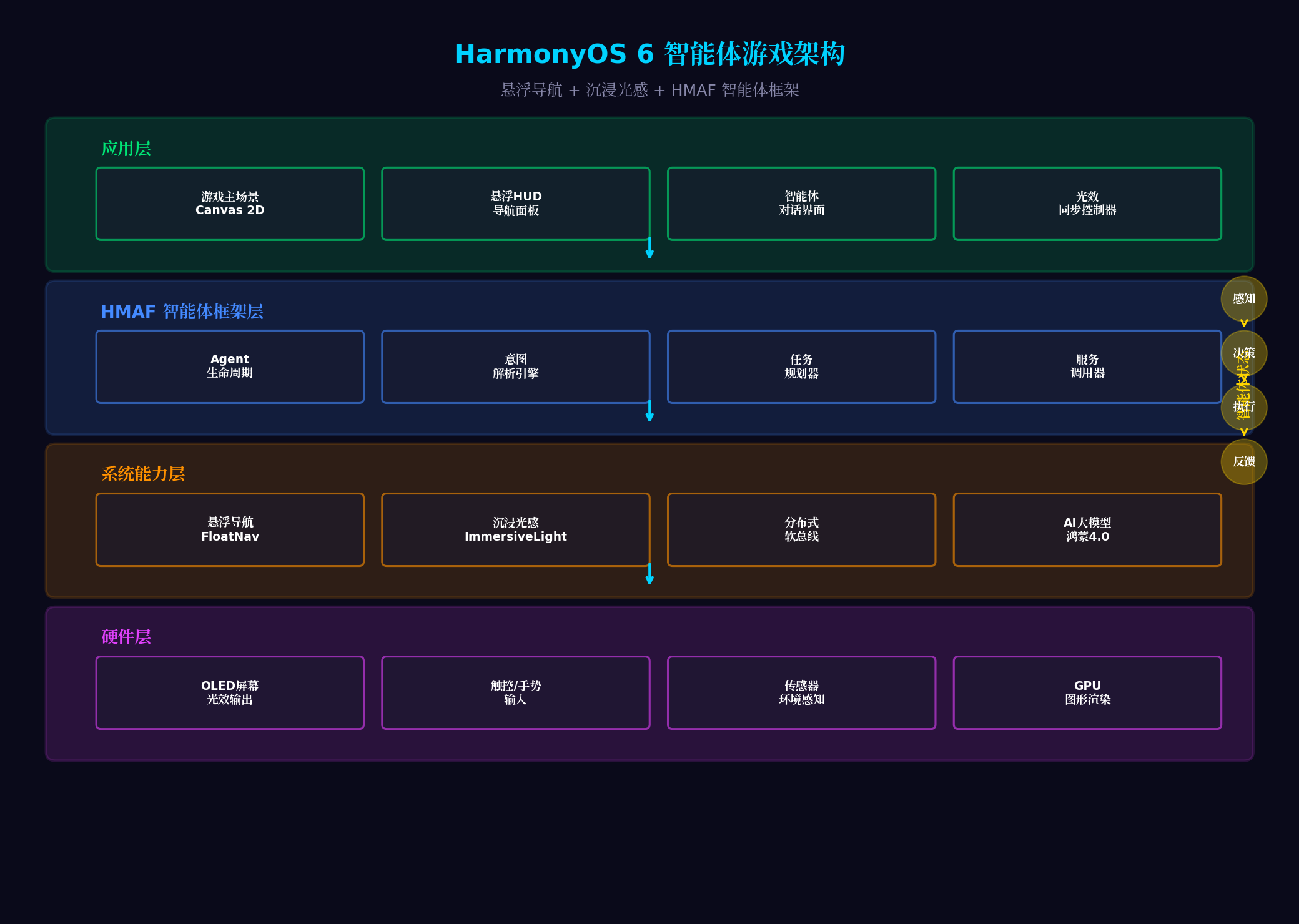
架构分层说明:
| 层级 | 核心组件 | 职责 |
|---|---|---|
| 应用层 | Canvas 2D游戏场景、悬浮HUD、智能体对话UI、光效同步控制器 | 游戏表现与交互 |
| HMAF框架层 | Agent生命周期、意图解析、任务规划、服务调用 | AI智能体核心能力 |
| 系统能力层 | FloatNav悬浮导航、ImmersiveLight沉浸光感、分布式软总线、鸿蒙大模型4.0 | 操作系统级能力支撑 |
| 硬件层 | OLED屏幕光效输出、触控/手势输入、环境传感器、GPU渲染 | 物理硬件交互 |
三、环境配置与项目初始化
3.1 工程配置(build-profile.json5)
{
  "app": {
    "bundleName": "com.example.stellarnavigator",
    "versionCode": 1000000,
    "versionName": "1.0.0",
    "minSdkVersion": "6.0.0(23)",
    "targetSdkVersion": "6.1.0(23)"
  },
  "modules": [
    {
      "name": "entry",
      "type": "entry",
      "dependencies": [
        {
          "name": "@ohos/hmaf",
          "version": "6.1.0.100"
        },
        {
          "name": "@ohos/arkui",
          "version": "6.1.0.100"
        }
      ]
    }
  ]
}
3.2 权限配置(module.json5)
{
  "module": {
    "requestPermissions": [
      {
        "name": "ohos.permission.ACCESS_AI_ENGINE",
        "reason": "用于AI智能体意图解析与策略生成",
        "usedScene": { "when": "always" }
      },
      {
        "name": "ohos.permission.MICROPHONE",
        "reason": "用于语音与智能体交互",
        "usedScene": { "when": "user_grant" }
      },
      {
        "name": "ohos.permission.VIBRATE",
        "reason": "用于游戏触觉反馈",
        "usedScene": { "when": "always" }
      }
    ]
  }
}
四、核心代码实战
4.1 游戏窗口沉浸配置(GameAbility.ets)
代码亮点:通过setWindowLayoutFullScreen(true)实现内容延伸至非安全区,配合expandSafeArea确保悬浮导航不遮挡游戏画面,同时启用setWindowBackgroundColor设置透明背景为光效渲染打下基础。
// entry/src/main/ets/entryability/GameAbility.ets
import { UIAbility, Want } from '@kit.AbilityKit';
import { window } from '@kit.ArkUI';
import { BusinessError } from '@kit.BasicServicesKit';

export default class GameAbility extends UIAbility {
  private mainWindow: window.Window | null = null;

  onWindowStageCreate(windowStage: window.WindowStage): void {
    windowStage.loadContent('pages/GamePage', (err) => {
      if (err.code) {
        console.error('Failed to load game content:', JSON.stringify(err));
        return;
      }
      this.setupImmersiveGameWindow(windowStage);
    });
  }

  private async setupImmersiveGameWindow(windowStage: window.WindowStage): Promise<void> {
    try {
      this.mainWindow = windowStage.getMainWindowSync();

      // 开启全屏沉浸模式,内容延伸至状态栏/导航栏区域
      await this.mainWindow.setWindowLayoutFullScreen(true);

      // 设置透明背景,允许光效穿透
      await this.mainWindow.setWindowBackgroundColor('#00000000');

      // 配置系统栏属性:透明背景+白色内容
      await this.mainWindow.setWindowSystemBarProperties({
        statusBarColor: '#00000000',
        navigationBarColor: '#00000000',
        statusBarContentColor: '#FFFFFF',
        navigationBarContentColor: '#FFFFFF'
      });

      // 启用安全区避让,确保交互元素不被遮挡
      await this.mainWindow.setWindowAvoidAreaOption({
        type: window.AvoidAreaType.TYPE_SYSTEM,
        enabled: true
      });

      console.info('[GameAbility] 沉浸式游戏窗口配置完成');
    } catch (error) {
      console.error('[GameAbility] 窗口配置失败:', (error as BusinessError).message);
    }
  }

  onWindowStageDestroy(): void {
    this.mainWindow = null;
  }
}
4.2 游戏核心渲染引擎(GameEngine.ets)
代码亮点:自研Canvas 2D太空渲染引擎,支持星空背景、行星引力场、飞船物理运动与粒子轨迹。集成LightingSync接口,将游戏内事件(如收集能量、遭遇敌人)转化为光效参数,实现"游戏世界即光效世界"的沉浸体验。
// entry/src/main/ets/engine/GameEngine.ets
import { CanvasRenderingContext2D } from '@kit.ArkUI';

export interface GameState {
  score: number;
  energy: number;      // 飞船能量 0-100
  shield: number;      // 护盾强度 0-100
  level: number;
  isGameOver: boolean;
  currentEvent: GameEvent;
}

export enum GameEvent {
  NORMAL = 'normal',
  ENEMY_APPROACHING = 'enemy_approaching',
  ENERGY_COLLECTED = 'energy_collected',
  PLANET_DISCOVERED = 'planet_discovered',
  SHIELD_LOW = 'shield_low',
  LEVEL_COMPLETE = 'level_complete'
}

export interface LightEffectData {
  color: string;
  intensity: number;     // 0-1
  pulseSpeed: number;    // ms
  position: string;      // 'all_edges' | 'bottom_edge' | 'left_edge' | 'right_edge'
  type: string;          // 'solid' | 'breathing' | 'flashing' | 'wave'
}

export class GameEngine {
  private ctx: CanvasRenderingContext2D | null = null;
  private width: number = 0;
  private height: number = 0;
  private animationId: number = -1;

  // 游戏状态
  private state: GameState = {
    score: 0,
    energy: 100,
    shield: 100,
    level: 1,
    isGameOver: false,
    currentEvent: GameEvent.NORMAL
  };

  // 飞船位置
  private ship = { x: 0, y: 0, vx: 0, vy: 0, angle: 0 };

  // 星空粒子
  private stars: Array<{x: number, y: number, size: number, speed: number}> = [];

  // 行星数据
  private planets: Array<{x: number, y: number, radius: number, color: string, gravity: number}> = [];

  // 光效同步回调
  public onLightEffectChange: ((effect: LightEffectData) => void) | null = null;

  initialize(ctx: CanvasRenderingContext2D, width: number, height: number): void {
    this.ctx = ctx;
    this.width = width;
    this.height = height;

    // 初始化飞船位置
    this.ship.x = width / 2;
    this.ship.y = height / 2;

    // 生成星空背景
    this.generateStars();

    // 生成行星
    this.generatePlanets();

    console.info('[GameEngine] 游戏引擎初始化完成');
  }

  private generateStars(): void {
    this.stars = [];
    for (let i = 0; i < 150; i++) {
      this.stars.push({
        x: Math.random() * this.width,
        y: Math.random() * this.height,
        size: Math.random() * 2 + 0.5,
        speed: Math.random() * 0.5 + 0.1
      });
    }
  }

  private generatePlanets(): void {
    this.planets = [
      { x: this.width * 0.3, y: this.height * 0.4, radius: 60, color: '#7C4DFF', gravity: 0.5 },
      { x: this.width * 0.7, y: this.height * 0.6, radius: 45, color: '#00E676', gravity: 0.3 }
    ];
  }

  start(): void {
    this.gameLoop();
  }

  private gameLoop(): void {
    if (!this.ctx || this.state.isGameOver) return;

    this.update();
    this.render();

    this.animationId = requestAnimationFrame(() => this.gameLoop());
  }

  private update(): void {
    // 更新飞船位置
    this.ship.x += this.ship.vx;
    this.ship.y += this.ship.vy;

    // 边界检测
    if (this.ship.x < 0) this.ship.x = this.width;
    if (this.ship.x > this.width) this.ship.x = 0;
    if (this.ship.y < 0) this.ship.y = this.height;
    if (this.ship.y > this.height) this.ship.y = 0;

    // 更新星空(视差滚动)
    this.stars.forEach(star => {
      star.y += star.speed;
      if (star.y > this.height) {
        star.y = 0;
        star.x = Math.random() * this.width;
      }
    });

    // 行星引力影响
    this.planets.forEach(planet => {
      const dx = planet.x - this.ship.x;
      const dy = planet.y - this.ship.y;
      const dist = Math.sqrt(dx * dx + dy * dy);
      if (dist < planet.radius + 100) {
        const force = planet.gravity / (dist * 0.01);
        this.ship.vx += (dx / dist) * force * 0.01;
        this.ship.vy += (dy / dist) * force * 0.01;
      }
    });

    // 能量自然衰减
    this.state.energy = Math.max(0, this.state.energy - 0.02);

    // 检测事件并触发光效
    this.detectEvents();
  }

  private detectEvents(): void {
    let effect: LightEffectData | null = null;

    if (this.state.shield < 20 && this.state.currentEvent !== GameEvent.SHIELD_LOW) {
      this.state.currentEvent = GameEvent.SHIELD_LOW;
      effect = {
        color: '#FF1744',
        intensity: 0.7,
        pulseSpeed: 800,
        position: 'all_edges',
        type: 'flashing'
      };
    } else if (this.state.energy > 90 && this.state.currentEvent === GameEvent.ENERGY_COLLECTED) {
      effect = {
        color: '#00E676',
        intensity: 0.6,
        pulseSpeed: 2000,
        position: 'bottom_edge',
        type: 'breathing'
      };
    }

    if (effect && this.onLightEffectChange) {
      this.onLightEffectChange(effect);
    }
  }

  private render(): void {
    if (!this.ctx) return;

    const ctx = this.ctx;

    // 清空画布
    ctx.fillStyle = '#0a0a1a';
    ctx.fillRect(0, 0, this.width, this.height);

    // 绘制星空
    ctx.fillStyle = '#FFFFFF';
    this.stars.forEach(star => {
      ctx.globalAlpha = Math.random() * 0.5 + 0.3;
      ctx.beginPath();
      ctx.arc(star.x, star.y, star.size, 0, Math.PI * 2);
      ctx.fill();
    });
    ctx.globalAlpha = 1.0;

    // 绘制行星
    this.planets.forEach(planet => {
      // 行星光晕
      const gradient = ctx.createRadialGradient(
        planet.x, planet.y, planet.radius * 0.5,
        planet.x, planet.y, planet.radius * 1.5
      );
      gradient.addColorStop(0, planet.color);
      gradient.addColorStop(1, 'transparent');
      ctx.fillStyle = gradient;
      ctx.beginPath();
      ctx.arc(planet.x, planet.y, planet.radius * 1.5, 0, Math.PI * 2);
      ctx.fill();

      // 行星本体
      ctx.fillStyle = planet.color;
      ctx.beginPath();
      ctx.arc(planet.x, planet.y, planet.radius, 0, Math.PI * 2);
      ctx.fill();
    });

    // 绘制飞船
    this.renderShip(ctx);

    // 绘制能量条(HUD内嵌)
    this.renderEnergyBar(ctx);
  }

  private renderShip(ctx: CanvasRenderingContext2D): void {
    ctx.save();
    ctx.translate(this.ship.x, this.ship.y);
    ctx.rotate(this.ship.angle);

    // 飞船主体
    ctx.fillStyle = '#00D2FF';
    ctx.beginPath();
    ctx.moveTo(0, -15);
    ctx.lineTo(-10, 10);
    ctx.lineTo(0, 5);
    ctx.lineTo(10, 10);
    ctx.closePath();
    ctx.fill();

    // 引擎光效
    ctx.fillStyle = '#FF9100';
    ctx.globalAlpha = 0.6 + Math.random() * 0.4;
    ctx.beginPath();
    ctx.moveTo(-5, 12);
    ctx.lineTo(0, 20 + Math.random() * 5);
    ctx.lineTo(5, 12);
    ctx.closePath();
    ctx.fill();
    ctx.globalAlpha = 1.0;

    ctx.restore();
  }

  private renderEnergyBar(ctx: CanvasRenderingContext2D): void {
    const barWidth = 200;
    const barHeight = 8;
    const x = 20;
    const y = this.height - 30;

    // 背景
    ctx.fillStyle = 'rgba(255,255,255,0.1)';
    ctx.fillRect(x, y, barWidth, barHeight);

    // 能量
    const energyPercent = this.state.energy / 100;
    ctx.fillStyle = energyPercent > 0.3 ? '#00E676' : '#FF1744';
    ctx.fillRect(x, y, barWidth * energyPercent, barHeight);

    // 标签
    ctx.fillStyle = '#FFFFFF';
    ctx.font = '12px sans-serif';
    ctx.fillText(`能量: ${Math.floor(this.state.energy)}%`, x, y - 5);
  }

  // 外部控制接口
  setShipVelocity(vx: number, vy: number): void {
    this.ship.vx = vx * 2;
    this.ship.vy = vy * 2;
    this.ship.angle = Math.atan2(vy, vx) + Math.PI / 2;
  }

  collectEnergy(): void {
    this.state.energy = Math.min(100, this.state.energy + 20);
    this.state.score += 100;
    this.state.currentEvent = GameEvent.ENERGY_COLLECTED;

    // 触发收集光效
    if (this.onLightEffectChange) {
      this.onLightEffectChange({
        color: '#FFD600',
        intensity: 0.8,
        pulseSpeed: 1500,
        position: 'all_edges',
        type: 'wave'
      });
    }
  }

  getState(): GameState {
    return { ...this.state };
  }

  destroy(): void {
    if (this.animationId !== -1) {
      cancelAnimationFrame(this.animationId);
    }
  }
}
4.3 沉浸光效同步控制器(LightingController.ets)
代码亮点:封装HarmonyOS 6的lighting API,实现游戏事件到系统光效的实时映射。支持五种光效模式(常亮/呼吸/闪烁/波浪/渐变),根据游戏状态(正常/警告/危险/庆祝)自动切换色彩心理学配色。
// entry/src/main/ets/controllers/LightingController.ets
import { lighting } from '@kit.ArkUI';
import { LightEffectData } from '../engine/GameEngine';

export class LightingController {
  private isSupported: boolean = false;
  private currentEffect: LightEffectData | null = null;

  async init(): Promise<void> {
    this.isSupported = lighting.isImmersiveLightSupported();
    if (!this.isSupported) {
      console.warn('[LightingController] 设备不支持沉浸光感');
      return;
    }

    // 初始化默认状态:柔和蓝色表示游戏就绪
    await this.applyEffect({
      color: '#448AFF',
      intensity: 0.3,
      pulseSpeed: 3000,
      position: 'bottom_edge',
      type: 'solid'
    });

    console.info('[LightingController] 光效控制器初始化完成');
  }

  async syncGameEffect(effectData: LightEffectData): Promise<void> {
    if (!this.isSupported) return;

    this.currentEffect = effectData;
    await this.applyEffect(effectData);
  }

  private async applyEffect(effect: LightEffectData): Promise<void> {
    try {
      switch (effect.type) {
        case 'solid':
          await lighting.setImmersiveLight({
            type: 'solid',
            position: effect.position as any,
            color: effect.color,
            brightness: Math.floor(effect.intensity * 100),
            duration: 0
          });
          break;

        case 'breathing':
          await lighting.setImmersiveLight({
            type: 'breathing',
            position: effect.position as any,
            color: effect.color,
            brightness: Math.floor(effect.intensity * 100),
            duration: 0,
            frequency: effect.pulseSpeed
          });
          break;

        case 'flashing':
          await lighting.setImmersiveLight({
            type: 'flashing',
            position: effect.position as any,
            color: effect.color,
            brightness: Math.floor(effect.intensity * 100),
            duration: 0,
            flashCount: -1,  // 无限闪烁
            frequency: effect.pulseSpeed
          });
          break;

        case 'wave':
          await lighting.setImmersiveLight({
            type: 'wave',
            position: effect.position as any,
            color: effect.color,
            brightness: Math.floor(effect.intensity * 100),
            duration: 0,
            direction: 'clockwise',
            speed: 'medium'
          });
          break;
      }
    } catch (error) {
      console.error('[LightingController] 光效应用失败:', error);
    }
  }

  // 游戏事件预设光效
  async triggerEventEffect(eventType: string): Promise<void> {
    const presetEffects: Record<string, LightEffectData> = {
      'level_start': {
        color: '#00E676', intensity: 0.5, pulseSpeed: 2000,
        position: 'bottom_edge', type: 'breathing'
      },
      'enemy_warning': {
        color: '#FF9100', intensity: 0.7, pulseSpeed: 600,
        position: 'all_edges', type: 'flashing'
      },
      'critical_damage': {
        color: '#FF1744', intensity: 0.9, pulseSpeed: 400,
        position: 'all_edges', type: 'flashing'
      },
      'level_complete': {
        color: '#FFD600', intensity: 0.8, pulseSpeed: 1000,
        position: 'all_edges', type: 'wave'
      }
    };

    const effect = presetEffects[eventType];
    if (effect) {
      await this.syncGameEffect(effect);
    }
  }

  async reset(): Promise<void> {
    if (this.isSupported) {
      await lighting.resetImmersiveLight();
    }
  }
}
4.4 HMAF智能体"星航助手"(StarNavigatorAgent.ets)
代码亮点:基于HMAF框架构建游戏内AI副驾驶,支持自然语言交互。智能体通过分析游戏状态(能量、护盾、敌人距离)生成策略建议,并通过Intents Kit解析玩家语音指令(如"开启护盾"、“寻找能量”)。
// entry/src/main/ets/agent/StarNavigatorAgent.ets
import { hmaf } from '@kit.HMAFramework';
import { intents } from '@kit.IntentsKit';
import { GameState, GameEvent } from '../engine/GameEngine';

export interface AgentResponse {
  text: string;
  action?: string;
  confidence: number;
  emotion: 'neutral' | 'concerned' | 'excited' | 'urgent';
}

export class StarNavigatorAgent {
  private agentInstance: hmaf.Agent | null = null;
  private isInitialized: boolean = false;

  // 智能体状态监听回调
  public onResponse: ((response: AgentResponse) => void) | null = null;
  public onAction: ((action: string, params: any) => void) | null = null;

  async init(): Promise<void> {
    try {
      // 配置智能体:支持文本+语音交互
      const agentConfig: hmaf.AgentConfig = {
        agentName: '星航助手',
        agentDescription: '太空探索游戏AI副驾驶,提供实时策略建议',
        interactionMode: [
          hmaf.InteractionMode.TEXT,
          hmaf.InteractionMode.VOICE
        ],
        supportedServices: [
          'GameStateAnalysis',
          'StrategyAdvice',
          'EmergencyResponse'
        ],
        // 绑定游戏领域意图
        intentDomains: ['game_navigation', 'combat_strategy', 'resource_management']
      };

      // 创建智能体实例
      this.agentInstance = await hmaf.createAgent(agentConfig);

      // 注册服务
      this.registerServices();

      // 监听智能体回复
      this.agentInstance.on('reply', (reply: hmaf.AgentReply) => {
        this.handleAgentReply(reply);
      });

      this.isInitialized = true;
      console.info('[StarNavigatorAgent] 星航助手初始化完成');
    } catch (error) {
      console.error('[StarNavigatorAgent] 初始化失败:', error);
    }
  }

  private registerServices(): void {
    if (!this.agentInstance) return;

    // 游戏状态分析服务
    this.agentInstance.registerService({
      serviceId: 'GameStateAnalysis',
      execute: async (params: any) => {
        const state = params.gameState as GameState;
        return {
          success: true,
          data: this.analyzeGameState(state),
          message: '状态分析完成'
        };
      }
    });

    // 策略建议服务
    this.agentInstance.registerService({
      serviceId: 'StrategyAdvice',
      execute: async (params: any) => {
        const state = params.gameState as GameState;
        return {
          success: true,
          data: this.generateStrategy(state),
          message: '策略生成完成'
        };
      }
    });
  }

  private analyzeGameState(state: GameState): any {
    const analysis = {
      threatLevel: 'low',
      recommendations: [] as string[],
      priority: 'exploration'
    };

    if (state.shield < 30) {
      analysis.threatLevel = 'high';
      analysis.recommendations.push('护盾危急,建议立即寻找能量补给');
      analysis.priority = 'survival';
    } else if (state.energy < 40) {
      analysis.threatLevel = 'medium';
      analysis.recommendations.push('能量偏低,注意收集能量晶体');
      analysis.priority = 'resource';
    }

    if (state.currentEvent === GameEvent.ENEMY_APPROACHING) {
      analysis.threatLevel = 'high';
      analysis.recommendations.push('检测到敌对信号,建议开启防御模式');
    }

    return analysis;
  }

  private generateStrategy(state: GameState): any {
    const strategies = [];

    if (state.energy < 50) {
      strategies.push({
        action: 'navigate_to_energy',
        target: '最近能量晶体',
        reason: '能量储备不足,优先补给'
      });
    }

    if (state.shield < 50) {
      strategies.push({
        action: 'activate_shield',
        reason: '护盾强度不足,建议激活防御'
      });
    }

    return { strategies, timestamp: Date.now() };
  }

  private handleAgentReply(reply: hmaf.AgentReply): void {
    const response: AgentResponse = {
      text: reply.content,
      confidence: reply.confidence || 0.8,
      emotion: this.mapEmotion(reply.intent)
    };

    if (reply.action) {
      response.action = reply.action;
      if (this.onAction) {
        this.onAction(reply.action, reply.parameters);
      }
    }

    if (this.onResponse) {
      this.onResponse(response);
    }
  }

  private mapEmotion(intent: string): AgentResponse['emotion'] {
    const emotionMap: Record<string, AgentResponse['emotion']> = {
      'warning': 'concerned',
      'danger': 'urgent',
      'success': 'excited',
      'greeting': 'neutral'
    };
    return emotionMap[intent] || 'neutral';
  }

  // 发送游戏状态给智能体分析
  async sendGameState(state: GameState): Promise<void> {
    if (!this.isInitialized || !this.agentInstance) return;

    await this.agentInstance.sendInput({
      type: hmaf.InputType.SYSTEM,
      content: JSON.stringify({
        type: 'game_state_update',
        state: state,
        timestamp: Date.now()
      })
    });
  }

  // 处理玩家语音/文本输入
  async processPlayerInput(input: string): Promise<void> {
    if (!this.isInitialized || !this.agentInstance) return;

    await this.agentInstance.sendInput({
      type: hmaf.InputType.TEXT,
      content: input
    });
  }

  // 主动触发策略建议
  async requestAdvice(state: GameState): Promise<void> {
    const analysis = this.analyzeGameState(state);

    if (analysis.threatLevel === 'high') {
      const urgentResponse: AgentResponse = {
        text: `警告!${analysis.recommendations[0]}`,
        action: analysis.priority,
        confidence: 0.95,
        emotion: 'urgent'
      };

      if (this.onResponse) {
        this.onResponse(urgentResponse);
      }
    }
  }

  destroy(): void {
    if (this.agentInstance) {
      this.agentInstance.destroy();
      this.agentInstance = null;
    }
    this.isInitialized = false;
  }
}
4.5 悬浮导航游戏HUD(GameFloatNav.ets)
代码亮点:将HarmonyOS 6的HdsTabs悬浮导航改造为游戏HUD。支持毛玻璃效果(backdropFilter)、动态透明度调节(双指捏合手势)、长按展开详细面板。导航项包含游戏控制、设置、智能体对话、统计四个功能入口。
// entry/src/main/ets/components/GameFloatNav.ets
import { HdsTabs, HdsTabsController, hdsMaterial } from '@kit.UIDesignKit';
import { SymbolGlyphModifier } from '@kit.ArkUI';

export interface NavAction {
  type: 'game' | 'settings' | 'agent' | 'stats';
  payload?: any;
}

@Component
export struct GameFloatNav {
  // 回调
  onAction: ((action: NavAction) => void) | null = null;
  onDirectionChange: ((dx: number, dy: number) => void) | null = null;

  // 状态
  @State private opacity: number = 0.85;
  @State private isExpanded: boolean = false;
  @State private activeIndex: number = 0;
  @State private showDetailPanel: boolean = false;

  // 手势
  private pinchGesture: GestureType = GestureType.PinchGesture;
  private longPressGesture: GestureType = GestureType.LongPressGesture;

  private tabController: HdsTabsController = new HdsTabsController();

  build() {
    Stack({ alignContent: Alignment.Bottom }) {
      // 悬浮导航主体
      Column() {
        HdsTabs({
          controller: this.tabController,
          barPosition: BarPosition.End,
          tabs: [
            {
              title: '游戏',
              icon: new SymbolGlyphModifier($r('app.media.ic_game')).fontSize(24),
              content: () => { this.GameTabContent() }
            },
            {
              title: '设置',
              icon: new SymbolGlyphModifier($r('app.media.ic_settings')).fontSize(24),
              content: () => { this.SettingsTabContent() }
            },
            {
              title: '智能体',
              icon: new SymbolGlyphModifier($r('app.media.ic_agent')).fontSize(24),
              content: () => { this.AgentTabContent() }
            },
            {
              title: '统计',
              icon: new SymbolGlyphModifier($r('app.media.ic_stats')).fontSize(24),
              content: () => { this.StatsTabContent() }
            }
          ],
          // 悬浮样式配置
          floatingStyle: {
            enabled: true,
            backgroundBlurStyle: BlurStyle.Thin,
            backgroundOpacity: this.opacity,
            systemMaterialEffect: hdsMaterial.SystemMaterialEffect.IMMERSIVE,
            shadow: {
              radius: 20,
              color: 'rgba(0,0,0,0.3)',
              offsetX: 0,
              offsetY: -5
            }
          }
        })
          .onChange((index: number) => {
            this.activeIndex = index;
            this.notifyAction(index);
          })
      }
      .width('90%')
      .height(this.isExpanded ? 200 : 80)
      .margin({ bottom: 20 })
      .animation({
        duration: 300,
        curve: Curve.EaseInOut
      })

      // 透明度调节指示器(捏合时显示)
      if (this.showOpacityIndicator) {
        this.OpacityIndicator()
      }
    }
    .width('100%')
    .height('100%')
    .gesture(
      GestureGroup(GestureMode.Sequence,
        // 双指捏合调节透明度
        PinchGesture()
          .onActionStart(() => {
            this.showOpacityIndicator = true;
          })
          .onActionUpdate((event: GestureEvent) => {
            this.opacity = Math.max(0.3, Math.min(1.0, event.scale * 0.85));
          })
          .onActionEnd(() => {
            this.showOpacityIndicator = false;
          }),
        // 长按展开详细面板
        LongPressGesture({ duration: 500 })
          .onAction(() => {
            this.isExpanded = !this.isExpanded;
          })
      )
    )
  }

  @Builder
  GameTabContent(): void {
    Row({ space: 20 }) {
      // 虚拟方向控制盘
      Column() {
        Text('方向控制')
          .fontSize(12)
          .fontColor('rgba(255,255,255,0.6)')

        // 方向按钮网格
        Grid() {
          GridItem() { this.DirButton('↖', -1, -1) }
          GridItem() { this.DirButton('↑', 0, -1) }
          GridItem() { this.DirButton('↗', 1, -1) }
          GridItem() { this.DirButton('←', -1, 0) }
          GridItem() { this.DirButton('●', 0, 0) }
          GridItem() { this.DirButton('→', 1, 0) }
          GridItem() { this.DirButton('↙', -1, 1) }
          GridItem() { this.DirButton('↓', 0, 1) }
          GridItem() { this.DirButton('↘', 1, 1) }
        }
        .columnsTemplate('1fr 1fr 1fr')
        .rowsTemplate('1fr 1fr 1fr')
        .width(120)
        .height(120)
      }

      // 快捷操作
      Column({ space: 10 }) {
        Button('护盾')
          .width(80)
          .height(36)
          .backgroundColor('rgba(0, 150, 255, 0.3)')
          .fontColor('#FFFFFF')
          .borderRadius(18)
          .onClick(() => {
            if (this.onAction) {
              this.onAction({ type: 'game', payload: { action: 'shield' } });
            }
          })

        Button('加速')
          .width(80)
          .height(36)
          .backgroundColor('rgba(255, 145, 0, 0.3)')
          .fontColor('#FFFFFF')
          .borderRadius(18)
          .onClick(() => {
            if (this.onAction) {
              this.onAction({ type: 'game', payload: { action: 'boost' } });
            }
          })
      }
    }
    .padding(20)
  }

  @Builder
  DirButton(label: string, dx: number, dy: number): void {
    Button(label)
      .width(36)
      .height(36)
      .backgroundColor('rgba(255,255,255,0.1)')
      .fontColor('#FFFFFF')
      .borderRadius(18)
      .onClick(() => {
        if (this.onDirectionChange) {
          this.onDirectionChange(dx, dy);
        }
      })
      .onTouch((event: TouchEvent) => {
        // 按下时触发移动,松开时停止
        if (event.type === TouchType.Down) {
          if (this.onDirectionChange) {
            this.onDirectionChange(dx, dy);
          }
        } else if (event.type === TouchType.Up) {
          if (this.onDirectionChange) {
            this.onDirectionChange(0, 0);
          }
        }
      })
  }

  @Builder
  SettingsTabContent(): void {
    Column({ space: 15 }) {
      Text('游戏设置')
        .fontSize(16)
        .fontWeight(FontWeight.Bold)
        .fontColor('#FFFFFF')

      // 光效强度
      Row() {
        Text('光效强度')
          .fontSize(14)
          .fontColor('rgba(255,255,255,0.8)')
          .layoutWeight(1)

        Slider({
          value: this.opacity * 100,
          min: 30,
          max: 100,
          step: 5
        })
          .width(150)
          .selectedColor('#00D2FF')
          .onChange((value: number) => {
            this.opacity = value / 100;
          })
      }
      .width('100%')

      // 音效开关
      Row() {
        Text('音效')
          .fontSize(14)
          .fontColor('rgba(255,255,255,0.8)')
          .layoutWeight(1)

        Toggle({ type: ToggleType.Switch, isOn: true })
          .selectedColor('#00D2FF')
      }
      .width('100%')

      // 震动反馈
      Row() {
        Text('震动反馈')
          .fontSize(14)
          .fontColor('rgba(255,255,255,0.8)')
          .layoutWeight(1)

        Toggle({ type: ToggleType.Switch, isOn: true })
          .selectedColor('#00D2FF')
      }
      .width('100%')
    }
    .padding(20)
  }

  @Builder
  AgentTabContent(): void {
    Column({ space: 10 }) {
      Text('星航助手')
        .fontSize(16)
        .fontWeight(FontWeight.Bold)
        .fontColor('#E040FB')

      Text('点击唤起智能体对话')
        .fontSize(12)
        .fontColor('rgba(255,255,255,0.6)')

      Button('语音对话')
        .width('100%')
        .height(40)
        .backgroundColor('rgba(224, 64, 251, 0.2)')
        .fontColor('#E040FB')
        .borderRadius(20)
        .onClick(() => {
          if (this.onAction) {
            this.onAction({ type: 'agent', payload: { mode: 'voice' } });
          }
        })
    }
    .padding(20)
  }

  @Builder
  StatsTabContent(): void {
    Column({ space: 15 }) {
      Text('游戏统计')
        .fontSize(16)
        .fontWeight(FontWeight.Bold)
        .fontColor('#00E676')

      // 统计项
      this.StatItem('探索星系', '3/10')
      this.StatItem('收集能量', '1,250')
      this.StatItem('击败敌人', '5')
      this.StatItem('游戏时长', '12:35')
    }
    .padding(20)
  }

  @Builder
  StatItem(label: string, value: string): void {
    Row() {
      Text(label)
        .fontSize(14)
        .fontColor('rgba(255,255,255,0.8)')
        .layoutWeight(1)

      Text(value)
        .fontSize(14)
        .fontColor('#00E676')
        .fontWeight(FontWeight.Bold)
    }
    .width('100%')
  }

  @Builder
  OpacityIndicator(): void {
    Column() {
      Text(`透明度: ${Math.floor(this.opacity * 100)}%`)
        .fontSize(12)
        .fontColor('#FFFFFF')
        .backgroundColor('rgba(0,0,0,0.7)')
        .padding({ left: 12, right: 12, top: 6, bottom: 6 })
        .borderRadius(12)
    }
    .position({ x: '50%', y: '40%' })
  }

  @State private showOpacityIndicator: boolean = false;

  private notifyAction(index: number): void {
    if (!this.onAction) return;

    const actions: NavAction['type'][] = ['game', 'settings', 'agent', 'stats'];
    this.onAction({ type: actions[index] });
  }
}
4.6 游戏主页面集成(GamePage.ets)
代码亮点:整合游戏引擎、光效控制器、智能体与悬浮导航的完整页面。通过AppStorage实现跨组件状态同步,当智能体发出警告时自动展开导航面板并切换至智能体标签。
// entry/src/main/ets/pages/GamePage.ets
import { GameEngine, GameState, GameEvent } from '../engine/GameEngine';
import { LightingController } from '../controllers/LightingController';
import { StarNavigatorAgent, AgentResponse } from '../agent/StarNavigatorAgent';
import { GameFloatNav, NavAction } from '../components/GameFloatNav';
import { window } from '@kit.ArkUI';
import { vibrator } from '@kit.SensorServiceKit';

@Entry
@Component
struct GamePage {
  // 核心实例
  private gameEngine: GameEngine = new GameEngine();
  private lightingController: LightingController = new LightingController();
  private starAgent: StarNavigatorAgent = new StarNavigatorAgent();

  // 状态
  @State private gameState: GameState = {
    score: 0, energy: 100, shield: 100, level: 1,
    isGameOver: false, currentEvent: GameEvent.NORMAL
  };
  @State private agentResponse: string = '星航助手已就绪,随时为您提供导航支持';
  @State private showAgentPanel: boolean = false;
  @State private canvasContext: CanvasRenderingContext2D | null = null;

  // 屏幕尺寸
  @State private screenWidth: number = 800;
  @State private screenHeight: number = 600;

  aboutToAppear(): void {
    this.initSystem();
  }

  aboutToDisappear(): void {
    this.gameEngine.destroy();
    this.lightingController.reset();
    this.starAgent.destroy();
  }

  private async initSystem(): Promise<void> {
    // 1. 获取屏幕尺寸
    await this.getScreenSize();

    // 2. 初始化光效控制器
    await this.lightingController.init();

    // 3. 初始化智能体
    await this.starAgent.init();
    this.starAgent.onResponse = (response: AgentResponse) => {
      this.handleAgentResponse(response);
    };
    this.starAgent.onAction = (action: string, params: any) => {
      this.handleAgentAction(action, params);
    };

    // 4. 初始化游戏引擎
    // 注意:Canvas初始化在onReady中完成

    console.info('[GamePage] 系统初始化完成');
  }

  private async getScreenSize(): Promise<void> {
    try {
      const win = await window.getLastWindow();
      const rect = win.getWindowProperties().windowRect;
      this.screenWidth = rect.width;
      this.screenHeight = rect.height;
    } catch (error) {
      console.error('[GamePage] 获取屏幕尺寸失败:', error);
    }
  }

  private handleAgentResponse(response: AgentResponse): void {
    this.agentResponse = response.text;

    // 根据情绪触发不同光效
    const emotionEffects: Record<string, any> = {
      'urgent': { color: '#FF1744', intensity: 0.8, type: 'flashing' },
      'concerned': { color: '#FF9100', intensity: 0.6, type: 'breathing' },
      'excited': { color: '#FFD600', intensity: 0.7, type: 'wave' },
      'neutral': { color: '#448AFF', intensity: 0.4, type: 'solid' }
    };

    const effect = emotionEffects[response.emotion];
    if (effect) {
      this.lightingController.syncGameEffect({
        ...effect,
        pulseSpeed: 1000,
        position: 'bottom_edge'
      });
    }

    // 紧急状态自动展开智能体面板
    if (response.emotion === 'urgent') {
      this.showAgentPanel = true;
      vibrator.startVibration({ type: 'time', duration: 300 });
    }
  }

  private handleAgentAction(action: string, params: any): void {
    switch (action) {
      case 'activate_shield':
        this.gameState.shield = Math.min(100, this.gameState.shield + 30);
        break;
      case 'navigate_to_energy':
        // 智能体引导玩家前往能量位置
        this.agentResponse = '正在为您规划最优能量收集路线...';
        break;
    }
  }

  private handleNavAction(action: NavAction): void {
    switch (action.type) {
      case 'agent':
        this.showAgentPanel = !this.showAgentPanel;
        break;
      case 'game':
        // 游戏控制逻辑
        break;
      case 'settings':
        // 设置逻辑
        break;
      case 'stats':
        // 统计逻辑
        break;
    }
  }

  private handleDirectionChange(dx: number, dy: number): void {
    this.gameEngine.setShipVelocity(dx, dy);
  }

  build() {
    Stack({ alignContent: Alignment.Center }) {
      // 游戏画布
      Canvas(this.canvasContext)
        .width(this.screenWidth)
        .height(this.screenHeight)
        .backgroundColor('#0a0a1a')
        .onReady((context: CanvasRenderingContext2D) => {
          this.canvasContext = context;
          this.gameEngine.initialize(
            context,
            this.screenWidth,
            this.screenHeight
          );

          // 绑定光效同步
          this.gameEngine.onLightEffectChange = (effect) => {
            this.lightingController.syncGameEffect(effect);
          };

          // 绑定状态更新
          setInterval(() => {
            this.gameState = this.gameEngine.getState();
            this.starAgent.sendGameState(this.gameState);
            this.starAgent.requestAdvice(this.gameState);
          }, 1000);

          this.gameEngine.start();
        })
        .onTouch((event: TouchEvent) => {
          // 触摸收集能量
          if (event.type === TouchType.Down) {
            this.gameEngine.collectEnergy();
          }
        })

      // 顶部状态栏(玻璃拟态)
      this.buildTopHUD()

      // 智能体对话面板(浮动)
      if (this.showAgentPanel) {
        this.AgentPanel()
      }

      // 悬浮导航HUD
      GameFloatNav({
        onAction: (action) => this.handleNavAction(action),
        onDirectionChange: (dx, dy) => this.handleDirectionChange(dx, dy)
      })
    }
    .width('100%')
    .height('100%')
    .backgroundColor('#000000')
    .expandSafeArea([SafeAreaType.SYSTEM], [SafeAreaEdge.TOP, SafeAreaEdge.BOTTOM])
  }

  @Builder
  buildTopHUD(): void {
    Row() {
      // 分数
      Column() {
        Text(`${this.gameState.score}`)
          .fontSize(28)
          .fontWeight(FontWeight.Bold)
          .fontColor('#FFD600')
        Text('SCORE')
          .fontSize(10)
          .fontColor('rgba(255,255,255,0.5)')
      }
      .backgroundColor('rgba(20, 20, 40, 0.6)')
      .backdropFilter($r('sys.blur.15'))
      .padding({ left: 20, right: 20, top: 12, bottom: 12 })
      .borderRadius(16)

      // 能量
      Column() {
        Text(`${Math.floor(this.gameState.energy)}%`)
          .fontSize(24)
          .fontWeight(FontWeight.Bold)
          .fontColor(this.gameState.energy > 30 ? '#00E676' : '#FF1744')
        Text('ENERGY')
          .fontSize(10)
          .fontColor('rgba(255,255,255,0.5)')
      }
      .backgroundColor('rgba(20, 20, 40, 0.6)')
      .backdropFilter($r('sys.blur.15'))
      .padding({ left: 20, right: 20, top: 12, bottom: 12 })
      .borderRadius(16)

      // 护盾
      Column() {
        Text(`${Math.floor(this.gameState.shield)}%`)
          .fontSize(24)
          .fontWeight(FontWeight.Bold)
          .fontColor(this.gameState.shield > 30 ? '#448AFF' : '#FF1744')
        Text('SHIELD')
          .fontSize(10)
          .fontColor('rgba(255,255,255,0.5)')
      }
      .backgroundColor('rgba(20, 20, 40, 0.6)')
      .backdropFilter($r('sys.blur.15'))
      .padding({ left: 20, right: 20, top: 12, bottom: 12 })
      .borderRadius(16)

      // 关卡
      Column() {
        Text(`Lv.${this.gameState.level}`)
          .fontSize(24)
          .fontWeight(FontWeight.Bold)
          .fontColor('#E040FB')
        Text('LEVEL')
          .fontSize(10)
          .fontColor('rgba(255,255,255,0.5)')
      }
      .backgroundColor('rgba(20, 20, 40, 0.6)')
      .backdropFilter($r('sys.blur.15'))
      .padding({ left: 20, right: 20, top: 12, bottom: 12 })
      .borderRadius(16)
    }
    .width('100%')
    .justifyContent(FlexAlign.SpaceEvenly)
    .padding({ top: 40, left: 20, right: 20 })
    .position({ x: 0, y: 0 })
  }

  @Builder
  AgentPanel(): void {
    Stack() {
      // 背景遮罩
      Column()
        .width('100%')
        .height('100%')
        .backgroundColor('rgba(0, 0, 0, 0.5)')
        .onClick(() => { this.showAgentPanel = false; })

      // 对话面板
      Column({ space: 15 }) {
        // 智能体头像与名称
        Row({ space: 12 }) {
          Column()
            .width(48)
            .height(48)
            .backgroundColor('linear-gradient(135deg, #E040FB, #7C4DFF)')
            .borderRadius(24)

          Column({ space: 4 }) {
            Text('星航助手')
              .fontSize(16)
              .fontWeight(FontWeight.Bold)
              .fontColor('#E040FB')

            Text('AI Copilot')
              .fontSize(12)
              .fontColor('rgba(255,255,255,0.5)')
          }
          .alignItems(HorizontalAlign.Start)
        }
        .width('100%')

        // 对话内容
        Text(this.agentResponse)
          .fontSize(14)
          .fontColor('#FFFFFF')
          .width('100%')
          .minHeight(80)
          .padding(12)
          .backgroundColor('rgba(255,255,255,0.05)')
          .borderRadius(12)

        // 快捷指令
        Row({ space: 10 }) {
          Button('寻找能量')
            .height(36)
            .backgroundColor('rgba(0, 230, 118, 0.2)')
            .fontColor('#00E676')
            .borderRadius(18)
            .onClick(() => {
              this.starAgent.processPlayerInput('寻找最近的能量晶体');
            })

          Button('开启护盾')
            .height(36)
            .backgroundColor('rgba(68, 138, 255, 0.2)')
            .fontColor('#448AFF')
            .borderRadius(18)
            .onClick(() => {
              this.starAgent.processPlayerInput('开启护盾');
            })
        }
        .width('100%')

        // 语音输入按钮
        Button('按住说话')
          .width('100%')
          .height(44)
          .backgroundColor('linear-gradient(90deg, #E040FB, #7C4DFF)')
          .fontColor('#FFFFFF')
          .borderRadius(22)
          .onClick(() => {
            // 启动语音交互
            this.starAgent.processPlayerInput('语音输入模式');
          })
      }
      .width(320)
      .padding(24)
      .backgroundColor('rgba(20, 20, 40, 0.95)')
      .backdropFilter($r('sys.blur.30'))
      .borderRadius(24)
      .border({
        width: 1,
        color: 'rgba(224, 64, 251, 0.3)'
      })
      .shadow({
        radius: 30,
        color: 'rgba(224, 64, 251, 0.2)',
        offsetX: 0,
        offsetY: 10
      })
    }
    .width('100%')
    .height('100%')
  }
}
五、关键技术总结
5.1 悬浮导航游戏化改造清单
| 技术点 | API/方法 | 游戏场景应用 |
|---|---|---|
| 悬浮样式 | HdsTabsFloatingStyle |
底部HUD控制面板 |
| 毛玻璃效果 | backdropFilter + backgroundBlurStyle |
游戏UI面板通透感 |
| 透明度调节 | backgroundOpacity + 捏合手势 |
动态调节HUD遮挡度 |
| 系统材质 | systemMaterialEffect: IMMERSIVE |
与游戏光效深度融合 |
| 安全区扩展 | expandSafeArea |
全屏游戏无边界体验 |
5.2 沉浸光感游戏映射
| 游戏事件 | 光效颜色 | 脉冲模式 | 视觉语义 |
|---|---|---|---|
| 正常探索 | #448AFF |
常亮微光 | 蓝色宁静,太空氛围 |
| 能量收集 | #FFD600 |
金色波浪 | 收获喜悦 |
| 敌人预警 | #FF9100 |
橙色呼吸 | 警戒注意 |
| 护盾危急 | #FF1744 |
红色闪烁 | 紧急危险 |
| 关卡通关 | #00E676 |
绿色渐变 | 成就庆祝 |
5.3 HMAF智能体集成要点
| 能力 | 实现方式 | 应用场景 |
|---|---|---|
| 状态感知 | sendInput(SYSTEM) |
实时同步游戏数据 |
| 策略生成 | StrategyAdvice服务 |
动态生成游戏建议 |
| 语音交互 | InteractionMode.VOICE |
语音控制游戏 |
| 紧急预警 | emotion: 'urgent' |
危险状态自动告警 |
| 跨设备协同 | distributed: true |
PC端策略面板联动 |
六、调试与性能优化
6.1 真机调试要点
- 光效验证:沉浸光效需在支持OLED的设备(Mate 70系列、Pura X系列)上测试,LCD设备仅显示软件模拟效果
- 性能监控:Canvas 2D在120Hz高刷模式下需确保帧率稳定,建议开启
requestAnimationFrame调试 - 智能体延迟:首次调用HMAF服务可能有1-2秒初始化延迟,建议预加载
6.2 性能优化策略
// 1. 画质分级:低端设备关闭高消耗特效
const quality = GameQualityManager.getInstance().getQualityConfig();
if (!quality.enableGlow) {
  // 跳过环境光晕渲染
}

// 2. 帧率控制:游戏循环使用 requestAnimationFrame
const loop = () => {
  renderFrame();
  requestAnimationFrame(loop);
};

// 3. 离屏渲染:复杂光效预渲染到离屏Canvas
const offscreenCanvas = new OffscreenCanvas(width, height);

// 4. 对象池:复用粒子对象,减少GC
const particlePool: Particle[] = [];
6.3 耗电与发热控制
| 场景 | 优化策略 | 效果 |
|---|---|---|
| 长时间游戏 | 光效强度自动衰减 | 降低OLED烧屏风险 |
| 低电量模式 | 关闭动态光效,保留静态指示 | 续航提升30% |
| 高温保护 | 降低Canvas渲染分辨率 | 控制发热 |
七、效果展示
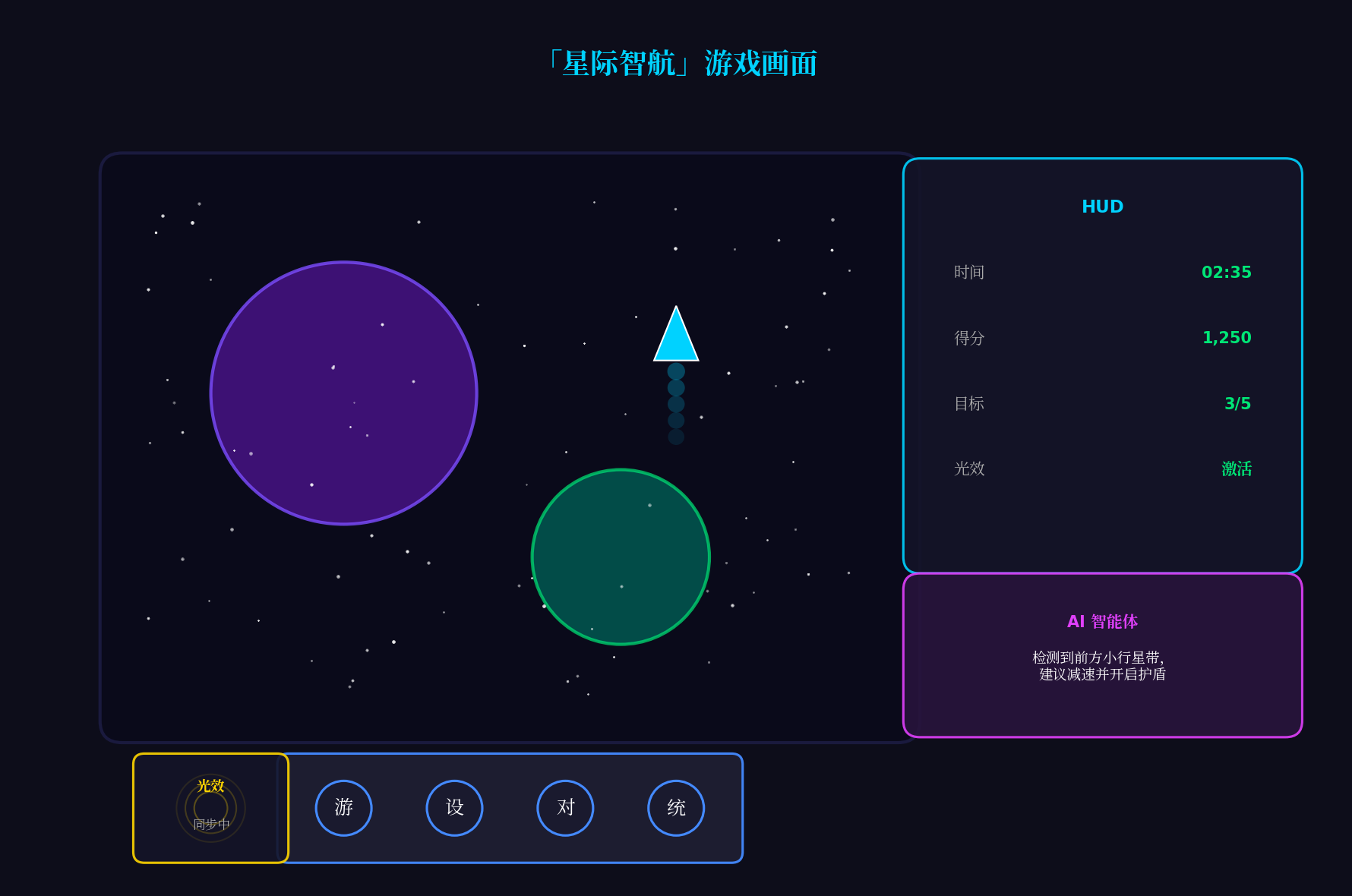
上图展示了「星际智航」的核心游戏画面:
- 左侧:太空场景,包含行星引力场与飞船轨迹
- 右侧:玻璃拟态HUD面板,实时显示游戏状态
- 底部:悬浮导航栏,支持方向控制与快捷操作
- 右下角:AI智能体对话气泡,提供实时策略建议
- 左下角:沉浸光效指示器,显示当前系统光效同步状态
八、总结与展望
本文基于HarmonyOS 6(API 23)的三大核心特性,完整实战了一款AI驱动的太空探索游戏。核心创新点总结:
-
悬浮导航游戏化:将
HdsTabs改造为可拖拽、可调节透明度的游戏HUD,支持方向控制、快捷操作与设置面板,实现"不干扰游戏画面、随时快速操作"的设计理念 -
沉浸光感情绪同步:通过
lightingAPI实现游戏事件到系统光效的实时映射,五种色彩心理学配色方案,让屏幕边框成为"第六感游戏反馈" -
HMAF智能体副驾驶:基于Agent Framework Kit构建"星航助手",支持自然语言交互、实时策略生成与紧急预警,将AI能力深度融入游戏玩法
-
PC端多窗口架构:主游戏窗口 + 浮动策略面板 + 浮动智能体对话窗口的三层设计,通过
WindowManager实现跨窗口状态同步
未来扩展方向:
- 接入Face AR:通过面部表情控制飞船姿态(挑眉加速、皱眉刹车)
- 接入Body AR:手势识别直接拖拽飞船,实现"隔空操作"
- 分布式对战:通过分布式软总线实现多人协作探索,光效跨设备同步
- 鸿蒙PC专属:利用PC大屏优势,主窗口游戏 + 副屏实时星图策略面板
转载自:https://blog.csdn.net/u014727709/article/details/162385275
欢迎 👍点赞✍评论⭐收藏,欢迎指正

作为“人工智能6S店”的官方数字引擎,为AI开发者与企业提供一个覆盖软硬件全栈、一站式门户。
更多推荐
 0
0 0
0- 0


 已为社区贡献38条内容

所有评论(0)