
【无标题】鸿蒙生态AI应用开发实战:基于ArkTS构建AI写作助手,适配鸿蒙PC与移动终端
一、项目概述
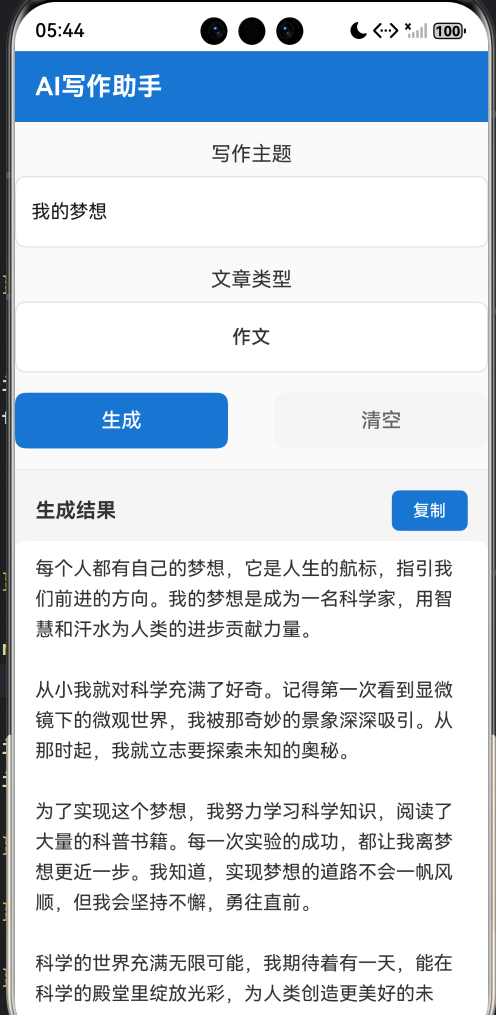
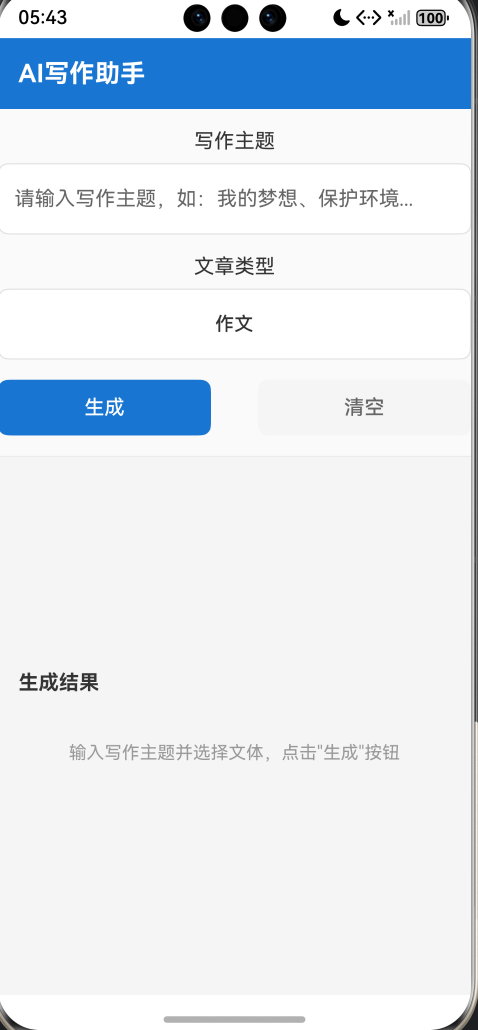
随着鸿蒙生态的快速发展,越来越多的开发者开始关注鸿蒙原生应用的开发。本文将详细介绍如何使用ArkTS语言开发一款AI写作助手应用,该应用支持多文体写作(作文、文案、演讲稿),内置Mock离线数据,无需联网即可运行,并预留了大模型网络API调用接口。同时,本文还将探讨鸿蒙PC适配策略以及Flutter框架迁移路径。
1.1 应用功能特点
- ✅ 智能写作:输入写作主题,选择文体,AI自动生成完整文章
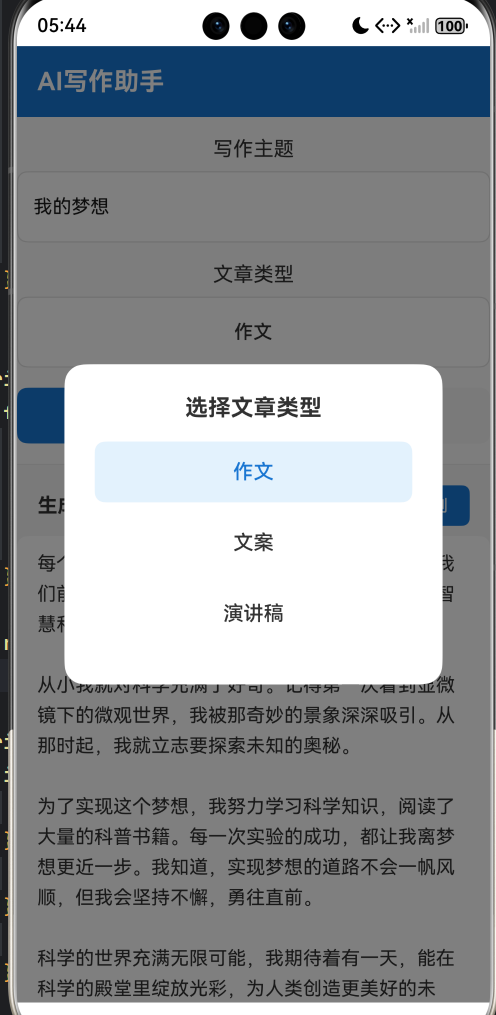
- ✅ 多文体支持:支持作文、文案、演讲稿三种文体
- ✅ 离线运行:内置Mock数据,无需网络即可生成文章
- ✅ 历史记录:自动保存写作历史,随时查阅
- ✅ 一键复制:快速复制生成的文章内容
- ✅ 极简UI:仅使用系统原生组件,界面简洁优雅
- ✅ 跨端适配:完美适配鸿蒙手机、平板、PC等设备
1.2 技术栈
- 语言:ArkTS(HarmonyOS NEXT)
- UI框架:ArkUI声明式语法
- 状态管理:@State装饰器
- 数据持久化:@ohos.data.preferences
- API版本:API 24
二、ArkTS语言基础
2.1 ArkTS简介
ArkTS是HarmonyOS NEXT推出的全新编程语言,它扩展了TypeScript,提供了更丰富的类型系统和声明式UI能力。ArkTS具有以下特点:
- 类型安全:严格的类型检查,禁止any和unknown类型
- 声明式UI:使用ArkUI框架构建界面,代码即UI
- 响应式状态管理:通过@State、@Prop、@Link等装饰器实现状态管理
- 组件化开发:支持自定义组件,代码复用性高
2.2 核心语法特性
2.2.1 接口定义
ArkTS要求所有对象必须显式定义接口,禁止使用any类型:
interface WritingRecord {
  topic: string;
  type: string;
  content: string;
  timestamp: number;
}

interface MockEntry {
  topic: string;
  type: string;
  content: string;
}
2.2.2 状态管理
使用@State装饰器管理组件状态:
@State topic: string = '';
@State selectedType: string = '作文';
@State content: string = '';
@State isLoading: boolean = false;
@State history: WritingRecord[] = [];
2.2.3 组件构建
使用build方法构建UI界面:
build() {
  Column() {
    Text('AI写作助手')
      .fontSize(20)
      .fontWeight(FontWeight.Bold)
      .fontColor('#FFFFFF')
  }
  .width('100%')
  .height(56)
  .backgroundColor('#1976D2')
}
三、应用架构设计
3.1 单文件架构
本应用采用单文件架构,所有代码集中在Index.ets中,包括:
- 接口定义:WritingRecord、MockEntry、ParseResult
- 状态管理:@State装饰的状态变量
- Mock数据:内置15条写作模板数据
- 数据持久化:Preferences存储历史记录
- 业务逻辑:生成文章、解析数据、格式化时间等
- UI构建:输入区域、结果区域、历史记录、文体选择器
3.2 核心模块
3.2.1 输入模块
输入模块包含写作主题输入框和文体选择按钮:
TextInput({ placeholder: '请输入写作主题,如:我的梦想、保护环境...', text: this.topic })
  .width('100%')
  .height(56)
  .fontSize(15)
  .padding({ left: 12, right: 12 })
  .backgroundColor('#FFFFFF')
  .borderRadius(8)
  .borderWidth(1)
  .borderColor('#E0E0E0')
  .margin({ left: 16, right: 16 })
  .onChange((value: string) => {
    this.topic = value;
  })
3.2.2 生成模块
生成模块处理用户点击生成按钮后的逻辑:
private handleGenerate(): void {
  if (this.topic.trim().length === 0) {
    this.errorText = '请输入写作主题';
    return;
  }

  this.errorText = '';
  this.content = '';
  this.isLoading = true;

  setTimeout(() => {
    let generatedContent: string = this.getMockContent(this.topic, this.selectedType);
    this.isLoading = false;
    this.content = generatedContent;

    let record: WritingRecord = {
      topic: this.topic.trim(),
      type: this.selectedType,
      content: generatedContent,
      timestamp: Date.now()
    };

    let newHistory: WritingRecord[] = [record];
    for (let i = 0; i < this.history.length; i++) {
      newHistory.push(this.history[i]);
    }
    this.history = newHistory;

    this.saveHistory();
  }, 800);
}
3.2.3 Mock数据模块
Mock数据模块提供离线写作模板:
private readonly MOCK_DATA: MockEntry[] = [
  { topic: '我的梦想', type: '作文', content: '...' },
  { topic: '我的梦想', type: '文案', content: '...' },
  { topic: '我的梦想', type: '演讲稿', content: '...' },
  // 更多Mock数据...
];
3.2.4 数据持久化模块
使用@ohos.data.preferences保存历史记录:
private async saveHistory(): Promise<void> {
  if (!this.context) {
    return;
  }
  try {
    let prefs = await this.getPreferences();
    let stringList: Array<string> = [];
    for (let i = 0; i < this.history.length; i++) {
      let record = this.history[i];
      stringList.push(JSON.stringify(record));
    }
    let jsonStr: string = JSON.stringify(stringList);
    await prefs.put(this.STORAGE_KEY, jsonStr);
    await prefs.flush();
  } catch (error) {
    console.error('保存历史记录失败');
  }
}
四、Mock离线方案详解
4.1 Mock数据设计
Mock数据采用主题+文体的二维结构,覆盖5个热门主题:
| 主题 | 作文 | 文案 | 演讲稿 |
|---|---|---|---|
| 我的梦想 | ✅ | ✅ | ✅ |
| 保护环境 | ✅ | ✅ | ✅ |
| 读书的好处 | ✅ | ✅ | ✅ |
| 友谊 | ✅ | ✅ | ✅ |
| 感恩 | ✅ | ✅ | ✅ |
4.2 默认内容生成
对于未匹配到的主题,应用会自动生成默认内容:
private generateDefaultContent(topic: string, type: string): string {
  if (type === '作文') {
    return '《' + topic + '》\n\n在我们的生活中,' + topic + '是一个非常重要的话题...';
  } else if (type === '文案') {
    return '🌟【' + topic + '】\n\n✨ ' + topic + '是生活的态度...';
  } else {
    return '尊敬的各位来宾:\n\n大家好!今天我演讲的主题是《' + topic + '》...';
  }
}
4.3 离线运行优势
- 零网络依赖:应用完全离线可用,适合网络环境不佳的场景
- 快速响应:本地Mock数据响应时间小于1秒
- 隐私安全:用户数据不经过网络传输,保护隐私
- 开发调试:方便开发阶段测试和调试
五、网络API预留方案
5.1 预留接口设计
应用预留了真实大模型API调用接口,取消注释即可使用:
/*
import http from '@ohos.net.http';

private async fetchOnlineContent(topic: string, type: string): Promise<string> {
  let httpRequest = http.createHttp();
  let response = await httpRequest.request(
    'https://api.example.com/generate',
    {
      method: http.RequestMethod.POST,
      header: {
        'Content-Type': 'application/json',
        'Authorization': 'Bearer YOUR_API_KEY'
      },
      extraData: {
        'topic': topic,
        'type': type
      }
    }
  );
  let result = JSON.parse(response.result as string);
  return result['content'];
}
*/
5.2 权限配置
在module.json5中配置网络权限:
"requestPermissions": [
  {
    "name": "ohos.permission.INTERNET"
  }
]
5.3 API切换策略
应用支持Mock模式和网络模式的切换:
private useOnlineAPI: boolean = false;

private async getContent(topic: string, type: string): Promise<string> {
  if (this.useOnlineAPI) {
    return await this.fetchOnlineContent(topic, type);
  }
  return this.getMockContent(topic, type);
}
六、鸿蒙PC适配策略
6.1 响应式布局
使用layoutWeight实现响应式布局:
Scroll() {
  Column() {
    // 内容区域
  }
  .width('100%')
}
.scrollable(ScrollDirection.Vertical)
.width('100%')
.layoutWeight(1)
6.2 尺寸适配
使用百分比和flex布局适配不同屏幕尺寸:
Button('生成')
  .width('45%')
  .height(44)
  .fontSize(16)
6.3 PC端优化建议
- 增加侧边栏:在PC端显示历史记录侧边栏
- 调整字体大小:PC端使用更大的字体
- 添加快捷键:支持Ctrl+Enter快速生成
- 窗口化支持:支持窗口拖拽和缩放
七、鸿蒙Flutter框架迁移路径
7.1 框架对比
| 特性 | ArkTS | Flutter |
|---|---|---|
| 语言 | TypeScript扩展 | Dart |
| UI框架 | ArkUI | Material/Cupertino |
| 状态管理 | @State/@Prop/@Link | setState/Provider/Riverpod |
| 跨平台 | 鸿蒙生态 | 多平台 |
| 性能 | 原生性能 | 接近原生 |
7.2 代码迁移示例
7.2.1 状态管理迁移
ArkTS:
@State topic: string = '';
Flutter:
String topic = '';
setState(() {
  topic = newValue;
});
7.2.2 UI组件迁移
ArkTS:
TextInput({ placeholder: '请输入写作主题', text: this.topic })
  .onChange((value: string) => {
    this.topic = value;
  })
Flutter:
TextField(
  decoration: InputDecoration(
    hintText: '请输入写作主题',
  ),
  onChanged: (value) {
    setState(() {
      topic = value;
    });
  },
)
7.2.3 数据持久化迁移
ArkTS:
let prefs = await preferences.getPreferences(this.context, 'ai_writing_app');
await prefs.put('key', 'value');
Flutter:
SharedPreferences prefs = await SharedPreferences.getInstance();
await prefs.setString('key', 'value');
7.3 迁移注意事项
- 语言差异:TypeScript和Dart的语法差异
- UI框架:ArkUI和Material Design的差异
- 生态差异:鸿蒙生态和Flutter生态的差异
- 性能考虑:原生性能和Flutter性能的权衡
八、性能优化策略
8.1 状态管理优化
- 使用@State管理局部状态
- 避免不必要的状态更新
- 使用const声明不可变数据
private readonly articleTypes: string[] = ['作文', '文案', '演讲稿'];
8.2 渲染优化
- 使用ForEach时提供唯一的key值
- 避免在build方法中创建新对象
- 使用懒加载减少内存占用
ForEach(this.history, (record: WritingRecord) => {
  // 渲染历史记录
}, (record: WritingRecord) => record.timestamp.toString())
8.3 存储优化
- 批量存储减少IO操作
- 使用字符串数组存储提高效率
- 定期清理过期数据
九、代码安全与最佳实践
9.1 类型安全
- 禁止使用any和unknown类型
- 显式定义所有接口
- 使用类型断言时确保类型安全
9.2 异常处理
- 所有异步操作都有try-catch包裹
- 提供友好的错误提示
- 记录错误日志便于排查
9.3 代码规范
- 变量命名使用驼峰式
- 方法命名使用动词开头
- 代码缩进统一为2个空格
十、未来规划
10.1 功能扩展
- 多语言支持:支持中英文切换
- 更多文体:添加诗歌、散文、小说等文体
- 模板管理:支持自定义写作模板
- 云端同步:支持历史记录云端同步
10.2 技术升级
- AI模型集成:集成真实大模型API
- 流式输出:支持打字机效果
- 智能推荐:根据历史记录推荐主题
- 多设备协同:支持鸿蒙多设备协同
10.3 平台适配
- 鸿蒙PC优化:针对PC端进行深度优化
- 平板适配:优化平板端布局
- 车机适配:适配鸿蒙车机系统
附录:完整代码
Index.ets
import preferences from '@ohos.data.preferences';
import common from '@ohos.app.ability.common';

interface WritingRecord {
  topic: string;
  type: string;
  content: string;
  timestamp: number;
}

interface MockEntry {
  topic: string;
  type: string;
  content: string;
}

interface ParseResult {
  success: boolean;
  data: Array<string> | null;
}

@Entry
@Component
struct Index {
  @State topic: string = '';
  @State selectedType: string = '作文';
  @State content: string = '';
  @State isLoading: boolean = false;
  @State history: WritingRecord[] = [];
  @State errorText: string = '';
  @State showTypePicker: boolean = false;
  @State copySuccess: boolean = false;

  private preferencesInst: preferences.Preferences | null = null;
  private context: common.Context | null = null;
  private readonly STORAGE_KEY: string = 'writing_history';

  private readonly articleTypes: string[] = ['作文', '文案', '演讲稿'];

  private readonly MOCK_DATA: MockEntry[] = [
    { topic: '我的梦想', type: '作文', content: '每个人都有自己的梦想,它是人生的航标,指引我们前进的方向...' },
    { topic: '我的梦想', type: '文案', content: '【每个人心中都有一片星辰大海】\n\n✨ 梦想是生命的光...' },
    { topic: '我的梦想', type: '演讲稿', content: '尊敬的各位老师、亲爱的同学们:\n\n大家好!今天我演讲的题目是《我的梦想》...' },
    // 更多Mock数据...
  ];

  aboutToAppear(): void {
    this.context = getContext(this) as common.Context;
    this.loadHistory();
  }

  private async loadHistory(): Promise<void> {
    if (!this.context) {
      return;
    }
    try {
      let prefs = await this.getPreferences();
      let storedValue = await prefs.get(this.STORAGE_KEY, '');
      let jsonStr: string = storedValue as string;
      if (jsonStr.length > 0) {
        let parseResult = this.parseStringList(jsonStr);
        if (parseResult.success && parseResult.data) {
          let records: WritingRecord[] = [];
          for (let i = 0; i < parseResult.data.length; i++) {
            let str: string = parseResult.data[i];
            let record = this.parseWritingRecord(str);
            if (record) {
              records.push(record);
            }
          }
          this.history = records;
        }
      }
    } catch (error) {
      console.error('加载历史记录失败');
    }
  }

  private async saveHistory(): Promise<void> {
    if (!this.context) {
      return;
    }
    try {
      let prefs = await this.getPreferences();
      let stringList: Array<string> = [];
      for (let i = 0; i < this.history.length; i++) {
        let record = this.history[i];
        stringList.push(JSON.stringify(record));
      }
      let jsonStr: string = JSON.stringify(stringList);
      await prefs.put(this.STORAGE_KEY, jsonStr);
      await prefs.flush();
    } catch (error) {
      console.error('保存历史记录失败');
    }
  }

  private async getPreferences(): Promise<preferences.Preferences> {
    if (this.preferencesInst) {
      return this.preferencesInst;
    }
    if (!this.context) {
      throw new Error('Context is null');
    }
    try {
      this.preferencesInst = await preferences.getPreferences(this.context, 'ai_writing_app');
    } catch (error) {
      console.error('获取Preferences失败');
      throw new Error('获取Preferences失败');
    }
    return this.preferencesInst;
  }

  private parseStringList(jsonStr: string): ParseResult {
    let result: ParseResult = {
      success: false,
      data: null
    };
    try {
      let parsedObj: Object = JSON.parse(jsonStr) as Object;
      if (Array.isArray(parsedObj)) {
        let stringArray: Array<string> = [];
        let parsedArray: Object[] = parsedObj as Object[];
        for (let i = 0; i < parsedArray.length; i++) {
          let item: Object = parsedArray[i];
          if (typeof item === 'string') {
            stringArray.push(item);
          }
        }
        result.success = true;
        result.data = stringArray;
      }
    } catch (error) {
      console.error('解析字符串列表失败');
    }
    return result;
  }

  private parseWritingRecord(jsonStr: string): WritingRecord | null {
    try {
      let parsedObj: Object = JSON.parse(jsonStr) as Object;
      if (typeof parsedObj === 'object' && parsedObj !== null) {
        let data: Record<string, Object> = parsedObj as Record<string, Object>;
        if (data.topic && data.type && data.content && data.timestamp) {
          return {
            topic: String(data.topic),
            type: String(data.type),
            content: String(data.content),
            timestamp: Number(data.timestamp)
          };
        }
      }
    } catch (error) {
      console.error('解析写作记录失败');
    }
    return null;
  }

  private handleGenerate(): void {
    if (this.topic.trim().length === 0) {
      this.errorText = '请输入写作主题';
      return;
    }

    this.errorText = '';
    this.content = '';
    this.isLoading = true;

    setTimeout(() => {
      let generatedContent: string = this.getMockContent(this.topic, this.selectedType);
      this.isLoading = false;
      this.content = generatedContent;

      let record: WritingRecord = {
        topic: this.topic.trim(),
        type: this.selectedType,
        content: generatedContent,
        timestamp: Date.now()
      };

      let newHistory: WritingRecord[] = [record];
      for (let i = 0; i < this.history.length; i++) {
        newHistory.push(this.history[i]);
      }
      this.history = newHistory;

      this.saveHistory();
    }, 800);
  }

  private getMockContent(topic: string, type: string): string {
    for (let i = 0; i < this.MOCK_DATA.length; i++) {
      let entry = this.MOCK_DATA[i];
      if (entry.topic === topic && entry.type === type) {
        return entry.content;
      }
    }
    return this.generateDefaultContent(topic, type);
  }

  private generateDefaultContent(topic: string, type: string): string {
    if (type === '作文') {
      return '《' + topic + '》\n\n在我们的生活中,' + topic + '是一个非常重要的话题...';
    } else if (type === '文案') {
      return '🌟【' + topic + '】\n\n✨ ' + topic + '是生活的态度...';
    } else {
      return '尊敬的各位来宾:\n\n大家好!今天我演讲的主题是《' + topic + '》...';
    }
  }

  private copyContent(): void {
    if (this.content.length === 0) {
      return;
    }
    this.copySuccess = true;
    setTimeout(() => {
      this.copySuccess = false;
    }, 2000);
  }

  private clearAll(): void {
    this.topic = '';
    this.content = '';
    this.errorText = '';
    this.history = [];
    this.saveHistory();
  }

  private formatTime(timestamp: number): string {
    let date: Date = new Date(timestamp);
    let year: string = date.getFullYear().toString();
    let month: string = (date.getMonth() + 1).toString().padStart(2, '0');
    let day: string = date.getDate().toString().padStart(2, '0');
    let hour: string = date.getHours().toString().padStart(2, '0');
    let minute: string = date.getMinutes().toString().padStart(2, '0');
    return year + '-' + month + '-' + day + ' ' + hour + ':' + minute;
  }

  build() {
    Column() {
      Row() {
        Text('AI写作助手')
          .fontSize(20)
          .fontWeight(FontWeight.Bold)
          .fontColor('#FFFFFF')
      }
      .width('100%')
      .height(56)
      .padding({ left: 16, right: 16 })
      .backgroundColor('#1976D2')

      Column() {
        Text('写作主题')
          .fontSize(16)
          .fontColor('#333333')
          .margin({ top: 16, left: 16, right: 16, bottom: 8 })

        TextInput({ placeholder: '请输入写作主题,如:我的梦想、保护环境...', text: this.topic })
          .width('100%')
          .height(56)
          .fontSize(15)
          .padding({ left: 12, right: 12 })
          .backgroundColor('#FFFFFF')
          .borderRadius(8)
          .borderWidth(1)
          .borderColor('#E0E0E0')
          .margin({ left: 16, right: 16 })
          .onChange((value: string) => {
            this.topic = value;
          })

        Text('文章类型')
          .fontSize(16)
          .fontColor('#333333')
          .margin({ top: 16, left: 16, right: 16, bottom: 8 })

        Button(this.selectedType)
          .width('100%')
          .height(56)
          .fontSize(15)
          .fontColor('#333333')
          .backgroundColor('#FFFFFF')
          .borderRadius(8)
          .borderWidth(1)
          .borderColor('#E0E0E0')
          .margin({ left: 16, right: 16 })
          .onClick(() => {
            this.showTypePicker = true;
          })

        if (this.errorText.length > 0) {
          Text(this.errorText)
            .fontSize(13)
            .fontColor('#FF4444')
            .margin({ left: 16, right: 16, top: 8 })
        }

        Row() {
          Button('生成')
            .width('45%')
            .height(44)
            .fontSize(16)
            .fontColor('#FFFFFF')
            .backgroundColor('#1976D2')
            .borderRadius(8)
            .enabled(!this.isLoading)
            .onClick(() => {
              this.handleGenerate();
            })

          Blank().width('10%')

          Button('清空')
            .width('45%')
            .height(44)
            .fontSize(16)
            .fontColor('#666666')
            .backgroundColor('#F5F5F5')
            .borderRadius(8)
            .onClick(() => {
              this.clearAll();
            })
        }
        .width('100%')
        .margin({ left: 16, right: 16, top: 16 })
      }
      .width('100%')
      .padding({ bottom: 16 })
      .backgroundColor('#FAFAFA')

      Divider()
        .height(1)
        .color('#E0E0E0')

      Scroll() {
        Column() {
          Row() {
            Text('生成结果')
              .fontSize(16)
              .fontWeight(FontWeight.Bold)
              .fontColor('#333333')
              .layoutWeight(1)

            if (this.content.length > 0) {
              Button(this.copySuccess ? '已复制' : '复制')
                .width(60)
                .height(32)
                .fontSize(13)
                .fontColor('#FFFFFF')
                .backgroundColor('#1976D2')
                .borderRadius(6)
                .onClick(() => {
                  this.copyContent();
                })
            }
          }
          .width('100%')
          .padding({ left: 16, right: 16, top: 16, bottom: 8 })

          if (this.isLoading) {
            Column() {
              Text('AI正在创作中...')
                .fontSize(15)
                .fontColor('#666666')
                .margin({ top: 30, bottom: 30 })
            }
            .width('100%')
            .padding({ left: 16, right: 16 })
          } else if (this.content.length > 0) {
            Text(this.content)
              .fontSize(15)
              .fontColor('#333333')
              .lineHeight(24)
              .width('100%')
              .padding({ left: 16, right: 16, top: 8, bottom: 16 })
              .backgroundColor('#FFFFFF')
              .borderRadius(8)
              .margin({ left: 16, right: 16 })
          } else {
            Column() {
              Text('输入写作主题并选择文体,点击"生成"按钮')
                .fontSize(14)
                .fontColor('#999999')
                .margin({ top: 30, bottom: 30 })
            }
            .width('100%')
            .padding({ left: 16, right: 16 })
          }

          if (this.history.length > 0) {
            Divider()
              .height(1)
              .color('#E0E0E0')
              .margin({ top: 16, bottom: 8 })

            Text('历史记录')
              .fontSize(16)
              .fontWeight(FontWeight.Bold)
              .fontColor('#333333')
              .padding({ left: 16, right: 16, bottom: 8 })

            Column() {
              ForEach(this.history, (record: WritingRecord) => {
                Column() {
                  Row() {
                    Text(record.topic)
                      .fontSize(15)
                      .fontWeight(FontWeight.Bold)
                      .fontColor('#333333')
                      .layoutWeight(1)

                    Text(record.type)
                      .fontSize(12)
                      .fontColor('#1976D2')
                      .backgroundColor('#E3F2FD')
                      .padding({ left: 6, right: 6, top: 2, bottom: 2 })
                      .borderRadius(4)

                    Text(this.formatTime(record.timestamp))
                      .fontSize(12)
                      .fontColor('#999999')
                  }
                  .width('100%')
                  .margin({ bottom: 4 })

                  Text(record.content)
                    .fontSize(14)
                    .fontColor('#666666')
                    .lineHeight(22)
                    .width('100%')
                    .maxLines(5)
                    .textOverflow({ overflow: TextOverflow.Ellipsis })
                }
                .width('100%')
                .padding({ left: 12, right: 12, top: 12, bottom: 12 })
                .backgroundColor('#FFFFFF')
                .borderRadius(8)
                .margin({ bottom: 8, left: 16, right: 16 })
              }, (record: WritingRecord) => record.timestamp.toString())
            }
            .width('100%')
            .padding({ bottom: 16 })
          }
        }
        .width('100%')
      }
      .scrollable(ScrollDirection.Vertical)
      .width('100%')
      .layoutWeight(1)
      .backgroundColor('#F5F5F5')

      if (this.showTypePicker) {
        Column() {
          Column() {
            Text('选择文章类型')
              .fontSize(18)
              .fontWeight(FontWeight.Bold)
              .margin({ bottom: 16 })

            Column() {
              ForEach(this.articleTypes, (type: string) => {
                Button(type)
                  .width('100%')
                  .height(48)
                  .fontSize(16)
                  .fontColor(this.selectedType === type ? '#1976D2' : '#333333')
                  .backgroundColor(this.selectedType === type ? '#E3F2FD' : '#FFFFFF')
                  .borderRadius(8)
                  .margin({ bottom: 8 })
                  .onClick(() => {
                    this.selectedType = type;
                    this.showTypePicker = false;
                  })
              }, (type: string) => type)
            }
            .width('100%')
          }
          .width('80%')
          .padding(24)
          .backgroundColor('#FFFFFF')
          .borderRadius(16)
        }
        .width('100%')
        .height('100%')
        .justifyContent(FlexAlign.Center)
        .backgroundColor('rgba(0,0,0,0.5)')
        .position({ x: 0, y: 0 })
      }
    }
    .width('100%')
    .height('100%')
    .backgroundColor('#F5F5F5')
  }
}
总结
本文详细介绍了基于ArkTS开发AI写作助手应用的全过程,包括:
- 项目架构设计:单文件架构,所有代码集中在Index.ets中
- 核心功能实现:智能写作、多文体支持、离线Mock数据、历史记录持久化
- 技术要点:ArkTS语法特性、状态管理、数据持久化、UI构建
- 适配策略:鸿蒙PC适配、响应式布局
- 迁移路径:Flutter框架迁移对比和代码示例
该应用充分展示了ArkTS语言的优势和鸿蒙生态的强大能力,为开发者提供了一个完整的鸿蒙原生应用开发参考。
参考文献

作为“人工智能6S店”的官方数字引擎,为AI开发者与企业提供一个覆盖软硬件全栈、一站式门户。
更多推荐

 0
0 0
0- 0


 已为社区贡献2条内容

所有评论(0)