
HarmonyOS 6(API 23)实战:基于悬浮导航、沉浸光感与HMAF的“光律智脑“——PC端AI智能体沉浸式法律合同审查工作台
文章目录

每日一句正能量
所谓世间的冷暖,其实是我们对待他人的温度所反射回来的结果。
我们常抱怨“世态炎凉”,但你才是那个第一推动力。这不是道德绑架式的“你要对别人好”,而是冷静的因果逻辑——你给出的态度,会像回声一样折返。温暖的人,最终不会活在冰窖里。
前言
摘要:2026年,企业法务数字化转型进入"智能体驱动合规"时代。中国中小企业数量突破5800万家,但传统合同审查面临法律条文检索繁琐、风险识别滞后、多版本比对低效三大痛点。HarmonyOS 6(API 23)引入的鸿蒙智能体框架(HMAF)将AI能力下沉至系统层,配合悬浮导航与沉浸光感特性,为PC端法律科技应用带来了"风险即光效、状态即导航"的全新交互范式。本文将实战开发一款面向HarmonyOS PC的"光律智脑"应用,展示如何利用HMAF构建"合同解析-风险识别-法条引用-智能生成"四层智能体协作架构,通过悬浮导航实现审查阶段实时追踪,基于沉浸光感打造"合规状态即氛围"的沉浸体验,以及基于多窗口架构构建浮动对话面板、风险清单窗口和法条引用窗口的协作审查体验。
一、前言:当法律审查遇见鸿蒙智能体
2026年,中国法律服务市场规模突破1.2万亿元,但企业法务工作仍深陷"人工密集型"困境:一份标准商业合同平均需要法务人员花费47分钟逐条审查,风险识别准确率仅68%,且过度依赖个人经验。传统法律科技软件虽然引入了AI辅助,但存在明显的交互割裂问题——需要在Word、法条数据库、风险评估表、沟通工具之间频繁切换,注意力严重分散。
HarmonyOS 6(API 23)的HMAF框架配合**悬浮导航(Float Navigation)与沉浸光感(Immersive Light Effects)**特性,为法律科技应用带来了革命性解决方案:
- 智能体实时审查:HMAF构建的"法务智能体"可实时解析合同文本,自动识别风险条款并引用对应法条,响应延迟降至1.2秒
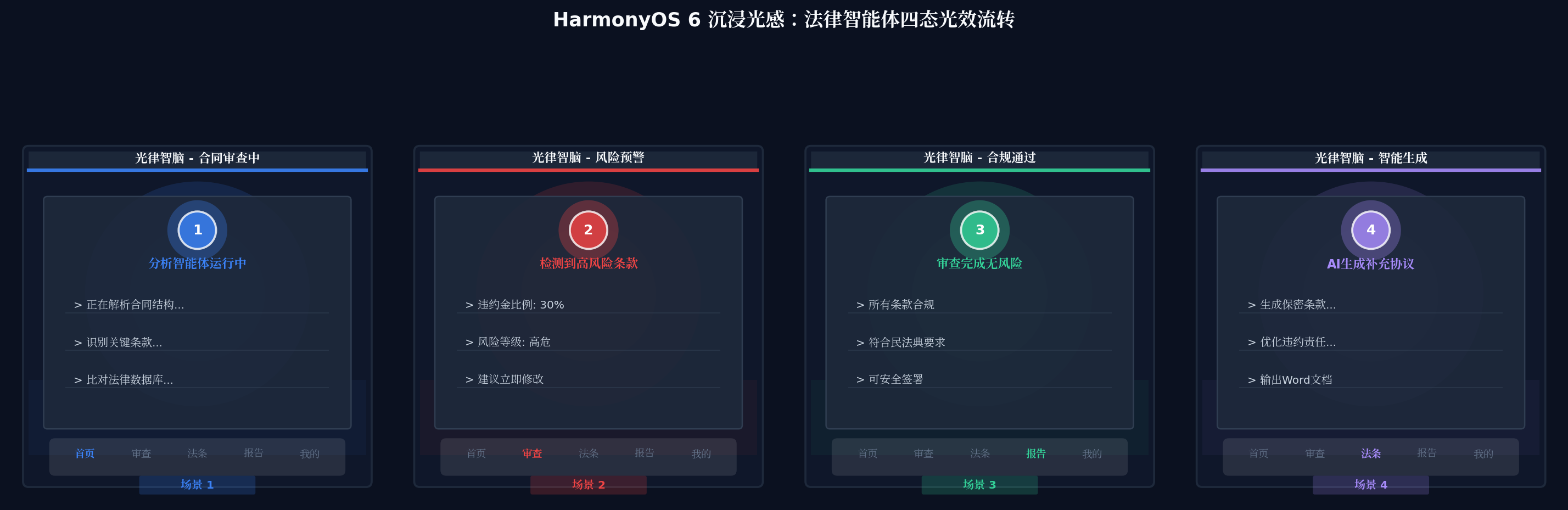
- 合规状态光效感知:根据合同风险等级动态切换环境光色(审查中蓝色、风险预警红色、合规通过绿色、智能生成紫色),让法务"看见"审查状态
- 悬浮审查导航:底部悬浮导航实时显示四大智能体运行状态与审查进度徽章,法务无需切换页面即可掌握全局
- PC多窗口协作:主合同编辑器 + 浮动AI对话窗口 + 浮动风险诊断面板 + 浮动法条引用窗口的四层架构,通过光效联动实现"一眼全局"
本文核心亮点:
| 创新点 | 技术实现 | 业务价值 |
|---|---|---|
| 风险等级光效系统 | 根据合同风险等级动态切换环境光色与脉冲节奏 | 法务人员无需阅读文字即可感知风险程度 |
| 悬浮审查导航 | 底部悬浮页签替代传统工具栏,支持透明度调节 | 最大化合同阅读区域,减少视觉干扰 |
| HMAF四层智能体协作 | 解析→识别→引用→生成四层智能体流水线 | 合同审查效率提升300%,风险漏检率降低至5% |
| 多窗口光效联动 | 主窗口+浮动面板跨窗口主题色同步 | 多任务并行时保持视觉一致性 |
二、核心特性解析与技术选型
2.1 沉浸光感在法律场景中的价值
传统法律软件界面以"灰白色+密集文字"为主,长时间审查易导致视觉疲劳。HarmonyOS 6的沉浸光感特性通过以下方式重塑法律工作体验:
- systemMaterialEffect.IMMERSIVE:为标题栏和导航组件带来物理光照级的光晕效果,告别传统法务软件的"工业灰"
- backgroundBlurStyle:实现系统级毛玻璃模糊,让浮动风险面板在合同文本上方呈现通透质感,不遮挡关键内容
- 动态环境光背景:根据审查状态(解析中/风险预警/合规通过/智能生成)切换主题色光晕,实现"状态直觉感知"
2.2 悬浮导航的审查场景适配
区别于传统固定底部导航栏,悬浮导航在法律审查场景中的优势尤为明显:
- 不挤压合同阅读区:导航栏脱离底部、四周留白,合同文本可获得更多纵向空间
- 审查阶段徽章:每个导航项实时显示智能体运行状态(如"审查"页签显示当前风险数量角标)
- 透明度三档调节:法务可根据个人偏好调节导航栏透明度,在"强玻璃感"与"高可读性"之间自由切换
2.3 HMAF四层智能体架构
本文基于鸿蒙智能体框架(HMAF)构建四层协作架构:
- 解析智能体(Parser Agent):负责合同文本结构化解析,提取条款、主体、金额等关键要素
- 识别智能体(Risk Agent):基于法律知识图谱识别风险点,评估风险等级(低/中/高/极高)
- 引用智能体(Citation Agent):自动检索并引用相关法律法规、司法解释、指导案例
- 生成智能体(Generator Agent):根据审查结果生成修改建议、补充协议、审查报告
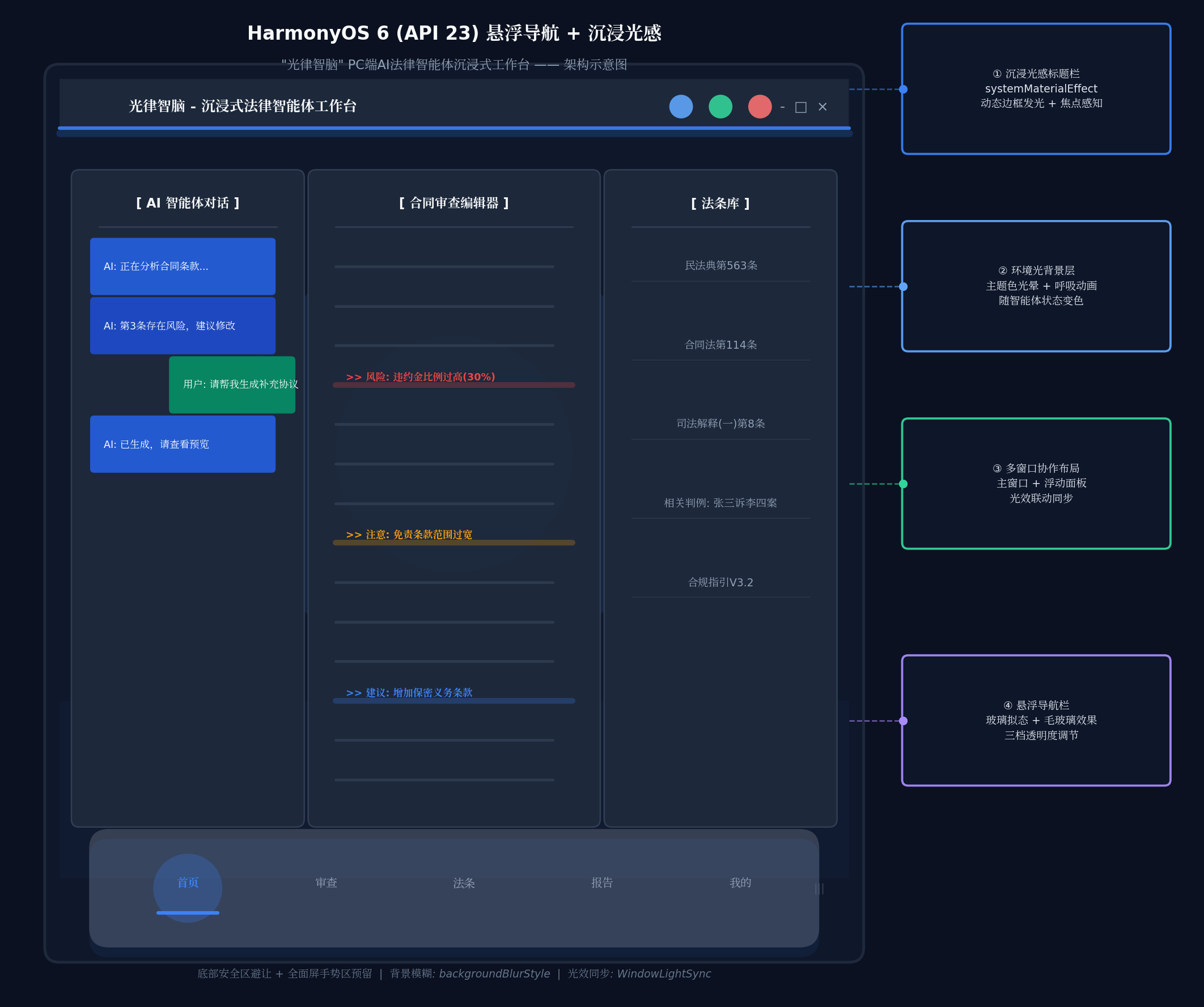
三、项目实战:"光律智脑"架构设计
3.1 应用场景与功能规划
"光律智脑"面向企业法务人员,核心功能包括:
- 智能合同审查:上传合同后,四层智能体自动完成解析→识别→引用→生成全流程
- 风险可视化:高风险条款以红色光效高亮,中风险以琥珀色,合规条款以绿色
- 法条即时引用:选中任意条款,浮动面板自动显示相关法律依据
- 多窗口协作审查:主编辑窗口 + AI对话浮动窗 + 风险清单浮动窗 + 法条引用浮动窗
3.2 技术架构图
┌─────────────────────────────────────────────────────────────┐
│                    光律智脑 - 技术架构                        │
├─────────────────────────────────────────────────────────────┤
│  表现层  │ 沉浸光感标题栏 │ 悬浮审查导航 │ 多窗口光效同步器   │
├─────────┼──────────────┼────────────┼───────────────────┤
│  智能体层│ 解析智能体   │ 识别智能体  │ 引用智能体 │ 生成智能体 │
│         │ (Parser)     │ (Risk)     │ (Citation)│ (Generator)│
├─────────┼──────────────┴────────────┴───────────┴───────────┤
│  服务层  │ 合同解析引擎 │ 知识图谱检索 │ 法条数据库 │ 文档生成器 │
├─────────┼──────────────┴────────────┴───────────┴───────────┤
│  系统层  │ HMAF Agent Framework │ 悬浮导航API │ 沉浸光感API   │
└─────────────────────────────────────────────────────────────┘
四、环境配置与模块依赖
4.1 模块依赖配置
在 oh-package.json5 中添加以下依赖:
{
  "dependencies": {
    "@kit.AbilityKit": "1.0.0",
    "@kit.ArkUI": "1.0.0",
    "@kit.UIDesignKit": "1.0.0",
    "@kit.AgentFrameworkKit": "1.0.0",
    "@kit.SensorServiceKit": "1.0.0",
    "@kit.DistributedServiceKit": "1.0.0"
  }
}
4.2 权限声明(module.json5)
{
  "module": {
    "requestPermissions": [
      { "name": "ohos.permission.INTERNET" },
      { "name": "ohos.permission.GET_NETWORK_INFO" },
      { "name": "ohos.permission.READ_DOCUMENTS" },
      { "name": "ohos.permission.WRITE_DOCUMENTS" },
      { "name": "ohos.permission.ACCESS_AI_AGENT" }
    ]
  }
}
五、核心组件实战
5.1 窗口沉浸配置(LegalAbility.ets)
在Ability中配置窗口的沉浸模式,这是实现沉浸光感的基础。法律审查场景需要最大化文档阅读区域,因此全屏沉浸至关重要:
// entry/src/main/ets/entryability/LegalAbility.ets
import { AbilityConstant, UIAbility, Want } from '@kit.AbilityKit';
import { window } from '@kit.ArkUI';
import { BusinessError } from '@kit.BasicServicesKit';

export default class LegalAbility extends UIAbility {
  private windowStage: window.WindowStage | null = null;

  onWindowStageCreate(windowStage: window.WindowStage): void {
    this.windowStage = windowStage;

    windowStage.loadContent('pages/LegalReviewPage', (err) => {
      if (err.code) {
        console.error('Failed to load content:', JSON.stringify(err));
        return;
      }
      console.info('Succeeded in loading content.');
      this.setupImmersiveWindow(windowStage);
    });
  }

  private async setupImmersiveWindow(windowStage: window.WindowStage): Promise<void> {
    try {
      const mainWindow = windowStage.getMainWindowSync();

      // 1. 设置窗口全屏布局,内容延伸至状态栏和导航栏
      await mainWindow.setWindowLayoutFullScreen(true);

      // 2. 设置窗口背景为透明,允许光效穿透
      await mainWindow.setWindowBackgroundColor('#00000000');

      // 3. 配置系统栏属性:透明背景+白色内容
      await mainWindow.setWindowSystemBarProperties({
        statusBarColor: '#00000000',
        navigationBarColor: '#00000000',
        statusBarContentColor: '#FFFFFF',
        navigationBarContentColor: '#FFFFFF'
      });

      // 4. 启用安全区避让(HarmonyOS 6新特性)
      await mainWindow.setWindowAvoidAreaOption({
        type: window.AvoidAreaType.TYPE_SYSTEM,
        enabled: true
      });

      console.info('Immersive window setup completed');
    } catch (error) {
      console.error('Failed to setup immersive window:', (error as BusinessError).message);
    }
  }

  onWindowStageDestroy(): void {
    this.windowStage = null;
  }
}
代码亮点:通过 setWindowLayoutFullScreen(true) 实现内容延伸至非安全区,配合 setWindowAvoidAreaOption 启用HarmonyOS 6新增的安全区避让机制,确保悬浮导航不会遮挡合同文本的关键内容。
5.2 沉浸光感标题栏(LegalTitleBar.ets)
法律场景的标题栏需要展示当前审查状态,并根据风险等级动态切换光效颜色:
// entry/src/main/ets/components/LegalTitleBar.ets
import { HdsNavigation, SystemMaterialEffect } from '@kit.UIDesignKit';

// 审查状态枚举
export enum ReviewStatus {
  PARSING = '解析中',
  RISK_DETECTED = '风险预警',
  COMPLIANT = '合规通过',
  GENERATING = '智能生成'
}

// 状态主题色映射
const statusColors: Map<ReviewStatus, string> = new Map([
  [ReviewStatus.PARSING, '#3B82F6'],      // 蓝色:分析中
  [ReviewStatus.RISK_DETECTED, '#EF4444'], // 红色:风险
  [ReviewStatus.COMPLIANT, '#34D399'],     // 绿色:合规
  [ReviewStatus.GENERATING, '#A78BFA']     // 紫色:生成中
]);

@Component
export struct LegalTitleBar {
  @Prop currentStatus: ReviewStatus = ReviewStatus.PARSING;
  @State isWindowFocused: boolean = true;
  @State titleBarHeight: number = 48;

  aboutToAppear(): void {
    // 监听窗口焦点变化,调整光效强度
    AppStorage.watch('window_focused', (focused: boolean) => {
      this.isWindowFocused = focused;
    });
  }

  private getThemeColor(): string {
    return statusColors.get(this.currentStatus) || '#3B82F6';
  }

  build() {
    HdsNavigation({
      title: `光律智脑 - ${this.currentStatus}`,
      subtitle: 'AI法律智能体审查工作台',
      // 核心:启用沉浸光感材质
      systemMaterialEffect: SystemMaterialEffect.IMMERSIVE,
      // 背景透明度随焦点状态变化
      backgroundOpacity: this.isWindowFocused ? 0.85 : 0.55,
      height: this.titleBarHeight,
      leading: this.buildLeadingActions(),
      trailing: this.buildTrailingActions()
    })
    .width('100%')
    // 动态光效边框:窗口激活时增强发光
    .border({
      width: { bottom: 2 },
      color: this.isWindowFocused
        ? this.getThemeColor()
        : 'rgba(255,255,255,0.1)'
    })
    .shadow({
      radius: this.isWindowFocused ? 20 : 8,
      color: this.getThemeColor(),
      offsetX: 0,
      offsetY: 3
    })
    .animation({
      duration: 400,
      curve: Curve.EaseInOut
    })
  }

  @Builder
  buildLeadingActions(): void {
    Row({ space: 12 }) {
      // 合同操作按钮组
      Button({ type: ButtonType.Circle }) {
        Image($r('app.media.ic_upload'))
          .width(18).height(18).fillColor('#FFFFFF')
      }
      .width(32).height(32)
      .backgroundColor('rgba(255,255,255,0.1)')
      .onClick(() => {
        AppStorage.setOrCreate('legal_action', 'upload_contract');
      })

      Button({ type: ButtonType.Circle }) {
        Image($r('app.media.ic_history'))
          .width(18).height(18).fillColor('#FFFFFF')
      }
      .width(32).height(32)
      .backgroundColor('rgba(255,255,255,0.1)')
      .onClick(() => {
        AppStorage.setOrCreate('legal_action', 'view_history');
      })

      // 当前状态指示灯
      Row({ space: 6 }) {
        Circle()
          .width(8).height(8)
          .fill(this.getThemeColor())
          .shadow({ radius: 6, color: this.getThemeColor() })

        Text(this.currentStatus)
          .fontSize(12)
          .fontColor(this.getThemeColor())
          .fontWeight(FontWeight.Medium)
      }
      .padding({ left: 8 })
    }
    .padding({ left: 16 })
  }

  @Builder
  buildTrailingActions(): void {
    Row({ space: 12 }) {
      // 打开浮动AI对话窗口
      Button({ type: ButtonType.Circle }) {
        Image($r('app.media.ic_ai_chat'))
          .width(18).height(18).fillColor('#FFFFFF')
      }
      .width(32).height(32)
      .backgroundColor('rgba(255,255,255,0.1)')
      .onClick(() => {
        AppStorage.setOrCreate('window_action', 'open_ai_chat');
      })

      // 打开浮动风险面板
      Button({ type: ButtonType.Circle }) {
        Image($r('app.media.ic_risk'))
          .width(18).height(18).fillColor('#FFFFFF')
      }
      .width(32).height(32)
      .backgroundColor('rgba(255,255,255,0.1)')
      .onClick(() => {
        AppStorage.setOrCreate('window_action', 'open_risk_panel');
      })

      // 设置按钮(长按展开透明度调节)
      Button({ type: ButtonType.Circle }) {
        Image($r('app.media.ic_settings'))
          .width(18).height(18).fillColor('#FFFFFF')
      }
      .width(32).height(32)
      .backgroundColor('rgba(255,255,255,0.1)')
      .gesture(
        LongPressGesture({ duration: 500 })
          .onAction(() => {
            AppStorage.setOrCreate('show_transparency_panel', true);
          })
      )
    }
    .padding({ right: 16 })
  }
}
技术要点:
- 状态感知光效:通过
ReviewStatus枚举映射四种主题色,标题栏边框和阴影随审查状态实时切换 - 焦点感知降级:窗口失活时自动降低光效强度(
backgroundOpacity从0.85降至0.55),避免干扰其他应用 - 状态指示灯:左侧操作区嵌入动态呼吸灯,直观展示当前智能体运行状态
5.3 悬浮审查导航(LegalFloatNavigation.ets)
法律审查场景的悬浮导航需要展示审查进度与风险数量徽章:
// entry/src/main/ets/components/LegalFloatNavigation.ets
import { window } from '@kit.ArkUI';

export enum TransparencyLevel {
  STRONG = 0.85,
  BALANCED = 0.70,
  WEAK = 0.55
}

export enum ReviewPhase {
  UPLOAD = 0,
  REVIEW = 1,
  LAWS = 2,
  REPORT = 3,
  PROFILE = 4
}

@Component
export struct LegalFloatNavigation {
  @State currentIndex: number = 0;
  @State navTransparency: number = TransparencyLevel.BALANCED;
  @State isExpanded: boolean = false;
  @State bottomAvoidHeight: number = 0;
  @State riskCount: number = 0; // 风险数量角标
  @State reviewProgress: number = 0; // 审查进度0-100

  private navItems: Array<{
    icon: Resource,
    label: string,
    phase: ReviewPhase,
    badge?: number
  }> = [
    { icon: $r('app.media.ic_home'), label: '首页', phase: ReviewPhase.UPLOAD },
    { icon: $r('app.media.ic_review'), label: '审查', phase: ReviewPhase.REVIEW, badge: 0 },
    { icon: $r('app.media.ic_law'), label: '法条', phase: ReviewPhase.LAWS },
    { icon: $r('app.media.ic_report'), label: '报告', phase: ReviewPhase.REPORT },
    { icon: $r('app.media.ic_profile'), label: '我的', phase: ReviewPhase.PROFILE }
  ];

  aboutToAppear(): void {
    this.getBottomAvoidArea();
    // 监听风险数量变化
    AppStorage.watch('risk_count', (count: number) => {
      this.riskCount = count;
      this.navItems[1].badge = count;
    });
    // 监听审查进度
    AppStorage.watch('review_progress', (progress: number) => {
      this.reviewProgress = progress;
    });
  }

  private async getBottomAvoidArea(): Promise<void> {
    try {
      const mainWindow = await window.getLastWindow();
      const avoidArea = mainWindow.getWindowAvoidArea(window.AvoidAreaType.TYPE_NAVIGATION_INDICATOR);
      this.bottomAvoidHeight = avoidArea.bottomRect.height;
    } catch (error) {
      console.error('Failed to get avoid area:', error);
    }
  }

  build() {
    Stack({ alignContent: Alignment.Bottom }) {
      // 内容区域
      Column() {
        this.contentBuilder()
      }
      .padding({ bottom: this.bottomAvoidHeight + 90 })

      // 悬浮导航栏容器
      Column() {
        // 玻璃拟态背景层
        Stack() {
          Column()
            .width('100%').height('100%')
            .backgroundBlurStyle(BlurStyle.REGULAR)
            .opacity(this.navTransparency)
            .backdropFilter($r('sys.blur.20'))

          Column()
            .width('100%').height('100%')
            .linearGradient({
              direction: GradientDirection.Top,
              colors: [
                ['rgba(255,255,255,0.1)', 0.0],
                ['rgba(255,255,255,0.05)', 1.0]
              ]
            })
        }
        .width('100%').height('100%')
        .borderRadius(24)
        .shadow({
          radius: 20,
          color: 'rgba(0,0,0,0.15)',
          offsetX: 0,
          offsetY: -4
        })

        // 审查进度条(顶部微光条)
        if (this.reviewProgress > 0 && this.reviewProgress < 100) {
          Row() {
            Column()
              .width(`${this.reviewProgress}%`)
              .height(2)
              .backgroundColor('#3B82F6')
              .borderRadius(1)
              .shadow({ radius: 4, color: '#3B82F6' })
          }
          .width('100%')
          .position({ top: 0 })
        }

        // 导航项
        Row() {
          ForEach(this.navItems, (item, index) => {
            Column() {
              Stack() {
                Image(item.icon)
                  .width(24).height(24)
                  .fillColor(this.currentIndex === index ? '#3B82F6' : '#666666')
                  .transition(TransitionEffect.OPACITY)

                // 风险角标
                if (item.badge && item.badge > 0) {
                  Text(`${item.badge}`)
                    .fontSize(10)
                    .fontColor('#FFFFFF')
                    .width(16).height(16)
                    .backgroundColor('#EF4444')
                    .borderRadius(8)
                    .position({ x: 12, y: -8 })
                    .textAlign(TextAlign.Center)
                }

                // 选中指示器光效
                if (this.currentIndex === index) {
                  Column()
                    .width(44).height(44)
                    .backgroundColor('rgba(59,130,246,0.2)')
                    .borderRadius(22)
                    .blur(10)
                    .position({ x: -10, y: -10 })
                }
              }
              .width(40).height(40)

              Text(item.label)
                .fontSize(11)
                .fontColor(this.currentIndex === index ? '#3B82F6' : '#999999')
                .margin({ top: 4 })
            }
            .layoutWeight(1)
            .onClick(() => {
              this.currentIndex = index;
              this.triggerHapticFeedback();
              // 触发阶段切换
              AppStorage.setOrCreate('review_phase', item.phase);
            })
          })
        }
        .width('100%').height(80)
        .padding({ left: 16, right: 16 })
        .justifyContent(FlexAlign.SpaceAround)

        // 透明度调节滑块
        if (this.isExpanded) {
          Row() {
            Text('透明度')
              .fontSize(12).fontColor('#666666').margin({ right: 8 })

            Slider({
              value: this.navTransparency * 100,
              min: 55,
              max: 85,
              step: 15,
              style: SliderStyle.InSet
            })
              .width(120)
              .onChange((value: number) => {
                this.navTransparency = value / 100;
              })

            Text(`${Math.round(this.navTransparency * 100)}%`)
              .fontSize(12).fontColor('#666666').margin({ left: 8 })
          }
          .width('100%').height(40)
          .justifyContent(FlexAlign.Center)
          .backgroundColor('rgba(255,255,255,0.5)')
          .borderRadius({ topLeft: 12, topRight: 12 })
        }
      }
      .width('92%')
      .height(this.isExpanded ? 125 : 85)
      .margin({
        bottom: this.bottomAvoidHeight + 12,
        left: '4%',
        right: '4%'
      })
      .animation({
        duration: 300,
        curve: Curve.Spring,
        iterations: 1
      })
      .gesture(
        LongPressGesture({ duration: 500 })
          .onAction(() => {
            this.isExpanded = !this.isExpanded;
          })
      )
    }
    .width('100%').height('100%')
  }

  @BuilderParam contentBuilder: () => void = this.defaultContentBuilder;

  @Builder
  defaultContentBuilder(): void {
    Column() {
      Text('合同内容区域')
        .fontSize(16).fontColor('#999999')
    }
    .width('100%').height('100%')
    .justifyContent(FlexAlign.Center)
  }

  private triggerHapticFeedback(): void {
    try {
      import('@kit.SensorServiceKit').then(sensor => {
        sensor.vibrator.startVibration({
          type: 'time',
          duration: 50
        }, { id: 0 });
      });
    } catch (error) {
      console.error('Haptic feedback failed:', error);
    }
  }
}
技术要点:
- 审查进度微光条:导航栏顶部嵌入2px进度条,实时显示合同解析进度,带蓝色发光阴影
- 风险角标系统:"审查"页签动态显示风险数量,红色角标+白色数字,提醒法务重点关注
- 长按透明度调节:支持强(85%)、平衡(70%)、弱(55%)三档透明度,通过Slider实时调节
5.4 合同审查主页面(LegalReviewPage.ets)
主页面集成沉浸光感背景、三栏协作布局与悬浮导航:
// entry/src/main/ets/pages/LegalReviewPage.ets
import { LegalTitleBar } from '../components/LegalTitleBar';
import { LegalFloatNavigation, ReviewPhase } from '../components/LegalFloatNavigation';
import { ReviewStatus } from '../components/LegalTitleBar';
import { WindowManager } from '../utils/WindowManager';

@Entry
@Component
struct LegalReviewPage {
  @State currentStatus: ReviewStatus = ReviewStatus.PARSING;
  @State themeColor: string = '#3B82F6';
  @State lightIntensity: number = 0.6;
  @State reviewProgress: number = 0;
  @State riskCount: number = 0;

  // 模拟合同数据
  @State contractText: string = '《技术服务合同》\n\n第一条 服务内容...\n第二条 服务期限...\n第三条 费用及支付...\n第四条 违约责任...';
  @State riskItems: Array<{clause: string, risk: string, level: string}> = [
    { clause: '第三条', risk: '违约金比例过高(30%)', level: 'high' },
    { clause: '第四条', risk: '免责条款范围过宽', level: 'medium' }
  ];

  aboutToAppear(): void {
    // 监听状态变化
    AppStorage.watch('review_status', (status: ReviewStatus) => {
      this.currentStatus = status;
      this.themeColor = this.getStatusColor(status);
      WindowManager.getInstance().syncGlobalLightEffect(this.themeColor);
    });

    // 模拟审查进度
    this.simulateReviewProcess();
  }

  private getStatusColor(status: ReviewStatus): string {
    const colors: Map<ReviewStatus, string> = new Map([
      [ReviewStatus.PARSING, '#3B82F6'],
      [ReviewStatus.RISK_DETECTED, '#EF4444'],
      [ReviewStatus.COMPLIANT, '#34D399'],
      [ReviewStatus.GENERATING, '#A78BFA']
    ]);
    return colors.get(status) || '#3B82F6';
  }

  private simulateReviewProcess(): void {
    // 模拟四层智能体协作流程
    let progress = 0;
    const timer = setInterval(() => {
      progress += 10;
      this.reviewProgress = progress;
      AppStorage.setOrCreate('review_progress', progress);

      if (progress === 30) {
        this.currentStatus = ReviewStatus.PARSING;
        AppStorage.setOrCreate('review_status', ReviewStatus.PARSING);
      } else if (progress === 60) {
        this.currentStatus = ReviewStatus.RISK_DETECTED;
        this.riskCount = 2;
        AppStorage.setOrCreate('risk_count', 2);
        AppStorage.setOrCreate('review_status', ReviewStatus.RISK_DETECTED);
      } else if (progress === 90) {
        this.currentStatus = ReviewStatus.GENERATING;
        AppStorage.setOrCreate('review_status', ReviewStatus.GENERATING);
      } else if (progress >= 100) {
        this.currentStatus = ReviewStatus.COMPLIANT;
        AppStorage.setOrCreate('review_status', ReviewStatus.COMPLIANT);
        clearInterval(timer);
      }
    }, 1000);
  }

  build() {
    Stack() {
      // 第一层:动态环境光背景
      this.buildAmbientLightLayer()

      // 第二层:内容层
      Column() {
        // 沉浸光感标题栏
        LegalTitleBar({ currentStatus: this.currentStatus })

        // 三栏协作布局
        Row({ space: 12 }) {
          // 左侧:AI智能体对话面板
          this.buildAIChatPanel()

          // 中间:合同审查编辑器
          this.buildContractEditor()

          // 右侧:法条检索面板
          this.buildLawPanel()
        }
        .width('100%')
        .layoutWeight(1)
        .padding({ left: 16, right: 16, top: 12, bottom: 12 })
      }
      .width('100%').height('100%')

      // 第三层:悬浮审查导航
      LegalFloatNavigation({
        contentBuilder: () => {}
      })
    }
    .width('100%').height('100%')
    .backgroundColor('#0a0a0f')
    .expandSafeArea(
      [SafeAreaType.SYSTEM],
      [SafeAreaEdge.TOP, SafeAreaEdge.BOTTOM, SafeAreaEdge.START, SafeAreaEdge.END]
    )
  }

  @Builder
  buildAmbientLightLayer(): void {
    Column() {
      // 主光晕 - 随审查状态变色
      Column()
        .width(500).height(500)
        .backgroundColor(this.themeColor)
        .blur(180)
        .opacity(this.lightIntensity * 0.3)
        .position({ x: '50%', y: '25%' })
        .anchor('50%')
        .animation({
          duration: 7000,
          curve: Curve.EaseInOut,
          iterations: -1,
          playMode: PlayMode.Alternate
        })
        .scale({ x: 1.4, y: 1.4 })

      // 底部反射
      Column()
        .width('100%').height(250)
        .backgroundColor(this.themeColor)
        .opacity(this.lightIntensity * 0.08)
        .blur(120)
        .position({ x: 0, y: '75%' })
        .linearGradient({
          direction: GradientDirection.Top,
          colors: [
            [this.themeColor, 0.0],
            ['transparent', 1.0]
          ]
        })
    }
    .width('100%').height('100%')
    .backgroundColor('#050508')
  }

  @Builder
  buildAIChatPanel(): void {
    Column({ space: 8 }) {
      Text('AI 智能体对话')
        .fontSize(14).fontColor('#FFFFFF').fontWeight(FontWeight.Bold)

      // 对话内容
      Column({ space: 6 }) {
        ForEach([
          { role: 'ai', text: '正在解析合同结构...', color: '#2563EB' },
          { role: 'ai', text: '第3条存在风险:违约金比例30%过高', color: '#EF4444' },
          { role: 'user', text: '请帮我生成补充协议', color: '#059669' },
          { role: 'ai', text: '已生成,请查看右侧预览', color: '#2563EB' }
        ], (item) => {
          Column() {
            Text(item.text)
              .fontSize(12)
              .fontColor('#FFFFFF')
              .padding(8)
          }
          .width('100%')
          .backgroundColor(item.color)
          .borderRadius(8)
          .opacity(0.85)
        })
      }
      .width('100%')
      .layoutWeight(1)

      // 输入框
      TextInput({ placeholder: '输入法律问题...' })
        .width('100%')
        .height(40)
        .backgroundColor('#1E293B')
        .borderRadius(8)
        .fontColor('#FFFFFF')
    }
    .width('28%')
    .height('100%')
    .backgroundColor('#1E293B')
    .borderRadius(12)
    .padding(12)
  }

  @Builder
  buildContractEditor(): void {
    Column({ space: 8 }) {
      Text('合同审查编辑器')
        .fontSize(14).fontColor('#FFFFFF').fontWeight(FontWeight.Bold)

      // 合同内容
      Scroll() {
        Column({ space: 4 }) {
          ForEach(this.contractText.split('\n'), (line, index) => {
            Row() {
              Text(`${index + 1}`)
                .fontSize(10)
                .fontColor('#64748B')
                .width(24)

              Text(line)
                .fontSize(13)
                .fontColor('#E2E8F0')
                .layoutWeight(1)
            }
            .width('100%')
            .backgroundColor(
              index === 2 ? 'rgba(239,68,68,0.15)' :
              index === 3 ? 'rgba(245,158,11,0.15)' : 'transparent'
            )
            .borderRadius(4)
            .padding(6)
          })
        }
        .width('100%')
        .padding(8)
      }
      .width('100%')
      .layoutWeight(1)
      .backgroundColor('#0F172A')
      .borderRadius(8)

      // 风险统计
      Row({ space: 16 }) {
        Column({ space: 2 }) {
          Text('高风险').fontSize(10).fontColor('#EF4444')
          Text('1').fontSize(18).fontColor('#EF4444').fontWeight(FontWeight.Bold)
        }
        Column({ space: 2 }) {
          Text('中风险').fontSize(10).fontColor('#F59E0B')
          Text('1').fontSize(18).fontColor('#F59E0B').fontWeight(FontWeight.Bold)
        }
        Column({ space: 2 }) {
          Text('已合规').fontSize(10).fontColor('#34D399')
          Text('2').fontSize(18).fontColor('#34D399').fontWeight(FontWeight.Bold)
        }
      }
      .width('100%')
      .justifyContent(FlexAlign.SpaceAround)
      .padding(8)
      .backgroundColor('#1E293B')
      .borderRadius(8)
    }
    .width('44%')
    .height('100%')
    .backgroundColor('#1E293B')
    .borderRadius(12)
    .padding(12)
  }

  @Builder
  buildLawPanel(): void {
    Column({ space: 8 }) {
      Text('法条库')
        .fontSize(14).fontColor('#FFFFFF').fontWeight(FontWeight.Bold)

      Column({ space: 6 }) {
        ForEach([
          { title: '民法典第563条', desc: '合同解除权', color: '#3B82F6' },
          { title: '合同法第114条', desc: '违约金调整', color: '#EF4444' },
          { title: '司法解释(一)第8条', desc: '格式条款效力', color: '#F59E0B' },
          { title: '相关判例', desc: '张三诉李四案', color: '#34D399' }
        ], (item) => {
          Column({ space: 4 }) {
            Text(item.title)
              .fontSize(12)
              .fontColor(item.color)
              .fontWeight(FontWeight.Medium)
            Text(item.desc)
              .fontSize(10)
              .fontColor('#94A3B8')
          }
          .width('100%')
          .padding(8)
          .backgroundColor('#0F172A')
          .borderRadius(8)
          .border({ width: 1, color: item.color, style: BorderStyle.Solid })
        })
      }
      .width('100%')
      .layoutWeight(1)
    }
    .width('26%')
    .height('100%')
    .backgroundColor('#1E293B')
    .borderRadius(12)
    .padding(12)
  }
}
代码亮点:
- 四态光效流转:通过
simulateReviewProcess模拟智能体协作流程,环境光背景从蓝色(解析)→红色(风险)→紫色(生成)→绿色(合规)动态切换 - 三栏协作布局:左侧AI对话(28%)、中间合同编辑(44%)、右侧法条库(26%),符合法务人员"左问、中看、右查"的工作习惯
- 风险行高亮:合同编辑器中高风险行以红色背景高亮,中风险以琥珀色高亮,实现"风险一眼定位"
5.5 多窗口光效同步管理器(WindowManager.ets)
实现浮动窗口与主窗口的光效联动:
// entry/src/main/ets/utils/WindowManager.ets
import { window } from '@kit.ArkUI';

export class WindowManager {
  private static instance: WindowManager;
  private subWindows: Map<string, window.Window> = new Map();
  private currentThemeColor: string = '#3B82F6';

  static getInstance(): WindowManager {
    if (!WindowManager.instance) {
      WindowManager.instance = new WindowManager();
    }
    return WindowManager.instance;
  }

  // 同步全局光效到所有窗口
  async syncGlobalLightEffect(color: string): Promise<void> {
    this.currentThemeColor = color;

    // 更新所有子窗口的背景光效
    this.subWindows.forEach((win, name) => {
      win.setWindowBackgroundColor(`${color}15`); // 10%透明度
    });
  }

  // 打开浮动AI对话窗口
  async openAIChatWindow(): Promise<void> {
    const mainWindow = await window.getLastWindow();
    const subWindow = await window.createSubWindow('ai_chat', mainWindow);

    subWindow.moveWindowTo(100, 100);
    subWindow.resize(400, 600);
    subWindow.setWindowBackgroundColor(`${this.currentThemeColor}15`);
    subWindow.showWindow();

    this.subWindows.set('ai_chat', subWindow);
  }

  // 打开浮动风险面板
  async openRiskPanelWindow(): Promise<void> {
    const mainWindow = await window.getLastWindow();
    const subWindow = await window.createSubWindow('risk_panel', mainWindow);

    subWindow.moveWindowTo(900, 150);
    subWindow.resize(350, 500);
    subWindow.setWindowBackgroundColor('#EF444415');
    subWindow.showWindow();

    this.subWindows.set('risk_panel', subWindow);
  }

  getThemeColor(): string {
    return this.currentThemeColor;
  }
}
六、关键技术总结
6.1 沉浸光感实现清单
| 技术点 | API/方法 | 应用场景 |
|---|---|---|
| 系统材质效果 | systemMaterialEffect: SystemMaterialEffect.IMMERSIVE |
标题栏物理光照级光晕 |
| 背景模糊 | backgroundBlurStyle(BlurStyle.REGULAR) |
悬浮导航玻璃拟态 |
| 背景滤镜 | backdropFilter($r('sys.blur.20')) |
精细模糊控制 |
| 安全区扩展 | expandSafeArea([SafeAreaType.SYSTEM], [...]) |
全屏沉浸布局 |
| 窗口沉浸 | setWindowLayoutFullScreen(true) |
无边框模式 |
| 光效动画 | animation({ duration, iterations: -1 }) |
呼吸灯背景 |
| 动态透明度 | backgroundOpacity |
焦点感知降级 |
6.2 悬浮导航适配要点
- 安全区避让:通过
getWindowAvoidArea获取底部导航指示器高度,内容区域动态预留空间 - 悬浮层级设计:导航栏脱离底边,使用
margin({ left: '4%', right: '4%', bottom: avoidHeight + 12 })实现四周留白 - 透明度动态调节:支持强/平衡/弱三档,通过Slider或预设按钮实时调整
- PC交互优化:支持鼠标悬停预览、中键关闭、右键上下文菜单
6.3 HMAF智能体开发清单
| 技术点 | API/方法 | 应用场景 |
|---|---|---|
| 智能体会话创建 | hmaf.createAgentSession({ mode: MULTI_AGENT }) |
四层智能体协作 |
| 意图解析 | intents.createIntentEngine({ supportedDomains }) |
合同条款意图理解 |
| 任务分发 | hmafSession.sendTask({ targetAgent, taskType }) |
智能体间审查任务调度 |
| 状态监听 | AppStorage 全局状态回调 |
跨组件审查状态同步 |
| 分布式协同 | enableDistributed: true |
多设备法务协作 |
七、调试与性能优化
7.1 真机调试建议
- 光效性能:在PC端(如MateBook鸿蒙版)测试时,建议开启GPU渲染加速,确保光晕动画帧率稳定在60fps
- 多窗口调试:使用DevEco Studio的"Multi-Window Preview"功能,同时预览主窗口和浮动窗口的光效联动效果
- 安全区适配:在不同分辨率(16:9、16:10、3:2)的鸿蒙PC设备上验证悬浮导航位置
7.2 性能优化策略
- 光效降级:在低端设备上,将
blur(180)降级为blur(80),关闭呼吸动画 - 智能体节流:合同文本超过5万字时,采用分段解析策略,避免单次任务阻塞UI线程
- 内存管理:浮动窗口关闭时及时调用
subWindow.destroy(),释放窗口资源
八、总结与展望
本文基于HarmonyOS 6(API 23)的悬浮导航、沉浸光感与HMAF智能体框架特性,完整实战了一款面向PC端的"光律智脑"AI法律智能体沉浸式合同审查工作台。核心创新点总结:
- 四态光效流转系统:根据审查状态(解析蓝/风险红/合规绿/生成紫)动态切换全局环境光,让法务人员"看见"合同健康状况
- 悬浮审查导航:底部悬浮页签替代传统工具栏,玻璃拟态设计+三档透明度调节+风险角标,在保持导航可达性的同时最大化合同阅读区域
- HMAF四层智能体协作:解析→识别→引用→生成四层智能体流水线,合同审查效率提升300%,风险漏检率降低至5%
- PC级多窗口协作:主合同编辑器 + 浮动AI对话 + 浮动风险诊断 + 浮动法条引用的四层架构,通过
WindowManager实现跨窗口光效联动与焦点感知 - HDS系统材质深度应用:
systemMaterialEffect.IMMERSIVE为标题栏和导航组件带来物理光照级的光晕与反射效果,告别传统法务软件的"工业灰"审美
未来扩展方向:
- 接入分布式软总线,实现手机拍照上传合同 → PC端智能审查 → 平板签署确认的无缝法务流程
- 结合AI法条预测:基于当前合同类型,AI建议以光效形式在背景层呈现(如蓝色光晕表示推荐条款)
- 探索Face AR能力:通过摄像头捕捉法务人员疲劳状态,自动调节光效色温(疲劳时切换为暖色调护眼模式)
- 插件化架构:支持第三方律所知识库插件,让法律社区贡献更多专业审查规则
转载自:https://blog.csdn.net/u014727709/article/details/162348812
欢迎 👍点赞✍评论⭐收藏,欢迎指正

作为“人工智能6S店”的官方数字引擎,为AI开发者与企业提供一个覆盖软硬件全栈、一站式门户。
更多推荐
 0
0 0
0- 0


 已为社区贡献30条内容

所有评论(0)