
鸿蒙6.0新特性实战:手把手做一个毛玻璃日历卡片组
鸿蒙6.0新特性实战:手把手做一个毛玻璃日历卡片组件
鸿蒙原生 ArkTS | backgroundBlurStyle | shadow | animateTo | 深浅色自适应
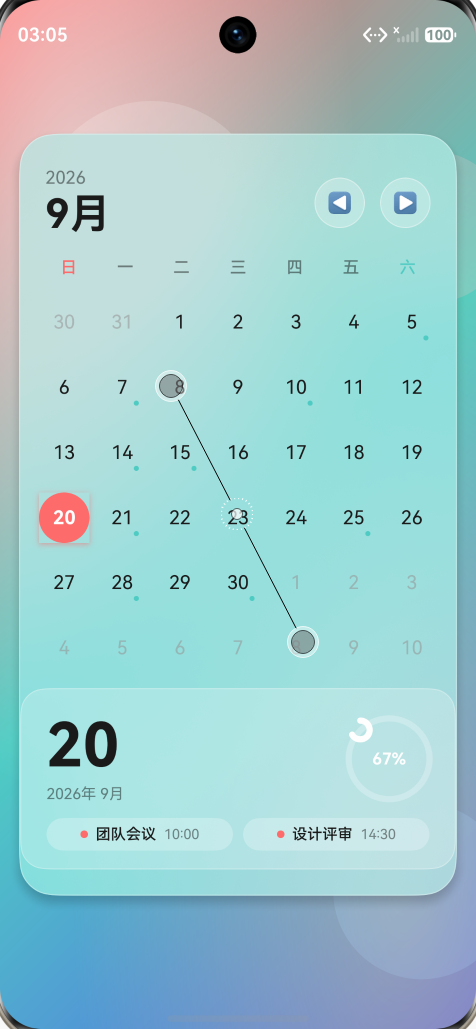
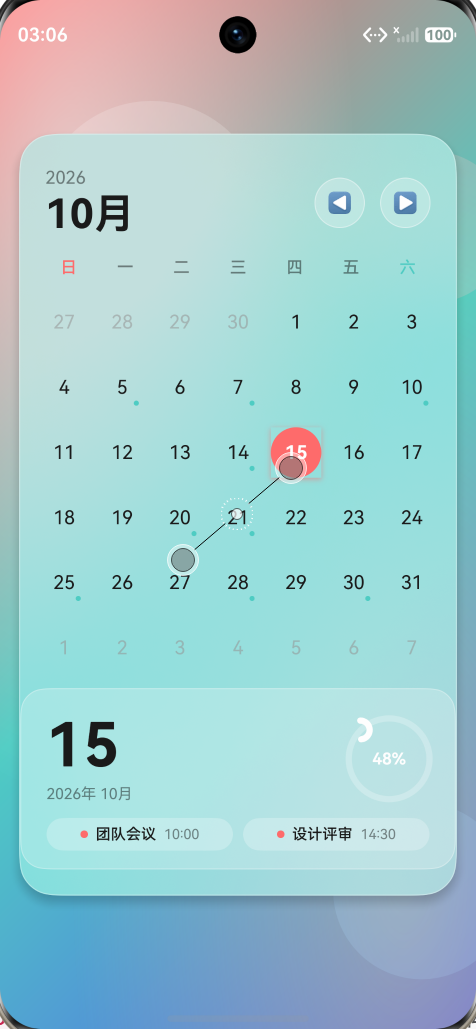
运行截图: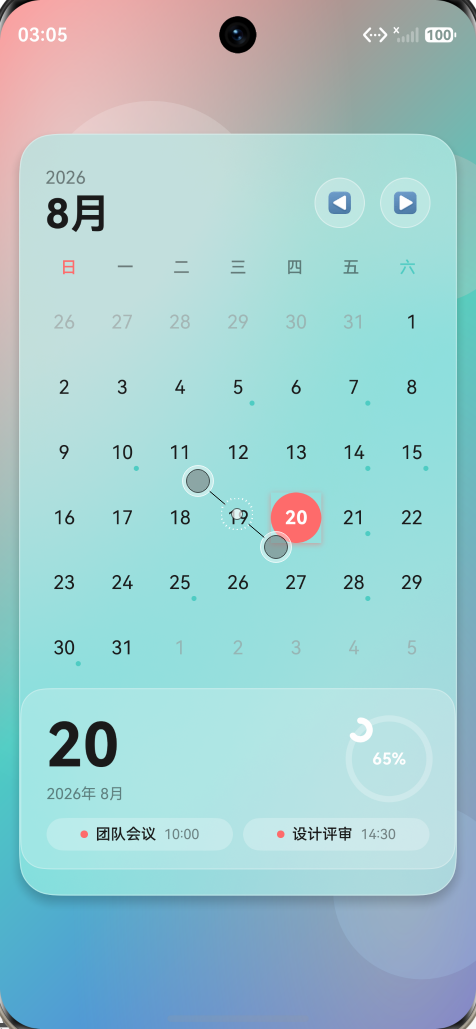
前言
HarmonyOS 6.0 在 ArkUI 框架上释放了大量新能力,毛玻璃(Glassmorphism) 视觉效果就是其中最出彩的一个。借助 backgroundBlurStyle、backdropBlur 和 shadow,我们可以零依赖地实现"悬浮毛玻璃卡片"。本文带你从零搭建一个沉浸式毛玻璃日历卡片组件,完整覆盖月视图、日期选择、进度环、弹性动画与深浅色主题自适应。
一、效果预览
最终运行效果包含四层视觉:
- 彩色渐变背景(红→青→蓝,135°)
- 径向光斑叠加层(左上白光 + 右下暖光)
- 浮动装饰圆(半透明色块,毛玻璃折射后产生彩色光晕)
- 居中毛玻璃卡片:圆角 + 描边 + 阴影 + 模糊,内嵌月份标题、星期表头、日期网格、详情卡与动态进度环
二、技术栈对照
| 需求点 | 实现方案 |
|---|---|
| 毛玻璃效果 | backgroundBlurStyle(BlurStyle.Regular) + backdropBlur(28) |
| 悬浮阴影 | shadow({ radius: 32, offsetY: 18, color: '#33000000' }) |
| 状态管理 | @State currentYear/Month、selectedDay、cardScale 等 |
| 弹性动画 | animateTo({ curve: curves.springMotion(0.5, 0.8) }) |
| 进度环绘制 | Path 组件 + SVG 路径命令(M...A...) |
| 深浅色主题 | base/element/color.json + dark/element/color.json 同名资源 |
⚠️ 踩坑提示:ArkTS 6.0 严格模式禁用
any/unknown,且Canvas的onReady回调类型已从CanvasRenderingContext2D改为DrawingRenderingContext,后者类型定义中不含clearRect、beginPath、arc等 2D 绘图方法。因此本组件进度环改用声明式Path+Circle实现,避开类型断言的坑。
三、资源准备
1. 颜色资源(base/element/color.json)
{
  "color": [
    { "name": "start_window_background", "value": "#FFFFFF" },
    { "name": "calendar_text_primary",   "value": "#1A1A1A" },
    { "name": "calendar_text_secondary", "value": "#73000000" },
    { "name": "calendar_accent",         "value": "#FF6B6B" },
    { "name": "calendar_accent_secondary","value": "#4ECDC4" }
  ]
}
2. 暗色资源(dark/element/color.json)
同名字段、值不同(如 calendar_text_primary: "#FFFFFF")。系统主题切换时,$r('app.color.calendar_text_primary') 会自动解析到对应 qualifier 下的资源,零代码实现深浅色自适应。
四、核心实现拆解
1. 沉浸式背景
Stack({ alignContent: Alignment.Center }) {
  // 1. 主渐变
  Column()
    .linearGradient({
      angle: 135,
      colors: [
        [$r('app.color.calendar_accent'), 0.0],
        [$r('app.color.calendar_accent_secondary'), 0.5],
        ['#5562EA', 1.0]
      ]
    })

  // 2. 径向光斑 (替代 Canvas 绘制)
  Column().radialGradient({
    center: ['15%', '18%'], radius: '60%',
    colors: [['rgba(255,255,255,0.55)', 0], ['rgba(255,255,255,0)', 1]]
  })
  Column().radialGradient({
    center: ['85%', '85%'], radius: '70%',
    colors: [['rgba(255,230,120,0.4)', 0], ['rgba(255,230,120,0)', 1]]
  })
  // 3. 浮动色块
  Stack() { /* 4 个 Circle 不同位置、不同色 */ }
}
浮动的半透明 Circle 配合模糊,能在卡片边缘折射出"彩色光斑"效果,是毛玻璃质感的关键。
2. 毛玻璃卡片本体
Column() {
  // 标题 / 星期 / 日期网格 / 详情卡...
}
.width('92%')
.backgroundColor('rgba(255,255,255,0.18)')
.backdropBlur(28)
.backgroundBlurStyle(BlurStyle.Regular, { adaptiveColor: AdaptiveColor.AVERAGE })
.borderRadius(28)
.border({ width: 1, color: 'rgba(255,255,255,0.35)' })
.shadow({ radius: 32, color: '#33000000', offsetX: 0, offsetY: 18 })
.scale({ x: this.cardScale, y: this.cardScale })
.onTouch((event: TouchEvent): void => {
  if (event.type === TouchType.Down) {
    animateTo({ duration: 200, curve: Curve.EaseOut }, () => { this.cardScale = 0.97 });
  } else if (event.type === TouchType.Up) {
    animateTo({ duration: 320, curve: curves.springMotion(0.5, 0.8) }, () => { this.cardScale = 1 });
  }
})
要点:
backdropBlur给定半径数值,backgroundBlurStyle指定模糊档位(Thin/Regular/Thick)。border一像素白色描边能极大提升"玻璃"质感。shadow的offsetY: 18营造悬浮层次。
3. 弹性动画
// 选中日期
private selectDay(day: CalendarDay): void {
  animateTo({ duration: 250, curve: curves.springMotion(0.5, 0.9) }, () => {
    this.selectedDay = day.day;
    this.selectedPulse = 1.18;  // 放大一下
  });
  setTimeout((): void => {
    animateTo({ duration: 280, curve: curves.springMotion(0.5, 0.7) }, () => {
      this.selectedPulse = 1;   // 回弹
    });
  }, 200);
}

// 切换月份
private changeMonth(delta: number): void {
  animateTo({ duration: 350, curve: curves.springMotion(0.6, 0.8) }, () => {
    /* 修正年月 */
  });
}
curves.springMotion(stiffness, damping) 是鸿蒙独有的"弹簧曲线",比 EaseInOut 更具物理感。
4. 进度环:Path + SVG 路径
Path.commands 接受标准 SVG 路径字符串。给定比例 ratio,我们计算从 -90° 出发的弧线终点:
private progressPath(ratio: number): string {
  const r = 26, cx = 32, cy = 32;
  const endAngle = -Math.PI / 2 + 2 * Math.PI * ratio;
  const sx = cx, sy = cy - r;
  const ex = cx + r * Math.cos(endAngle);
  const ey = cy + r * Math.sin(endAngle);
  const large = ratio > 0.5 ? 1 : 0;
  return `M ${sx} ${sy} A ${r} ${r} 0 ${large} 1 ${ex} ${ey}`;
}

@State @Watch('onProgressAnimChange') progressAnim: number = 0;
@State progressCommands: string = '';

private onProgressAnimChange(): void {
  const ratio = this.selectedDay / this.getDaysInMonth(this.currentYear, this.currentMonth);
  this.progressCommands = this.progressPath(ratio * this.progressAnim);
}
UI 端:
Stack({ alignContent: Alignment.Center }) {
  Circle()  // 背景环
    .width(64).height(64)
    .fill(Color.Transparent)
    .stroke('rgba(255,255,255,0.25)').strokeWidth(5)
  Path()   // 进度环
    .width(64).height(64)
    .commands(this.progressCommands)
    .stroke('#FFFFFF').strokeWidth(5)
    .strokeLineCap(LineCapStyle.Round)
    .fill(Color.Transparent)
  Text(`${ratio}%`)…
}
@Watch 监听 progressAnim 变化,逐帧重算 commands,实现 0→100% 的平滑填充。
五、EntryAbility 沉浸式配置
const win = windowStage.getMainWindowSync();
win.setWindowLayoutFullScreen(true);
win.setWindowSystemBarProperties({
  statusBarColor: '#00000000',
  statusBarContentColor: '#FFFFFFFF',
  navigationBarColor: '#00000000'
});
状态栏与导航栏透明,让毛玻璃内容延伸到屏幕边缘,沉浸感拉满。
六、常见踩坑清单
- 箭头函数必须显式返回类型:
(): void => this.fn()而不是() => this.fn(),否则报arkts-no-implicit-return-types。 backdropBlur的 options 不支持adaptiveColor:该参数属于backgroundBlurStyle的BackgroundBlurStyleOptions,写错会报"Object literal may only specify known properties"。Canvas.onReady回调类型:DrawingRenderingContext在 6.0 移除了 2D 方法定义,建议用Path替代或封装为自定义组件。any/unknown禁用:ArkTS 严格模式用arkts-no-any-unknown拦截,必须用具体接口类型。@Builder嵌套链式调用:形参中调用的方法建议也加: void,避免级联编译失败。
七、结语
通过这个项目我们看到,鸿蒙 6.0 在 UI 表现力 与 类型严格度 上同时发力。开发者用更少代码(backgroundBlurStyle 一行搞定磨砂)换来更强视觉,但也要适应更严格的 ArkTS 类型系统。
把上面的代码拷进 DevEco Studio(API 12+),运行到模拟器或真机,就能看到一个会"呼吸"的毛玻璃日历卡。后续可扩展:日程标记、滑动切换月份、列表弹层、节日高亮…… 玩法不设限,欢迎评论区交流你的二次创作 🚀
项目源码路径:
entry/src/main/ets/pages/Index.ets,依赖资源位于resources/base/element/与resources/dark/element/。

作为“人工智能6S店”的官方数字引擎,为AI开发者与企业提供一个覆盖软硬件全栈、一站式门户。
更多推荐


 0
0 0
0- 0


 已为社区贡献6条内容

所有评论(0)