
实训:用鸿蒙语言写一个登录页面
·
实例:
@Entry
@Component
struct MyPageLogin{
  @State isRemb:boolean=true;
  @State username:string="";
  @State password:string="";

  build() {
    Column({space:30}){
      Image($r('app.media.cxstudy_1781085599889'))
        .width(120)
        .height(120)
        .borderRadius(60)
        .shadow({radius:50,color:Color.Red})

      Text("账号登录")
        .fontSize(30)
        .fontWeight(FontWeight.Bolder)

      TextInput({text:this.username,placeholder:"请输入账号"})
        .width('100%')
        .height(50)
        .borderRadius(12)
        .padding({left:20})
        .onChange((value:string)=>{
          this.username = value
        })

      TextInput({text:this.password,placeholder:"请输入密码"})
        .width('100%')
        .height(50)
        .borderRadius(12)
        .padding({left:20})
        .type(InputType.Password)
        .onChange((value:string)=>{
          this.password = value
        })

      Row({space:20}){
        Text("记住密码")
          .fontSize(20)
        Toggle({
          type:ToggleType.Switch,
          isOn:this.isRemb
        })
          .height(28)
          .width(50)
          .onChange((value: boolean) => {
            this.isRemb = value
          })
      }

      Row({space:20}){
        Button('登录')
          .width('45%')
          .height(50)
          .fontSize(20)
          .onClick(()=>{
            if (this.username && this.password) {
              AlertDialog.show({
                title:"登录成功",
                message:`欢迎你,${this.username}`
              })
            }else {
              AlertDialog.show({
                title:"登录失败",
                message:`用户名${this.username}或密码不正确`
              })
            }
          })

        Button('注册')
          .width('45%')
          .height(50)
          .fontSize(20)
      }
    }
    .width('100%')
    .height('100%')
    .padding(20)
    .justifyContent(FlexAlign.Center)
  }
}
成果展示: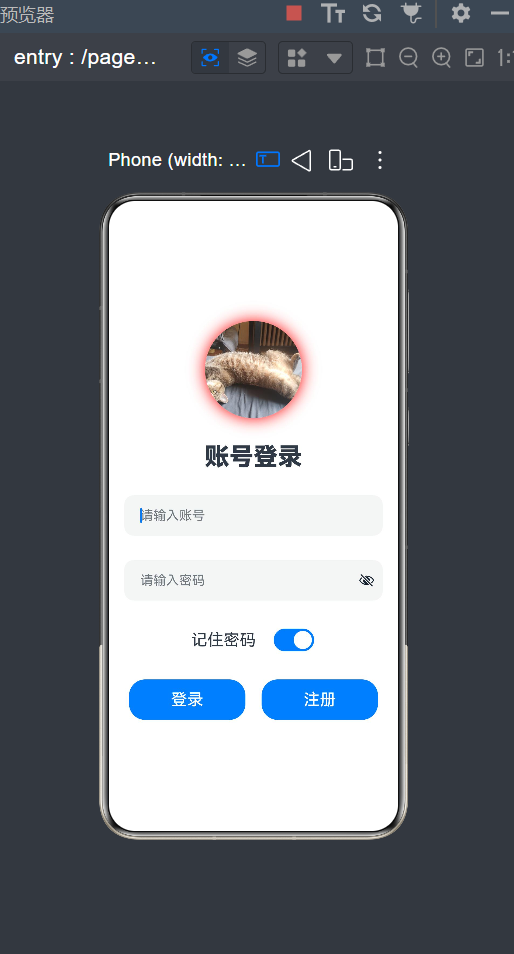
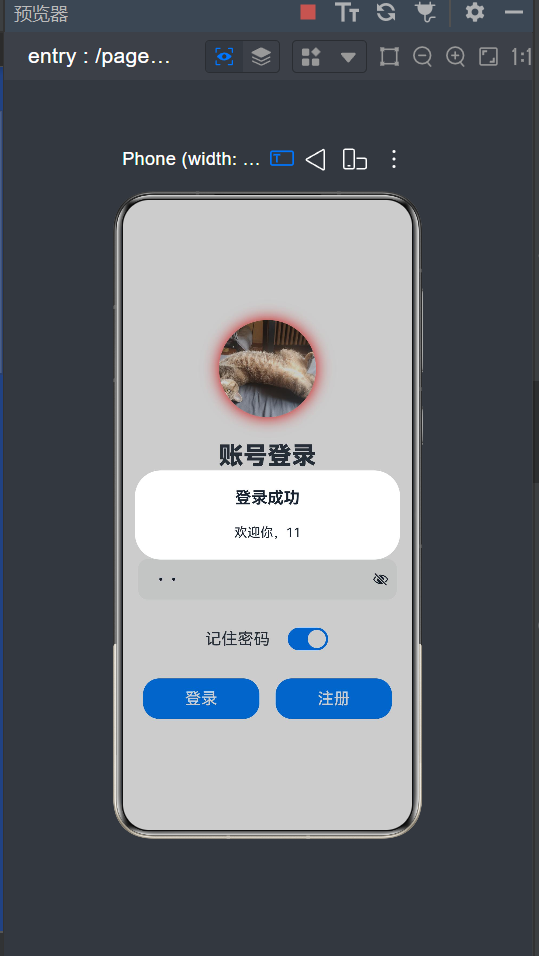
代码解析说明:
-
@State:修饰变量为响应式状态,变量一改,界面自动刷新。
-
isRemb:布尔值,控制 “记住密码” 开关是否默认打开,初始为 true。 -
username:保存账号输入内容。 -
password:保存密码输入内容 -
space:30:内部子控件上下间距 30。 -
宽高铺满全屏,四周内边距 20。
-
justifyContent(FlexAlign.Center):所有内容垂直居中。 -
加载项目 media 目录下的图片资源。
-
宽高 120,圆角 60 → 变成圆形头像。
-
添加红色阴影。
-
placeholder:输入框提示文字。 -
onChange:监听输入内容,把用户输入实时赋值给响应式变量username。 -
type(InputType.Password):内容自动隐藏为密文。 逻辑和账号框一致,内容存入password。 -
Row:横向排列。 -
Toggle:开关控件,绑定状态isRemb。 -
点击开关会同步更新
isRemb的值。

作为“人工智能6S店”的官方数字引擎,为AI开发者与企业提供一个覆盖软硬件全栈、一站式门户。
更多推荐

 1
1 0
0- 0


 已为社区贡献5条内容

所有评论(0)