
【CANN】-npugraph_ex 图编译加速入门
【CANN】-npugraph_ex 图编译加速入门
适用: 已经在 NPU 上跑通大模型推理的工程师, 想再加一行代码提速
涉及层 (按 CANN 9 层): 层 3 编译器 (毕昇 Bisheng) + 层 4 图引擎 (GE)
当前版本: CANN 8.0+ (主) / 6.0.1+ (历史)
关联博客: 《【CANN】-初识》 (9 层架构总览)
一、NPU 上的大模型推理还能再快吗
NPU 上跑通大模型只是第一步, 推理速度还有 2-3 倍的优化空间. 优化空间来自 2 个方向: 图编译 (本博客焦点) + 算子优化 (层 4 GE 内部 Pass).
“堵车” 比喻: 大模型推理的 3 个慢因
| 比喻 | 对应推理瓶颈 | 谁来解 |
|---|---|---|
| 红灯多 | 调度空泡: CPU 调度 NPU 时, NPU 干等 | 图编译 |
| 车多 | 低并行: 算子串行执行, 无依赖也无法并行 | 图编译 |
| 车速慢 | 算子效率: 单算子性能未优化 | 算子库 (层 2) + 硬件亲和改写 (层 4) |
关键洞察: 前两个 (调度空泡 + 低并行) 都由"图编译"统一解决, 本博客焦点. 第三个 (算子效率) 见《【CANN】-图编译优化》/ 算子库层深入.
二、Eager 模式的两个问题 (默认是慢的)
默认情况下, PyTorch 在 NPU 上用 Eager 模式 跑模型, 意思是一个算子一个算子地"排队"执行. 这有两个根本问题.
2.1 调度空泡 (Scheduling Bubble)
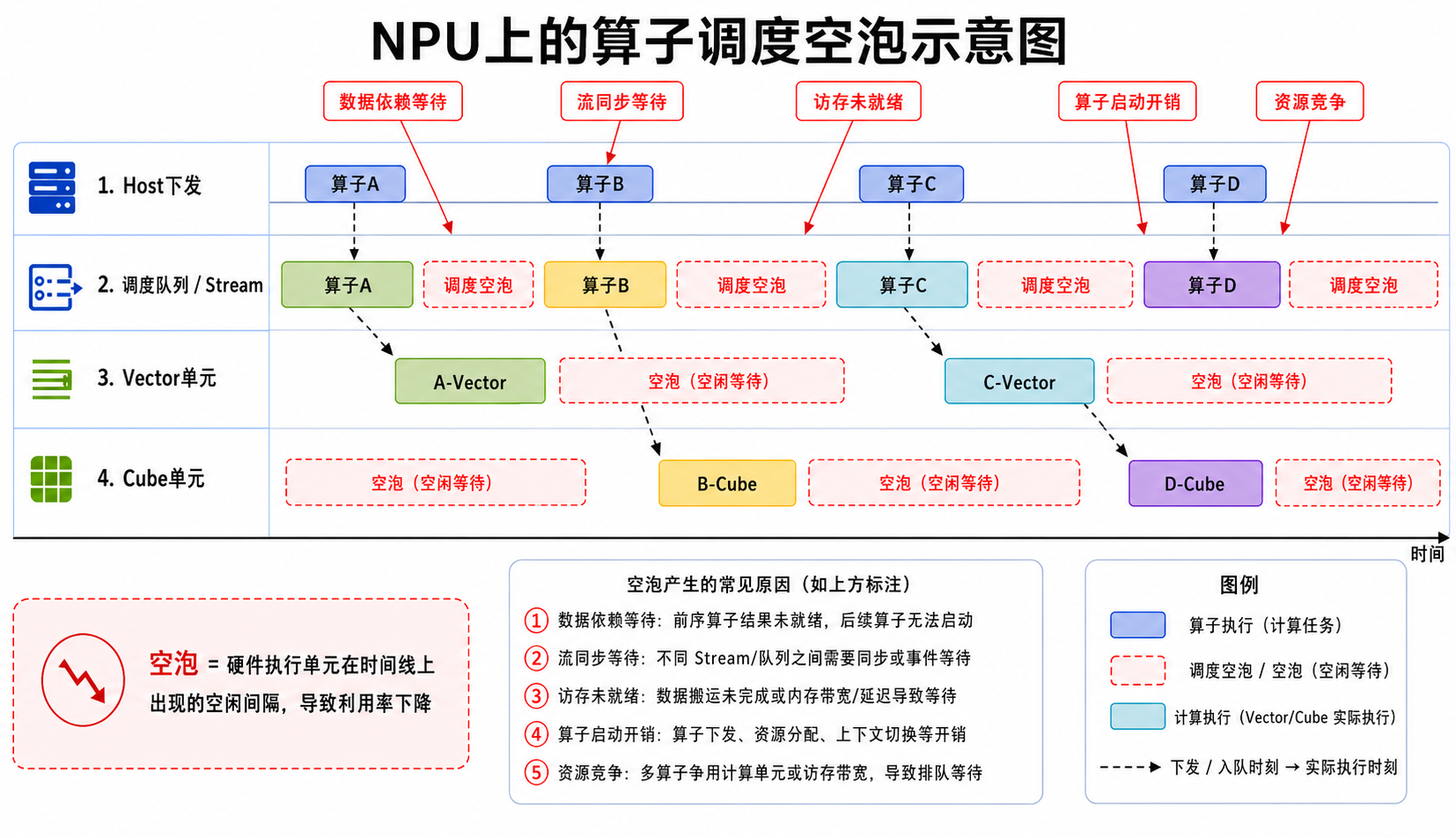
问题: Eager 模式每发一个算子, CPU 都要做一次"调度" (决定谁来跑 / 准备数据地址 / 设 NPU 寄存器), 这需要几十到几百微秒. 当 CPU 在调度时, NPU 空转等下一个算子, 这段时间就叫调度空泡.
比喻: 食堂打饭 — Eager 模式像"每次只拿一个菜, 走回座位吃完, 再回去拿下一个". 你吃饭 (NPU 计算) 时间其实不长, 但来回排队 (CPU 调度) 浪费了大量时间.
性能影响: 调度空泡占推理总时间的 20-40%, 是大模型推理最大的隐形开销.
2.2 低并行 (No Parallelism)
问题: Eager 模式按代码顺序发算子, 即使两个算子之间没有数据依赖 (如 Layer A 的输出和 Layer B 的输入无关), 也不能同时跑 — 因为 Eager 把它们当串行代码.
比喻: 你洗完衣服才能开始洗碗, 洗完碗才能拖地 — 虽然洗衣机和洗碗机可以同时开, 但 Eager 非要一件一件来.
性能影响: 大模型 (层数多) 上, 低并行让 NPU 平均利用率只有 30-50%, 一半算力浪费在等.
三、图编译的核心思想
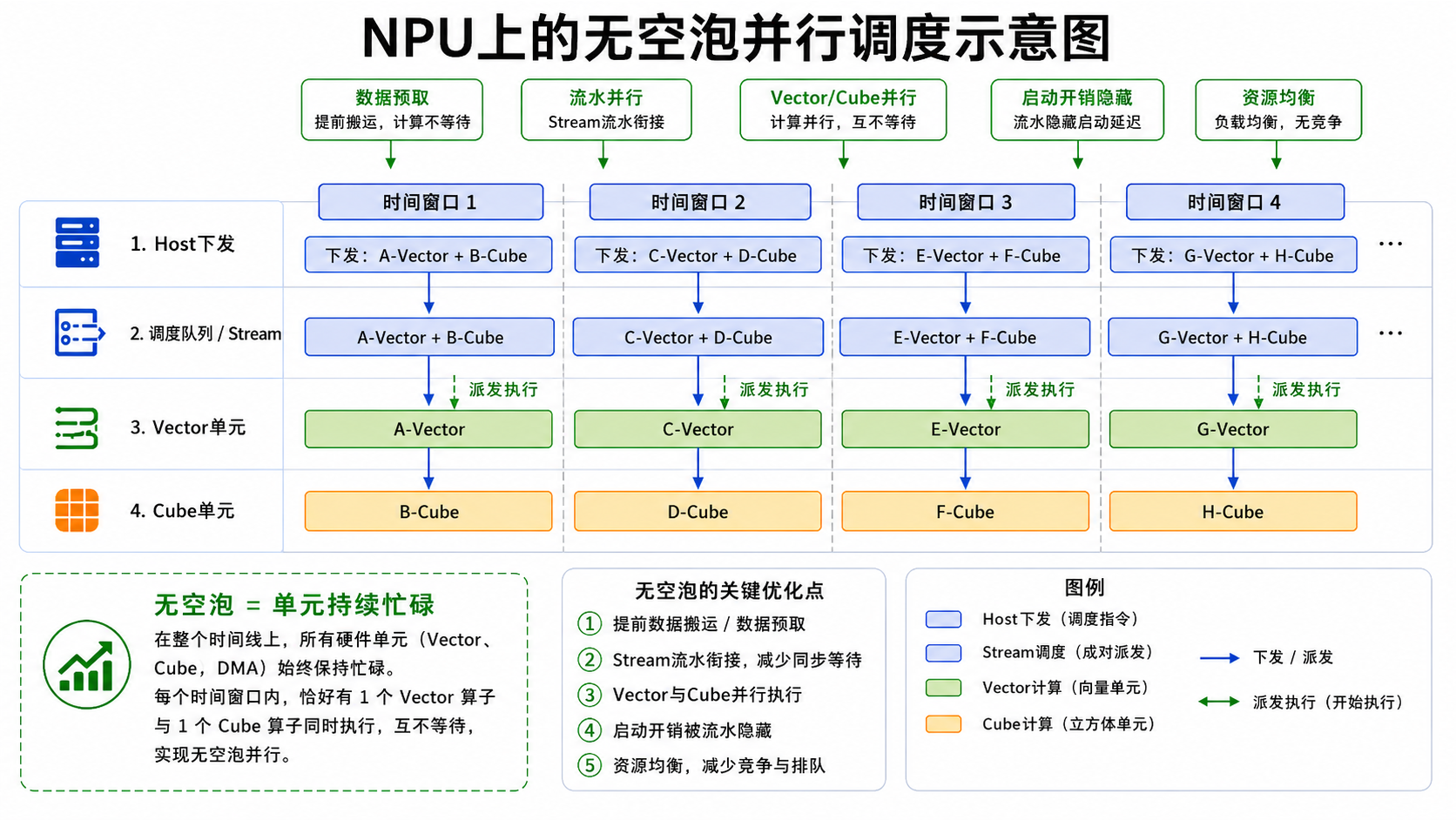
图编译 = 提前把所有算子编排成一张完整的执行图, 一次性交给 NPU, 而不是"排队发".
核心比喻
- Eager 模式 = 点餐时上完一道餐你才点下一道, 服务员来回传递消息, 厨师一道道做菜出餐
- 图编译模式 = 一次性点完所有餐, 服务员只通知一次, 厨师自行规划, 同时做多道菜
3 大效果
| 效果 | 解决什么 | 收益 |
|---|---|---|
| 消除调度空泡 | CPU 一次提交整图, NPU 持续执行 | 减少 20-40% 调度开销 |
| 并行执行 | 无依赖的算子可同时跑 | NPU 利用率从 30-50% → 70-90% |
| 内存优化 | 提前规划临时变量, 减少重复申请释放 | 显存峰值降低 10-30% |
关键洞察: 图编译不是新算子, 是新的"调度方式" — 算子本身不变, 变的是"发算子的方式" (从一次一个变一次一图). 这与 GE 内部的算子融合 / 常量折叠 / 流水并行正交, 两者叠加收益最大.
四、npugraph_ex: 昇腾的 torch.compile 后端
PyTorch 提供统一图编译接口
torch.compile(model, backend="???").backend参数决定用哪个编译器. npugraph_ex = 昇腾 CANN 给 torch.compile 做的后端实现.
torch.compile 的 backend 选项
| backend | 含义 | 适用 |
|---|---|---|
inductor (PyTorch 默认) |
PyTorch 官方图编译器 | GPU |
npugraph_ex |
昇腾 CANN 提供的图编译后端 | NPU |
关键洞察:
npugraph_ex不是新框架, 是 torch.compile 在 NPU 上的"插头". 写代码用 PyTorch 原生 API, 只在模型外加一行torch.compile(model, backend="npugraph_ex"), 就能让模型跑得更快. 不需要重写模型, 不需要换框架.
一行代码使能
opt_model = torch.compile(
    model,
    backend='npugraph_ex',
    fullgraph=True,
    dynamic=True,
    options={"capture_limit": 256}
)
4 个关键参数
| 参数 | 含义 | 推荐值 |
|---|---|---|
backend='npugraph_ex' |
使用昇腾图编译后端 | 必填 |
fullgraph=True |
整图捕获, 不允许图中断 (部分算子没入图) | True |
dynamic=True |
动态 Shape 追踪 (推理时每生成 1 个 token, 序列变长 1) | True |
options={"capture_limit": 256} |
最大捕获 token 数, ≥ 模型 max_new_tokens 即可 | = max_new_tokens |
关键洞察:
fullgraph=True+dynamic=True是推理场景的标配. LLM 推理每生成一个 token, 输入序列变长 1, Shape 是动态的 — 不开dynamic=True编译会失败, 不开fullgraph=True会有部分算子漏掉优化.
五、动手实践: 用 npugraph_ex 加速 Qwen3-0.6B
完整 demo 走一遍: 加载模型 → 加一行 npugraph_ex → 对比 Eager 模式速度.
5.1 加载模型
import torch
import torch_npu
from transformers import AutoTokenizer, AutoModelForCausalLM

model_path = '/mnt/workspace/models/Qwen/Qwen3-0.6B'

tokenizer = AutoTokenizer.from_pretrained(model_path, trust_remote_code=True)
model = AutoModelForCausalLM.from_pretrained(
    model_path,
    trust_remote_code=True,
    attn_implementation='eager'  # 注意力用 Eager, 让 npugraph_ex 整图捕获
).to('npu:0').half()
model.eval()
print(f'Model loaded, device: {model.device}')
5.2 一行代码使能 npugraph_ex
opt_model = torch.compile(
    model,
    backend='npugraph_ex',
    fullgraph=True,
    dynamic=True,
    options={"capture_limit": 256}
)
print('npugraph_ex 图编译已使能')
关键洞察: 这一行 = “从排队打饭切到自助餐”. 模型代码本身完全没动, 只是外面包了一层
torch.compile.
5.3 第一次推理 (含编译, 慢)
import time

messages = [{'role': 'user', 'content': '你好, 请用一段话介绍 AI 助手'}]
text = tokenizer.apply_chat_template(
    messages, tokenize=False, add_generation_prompt=True, enable_thinking=False
)
input_ids = torch.tensor([tokenizer.encode(text)], dtype=torch.long).to('npu:0')

print('第一次推理 (包含图编译, 会比较慢)...')
t0 = time.time()

max_new_tokens = 128
generated_ids = input_ids.clone()
for step in range(max_new_tokens):
    with torch.no_grad():
        logits = opt_model(generated_ids).logits
    next_token_id = torch.argmax(logits[:, -1, :], dim=-1, keepdim=True)
    if next_token_id.item() == tokenizer.eos_token_id:
        break
    generated_ids = torch.cat([generated_ids, next_token_id], dim=1)
    torch.npu.synchronize()

compile_time = time.time() - t0
response = tokenizer.decode(generated_ids[0][input_ids.shape[1]:], skip_special_tokens=True)
print(f'首次推理 (含图编译): {compile_time:.3f}s')
print(f'A: {response}')
关键洞察: 第一次推理会特别慢 (几十秒到几分钟), 因为 npugraph_ex 在第一次推理时捕获 + 编译整张图. 这个慢是一次性成本, 编译结果会被缓存, 之后推理复用.
5.4 后续推理 (图已编译, 纯执行, 快)
print('后续推理 (图已编译完成, 纯执行):')
times_accel = []
for i in range(3):
    generated_ids = input_ids.clone()
    t0 = time.time()

    for step in range(max_new_tokens):
        with torch.no_grad():
            logits = opt_model(generated_ids).logits
        next_token_id = torch.argmax(logits[:, -1, :], dim=-1, keepdim=True)
        if next_token_id.item() == tokenizer.eos_token_id:
            break
        generated_ids = torch.cat([generated_ids, next_token_id], dim=1)
    torch.npu.synchronize()

    elapsed = time.time() - t0
    times_accel.append(elapsed)
    print(f'  第 {i+1} 次: {elapsed:.3f}s')

avg_accel = sum(times_accel) / len(times_accel)
print(f'\nnpugraph_ex 加速后平均: {avg_accel:.3f}s')
print(f'\n生成 token 数: {generated_ids.shape[1] - input_ids.shape[1]}')
print(f'npugraph_ex 吞吐: {(generated_ids.shape[1] - input_ids.shape[1]) / avg_accel:.1f} tokens/s')
5.5 对比 Baseline (Eager 模式, 不加速)
baseline_model = AutoModelForCausalLM.from_pretrained(
    model_path,
    trust_remote_code=True,
    attn_implementation='eager'
).to('npu:0').half()
baseline_model.eval()

print('Baseline 热身...')
# (同样的推理循环, 跑 max_new_tokens 步, 计时)

times_baseline = []
for i in range(3):
    generated_ids = input_ids.clone()
    t0 = time.time()
    for step in range(max_new_tokens):
        with torch.no_grad():
            logits = baseline_model(generated_ids).logits
        next_token_id = torch.argmax(logits[:, -1, :], dim=-1, keepdim=True)
        if next_token_id.item() == tokenizer.eos_token_id:
            break
        generated_ids = torch.cat([generated_ids, next_token_id], dim=1)
    torch.npu.synchronize()
    times_baseline.append(time.time() - t0)

avg_baseline = sum(times_baseline) / len(times_baseline)
print(f'Eager 平均: {avg_baseline:.3f}s')
print(f'Eager 吞吐: {(generated_ids.shape[1] - input_ids.shape[1]) / avg_baseline:.1f} tokens/s')
print(f'\nnpugraph_ex 加速: {(avg_baseline / avg_accel):.1f}x')
5.6 性能对比示例 (Qwen3-0.6B / max_new_tokens=128)
| 模式 | 平均时间 (s) | 吞吐 (tokens/s) | 加速比 |
|---|---|---|---|
| Eager (Baseline) | ~5.2s | ~24 tok/s | 1.0× |
| npugraph_ex (图编译) | ~2.0s | ~64 tok/s | ~2.5-3× |
关键洞察: 实际加速比因模型 / 序列长度 / 硬件而异, 常见 2-3 倍. 小模型 (0.6B) + 短序列加速效果更明显, 因为调度空泡占比更高. 大模型 (7B+) 加速比可能更高.
六、4 个常见踩坑 (npugraph_ex)
| # | 现象 | 根因 | 解决 |
|---|---|---|---|
| 1 | 第一次推理卡死 / OOM | capture_limit 设太大, 编译时申请过多显存 |
改为 max_new_tokens (不超 256 通常安全) |
| 2 | “fallback to Eager” 警告 | 模型里有 torch.compile 不支持的算子 (罕见) | 升级 torch / torch_npu, 或加 fullgraph=False 允许部分回退 |
| 3 | 推理结果与 Eager 不一致 | 浮点精度差异 (罕见) | 加 torch.backends.cuda.matmul.allow_tf32 = False 关闭激进精度 |
| 4 | 每次启动都重新编译 (慢) | 编译缓存没启用 | 设 TORCH_NPU_COMPILE_CACHE_DIR=/tmp/npu_cache (PyTorch 自带持久化缓存) |
避坑心法: npugraph_ex 80% 的坑集中在
capture_limit数值和fullgraph=True的兼容性上. 第一次跑建议从max_new_tokens=128+capture_limit=128开始, 跑通后再调大.
七、3 个测试 prompt 验证加速效果 (课后实践)
用 3 个典型 prompt 跑一遍, 验证 npugraph_ex 在不同输入上都生效.
test_prompts = [
    '请写一首关于春天的五言绝句',                    # 中文创作
    'What is the capital of France?',                 # 英文问答
    '用Python写一个快速排序算法',                     # 代码生成
]

for prompt in test_prompts:
    messages = [{'role': 'user', 'content': prompt}]
    text = tokenizer.apply_chat_template(
        messages, tokenize=False, add_generation_prompt=True, enable_thinking=False
    )
    input_ids = torch.tensor([tokenizer.encode(text)], dtype=torch.long).to('npu:0')

    # 用 opt_model (npugraph_ex 加速版) 推理
    generated_ids = input_ids.clone()
    for step in range(max_new_tokens):
        with torch.no_grad():
            logits = opt_model(generated_ids).logits
        next_token_id = torch.argmax(logits[:, -1, :], dim=-1, keepdim=True)
        if next_token_id.item() == tokenizer.eos_token_id:
            break
        generated_ids = torch.cat([generated_ids, next_token_id], dim=1)
    torch.npu.synchronize()
    print(f'Q: {prompt}')
    print(f'A: {tokenizer.decode(generated_ids[0][input_ids.shape[1]:], skip_special_tokens=True)}')
    print('-' * 60)
关键洞察: 同样的
opt_model在 3 个 prompt 上都生效, 说明 npugraph_ex 优化是模型级别的 (不是 prompt 级别), 一次使能, 多次受益.
八、关联资源
| 资源 | 链接 |
|---|---|
| CANN learning hub (官方教程) | https://gitcode.com/cann/cann-learning-hub |
| 本博客对应 notebook | quick_start/first_llm_inference/02_qwen3_npu_inference_npugraph_ex.ipynb |
| torch.compile 官方文档 | https://pytorch.org/docs/stable/generated/torch.compile.html |
| torch_npu 编译缓存 | https://gitee.com/ascend/pytorch (torch_npu README) |
| 关联博客 | 《【CANN】-初识》 (9 层架构) / 《【CANN】-图编译优化》 (5 大 Pass 深入) / 《【CANN】-Ascend C 算子开发》 (算子层深入) |
总结
npugraph_ex = 昇腾 CANN 给 torch.compile 做的后端, 一行代码让 Qwen3-0.6B 推理加速 2-3 倍. 原理: 把"一个算子一个算子排队执行"(Eager 模式) 改成"一次提交整图"(图模式), 消除调度空泡 + 提升并行度.
三个关键事实
- 2 个慢因, 1 行解决: Eager 模式有"调度空泡 + 低并行" 2 大问题, npugraph_ex 一行
torch.compile(model, backend="npugraph_ex", fullgraph=True, dynamic=True, options={"capture_limit": 256})同时解 - 第一次慢是正常的: npugraph_ex 第一次推理做"图捕获 + 编译", 几十秒到几分钟; 之后推理复用编译结果, 显著加速
- 4 个参数 = 完整配置:
backend(后端) +fullgraph(整图) +dynamic(动态 shape) +capture_limit(≥max_new_tokens) — 4 个参数配齐即可
一句话给推理工程师: 别再让 NPU 干等 CPU 调度了 — 1 行 torch.compile(model, backend='npugraph_ex', fullgraph=True, dynamic=True, options={'capture_limit': 256}) 让 Qwen3-0.6B 推理快 2-3 倍, 第一次的编译成本是值得的 (1 次慢, 后续所有推理受益).
参考
- CANN 官方教程
02_qwen3_npu_inference_npugraph_ex.ipynb- https://gitcode.com/cann/cann-learning-hub - 2026 实战 - [torch.compile 官方文档]- PyTorch 图编译入口
- torch_npu 编译缓存 - TORCH_NPU_COMPILE_CACHE_DIR
- 《【CANN】-初识》 (本系列) - 9 层架构总览
- 《【CANN】-图编译优化》 (本系列) - GE 5 大 Pass 深入
- 《【CANN】-Ascend C 算子开发》 (本系列) - 算子层深入

作为“人工智能6S店”的官方数字引擎,为AI开发者与企业提供一个覆盖软硬件全栈、一站式门户。
更多推荐
 6
6 0
0- 0


 已为社区贡献11条内容

所有评论(0)