
鸿蒙原生ArkTS布局之List下拉刷新PullToRefresh深度实践
鸿蒙原生 ArkTS 布局之 List 下拉刷新(PullToRefresh)深度实践
一、引言
下拉刷新(Pull-to-Refresh)是移动端最基础的交互范式之一。用户通过向下拖拽列表触发数据更新,反馈即时、直觉化。在 HarmonyOS NEXT 中,ArkTS 提供了 Refresh 组件和 List 组件的 .onRefreshing() 回调,将整个交互流程封装为声明式 API,开发者只需关心「刷新触发后做什么」,其余统统交给框架。
本文以一个完整的「消息中心」通知列表为业务场景,从零搭建下拉刷新示例,并深度剖析布局要点、API 设计哲学与 ArkTS 语法约束。
二、项目准备
| 项目 | 版本 |
|---|---|
| HarmonyOS SDK | API 24(HarmonyOS NEXT) |
| DevEco Studio | 5.0.3.600+ |
| 构建工具 | hvigor 6.23.5 |
项目结构:
entry/src/main/ets/pages/
└── Index.ets        # 首页 — 下拉刷新示例
路由配置(main_pages.json):
{ "src": ["pages/Index"] }
三、核心组件解析
3.1 Refresh 组件
Refresh 是鸿蒙 NEXT 提供的下拉刷新容器,包裹可滚动内容,自动处理拖拽识别、阈值判定、动画反馈。
| 属性/回调 | 类型 | 说明 |
|---|---|---|
refreshing | boolean | 绑定刷新状态 |
onRefreshing() | () => void | 松手触发刷新 |
onStateChange() | (status) => void | 监听状态变化 |
3.2 List 组件
List 是高性能虚拟列表组件,与 Refresh 配合时需通过 nestedScroll 配置事件分发策略。
3.3 @State + @Builder
@State:标记响应式状态,修改后自动触发 UI 重绘@Builder:自定义构建函数,封装可复用 UI 片段
四、代码实现详解
4.1 数据模型
interface NotificationItem {
  id: number;
  title: string;
  summary: string;
  time: string;
  read: boolean;
}
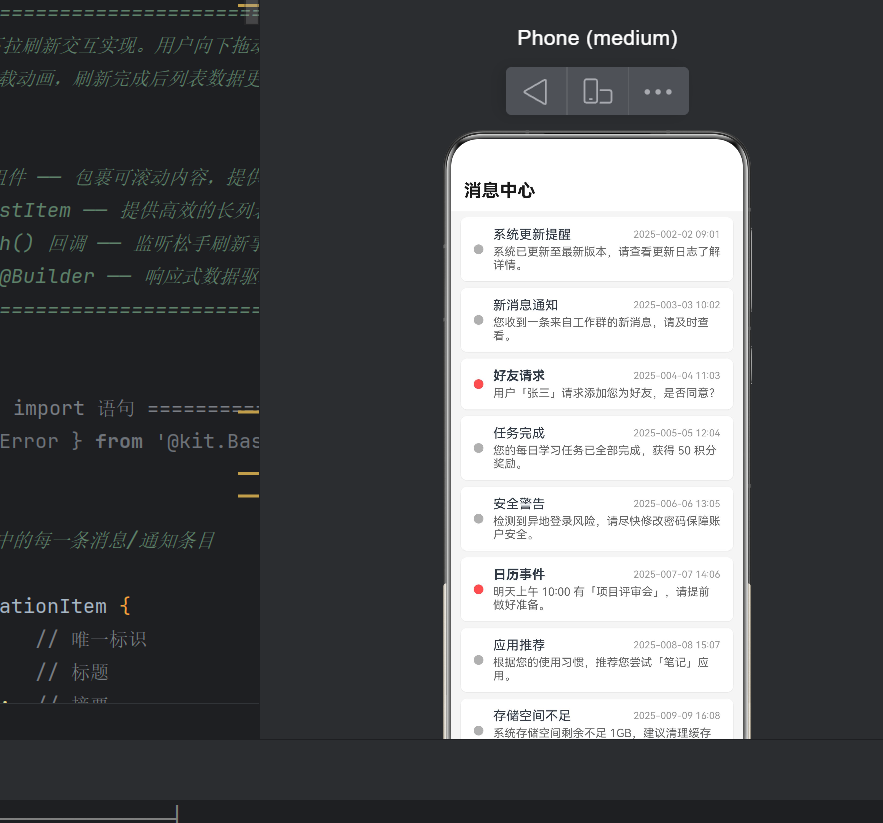
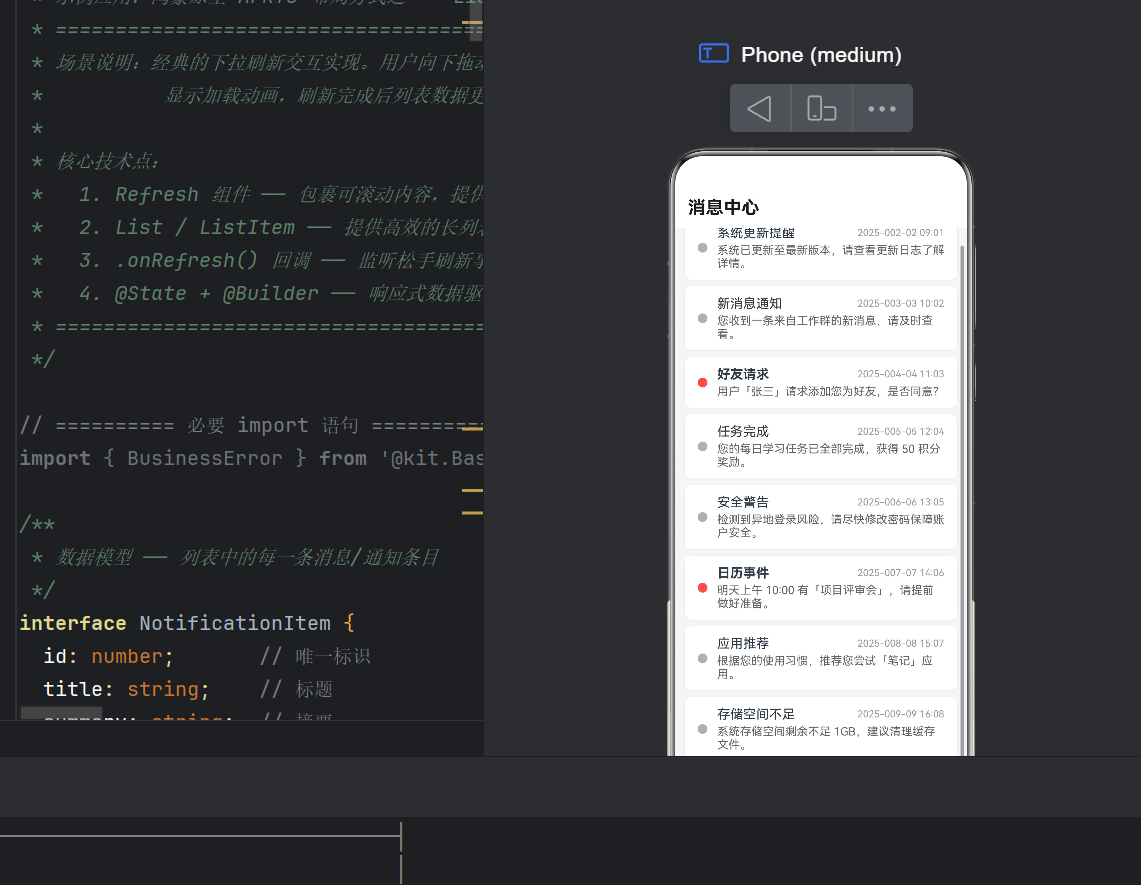
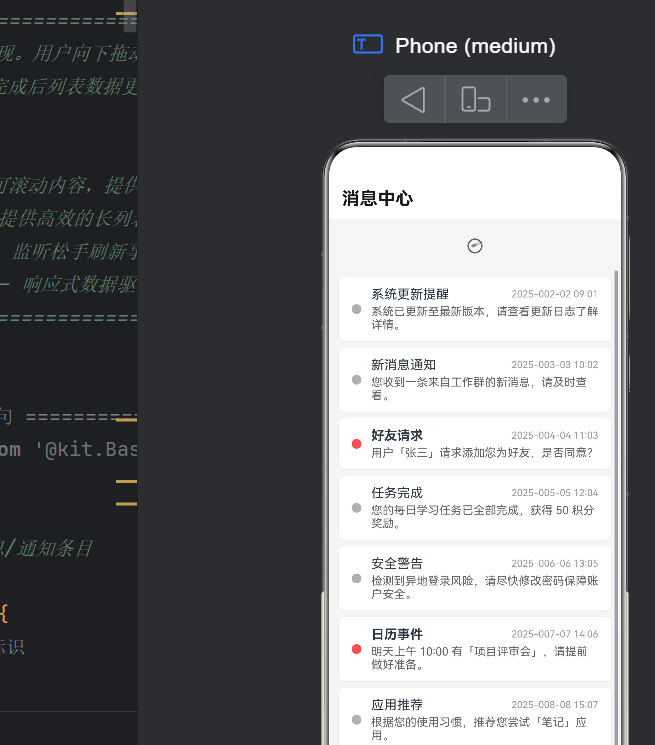
每条通知包含已读/未读状态,通过左侧圆点颜色区分(红色未读、灰色已读)。
4.2 状态变量
@State private dataList: NotificationItem[] = [];
@State private isRefreshing: boolean = false;
private nextId: number = 10;
dataList:列表数据源,重新赋值触发 UI 更新isRefreshing:绑定到Refresh.refreshing,控制 loading 动画nextId:数据计数器,非响应式
4.3 数据初始化
aboutToAppear(): void { this.loadInitData(); }

private loadInitData(): void {
  const list: NotificationItem[] = [];
  for (let i = 1; i <= 8; i++) list.push(this.createItem(i));
  this.dataList = list;
  this.nextId = 9;
}
createItem() 从预设标题/摘要数组中循环取值,生成格式化的通知条目。
4.4 核心:下拉刷新逻辑
private onPullRefresh(): void {
  this.isRefreshing = true;          // ① 显示 loading
  setTimeout(() => {                  // ② 模拟 2s 网络延迟
    const newItems: NotificationItem[] = [];
    for (let i = 0; i < 2; i++) {
      this.nextId++;
      newItems.push(this.createItem(this.nextId));
    }
    this.dataList = newItems.concat(this.dataList); // ③ 新数据插入头部
    this.isRefreshing = false;        // ④ 关闭 loading
  }, 2000);
}
执行流程:
下拉松手 → onRefreshing() → isRefreshing=true → loading 显示
    → 网络请求(模拟2s) → 数据 concat 到头部 → isRefreshing=false → loading 消失
4.5 @Builder 封装列表项
@Builder
private itemRow(item: NotificationItem) {
  Row() {
    Circle().width(12).height(12)
      .fill(item.read ? '#b0b0b0' : '#ff4d4f')
      .margin({ right: 12 })
    Column() {
      Row() {
        Text(item.title).fontSize(16)
          .fontWeight(item.read ? FontWeight.Normal : FontWeight.Bold)
          .textOverflow({ overflow: TextOverflow.Ellipsis }).maxLines(1).layoutWeight(1)
        Text(item.time).fontSize(12).fontColor('#999')
      }.width('100%')
      Text(item.summary).fontSize(14).fontColor('#666')
        .textOverflow({ overflow: TextOverflow.Ellipsis }).maxLines(2).margin({ top: 4 })
    }.layoutWeight(1).alignItems(HorizontalAlign.Start)
  }
  .width('100%').padding({ top: 12, bottom: 12, left: 16, right: 16 })
  .backgroundColor('#ffffff').borderRadius(8)
  .shadow({ radius: 2, offsetX: 0, offsetY: 1, color: '#1a000000' })
}
布局层次:
Row
 ├── Circle(状态圆点)
 └── Column(layoutWeight=1)
      ├── Row → Text(标题) + Text(时间)
      └── Text(摘要,最多2行)
4.6 页面主布局
build() {
  Column() {
    // 标题栏
    Row() {
      Text('消息中心').fontSize(22).fontWeight(FontWeight.Bold)
    }.width('100%').padding({ top:12, bottom:12, left:16, right:16 }).backgroundColor('#fff')

    // Refresh 包裹 List
    Refresh({ refreshing: this.isRefreshing }) {
      List() {
        ForEach(this.dataList, (item: NotificationItem, index?: number) => {
          ListItem() {
            this.itemRow(item)
          }
          .margin({ left:12, right:12, top: index===0 ? 8 : 4, bottom:4 })
          .onClick(() => {
            const idx = this.dataList.indexOf(item);
            if (idx !== -1) {
              const updated: NotificationItem = {
                id: item.id, title: item.title,
                summary: item.summary, time: item.time,
                read: !item.read
              };
              this.dataList[idx] = updated;
              this.dataList = this.dataList.concat([]); // 触发响应式
            }
          })
        }, (item: NotificationItem) => item.id.toString())
      }
      .listDirection(Axis.Vertical)
      .edgeEffect(EdgeEffect.Spring)
      .nestedScroll({
        scrollForward: NestedScrollMode.SELF_FIRST,
        scrollBackward: NestedScrollMode.SELF_FIRST,
      })
    }
    .onRefreshing(() => { this.onPullRefresh(); })
    .onStateChange((status: RefreshStatus) => {
      switch (status) {
        case RefreshStatus.Inactive: break;
        case RefreshStatus.Drag: break;
        case RefreshStatus.OverDrag: break;
        case RefreshStatus.Refresh: break;
        case RefreshStatus.Done: break;
      }
    })
    .layoutWeight(1).width('100%')
  }
  .width('100%').height('100%').backgroundColor('#f5f5f5')
}
4.7 响应式更新要点
ArkTS 响应式基于引用比较,必须重新赋值数组才能触发 UI 更新:
// ❌ 错误:数组引用未变,UI 不更新
this.dataList[idx] = updated;

// ✅ 正确:重新赋值数组
this.dataList[idx] = updated;
this.dataList = this.dataList.concat([]);
五、布局要点剖析
5.1 Refresh 状态机
Inactive → Drag → OverDrag → Refresh → Done → Inactive
| 状态 | 含义 |
|---|---|
Inactive | 初始闲置 |
Drag | 拖拽中 |
OverDrag | 超过阈值 |
Refresh | 执行刷新 |
Done | 完成 |
5.2 NestedScroll 配置
List 与 Refresh 需协调滚动事件:
.nestedScroll({
  scrollForward: NestedScrollMode.SELF_FIRST,
  scrollBackward: NestedScrollMode.SELF_FIRST,
})
SELF_FIRST 表示组件先消费事件,消费不完再传父组件。
5.3 布局层次
Column(全屏)
 ├── Row(标题栏)
 └── Refresh(layoutWeight=1)
      └── List → ForEach → ListItem × N
           └── Row → Circle + Column(标题+摘要)
5.4 性能优化
- ForEach key:
item.id.toString()稳定 key 避免全量渲染 - EdgeEffect.Spring:弹簧回弹提升手感
- maxLines + textOverflow:限制行数避免高度波动
- shadow 属性:GPU 加速
六、常见编译错误
6.1 展开运算符 arkts-no-spread
// ❌ 错误
this.dataList = [...newItems, ...this.dataList];
const updated = { ...item, read: !item.read };

// ✅ 正确
this.dataList = newItems.concat(this.dataList);
const updated: NotificationItem = {
  id: item.id, title: item.title,
  summary: item.summary, time: item.time,
  read: !item.read
};
6.2 枚举值大小写
// ❌ 错误 → ✅ 正确
RefreshStatus.INACTIVE  → RefreshStatus.Inactive
RefreshStatus.DRAGGING  → RefreshStatus.Drag
RefreshStatus.OVERDRAG  → RefreshStatus.OverDrag
RefreshStatus.REFRESH   → RefreshStatus.Refresh
RefreshStatus.DONE      → RefreshStatus.Done
6.3 onRefresh vs onRefreshing
// ❌ 错误
Refresh({...}).onRefresh(() => {})

// ✅ 正确
Refresh({...}).onRefreshing(() => {})
七、生产进阶建议
7.1 上拉加载更多
在 List.onReachEnd 中触发分页加载,与下拉刷新配合:
List() { ... }
  .onReachEnd(() => {
    if (!this.isLoadingMore) this.loadNextPage();
  })
下拉刷新重置页码,上拉加载追加数据。
7.2 异常处理
.onRefreshing(() => {
  this.onPullRefresh().catch(() => {
    promptAction.showToast({ message: '刷新失败,请重试' });
  });
})
八、完整源码
/**
 * List 下拉刷新(PullToRefresh)示例
 * 核心技术:Refresh + List + onRefreshing
 * API 版本:HarmonyOS NEXT API 24
 */

interface NotificationItem {
  id: number;
  title: string;
  summary: string;
  time: string;
  read: boolean;
}

@Entry
@Component
struct Index {
  @State private dataList: NotificationItem[] = [];
  @State private isRefreshing: boolean = false;
  private nextId: number = 10;

  aboutToAppear(): void { this.loadInitData(); }

  private loadInitData(): void {
    const list: NotificationItem[] = [];
    for (let i = 1; i <= 8; i++) list.push(this.createItem(i));
    this.dataList = list;
    this.nextId = 9;
  }

  private createItem(id: number): NotificationItem {
    const titles = ['系统更新提醒','新消息通知','好友请求','任务完成',
      '安全警告','日历事件','应用推荐','存储空间不足'];
    const summaries = ['系统已更新至最新版本。','您收到一条新消息。',
      '用户「张三」请求添加好友。','每日任务已完成,获得50积分。',
      '检测到异地登录风险。','明天上午10:00有项目评审会。',
      '推荐您尝试「笔记」应用。','存储空间不足1GB,建议清理缓存。'];
    const idx = (id - 1) % titles.length;
    return {
      id, title: titles[idx], summary: summaries[idx],
      time: `2025-0${id%9+1}-${String(id%28+1).padStart(2,'0')}`,
      read: id % 3 !== 0
    };
  }

  private onPullRefresh(): void {
    this.isRefreshing = true;
    setTimeout(() => {
      const newItems: NotificationItem[] = [];
      for (let i = 0; i < 2; i++) {
        this.nextId++;
        newItems.push(this.createItem(this.nextId));
      }
      this.dataList = newItems.concat(this.dataList);
      this.isRefreshing = false;
    }, 2000);
  }

  @Builder
  private itemRow(item: NotificationItem) {
    Row() {
      Circle().width(12).height(12)
        .fill(item.read ? '#b0b0b0' : '#ff4d4f').margin({ right: 12 })
      Column() {
        Row() {
          Text(item.title).fontSize(16)
            .fontWeight(item.read ? FontWeight.Normal : FontWeight.Bold)
            .textOverflow({overflow:TextOverflow.Ellipsis}).maxLines(1).layoutWeight(1)
          Text(item.time).fontSize(12).fontColor('#999')
        }.width('100%')
        Text(item.summary).fontSize(14).fontColor('#666')
          .textOverflow({overflow:TextOverflow.Ellipsis}).maxLines(2).margin({top:4})
      }.layoutWeight(1).alignItems(HorizontalAlign.Start)
    }
    .width('100%').padding({top:12,bottom:12,left:16,right:16})
    .backgroundColor('#fff').borderRadius(8)
    .shadow({radius:2,offsetX:0,offsetY:1,color:'#1a000000'})
  }

  build() {
    Column() {
      Row() {
        Text('消息中心').fontSize(22).fontWeight(FontWeight.Bold)
      }.width('100%').padding({top:12,bottom:12,left:16,right:16}).backgroundColor('#fff')

      Refresh({ refreshing: this.isRefreshing }) {
        List() {
          ForEach(this.dataList, (item: NotificationItem, index?: number) => {
            ListItem() {
              this.itemRow(item)
            }
            .margin({left:12,right:12,top:index===0?8:4,bottom:4})
            .onClick(() => {
              const idx = this.dataList.indexOf(item);
              if (idx !== -1) {
                this.dataList[idx] = {
                  id: item.id, title: item.title,
                  summary: item.summary, time: item.time,
                  read: !item.read
                };
                this.dataList = this.dataList.concat([]);
              }
            })
          }, (item: NotificationItem) => item.id.toString())
        }
        .listDirection(Axis.Vertical)
        .edgeEffect(EdgeEffect.Spring)
        .nestedScroll({
          scrollForward: NestedScrollMode.SELF_FIRST,
          scrollBackward: NestedScrollMode.SELF_FIRST,
        })
      }
      .onRefreshing(() => { this.onPullRefresh(); })
      .onStateChange((status: RefreshStatus) => {
        switch (status) {
          case RefreshStatus.Inactive: break;
          case RefreshStatus.Drag: break;
          case RefreshStatus.OverDrag: break;
          case RefreshStatus.Refresh: break;
          case RefreshStatus.Done: break;
        }
      })
      .layoutWeight(1).width('100%')
    }
    .width('100%').height('100%').backgroundColor('#f5f5f5')
  }
}
九、总结
本文构建了一个基于 HarmonyOS NEXT(API 24)的下拉刷新示例,覆盖了数据模型、状态管理、Refresh + List 组合布局、@Builder 封装、事件处理到响应式更新的完整链路。
核心收获:
Refresh组件是鸿蒙原生下拉刷新首选方案,声明式 API 降低实现复杂度@State+ 重新赋值是 ArkTS 响应式核心编程模型,需注意引用变化- API 24 语法约束:禁止展开运算符、PascalCase 枚举、
onRefreshing命名 NestedScroll配置是 Refresh + List 组合的关键细节
下拉刷新涉及状态管理、事件分发、动画协调等多维配合。鸿蒙 ArkTS 提供端到端的声明式解决方案,让开发者聚焦业务逻辑而非底层交互细节。
本文由 AtomCode 撰写,已在 HarmonyOS NEXT API 24 环境下编译通过。

作为“人工智能6S店”的官方数字引擎,为AI开发者与企业提供一个覆盖软硬件全栈、一站式门户。
更多推荐


 3
3 0
0- 0


 已为社区贡献171条内容

所有评论(0)