
鸿蒙6.0应用开发——Tabs切换动效实现
鸿蒙6.0应用开发——Tabs切换动效实现
TabContent切换动画
Tabs 自带的页签切换动画为平移动画。若开发者需实现更高级的动画效果,可通过Tabs提供的API实现自定义动画。

实现原理
使用customContentTransition()函数来自定义Tabs页面的切换动画。本场景采用属性动画实现,开发者可以定义由@State修饰的可动画属性,并在build()方法中将这些属性绑定到对应的页签上。这里,淡入淡出动画选用了TabContent的尺寸属性scale和透明度属性opacity作为生成动画属性。然后,在customContentTransition()函数中,设置动画的起始帧和结束帧对应的可动画属性值,系统将自动补全中间帧从而生成动画。关于属性动画详情可参考:实现属性动画。
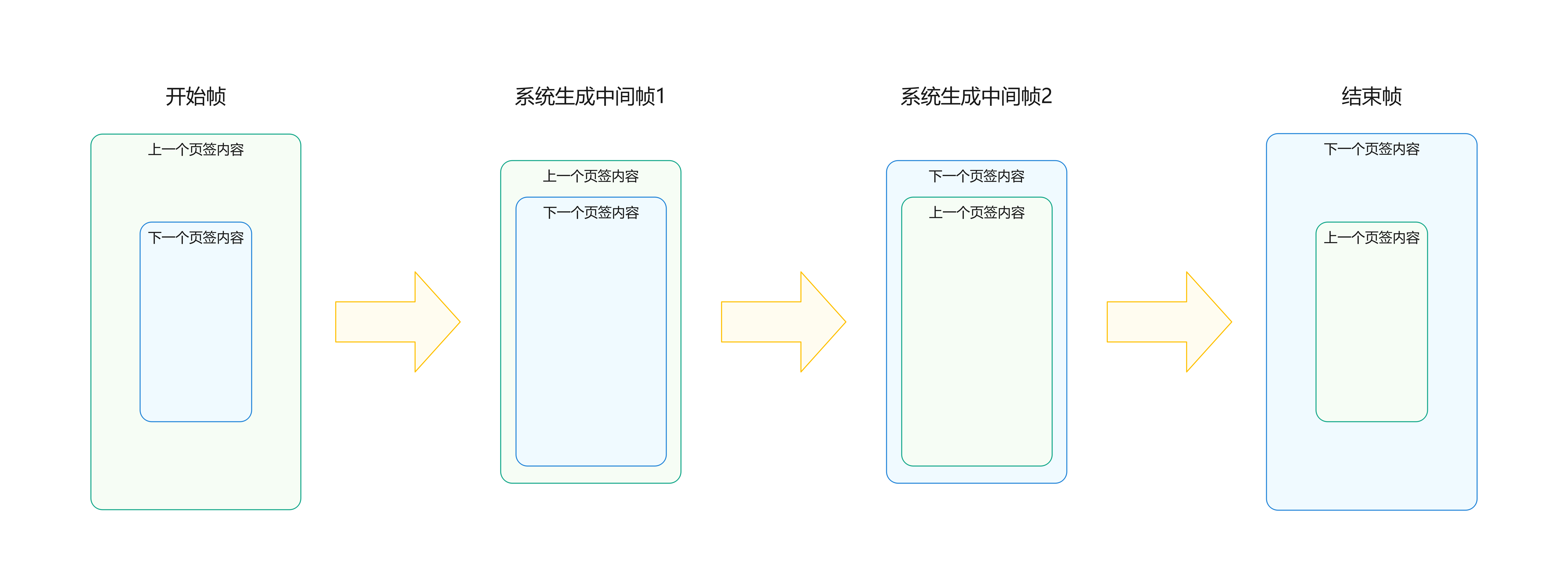
说明
- 使用自定义切换动画时,Tabs组件的默认切换动画将被禁用,且页面将无法通过手势滑动切换。
- 将customContentTransition设置为undefined表示不使用自定义切换动画,继续使用组件自带的默认切换动画。
- 当前自定义切换动画不支持中途打断。
- 目前,自定义切换动画仅支持以下两种触发场景:点击页签或通过调用TabsController.changeIndex()方法。
开发步骤
-
定义动画所需用到的属性数组。
@Component export default struct InTabsComponent { // ... @State scaleList: number[] = []; @State opacityList: number[] = []; // ... } -
将属性数组绑定到对应的页签上。
Tabs({ // ... }) { // bind selected tabs to ui ForEach(this.selectTabsViewModel.selectedTabs, (tab: TabItemViewModel, index: number) => { if (index === this.selectTabsViewModel.selectedTabs.length - 1) { TabContent() { // ... } // ... // bind animation properties .opacity(this.opacityList[index]) .scale({ x: this.scaleList[index], y: this.scaleList[index] }) } else { // ... } }, (tab: TabItemViewModel, index: number) => index + '_' + JSON.stringify(tab)) } -
定义Tabs的自定义转场函数。
@Component export default struct InTabsComponent { // ... @State scaleList: number[] = []; @State opacityList: number[] = []; // ... private animateDuration: number = 1000; private animateTimeout: number = 1000; private customContentTransition: (from: number, to: number) => TabContentAnimatedTransition = (from: number, to: number) => { let tabContentAnimatedTransition = { timeout: this.animateTimeout, transition: (proxy: TabContentTransitionProxy) => { // start frame this.scaleList[from] = 1.0; this.scaleList[to] = 0.5; this.opacityList[from] = 1.0; this.opacityList[to] = 0.5; this.getUIContext().animateTo({ duration: this.animateDuration, onFinish: () => { proxy.finishTransition(); } }, () => { // end frame this.scaleList[from] = 0.5; this.scaleList[to] = 1.0; this.opacityList[from] = 0.5; this.opacityList[to] = 1.0; }); } } as TabContentAnimatedTransition; return tabContentAnimatedTransition; }; // ... } -
将转场函数作为参数传递给Tabs的customContentTransition()方法。
Tabs({
  barPosition: BarPosition.Start,
  controller: this.subsController,
  barModifier: this.tabBarModifier
}) {
  // ...
}
// add animation function
.customContentTransition(this.customContentTransition) // comment out to slide to switch
自定义Tabs页签切换联动
在自定义页签样式中,页签的选中和非选中状态显示样式不同时,页签的样式依赖于Tabs组件的切换动作。这种情况下,需要实现Tabs页签的联动,页签切换时,页签样式自动变更。

实现原理
可以通过onChange事件,在切换页签时自定义TabBar和TabContent的联动效果。具体做法是定义一个由@State修饰的变量currentIndex,用于标识当前显示的页签索引。然后,利用onChange()方法注册处理函数,并在处理函数中更新currentIndex,确保其与当前选择的页签的索引一致。在页签样式的实现中,通过判断currentIndex变量与各页签索引是否相等来决定显示的样式,同时currentIndex属性的变化会触发页签样式的更新。
开发步骤
定义currentIndex属性,tabBuilder方法,并在onChange函数中更新currentIndex属性值。
@Component
export default struct OutTabsComponent {
  @State currentIndex: number = 0;
  // ...
  @Builder
  tabBuilder(index: number, name: string | Resource, icon: Resource) {
    Column() {
      // set special styles if selected

      SymbolGlyph(icon).fontColor([this.currentIndex === index
        ? $r('app.color.out_tab_bar_font_active_color')
        : $r('app.color.out_tab_bar_font_inactive_color')])
        .fontSize(25)

      Text(name)
        .margin({ top: 4 })
        .fontSize(10)
        .fontColor(this.currentIndex === index
          ? $r('app.color.out_tab_bar_font_active_color')
          : $r('app.color.out_tab_bar_font_inactive_color'))
    }
    // ...
  }
  build() {
    Tabs({
      // ...
    }) {
      // ...
    }
    // ...
    .onChange((index: number) => {
      this.currentIndex = index;
    })
    // ...
  }
}

作为“人工智能6S店”的官方数字引擎,为AI开发者与企业提供一个覆盖软硬件全栈、一站式门户。
更多推荐



 60
60 0
0- 0


 已为社区贡献68条内容

所有评论(0)