
鸿蒙 3D 盲盒贴纸 App 开发实战:收藏系统与概率设计
·
鸿蒙 3D 盲盒贴纸 App 开发实战:收藏系统与概率设计
作者:DULUO
平台:HarmonyOS Next (API 24)
语言:ArkTS
字数:约 10,000 字
一、项目背景
1.1 什么是盲盒贴纸?
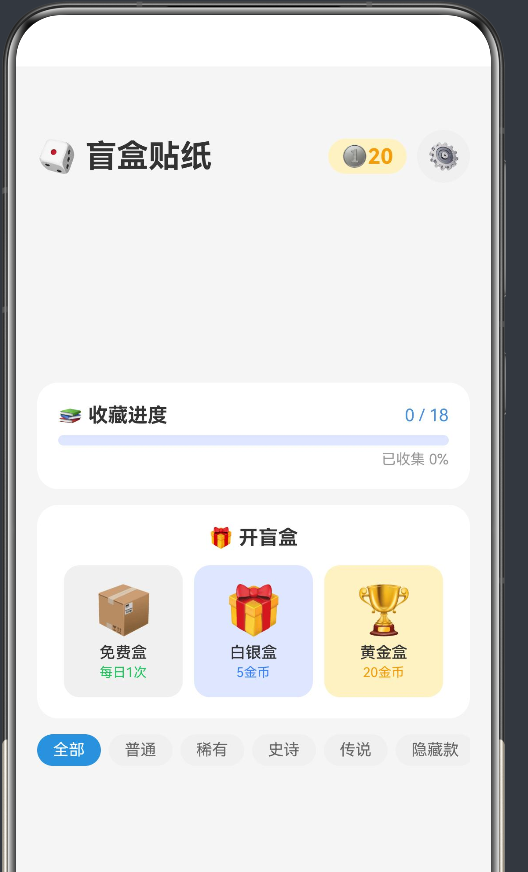
盲盒(Blind Box)是一种流行的消费品形式——消费者在购买时不知道盒内具体是哪一款商品,这种不确定性带来了强烈的期待感和收集欲。将盲盒机制数字化,结合 3D 贴纸展示,就构成了本 App 的核心创意:
- 开盒机制:消耗虚拟金币,随机获得贴纸
- 稀有度体系:普通 → 稀有 → 史诗 → 传说 → 隐藏款
- 收藏系统:进度追踪、重复计数、收藏切换
- 3D 展示:卡片旋转效果、彩色稀有度标签
- 桌面放置:将贴纸"放置"到桌面的模拟体验
1.2 技术亮点
| 维度 | 方案 |
|---|---|
| 概率引擎 | 分层概率算法,5 种稀有度 |
| 数据持久化 | Preferences JSON 序列化 |
| 3D 效果 | ArkUI rotate 属性 + 动画 |
| 状态管理 | @State 引用拷贝模式 |
| 路由 | router.pushUrl 参数传递 |
1.3 功能架构
首页(收藏展示 + 开盒入口)
├── 进度条(已收集 / 总数)
├── 盲盒选择(免费/白银/黄金)
├── 最近获得(水平滚动)
├── 稀有度过滤器
├── 收藏网格
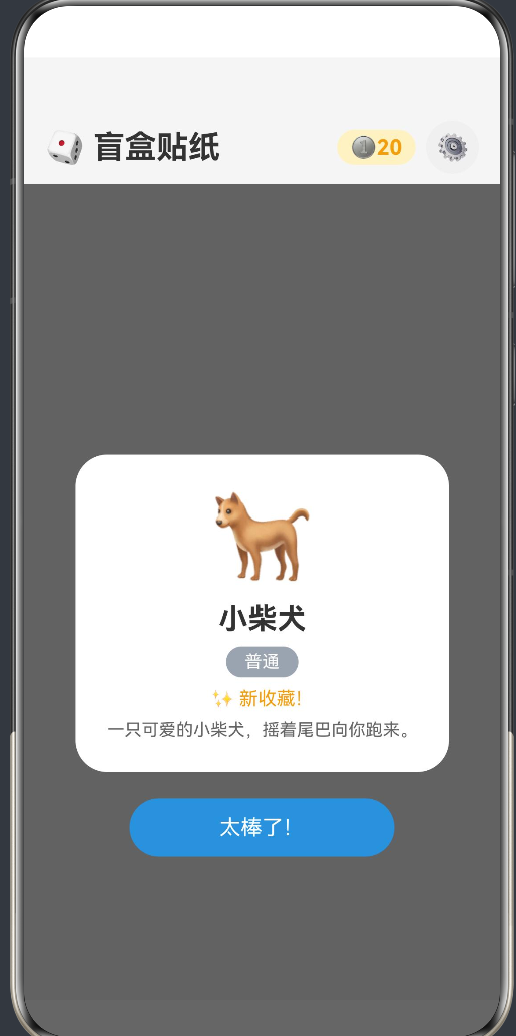
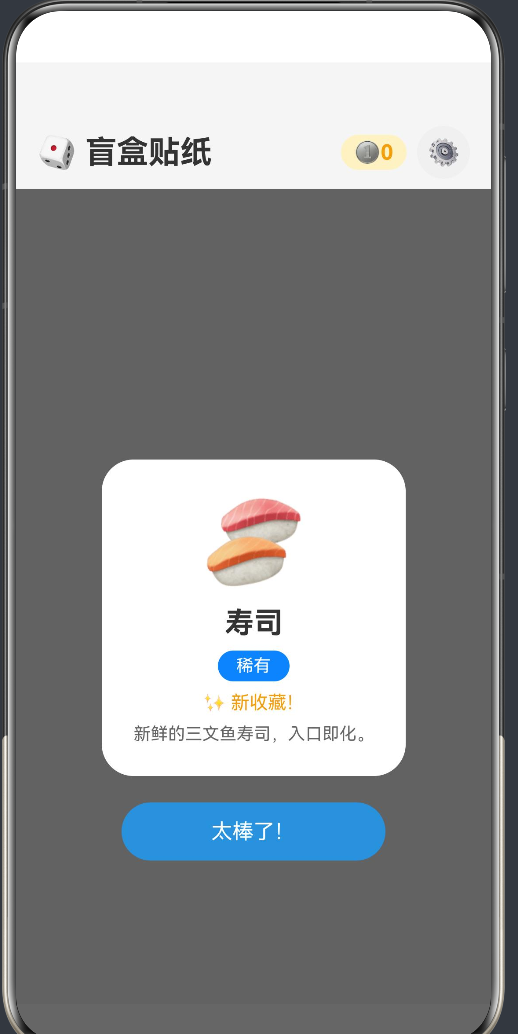
└── 开盒结果弹窗
    ├── 贴纸 emoji + 名称
    ├── 稀有度标签
    ├── 新收藏 / 重复提示
    └── 确认按钮
二、数据模型设计
2.1 稀有度体系
export enum Rarity {
  COMMON = '普通',     // 灰色
  RARE = '稀有',       // 蓝色
  EPIC = '史诗',       // 紫色
  LEGENDARY = '传说',  // 金色
  HIDDEN = '隐藏款',   // 红色
}
每种稀有度对应一种视觉颜色:
export function getRarityColor(r: Rarity): string {
  switch (r) {
    case Rarity.COMMON:    return '#9ca3af'; // 灰
    case Rarity.RARE:      return '#3b82f6'; // 蓝
    case Rarity.EPIC:      return '#8b5cf6'; // 紫
    case Rarity.LEGENDARY: return '#f59e0b'; // 金
    case Rarity.HIDDEN:    return '#ef4444'; // 红
  }
}
2.2 贴纸数据结构
/** 贴纸定义(静态模板) */
export interface StickerDef {
  id: number;
  name: string;
  emoji: string;
  rarity: Rarity;
  series: Series;
  description: string;
  bgColor: string;       // 卡片背景色
}

/** 用户拥有的贴纸(动态状态) */
export interface StickerOwned {
  defId: number;
  count: number;          // 拥有数量(重复叠加)
  isFavorite: boolean;
  obtainedAt: number;     // 首次获得时间戳
}
2.3 系列与贴纸
App 内置 18 张贴纸,分布在 5 个系列中:
| 系列 | 贴纸 | 最高稀有度 |
|---|---|---|
| 动物乐园 🐕 | 柴犬、橘猫、兔子、熊猫、狐狸、恐龙 | 稀有 |
| 美食世界 🎂 | 蛋糕、奶茶、寿司 | 稀有 |
| 星际探索 🚀 | 火箭、外星人、行星 | 史诗 |
| 奇幻森林 🦄 | 独角兽、精灵、龙、凤凰 | 隐藏款 |
| 赛博都市 🤖 | 机器人、赛博猫 | 传说 |
三、概率引擎设计
3.1 分层概率算法
盲盒的核心是概率系统。我设计了三层概率模型,每种盲盒有不同的稀有度分布:
private rollRarity(boxType: BoxType): Rarity {
  const r = Math.random() * 100;  // 0-100 随机数

  switch (boxType) {
    case BoxType.FREE:    // 免费盒
      if (r < 70)  return Rarity.COMMON;     // 70%
      if (r < 95)  return Rarity.RARE;       // 25%
      if (r < 99)  return Rarity.EPIC;       // 4%
      return Rarity.LEGENDARY;                // 1%

    case BoxType.SILVER:  // 白银盒(5金币)
      if (r < 40)  return Rarity.COMMON;     // 40%
      if (r < 75)  return Rarity.RARE;       // 35%
      if (r < 93)  return Rarity.EPIC;       // 18%
      if (r < 98)  return Rarity.LEGENDARY;  // 5%
      return Rarity.HIDDEN;                   // 2%

    case BoxType.GOLD:    // 黄金盒(20金币)
      if (r < 20)  return Rarity.COMMON;     // 20%
      if (r < 50)  return Rarity.RARE;       // 30%
      if (r < 78)  return Rarity.EPIC;       // 28%
      if (r < 95)  return Rarity.LEGENDARY;  // 17%
      return Rarity.HIDDEN;                   // 5%
  }
}
3.2 概率对比
| 稀有度 | 免费盒 | 白银盒 | 黄金盒 |
|---|---|---|---|
| 普通 | 70% | 40% | 20% |
| 稀有 | 25% | 35% | 30% |
| 史诗 | 4% | 18% | 28% |
| 传说 | 1% | 5% | 17% |
| 隐藏款 | 0% | 2% | 5% |
3.3 开盒流程
用户点击盲盒
  ↓
检查金币是否足够
  ↓ (不足则弹出提示)
扣除金币
  ↓
rollRarity() → 确定稀有度
  ↓
从该稀有度池中随机选取一款
  ↓
检查是否已拥有 → isNew / isDuplicate
  ↓
更新收藏 Map → owned.set(defId, updatedCount)
  ↓
记录历史
  ↓
显示结果弹窗
3.4 稀有度池
// 筛选对应稀有度的贴纸
const candidates: StickerDef[] = [];
for (let i = 0; i < this.allStickers.length; i++) {
  if (this.allStickers[i].rarity === rarity) {
    candidates.push(this.allStickers[i]);
  }
}
// 随机选一个
const idx = Math.floor(Math.random() * candidates.length);
const sticker = candidates[idx];
四、Map 数据结构在 ArkTS 中的应用
4.1 收藏管理器
由于 ArkTS 严格模式不支持 Array.from(),我使用 Map.forEach 来遍历:
export class CollectionManager {
  private owned: Map<number, StickerOwned> = new Map();

  /** 获取所有 Map key */
  private getMapKeys(): number[] {
    const r: number[] = [];
    this.owned.forEach((_v: StickerOwned, k: number) => { r.push(k); });
    return r;
  }

  /** 序列化到 Preferences */
  private async save(): Promise<void> {
    const obj: Record<string, StickerOwned> = {};
    const keys = this.getMapKeys();
    for (let i = 0; i < keys.length; i++) {
      obj[keys[i].toString()] = this.owned.get(keys[i]) as StickerOwned;
    }
    await this.pref.put(KEY_COLLECTION, JSON.stringify(obj));
    await this.pref.flush();
  }
}
4.2 更新收藏
// 更新收藏(新获得或重复)
if (owned !== undefined) {
  // 已拥有 → 数量 +1
  this.owned.set(sticker.id, {
    defId: sticker.id,
    count: owned.count + 1,
    isFavorite: owned.isFavorite,
    obtainedAt: owned.obtainedAt,
  } as StickerOwned);
} else {
  // 新收藏
  this.owned.set(sticker.id, {
    defId: sticker.id,
    count: 1,
    isFavorite: false,
    obtainedAt: Date.now(),
  } as StickerOwned);
}
4.3 @Builder 中调用管理器方法
在 @Builder 中不能声明 const 变量,但可以直接调用类方法:
// ✅ 正确 - 直接在 UI 中调用方法
@Builder
RecentSection() {
  if (this.manager.getRecentResults(4).length > 0) {
    // ...
    ForEach(this.manager.getRecentResults(4), (r: BoxResult) => {
      // ...
    })
  }
}

// ✅ 正确
@Builder
CollectionGrid() {
  Flex({ wrap: FlexWrap.Wrap }) {
    ForEach(this.manager.getAllCollected(), (s: StickerDef) => {
      // ...
    })
  }
}
五、路由与参数传递
5.1 页面跳转
import { router } from '@kit.ArkUI';

// 无参数跳转
router.pushUrl({ url: 'pages/Settings' });

// 带参数跳转
router.pushUrl({
  url: 'pages/StickerDetail',
  params: { 'stickerId': stickerId } as Record<string, Object>,
});
5.2 接收参数
aboutToAppear(): void {
  const p = router.getParams() as Record<string, Object>;
  if (p !== undefined && p['stickerId'] !== undefined) {
    this.stickerId = Number(p['stickerId']);
    this.loadSticker();
  }
}
注意事项:
params的 key 必须用引号包裹:{ 'key': value }- 接收后需要手动转型:
Number(),String() - 始终检查
undefined
六、3D 视觉效果实现
6.1 rotate API
API 24 的 rotate 属性使用 RotateOptions:
// ✅ 正确的 2D 旋转
.rotate({ angle: 3 })

// ✅ 带动画的旋转
.rotate({ angle: this.shaking ? 5 : 0 })
.animation({ duration: 200, curve: Curve.EaseInOut, iterations: -1 })
⚠️ 注意:
rotate({ x, y, z })不带angle在 API 24 中不合法。RotateOptions必须包含angle属性。
6.2 卡片设计
每张贴纸卡片使用独特的背景色和阴影效果:
Column() {
  Text(sticker.emoji).fontSize(48)
  Text(sticker.name).fontSize(16).fontWeight(FontWeight.Bold)
  Text(sticker.rarity)         // 稀有度标签
    .backgroundColor(getRarityColor(sticker.rarity))
    .borderRadius(10)
  Text(sticker.description)
}
.backgroundColor(sticker.bgColor)  // 每张贴纸独特背景色
.borderRadius(16)
.rotate({ angle: 3 })              // 微倾斜 3D 效果
.shadow({ radius: 16, offsetY: 8 })
6.3 盲盒摇动动画
// 盲盒组件 - 点击时摇动
@State shaking: boolean = false;

.onClick(() => {
  this.shaking = true;
  setTimeout(() => {
    this.shaking = false;
    this.onOpen(this.boxType);
  }, 600);
})

.rotate({ angle: this.shaking ? 5 : 0 })
.animation({ duration: 200, curve: Curve.EaseInOut,
             iterations: this.shaking ? -1 : 0 })
七、ArkTS 严格模式避坑指南
7.1 本项目的踩坑记录
| # | 错误 | 原因 | 修复 |
|---|---|---|---|
| 1 | Cannot find name 'Series' |
漏导入枚举 | 添加 import { Series } |
| 2 | rotate() 缺少 angle |
API 24 需要 RotateOptions |
加 angle: 值 |
| 3 | @Link vs @Prop |
循环变量不能传给 @Link |
改为 @Prop |
| 4 | const x = fn() 在 @Builder 中 |
@Builder 禁止声明 | 内联调用 |
| 5 | StickerData 未导出 |
导入不存在的名 | 从 import 中移除 |
7.2 @Prop 默认值最佳实践
当子组件使用 @Prop 时,必须提供默认值。对于接口类型,使用工厂风格的默认值:
// ❌ 错误 - 没有默认值
@Prop sticker: StickerDef;

// ✅ 正确 - 提供默认值
@Prop sticker: StickerDef = {
  id: 0, name: '', emoji: '',
  rarity: Rarity.COMMON,
  series: Series.ANIMALS,
  description: '', bgColor: '#fff',
} as StickerDef;
7.3 枚举导入
枚举在 ArkTS 中是值,需要像接口一样导入:
// StickerData.ets 中定义
export enum Rarity { COMMON = '普通', ... }

// 使用方必须导入
import { Rarity } from '../model/StickerData';
// 如果用到 Series,也要导入
import { Series } from '../model/StickerData';
八、UI 组件设计模式
8.1 弹窗覆盖层
开盒结果使用全屏半透明覆盖层,而非系统 Dialog:
@Builder
ResultOverlay() {
  if (this.lastResult !== null) {
    Column() {
      // 结果卡片
      Column() {
        Text(this.lastResult.sticker.emoji).fontSize(64)
        Text(this.lastResult.sticker.name).fontSize(22)
        // ...
      }
      .backgroundColor(Color.White)
      .borderRadius(24)

      Button('太棒了!')
        .onClick(() => {
          this.showResult = false;
          this.lastResult = null;
          this.refresh();
        })
    }
    .width('100%').height('100%')
    .backgroundColor('rgba(0,0,0,0.6)')
    .justifyContent(FlexAlign.Center)
    .alignItems(HorizontalAlign.Center)
  }
}
8.2 网格布局
收藏网格使用 Flex 的 wrap 模式:
Flex({ wrap: FlexWrap.Wrap }) {
  ForEach(this.manager.getAllCollected(), (s: StickerDef) => {
    if (this.filterRarity === '全部' || s.rarity === this.filterRarity) {
      this.StickerCell(s)
    }
  })
}
8.3 水平滚动条
最近获得和过滤器使用 Scroll 水平滚动:
Scroll() {
  Row() {
    ForEach(items, (item) => {
      // 每个项目
    })
  }
}.scrollable(ScrollDirection.Horizontal)
九、数据持久化
9.1 Preferences 的使用
const KEY_COLLECTION = 'sticker_collection';
const KEY_COINS = 'sticker_coins';

// 加载
const oVal = await this.pref.get(KEY_COLLECTION, '{}');
const parsed = JSON.parse(oVal as string) as Record<string, StickerOwned>;
const cVal = await this.pref.get(KEY_COINS, 20);
this.coins = cVal as number;

// 保存
await this.pref.put(KEY_COLLECTION, JSON.stringify(obj));
await this.pref.put(KEY_COINS, this.coins);
await this.pref.flush();  // 必须调用
9.2 金币系统
getCoins(): number { return this.coins; }

addCoins(n: number): void {
  this.coins += n;
  this.save();
}

spendCoins(n: number): boolean {
  if (this.coins >= n) {
    this.coins -= n;
    this.save();
    return true;
  }
  return false;
}
用户初始拥有 30 金币,免费盒不消耗金币。
十、常见编译错误与修复
10.1 rotate API 错误
// ❌ 错误 - API 24 不兼容
.rotate({ x: 0, y: 8, z: 0 })

// ✅ 正确
.rotate({ angle: 8 })

// 带中心点
.rotate({ x: 50, y: 50, angle: 8 })
10.2 @Prop 默认值缺失
// ❌ 错误
@Component
export struct MyComp {
  @Prop data: MyInterface;  // 没有默认值
}

// ✅ 正确
@Component
export struct MyComp {
  @Prop data: MyInterface = { ... } as MyInterface;
}
10.3 @Link 与循环变量
// ❌ 错误 - ForEach 循环变量不能传给 @Link
ForEach(items, (item: Type) => {
  ChildComp({ linkProp: item })  // item 是 regular property
})

// ✅ 正确 - 子组件用 @Prop 接收
ForEach(items, (item: Type) => {
  ChildComp({ propProp: item })
})
10.4 编译错误速查表
| 错误码 | 信息 | 常见原因 |
|---|---|---|
| 10505001 | Cannot find name ‘X’ | 漏导入或拼写错误 |
| 10505001 | No overload matches | API 使用方式错误 |
| 10605038 | Object literal must correspond to interface | 缺少 as Type |
| 10905209 | Only UI component syntax | @Builder 中有声明语句 |
| 10905315 | Cannot assign to @Link property | 循环变量传给 @Link |
十一、扩展方向
11.1 真实图片贴纸
// 使用 PixelMap 作为贴纸图片
import { image } from '@kit.ImageKit';

async function loadStickerImage(uri: string): Promise<image.PixelMap> {
  const source = image.createImageSource(uri);
  return await source.createPixelMap();
}
11.2 桌面小组件
利用 HarmonyOS 的 Form 能力,将贴纸展示在桌面:
// 在桌面创建 Widget
import { formBindingData } from '@kit.FormKit';

function updateWidget(stickers: StickerDef[]) {
  const data = formBindingData.createFormBindingData({
    stickers: JSON.stringify(stickers),
  });
  // 更新 widget...
}
11.3 交换/赠送系统
// 贴纸交换
async function tradeSticker(
  fromUser: string,
  toUser: string,
  stickerId: number
): Promise<boolean> {
  // 通过网络请求交换贴纸
}
11.4 更多扩展功能
| 功能 | 优先级 | 技术方案 |
|---|---|---|
| 真实图片贴纸 | P0 | @ohos.multimedia.image |
| 每日签到领金币 | P1 | Preferences + 日期判断 |
| 贴纸交换系统 | P2 | 网络请求 + 云存储 |
| 桌面 Widget | P2 | ArkTS Form 能力 |
| 成就系统 | P2 | 条件触发 + 通知 |
| 开盒动画 | P3 | Lottie / 帧动画 |
十二、项目总结
12.1 技术要点回顾
- 5 种稀有度的概率引擎设计,3 种盲盒各有不同概率分布
- Map + Preferences 实现收藏数据持久化
- @Builder 内联调用 替代变量声明
- @Prop 替代 @Link 处理循环变量传递
- **rotate({ angle }) ** 实现 3D 卡片效果
12.2 ArkTS 学习曲线
第 1 阶段:语法适应
  理解 @State/@Prop/@Link 响应式系统
  掌握 @Builder 的 UI-only 原则
  熟练使用 import/export

第 2 阶段:模式建立
  工厂函数 + as Type 创建对象
  模块级变量实现单例
  内联调用替代 const 声明

第 3 阶段:架构设计
  Map + forEach 遍历模式
  深度拷贝更新 @State
  分层概率算法
12.3 最终数据
项目文件:8 个 .ets 文件
代码总量:约 1,800 行
贴纸数量:18 张
稀有度等级:5 级
盲盒类型:3 种
页面数量:3 个页面

作为“人工智能6S店”的官方数字引擎,为AI开发者与企业提供一个覆盖软硬件全栈、一站式门户。
更多推荐


 5
5 0
0- 0


 已为社区贡献18条内容

所有评论(0)