
鸿蒙原生ArkTS布局方式之WaterFlow+rowsGap行间距
鸿蒙原生ArkTS布局方式之WaterFlow+rowsGap行间距
一、引言
在鸿蒙HarmonyOS NEXT应用开发中,布局是构建用户界面的核心环节。随着移动应用内容呈现方式的多样化,传统的线性布局已难以满足复杂场景的需求。瀑布流(WaterFlow)布局作为一种经典的内容展示方式,以其灵活、高效的特点被广泛应用于图片展示、商品列表、新闻资讯等场景。
本文将深入探讨鸿蒙原生ArkTS开发中WaterFlow组件与rowsGap属性的组合使用,系统介绍瀑布流行间距控制的核心技术,帮助开发者掌握这一重要的布局技能。
二、WaterFlow组件概述
2.1 什么是WaterFlow
WaterFlow是鸿蒙ArkUI框架提供的原生瀑布流布局组件。瀑布流布局的核心特点是将内容以多列形式排列,每列的高度根据内容自动调整,形成错落有致的视觉效果。与传统的网格布局(Grid)不同,瀑布流中的每个元素可以具有不同的高度,系统会自动将下一个元素放置到高度最小的列中,从而实现紧凑高效的空间利用。
2.2 WaterFlow的应用场景
瀑布流布局特别适合以下场景:
- 图片展示应用:如相册、图片分享平台,不同尺寸的图片可以自然排列
- 电商商品列表:商品卡片高度可能因描述长度不同而变化
- 新闻资讯聚合:文章摘要长度不一,瀑布流可以充分利用屏幕空间
- 社交内容流:动态、帖子等内容高度各异的场景
2.3 WaterFlow与Grid布局的区别
| 特性 | WaterFlow | Grid |
|---|---|---|
| 元素高度 | 支持不同高度 | 每行高度统一 |
| 布局策略 | 自动填充最短列 | 按行顺序排列 |
| 空间利用率 | 高,无空白区域 | 较低,可能有空白 |
| 适用场景 | 不规则内容 | 规则内容展示 |
三、核心属性解析
3.1 rowsGap属性
rowsGap是WaterFlow组件的核心属性之一,用于控制瀑布流中行与行之间的垂直间距。这里的"行"指的是瀑布流中同一列内相邻元素之间的距离。
WaterFlow() {
  // ... 内容
}
.rowsGap(20)  // 设置行间距为20vp
3.1.1 rowsGap的作用
rowsGap属性主要有以下作用:
- 视觉分隔:为相邻卡片提供清晰的视觉边界,避免内容拥挤
- 呼吸空间:适当的间距可以提升页面的舒适度和可读性
- 布局美观:统一的行间距使整体布局更加规整有序
3.1.2 rowsGap与其他间距属性的关系
在WaterFlow中,有几个关键的间距控制属性:
rowsGap:控制同一列内元素之间的垂直间距(行间距)columnsGap:控制不同列之间的水平间距(列间距)padding:控制瀑布流容器的内边距
合理组合这三个属性可以创建出美观且层次分明的布局效果。
3.2 columnsGap属性
columnsGap用于控制瀑布流中列与列之间的水平间距。
WaterFlow() {
  // ... 内容
}
.columnsGap(15)  // 设置列间距为15vp
3.3 columnsTemplate属性
columnsTemplate定义了瀑布流的列数和宽度分配规则。
WaterFlow() {
  // ... 内容
}
.columnsTemplate('1fr 1fr')  // 两列等宽布局
.columnsTemplate('2fr 1fr')   // 第一列宽度是第二列的两倍
.columnsTemplate('100vp 1fr') // 第一列固定100vp,第二列自适应
3.4 完整的间距控制示例
WaterFlow() {
  // ... 内容
}
.rowsGap(20)           // 行间距20vp
.columnsGap(15)        // 列间距15vp
.columnsTemplate('1fr 1fr')  // 两列等宽
.padding({ left: 15, right: 15, top: 10, bottom: 10 })  // 内边距
四、完整示例代码详解
4.1 示例概述
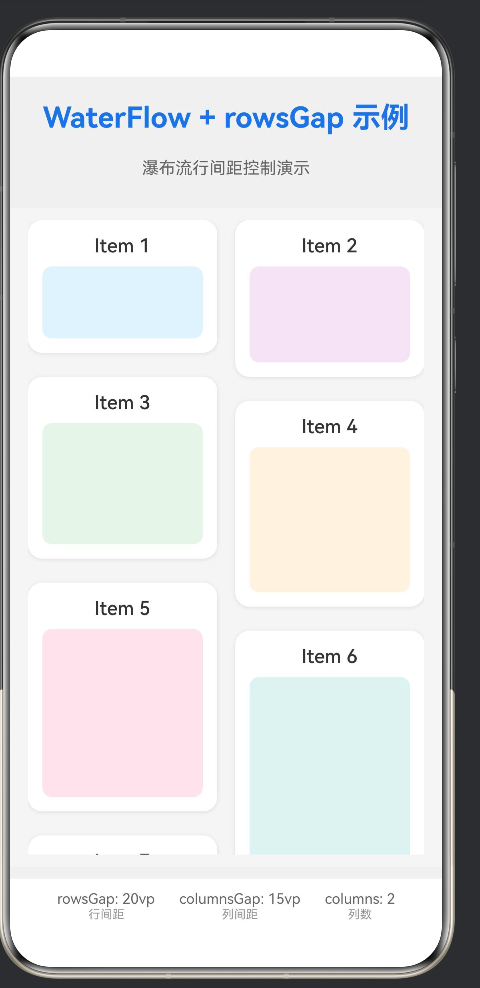
本示例展示了一个完整的WaterFlow瀑布流布局应用,包含30个不同高度的卡片,通过rowsGap控制行间距,columnsGap控制列间距,实现美观的瀑布流展示效果。
4.2 代码结构分析
@Entry
@Component
struct WaterFlowRowGapExample {
  // 数据源
  @State dataList: Array<ItemData> = [];

  // 生命周期方法:页面即将出现时初始化数据
  aboutToAppear(): void {
    // ...
  }

  // 构建UI
  build() {
    // ...
  }

  // 辅助方法
  private getRandomHeight(index: number): number { /* ... */ }
  private getRandomColor(index: number): string { /* ... */ }
}

// 数据接口定义
interface ItemData {
  id: number;
  title: string;
  height: number;
  color: string;
}
4.3 数据源设计
@State dataList: Array<ItemData> = [];

aboutToAppear(): void {
  for (let i = 0; i < 30; i++) {
    this.dataList.push({
      id: i,
      title: `Item ${i + 1}`,
      height: this.getRandomHeight(i),
      color: this.getRandomColor(i)
    });
  }
}
在aboutToAppear生命周期方法中初始化数据,创建30个卡片对象,每个卡片包含:
id:唯一标识符,用于ForEach的keytitle:卡片标题height:随机高度,模拟不同内容的卡片color:随机背景色,用于视觉区分
4.4 卡片高度生成策略
private getRandomHeight(index: number): number {
  const heights = [60, 80, 100, 120, 140, 160, 180];
  return heights[index % heights.length];
}
通过取模运算循环使用预设的高度值,确保卡片高度的多样性,同时避免极端值。
4.5 卡片颜色生成策略
private getRandomColor(index: number): string {
  const colors = [
    '#e3f2fd', '#f3e5f5', '#e8f5e9', '#fff3e0', '#fce4ec',
    '#e0f2f1', '#f1f8e9', '#fff9c4', '#e1f5fe', '#f8bbd0'
  ];
  return colors[index % colors.length];
}
使用柔和的马卡龙色系,提升视觉体验。
4.6 WaterFlow布局构建
WaterFlow() {
  ForEach(this.dataList, (item: ItemData) => {
    FlowItem() {
      // 卡片内容
      Column() {
        Text(item.title)
          .fontSize(16)
          .fontWeight(FontWeight.Medium)
          .fontColor('#333333')

        Column()
          .width('100%')
          .height(item.height)
          .backgroundColor(item.color)
          .borderRadius(8)
          .margin({ top: 8 })
      }
      .width('100%')
      .padding(12)
      .backgroundColor('#ffffff')
      .borderRadius(12)
      .shadow({
        radius: 8,
        color: '#1a000000',
        offsetX: 0,
        offsetY: 2
      })
    }
    .width('100%')
  }, (item: ItemData) => item.id.toString())
}
.rowsGap(20)
.columnsGap(15)
.columnsTemplate('1fr 1fr')
.padding({ left: 15, right: 15, top: 10, bottom: 10 })
.backgroundColor('#f5f5f5')
.layoutWeight(1)
4.6.1 FlowItem的使用
每个FlowItem代表瀑布流中的一个元素,它会被自动分配到合适的列中。
4.6.2 卡片样式设计
- 使用白色背景(
#ffffff) - 添加圆角(
borderRadius(12)) - 添加阴影效果(
shadow)增强立体感 - 使用内边距(
padding(12))保持内容与边框的距离
4.6.3 间距属性的组合
rowsGap(20):行间距20vp,确保同一列内卡片之间有足够的呼吸空间columnsGap(15):列间距15vp,两列之间的距离适中padding:容器内边距,避免内容贴边
五、rowsGap行间距的深层理解
5.1 行间距的视觉心理学
行间距不仅仅是一个技术参数,它还涉及视觉心理学:
- 过小的间距:内容拥挤,阅读疲劳,视觉压迫感强
- 过大的间距:内容松散,缺乏连贯性,信息密度低
- 适中的间距:视觉舒适,层次分明,易于浏览
5.2 rowsGap的最佳实践
5.2.1 根据内容类型选择合适的间距
| 内容类型 | 推荐rowsGap值 | 说明 |
|---|---|---|
| 图片密集展示 | 8-12vp | 紧凑布局,强调视觉冲击力 |
| 图文卡片 | 16-24vp | 保持阅读舒适度 |
| 商品列表 | 12-20vp | 平衡信息量和视觉美观 |
| 大尺寸卡片 | 24-32vp | 避免视觉拥挤 |
5.2.2 响应式间距调整
在不同屏幕尺寸下,行间距可以动态调整:
@State rowGapValue: number = 20;

aboutToAppear(): void {
  const windowWidth = this.context.windowWidth;
  if (windowWidth < 360) {
    this.rowGapValue = 12;  // 小屏幕紧凑布局
  } else if (windowWidth > 720) {
    this.rowGapValue = 28;  // 大屏幕宽松布局
  }
}

build() {
  WaterFlow() {
    // ...
  }
  .rowsGap(this.rowGapValue)
}
5.3 rowsGap与内容高度的关系
行间距的设置应该与卡片内容的平均高度相匹配:
- 内容高度较小(<100vp):行间距可以相对较小(12-16vp)
- 内容高度适中(100-200vp):行间距适中(16-24vp)
- 内容高度较大(>200vp):行间距可以相对较大(24-32vp)
这种匹配关系可以保持视觉比例的协调性。
六、WaterFlow高级特性
6.1 动态列数调整
根据屏幕方向和尺寸动态调整列数:
@State columnsTemplate: string = '1fr 1fr';

aboutToAppear(): void {
  const windowWidth = this.context.windowWidth;
  if (windowWidth > 600) {
    this.columnsTemplate = '1fr 1fr 1fr';  // 大屏三列
  }
}

build() {
  WaterFlow() {
    // ...
  }
  .columnsTemplate(this.columnsTemplate)
}
6.2 瀑布流滚动监听
通过滚动监听实现加载更多功能:
@State isLoading: boolean = false;
@State hasMore: boolean = true;

build() {
  WaterFlow() {
    ForEach(this.dataList, (item) => {
      FlowItem() {
        // ...
      }
    }, (item) => item.id.toString())

    if (this.isLoading) {
      FlowItem() {
        Text('加载中...')
          .fontSize(14)
          .fontColor('#999999')
          .padding(20)
      }
    }
  }
  .onReachEnd(() => {
    if (!this.isLoading && this.hasMore) {
      this.isLoading = true;
      // 模拟异步加载
      setTimeout(() => {
        // 添加更多数据
        for (let i = this.dataList.length; i < this.dataList.length + 10; i++) {
          this.dataList.push({
            id: i,
            title: `Item ${i + 1}`,
            height: this.getRandomHeight(i),
            color: this.getRandomColor(i)
          });
        }
        this.isLoading = false;
        if (this.dataList.length >= 100) {
          this.hasMore = false;
        }
      }, 1000);
    }
  })
}
6.3 瀑布流动画效果
为卡片添加入场动画:
@State enterAnimations: Array<boolean> = [];

aboutToAppear(): void {
  for (let i = 0; i < 30; i++) {
    this.enterAnimations.push(false);
    setTimeout(() => {
      this.enterAnimations[i] = true;
    }, i * 50);  // 依次触发动画
  }
}

build() {
  WaterFlow() {
    ForEach(this.dataList, (item: ItemData, index: number) => {
      FlowItem() {
        Column()
          .width('100%')
          .height(item.height)
          .backgroundColor(item.color)
          .borderRadius(12)
          .animation({
            duration: 400,
            curve: Curve.EaseOut
          })
          .translateY(this.enterAnimations[index] ? 0 : 50)
          .opacity(this.enterAnimations[index] ? 1 : 0)
      }
    }, (item) => item.id.toString())
  }
}
七、性能优化策略
7.1 虚拟滚动优化
当瀑布流包含大量数据时,使用虚拟滚动可以显著提升性能:
WaterFlow() {
  // ...
}
.enableVirtualScroll(true)
虚拟滚动只渲染当前可见区域的内容,避免一次性渲染所有数据导致的性能问题。
7.2 图片懒加载
对于包含图片的瀑布流,实现懒加载可以减少初始加载时间:
@State loadedImages: Set<number> = new Set();

build() {
  WaterFlow() {
    ForEach(this.dataList, (item: ItemData) => {
      FlowItem() {
        Image(this.loadedImages.has(item.id) ? item.imageUrl : '')
          .width('100%')
          .aspectRatio(1.5)
          .onAppear(() => {
            this.loadedImages.add(item.id);
          })
      }
    }, (item) => item.id.toString())
  }
}
7.3 避免复杂布局嵌套
尽量减少FlowItem内部的布局嵌套层级:
// 推荐:扁平化布局
FlowItem() {
  Column() {
    Image(...)
      .width('100%')
    Text(...)
  }
}

// 不推荐:多层嵌套
FlowItem() {
  Column() {
    Row() {
      Column() {
        Image(...)
      }
    }
    Stack() {
      Text(...)
    }
  }
}
八、常见问题与解决方案
8.1 行间距不生效
问题描述:设置了rowsGap属性,但行间距没有变化。
可能原因:
- FlowItem设置了margin,覆盖了rowsGap效果
- 卡片内容高度不一致,导致视觉上间距不明显
解决方案:
// 确保FlowItem没有margin
FlowItem() {
  // ...
}
.width('100%')
// 不要设置margin

// 如果需要额外间距,使用padding或调整rowsGap
8.2 瀑布流布局错乱
问题描述:卡片排列混乱,出现重叠或空白区域。
可能原因:
- 卡片高度动态变化导致重排
- 图片加载延迟导致高度计算错误
解决方案:
// 设置图片固定高度或占位符
Image(item.imageUrl)
  .width('100%')
  .aspectRatio(1.5)  // 设置宽高比
  .placeholder('path/to/placeholder.png')
8.3 滚动性能差
问题描述:滚动时卡顿,尤其是在数据量大的情况下。
解决方案:
- 使用虚拟滚动
- 减少卡片内的复杂组件
- 优化图片加载
WaterFlow() {
  // ...
}
.enableVirtualScroll(true)
.maxItemCache(50)  // 设置缓存数量
九、实际应用案例
9.1 图片瀑布流展示
@Entry
@Component
struct ImageGallery {
  @State images: Array<{ id: number; url: string; height: number }> = [];

  build() {
    Column() {
      Text('图片瀑布流')
        .fontSize(24)
        .fontWeight(FontWeight.Bold)
        .margin({ top: 20, bottom: 15 })

      WaterFlow() {
        ForEach(this.images, (img) => {
          FlowItem() {
            Image(img.url)
              .width('100%')
              .height(img.height)
              .objectFit(ImageFit.Cover)
              .borderRadius(8)
          }
        }, (img) => img.id.toString())
      }
      .rowsGap(8)
      .columnsGap(8)
      .columnsTemplate('1fr 1fr')
      .padding(15)
      .layoutWeight(1)
    }
  }
}
9.2 商品列表展示
@Entry
@Component
struct ProductList {
  @State products: Array<{ id: number; name: string; price: string; image: string; height: number }> = [];

  build() {
    Column() {
      Text('商品列表')
        .fontSize(24)
        .fontWeight(FontWeight.Bold)
        .margin({ top: 20, bottom: 15 })

      WaterFlow() {
        ForEach(this.products, (product) => {
          FlowItem() {
            Column() {
              Image(product.image)
                .width('100%')
                .height(150)
                .objectFit(ImageFit.Cover)
                .borderRadius(8)

              Text(product.name)
                .fontSize(14)
                .fontWeight(FontWeight.Medium)
                .margin({ top: 8 })
                .maxLines(2)
                .textOverflow({ overflow: TextOverflow.Ellipsis })

              Text(`¥${product.price}`)
                .fontSize(16)
                .fontColor('#ff4d4f')
                .fontWeight(FontWeight.Bold)
                .margin({ top: 4 })
            }
            .width('100%')
            .padding(10)
            .backgroundColor('#ffffff')
            .borderRadius(12)
            .shadow({ radius: 4, color: '#1a000000' })
          }
        }, (product) => product.id.toString())
      }
      .rowsGap(15)
      .columnsGap(12)
      .columnsTemplate('1fr 1fr')
      .padding(15)
      .layoutWeight(1)
    }
  }
}
十、总结与展望
10.1 核心要点回顾
通过本文的学习,我们掌握了以下核心知识:
- WaterFlow组件:鸿蒙原生的瀑布流布局组件,支持不规则高度元素的自动排列
- rowsGap属性:控制同一列内相邻元素之间的垂直间距,是瀑布流布局的核心间距属性
- columnsGap属性:控制不同列之间的水平间距
- columnsTemplate属性:定义列数和宽度分配规则
- 最佳实践:根据内容类型和屏幕尺寸选择合适的间距值
- 性能优化:虚拟滚动、图片懒加载等优化策略
10.2 未来发展方向
随着鸿蒙生态的不断发展,WaterFlow组件也将持续进化:
- 更多布局模式:支持交错排列、自定义排序等高级布局模式
- 增强的动画效果:内置更多入场、滚动动画
- 更好的性能优化:自动优化渲染策略
- 跨平台适配:更好的多设备适配能力
10.3 学习建议
要深入掌握WaterFlow布局,建议:
- 实践多种场景:尝试在不同类型的应用中使用瀑布流布局
- 调试布局参数:通过调整rowsGap、columnsGap等参数观察效果变化
- 学习性能优化:了解虚拟滚动、懒加载等技术原理
- 关注官方文档:及时了解组件的更新和新特性
附录:完整示例代码
以下是完整的WaterFlow + rowsGap示例代码,可直接复制使用:
/**
 * WaterFlow + rowsGap 示例应用
 * 场景描述:瀑布流行间间距控制
 * 核心技术:WaterFlow组件 + rowsGap属性
 *
 * 布局要点:
 * 1. WaterFlow是鸿蒙原生的瀑布流布局组件
 * 2. rowsGap用于设置行与行之间的垂直间距
 * 3. 瀑布流布局适合展示不同高度的卡片内容
 */

@Entry
@Component
struct WaterFlowRowGapExample {
  @State dataList: Array<ItemData> = [];

  aboutToAppear(): void {
    for (let i = 0; i < 30; i++) {
      this.dataList.push({
        id: i,
        title: `Item ${i + 1}`,
        height: this.getRandomHeight(i),
        color: this.getRandomColor(i)
      });
    }
  }

  build() {
    Column({ space: 10 }) {
      Text('WaterFlow + rowsGap 示例')
        .fontSize(24)
        .fontWeight(FontWeight.Bold)
        .fontColor('#1a73e8')
        .margin({ top: 20, bottom: 10 })

      Text('瀑布流行间距控制演示')
        .fontSize(14)
        .fontColor('#666666')
        .margin({ bottom: 15 })

      WaterFlow() {
        ForEach(this.dataList, (item: ItemData) => {
          FlowItem() {
            Column() {
              Text(item.title)
                .fontSize(16)
                .fontWeight(FontWeight.Medium)
                .fontColor('#333333')

              Column()
                .width('100%')
                .height(item.height)
                .backgroundColor(item.color)
                .borderRadius(8)
                .margin({ top: 8 })
            }
            .width('100%')
            .padding(12)
            .backgroundColor('#ffffff')
            .borderRadius(12)
            .shadow({
              radius: 8,
              color: '#1a000000',
              offsetX: 0,
              offsetY: 2
            })
          }
          .width('100%')
        }, (item: ItemData) => item.id.toString())
      }
      .rowsGap(20)
      .columnsGap(15)
      .columnsTemplate('1fr 1fr')
      .padding({ left: 15, right: 15, top: 10, bottom: 10 })
      .backgroundColor('#f5f5f5')
      .layoutWeight(1)

      Row({ space: 20 }) {
        Column() {
          Text('rowsGap: 20vp')
            .fontSize(12)
            .fontColor('#666666')
          Text('行间距')
            .fontSize(10)
            .fontColor('#999999')
        }

        Column() {
          Text('columnsGap: 15vp')
            .fontSize(12)
            .fontColor('#666666')
          Text('列间距')
            .fontSize(10)
            .fontColor('#999999')
        }

        Column() {
          Text('columns: 2')
            .fontSize(12)
            .fontColor('#666666')
          Text('列数')
            .fontSize(10)
            .fontColor('#999999')
        }
      }
      .width('100%')
      .justifyContent(FlexAlign.Center)
      .padding({ top: 10, bottom: 10 })
      .backgroundColor('#ffffff')
    }
    .width('100%')
    .height('100%')
    .backgroundColor('#f0f0f0')
  }

  private getRandomHeight(index: number): number {
    const heights = [60, 80, 100, 120, 140, 160, 180];
    return heights[index % heights.length];
  }

  private getRandomColor(index: number): string {
    const colors = [
      '#e3f2fd', '#f3e5f5', '#e8f5e9', '#fff3e0', '#fce4ec',
      '#e0f2f1', '#f1f8e9', '#fff9c4', '#e1f5fe', '#f8bbd0'
    ];
    return colors[index % colors.length];
  }
}

interface ItemData {
  id: number;
  title: string;
  height: number;
  color: string;
}
参考资料:
- 鸿蒙官方文档:WaterFlow组件
- 鸿蒙开发者社区:布局指南
- ArkUI组件库API参考
相关文件:
- [WaterFlowRowGapExample.ets](file:///d:/Files/MyApplication66/entry/src/main/ets/pages/WaterFlowRowGapExample.ets)
- [EntryAbility.ets](file:///d:/Files/MyApplication66/entry/src/main/ets/entryability/EntryAbility.ets)
- [main_pages.json](file:///d:/Files/MyApplication66/entry/src/main/resources/base/profile/main_pages.json)

作为“人工智能6S店”的官方数字引擎,为AI开发者与企业提供一个覆盖软硬件全栈、一站式门户。
更多推荐


 1
1 0
0- 0


 已为社区贡献10条内容

所有评论(0)