
如何制作用户登录表?
·
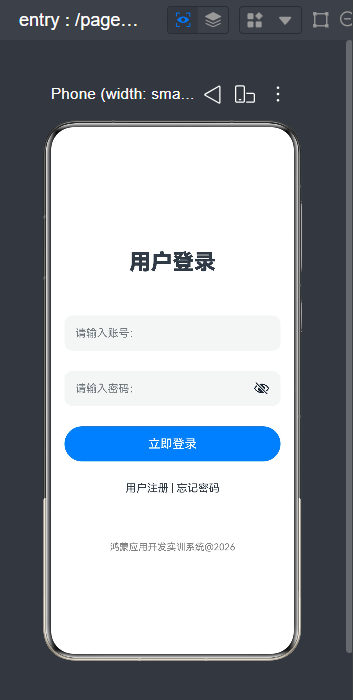
1.先判断是横向布局还是垂直布局
根据图片判断是垂直布局
2.写出基本框架
@Entry
@Component
struct Login1{
  build() {
    Column(){

    }
  }
}
3.从上往下依次罗列
引用Text()文本,在里面呈现“用户登录”四个字
Text('用户登录')
  .fontSize(32)
  .fontWeight(FontWeight.Bolder)
  .margin({top:20,bottom:30})
然后引入文本框 TextInput({placeholder:""}),写出我们所需的账号及密码
TextInput({placeholder:"请输入账号:"})
  .width(320)
  .height(52)
  .borderRadius(12)
  .fontSize(16)
TextInput({placeholder:'请输入密码:'})
  .type(InputType.Password)
  .width(320)
  .height(52)
  .borderRadius(12)
  .fontSize(16)
然后“登录”这里我们需要用到按钮Button组件
Button("立即登录")
  .width(320)
  .height(52)
  .backgroundColor(0x007Dff)
  .fontSize(18)
  .borderRadius(12)
引入文本Text()
Text('用户注册 | 忘记密码')
最后设置一个版权信息的书写
Text("鸿蒙应用开发实训系统@2026")
  .fontSize(14)
  .fontColor(Color.Gray)
  .margin({top:40})
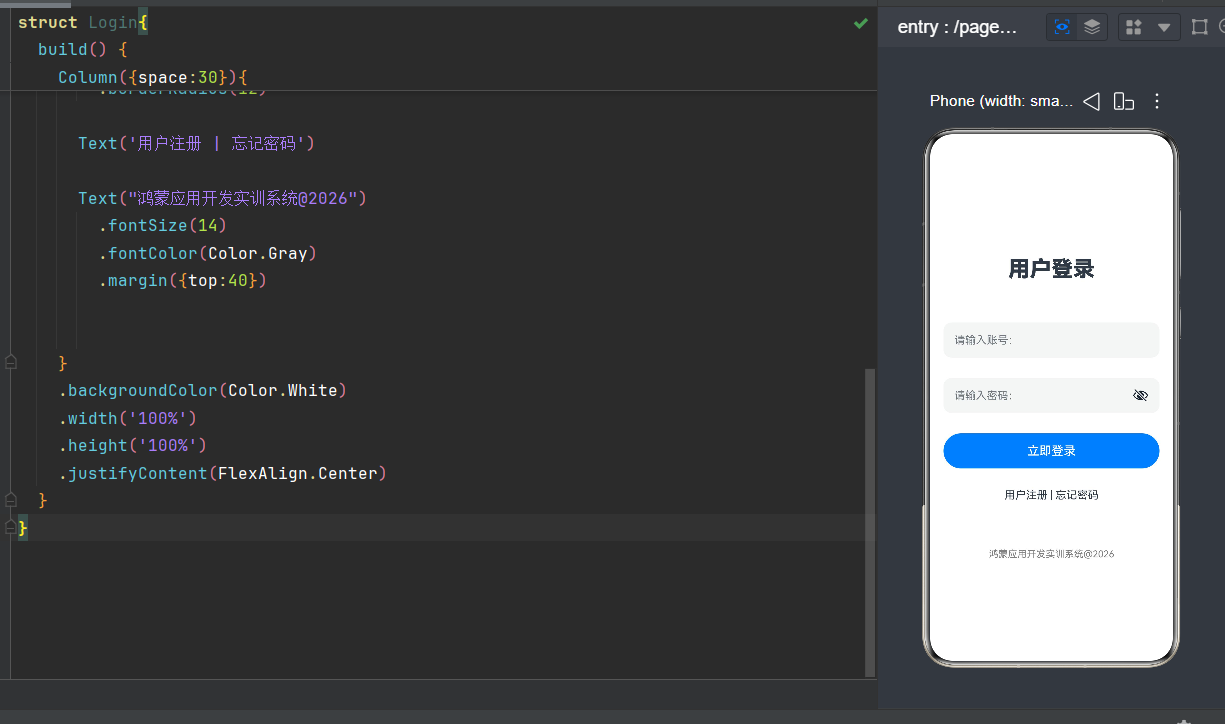
4.最终代码及效果图如图所示
@Entry
@Component
struct Login{
  @State isOn: boolean = false
  build() {
    Column({space:30}){
      Text('用户登录')
        .fontSize(32)
        .fontWeight(FontWeight.Bolder)
        .margin({top:20,bottom:30})

      TextInput({placeholder:"请输入账号:"})
        .width(320)
        .height(52)
        .borderRadius(12)
        .fontSize(16)
      TextInput({placeholder:'请输入密码:'})
        .type(InputType.Password)
        .width(320)
        .height(52)
        .borderRadius(12)
        .fontSize(16)

      Button("立即登录")
        .width(320)
        .height(52)
        .backgroundColor(0x007Dff)
        .fontSize(18)
        .borderRadius(12)

      Text('用户注册 | 忘记密码')

      Text("鸿蒙应用开发实训系统@2026")
        .fontSize(14)
        .fontColor(Color.Gray)
        .margin({top:40})


    }
    .backgroundColor(Color.White)
    .width('100%')
    .height('100%')
    .justifyContent(FlexAlign.Center)
  }
}

作为“人工智能6S店”的官方数字引擎,为AI开发者与企业提供一个覆盖软硬件全栈、一站式门户。
更多推荐


 2
2 0
0- 0


 已为社区贡献2条内容

所有评论(0)