
鸿蒙原生应用实战(二十四)ArkUI 白噪音专注 App:音频播放 + 番茄计时 + 专注统计
·
🧘 鸿蒙原生应用实战(二十四)ArkUI 白噪音专注 App:音频播放 + 番茄计时 + 专注统计
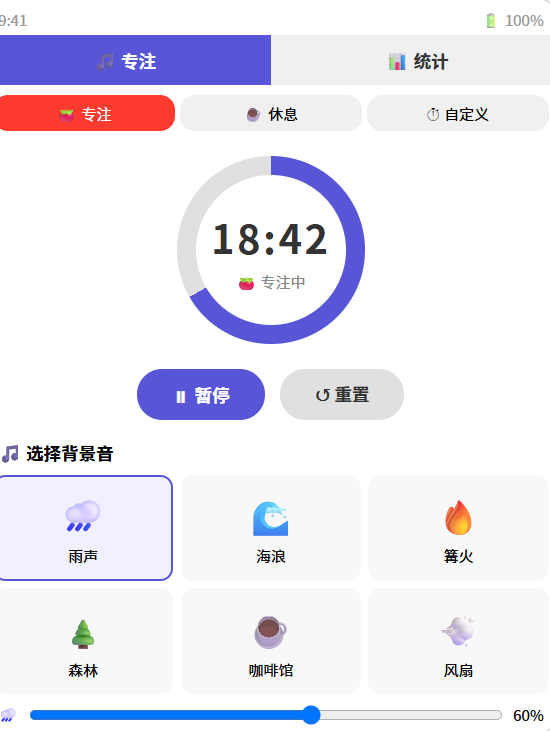
博主说: 学习/工作的时候听白噪音可以提高专注力——雨声、海浪、篝火、咖啡馆……今天用 ArkUI 的音频播放 API + 番茄工作法 + 统计图表,从零实现一个支持 6 种白噪音、番茄计时器、专注时长统计、音效混音的专注力 App。
📱 应用场景
| 功能 | 说明 |
|---|---|
| 🌧️ 白噪音 | 雨声/海浪/篝火/森林/咖啡馆/ASMR |
| 🍅 番茄计时 | 25 分钟专注 + 5 分钟休息 |
| 📊 专注统计 | 今日/本周专注时长 |
| ⏱️ 计时器 | 自定义时长倒计时 |
| 🎚️ 混音 | 多种音效叠加 |
⚙️ 运行环境要求
| 项目 | 版本要求 |
|---|---|
| DevEco Studio | 5.0.3.800+ |
| HarmonyOS SDK | API 12 |
| 核心 API | @ohos.multimedia.audio + @ohos.data.preferences |
| 权限 | 无(播放本地 rawfile 不需要权限) |
🛠️ 实战:从零搭建白噪音专注 App
Step 1:数据模型
interface SoundSource {
  id: string;
  name: string;
  icon: string;
  file: string;       // rawfile 路径
  category: string;
  color: string;
}

interface FocusSession {
  date: string;
  totalMinutes: number;
  sessions: number;
}
Step 2:完整代码
// pages/Index.ets — 白噪音专注 App
import audio from '@ohos.multimedia.audio';
import preferences from '@ohos.data.preferences';

const SOUNDS: SoundSource[] = [
  { id: 'rain', name: '🌧️ 雨声', icon: '🌧️', file: 'rain.mp3', category: '自然', color: '#4A90D9' },
  { id: 'ocean', name: '🌊 海浪', icon: '🌊', file: 'ocean.mp3', category: '自然', color: '#007AFF' },
  { id: 'fire', name: '🔥 篝火', icon: '🔥', file: 'fire.mp3', category: '自然', color: '#FF9500' },
  { id: 'forest', name: '🌲 森林', icon: '🌲', file: 'forest.mp3', category: '自然', color: '#34C759' },
  { id: 'cafe', name: '☕ 咖啡馆', icon: '☕', file: 'cafe.mp3', category: '场景', color: '#8B6914' },
  { id: 'fan', name: '💨 风扇', icon: '💨', file: 'fan.mp3', category: '场景', color: '#888' },
];

@Entry
@Component
struct FocusApp {
  @State activeSounds: Set<string> = new Set();
  @State volumes: Map<string, number> = new Map();
  @State timerMode: 'focus' | 'break' | 'custom' = 'focus';
  @State remainingSeconds: number = 25 * 60;
  @State isTimerRunning: boolean = false;
  @State totalFocusMinutes: number = 0;
  @State todaySessions: number = 0;
  @State weekData: number[] = [0,0,0,0,0,0,0];
  @State currentView: 'player' | 'stats' = 'player';

  private players: Map<string, audio.AudioPlayer> = new Map();
  private pref!: preferences.Preferences;
  private timerId: number = -1;

  // 番茄时钟配
  private readonly FOCUS_MINUTES = 25;
  private readonly BREAK_MINUTES = 5;

  aboutToAppear() {
    this.initStorage();
  }

  async initStorage() {
    this.pref = await preferences.getPreferences(getContext(this), 'focus_data');
    const total = this.pref.get('totalMinutes', '0');
    this.totalFocusMinutes = parseInt(total as string);
    await this.loadWeekData();
  }

  async saveFocusData(minutes: number) {
    this.totalFocusMinutes += minutes;
    this.todaySessions++;
    await this.pref.put('totalMinutes', this.totalFocusMinutes.toString());

    // 更新本周数据
    const today = new Date().getDay();
    const idx = today === 0 ? 6 : today - 1;
    this.weekData[idx] += minutes;
    await this.pref.put('weekData', JSON.stringify(this.weekData));
    await this.pref.flush();
  }

  async loadWeekData() {
    const data = this.pref.get('weekData', JSON.stringify([0,0,0,0,0,0,0]));
    this.weekData = JSON.parse(data as string);
  }

  // ======== 播放/停止音效 ========
  async toggleSound(sound: SoundSource) {
    if (this.activeSounds.has(sound.id)) {
      // 停止
      const player = this.players.get(sound.id);
      if (player) {
        await player.stop();
        player.release();
      }
      this.activeSounds.delete(sound.id);
      this.activeSounds = new Set(this.activeSounds);
    } else {
      // 播放
      try {
        const player = audio.createAudioPlayer();
        // 从 rawfile 加载
        player.src = `rawfile://${sound.file}`;
        await player.prepare();
        await player.play();

        // 设置循环
        player.loop = true;

        // 音量
        const vol = this.volumes.get(sound.id) || 0.5;
        player.setVolume(vol);

        this.players.set(sound.id, player);
        this.activeSounds.add(sound.id);
        this.activeSounds = new Set(this.activeSounds);
      } catch (err) {
        console.error(`播放 ${sound.name} 失败:`, JSON.stringify(err));
      }
    }
  }

  // ======== 调节音量 ========
  setVolume(soundId: string, volume: number) {
    this.volumes.set(soundId, volume);
    const player = this.players.get(soundId);
    if (player) player.setVolume(volume);
  }

  // ======== 番茄计时器 ========
  startTimer() {
    if (this.isTimerRunning) return;
    this.isTimerRunning = true;

    this.timerId = setInterval(() => {
      if (this.remainingSeconds <= 0) {
        this.stopTimer();
        // 专注结束→休息
        if (this.timerMode === 'focus') {
          this.saveFocusData(this.FOCUS_MINUTES);
          AlertDialog.show({ title: '🎉 专注结束!', message: '休息 5 分钟吧!' });
          this.timerMode = 'break';
          this.remainingSeconds = this.BREAK_MINUTES * 60;
        } else if (this.timerMode === 'break') {
          AlertDialog.show({ title: '☕ 休息结束', message: '开始下一轮专注!' });
          this.timerMode = 'focus';
          this.remainingSeconds = this.FOCUS_MINUTES * 60;
        }
      } else {
        this.remainingSeconds--;
      }
    }, 1000);
  }

  stopTimer() {
    if (this.timerId > -1) clearInterval(this.timerId);
    this.isTimerRunning = false;
  }

  resetTimer() {
    this.stopTimer();
    this.remainingSeconds = this.timerMode === 'focus' ? this.FOCUS_MINUTES * 60 : this.BREAK_MINUTES * 60;
  }

  switchTimerMode(mode: 'focus' | 'break' | 'custom') {
    this.stopTimer();
    this.timerMode = mode;
    if (mode === 'focus') this.remainingSeconds = this.FOCUS_MINUTES * 60;
    else if (mode === 'break') this.remainingSeconds = this.BREAK_MINUTES * 60;
    else this.remainingSeconds = 10 * 60;
  }

  formatTime(s: number): string {
    const m = Math.floor(s / 60);
    const sec = s % 60;
    return `${String(m).padStart(2, '0')}:${String(sec).padStart(2, '0')}`;
  }

  getTimerProgress(): number {
    const total = this.timerMode === 'focus' ? this.FOCUS_MINUTES * 60 :
                 this.timerMode === 'break' ? this.BREAK_MINUTES * 60 : 10 * 60;
    return 1 - this.remainingSeconds / total;
  }

  build() {
    Column() {
      // Tab 切换
      Row() {
        Button('🎵 专注').width('50%').height(40)
          .backgroundColor(this.currentView === 'player' ? '#5856D6' : '#F0F0F0')
          .fontColor(this.currentView === 'player' ? '#fff' : '#333')
          .onClick(() => { this.currentView = 'player'; })
        Button('📊 统计').width('50%').height(40)
          .backgroundColor(this.currentView === 'stats' ? '#5856D6' : '#F0F0F0')
          .fontColor(this.currentView === 'stats' ? '#fff' : '#333')
          .onClick(() => { this.currentView = 'stats'; })
      }.width('100%')

      if (this.currentView === 'player') {
        // ====== 专注模式 ======
        Column() {
          // 模式选择
          Row() {
            Button('🍅 专注').width('33%').height(32)
              .backgroundColor(this.timerMode === 'focus' ? '#FF3B30' : '#F0F0F0')
              .fontColor(this.timerMode === 'focus' ? '#fff' : '#333').fontSize(13).borderRadius(16)
              .onClick(() => { this.switchTimerMode('focus'); })
            Button('☕ 休息').width('33%').height(32)
              .backgroundColor(this.timerMode === 'break' ? '#34C759' : '#F0F0F0')
              .fontColor(this.timerMode === 'break' ? '#fff' : '#333').fontSize(13).borderRadius(16)
              .onClick(() => { this.switchTimerMode('break'); })
            Button('⏱️ 自定义').width('33%').height(32)
              .backgroundColor(this.timerMode === 'custom' ? '#007AFF' : '#F0F0F0')
              .fontColor(this.timerMode === 'custom' ? '#fff' : '#333').fontSize(13).borderRadius(16)
              .onClick(() => { this.switchTimerMode('custom'); })
          }.width('94%').margin({ top: 8 })

          // 计时器
          Stack() {
            Circle().width(180).height(180).fill('none')
              .stroke('#E0E0E0').strokeWidth(8)
            Circle().width(180).height(180).fill('none')
              .stroke(this.timerMode === 'focus' ? '#FF3B30' : this.timerMode === 'break' ? '#34C759' : '#007AFF')
              .strokeWidth(8)
              .strokeDashArray([this.getTimerProgress() * 530, 530])
              .rotate({ angle: -90 })

            Column() {
              Text(this.formatTime(this.remainingSeconds)).fontSize(40).fontWeight(FontWeight.Bold)
                .fontVariant(FontVariant.TabularNums)
              Text(this.timerMode === 'focus' ? '🍅 专注中' : this.timerMode === 'break' ? '☕ 休息中' : '⏱️ 计时')
                .fontSize(14).fontColor('#888').margin({ top: 4 })
            }
          }.margin({ top: 16 })

          // 控制按钮
          Row() {
            Button(this.isTimerRunning ? '⏸ 暂停' : '▶ 开始')
              .width(120).height(44).backgroundColor('#5856D6').fontColor('#fff').borderRadius(22)
              .onClick(() => { this.isTimerRunning ? this.stopTimer() : this.startTimer(); })
            Button('↺ 重置').width(100).height(44).backgroundColor('#E5E5EA').fontColor('#333').borderRadius(22)
              .onClick(() => { this.resetTimer(); })
          }.gap(12).margin({ top: 12 })

          Divider().margin({ top: 12, bottom: 8 })

          // 音效网格
          Text('🎵 选择背景音').fontSize(16).fontWeight(FontWeight.Bold).margin({ bottom: 8 })

          Grid() {
            ForEach(SOUNDS, (sound: SoundSource) => {
              GridItem() {
                Column() {
                  Text(sound.icon).fontSize(32)
                  Text(sound.name).fontSize(11).margin({ top: 4 }).fontColor('#333')
                  if (this.activeSounds.has(sound.id)) {
                    Circle().width(8).height(8).fill('#34C759').margin({ top: 4 })
                  }
                }
                .padding(10).width(80).height(80)
                .backgroundColor(this.activeSounds.has(sound.id) ? '#E8F0FE' : '#F8F8F8')
                .borderRadius(12)
                .border({ width: 2, color: this.activeSounds.has(sound.id) ? '#5856D6' : 'transparent' })
              }
              .onClick(() => { this.toggleSound(sound); })
            }, (s: SoundSource) => s.id)
          }
          .columnsTemplate('1fr 1fr 1fr')
          .rowsTemplate('1fr 1fr')
          .width('90%').height(200)

          // 音量
          if (this.activeSounds.size > 0) {
            Text('🎚️ 音量').fontSize(14).fontWeight(FontWeight.Bold).margin({ top: 4 })
            ForEach(Array.from(this.activeSounds), (id: string) => {
              const sound = SOUNDS.find(s => s.id === id);
              if (sound) {
                Row() {
                  Text(sound.icon).fontSize(16)
                  Slider({ value: (this.volumes.get(id) || 0.5) * 100, min: 0, max: 100, step: 5 })
                    .width(150).onChange((v) => { this.setVolume(id, v / 100); })
                  Text(`${Math.round((this.volumes.get(id) || 0.5) * 100)}%`).fontSize(12).fontColor('#888')
                }.padding({ left: 16 })
              }
            }, (id: string) => id)
          }
        }
        .layoutWeight(1).width('100%').alignItems(HorizontalAlign.Center)
      } else {
        // ====== 统计视图 ======
        Column() {
          Text('📊 专注统计').fontSize(20).fontWeight(FontWeight.Bold).margin({ top: 16 })

          Row() {
            this.StatCard('🍅 总专注', `${this.totalFocusMinutes} 分钟`)
            this.StatCard('📋 今日', `${this.todaySessions} 次`)
          }.width('90%').gap(12).margin({ top: 12 })

          Text('📈 本周趋势').fontSize(16).fontWeight(FontWeight.Bold).margin({ top: 16 })
          Row() {
            ForEach(this.weekData, (min: number, idx: number) => {
              Column() {
                Column()
                  .width(28)
                  .height(Math.max(4, (min / 120) * 150))
                  .backgroundColor('#5856D6').borderRadius(4)
                Text(['一','二','三','四','五','六','日'][idx as number])
                  .fontSize(11).fontColor('#888').margin({ top: 4 })
              }
            }, (_, i) => i.toString())
          }
          .height(200).alignItems(FlexAlign.End).gap(8).padding(12)

          Text('🧘 专注是种习惯,每天进步一点点').fontSize(13).fontColor('#888').margin({ top: 8 })
        }
        .layoutWeight(1).width('100%').alignItems(HorizontalAlign.Center)
      }
    }
    .width('100%').height('100%').backgroundColor('#F8F9FA')
  }

  @Builder
  StatCard(label: string, value: string) {
    Column() {
      Text(label).fontSize(13).fontColor('#888')
      Text(value).fontSize(22).fontWeight(FontWeight.Bold).fontColor('#333').margin({ top: 4 })
    }
    .padding(16).backgroundColor('#FFF').borderRadius(12).layoutWeight(1)
    .shadow({ radius: 2, color: '#10000000', offsetY: 1 })
  }
}
📊 白噪音推荐场景
| 音效 | 适用场景 | 专注效果 |
|---|---|---|
| 🌧️ 雨声 | 阅读/写作/睡眠 | ⭐⭐⭐⭐⭐ |
| 🌊 海浪 | 冥想/放松/瑜伽 | ⭐⭐⭐⭐ |
| 🔥 篝火 | 冬天/露营氛围 | ⭐⭐⭐ |
| 🌲 森林 | 自然/清新/白天 | ⭐⭐⭐⭐ |
| ☕ 咖啡馆 | 社交/轻松工作 | ⭐⭐⭐ |
| 💨 风扇 | 睡眠/低噪环境 | ⭐⭐⭐⭐ |
⚠️ 避坑指南
| 坑 | 原因 | 正确做法 |
|---|---|---|
| 音频不循环 | 默认播放一次结束 | player.loop = true |
| rawfile 路径不对 | 用了绝对路径 | 用 rawfile://${filename} 格式 |
| 计时器切换到后台暂停 | setInterval 在后台受限 | 用 backgroundTaskManager |
| 同时播放多个音频崩溃 | 创建了多个 player | 限制最多 3 个同时播放 |
| 统计丢失 | 忘了调用 flush | 每次修改后 pref.flush() |
🔥 最佳实践
- 渐进式音效:开始时音量渐增,结束时音量渐减
- 混音叠加:雨声 + 篝火 = 雨夜壁炉效果
- 定时停止:设置 30 分钟后自动停止(睡眠模式)
- 专注提醒:每个番茄结束时显示鼓励语
- 背景播放:退到后台继续播放(需申请后台任务权限)
官方文档: HarmonyOS 应用开发文档
- 开发者社区: 华为开发者论坛
- 欢迎加入开源鸿蒙跨平台社区: https://openharmonycrossplatform.csdn.net/

作为“人工智能6S店”的官方数字引擎,为AI开发者与企业提供一个覆盖软硬件全栈、一站式门户。
更多推荐

 0
0 0
0- 0


 已为社区贡献24条内容

所有评论(0)