
鸿蒙原生应用实战(二十三)ArkUI 随机决策器:转盘动画 + 抽奖 + 历史记录
·
🎡 鸿蒙原生应用实战(二十三)ArkUI 随机决策器:转盘动画 + 抽奖 + 历史记录
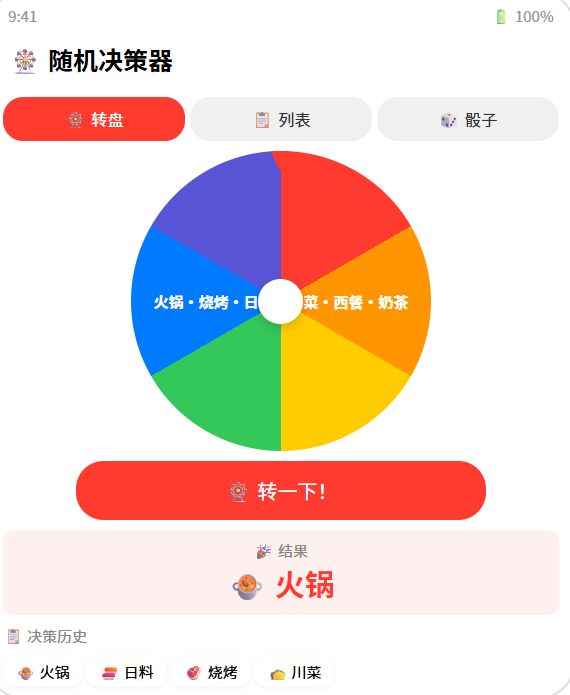
博主说: “今天吃什么?”“周末去哪玩?”“选哪个 offer?”——选择困难症的救星来了!今天用 ArkUI 的 Canvas 动画 + 随机算法,从零实现一个支持转盘抽奖、随机列表、历史记录、自定义选项的随机决策器。
📱 应用场景
| 功能 | 说明 |
|---|---|
| 🎡 幸运转盘 | 转盘式随机选择 |
| 📋 随机列表 | 从列表中随机抽取 |
| 🎲 骰子模式 | 1~6 随机数 |
| 📝 自定义选项 | 自由增删选项 |
| 📋 决策历史 | 记录所有决策结果 |
⚙️ 运行环境要求
| 项目 | 版本要求 |
|---|---|
| DevEco Studio | 5.0.3.800+ |
| HarmonyOS SDK | API 12 |
| 核心 API | Canvas 2D + animateTo + @ohos.data.preferences |
| 权限 | 无 |
🛠️ 实战:从零搭建随机决策器
Step 1:核心算法
// 随机抽取一个
function randomPick<T>(items: T[]): T {
  return items[Math.floor(Math.random() * items.length)];
}

// 转盘旋转角度
function getSpinAngle(sections: number, target: number): number {
  // 确保转至少 5 圈 + 目标扇区角度
  const baseSpins = 5 * 360;
  const sectionAngle = 360 / sections;
  const targetAngle = target * sectionAngle + sectionAngle / 2;
  return baseSpins + (360 - targetAngle);
}
Step 2:完整代码
// pages/Index.ets — 随机决策器
import preferences from '@ohos.data.preferences';

@Entry
@Component
struct DecisionWheel {
  @State options: string[] = ['火锅', '烧烤', '日料', '川菜', '西餐', '奶茶'];
  @State newOption: string = '';
  @State selectedResult: string = '';
  @State isSpinning: boolean = false;
  @State currentRotation: number = 0;
  @State showResult: boolean = false;
  @State history: string[] = [];
  @State mode: 'wheel' | 'list' | 'dice' = 'wheel';

  private canvasCtx!: CanvasRenderingContext2D;
  private pref!: preferences.Preferences;
  private readonly COLORS = ['#FF3B30','#FF9500','#FFCC00','#34C759','#007AFF','#5856D6','#AF52DE','#FF6B6B'];

  aboutToAppear() {
    this.initStorage();
    this.drawWheel();
  }

  async initStorage() {
    this.pref = await preferences.getPreferences(getContext(this), 'decisions');
    const h = this.pref.get('history', '[]');
    this.history = JSON.parse(h as string);
    const opts = this.pref.get('options', '[]');
    const parsed = JSON.parse(opts as string);
    if (parsed.length > 0) this.options = parsed;
  }

  async saveHistory(result: string) {
    this.history.unshift(result);
    await this.pref.put('history', JSON.stringify(this.history.slice(0, 50)));
    await this.pref.flush();
  }

  async saveOptions() {
    await this.pref.put('options', JSON.stringify(this.options));
    await this.pref.flush();
  }

  addOption() {
    if (this.newOption.trim() && !this.options.includes(this.newOption.trim())) {
      this.options.push(this.newOption.trim());
      this.newOption = '';
      this.saveOptions();
      this.drawWheel();
    }
  }

  removeOption(index: number) {
    this.options.splice(index, 1);
    this.saveOptions();
    this.drawWheel();
  }

  // ======== 绘制转盘 ========
  drawWheel(rotation: number = this.currentRotation) {
    if (!this.canvasCtx || this.options.length === 0) return;
    const ctx = this.canvasCtx;
    const cx = 150, cy = 150, r = 140;
    const n = this.options.length;
    const arc = (2 * Math.PI) / n;

    ctx.clearRect(0, 0, 300, 300);

    // 绘制每个扇区
    for (let i = 0; i < n; i++) {
      const startAngle = rotation + i * arc - Math.PI / 2;
      const endAngle = startAngle + arc;

      ctx.beginPath();
      ctx.moveTo(cx, cy);
      ctx.arc(cx, cy, r, startAngle, endAngle);
      ctx.closePath();
      ctx.fillStyle = this.COLORS[i % this.COLORS.length];
      ctx.fill();
      ctx.strokeStyle = '#fff';
      ctx.lineWidth = 2;
      ctx.stroke();

      // 文字
      ctx.save();
      ctx.translate(cx, cy);
      ctx.rotate(startAngle + arc / 2);
      ctx.textAlign = 'right';
      ctx.fillStyle = '#fff';
      ctx.font = '14px sans-serif';
      ctx.fillText(this.options[i].substring(0, 4), r - 12, 5);
      ctx.restore();
    }

    // 中心圆
    ctx.beginPath();
    ctx.arc(cx, cy, 20, 0, Math.PI * 2);
    ctx.fillStyle = '#fff';
    ctx.fill();
    ctx.strokeStyle = '#ddd';
    ctx.lineWidth = 2;
    ctx.stroke();

    // 指针(固定在顶部)
    ctx.beginPath();
    ctx.moveTo(cx - 10, 5);
    ctx.lineTo(cx + 10, 5);
    ctx.lineTo(cx, 25);
    ctx.closePath();
    ctx.fillStyle = '#FF3B30';
    ctx.fill();
  }

  // ======== 转盘旋转 ========
  spinWheel() {
    if (this.isSpinning || this.options.length < 2) return;
    this.isSpinning = true;
    this.showResult = false;

    const targetIndex = Math.floor(Math.random() * this.options.length);
    const sectionAngle = 360 / this.options.length;
    const targetAngle = targetIndex * sectionAngle;
    const totalSpin = 1800 + (360 - targetAngle); // 5 圈 + 目标

    const startRotation = this.currentRotation;
    const endRotation = startRotation + totalSpin;

    // 动画
    const duration = 3000;
    const startTime = Date.now();

    const animate = () => {
      const elapsed = Date.now() - startTime;
      const progress = Math.min(1, elapsed / duration);
      const eased = 1 - Math.pow(1 - progress, 3); // easeOutCubic

      this.currentRotation = startRotation + (endRotation - startRotation) * eased;
      this.drawWheel(this.currentRotation * Math.PI / 180);

      if (progress < 1) {
        requestAnimationFrame(animate);
      } else {
        this.currentRotation = endRotation % 360;
        this.selectedResult = this.options[targetIndex];
        this.showResult = true;
        this.isSpinning = false;
        this.saveHistory(this.selectedResult);
      }
    };
    animate();
  }

  // ======== 随机列表模式 ========
  pickFromList() {
    if (this.options.length === 0) return;
    this.selectedResult = this.options[Math.floor(Math.random() * this.options.length)];
    this.showResult = true;
    this.saveHistory(this.selectedResult);
  }

  // ======== 骰子模式 ========
  rollDice() {
    const result = Math.floor(Math.random() * 6) + 1;
    this.selectedResult = `${result}`;
    this.showResult = true;
    this.saveHistory(`🎲 ${result}`);
  }

  getDiceEmoji(val: number): string {
    return ['⚀','⚁','⚂','⚃','⚄','⚅'][val - 1] || '🎲';
  }

  build() {
    Column() {
      // 标题
      Text('🎡 随机决策器').fontSize(24).fontWeight(FontWeight.Bold).padding({ top: 8 })

      // 模式切换
      Row() {
        Button('🎡 转盘').width('33%').height(34)
          .backgroundColor(this.mode === 'wheel' ? '#FF3B30' : '#F0F0F0')
          .fontColor(this.mode === 'wheel' ? '#fff' : '#333').fontSize(13).borderRadius(17)
          .onClick(() => { this.mode = 'wheel'; this.drawWheel(); })
        Button('📋 列表').width('33%').height(34)
          .backgroundColor(this.mode === 'list' ? '#FF3B30' : '#F0F0F0')
          .fontColor(this.mode === 'list' ? '#fff' : '#333').fontSize(13).borderRadius(17)
          .onClick(() => { this.mode = 'list'; })
        Button('🎲 骰子').width('33%').height(34)
          .backgroundColor(this.mode === 'dice' ? '#FF3B30' : '#F0F0F0')
          .fontColor(this.mode === 'dice' ? '#fff' : '#333').fontSize(13).borderRadius(17)
          .onClick(() => { this.mode = 'dice'; })
      }.width('94%').margin({ top: 8 })

      if (this.mode === 'wheel') {
        // ====== 转盘模式 ======
        Canvas(this.canvasCtx).width(300).height(300).margin({ top: 8 })

        Button(this.isSpinning ? '🎡 转动中...' : '🎡 转一下!')
          .width('80%').height(48)
          .backgroundColor(this.isSpinning ? '#999' : '#FF3B30')
          .fontColor('#fff').borderRadius(24).fontSize(18)
          .enabled(!this.isSpinning).margin({ top: 8 })
          .onClick(() => { this.spinWheel(); })

      } else if (this.mode === 'list') {
        // ====== 列表模式 ======
        Row() {
          TextInput({ placeholder: '添加选项...', text: this.newOption })
            .layoutWeight(1).height(40).backgroundColor('#F0F0F0').borderRadius(8).padding({ left: 12 })
          Button('➕').width(44).height(40).backgroundColor('#007AFF').fontColor('#fff').borderRadius(8)
            .onClick(() => { this.addOption(); })
        }.width('94%').margin({ top: 8 })

        List({ space: 4 }) {
          ForEach(this.options, (opt: string, idx: number) => {
            ListItem() {
              Row() {
                Text(opt).fontSize(16).layoutWeight(1)
                Button('✕').fontSize(14).backgroundColor('transparent').fontColor('#FF3B30')
                  .onClick(() => { this.removeOption(idx as number); })
              }.padding(12).backgroundColor('#FFF').borderRadius(8)
            }
          }, (opt: string) => opt)
        }.layoutWeight(1).width('94%')

        Button('🎲 随机选一个!').width('80%').height(48).backgroundColor('#FF3B30')
          .fontColor('#fff').borderRadius(24).fontSize(16).margin({ top: 8 })
          .onClick(() => { this.pickFromList(); })

      } else {
        // ====== 骰子模式 ======
        Column() {
          Text(this.selectedResult ? this.getDiceEmoji(parseInt(this.selectedResult)) : '🎲')
            .fontSize(120).margin({ top: 40 })
          Text(this.selectedResult ? `点数: ${this.selectedResult}` : '点击摇骰子')
            .fontSize(20).fontColor('#888').margin({ top: 8 })

          Button('🎲 摇一摇!').width('70%').height(56).backgroundColor('#FF3B30')
            .fontColor('#fff').borderRadius(28).fontSize(20).margin({ top: 24 })
            .onClick(() => { this.rollDice(); })
        }.layoutWeight(1).width('100%').alignItems(HorizontalAlign.Center)
      }

      // ====== 结果显示 ======
      if (this.showResult && this.selectedResult && this.mode !== 'dice') {
        Column() {
          Text('🎉 结果').fontSize(14).fontColor('#888')
          Text(this.selectedResult).fontSize(32).fontWeight(FontWeight.Bold).fontColor('#FF3B30')
        }.padding(12).margin({ top: 4 })
      }

      // ====== 历史记录 ======
      if (this.history.length > 0) {
        Text('📋 决策历史').fontSize(14).fontWeight(FontWeight.Bold).margin({ top: 8 })
        Scroll() {
          Row() {
            ForEach(this.history.slice(0, 10), (item: string) => {
              Text(item).fontSize(13).padding({ left: 10, right: 10, top: 4, bottom: 4 })
                .backgroundColor('#FFF').borderRadius(12).margin(2)
            }, (item: string, idx: number) => idx.toString())
          }.padding(4)
        }.height(36).width('94%')
      }
    }
    .width('100%').height('100%').backgroundColor('#F8F9FA')
    .alignItems(HorizontalAlign.Center)
  }
}
📊 三种模式对比
| 模式 | 随机方式 | 视觉反馈 | 适用场景 |
|---|---|---|---|
| 🎡 转盘 | Canvas 动画旋转 | 🎨 丰富 | 多个选项选一 |
| 📋 列表 | 随机下标抽取 | 📝 简洁 | 选项较多的列表 |
| 🎲 骰子 | 1~6 随机数 | 🎯 直观 | 数字随机 |
⚠️ 避坑指南
| 坑 | 原因 | 正确做法 |
|---|---|---|
| 转盘动画卡顿 | requestAnimationFrame 频率太高 | 限制 60fps |
| 指针不对准扇区 | 角度计算偏移 | targetAngle = index × sectionAngle + sectionAngle/2 |
| 选项重复 | 用户添加了同名选项 | addOption 时去重检查 |
| 转盘空白 | options 为空或长度为 1 | 少于 2 个选项禁用转盘 |
| 历史记录太多 | 无限累积 | 限制最多 50 条 |
🔥 最佳实践
- 震动反馈:转盘停止时调用
@ohos.vibrator增加手感 - 色彩优化:相邻扇区颜色尽量不同
- 音效:旋转时播放"咔哒"声,停止时播放"叮"声
- 公平性:真正的 random 无需做权重修正
- 分享结果:选中结果支持一键分享到社交媒体
官方文档: HarmonyOS 应用开发文档
- 开发者社区: 华为开发者论坛
- 欢迎加入开源鸿蒙跨平台社区: https://openharmonycrossplatform.csdn.net/

作为“人工智能6S店”的官方数字引擎,为AI开发者与企业提供一个覆盖软硬件全栈、一站式门户。
更多推荐



 0
0 0
0- 0


 已为社区贡献24条内容

所有评论(0)