
鸿蒙原生应用实战(二十)ArkUI 课程表 App:Grid 网格 + SQLite 存储 + 周次切换 + 上课提醒
·
📚 鸿蒙原生应用实战(二十)ArkUI 课程表 App:Grid 网格 + SQLite 存储 + 周次切换 + 上课提醒
博主说: 每个学生手机里都应该有一个课程表 App。今天我们用 ArkUI 的 Grid 网格布局 + SQLite 存储 + Notification 通知,从零实现一个支持课程管理、周次切换、上课提醒、单/双周区分、Widget 桌面显示的智能课程表。
📱 应用场景
| 功能 | 说明 |
|---|---|
| 🗓️ 课程表网格 | 7×6 Grid 展示一周课程 |
| 📝 课程管理 | 添加/编辑/删除课程 |
| 🔄 周次切换 | 第 1~20 周,单/双周 |
| 🔔 上课提醒 | 课前 5 分钟通知 |
| 🎨 颜色标记 | 不同科目不同颜色 |
⚙️ 运行环境要求
| 项目 | 版本要求 |
|---|---|
| DevEco Studio | 5.0.3.800+ |
| HarmonyOS SDK | API 12 |
| 核心 API | @ohos.data.relationalStore + @ohos.notification + Grid |
| 权限 | NOTIFICATION |
🛠️ 实战:从零搭建课程表 App
Step 1:数据结构
interface Course {
  id: number;
  name: string;           // 课程名
  teacher: string;        // 老师
  classroom: string;      // 教室
  dayOfWeek: number;      // 1~7 (周一~周日)
  startSlot: number;      // 开始节次 1~12
  endSlot: number;        // 结束节次
  weekStart: number;      // 开始周
  weekEnd: number;        // 结束周
  weekType: 'all' | 'odd' | 'even'; // 全部/单周/双周
  color: string;          // 颜色标记
}
Step 2:完整代码
// pages/Index.ets — 课程表 App
import relationalStore from '@ohos.data.relationalStore';
import notification from '@ohos.notification';
const TIME_SLOTS = [
'08:00-08:45', '08:55-09:40', '09:50-10:35', '10:45-11:30',
'11:40-12:25', '14:00-14:45', '14:55-15:40', '15:50-16:35',
'16:45-17:30', '18:30-19:15', '19:25-20:10', '20:20-21:05'
];
const COLORS = ['#FF3B30','#FF9500','#FFCC00','#34C759','#007AFF','#5856D6','#AF52DE'];
@Entry
@Component
struct TimetableApp {
@State courses: Course[] = [];
@State currentWeek: number = 1;
@State totalWeeks: number = 20;
@State showAddDialog: boolean = false;
@State editName: string = '';
@State editTeacher: string = '';
@State editRoom: string = '';
@State editDay: number = 1;
@State editStart: number = 1;
@State editEnd: number = 2;
@State editColor: string = '#007AFF';
@State editWeekType: 'all' | 'odd' | 'even' = 'all';
@State selectedCourse: Course | null = null;
private store!: relationalStore.RdbStore;
// 星期标题
private weekDays = ['周一', '周二', '周三', '周四', '周五', '周六', '周日'];
aboutToAppear() {
this.initDB();
}
async initDB() {
const config = { name: 'timetable.db', securityLevel: relationalStore.SecurityLevel.S1 };
this.store = await relationalStore.getRdbStore(getContext(this), config);
await this.store.executeSql(
`CREATE TABLE IF NOT EXISTS courses (
id INTEGER PRIMARY KEY AUTOINCREMENT,
name TEXT, teacher TEXT, classroom TEXT,
dayOfWeek INTEGER, startSlot INTEGER, endSlot INTEGER,
weekStart INTEGER, weekEnd INTEGER,
weekType TEXT DEFAULT 'all', color TEXT DEFAULT '#007AFF'
)`
);
await this.loadCourses();
}
async loadCourses() {
const p = new relationalStore.RdbPredicates('courses');
p.orderByAsc('dayOfWeek').orderByAsc('startSlot');
const r = await this.store.query(p, ['id','name','teacher','classroom','dayOfWeek','startSlot','endSlot','weekStart','weekEnd','weekType','color']);
const list: Course[] = [];
while (r.goToNextRow()) {
list.push({
id: r.getLong(r.getColumnIndex('id')),
name: r.getString(r.getColumnIndex('name')),
teacher: r.getString(r.getColumnIndex('teacher') || ''),
classroom: r.getString(r.getColumnIndex('classroom') || ''),
dayOfWeek: r.getLong(r.getColumnIndex('dayOfWeek')),
startSlot: r.getLong(r.getColumnIndex('startSlot')),
endSlot: r.getLong(r.getColumnIndex('endSlot')),
weekStart: r.getLong(r.getColumnIndex('weekStart')),
weekEnd: r.getLong(r.getColumnIndex('weekEnd')),
weekType: r.getString(r.getColumnIndex('weekType')) as 'all' | 'odd' | 'even',
color: r.getString(r.getColumnIndex('color'))
});
}
this.courses = list;
r.close();
}
async addCourse() {
if (!this.editName.trim()) return;
await this.store.insert('courses', {
name: this.editName, teacher: this.editTeacher,
classroom: this.editRoom, dayOfWeek: this.editDay,
startSlot: this.editStart, endSlot: this.editEnd,
weekStart: 1, weekEnd: this.totalWeeks,
weekType: this.editWeekType, color: this.editColor
});
await this.loadCourses();
this.showAddDialog = false;
this.editName = '';
}
async deleteCourse(id: number) {
const p = new relationalStore.RdbPredicates('courses');
p.equalTo('id', id);
await this.store.delete(p);
await this.loadCourses();
}
// ======== 判断当前周是否上课 ========
isCourseActive(course: Course): boolean {
if (this.currentWeek < course.weekStart || this.currentWeek > course.weekEnd) return false;
if (course.weekType === 'odd' && this.currentWeek % 2 === 0) return false;
if (course.weekType === 'even' && this.currentWeek % 2 === 1) return false;
return true;
}
// ======== 获取某天某节次的课程 ========
getCourse(day: number, slot: number): Course | undefined {
return this.courses.find(c =>
c.dayOfWeek === day &&
c.startSlot <= slot && c.endSlot >= slot &&
this.isCourseActive(c)
);
}
// ======== 计算课程占据的行数 ========
getCourseRowSpan(course: Course): number {
return course.endSlot - course.startSlot + 1;
}
// ======== 获取某天的所有课程(按节次排序) ========
getCoursesForDay(day: number): Course[] {
return this.courses.filter(c => c.dayOfWeek === day && this.isCourseActive(c))
.sort((a, b) => a.startSlot - b.startSlot);
}
// ======== 时间格式化 ========
formatCourseTime(course: Course): string {
return `${TIME_SLOTS[course.startSlot - 1]}~${TIME_SLOTS[course.endSlot - 1].split('-')[1]}`;
}
// ======== 获取周的奇偶 ========
getWeekLabel(): string {
return `第 ${this.currentWeek} 周${this.currentWeek % 2 === 1 ? ' (单周)' : ' (双周)'}`;
}
build() {
Column() {
// ---- 周次导航 ----
Row() {
Button('◀').fontSize(20).backgroundColor('transparent').fontColor('#007AFF')
.onClick(() => { if (this.currentWeek > 1) this.currentWeek--; })
Text(this.getWeekLabel()).fontSize(18).fontWeight(FontWeight.Bold).layoutWeight(1)
.textAlign(TextAlign.Center)
Button('▶').fontSize(20).backgroundColor('transparent').fontColor('#007AFF')
.onClick(() => { if (this.currentWeek < this.totalWeeks) this.currentWeek++; })
Button('➕').fontSize(18).backgroundColor('transparent').fontColor('#FF3B30')
.onClick(() => { this.showAddDialog = true; })
}.width('96%').padding({ top: 8 })
// ---- 星期标题行 ----
Grid() {
ForEach(this.weekDays, (day: string) => {
GridItem() {
Text(day).fontSize(12).fontColor('#666').fontWeight(FontWeight.Bold)
.textAlign(TextAlign.Center).width('100%')
}
})
}
.columnsTemplate('1fr 1fr 1fr 1fr 1fr 1fr 1fr')
.width('96%').height(24)
// ---- 课程网格 (节次×星期) ----
Scroll() {
Grid() {
ForEach([1,2,3,4,5,6,7,8,9,10,11,12], (slot: number) => {
ForEach([1,2,3,4,5,6,7], (day: number) => {
GridItem() {
const course = this.getCourse(day, slot);
if (course && course.startSlot === slot) {
// 课程卡片(只渲染起始节次)
Column() {
Text(course.name).fontSize(12).fontWeight(FontWeight.Bold)
.fontColor('#fff').maxLines(2).textOverflow({ overflow: TextOverflow.Ellipsis })
Text(`@${course.classroom || '未定'}`).fontSize(9).fontColor('rgba(255,255,255,0.8)')
.margin({ top: 2 })
}
.padding(4).width('100%').height('100%')
.backgroundColor(course.color)
.borderRadius(6)
.onClick(() => {
this.selectedCourse = course;
AlertDialog.show({
title: course.name,
message: `👨🏫 ${course.teacher}\n🏫 ${course.classroom}\n⏰ ${this.formatCourseTime(course)}`,
confirm: { value: '删除', fontColor: '#FF3B30', action: () => { this.deleteCourse(course.id); } }
});
})
} else if (!course) {
// 空格
Column().width('100%').height(55)
} else {
// 已被占据(跨节的课程)
Column().width('100%').height(55)
}
}
})
})
}
.columnsTemplate('1fr 1fr 1fr 1fr 1fr 1fr 1fr')
.rowsTemplate('repeat(12, 55px)')
.width('96%')
}
.layoutWeight(1).width('100%')
// ---- 底部统计 ----
Row() {
Text(`📚 本周 ${this.courses.filter(c => this.isCourseActive(c)).length} 节课`)
.fontSize(13).fontColor('#888')
}.padding(8)
}
.width('100%').height('100%').backgroundColor('#F8F9FA')
// 添加课程弹窗
.bindSheet(this.showAddDialog, this.AddSheet())
}
@Builder
AddSheet() {
Column() {
Text('添加课程').fontSize(20).fontWeight(FontWeight.Bold).margin({ bottom: 16 })
TextInput({ placeholder: '课程名称 *', text: this.editName })
.width('100%').height(40).backgroundColor('#F8F8F8').borderRadius(8).padding({ left: 12 })
TextInput({ placeholder: '授课老师', text: this.editTeacher })
.width('100%').height(40).backgroundColor('#F8F8F8').borderRadius(8).padding({ left: 12 }).margin({ top: 8 })
TextInput({ placeholder: '教室', text: this.editRoom })
.width('100%').height(40).backgroundColor('#F8F8F8').borderRadius(8).padding({ left: 12 }).margin({ top: 8 })
Row() {
Text('星期:').fontSize(14)
ForEach(['周一','周二','周三','周四','周五','周六','周日'], (day: string, i: number) => {
Button(day).fontSize(12).height(30)
.backgroundColor(this.editDay === i+1 ? '#007AFF' : '#F0F0F0')
.fontColor(this.editDay === i+1 ? '#fff' : '#333')
.onClick(() => { this.editDay = i+1; })
})
}.width('100%').gap(4).margin({ top: 8 })
Row() {
Text('节次:').fontSize(14)
Select([{ value: '1-2' }, { value: '3-4' }, { value: '5-6' }, { value: '7-8' }, { value: '9-10' }])
.selected(0)
.onSelect((_, val) => {
const parts = val.split('-');
this.editStart = parseInt(parts[0]);
this.editEnd = parseInt(parts[1]);
})
}.margin({ top: 8 })
Row() {
Button('取消').backgroundColor('#E5E5EA').fontColor('#333').borderRadius(8).width('45%')
.onClick(() => { this.showAddDialog = false; })
Button('保存').backgroundColor('#007AFF').fontColor('#fff').borderRadius(8).width('45%')
.onClick(() => { this.addCourse(); })
}.width('100%').margin({ top: 16 })
}.padding(24).width('100%')
}
}
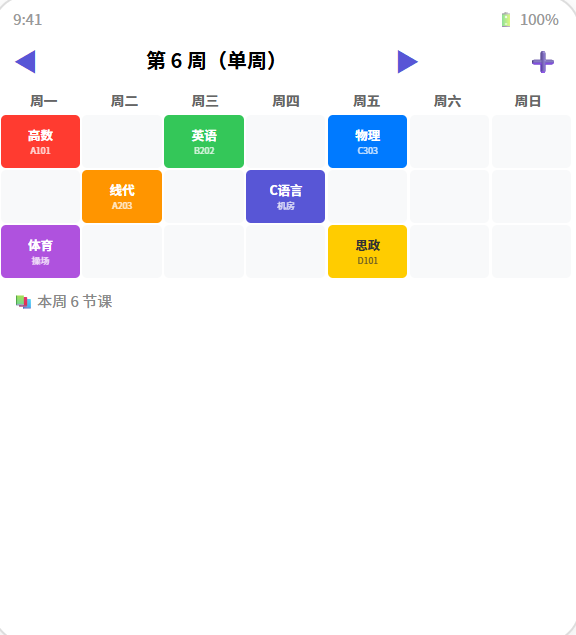
📊 课程表网格结构
┌──────┬──────┬──────┬──────┬──────┬──────┬──────┐
│ 周一  │ 周二  │ 周三  │ 周四  │ 周五  │ 周六  │ 周日  │
├──────┼──────┼──────┼──────┼──────┼──────┼──────┤
│ 高数  │      │ 英语  │      │ 物理  │      │      │
│ 1-2节│      │ 1-2节│      │ 1-2节│      │      │
├──────┼──────┼──────┼──────┼──────┼──────┼──────┤
│      │ 线代  │      │ C语言 │      │      │      │
│      │ 3-4节│      │ 3-4节│      │      │      │
├──────┼──────┼──────┼──────┼──────┼──────┼──────┤
│ 体育  │      │      │      │ 思政  │      │      │
│ 5-6节│      │      │      │ 5-6节│      │      │
└──────┴──────┴──────┴──────┴──────┴──────┴──────┘
⚠️ 避坑指南
| 坑 | 原因 | 正确做法 |
|---|---|---|
| 课程重叠 | 同一时间两门课 | 添加时检测时间冲突 |
| 跨节课程显示不全 | GridItem 固定高度 | 用 rowsTemplate 的 repeat + rowStart |
| 单双周判断反了 | 学期第一周可能不是第 1 周 | 提供学期起始周配置 |
| 删除后网格错乱 | 索引没刷新 | 删除后重新 loadCourses() |
| 周次切换不刷新 | 没监听 @State 变化 | 周次变化自动触发 getCourse 重算 |
🔥 最佳实践
- 颜色编码:每门课固定颜色,一目了然
- 学期切换:支持上/下学期数据分离
- 上课提醒:每天早晨推送当天课程表
- Widget 卡片:桌面 Widget 显示今日课程
- 考试模式:课程结束后显示"已结课"标记
官方文档: HarmonyOS 应用开发文档
- 开发者社区: 华为开发者论坛
- 欢迎加入开源鸿蒙跨平台社区: https://openharmonycrossplatform.csdn.net/

作为“人工智能6S店”的官方数字引擎,为AI开发者与企业提供一个覆盖软硬件全栈、一站式门户。
更多推荐

 6
6 0
0- 0


 已为社区贡献24条内容

所有评论(0)