
鸿蒙原生应用实战(十四)ArkUI 新闻阅读器:RSS 解析 + WebView 渲染 + 离线缓存
·
📰 鸿蒙原生应用实战(十四)ArkUI 新闻阅读器:RSS 解析 + WebView 渲染 + 离线缓存
博主说: 每天刷新闻是大多数人的习惯。今天我们用 ArkUI 的 HTTP 网络请求 + XML 解析 + WebView 组件,从零实现一个支持 RSS 订阅、文章列表、WebView 阅读、离线缓存、分类管理的新闻阅读器。
📱 应用场景
| 功能 | 说明 |
|---|---|
| 📡 RSS 订阅 | 解析标准 RSS/Atom 格式 |
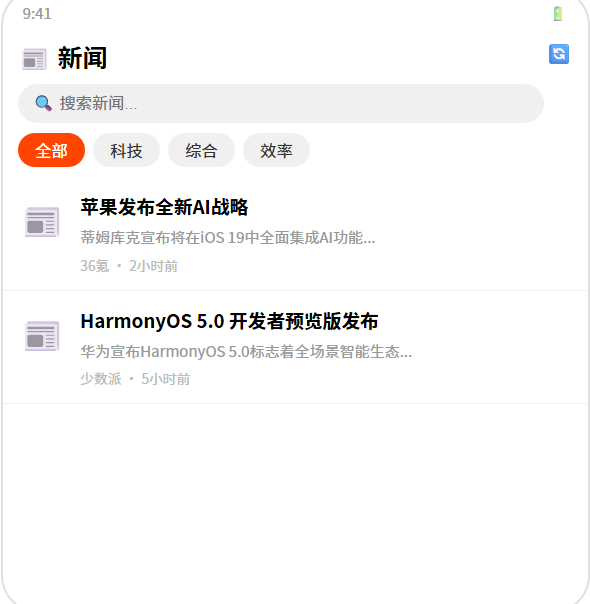
| 📋 文章列表 | 标题+摘要+时间+来源 |
| 📖 阅读模式 | WebView 加载全文 |
| 💾 离线缓存 | 缓存文章正文到本地 |
| 📂 分类管理 | 科技/体育/娱乐等多分类 |
⚙️ 运行环境要求
| 项目 | 版本要求 |
|---|---|
| DevEco Studio | 5.0.3.800+ |
| HarmonyOS SDK | API 12 |
| 核心 API | @ohos.net.http + @ohos.web.webview + @ohos.data.preferences |
| 权限 | INTERNET |
🛠️ 实战:从零搭建新闻阅读器
Step 1:RSS 数据结构
interface Article {
  id: string;
  title: string;
  link: string;
  description: string;     // 摘要
  pubDate: string;         // 发布时间
  source: string;          // 来源
  category: string;        // 分类
  isRead: boolean;         // 是否已读
  isBookmarked: boolean;   // 是否收藏
  cachedContent: string;   // 缓存的全文
}

interface RSSSource {
  name: string;
  url: string;
  category: string;
  icon: string;
}
Step 2:完整代码
// pages/Index.ets — 新闻阅读器
import http from '@ohos.net.http';
import webview from '@ohos.web.webview';
import preferences from '@ohos.data.preferences';

const DEFAULT_SOURCES: RSSSource[] = [
  { name: '知乎日报', url: 'https://feeds.zhihu.com/daily', category: '综合', icon: '📰' },
  { name: '36氪', url: 'https://36kr.com/feed', category: '科技', icon: '💻' },
  { name: '少数派', url: 'https://sspai.com/feed', category: '效率', icon: '⚡' },
  { name: '豆瓣精选', url: 'https://www.douban.com/feed/group/beijing', category: '生活', icon: '🎬' },
];

@Entry
@Component
struct NewsReader {
  @State articles: Article[] = [];
  @State sources: RSSSource[] = DEFAULT_SOURCES;
  @State currentCategory: string = '全部';
  @State isLoading: boolean = false;
  @State currentArticle: Article | null = null;
  @State showReader: boolean = false;
  @State searchText: string = '';

  private pref!: preferences.Preferences;
  private categories: string[] = ['全部', '科技', '综合', '效率', '生活'];

  aboutToAppear() {
    this.loadCache();
    this.fetchAllFeeds();
  }

  // ======== 加载本地缓存 ========
  async loadCache() {
    this.pref = await preferences.getPreferences(getContext(this), 'news_cache');
    const json = this.pref.get('articles', '[]');
    const cached = JSON.parse(json as string);
    if (cached.length > 0) this.articles = cached;
  }

  async saveCache() {
    await this.pref.put('articles', JSON.stringify(this.articles));
    await this.pref.flush();
  }

  // ======== 抓取所有订阅源 ========
  async fetchAllFeeds() {
    this.isLoading = true;
    const allArticles: Article[] = [];

    for (const source of this.sources) {
      try {
        const articles = await this.fetchFeed(source);
        allArticles.push(...articles);
      } catch (err) {
        console.error(`获取 ${source.name} 失败:`, JSON.stringify(err));
      }
    }

    // 按时间排序
    allArticles.sort((a, b) => new Date(b.pubDate).getTime() - new Date(a.pubDate).getTime());
    this.articles = allArticles;
    this.saveCache();
    this.isLoading = false;
  }

  // ======== 解析单个 RSS 源 ========
  async fetchFeed(source: RSSSource): Promise<Article[]> {
    const req = http.createHttp();
    const resp = await req.request(source.url, {
      method: http.RequestMethod.GET,
      expectDataType: http.HttpDataType.STRING
    });

    const xml = resp.result as string;
    // 简单 XML 解析(RSS 2.0 格式)
    const articles: Article[] = [];
    const itemRegex = /<item>([\s\S]*?)<\/item>/g;
    let match;

    while ((match = itemRegex.exec(xml)) !== null) {
      const item = match[1];
      const title = this.extractXmlTag(item, 'title');
      const link = this.extractXmlTag(item, 'link');
      const description = this.extractXmlTag(item, 'description').replace(/<[^>]+>/g, '').substring(0, 200);
      const pubDate = this.extractXmlTag(item, 'pubDate');

      if (title) {
        articles.push({
          id: Date.now().toString() + Math.random().toString(36).substring(2, 8),
          title, link, description, pubDate,
          source: source.name,
          category: source.category,
          isRead: false,
          isBookmarked: false,
          cachedContent: ''
        });
      }
    }

    req.destroy();
    return articles;
  }

  // ======== XML 标签提取 ========
  extractXmlTag(xml: string, tag: string): string {
    const regex = new RegExp(`<${tag}[^>]*>([\\s\\S]*?)<\\/${tag}>`);
    const match = regex.exec(xml);
    return match ? match[1].trim() : '';
  }

  // ======== 打开文章阅读 ========
  openArticle(article: Article) {
    article.isRead = true;
    this.currentArticle = article;
    this.showReader = true;
    this.saveCache();
  }

  // ======== 切换收藏 ========
  toggleBookmark(article: Article) {
    article.isBookmarked = !article.isBookmarked;
    this.saveCache();
  }

  // ======== 过滤文章 ========
  get filteredArticles(): Article[] {
    let list = this.articles;
    if (this.currentCategory !== '全部') {
      list = list.filter(a => a.category === this.currentCategory);
    }
    if (this.searchText.trim()) {
      const kw = this.searchText.toLowerCase();
      list = list.filter(a => a.title.toLowerCase().includes(kw));
    }
    return list;
  }

  // ======== 格式化时间 ========
  formatTime(dateStr: string): string {
    const d = new Date(dateStr);
    const now = new Date();
    const diff = now.getTime() - d.getTime();
    if (diff < 3600000) return `${Math.floor(diff/60000)}分钟前`;
    if (diff < 86400000) return `${Math.floor(diff/3600000)}小时前`;
    return `${d.getMonth()+1}/${d.getDate()}`;
  }

  build() {
    Column() {
      // 标题栏
      Row() {
        Text('📰 新闻阅读').fontSize(22).fontWeight(FontWeight.Bold).layoutWeight(1)
        Button('🔄').fontSize(18).backgroundColor('transparent').fontColor('#007AFF')
          .onClick(() => { this.fetchAllFeeds(); })
        Button('⚙️').fontSize(18).backgroundColor('transparent').fontColor('#333')
      }.width('94%').padding({ top: 8, bottom: 4 })

      // 搜索
      TextInput({ placeholder: '🔍 搜索新闻...', text: this.searchText })
        .width('94%').height(36).backgroundColor('#F0F0F0').borderRadius(18)
        .padding({ left: 12 }).fontSize(14)

      // 分类
      Scroll({ scroller: new Scroller() }) {
        Row() {
          ForEach(this.categories, (cat: string) => {
            Text(cat).fontSize(14).padding({ left: 16, right: 16, top: 6, bottom: 6 })
              .backgroundColor(this.currentCategory === cat ? '#007AFF' : '#F0F0F0')
              .fontColor(this.currentCategory === cat ? '#fff' : '#333')
              .borderRadius(16)
              .onClick(() => { this.currentCategory = cat; })
          })
        }.padding(4)
      }.height(40)

      // 列表
      if (this.isLoading) {
        Column() {
          LoadingProgress().width(36).height(36).color('#007AFF')
          Text('正在获取最新新闻...').fontSize(14).fontColor('#888').margin({ top: 8 })
        }.layoutWeight(1).justifyContent(FlexAlign.Center).width('100%')
      } else if (this.filteredArticles.length === 0) {
        Column() {
          Text('📭').fontSize(48)
          Text('暂无新闻').fontSize(16).fontColor('#999').margin({ top: 8 })
        }.layoutWeight(1).justifyContent(FlexAlign.Center).width('100%')
      } else {
        List({ space: 8 }) {
          ForEach(this.filteredArticles, (article: Article) => {
            ListItem() {
              Row() {
                // 来源图标
                Text(this.getSourceIcon(article.source)).fontSize(32).margin({ right: 10 })

                Column() {
                  Text(article.title).fontSize(15).fontWeight(FontWeight.Bold)
                    .fontColor(article.isRead ? '#888' : '#333')
                    .textOverflow({ overflow: TextOverflow.Ellipsis }).maxLines(2)
                  Text(article.description).fontSize(13).fontColor('#999')
                    .textOverflow({ overflow: TextOverflow.Ellipsis }).maxLines(1)
                    .margin({ top: 4 })
                  Row() {
                    Text(article.source).fontSize(11).fontColor('#007AFF')
                    Text(this.formatTime(article.pubDate)).fontSize(11).fontColor('#bbb').margin({ left: 8 })
                    if (article.isBookmarked) Text('🔖').fontSize(11).margin({ left: 4 })
                  }.margin({ top: 4 })
                }.layoutWeight(1).alignItems(HorizontalAlign.Start)
              }
              .padding(12).width('96%').backgroundColor('#FFF').borderRadius(10)
              .shadow({ radius: 2, color: '#10000000', offsetY: 1 })
            }
            .onClick(() => { this.openArticle(article); })
            .swipeAction({ end: this.SwipeBtn(article) })
          }, (article: Article) => article.id)
        }
        .layoutWeight(1).width('100%').padding({ top: 4 })
      }
    }
    .width('100%').height('100%').backgroundColor('#F8F9FA')

    // 阅读弹窗
    .bindSheet(this.showReader && this.currentArticle !== null, this.ReaderSheet())
  }

  @Builder
  SwipeBtn(article: Article) {
    Button(article.isBookmarked ? '取消收藏' : '🔖 收藏')
      .backgroundColor('#FF9500').fontColor('#fff').borderRadius(8).width(80)
      .onClick(() => { this.toggleBookmark(article); })
  }

  @Builder
  ReaderSheet() {
    if (this.currentArticle) {
      Column() {
        Scroll() {
          Column() {
            Text(this.currentArticle.title).fontSize(22).fontWeight(FontWeight.Bold).width('100%')

            Row() {
              Text(this.currentArticle.source).fontSize(13).fontColor('#007AFF')
              Text(this.formatTime(this.currentArticle.pubDate)).fontSize(13).fontColor('#bbb').margin({ left: 12 })
            }.width('100%').margin({ top: 8 })

            Divider().margin({ top: 12, bottom: 12 })

            // WebView 加载全文
            if (this.currentArticle.link) {
              Web({ src: this.currentArticle.link, controller: new webview.WebviewController() })
                .width('100%').height(400)
                .javaScriptAccess(true).domStorageAccess(true)
            }
          }.padding(16)
        }.layoutWeight(1)

        Row() {
          Button('🔖').fontSize(20).backgroundColor('transparent')
            .fontColor(this.currentArticle.isBookmarked ? '#FF9500' : '#999')
            .onClick(() => { this.toggleBookmark(this.currentArticle!); })
          Button(this.currentArticle.isRead ? '✅ 已读' : '📖 标记已读').fontSize(14).backgroundColor('#F0F0F0')
          Button('✕ 关闭').fontSize(14).backgroundColor('#007AFF').fontColor('#fff').borderRadius(16)
            .onClick(() => { this.showReader = false; })
        }.width('100%').justifyContent(FlexAlign.SpaceEvenly).padding(12)
      }.width('100%').height('90%')
    }
  }

  getSourceIcon(source: string): string {
    const icons: Record<string, string> = {
      '知乎日报': '📰', '36氪': '💻', '少数派': '⚡', '豆瓣精选': '🎬'
    };
    return icons[source] || '📄';
  }
}
⚠️ 避坑指南
| 坑 | 原因 | 正确做法 |
|---|---|---|
| RSS XML 解析失败 | 不同站点 RSS 格式差异大 | 用正则 + 容错处理 |
| WebView 白屏 | 忘了开启 JS/DOM 存储 | javaScriptAccess(true) + domStorageAccess(true) |
| 离线缓存过大 | 文章内容无限累计 | 限制缓存 200 篇,FIFO 淘汰 |
| HTTP 请求超时 | 部分 RSS 源不可用 | 设 10s 超时 + try/catch |
| 新闻列表内存泄漏 | 图片太多 | 压缩摘要文字,不加载图片 |
🔥 最佳实践
- 增量更新:每次抓取只取最新文章,不重复存储
- 缓存策略:展示用缓存数据,后台静默刷新
- 阅读标记:已读/未读用不同颜色区分
- 收藏同步:收藏文章存到 preferences 单独管理
- 网络容错:某个 RSS 源挂了不阻塞其他源的加载
官方文档: HarmonyOS 应用开发文档
- 开发者社区: 华为开发者论坛
- 欢迎加入开源鸿蒙跨平台社区: https://openharmonycrossplatform.csdn.net/

作为“人工智能6S店”的官方数字引擎,为AI开发者与企业提供一个覆盖软硬件全栈、一站式门户。
更多推荐


 7
7 0
0- 0


 已为社区贡献24条内容

所有评论(0)