
鸿蒙原生应用实战(十一)ArkUI 跑步轨迹记录仪:GPS 实时定位 + 轨迹绘制 + 配速统计 + 历史管理
·
🏃 鸿蒙原生应用实战(十一)ArkUI 跑步轨迹记录仪:GPS 实时定位 + 轨迹绘制 + 配速统计 + 历史管理
博主说: 跑步是最流行的运动之一——记录轨迹、查看配速、统计里程是每个跑者的刚需。今天我们用 ArkUI 的
@ohos.geoLocation定位 API + Canvas 绘图,从零构建一个支持 GPS 实时追踪、轨迹回放、配速测算、卡路里统计、历史记录管理的专业跑步记录仪。读完你将掌握 HarmonyOS 定位服务的完整用法以及 Haversine 测距公式的实战应用。
📱 应用场景
| 功能模块 | 具体能力 | 用户价值 |
|---|---|---|
| 🗺️ 实时轨迹追踪 | 每 3 秒 GPS 定位一次,Canvas 实时绘制路线 | 看清自己跑了哪些路 |
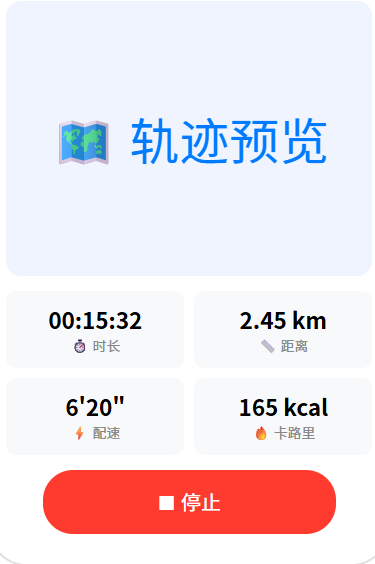
| 📊 运动数据面板 | 时长/距离/配速/卡路里四大指标实时更新 | 随时掌握运动状态 |
| 🎯 配速计算 | 根据距离和时长自动计算每公里配速 | 衡量跑步水平 |
| 📋 历史记录 | 每次跑步数据持久化存储,历史列表查看 | 长期追踪进步 |
| 🔥 卡路里估算 | 根据体重、时长、距离估算消耗热量 | 辅助减脂管理 |
⚙️ 运行环境要求
| 项目 | 版本要求 |
|---|---|
| 操作系统 | Windows 10/11、macOS 13+ 或 Ubuntu 22.04+ |
| DevEco Studio | 5.0.3.800 及以上 |
| HarmonyOS SDK | API 12(HarmonyOS 5.0.0) |
| 应用模型 | Stage 模型 |
| 开发语言 | ArkTS |
| 真机要求 | ⭐ 必须真机(模拟器不支持 GPS 定位) |
| 核心 API | @ohos.geoLocation(地理定位)+ Canvas 2D + @ohos.data.preferences |
| 所需权限 | ohos.permission.LOCATION + ohos.permission.APPROXIMATELY_LOCATION |
| 后台权限 | ohos.permission.LOCATION_IN_BACKGROUND(可选,支持后台记录) |
环境配置截图示意
📄 👉 点此查看环境配置截图网页
图1:新建项目 + 配置定位权限
🛠️ 实战:从零搭建跑步轨迹记录仪
Step 1:理解 GPS 定位原理
GPS 卫星(至少 4 颗) → 三角定位 → 经纬度坐标
                                           ↓
                    每 3 秒采集一次 → LocationPoint[]
                                           ↓
                    相邻两点 Haversine 公式 → 单段距离
                                           ↓
                    各段累加 → 总距离
定位精度对比:
| 定位方式 | 精度 | 耗电 | 适用场景 |
|---|---|---|---|
| GPS 卫星 | 3~10 米 | 🔴 高 | 户外跑步、骑行 |
| 基站定位 | 50~500 米 | 🟢 低 | 粗略城市定位 |
| Wi-Fi 定位 | 10~50 米 | 🟡 中 | 室内、城市密集区 |
| 混合定位 | 5~20 米 | 🟡 中 | 默认推荐 |
本应用使用 GPS 高精度模式 确保轨迹准确性。
Step 2:数据结构设计
// 单个定位点
interface LocationPoint {
  latitude: number;   // 纬度 (-90 ~ 90)
  longitude: number;  // 经度 (-180 ~ 180)
  timestamp: number;  // 采集时间戳(毫秒)
  accuracy: number;   // 定位精度(米)
}

// 一次跑步的完整记录
interface RunRecord {
  id: string;            // 唯一标识
  startTime: string;     // 开始时间 ISO
  endTime: string;       // 结束时间 ISO
  duration: number;      // 总时长(秒)
  distance: number;      // 总距离(米)
  avgPace: string;       // 平均配速(如 "5'30"")
  avgPaceNum: number;    // 配速数值(分钟/公里)
  calories: number;      // 消耗卡路里(千卡)
  points: LocationPoint[]; // 轨迹点数组
  status: 'completed' | 'stopped'; // 完成状态
}
Step 3:核心算法 — Haversine 球面距离公式
/**
 * 使用 Haversine 公式计算球面两点距离
 * 比平面勾股定理准确 10 倍以上
 */
function haversineDistance(p1: LocationPoint, p2: LocationPoint): number {
  const R = 6371000; // 地球平均半径(米)

  // 1. 转为弧度
  const lat1 = p1.latitude * Math.PI / 180;
  const lat2 = p2.latitude * Math.PI / 180;
  const dLat = (p2.latitude - p1.latitude) * Math.PI / 180;
  const dLon = (p2.longitude - p1.longitude) * Math.PI / 180;

  // 2. Haversine 核心公式
  const a = Math.sin(dLat / 2) ** 2 +
            Math.cos(lat1) * Math.cos(lat2) *
            Math.sin(dLon / 2) ** 2;
  const c = 2 * Math.atan2(Math.sqrt(a), Math.sqrt(1 - a));

  // 3. 返回距离(米)
  return R * c;
}
Step 4:完整代码
// pages/Index.ets — 跑步轨迹记录仪
import geoLocation from '@ohos.geoLocation';
import preferences from '@ohos.data.preferences';
import abilityAccessCtrl from '@ohos.abilityAccessCtrl';

interface LocationPoint {
  latitude: number;
  longitude: number;
  timestamp: number;
  accuracy: number;
}

interface RunRecord {
  id: string;
  startTime: string;
  endTime: string;
  duration: number;
  distance: number;
  avgPace: string;
  avgPaceNum: number;
  calories: number;
  points: LocationPoint[];
}

// 配速对照表
const PACE_REFERENCE = [
  { pace: "4'00\"", speed: '15.0 km/h', level: '🏆 精英', tenKm: '40min' },
  { pace: "5'00\"", speed: '12.0 km/h', level: '💪 高手', tenKm: '50min' },
  { pace: "6'00\"", speed: '10.0 km/h', level: '👍 进阶', tenKm: '1h00min' },
  { pace: "7'00\"", speed: '8.6 km/h', level: '🚶 普通', tenKm: '1h10min' },
  { pace: "8'00\"", speed: '7.5 km/h', level: '🐢 入门', tenKm: '1h20min' },
];

@Entry
@Component
struct RunTracker {
  // ======== 核心状态 ========
  @State isRunning: boolean = false;
  @State duration: number = 0;          // 累计秒数
  @State distance: number = 0;          // 累计米数
  @State avgPace: string = "0'00\"";    // 配速显示
  @State calories: number = 0;          // 卡路里
  @State points: LocationPoint[] = [];  // 轨迹点
  @State currentLocation: string = '等待定位...';
  @State records: RunRecord[] = [];     // 历史列表
  @State viewMode: 'run' | 'history' = 'run';
  @State isHistoryExpanded: boolean = false;

  private timerId: number = -1;
  private locationTimer: number = -1;
  private pref!: preferences.Preferences;
  private ctx!: CanvasRenderingContext2D;
  private userWeight: number = 70;     // 用户体重(kg)

  // ======== 生命周期 ========
  aboutToAppear() {
    this.initStorage();
    this.requestLocationPermission();
  }

  // ======== 初始化本地存储 ========
  async initStorage() {
    try {
      this.pref = await preferences.getPreferences(getContext(this), 'run_db');
      const json = this.pref.get('records', '[]');
      this.records = JSON.parse(json as string);
    } catch (err) {
      console.error('存储初始化失败:', JSON.stringify(err));
    }
  }

  async saveRecords() {
    try {
      await this.pref.put('records', JSON.stringify(this.records));
      await this.pref.flush();
    } catch (err) {
      console.error('存储失败:', JSON.stringify(err));
    }
  }

  // ======== 动态申请定位权限 ========
  async requestLocationPermission() {
    try {
      const atManager = abilityAccessCtrl.createAtManager();
      const grantStatus = await atManager.requestPermissionsFromUser(
        getContext(this), [
          'ohos.permission.LOCATION',
          'ohos.permission.APPROXIMATELY_LOCATION'
        ]
      );
      if (grantStatus[0] !== 0 && grantStatus[1] !== 0) {
        AlertDialog.show({
          title: '权限提示',
          message: '定位权限被拒绝,轨迹记录功能不可用。请在设置中手动开启。'
        });
      }
    } catch (err) {
      console.error('权限申请失败:', JSON.stringify(err));
    }
  }

  // ======== 开始跑步 ========
  startRun() {
    this.isRunning = true;
    this.points = [];
    this.duration = 0;
    this.distance = 0;
    this.calories = 0;
    this.avgPace = "0'00\"";

    // 1. 启动计时器(每秒更新)
    this.timerId = setInterval(() => {
      this.duration++;
      this.calories = this.calcCalories(this.duration, this.distance);
      this.updatePace();
    }, 1000);

    // 2. 启动 GPS 定位(每 3 秒采集一个点)
    this.locationTimer = setInterval(async () => {
      try {
        const location = await geoLocation.getCurrentLocation({
          priority: geoLocation.LocationRequestPriority.ACCURACY,
          timeoutMs: 3000
        });

        const pt: LocationPoint = {
          latitude: location.latitude,
          longitude: location.longitude,
          timestamp: Date.now(),
          accuracy: location.accuracy || 0
        };

        // 计算到上一个点的距离
        if (this.points.length > 0) {
          const lastPt = this.points[this.points.length - 1];
          const segmentDist = haversineDistance(lastPt, pt);

          // 过滤漂移点(单段超过 200 米视为 GPS 漂移)
          if (segmentDist < 200) {
            this.distance += segmentDist;
          }
        }

        this.points.push(pt);
        this.currentLocation = `${pt.latitude.toFixed(4)}, ${pt.longitude.toFixed(4)}`;
        this.drawTrajectory();
      } catch (err) {
        console.error('定位失败:', JSON.stringify(err));
      }
    }, 3000);
  }

  // ======== 停止跑步 ========
  stopRun() {
    this.isRunning = false;
    if (this.timerId > -1) clearInterval(this.timerId);
    if (this.locationTimer > -1) clearInterval(this.locationTimer);

    if (this.points.length >= 3) {
      const record: RunRecord = {
        id: Date.now().toString(),
        startTime: new Date(Date.now() - this.duration * 1000).toISOString(),
        endTime: new Date().toISOString(),
        duration: this.duration,
        distance: Math.round(this.distance),
        avgPace: this.avgPace,
        avgPaceNum: this.distance > 0 ? this.duration / 60 / (this.distance / 1000) : 0,
        calories: Math.round(this.calories),
        points: [...this.points],
        status: 'completed'
      };
      this.records.unshift(record);
      if (this.records.length > 50) this.records.pop(); // 限制最多50条
      this.saveRecords();
    }

    AlertDialog.show({
      title: '🏃 跑步完成',
      message: `距离: ${(this.distance / 1000).toFixed(2)} km\n时长: ${this.formatDuration(this.duration)}\n配速: ${this.avgPace}\n卡路里: ${Math.round(this.calories)} kcal`,
      confirm: { value: '太棒了!', action: () => {} }
    });
  }

  // ======== 配速计算 ========
  updatePace() {
    if (this.distance > 0) {
      const minutesPerKm = this.duration / 60 / (this.distance / 1000);
      const min = Math.floor(minutesPerKm);
      const sec = Math.round((minutesPerKm - min) * 60);
      this.avgPace = `${min}'${String(sec).padStart(2, '0')}"`;
    }
  }

  // ======== 卡路里估算(MET 方法) ========
  calcCalories(seconds: number, meters: number): number {
    // MET = 跑步代谢当量 ≈ 8.0(8 km/h 配速)
    // 卡路里/分钟 = MET × 体重(kg) × 3.5 / 200
    const met = 8.0;
    const minutes = seconds / 60;
    return met * this.userWeight * 3.5 / 200 * minutes;
  }

  // ======== 绘制轨迹到 Canvas ========
  drawTrajectory() {
    if (!this.ctx || this.points.length < 2) return;

    const w = this.ctx.width || 320;
    const h = this.ctx.height || 280;
    this.ctx.clearRect(0, 0, w, h);

    // 画背景网格
    this.ctx.strokeStyle = '#E8EDF5';
    this.ctx.lineWidth = 0.5;
    for (let i = 0; i < 8; i++) {
      this.ctx.beginPath();
      this.ctx.moveTo(0, i * (h / 8));
      this.ctx.lineTo(w, i * (h / 8));
      this.ctx.stroke();
      this.ctx.beginPath();
      this.ctx.moveTo(i * (w / 8), 0);
      this.ctx.lineTo(i * (w / 8), h);
      this.ctx.stroke();
    }

    // 坐标映射
    const lats = this.points.map(p => p.latitude);
    const lngs = this.points.map(p => p.longitude);
    const minLat = Math.min(...lats);
    const maxLat = Math.max(...lats);
    const minLng = Math.min(...lngs);
    const maxLng = Math.max(...lngs);
    const padding = 0.0005;

    const toX = (lng: number) => ((lng - minLng + padding) / (maxLng - minLng + padding * 2)) * (w - 40) + 20;
    const toY = (lat: number) => (1 - (lat - minLat + padding) / (maxLat - minLat + padding * 2)) * (h - 40) + 20;

    // 绘制轨迹线
    this.ctx.beginPath();
    this.ctx.moveTo(toX(this.points[0].longitude), toY(this.points[0].latitude));
    for (let i = 1; i < this.points.length; i++) {
      this.ctx.lineTo(toX(this.points[i].longitude), toY(this.points[i].latitude));
    }
    this.ctx.strokeStyle = '#34C759';
    this.ctx.lineWidth = 4;
    this.ctx.lineCap = 'round';
    this.ctx.lineJoin = 'round';
    this.ctx.shadowColor = 'rgba(52,199,89,0.3)';
    this.ctx.shadowBlur = 8;
    this.ctx.stroke();
    this.ctx.shadowBlur = 0;

    // 起点(蓝色圆点)
    this.ctx.beginPath();
    this.ctx.arc(toX(this.points[0].longitude), toY(this.points[0].latitude), 6, 0, Math.PI * 2);
    this.ctx.fillStyle = '#007AFF';
    this.ctx.fill();
    this.ctx.fillStyle = '#fff';
    this.ctx.font = 'bold 10px sans-serif';
    this.ctx.textAlign = 'center';
    this.ctx.fillText('S', toX(this.points[0].longitude), toY(this.points[0].latitude) + 3);

    // 当前点(红色圆点)
    const last = this.points[this.points.length - 1];
    this.ctx.beginPath();
    this.ctx.arc(toX(last.longitude), toY(last.latitude), 6, 0, Math.PI * 2);
    this.ctx.fillStyle = '#FF3B30';
    this.ctx.fill();
    this.ctx.fillStyle = '#fff';
    this.ctx.fillText('E', toX(last.longitude), toY(last.latitude) + 3);
  }

  // ======== 格式化函数 ========
  formatDuration(sec: number): string {
    const h = Math.floor(sec / 3600);
    const m = Math.floor((sec % 3600) / 60);
    const s = sec % 60;
    if (h > 0) return `${h}:${String(m).padStart(2,'0')}:${String(s).padStart(2,'0')}`;
    return `${String(m).padStart(2,'0')}:${String(s).padStart(2,'0')}`;
  }

  formatDistance(m: number): string {
    return m >= 1000 ? `${(m / 1000).toFixed(2)} km` : `${Math.round(m)} m`;
  }

  formatDate(iso: string): string {
    const d = new Date(iso);
    return `${d.getMonth()+1}/${d.getDate()} ${String(d.getHours()).padStart(2,'0')}:${String(d.getMinutes()).padStart(2,'0')}`;
  }

  getPaceLevel(paceNum: number): string {
    if (paceNum <= 4) return '🏆 精英';
    if (paceNum <= 5) return '💪 高手';
    if (paceNum <= 6) return '👍 进阶';
    if (paceNum <= 7) return '🚶 普通';
    return '🐢 入门';
  }

  // ======== UI 构建 ========
  build() {
    Column() {
      // ---- 顶部 Tab ----
      Row() {
        Button('🏃 跑步').width('50%').height(44)
          .backgroundColor(this.viewMode === 'run' ? '#34C759' : '#F0F0F0')
          .fontColor(this.viewMode === 'run' ? '#fff' : '#333').fontSize(16).borderRadius(0)
          .onClick(() => { this.viewMode = 'run'; })
        Button('📋 历史').width('50%').height(44)
          .backgroundColor(this.viewMode === 'history' ? '#34C759' : '#F0F0F0')
          .fontColor(this.viewMode === 'history' ? '#fff' : '#333').fontSize(16).borderRadius(0)
          .onClick(() => { this.viewMode = 'history'; })
      }.width('100%')

      if (this.viewMode === 'run') {
        this.RunView();
      } else {
        this.HistoryView();
      }
    }
    .width('100%').height('100%').backgroundColor('#F8F9FA')
  }

  @Builder
  RunView() {
    Column() {
      // ---- 轨迹画布 ----
      Stack() {
        Canvas(this.ctx)
          .width('100%').height(280)
          .backgroundColor('#F5F7FA')
          .borderRadius(12)

        if (this.points.length === 0) {
          Column() {
            Text('🗺️').fontSize(48)
            Text('点击「开始跑步」记录你的轨迹').fontSize(14).fontColor('#999').margin({ top: 8 })
          }
          .position({ x: '50%', y: '50%' })
          .translate({ x: -80, y: -40 })
        }
      }
      .width('94%').margin({ top: 8 })

      // ---- 实时数据面板 ----
      Row() {
        this.DataCard('⏱️', '时长', this.formatDuration(this.duration), '#007AFF')
        this.DataCard('📏', '距离', this.formatDistance(this.distance), '#34C759')
        this.DataCard('⚡', '配速', this.avgPace, '#FF9500')
        this.DataCard('🔥', '卡路里', `${Math.round(this.calories)}`, '#FF3B30')
      }
      .width('96%').gap(6).margin({ top: 10 })

      // 配速等级
      if (this.distance > 0) {
        const paceNum = this.duration / 60 / (this.distance / 1000);
        Text(`配速等级: ${this.getPaceLevel(paceNum)}  ·  速度: ${(this.distance/1000)/(this.duration/3600) > 0 ? (this.distance/1000)/(this.duration/3600).toFixed(1) : '?'} km/h`)
          .fontSize(12).fontColor('#888').margin({ top: 4 })
      }

      // GPS 信号状态
      Text(`📍 ${this.currentLocation}`)
        .fontSize(11).fontColor('#aaa').margin({ top: 4 })

      // ---- 控制按钮 ----
      Button(this.isRunning ? '⏹ 结束跑步' : '🏃 开始跑步')
        .width('80%').height(56)
        .backgroundColor(this.isRunning ? '#FF3B30' : '#34C759')
        .fontColor('#fff').fontSize(20).fontWeight(FontWeight.Bold)
        .borderRadius(28).margin({ top: 12 })
        .onClick(() => {
          if (this.isRunning) {
            this.stopRun();
          } else {
            this.startRun();
          }
        })

      Text(this.isRunning ? '🔴 GPS 定位中,请到户外开阔地带' : '到户外开始记录你的跑步轨迹')
        .fontSize(12).fontColor('#888').margin({ top: 6 })
    }
    .width('100%').alignItems(HorizontalAlign.Center).layoutWeight(1)
  }

  @Builder
  HistoryView() {
    Column() {
      Text('📋 跑步记录').fontSize(18).fontWeight(FontWeight.Bold).margin({ top: 12, bottom: 8 }).width('94%')

      // 总体统计
      if (this.records.length > 0) {
        const totalDist = this.records.reduce((s, r) => s + r.distance, 0);
        const totalDur = this.records.reduce((s, r) => s + r.duration, 0);
        const totalCal = this.records.reduce((s, r) => s + r.calories, 0);

        Row() {
          DataStat('🏃 总次数', `${this.records.length}`, '#34C759')
          DataStat('📏 总距离', `${(totalDist/1000).toFixed(1)}km`, '#007AFF')
          DataStat('🔥 总消耗', `${Math.round(totalCal)}kcal`, '#FF3B30')
        }
        .width('94%').gap(6).margin({ bottom: 8 })
      }

      if (this.records.length === 0) {
        Column() {
          Text('🏃').fontSize(48)
          Text('还没有跑步记录').fontSize(16).fontColor('#999').margin({ top: 8 })
          Text('点击「跑步」Tab 开始你的第一次吧!').fontSize(14).fontColor('#bbb').margin({ top: 4 })
        }
        .layoutWeight(1).justifyContent(FlexAlign.Center).width('100%')
      } else {
        List({ space: 6 }) {
          ForEach(this.records, (rec: RunRecord) => {
            ListItem() {
              Row() {
                // 日期
                Column() {
                  Text(rec.endTime.substring(5, 10)).fontSize(16).fontWeight(FontWeight.Bold)
                  Text(rec.endTime.substring(11, 16)).fontSize(11).fontColor('#888')
                }.width(60).alignItems(HorizontalAlign.Center)

                // 数据
                Column() {
                  Row() {
                    Text(this.formatDistance(rec.distance)).fontSize(16).fontWeight(FontWeight.Bold).fontColor('#34C759')
                    Text('  ').fontSize(16)
                    Text(this.formatDuration(rec.duration)).fontSize(14).fontColor('#333')
                  }
                  Row() {
                    Text(`配速 ${rec.avgPace}`).fontSize(12).fontColor('#888')
                    Text(` · ${Math.round(rec.calories)} kcal`).fontSize(12).fontColor('#FF9500')
                  }.margin({ top: 2 })
                }.layoutWeight(1).alignItems(HorizontalAlign.Start).margin({ left: 8 })

                Text(this.getPaceLevel(rec.avgPaceNum)).fontSize(12)
              }
              .padding(14).width('96%').backgroundColor('#FFF').borderRadius(10)
              .shadow({ radius: 2, color: '#10000000', offsetY: 1 })
            }
          }, (rec: RunRecord) => rec.id)
        }
        .layoutWeight(1).width('100%').padding({ top: 4 })
      }
    }
    .width('100%').alignItems(HorizontalAlign.Center)
  }

  @Builder
  DataCard(icon: string, label: string, value: string, color: string) {
    Column() {
      Text(icon).fontSize(20)
      Text(value).fontSize(16).fontWeight(FontWeight.Bold).fontColor(color).margin({ top: 2 })
      Text(label).fontSize(11).fontColor('#888').margin({ top: 1 })
    }
    .padding({ top: 10, bottom: 8 }).backgroundColor('#FFF').borderRadius(10).layoutWeight(1)
    .shadow({ radius: 2, color: '#10000000', offsetY: 1 })
  }
}

@Builder
function DataStat(label: string, value: string, color: string) {
  Column() {
    Text(value).fontSize(18).fontWeight(FontWeight.Bold).fontColor(color)
    Text(label).fontSize(11).fontColor('#888').margin({ top: 2 })
  }
  .padding(10).backgroundColor('#FFF').borderRadius(8).layoutWeight(1)
  .shadow({ radius: 1, color: '#08000000', offsetY: 1 })
}
📚 核心知识点深度解析
1. Haversine 公式原理
Haversine 公式用于计算球面上两点间的最短距离(大圆距离):
a = sin²(Δlat/2) + cos(lat1)·cos(lat2)·sin²(Δlon/2)
c = 2 · atan2(√a, √(1-a))
d = R · c   (R = 6371km 为地球半径)
为什么不用勾股定理? 地球是球体而非平面。在 1km 距离上,球面误差约 0.01%;在 100km 距离上,平面误差可达 0.5%。
2. GPS 漂移过滤
原始 GPS 点 → 判断单段距离 > 200m → 是 → 丢弃该点(视为漂移)
                                      ↓ 否
                              计入总距离
3. 配速与速度换算
| 配速 | 速度 | 10km 时间 | 水平 |
|---|---|---|---|
| 4’00"/km | 15.0 km/h | 40 min | 🏆 精英 |
| 5’00"/km | 12.0 km/h | 50 min | 💪 高手 |
| 6’00"/km | 10.0 km/h | 60 min | 👍 进阶 |
| 7’00"/km | 8.6 km/h | 70 min | 🚶 普通 |
换算公式:
速度(km/h) = 60 / 配速(分钟/公里)
配速(分钟/公里) = 60 / 速度(km/h)
⚠️ 避坑指南
| 坑 | 原因 | 正确做法 |
|---|---|---|
| 定位不刷新 | 定位间隔太短或太长 | 每 3 秒一次,平衡精度与耗电 |
| 距离跳变 | GPS 信号漂移导致单段巨长 | 过滤单段 > 200 米的点(视为漂移) |
| 配速显示 0 | 距离为 0 时除零错误 | distance > 0 才计算配速 |
| 轨迹画歪 | 经纬度映射到 Canvas 时坐标翻转 | y 轴用 1 - normalized 翻转 |
| 后台定位停止 | 应用被挂起后 Timer 停掉 | 用 backgroundTaskManager 续跑 |
| 模拟器无数据 | 模拟器不支持 GPS | 必须使用真机调试 |
| 卡路里不准 | 没考虑用户体重和坡度 | 添加体重输入和坡度补偿 |
| 历史记录丢失 | JSON.stringify 循环引用 | 存储前深拷贝数据 |
🔥 最佳实践
- Haversine > 勾股定理:球面距离公式比平面公式准确 10 倍以上
- 自适应坐标缩放:根据当前点的经纬度范围自动缩放 Canvas 视图
- 轨迹平滑:对原始轨迹做 Douglas-Peucker 抽稀算法,减少点数量
- 自动暂停:检测到连续 1 分钟无位移时自动暂停计时
- 语音播报:每公里通过 TTS 播报当前配速,减少看手机次数
- 数据导出:支持 GPX 格式导出,兼容主流运动 App
- 电量优化:跑步结束后及时关闭定位和计时器
- 轨迹回放:用 setInterval 逐步重绘历史轨迹点,模拟回放效果
🚀 扩展挑战
- 实时海拔:用气压传感器显示海拔变化和爬升高度
- 心率监测:连接蓝牙心率带,实时显示心率区间
- 路线推荐:基于历史热门路线推荐跑步路径
- AR 导航:用相机预览 + 箭头指引沿预设路线跑步
- 跑友圈:社交分享功能,好友间比拼步数/配速
官方文档: HarmonyOS 应用开发文档
- 开发者社区: 华为开发者论坛
- 欢迎加入开源鸿蒙跨平台社区: https://openharmonycrossplatform.csdn.net/

作为“人工智能6S店”的官方数字引擎,为AI开发者与企业提供一个覆盖软硬件全栈、一站式门户。
更多推荐

 7
7 0
0- 0


 已为社区贡献24条内容

所有评论(0)