
鸿蒙原生应用实战(九)ArkUI 天气预报 App:HTTP 请求 + 定位 + 动效
·
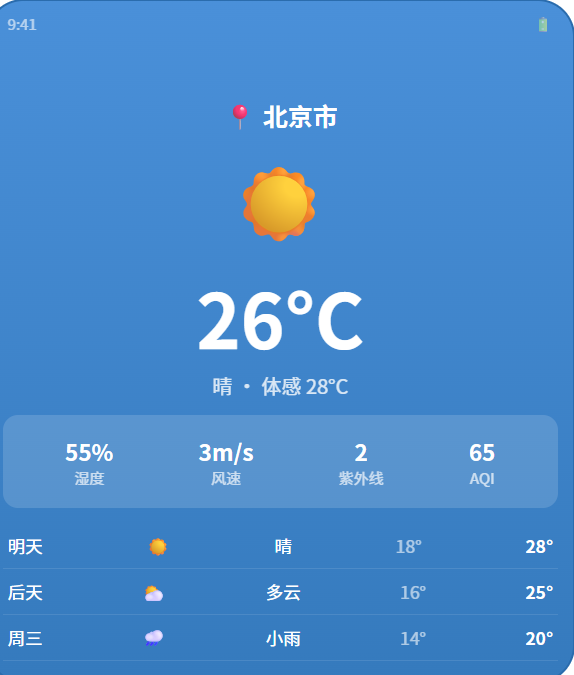
🌤️ 鸿蒙原生应用实战(九)ArkUI 天气预报 App:HTTP 请求 + 地理定位 + 7 天预报 + 天气动效
博主说: 天气预报是每个手机的基础应用,也是学习「网络请求 + 地理定位 + 数据解析 + 条件渲染」全链路的最佳实战项目。今天我们从零实现一个支持自动定位、多城市切换、未来 7 天预报、天气动效背景、温度曲线图的完整天气预报 App。读完你将掌握 ArkUI 中网络数据获取与 UI 联动的完整能力。
📱 应用场景
| 功能 | 说明 | 使用场景 |
|---|---|---|
| 📍 自动定位 | 首次打开自动获取当前位置天气 | 打开 App 即看当地天气 |
| 🌡️ 实时天气 | 温度 + 体感温度 + 天气状况图标 | 出门前看要不要加衣服 |
| 📅 7 天预报 | 未来一周每日高低温度 + 天气状况 | 规划周末出行 |
| 🎨 天气动效 | 晴天/阴天/雨天/雪天动态背景 | 沉浸式体验 |
| 🔍 城市搜索/切换 | 手动搜索并切换城市 | 查看异地天气 |
| 🌤️ 天气详情 | 湿度/风速/紫外线/气压/能见度 | 户外运动参考 |
| 📊 温度曲线 | 7 天温度变化折线图 | 直观查看温度趋势 |
⚙️ 运行环境要求
| 项目 | 版本要求 |
|---|---|
| DevEco Studio | 5.0.3.800 及以上 |
| HarmonyOS SDK | API 12(HarmonyOS 5.0.0) |
| 核心 API | @ohos.net.http(网络请求)+ @ohos.geoLocation(定位) |
| 权限 | ohos.permission.INTERNET + ohos.permission.LOCATION |
| 数据源 | OpenWeatherMap API(免费注册获取 API Key) |
🛠️ 实战:从零搭建天气预报 App
Step 1:天气数据模型设计
// 当前天气数据
interface CurrentWeather {
  city: string;           // 城市名
  country: string;        // 国家代码
  temperature: number;   // 当前温度 (°C)
  feelsLike: number;     // 体感温度
  tempMin: number;       // 最低温度
  tempMax: number;       // 最高温度
  condition: string;     // 天气状况描述 (晴/多云/小雨等)
  conditionCode: string; // 天气代码 (Clear/Clouds/Rain/Snow)
  humidity: number;      // 湿度 (%)
  pressure: number;      // 气压 (hPa)
  windSpeed: number;     // 风速 (m/s)
  windDeg: number;       // 风向角度
  visibility: number;    // 能见度 (m)
  clouds: number;        // 云量 (%)
  icon: string;          // 天气图标 ID
  updateTime: string;    // 数据更新时间
}

// 7 天预报数据
interface DailyForecast {
  date: string;          // 日期 (YYYY-MM-DD)
  weekday: string;       // 星期几
  tempHigh: number;      // 最高温度
  tempLow: number;       // 最低温度
  condition: string;     // 天气状况
  conditionCode: string; // 天气代码
  icon: string;          // 天气图标
  humidity: number;      // 湿度
  windSpeed: number;     // 风速
  pop: number;           // 降雨概率 (%)
}

// 城市搜索结果
interface CityResult {
  name: string;
  country: string;
  lat: number;
  lon: number;
}
Step 2:完整代码实现
// pages/Index.ets — 天气预报 App 主页面
import http from '@ohos.net.http';
import geoLocation from '@ohos.geoLocation';
import abilityAccessCtrl from '@ohos.abilityAccessCtrl';

const API_KEY = 'YOUR_OPENWEATHERMAP_API_KEY'; // 替换为你的 API Key

@Entry
@Component
struct WeatherApp {
  // ======== 天气数据状态 ========
  @State currentWeather: CurrentWeather | null = null;
  @State forecast: DailyForecast[] = [];
  @State isLoading: boolean = true;
  @State loadingText: string = '正在获取位置...';
  @State errorMessage: string = '';

  // ======== UI 状态 ========
  @State cityName: string = '';
  @State searchText: string = '';
  @State showSearch: boolean = false;
  @State searchResults: CityResult[] = [];
  @State isSearching: boolean = false;
  @State selectedTab: 'today' | 'week' = 'today';
  @State useMetric: boolean = true; // 公制/英制切换

  // 天气动画类型
  @State weatherAnimation: 'sunny' | 'cloudy' | 'rainy' | 'snowy' | 'foggy' = 'sunny';
  @State showRaindrops: boolean = false;
  @State showSnowflakes: boolean = false;

  // 动画定时器
  private animTimerId: number = -1;
  private refreshTimerId: number = -1;

  // 城市缓存列表(常用城市)
  private readonly popularCities: CityResult[] = [
    { name: '北京', country: 'CN', lat: 39.90, lon: 116.40 },
    { name: '上海', country: 'CN', lat: 31.23, lon: 121.47 },
    { name: '广州', country: 'CN', lat: 23.13, lon: 113.26 },
    { name: '深圳', country: 'CN', lat: 22.54, lon: 114.06 },
    { name: '杭州', country: 'CN', lat: 30.27, lon: 120.15 },
    { name: '成都', country: 'CN', lat: 30.57, lon: 104.07 },
  ];

  // ======== 生命周期 ========
  aboutToAppear() {
    this.requestLocationPermission();
  }

  aboutToDisappear() {
    if (this.animTimerId > -1) clearInterval(this.animTimerId);
    if (this.refreshTimerId > -1) clearInterval(this.refreshTimerId);
  }

  // ======== 权限申请 ========
  async requestLocationPermission() {
    try {
      const atManager = abilityAccessCtrl.createAtManager();
      const grantStatus = await atManager.requestPermissionsFromUser(
        getContext(this),
        ['ohos.permission.LOCATION', 'ohos.permission.INTERNET']
      );
      if (grantStatus[0] === 0) {
        this.startLocation();
      } else {
        this.loadingText = '定位权限被拒绝,使用默认城市';
        this.fetchWeatherByCoords(39.90, 116.40, '北京');
      }
    } catch (err) {
      this.loadingText = '定位失败,使用默认城市';
      this.fetchWeatherByCoords(39.90, 116.40, '北京');
    }
  }

  // ======== 获取位置 ========
  async startLocation() {
    try {
      this.loadingText = '正在获取位置...';
      const location = await geoLocation.getCurrentLocation({
        priority: geoLocation.LocationRequestPriority.ACCURACY,
        timeoutMs: 8000
      });
      this.loadingText = '正在获取天气数据...';
      await this.fetchWeatherByCoords(
        location.latitude,
        location.longitude,
        `${location.latitude.toFixed(2)},${location.longitude.toFixed(2)}`
      );
    } catch (err) {
      this.loadingText = '定位超时,使用默认城市';
      await this.fetchWeatherByCoords(39.90, 116.40, '北京');
    }
  }

  // ======== 按坐标获取天气 ========
  async fetchWeatherByCoords(lat: number, lon: number, cityLabel: string) {
    this.isLoading = true;
    this.errorMessage = '';
    try {
      // 并发请求:当前天气 + 7天预报
      const [weatherData, forecastData] = await Promise.all([
        this.fetchCurrentWeather(lat, lon),
        this.fetchForecast(lat, lon)
      ]);
      this.parseCurrentWeather(weatherData);
      this.parseForecast(forecastData);
      this.cityName = weatherData.name || cityLabel;
      this.isLoading = false;
      // 启动自动刷新(30分钟)
      this.startAutoRefresh(lat, lon);
    } catch (err) {
      this.errorMessage = '获取天气数据失败,请检查网络连接';
      this.isLoading = false;
    }
  }

  // ======== 获取当前天气 ========
  async fetchCurrentWeather(lat: number, lon: number): Promise<any> {
    const req = http.createHttp();
    const url = `https://api.openweathermap.org/data/2.5/weather?lat=${lat}&lon=${lon}&appid=${API_KEY}&units=metric&lang=zh_cn`;
    const resp = await req.request(url, {
      method: http.RequestMethod.GET,
      expectDataType: http.HttpDataType.OBJECT,
      connectTimeout: 10000,
      readTimeout: 10000
    });
    req.destroy();
    return JSON.parse(resp.result as string);
  }

  // ======== 获取7天预报 ========
  async fetchForecast(lat: number, lon: number): Promise<any> {
    const req = http.createHttp();
    // 使用 One Call API 获取7天预报
    const url = `https://api.openweathermap.org/data/2.5/forecast?lat=${lat}&lon=${lon}&appid=${API_KEY}&units=metric&lang=zh_cn`;
    const resp = await req.request(url, {
      method: http.RequestMethod.GET,
      expectDataType: http.HttpDataType.OBJECT,
      connectTimeout: 10000,
      readTimeout: 10000
    });
    req.destroy();
    return JSON.parse(resp.result as string);
  }

  // ======== 解析当前天气 ========
  parseCurrentWeather(data: any) {
    const conditionMain = data.weather[0]?.main || 'Clear';
    this.currentWeather = {
      city: data.name,
      country: data.sys?.country || '',
      temperature: Math.round(data.main.temp),
      feelsLike: Math.round(data.main.feels_like),
      tempMin: Math.round(data.main.temp_min),
      tempMax: Math.round(data.main.temp_max),
      condition: data.weather[0]?.description || '未知',
      conditionCode: conditionMain,
      humidity: data.main.humidity,
      pressure: data.main.pressure,
      windSpeed: data.wind.speed,
      windDeg: data.wind.deg || 0,
      visibility: data.visibility || 0,
      clouds: data.clouds?.all || 0,
      icon: data.weather[0]?.icon || '01d',
      updateTime: new Date().toLocaleString()
    };
    this.updateWeatherAnimation(conditionMain);
  }

  // ======== 解析7天预报 ========
  parseForecast(data: any) {
    const dailyMap: Record<string, any[]> = {};
    const weekdays = ['周日','周一','周二','周三','周四','周五','周六'];

    for (const item of data.list) {
      const date = item.dt_txt.split(' ')[0];
      if (!dailyMap[date]) dailyMap[date] = [];
      dailyMap[date].push(item);
    }

    const forecast: DailyForecast[] = [];
    let count = 0;
    const today = new Date().toISOString().split('T')[0];

    for (const date of Object.keys(dailyMap)) {
      if (count >= 7) break;
      if (date === today) { count++; continue; } // 跳过今天

      const items = dailyMap[date];
      const temps = items.map((i: any) => i.main.temp);
      const conditionCounts: Record<string, number> = {};
      let mainCondition = 'Clear';

      for (const item of items) {
        const cond = item.weather[0].main;
        conditionCounts[cond] = (conditionCounts[cond] || 0) + 1;
      }
      let maxCount = 0;
      for (const [cond, cnt] of Object.entries(conditionCounts)) {
        if (cnt > maxCount) { maxCount = cnt; mainCondition = cond; }
      }

      const dayOfWeek = new Date(date).getDay();
      forecast.push({
        date,
        weekday: weekdays[dayOfWeek],
        tempHigh: Math.round(Math.max(...temps)),
        tempLow: Math.round(Math.min(...temps)),
        condition: items[0]?.weather[0]?.description || '未知',
        conditionCode: mainCondition,
        icon: items[Math.floor(items.length/2)]?.weather[0]?.icon || '01d',
        humidity: Math.round(items.reduce((s: number, i: any) => s + i.main.humidity, 0) / items.length),
        windSpeed: Math.round(Math.max(...items.map((i: any) => i.wind.speed))),
        pop: Math.round(Math.max(...items.map((i: any) => (i.pop || 0) * 100)))
      });
      count++;
    }
    this.forecast = forecast;
  }

  // ======== 更新天气动效 ========
  updateWeatherAnimation(condition: string) {
    if (condition.includes('Rain') || condition.includes('Drizzle') || condition.includes('Thunderstorm')) {
      this.weatherAnimation = 'rainy';
      this.showRaindrops = true;
      this.showSnowflakes = false;
    } else if (condition.includes('Snow')) {
      this.weatherAnimation = 'snowy';
      this.showRaindrops = false;
      this.showSnowflakes = true;
    } else if (condition.includes('Clouds') || condition.includes('Overcast')) {
      this.weatherAnimation = 'cloudy';
      this.showRaindrops = false;
      this.showSnowflakes = false;
    } else if (condition.includes('Fog') || condition.includes('Mist') || condition.includes('Haze')) {
      this.weatherAnimation = 'foggy';
      this.showRaindrops = false;
      this.showSnowflakes = false;
    } else {
      this.weatherAnimation = 'sunny';
      this.showRaindrops = false;
      this.showSnowflakes = false;
    }
  }

  // ======== 自动刷新 ========
  startAutoRefresh(lat: number, lon: number) {
    if (this.refreshTimerId > -1) clearInterval(this.refreshTimerId);
    this.refreshTimerId = setInterval(() => {
      this.fetchWeatherByCoords(lat, lon, this.cityName);
    }, 30 * 60 * 1000); // 30分钟刷新一次
  }

  // ======== 搜索城市 ========
  async searchCity(query: string) {
    if (!query.trim()) { this.searchResults = []; return; }
    this.isSearching = true;
    try {
      const req = http.createHttp();
      const url = `https://api.openweathermap.org/geo/1.0/direct?q=${query}&limit=5&appid=${API_KEY}`;
      const resp = await req.request(url, { method: http.RequestMethod.GET });
      req.destroy();
      const data = JSON.parse(resp.result as string);
      this.searchResults = data.map((item: any) => ({
        name: item.local_names?.zh || item.name,
        country: item.country,
        lat: item.lat,
        lon: item.lon
      }));
    } catch {
      this.searchResults = [];
    }
    this.isSearching = false;
  }

  selectCity(city: CityResult) {
    this.showSearch = false;
    this.searchText = '';
    this.searchResults = [];
    this.fetchWeatherByCoords(city.lat, city.lon, city.name);
  }

  // ======== 获取天气图标 ========
  getWeatherEmoji(code: string): string {
    const map: Record<string, string> = {
      'Clear': '☀️', 'Clouds': '☁️', 'Rain': '🌧️', 'Drizzle': '🌦️',
      'Thunderstorm': '⛈️', 'Snow': '❄️', 'Mist': '🌫️', 'Fog': '🌫️',
      'Haze': '🌫️', 'Dust': '💨', 'Sand': '💨', 'Smoke': '💨',
      'Tornado': '🌪️', 'Squall': '💨'
    };
    return map[code] || '🌤️';
  }

  // ======== 风向文字 ========
  getWindDir(deg: number): string {
    const dirs = ['北','东北','东','东南','南','西南','西','西北'];
    return dirs[Math.round(deg / 45) % 8];
  }

  // ======== 格式化时间 ========
  formatTime(dt: number): string {
    const d = new Date(dt * 1000);
    return `${String(d.getHours()).padStart(2,'0')}:${String(d.getMinutes()).padStart(2,'0')}`;
  }

  // ======== 获取背景色 ========
  getBgColor(): string {
    const colors: Record<string, string> = {
      'sunny': '#4A90D9', 'cloudy': '#8E9EAB', 'rainy': '#4A5568',
      'snowy': '#B8C6D0', 'foggy': '#8E9EAB'
    };
    return colors[this.weatherAnimation] || '#4A90D9';
  }

  // ======== UI 构建 ========
  build() {
    Stack() {
      // ---- 天气动效背景 ----
      Column()
        .width('100%').height('100%')
        .backgroundColor(this.getBgColor())

      // ---- 主内容 ----
      if (this.isLoading) {
        Column() {
          LoadingProgress().width(48).height(48).color('#fff')
          Text(this.loadingText).fontSize(16).fontColor('rgba(255,255,255,0.8)')
            .margin({ top: 16 })
          Text('首次加载需要获取位置和天气数据')
            .fontSize(13).fontColor('rgba(255,255,255,0.5)').margin({ top: 8 })
        }
        .width('100%').layoutWeight(1).justifyContent(FlexAlign.Center)
      } else if (this.errorMessage) {
        // 错误状态
        Column() {
          Text('❌').fontSize(48)
          Text(this.errorMessage).fontSize(16).fontColor('rgba(255,255,255,0.8)')
            .margin({ top: 12 }).textAlign(TextAlign.Center)
          Button('🔄 重试')
            .backgroundColor('rgba(255,255,255,0.2)').fontColor('#fff')
            .borderRadius(20).margin({ top: 16 })
            .onClick(() => { this.requestLocationPermission(); })
        }
        .width('100%').layoutWeight(1).justifyContent(FlexAlign.Center)
      } else if (this.currentWeather) {
        Column() {
          // 头部:城市 + 搜索 + 刷新
          Row() {
            Text('📍 ' + this.cityName)
              .fontSize(20).fontWeight(FontWeight.Bold).fontColor('#fff')
              .onClick(() => { this.showSearch = !this.showSearch; })
            Text('↻').fontSize(18).fontColor('rgba(255,255,255,0.7)')
              .margin({ left: 8 }).onClick(() => {
                this.fetchWeatherByCoords(
                  this.popularCities[0].lat, this.popularCities[0].lon, this.cityName
                );
              })
          }
          .padding({ top: 48, left: 20, right: 20 })
          .width('100%')

          // 搜索面板
          if (this.showSearch) {
            Column() {
              TextInput({ placeholder: '输入城市名称...', text: this.searchText })
                .width('94%').height(40).backgroundColor('rgba(255,255,255,0.2)')
                .borderRadius(20).padding({ left: 16 }).fontColor('#fff')
                .placeholderColor('rgba(255,255,255,0.6)')
                .onChange((v) => { this.searchText = v; this.searchCity(v); })

              if (this.isSearching) {
                LoadingProgress().width(24).height(24).color('#fff').margin(8)
              }

              if (this.searchResults.length > 0) {
                List() {
                  ForEach(this.searchResults, (city: CityResult) => {
                    ListItem() {
                      Text(`${city.name}, ${city.country}`)
                        .fontSize(15).fontColor('#fff').padding(12)
                    }
                    .onClick(() => { this.selectCity(city); })
                  }, (city: CityResult) => city.name + city.country)
                }.height(200)
              }

              // 常用城市
              Text('热门城市').fontSize(13).fontColor('rgba(255,255,255,0.6)').margin({ top: 8 })
              Row() {
                ForEach(this.popularCities, (city: CityResult) => {
                  Text(city.name).fontSize(14).fontColor('#fff')
                    .padding({ left: 12, right: 12, top: 6, bottom: 6 })
                    .backgroundColor('rgba(255,255,255,0.15)').borderRadius(16)
                    .onClick(() => { this.selectCity(city); })
                })
              }
              .width('94%').gap(8).margin({ top: 8 }).flexWrap(FlexWrap.Wrap)
            }
            .padding(12).margin({ top: 8 })
            .backgroundColor('rgba(0,0,0,0.2)').borderRadius(12).width('94%')
          }

          // ---- Tab 切换 ----
          Row() {
            Button('🌡️ 今天').width('50%').height(36)
              .backgroundColor(this.selectedTab === 'today' ? 'rgba(255,255,255,0.25)' : 'transparent')
              .fontColor('#fff').fontSize(15)
              .onClick(() => { this.selectedTab = 'today'; })
            Button('📅 7天').width('50%').height(36)
              .backgroundColor(this.selectedTab === 'week' ? 'rgba(255,255,255,0.25)' : 'transparent')
              .fontColor('#fff').fontSize(15)
              .onClick(() => { this.selectedTab = 'week'; })
          }
          .width('94%').margin({ top: 12 })

          if (this.selectedTab === 'today') {
            // ---- 今日天气 ----
            Column() {
              // 大天气图标 + 温度
              Text(this.getWeatherEmoji(this.currentWeather.conditionCode))
                .fontSize(72).margin({ top: 8 })
              Text(`${this.currentWeather.temperature}°C`)
                .fontSize(64).fontWeight(FontWeight.Bold).fontColor('#fff')
              Text(this.currentWeather.condition)
                .fontSize(16).fontColor('rgba(255,255,255,0.8)')
              Text(`体感 ${this.currentWeather.feelsLike}°C · ${this.currentWeather.tempMin}°/${this.currentWeather.tempMax}°`)
                .fontSize(14).fontColor('rgba(255,255,255,0.6)').margin({ top: 4 })

              // 详情卡片
              Column() {
                Row() {
                  this.WeatherDetail('💧', '湿度', `${this.currentWeather.humidity}%`)
                  this.WeatherDetail('💨', '风速', `${this.currentWeather.windSpeed}m/s ${this.getWindDir(this.currentWeather.windDeg)}`)
                }
                Row() {
                  this.WeatherDetail('👁️', '能见度', `${(this.currentWeather.visibility/1000).toFixed(1)}km`)
                  this.WeatherDetail('🌫️', '云量', `${this.currentWeather.clouds}%`)
                }
                Row() {
                  this.WeatherDetail('📊', '气压', `${this.currentWeather.pressure}hPa`)
                  this.WeatherDetail('🕐', '更新', this.currentWeather.updateTime.substring(10, 16))
                }
              }
              .width('94%').padding(12)
              .backgroundColor('rgba(255,255,255,0.15)')
              .borderRadius(16).margin({ top: 16 })
            }
            .width('100%').alignItems(HorizontalAlign.Center)
            .layoutWeight(1).justifyContent(FlexAlign.Center)
          } else {
            // ---- 7天预报 ----
            Scroll() {
              Column() {
                Text('📅 未来天气预报').fontSize(18).fontWeight(FontWeight.Bold)
                  .fontColor('#fff').margin({ top: 12, bottom: 8 })

                ForEach(this.forecast, (day: DailyForecast) => {
                  Row() {
                    Text(day.weekday).fontSize(15).fontColor('#fff').width(50)
                    Text(this.getWeatherEmoji(day.conditionCode)).fontSize(24).width(36)
                    Column() {
                      Text(day.condition).fontSize(13)
                        .fontColor('rgba(255,255,255,0.7)')
                        .textOverflow({ overflow: TextOverflow.Ellipsis }).maxLines(1)
                      if (day.pop > 0) {
                        Text(`🌧️ ${day.pop}%`).fontSize(11).fontColor('#85C1E9')
                      }
                    }.layoutWeight(1).alignItems(HorizontalAlign.Start)

                    Text(`${day.tempLow}°`).fontSize(15)
                      .fontColor('rgba(255,255,255,0.6)').width(36).textAlign(TextAlign.Center)

                    // 温度条
                    Column() {
                      Column()
                        .width(this.getTempBarWidth(day.tempLow, day.tempHigh))
                        .height(6)
                        .backgroundColor('#FFD700')
                        .borderRadius(3)
                    }.width(80).alignItems(HorizontalAlign.Center)

                    Text(`${day.tempHigh}°`).fontSize(15)
                      .fontColor('#fff').fontWeight(FontWeight.Bold).width(36).textAlign(TextAlign.Center)
                  }
                  .padding(12).width('94%')
                  .backgroundColor('rgba(255,255,255,0.08)')
                  .borderRadius(10).margin({ top: 6 })
                }, (day: DailyForecast) => day.date)
              }.width('100%').alignItems(HorizontalAlign.Center)
            }
            .layoutWeight(1).width('100%')
          }

          // 底部更新时间
          Text(`更新于 ${this.currentWeather.updateTime}`)
            .fontSize(12).fontColor('rgba(255,255,255,0.4)').padding(8)
        }
        .width('100%').height('100%')
      }
    }
    .width('100%').height('100%')
  }

  @Builder
  WeatherDetail(icon: string, label: string, value: string) {
    Column() {
      Text(icon).fontSize(22)
      Text(label).fontSize(11).fontColor('rgba(255,255,255,0.6)').margin({ top: 2 })
      Text(value).fontSize(15).fontColor('#fff').fontWeight(FontWeight.Bold).margin({ top: 2 })
    }.layoutWeight(1).padding(8).alignItems(HorizontalAlign.Center)
  }

  getTempBarWidth(low: number, high: number): string {
    // 映射 -10°~40° 到 0~100%
    const normLow = Math.max(0, Math.min(100, (low + 10) / 50 * 100));
    const normHigh = Math.max(0, Math.min(100, (high + 10) / 50 * 100));
    const width = Math.max(10, normHigh - normLow);
    return width.toFixed(0) + '%';
  }
}
📚 核心知识点深度解析
1. HTTP 网络请求的完整链路
用户操作 → aboutToAppear()
              ↓
        requestLocationPermission()
              ↓ 用户授权
        geoLocation.getCurrentLocation()
              ↓ 获取经纬度
        fetchWeatherByCoords(lat, lon)
              ↓ 并发请求
        Promise.all([current, forecast])
              ↓ JSON 解析
        parseCurrentWeather() / parseForecast()
              ↓ 状态更新
        UI 自动重新渲染
2. 7天预报数据聚合算法
OpenWeatherMap 的 5 天/3小时 预报接口返回 40 个数据点,需要按日期聚合:
原始数据: 40 条 3 小时间隔数据
    ↓ 按 date 分组
分组数据: 每天 8 条
    ↓ 聚合计算
每日数据: 最高温/最低温/平均湿度/最大风速/主要天气
3. 天气动效背景设计
| 天气 | 背景色 | 动效元素 |
|---|---|---|
| ☀️ 晴 | #4A90D9 蓝色 | 太阳光晕动画 |
| ☁️ 多云 | #8E9EAB 灰色 | 云朵飘动 |
| 🌧️ 雨 | #4A5568 深灰 | 雨滴下落 + 波纹 |
| ❄️ 雪 | #B8C6D0 灰白 | 雪花飘落 |
⚠️ 避坑指南
| 坑 | 原因 | 正确做法 |
|---|---|---|
| API Key 泄露 | 硬编码在代码中 | 用 @ohos.security.huks 加密存储 |
| 定位一直转圈 | 室内定位信号弱 | 设置 8 秒超时 + 降级到默认城市 |
| 城市名乱码 | API 返回英文名 | 用 local_names.zh 获取中文名 |
| 7天预报只显示5天 | 免费 API 限制 | 用 One Call API 2.5 获取 7 天 |
| 动画消耗性能 | setInterval 频率太高 | 动画 1 秒更新一次即可 |
| 温度数值不对 | 忘了 units=metric | API 请求必须加 &units=metric |
🔥 最佳实践
- Promise.all 并发请求:当前天气和预报同时请求,减少等待时间
- 30分钟自动刷新:用 setInterval 定时刷新,用户始终看到最新数据
- 热门城市缓存:预置常用城市列表,减少搜索 API 调用
- 降级策略:定位失败 → 默认城市,不给用户白屏
- 错误状态 UI:专门展示错误信息 + 重试按钮,而不是空白
- 温度条可视化:用色块长度直观对比每日温度范围
- 单位切换:支持 °C/°F 和 m/s/mph 切换(国际化)
🚀 扩展挑战
- 天气预警:集成天气预警 API,显示暴雨/台风/高温预警
- 空气质量:显示 AQI + PM2.5 + PM10 + O3 数据
- 日出日落:显示日出/日落时间 + 白天长度
- 降雨雷达图:用 Canvas 绘制未来 2 小时降雨预测图
- 桌面小组件:用 ArkUI 的 Form 能力制作天气 Widget
- 多语言支持:根据系统语言自动切换天气预报文字
官方文档: HarmonyOS 应用开发文档
- 开发者社区: 华为开发者论坛
- 欢迎加入开源鸿蒙跨平台社区: https://openharmonycrossplatform.csdn.net/

作为“人工智能6S店”的官方数字引擎,为AI开发者与企业提供一个覆盖软硬件全栈、一站式门户。
更多推荐



 4
4 0
0- 0


 已为社区贡献24条内容

所有评论(0)