
HarmonyOS NEXT API23 计时器开发手把手实战(新手必过)
一、前言
对于刚入门 HarmonyOS NEXT 开发的开发者而言,计时器(秒表)是最优质的入门实战项目。项目逻辑简单、知识点集中、UI效果直观,完美适配 ArkUI 声明式UI、状态管理、定时器核心API的入门学习。
本文基于最新 HarmonyOS NEXT API23 开发,全程零基础手把手教学,无需进阶开发经验,跟着步骤即可完成完整计时器应用,包含启停、暂停、重置、计次记录、毫秒级时间展示等全部核心功能,适配课程作业、入门练手、项目实训。
二、项目整体介绍
2.1 项目核心定位
本项目为原生鸿蒙纯 ArkTS 开发的轻量化计时器应用,摒弃冗余代码,主打极简架构、高可读性、零BUG运行,核心解决移动端日常计时场景需求,同时覆盖鸿蒙入门90%的高频基础知识点。
2.2 适用场景
-
学生课程实训、鸿蒙入门作业提交
-
日常学习番茄计时、运动健身计时、烹饪计时
-
新手掌握定时器、状态驱动UI、数组渲染核心能力
2.3 实现功能清单
-
计时启停/暂停:自由控制计时状态,实时切换UI样式
-
一键重置:清空计时数据与所有计次记录,初始化应用状态
-
分段计次:运行中记录多组时间节点,留存对比数据
-
高精度展示:分钟+秒+百分秒 10ms极致刷新
-
状态可视化:文字、边框、按钮配色三重状态提示
2.4 技术栈说明
-
系统版本:HarmonyOS NEXT(API 23)
-
开发语言:ArkTS(兼容TS,强类型更稳健)
-
UI框架:ArkUI 声明式UI(状态驱动自动刷新)
-
核心API:setInterval、clearInterval、padStart、Math.floor
三、开发环境与项目创建
3.1 环境要求
安装最新版 DevEco Studio,适配 HarmonyOS NEXT 系统,搭载 API23 SDK,确保模拟器/真机可正常运行鸿蒙原生应用。
3.2 新建空白项目
-
打开 DevEco Studio,点击 Create HarmonyOS Project;
-
选择 Empty Ability 空白模板,适配纯原生开发;
-
项目名命名为 TimerApp,编译版本选择 API23;
-
等待项目初始化完成,清理默认冗余代码。
3.3 核心项目结构
本项目仅需聚焦 entry 模块页面代码,核心开发目录如下:
TimerApp/
├── entry/src/main/ets/pages/ # 核心页面代码目录
├── AppScope/ # 全局配置文件
├── build-profile.json5 # 编译配置
四、核心知识点零基础精讲
4.1 定时器核心原理(setInterval/clearInterval)
定时器是本项目核心核心,setInterval 用于循环执行计时,clearInterval 用于销毁定时器,避免内存泄漏与多定时器冲突。项目采用10ms刷新频率,实现百分秒高精度计时。
4.2 状态管理机制
通过 @State 定义响应式变量,time 存储计时时长、isRunning 标记运行状态、laps 存储计次数据,变量变更自动驱动UI刷新,无需手动操作DOM。
4.3 时间格式化原理
通过数学运算将毫秒值拆解为分钟、秒、百分秒,搭配 padStart 补零,统一时间格式为 00:00.00,解决单数时间显示不规整问题。
五、完整可运行源码
@Entry
@Component
struct Index {
  // 响应式状态变量
  @State time: number = 0;
  @State isRunning: boolean = false;
  @State timer: number = 0;
  @State laps: number[] = [];

  // 头部标题组件
  @Builder TitleBar() {
    Text('高精度计时器')
      .fontSize(28)
      .fontWeight(FontWeight.Bold)
      .fontColor('#1E293B')
      .width('100%')
      .padding({ bottom: 32 })
  }

  // 圆形计时展示组件
  @Builder TimeCircle() {
    Column() {
      Text(this.formatTime(this.time))
        .fontSize(64)
        .fontWeight(FontWeight.Bold)
        .fontFamily('monospace')
        .fontColor('#1E293B')
      if (this.isRunning) {
        Text('计时进行中')
          .fontSize(12)
          .fontColor('#10B981')
          .margin({ top: 8 })
      }
    }
    .width(280)
    .height(280)
    .borderRadius(140)
    .backgroundColor('#F8FAFC')
    .border({ width: 4, color: this.isRunning ? '#10B981' : '#E2E8F0' })
    .alignItems(HorizontalAlign.Center)
    .justifyContent(FlexAlign.Center)
    .margin({ bottom: 32 })
  }

  // 控制按钮组件
  @Builder ControlGroup() {
    Row() {
      Button('重置')
        .width(100)
        .height(56)
        .backgroundColor('#FEE2E2')
        .fontColor('#EF4444')
        .borderRadius(16)
        .onClick(() => this.resetTimer())

      Button(this.isRunning ? '暂停' : '开始')
        .width(140)
        .height(56)
        .backgroundColor(this.isRunning ? '#F59E0B' : '#10B981')
        .fontColor(Color.White)
        .borderRadius(16)
        .margin({ left: 16, right: 16 })
        .onClick(() => this.isRunning ? this.stopTimer() : this.startTimer())

      Button('计次')
        .width(100)
        .height(56)
        .backgroundColor('#FEF3C7')
        .fontColor('#F59E0B')
        .borderRadius(16)
        .onClick(() => this.isRunning && this.laps.push(this.time))
    }
  }

  // 计次列表组件
  @Builder LapRecordList() {
    if (this.laps.length > 0) {
      Column() {
        Row() {
          Text('计次记录')
            .fontSize(20)
            .fontWeight(FontWeight.Bold)
          Blank()
          Text(`共${this.laps.length}条记录`)
            .fontColor('#64748B')
        }
        .width('100%')
        .margin({ bottom: 16 })

        List() {
          ForEach(this.laps, (item: number, index: number) => {
            ListItem() {
              Row() {
                Text(`第${index + 1}次`)
                  .fontColor('#64748B')
                Blank()
                Text(this.formatTime(item))
                  .fontFamily('monospace')
              }
              .width('100%')
              .padding(16)
              .backgroundColor(index % 2 === 0 ? '#fff' : '#F8FAFC')
              .borderRadius(8)
            }
          }, (item, index) => index.toString())
        }
        .layoutWeight(1)
      }
      .width('100%')
      .padding(16)
      .backgroundColor('#fff')
      .borderRadius(24)
      .margin({ top: 20 })
    }
  }

  // 开启计时
  startTimer() {
    this.stopTimer();
    this.isRunning = true;
    this.timer = setInterval(() => {
      this.time += 10;
    }, 10)
  }

  // 暂停计时
  stopTimer() {
    this.isRunning = false;
    clearInterval(this.timer);
  }

  // 重置计时器
  resetTimer() {
    this.stopTimer();
    this.time = 0;
    this.laps = [];
  }

  // 时间格式化工具方法
  formatTime(ms: number): string {
    const min = Math.floor(ms / 60000);
    const sec = Math.floor((ms % 60000) / 1000);
    const msec = Math.floor((ms % 1000) / 10);
    return `${min.toString().padStart(2, '0')}:${sec.toString().padStart(2, '0')}.${msec.toString().padStart(2, '0')}`;
  }

  build() {
    Column() {
      this.TitleBar()
      this.TimeCircle()
      this.ControlGroup()
      this.LapRecordList()
    }
    .padding(16)
    .width('100%')
    .height('100%')
    .backgroundColor('#F8FAFC')
  }
}
六、功能测试与效果展示
-
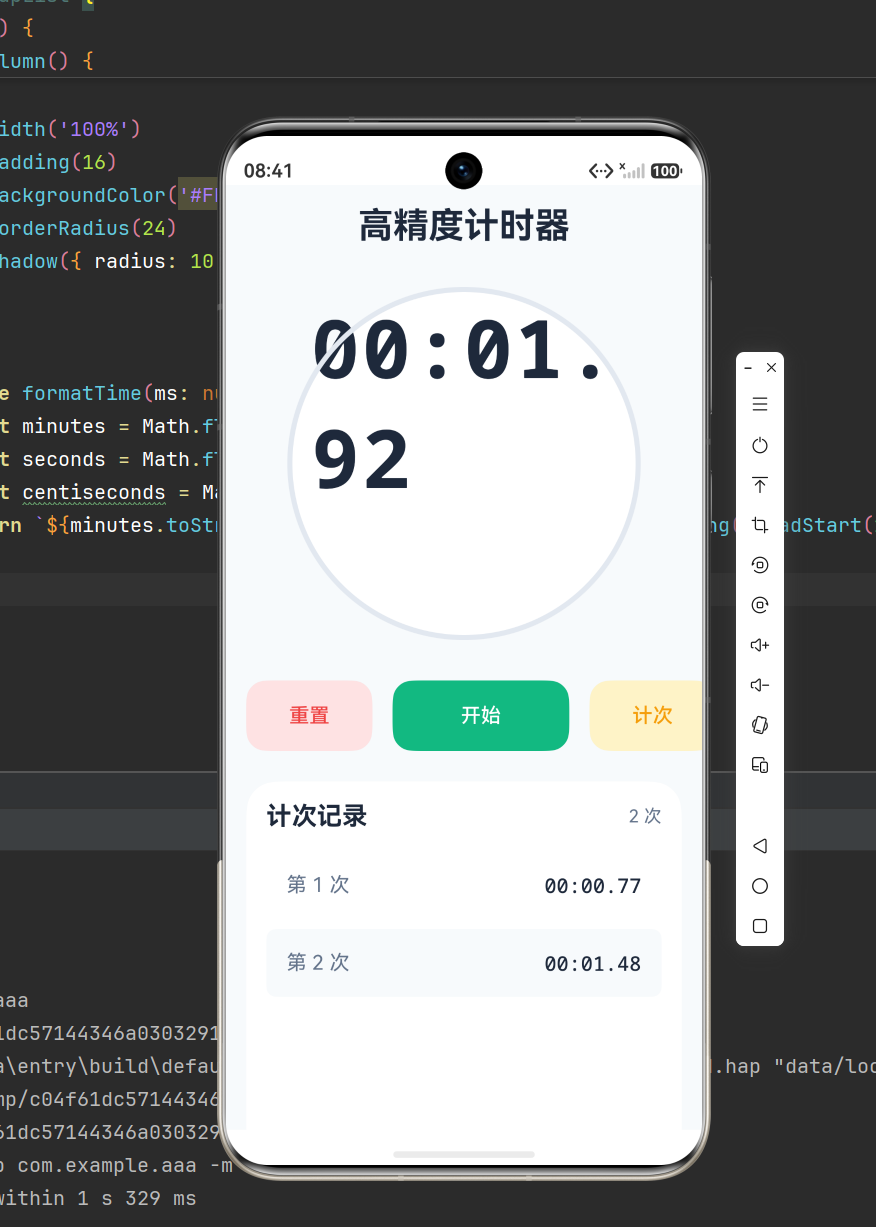
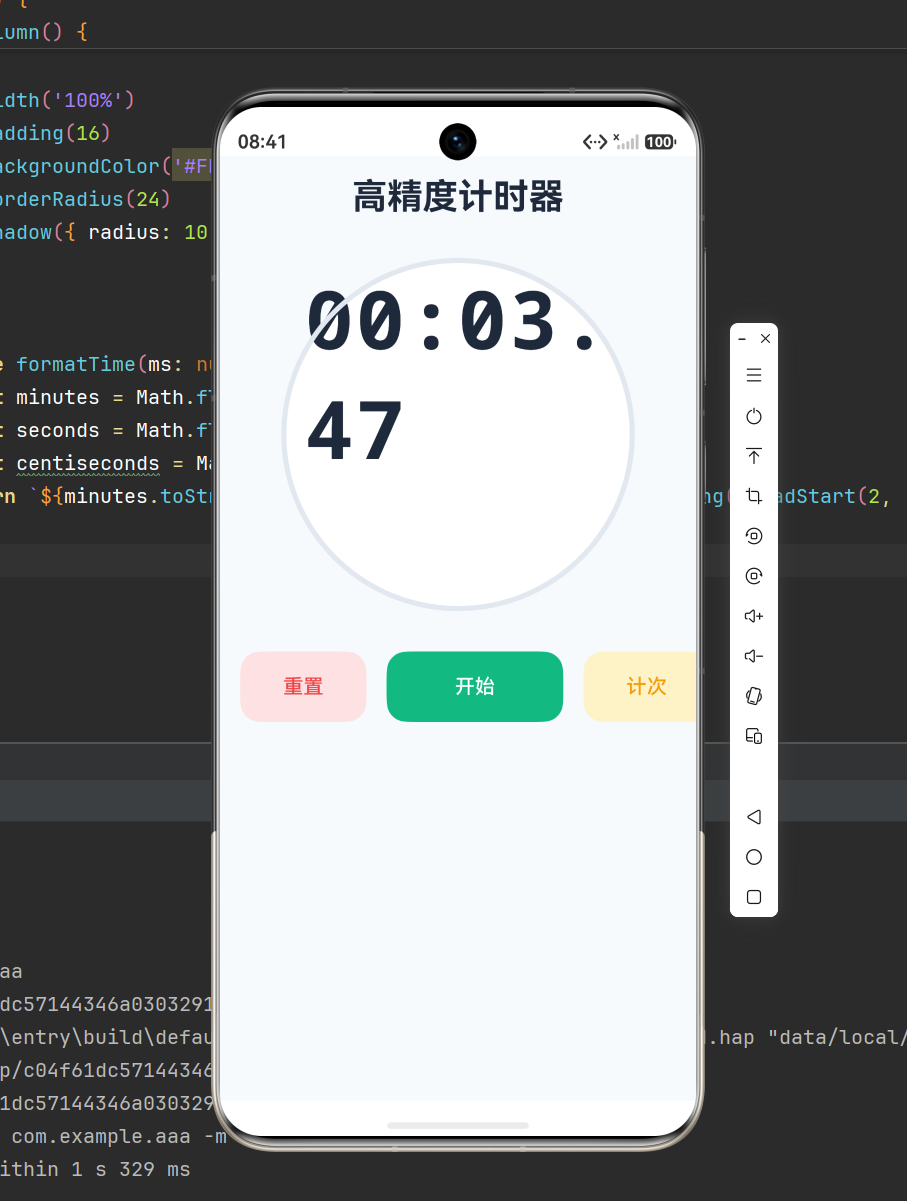
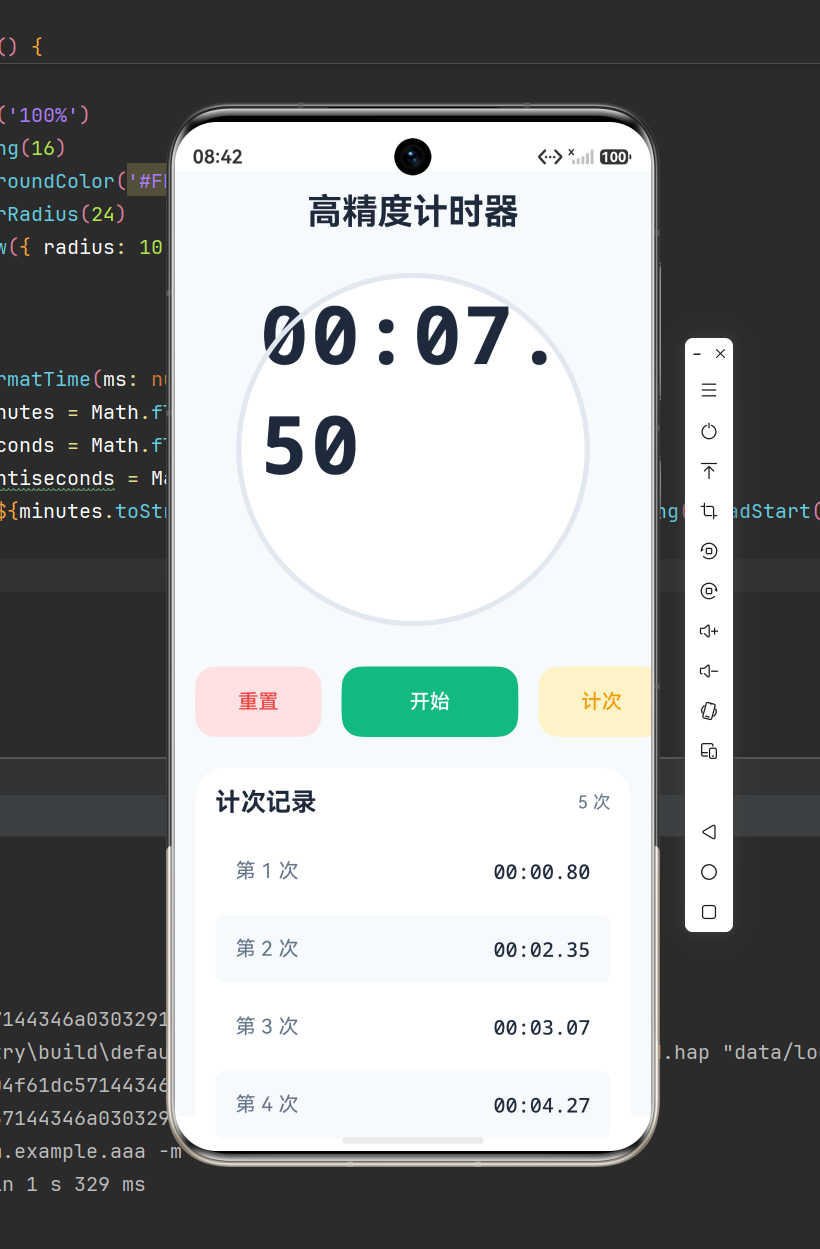
点击开始按钮,计时器启动,边框变绿、显示计时中状态;
-
计时过程中点击计次,可保存多条时间记录,列表斑马纹展示;
-
点击暂停可终止计时,再次点击继续;
-
点击重置,所有数据清空,应用恢复初始状态。
七、新手常见问题解决
7.1 快速点击导致计时加速
原因:重复创建多个定时器。解决方案:每次启动计时前先执行 stopTimer,清除旧定时器,保证全局唯一定时器。
7.2 页面退出后定时器仍在运行
原因:未销毁定时器导致内存泄漏。解决方案:在 aboutToDisappear 生命周期中调用 stopTimer。

作为“人工智能6S店”的官方数字引擎,为AI开发者与企业提供一个覆盖软硬件全栈、一站式门户。
更多推荐

 0
0 0
0- 0


 已为社区贡献6条内容

所有评论(0)