
鸿蒙原生应用实战(五):教程、主题与项目总结 — 从开发到上线的完整回顾
鸿蒙原生应用实战(五):教程、主题与项目总结 — 从开发到上线的完整回顾
前言
这是本系列的最后一篇。我们将完成剩余两个页面——教程页面(TutorialPage) 和 自定义主题(CustomThemePage),然后对整个项目的架构、关键技术点和优化方向做全面总结。
本篇内容:
- 交互式教程页面的步进设计
- 7 步数独教学的内容规划
- 主题系统的数据结构与实时预览
- 8 套主题的 Grid 网格布局
- 项目架构回顾与设计模式总结
- 持续优化方向
一、教程页面 — TutorialPage
教程页面是新手引导的重要组成部分。我们设计了一个 7 步的教学流程,覆盖从规则到技巧的完整学习路径。
1.1 页面设计思路
                  进度条 (7段)
┌────────────────────────────────────────┐
│  ← 返回     数独教程        2/7       │  ← 标题栏
├────────────────────────────────────────┤
│  ▓▓▓▓▓▓░░░░░░░░░░░░░░░░░░░░░░░░░░░░  │  ← 进度条
├────────────────────────────────────────┤
│  第2步                                │  ← 步骤编号
│  基本规则                              │  ← 步骤标题
│                                      │
│  ┌────────────────────────────┐      │
│  │ 规则一:每行1-9各一次       │      │  ← 内容卡片
│  │ 规则二:每列1-9各一次       │      │
│  │ 规则三:每宫1-9各一次       │      │
│  └────────────────────────────┘      │
│                                      │
│  ┌────────────────────────────┐      │
│  │ 示例说明                     │      │  ← 示例卡片
│  │ 行: 每行9个数字不重复        │      │
│  └────────────────────────────┘      │
│                                      │
├────────────────────────────────────────┤
│  [上一步]              [下一步]       │  ← 导航按钮
└────────────────────────────────────────┘
1.2 数据结构
interface StepItem {
  step: number;      // 步骤序号
  title: string;     // 步骤标题
  content: string;   // 详细内容
  example: string;   // 示例说明
}
1.3 7 步教程内容
第1步 — 认识数独
  内容:盘面是9×9网格 → 9个3×3宫格 → 填入1-9
  示例:用 ASCII 棋盘展示初始状态

第2步 — 基本规则
  内容:行规则 + 列规则 + 宫规则 + 提示数
  示例:文字形式描述三条规则

第3步 — 唯一余数法
  内容:观察行/列/宫 → 8个数字已出现 → 剩唯一数字
  示例:某空格行列宫的数字交集

第4步 — 摒除法
  内容:某数字在区域内只能放一个位置
  示例:数字1在左上宫只能放在中间格

第5步 — 笔记模式
  内容:候选数标记 → 逐步排除
  示例:格子可能填 2,5,8 → 逐步排除

第6步 — 游戏技巧
  内容:从易到难 → 逐数扫描 → 注意成对候选数
  示例:综合技巧运用

第7步 — 难度说明
  内容:简单(★☆☆) / 中等(★★★) / 困难(★★★★★)
  示例:各难度特点对比
1.4 步骤状态管理
@State currentStep: number = 0;  // 当前步骤索引(0开始)

private steps: StepItem[] = [ /* 7个步骤 */ ];
currentStep 是唯一的 @State 变量。每次用户点击"上一步/下一步"时修改它,触发整个页面重新渲染。
1.5 进度条实现
教程顶部有一个 7 段进度条,直观显示当前位置:
Row() {
  ForEach(this.steps, (step: StepItem, index: number) => {
    Column()
      .layoutWeight(1)
      .height(4)
      .backgroundColor(
        index <= this.currentStep
          ? $r('app.color.primary')     // 已完成的步骤:主题色
          : $r('app.color.divider')     // 未完成的步骤:灰色
      )
      .margin({ left: 2, right: 2 })
      .borderRadius(2)
  }, (step: StepItem) => step.step.toString())
}
.width('90%')
.margin({ bottom: 16 })
关键设计点:
index <= this.currentStep:当前步及之前的已完成,之后的未完成layoutWeight(1):7 段均分宽度- 段之间用 2vp 间距分隔
1.6 内容卡片
Column() {
  Text(this.steps[this.currentStep].content)
    .fontSize($r('app.float.body_font_size'))
    .fontColor($r('app.color.text_secondary'))
    .lineHeight(24)
}
.width('100%')
.padding(16)
.backgroundColor($r('app.color.card_bg'))
.borderRadius($r('app.float.card_corner_radius'))
.margin({ top: 16 })
示例卡片使用 monospace 字体(等宽字体),适合展示 ASCII 棋盘:
Column() {
  Text('示例说明')
    .fontSize($r('app.float.body_font_size'))
    .fontWeight(FontWeight.Medium)
    .fontColor($r('app.color.text_primary'))
    .margin({ bottom: 12 })

  Text(this.steps[this.currentStep].example)
    .fontSize($r('app.float.small_font_size'))
    .fontColor($r('app.color.text_secondary'))
    .fontFamily('monospace')  // 等宽字体
    .lineHeight(22)
}
.width('100%')
.padding(16)
.backgroundColor($r('app.color.card_bg'))
.borderRadius($r('app.float.card_corner_radius'))
.margin({ top: 12 })
1.7 导航按钮的条件渲染
底部按钮根据当前步骤动态变化:
Row() {
  // "上一步"按钮:只在第1步之后显示
  if (this.currentStep > 0) {
    Button('上一步')
      .height(44)
      .backgroundColor($r('app.color.background'))
      .borderRadius(22)
      .fontColor($r('app.color.text_primary'))
      .border({ width: 1, color: $r('app.color.divider') })
      .layoutWeight(1)
      .margin({ right: 8 })
      .onClick(() => { this.currentStep--; })
  }

  // "下一步/完成"按钮
  Button(this.currentStep === this.steps.length - 1 ? '完成' : '下一步')
    .height(44)
    .backgroundColor($r('app.color.primary'))
    .borderRadius(22)
    .fontColor(Color.White)
    .layoutWeight(1)
    .margin({ left: this.currentStep > 0 ? 8 : 0 })
    .onClick(() => {
      if (this.currentStep < this.steps.length - 1) {
        this.currentStep++;   // 继续下一步
      } else {
        router.back();        // 完成,返回
      }
    })
}
.width('90%')
.margin({ bottom: 24 })
交互逻辑:
| 位置 | 上一步按钮 | 下一步按钮 |
|---|---|---|
| 第1步 | 不显示 | 文字"下一步" |
| 第2~6步 | 显示 | 文字"下一步" |
| 第7步 | 显示 | 文字"完成",点击返回 |
margin.left 的动态调整确保只有一个按钮时居中,两个按钮时有间距。
二、自定义主题 — CustomThemePage
主题系统让用户自定义游戏的外观,包括颜色方案和暗夜模式。
2.1 主题数据结构
interface ThemeOption {
  id: number;           // 主题ID
  name: string;         // 主题名称
  primaryColor: string; // 主题主色
  bgColor: string;      // 背景色
  cardColor: string;    // 卡片色
  isDark: boolean;      // 是否为暗夜模式
  preview: string;      // 预览表情
}
2.2 8 套主题方案
| ID | 名称 | 主色 | 背景色 | 特点 |
|---|---|---|---|---|
| 0 | 默认蓝 🎨 | #FF5C6BC0 |
#FFF5F5F5 |
经典靛蓝 |
| 1 | 森林绿 🌿 | #FF388E3C |
#FFF1F8E9 |
清新自然 |
| 2 | 日落橙 🌅 | #FFE64A19 |
#FFFBE9E7 |
温暖活力 |
| 3 | 星空紫 🌌 | #FF7B1FA2 |
#FFF3E5F5 |
神秘深邃 |
| 4 | 深海蓝 🌊 | #FF01579B |
#FFE1F5FE |
沉稳宁静 |
| 5 | 樱花粉 🌸 | #FFC2185B |
#FFFCE4EC |
甜美柔和 |
| 6 | 暗夜模式 🌙 | #FFBB86FC |
#FF121212 |
护眼节能 |
| 7 | 极简灰 ⬜ | #FF424242 |
#FFFAFAFA |
简约商务 |
2.3 预览区域
选中主题后,预览区域实时展示效果:
Column() {
  Text('预览').fontSize($r('app.float.small_font_size'))

  Column() {
    // 预览"数独"标题
    Text(this.themes[this.selectedTheme].preview)
      .fontSize(48)
    Text('数独')
      .fontSize(24)
      .fontWeight(FontWeight.Bold)
      .fontColor(this.themes[this.selectedTheme].primaryColor)
    Text('经典数独 挑战大脑')
      .fontSize($r('app.float.small_font_size'))
      .fontColor(this.themes[this.selectedTheme].isDark ? '#FFAAAAAA' : '#FF999999')

    // 预览按钮
    Row() {
      Button('简单')
        .backgroundColor(this.themes[this.selectedTheme].primaryColor)
        .fontColor(Color.White)
      Button('中等')
        .backgroundColor(this.themes[this.selectedTheme].isDark ? '#FF333333' : '#FFF5F5F5')
        .fontColor(this.themes[this.selectedTheme].primaryColor)
        .border({ width: 1, color: this.themes[this.selectedTheme].primaryColor })
    }

    // 模拟小棋盘 (3×3 Grid)
    Grid() {
      ForEach([1, 2, 3, 4, 5, 6, 7, 8, 9], (idx: number) => {
        GridItem() {
          Text(idx <= 5 ? idx.toString() : '')
            .fontColor(idx <= 3 ? this.themes[this.selectedTheme].primaryColor : '#FF333333')
        }
        .aspectRatio(1)
        .backgroundColor(idx === 5 ? '#FFE8EAF6' : Color.Transparent)
        .border({ width: 0.5, color: '#FFE0E0E0' })
      })
    }
    .columnsTemplate('1fr 1fr 1fr')
    .rowsTemplate('1fr 1fr 1fr')
    .width(150).height(150)
    .border({ width: 2, color: '#FF333333' })
  }
  .backgroundColor(this.themes[this.selectedTheme].cardColor)
  .borderRadius($r('app.float.card_corner_radius'))
}
.backgroundColor(this.themes[this.selectedTheme].isDark ? '#FF1E1E1E' : $r('app.color.card_bg'))
预览区域动态变化的内容:
- 标题颜色 → 主题主色
- 暗夜模式文字颜色 → 浅灰色
- 实心按钮颜色 → 主题主色
- 描边按钮颜色 → 主题主色
- 模拟棋盘数字颜色 → 主题主色
- 预览卡片背景色 → 主题卡片色
- 整个预览容器背景 → 暗夜模式时为深色
2.4 主题选择网格
使用 Grid 组件以 4 列 2 行的网格展示所有主题:
@State selectedTheme: number = 0;

Grid() {
  ForEach(this.themes, (theme: ThemeOption) => {
    GridItem() {
      Column() {
        // 颜色圆形
        Circle()
          .width(40).height(40)
          .fill(theme.primaryColor)

        Text(theme.name)
          .fontSize($r('app.float.small_font_size'))
          .fontColor($r('app.color.text_primary'))
          .margin({ top: 6 })

        // 选中标记
        if (this.selectedTheme === theme.id) {
          Text('✓')
            .fontSize(14)
            .fontColor($r('app.color.primary'))
            .fontWeight(FontWeight.Bold)
        }
      }
      .padding(12)
      .alignItems(HorizontalAlign.Center)
      .backgroundColor(this.selectedTheme === theme.id ? '#FFE8EAF6' : $r('app.color.card_bg'))
      .borderRadius($r('app.float.card_corner_radius'))
      .border({
        width: this.selectedTheme === theme.id ? 2 : 0,
        color: theme.primaryColor
      })
    }
    .padding(6)
    .onClick(() => { this.selectedTheme = theme.id; })
  }, (theme: ThemeOption) => theme.id.toString())
}
.columnsTemplate('1fr 1fr 1fr 1fr')
.rowsTemplate('1fr 1fr 1fr')
.width('95%')
.layoutWeight(1)
选中的视觉反馈(三重提示):
- 背景变成浅蓝色 (
#FFE8EAF6) - 边框出现,颜色为对应主题色(2px)
- 对勾 ✓ 标记出现
2.5 Grid 组件详解
Grid 是 ArkTS 提供的网格布局组件,与前端 CSS Grid 类似:
Grid() {
  // GridItem 作为子元素
  GridItem() { /* 内容 */ }
}
.columnsTemplate('1fr 1fr 1fr 1fr')  // 4列,每列等宽
.rowsTemplate('1fr 1fr')              // 2行,每行等高
fr 单位表示"份数",1fr 1fr 1fr 1fr 表示 4 列均分宽度。如果希望第一列更宽,可以写 '2fr 1fr 1fr'。
Grid 与 ForEach 的区别:
Grid+GridItem:自动排列,适合固定模板的网格布局Column+Row+ForEach:完全手动控制,适合复杂布局- 主题选择器用 Grid 最合适,因为它是规则的 4 列排列
三、项目整体架构回顾
至此,我们完成了所有 8 个页面的开发。让我们俯瞰整个项目的架构:
3.1 页面关系图
                    ┌─────────────────┐
                    │    Index.ets    │  ← 首页
                    │  (难度选择入口)  │
                    └────────┬────────┘
                             │
          ┌──────────────────┼──────────────────┐
          ▼                  ▼                  ▼
   ┌─────────────┐  ┌──────────────┐  ┌────────────────┐
   │ GamePage.ets│  │Leaderboard   │  │  StatsPage.ets │
   │ (游戏核心)   │  │ Page.ets     │  │  (数据统计)    │
   └─────────────┘  │ (排行榜)      │  └────────────────┘
                     └──────────────┘
   ┌──────────────┐  ┌──────────────┐  ┌────────────────┐
   │SettingsPage  │  │Achievements  │  │ TutorialPage   │
   │.ets (设置)   │  │Page.ets(成就)│  │ .ets (教程)    │
   └──────────────┘  └──────────────┘  └────────────────┘
   ┌─────────────────┐
   │ CustomThemePage │
   │ .ets (主题)     │
   └─────────────────┘
3.2 模块职责划分
| 层次 | 职责 | 文件 |
|---|---|---|
| Ability层 | 生命周期管理、窗口创建 | EntryAbility.ets |
| 页面层 | UI 渲染、用户交互 | pages/*.ets |
| 路由层 | 页面跳转、参数传递 | @ohos.router |
| 资源层 | 字符串/颜色/尺寸集中管理 | resources/ |
| 构建层 | 模块配置、编译选项 | build-profile.json5, module.json5 |
3.3 ArkTS 设计模式总结
在 5 篇博文的开发中,我们反复使用了以下模式:
1. @State 数据驱动模式
用户操作 → 修改@State → 框架自动更新UI → 用户看到新界面
适用:所有交互页面(游戏、设置、成就、主题)
2. 计算属性模式
get filteredAchievements(): Type[] {
  // 依赖 @State 变量,自动计算
}
适用:列表筛选、数据统计
3. 条件渲染模式
if (condition) {
  // 只在条件满足时渲染
}
适用:已完成/未完成状态、导航按钮切换
4. 卡片容器模式
Column()
  .backgroundColor($r('app.color.card_bg'))
  .borderRadius($r('app.float.card_corner_radius'))
  .padding(16)
适用:内容分组、设置项、统计卡片
5. 列表-详情模式
List → ListItem → Column → Text/Image
适用:排行榜、成就列表
四、Route 路由最佳实践
4.1 统一 RouteOpt 接口
所有页面使用同一套路由接口定义:
interface RouteOpt {
  url: string;
  params?: Object;
}
这是为了满足 ArkTS 严格模式的对象字面量类型要求。
4.2 页面入口配置
所有页面必须在 main_pages.json 中注册:
{
  "src": [
    "pages/Index",
    "pages/GamePage",
    "pages/LeaderboardPage",
    "pages/StatsPage",
    "pages/SettingsPage",
    "pages/TutorialPage",
    "pages/AchievementsPage",
    "pages/CustomThemePage"
  ]
}
常见错误:页面未注册时跳转会报错"Page not found"。
4.3 参数传递的类型安全
// 发送方
router.pushUrl({
  url: 'pages/GamePage',
  params: { difficulty: 'easy' }
});

// 接收方
aboutToAppear(): void {
  const params = router.getParams() as Record<string, Object>;
  if (params && params['difficulty']) {
    this.difficulty = params['difficulty'] as string;
  }
}
使用 Record<string, Object> 进行类型断言接收参数,然后用 as string 进行二次类型转换。
五、资源管理的最佳实践
5.1 $r 引用规范
整个项目中的颜色、字号、字符串全部通过 $r 引用,没有一个硬编码值:
| 引用方式 | 示例 | 对应文件 |
|---|---|---|
$r('app.string.xxx') |
按钮文字、标题 | string.json |
$r('app.color.xxx') |
背景色、文字色 | color.json |
$r('app.float.xxx') |
字号、间距、圆角 | float.json |
5.2 深色模式资源
项目还预备了深色模式的资源文件:
entry/src/main/resources/
├── base/                    # 默认资源
│   └── element/
│       ├── color.json
│       ├── float.json
│       └── string.json
└── dark/                    # 深色模式资源
    └── element/
        └── color.json       # 深色颜色覆盖
当系统切换到深色模式时,框架自动加载 dark/element/color.json 覆盖同名的颜色值。
六、从开发到上线的优化方向
6.1 短期优化(1-2 天)
- 数据持久化:使用
PersistentStorage保存游戏进度、成就解锁状态、设置偏好 - 真正的数独生成器:用回溯算法替代预设棋盘,实现真正的无限随机题目
- 动画效果:为成就解锁、游戏完成添加 transition 动画
6.2 中期优化(1 周)
- 网络对战:接入鸿蒙网络框架,实现好友对战
- 云同步:使用华为账号服务(Account Kit)同步进度
- 多端适配:适配平板折叠屏、手表等更多设备类型(deviceTypes)
- 本地化:完善多语言资源(如英文
en.json)
6.3 长期优化
- 性能优化:分析 hvigor 构建产物,优化包体积
- 无障碍:添加 contentDescription 支持屏幕阅读
- 统计分析:接入华为分析服务(Analytics Kit)
七、开发心得总结
通过这 5 篇博文的实战开发,我们完整地体验了鸿蒙原生应用从零到一的过程:
7.1 学到了什么
| 知识点 | 对应博文 |
|---|---|
| Stage 模型 + 项目结构 | 第一篇 |
| ArkTS 组件化开发 (@Entry, @Component) | 第一篇 |
| 路由导航 (@ohos.router) | 第一篇 |
| 资源文件管理 ($r) | 第一篇 |
| 数独生成算法 + 棋盘渲染 | 第二篇 |
| 交互逻辑(选中/填数/笔记/提示) | 第二篇 |
| 计时器生命周期 | 第二篇 |
| Toggle 开关 + Scroll 滚 | 第三篇 |
| 数据统计展示 | 第三篇 |
| 成就系统设计 + 进度追踪 | 第四篇 |
| 排行榜 + 列表渲染优化 | 第四篇 |
| 条件渲染 (if) | 第四篇 |
| 交互式教程 (步进器) | 第五篇 |
| 主题系统 (Grid 网格) | 第五篇 |
7.2 核心技术栈
- 语言:ArkTS(鸿蒙版 TypeScript)
- 框架:Stage 模型
- UI 框架:ArkUI(声明式 UI)
- 构建工具:hvigor
- IDE:DevEco Studio
- API 版本:API 23
7.3 一句话总结
鸿蒙原生应用开发吸取了现代移动开发的最佳实践——声明式 UI、数据驱动、组件化、资源分离——同时保持了与 Android/iOS 不同的设计哲学:更强调跨设备协同和系统级服务集成。
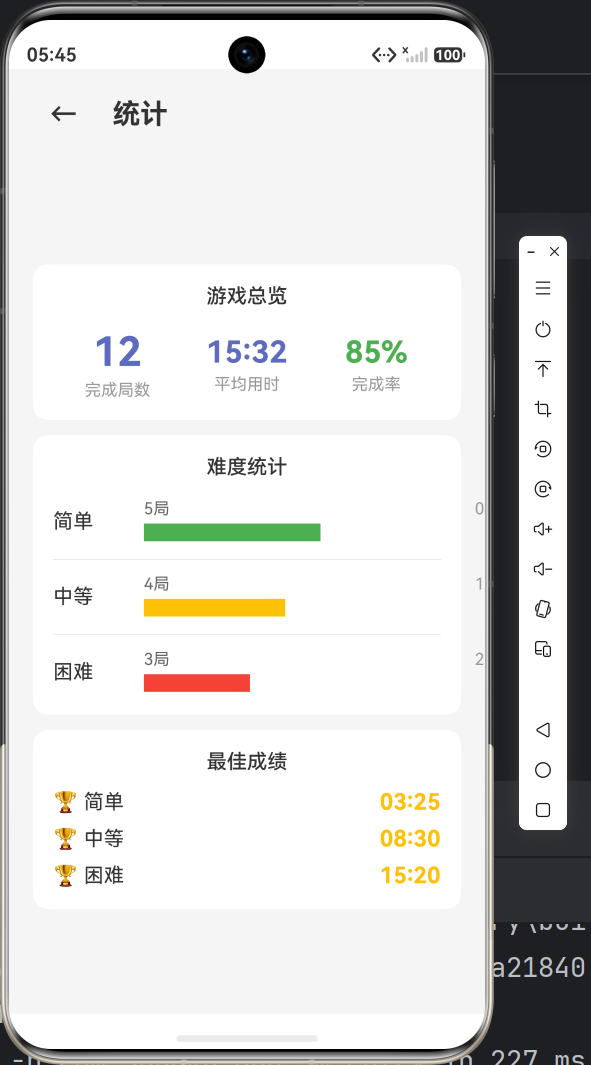
写在最后
感谢你跟随这 5 篇博文完成了整个数独游戏的开发之旅。从第一个页面的搭建,到复杂的游戏逻辑,再到辅助功能和个性化设置,每一步都是鸿蒙原生开发技能的积累。
当然,这个项目还有很多可以完善的地方——数据持久化、网络对战、AI 解题等。但这些都留给你去探索和实现。
如果你在开发过程中遇到问题,欢迎留言交流。Happy coding!🚀

作为“人工智能6S店”的官方数字引擎,为AI开发者与企业提供一个覆盖软硬件全栈、一站式门户。
更多推荐

 0
0 0
0- 0


 已为社区贡献37条内容

所有评论(0)