
鸿蒙原生 ArkTS 毛玻璃日历卡片组件
鸿蒙原生 ArkTS 毛玻璃日历卡片组件
基于 HarmonyOS 6.0 / OpenHarmony API 12+ ArkUI 框架实现的沉浸式毛玻璃日历卡片组件 Demo。
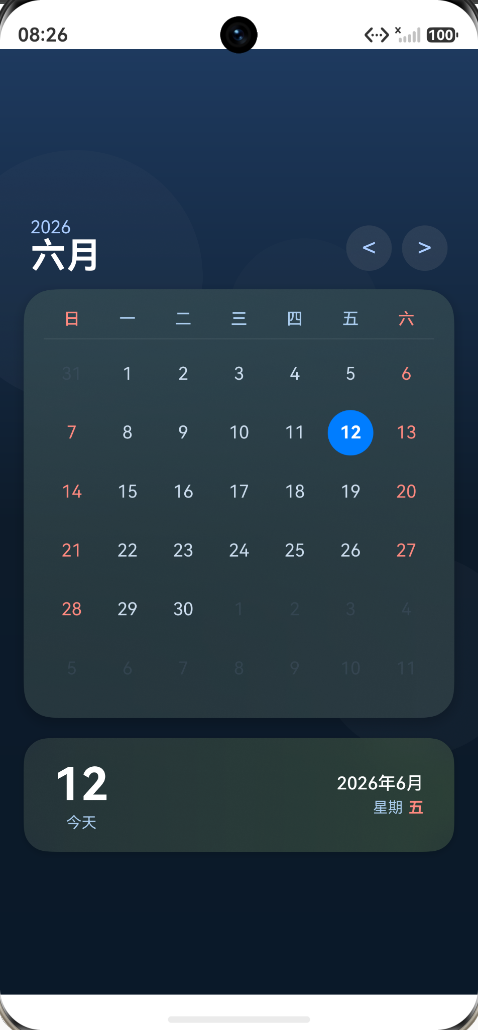
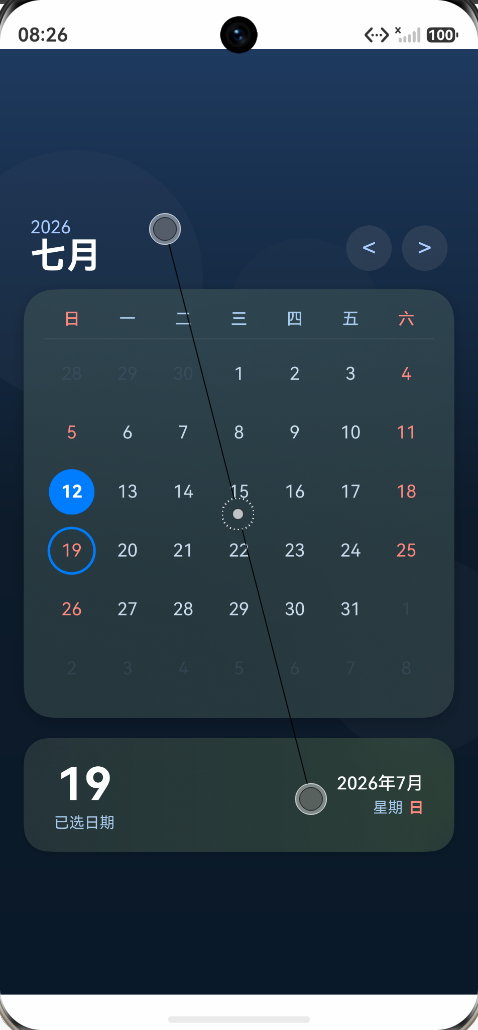
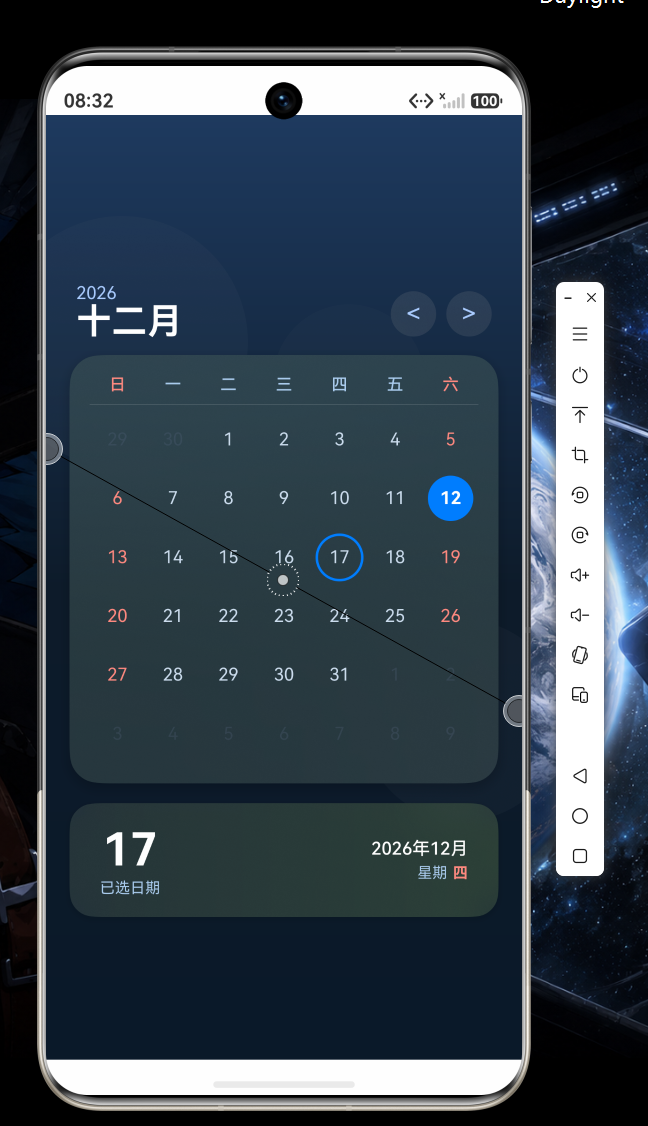
运行效果:
一、项目简介
本项目是「21 天 HarmonyOS 训练营」中 Day ?:鸿蒙 6.0 新特性 — 毛玻璃日历卡片 的实战 Demo。
它使用纯原生 ArkTS(Stage 模型)开发,不依赖任何第三方 UI 库,通过 ArkUI 6.0 提供的 模糊背景(Background Blur)、阴影(Shadow)、弹性动画(AnimateTo)、状态管理(@State) 与 Canvas / Grid 等能力,从零构建了一张带沉浸式毛玻璃效果的可交互日历卡片。
主要演示的能力包括:
- 沉浸式毛玻璃卡片(
backgroundBlurStyle) - 悬浮投影(
shadow) - 月份切换的弹性动画(
animateTo+Curve.Friction) - 按压反馈(
scale+animateTo) - 选中日期高亮 + 圆环描边
- 跨月日期无缝展示
- 周六/周日配色区分
- 底部信息卡片与日历联动
- 深浅色主题资源(
dark/element/color.json)预留
二、运行效果展示
1. 主界面
打开应用即可看到一张漂浮在深色渐变背景之上的毛玻璃日历卡片:
- 顶部:当前年份 + 月份名(如「2026 / 六月」),右侧有
<>月份切换按钮 - 中部:6 行 × 7 列的日历网格,今日高亮(蓝色实心圆),选中日期(蓝色描边圆环)
- 底部:信息卡片,展示「今天 / 已选日期」与「年月日 + 星期几」
2. 关键交互
| 操作 | 反馈 |
|---|---|
点击 < / > |
卡片向右/向左滑出 → 切换月份 → 弹入新月份 |
| 点击日历日期 | 该日期出现蓝色描边圆环(弹性动画) |
| 点击卡片空白 | 卡片轻微缩放 0.97,按下/释放均有动画 |
| 切换深浅色主题 | 资源系统自动加载 dark/ 下的颜色覆盖 |
三、涉及的技术与组件
| 类别 | 名称 | 用途 |
|---|---|---|
| 框架 | ArkUI | 声明式 UI 框架 |
| 语言 | ArkTS | 鸿蒙主力开发语言(TypeScript 超集) |
| 模型 | Stage 模型 | 鸿蒙 6.0 推荐的应用架构 |
| 状态 | @State | 组件内响应式状态(年月、选中日期、动画偏移等) |
| 模糊 | backgroundBlurStyle | 卡片毛玻璃效果(BACKGROUND_ULTRA_THICK / BACKGROUND_THIN) |
| 阴影 | shadow | 卡片悬浮投影(radius: 40, offsetY: 12) |
| 动画 | animateTo | 月份切换、卡片按压、日期选中动画 |
| 曲线 | Curve.Friction / EaseOut / EaseInOut | 不同动画阶段使用不同缓动曲线 |
| 布局 | Stack / Column / Row / Grid / GridItem | 组合搭建页面骨架与日历网格 |
| 装饰 | Circle | 选中/今日高亮圆与圆环 |
| 渐变 | linearGradient | 背景与卡片的渐变叠层 |
| 主题 | dark/element/color.json | 深浅色主题自适应切换 |
| 资源 | $r / $color / $float | 多分辨率、多主题资源访问 |
四、项目结构
ArkTsCalendar/
├── AppScope/                          # 应用级配置
│   ├── app.json5                      #   应用标识、版本号
│   └── resources/base/                #   应用级资源
│
├── entry/                             # 主模块(HAP)
│   ├── build-profile.json5            #   模块构建配置
│   ├── oh-package.json5               #   模块依赖
│   ├── hvigorfile.ts                  #   构建脚本
│   └── src/
│       ├── main/
│       │   ├── ets/
│       │   │   ├── entryability/
│       │   │   │   └── EntryAbility.ets       #   入口 Ability
│       │   │   ├── entrybackupability/
│       │   │   │   └── EntryBackupAbility.ets #   备份能力
│       │   │   └── pages/
│       │   │       └── Index.ets              #   ⭐ 毛玻璃日历卡片主页
│       │   ├── resources/
│       │   │   ├── base/
│       │   │   │   ├── element/
│       │   │   │   │   ├── color.json         #   浅色主题颜色
│       │   │   │   │   ├── float.json         #   尺寸资源
│       │   │   │   │   └── string.json        #   字符串资源
│       │   │   │   ├── media/                 #   图片资源
│       │   │   │   └── profile/
│       │   │   │       └── main_pages.json    #   页面路由
│       │   │   └── dark/
│       │   │       └── element/
│       │   │           └── color.json         #   深色主题颜色
│       │   └── module.json5           #   模块配置
│       ├── ohosTest/                  #   E2E 测试
│       └── test/                      #   本地单元测试
│
├── build-profile.json5                # 工程级构建配置(targetSdk 6.1.1(24))
├── hvigorfile.ts                      # 工程级构建脚本
├── oh-package.json5                   # 工程级依赖
├── code-linter.json5                  # 代码检查配置
└── README.md                          # ⭐ 本文档
五、核心实现讲解
1. 沉浸式毛玻璃效果
毛玻璃由「背景渐变 + 模糊圆形装饰 + 模糊卡片」三层叠加实现:
// 1) 深色渐变背景
Column()
  .linearGradient({
    direction: GradientDirection.Bottom,
    colors: [['#1E3A5F', 0.0], ['#0D1B2A', 0.5], ['#0A1929', 1.0]]
  })

// 2) 模糊圆形装饰(增加光影层次)
Column()
  .width(200).height(200).borderRadius(100)
  .backgroundBlurStyle(BlurStyle.BACKGROUND_ULTRA_THICK)
  .opacity(0.3)

// 3) 毛玻璃主卡片
Column()
  .borderRadius(24)
  .backgroundBlurStyle(BlurStyle.BACKGROUND_ULTRA_THICK)
  .linearGradient(...)
  .shadow({ radius: 40, color: '#33000000', offsetY: 12 })
BACKGROUND_ULTRA_THICK是 HarmonyOS 6.0 提供的最强模糊等级,可让卡片背后的内容产生 iOS 风格的高斯模糊视觉。
2. 弹性切换动画
月份切换采用 「先滑出 → 切数据 → 滑入」 的两段式动画:
private switchMonth(direction: number): void {
  if (this.isAnimating) return;
  this.isAnimating = true;

  // 第一段:当前月滑出
  animateTo({
    duration: 150,
    curve: Curve.EaseOut,
    onFinish: () => {
      // 更新月份数据
      this.currentMonth += direction;
      // ...
      this.monthOffset = -direction * 100;
      // 第二段:新月弹性滑入
      animateTo({
        duration: 300,
        curve: Curve.Friction,   // 摩擦曲线 → 弹性回弹
        onFinish: () => { this.monthOffset = 0; this.isAnimating = false; }
      }, () => { this.monthOffset = 0; });
    }
  }, () => { this.monthOffset = direction * 100; });
}
通过 translate({ x: this.monthOffset }) 绑定到卡片上,实现自然过渡。
3. 日历网格数据生成
getCalendarData() 负责拼装当月日历所需的所有 42 个格子(6 行 × 7 列),首格自动补齐上月末尾日期,末格自动补齐下月头部日期:
private getCalendarData(year: number, month: number): CalendarData {
  const firstDay = new Date(year, month - 1, 1).getDay();         // 本月第一天是周几
  const daysInMonth = new Date(year, month, 0).getDate();         // 本月总天数
  const daysInPrevMonth = new Date(year, month - 1, 0).getDate(); // 上月总天数

  // 1) 上月尾部
  for (let i = 0; i < firstDay; i++) {
    days.push({ day: daysInPrevMonth - firstDay + 1 + i, isCurrentMonth: false });
  }
  // 2) 本月
  for (let i = 1; i <= daysInMonth; i++) {
    days.push({ day: i, isCurrentMonth: true });
  }
  // 3) 下月头部(补齐到 42 格)
  for (let i = 1; i <= 42 - days.length; i++) {
    days.push({ day: i, isCurrentMonth: false });
  }
  return { year, month, days };
}
4. 日历网格渲染(Grid + GridItem)
使用 ArkUI 的 Grid 组件按 7×6 网格渲染:
Grid() {
  ForEach(this.getCalendarData(this.currentYear, this.currentMonth).days,
    (item: CalendarDay, index: number) => {
      GridItem() {
        Stack({ alignContent: Alignment.Center }) {
          // 选中日期的圆环
          if (this.selectedDay === item.day && item.isCurrentMonth) {
            Circle().width(36).height(36).fill(Color.Transparent)
              .stroke('#007DFF').strokeWidth(2)
          }
          // 今天的高亮圆
          else if (this.today === item.day && item.isCurrentMonth) {
            Circle().width(36).height(36).fill('#007DFF')
          }
          // 日期文字
          Text(item.day.toString())
            .fontSize(14)
            .fontColor(this.getDayColor(item, index % 7))
        }
        .onClick(() => { if (item.isCurrentMonth) this.selectDay(item.day); })
      }
    },
    (item: CalendarDay, index: number) => `${this.currentYear}-${this.currentMonth}-${index}`)
}
.columnsTemplate('1fr 1fr 1fr 1fr 1fr 1fr 1fr')
.rowsTemplate('1fr 1fr 1fr 1fr 1fr 1fr')
getDayColor()根据「是否当月」「是否今天」「所在列」返回不同文字颜色:
- 周末(列 0/6)→ 红色
#FF8A80- 今天 → 白色加粗
- 普通日期 → 浅蓝白
#CCDDEE- 非当月 → 半透明灰
#44556680
5. 按压反馈
private onPressAnimation(pressed: boolean): void {
  animateTo({ duration: 200, curve: Curve.EaseInOut }, () => {
    this.cardScale = pressed ? 0.97 : 1;
  });
}
// 卡片上 .scale({ x: this.cardScale, y: this.cardScale })
// 卡片上 .onClick(() => { this.onPressAnimation(true); setTimeout(() => this.onPressAnimation(false), 200); })
6. 深浅色主题
在 resources/dark/element/color.json 中提供同名 color 资源的深色版本,鸿蒙系统会自动按当前主题色模式加载对应资源。配合 ArkTS 颜色常量 $r('app.color.xxx') 即可实现「写一次代码,多主题自动适配」。
六、关键 API 速查
| API | 最低支持版本 | 说明 |
|---|---|---|
backgroundBlurStyle(BlurStyle.BACKGROUND_ULTRA_THICK) |
API 11+ | 背景模糊,毛玻璃效果核心 |
shadow({ radius, color, offsetX, offsetY }) |
API 11+ | 组件阴影 |
animateTo({ duration, curve, onFinish }, () => { ... }) |
API 9+ | 显式动画 |
Curve.Friction / EaseOut / EaseInOut |
API 11+ | 缓动曲线 |
linearGradient({ direction, colors }) |
API 11+ | 线性渐变 |
Grid / GridItem |
API 11+ | 网格布局 |
Circle().fill().stroke().strokeWidth() |
API 11+ | 圆形与描边 |
Blank() |
API 11+ | 弹性占位 |
@State |
API 9+ | 组件内响应式状态 |
七、环境要求
| 项 | 要求 |
|---|---|
| DevEco Studio | 5.0+(建议 5.0.4 及以上) |
| HarmonyOS SDK | API 12 (6.1.1(24)) 及以上 |
| 设备/模拟器 | HarmonyOS 6.0 及以上真机或模拟器 |
| Node.js | 18.x 或 20.x |
| ArkTS 编译 | stageMode(已在 build-profile.json5 配置) |
八、运行步骤
-
克隆 / 打开项目
git clone <your-repo-url> cd ArkTsCalendar -
用 DevEco Studio 打开 根目录
-
同步依赖:
File → Sync and Refresh Project -
选择设备:顶部工具栏选择已登录的真机或
Phone模拟器 -
运行:点击 ▶ Run
entry:default@CompileResource&entry:default@CompileArkTS&entry:default@Install
第一次运行请先在
File → Project Structure → Signing Configs中配置调试证书。
九、常见问题(FAQ)
Q1:编译报 Property 'ElasticOut' does not exist on type 'typeof Curve'
A:HarmonyOS ArkTS 暂未提供 ElasticOut 曲线,可改用 Curve.Friction(摩擦回弹)或 Curve.Smooth,效果接近。
Q2:Divider().stroke() 报错
A:Divider 的属性是 color() + strokeWidth(),没有 stroke()。
Q3:Canvas 2D 上下文类型不匹配
A:ArkTS 的 Canvas.onReady 回调类型是 DrawingRenderingContext,与 Web 的 CanvasRenderingContext2D 不兼容。如需绘制,推荐用 Grid + Circle + Text 等声明式组件替代。
Q4:报错 Use explicit types instead of "any", "unknown"
A:ArkTS 严格模式禁止 any/unknown 隐式转换,遇到 as unknown as ... 时需重写为显式类型或重构逻辑。
Q5:毛玻璃看不到效果?
A:检查两点:① 卡片所在的 Stack 是否开启了 .clip(true),否则模糊不会裁切;② 卡片背后是否有真实内容(渐变、装饰圆形)可被模糊,「空」背景模糊不出效果。
Q6:Invalid qualifier key 'profile'
A:main_pages.json 必须放在 resources/base/profile/ 下,不能与 base/ 同级。
十、可拓展方向
- 接入系统日历能力(@ohos.calendarManager)读取真实日程
- 长按日期弹出日程添加面板
- 支持手势左右滑动切换月份(
panGesture) - 增加农历日期显示
- 增加「回到今天」快捷按钮
- 适配折叠屏 / 平板(
GridRow+GridCol) - 将日历卡片封装为可复用
@Component,对外暴露@Prop date
十一、参考文档
十二、协议
本项目示例代码遵循 Apache License 2.0,可自由用于学习与二次开发。
十三、作者 & 致谢
- 作者:ArkTsCalendar Training Camp 学员
- 训练营:21 天 HarmonyOS 训练营
- 致谢:感谢 DevEco Studio 团队与 HarmonyOS 社区提供的丰富文档与示例。
如果本项目对你有帮助,欢迎 ⭐ Star 支持一下!

作为“人工智能6S店”的官方数字引擎,为AI开发者与企业提供一个覆盖软硬件全栈、一站式门户。
更多推荐

 0
0 0
0- 0


 已为社区贡献5条内容

所有评论(0)